From SimplyBook.me
Marked this version for translation |
No edit summary |
||
| Line 24: | Line 24: | ||
;How to use | ;How to use | ||
:1. Enable Intake Forms Custom Feature in the Custom Feature//Adding more to the booking page. | :1. Enable Intake Forms Custom Feature in the Custom Feature//Adding more to the booking page. | ||
[[File:Intake forms enable path | [[File:Intake forms enable path redesigned.png|1200px | center|link=https://help.simplybook.me/images/d/d7/Intake_forms_enable_path_redesigned.png]] | ||
<br><br> | <br><br> | ||
:2. Go to its management or to Manage//Intake forms page. | :2. Go to its management or to Manage//Intake forms page. | ||
[[File:Intake forms settings path | [[File:Intake forms settings path redesinged.png|1200px | center|link=https://help.simplybook.me/images/6/64/Intake_forms_settings_path_redesinged.png]] | ||
<br><br> | <br><br> | ||
:3. Press "+" button in the settings of Custom Feature to create a new form. | :3. Press "+" button in the settings of Custom Feature to create a new form. | ||
[[File: | [[File:New intake form form redesigned.png|1200px | center|link=https://help.simplybook.me/images/1/1c/New_intake_form_form_redesigned.png]] | ||
<br><br> | <br><br> | ||
:4. In the field "Question title" write the question you want your clients to answer. For example: Age, preferences, Do you have any health problems?, etc. | :4. In the field "Question title" write the question you want your clients to answer. For example: Age, preferences, Do you have any health problems?, etc. | ||
| Line 42: | Line 42: | ||
:'''barcode''' - allows to scan barcodes via admin mobile application and get the values from scanning. Also allows simple text input like in single line intake forms. | :'''barcode''' - allows to scan barcodes via admin mobile application and get the values from scanning. Also allows simple text input like in single line intake forms. | ||
:'''custom HTML''' - allows to add visual dividers or additional text near the intake form. Cannot be used for client input. | :'''custom HTML''' - allows to add visual dividers or additional text near the intake form. Cannot be used for client input. | ||
[[File:Intake forms types | :'''file uploader - Google Drive''' - available if [[File Uploader - Google Drive custom feature]] is enabled. Allows file upload that you will be able to see in the dedicated folder on your Google Drive. | ||
[[File:Intake forms types redesigned.png|1200px|border |center|link=https://help.simplybook.me/images/1/1b/Intake_forms_types_redesigned.png]] | |||
<br><br> | <br><br> | ||
:6. Make it rather obligatory or not with the help of "optional" switcher. | :6. Make it rather obligatory or not with the help of "optional" switcher. | ||
:Include the field (both title and response will be included) to client invoices if you need and if you use [[Special:MyLanguage/Accept_payments_custom_feature|Accept payments]] custom feature. | :Include the field (both title and response will be included) to client invoices if you need and if you use [[Special:MyLanguage/Accept_payments_custom_feature|Accept payments]] custom feature. | ||
:7. If you wish to relate form with certain services, choose "Services, attached to this field" tab and check the boxes near corresponding services. | :7. If you wish to relate form with certain services, choose "Services, attached to this field" tab and check the boxes near corresponding services. | ||
[[File: | [[File:Connect intake form to services redesigned.png|1200px| center|link=https://help.simplybook.me/images/6/66/Connect_intake_form_to_services_redesigned.png]] | ||
<br><br> | <br><br> | ||
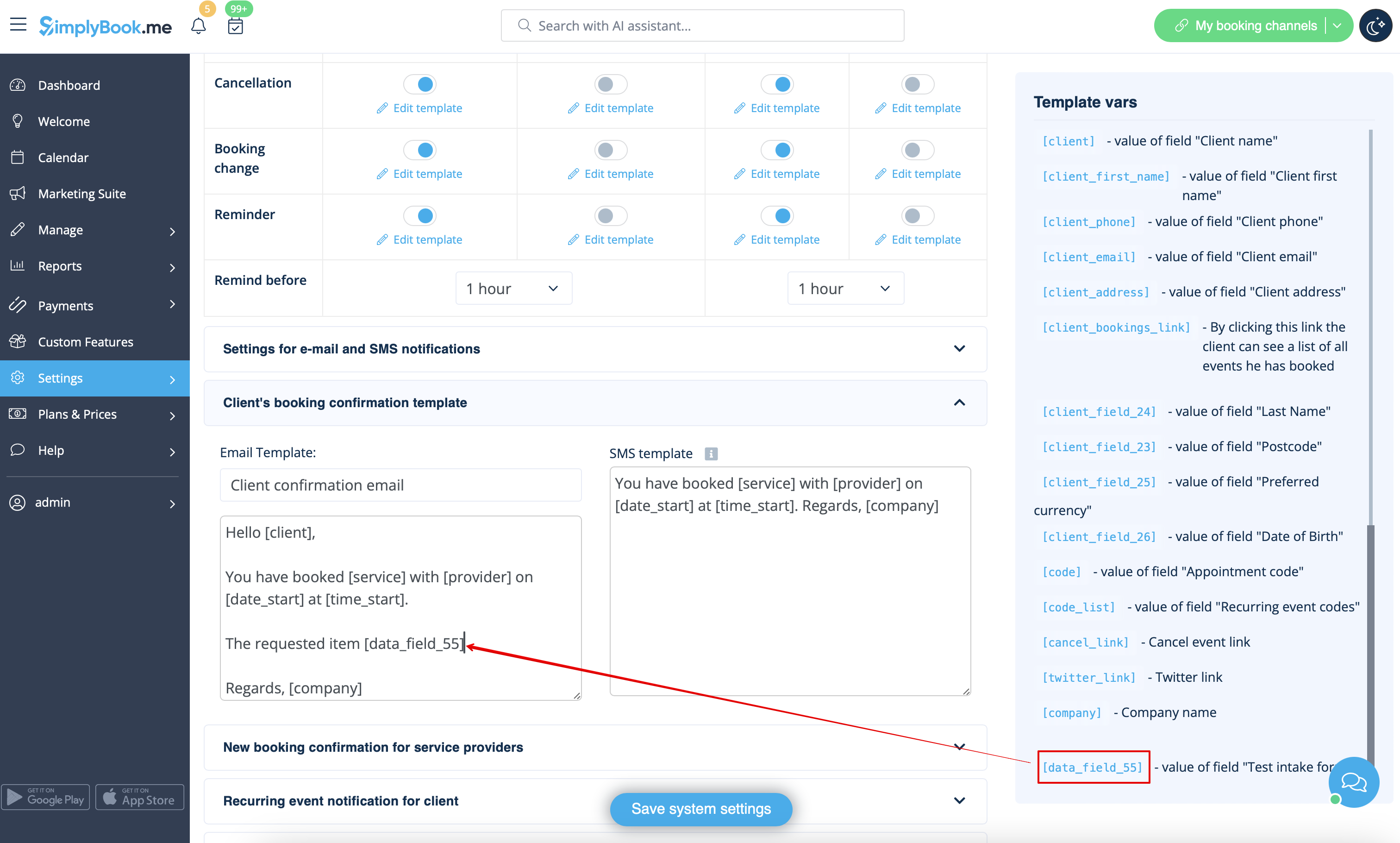
:8. If you want to include intake form information to email templates, find the intake forms variables and add them to templates in Settings//Email and SMS settings. | :8. If you want to include intake form information to email templates, find the intake forms variables and add them to templates in Settings//Email and SMS settings. | ||
[[File:Add | [[File:Add notification variable to template intake form redesigned.png|1200px | center|link=https://help.simplybook.me/images/5/59/Add_notification_variable_to_template_intake_form_redesigned.png]] | ||
<br><br> | <br><br> | ||
</translate> | </translate> | ||
Revision as of 14:53, 13 September 2024

Intake Forms Custom Feature allows you to request more information from your clients during the booking process. You can ask several questions and they can be answered in many types of fields, such as text lines, drop-downs, text boxes etc.
- How to use
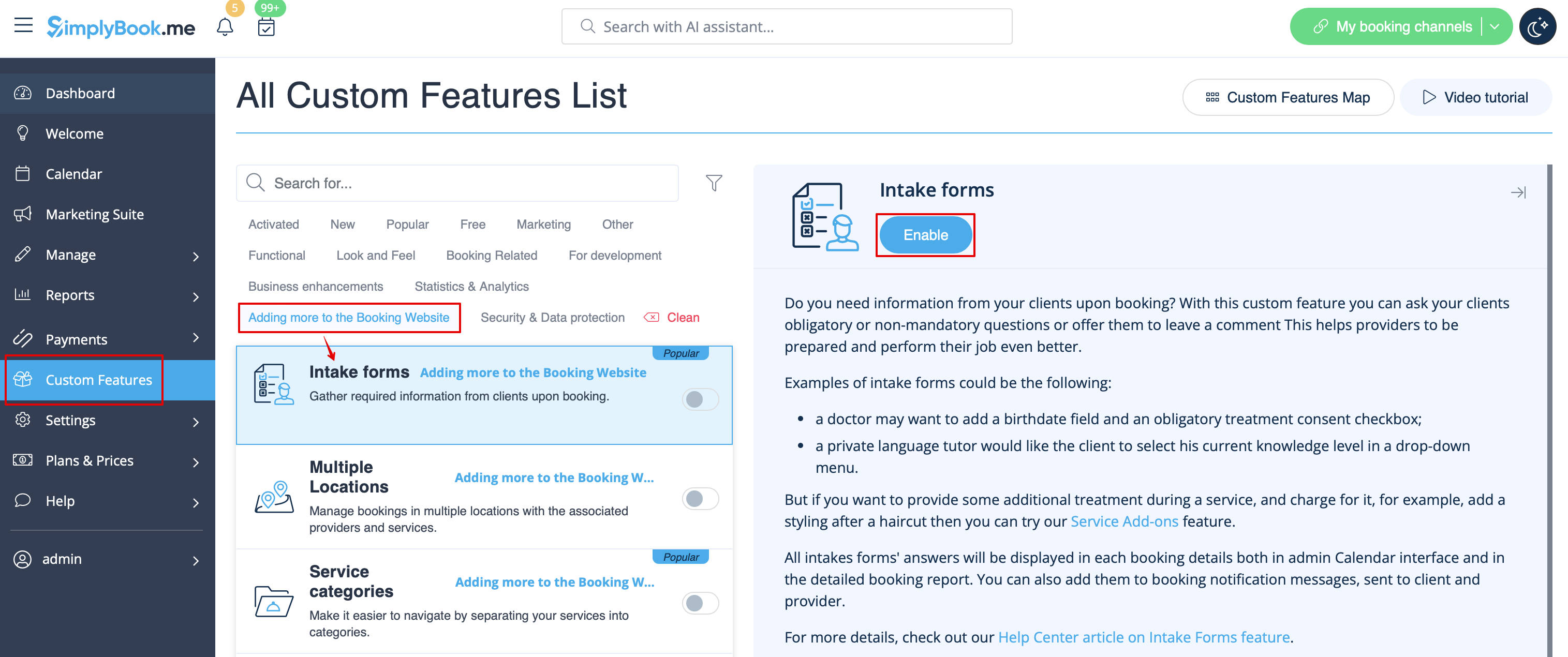
- 1. Enable Intake Forms Custom Feature in the Custom Feature//Adding more to the booking page.
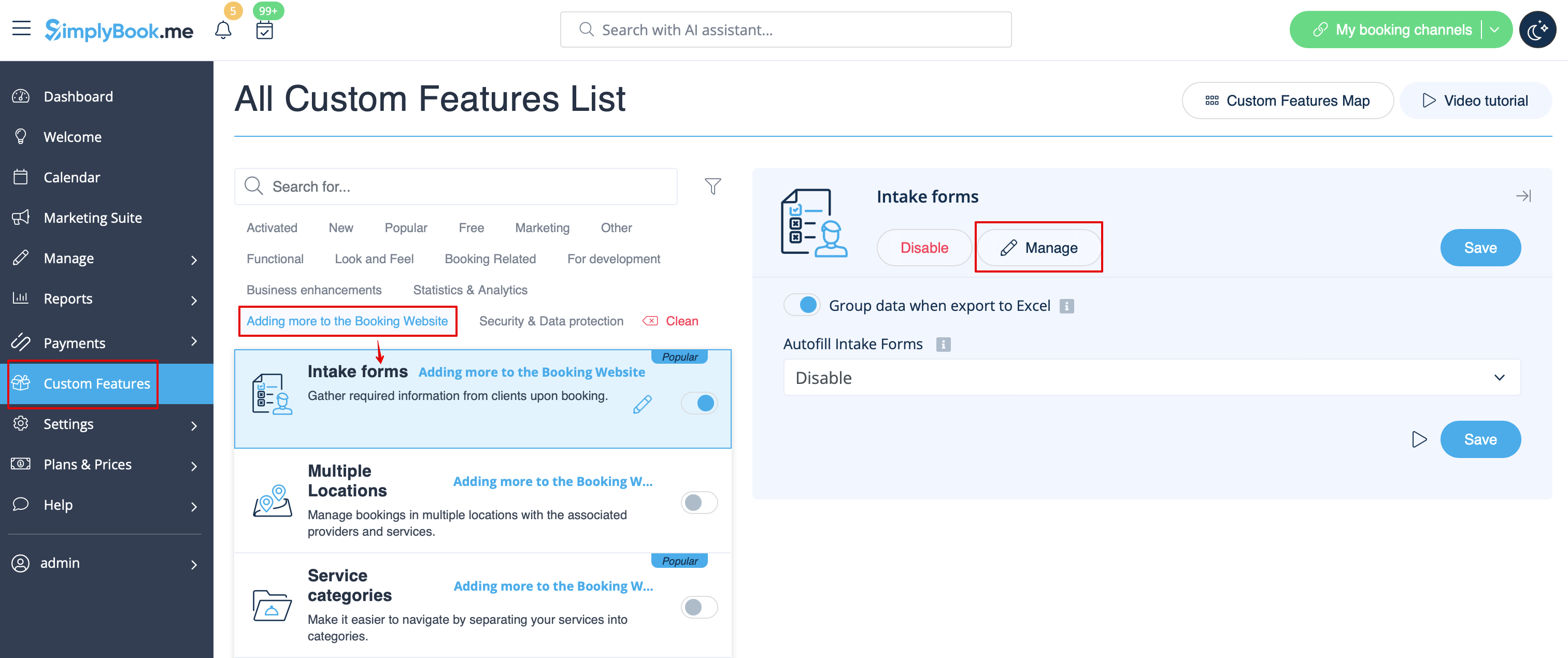
- 2. Go to its management or to Manage//Intake forms page.
- 3. Press "+" button in the settings of Custom Feature to create a new form.
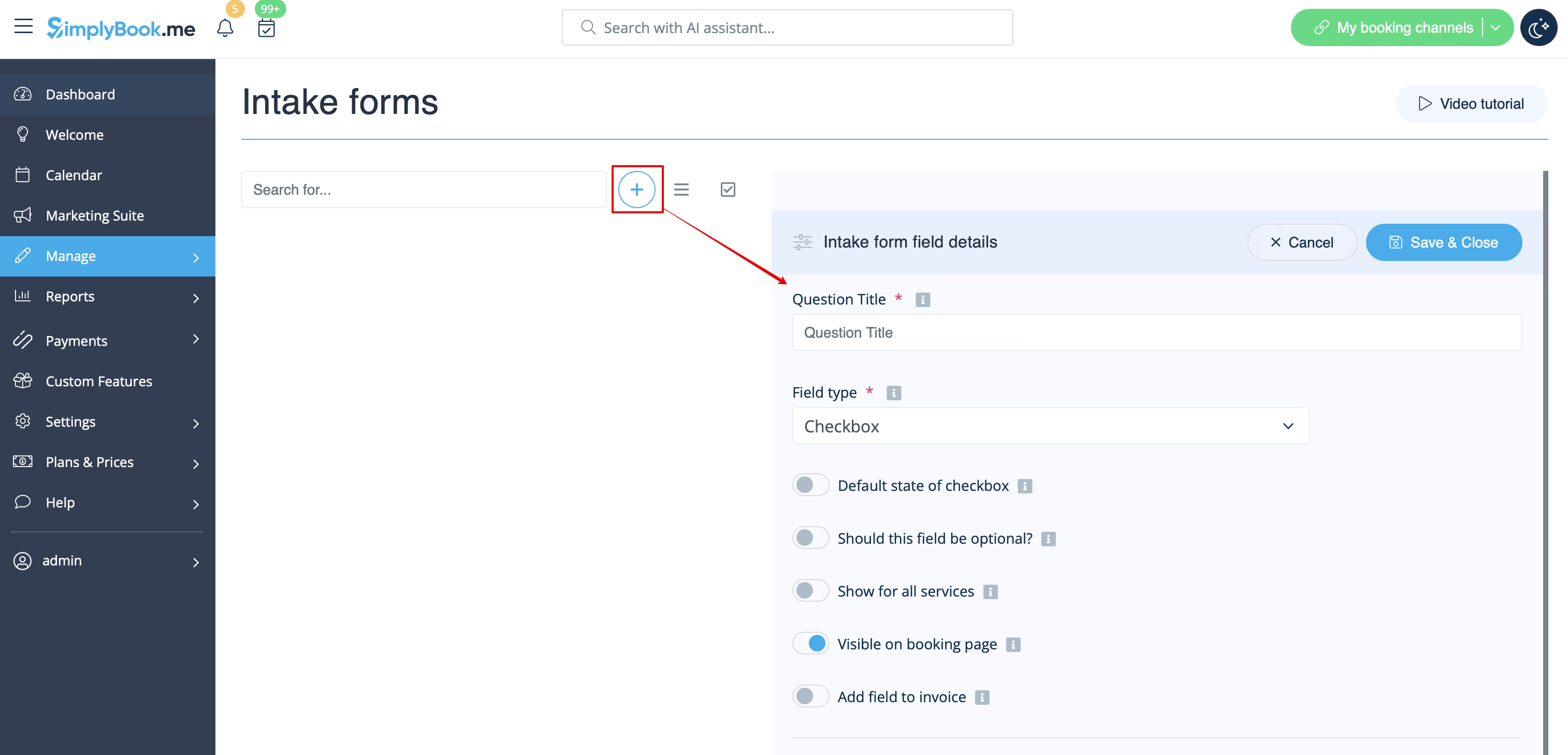
- 4. In the field "Question title" write the question you want your clients to answer. For example: Age, preferences, Do you have any health problems?, etc.
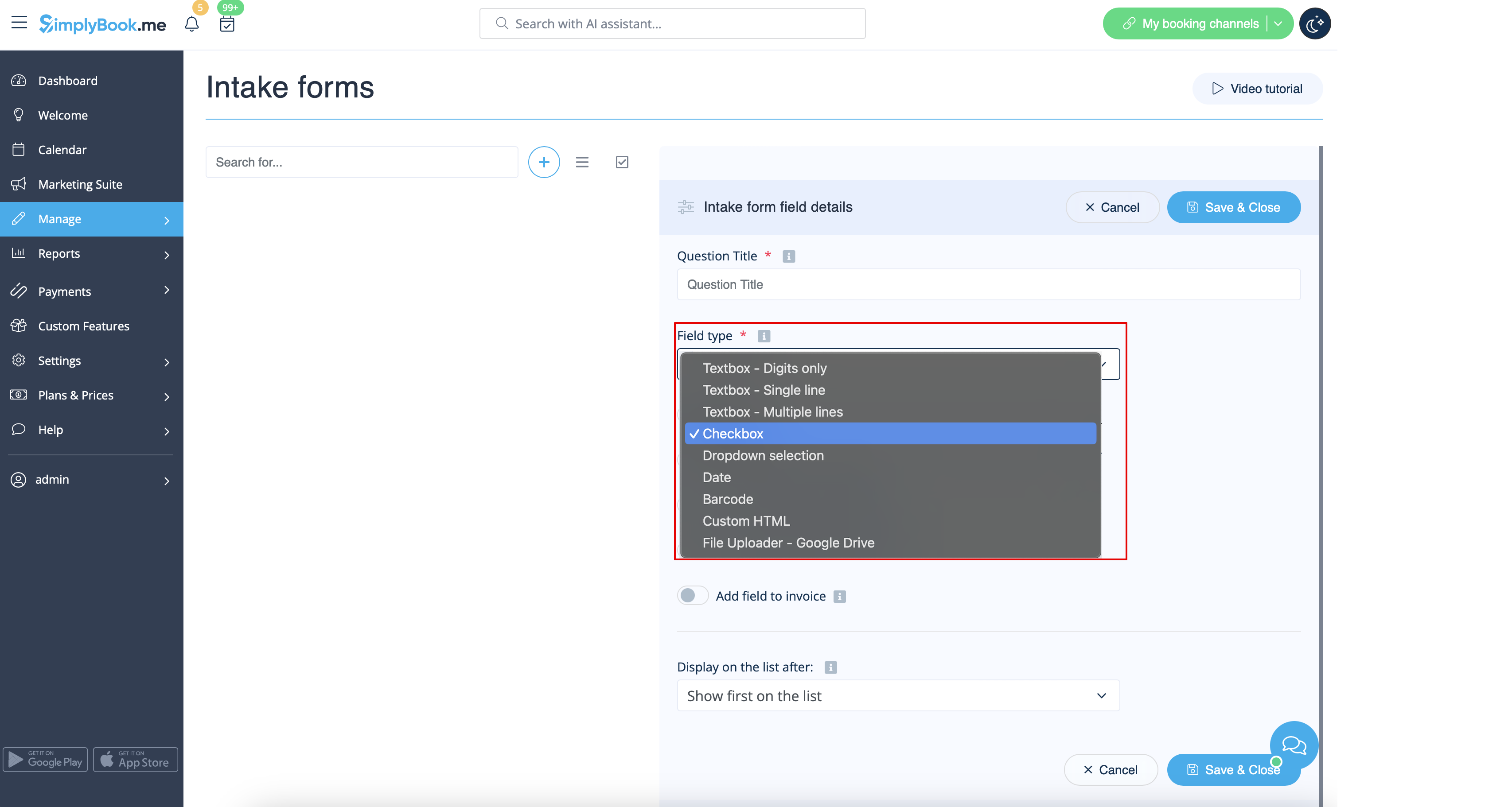
- 5. Choose the field type:
- digits only - allows entering only numbers. Useful when you need to know the age, height or any other information that will require only digits.
- single line - usually used for short answers
- multiple lines - use this type of filed if you expect lengthy explanations from your clients
- checkbox - creates a checkbox that clients should either check or leave unchecked. Useful for questions that require binary answer, for example "I will need additional services".
- dropdown selection - creates a drop-down list with the ability to choose only 1 option. In order to create this field, you will need to create a list of values in the section "Dropdown options and default option". Also you can select the Default value that will be assigned if nothing is chosen from the list.
- date - creates date selection option with calendar.
- barcode - allows to scan barcodes via admin mobile application and get the values from scanning. Also allows simple text input like in single line intake forms.
- custom HTML - allows to add visual dividers or additional text near the intake form. Cannot be used for client input.
- file uploader - Google Drive - available if File Uploader - Google Drive custom feature is enabled. Allows file upload that you will be able to see in the dedicated folder on your Google Drive.
- 6. Make it rather obligatory or not with the help of "optional" switcher.
- Include the field (both title and response will be included) to client invoices if you need and if you use Accept payments custom feature.
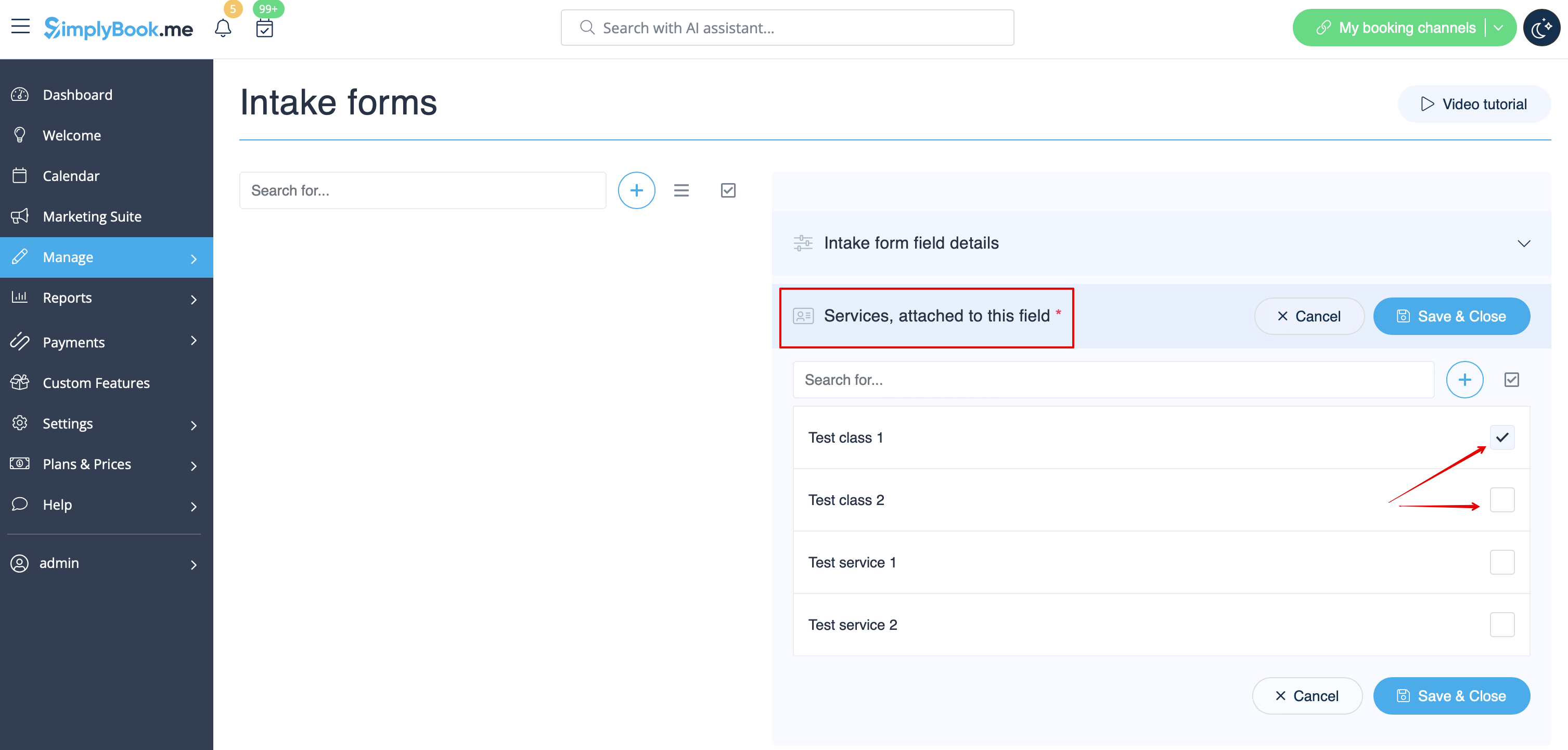
- 7. If you wish to relate form with certain services, choose "Services, attached to this field" tab and check the boxes near corresponding services.
- 8. If you want to include intake form information to email templates, find the intake forms variables and add them to templates in Settings//Email and SMS settings.