Created page with "{{#seo : |title=Où modifier mes informations - SimplyBook.me |description=Modifiez vos informations personnelles et professionnelles sur votre compte SimplyBook.me. Suivez notre guide pour des mises à jour rapides. Apprenez comment ici ! |titlemode=append |keywords=faq, frequently asked questions, booking software, appointment system questions, appointments online, calendar software, booking system, booking calendar, scheduling software, online appointment scheduling,..." |
Created page with "'''Gratuit :''' Vous pouvez créer une nouvelle société avec le nom souhaité dans l'url et y transférer manuellement toutes les données et paramètres. Vous pouvez créer des services et des fournisseurs, et copier la liste des clients dans le nouveau système à l'aide de la fonction personnalisée d'importation de clients (voir les instructions ici). Les réservations et autres paramètres ne..." |
||
| Line 10: | Line 10: | ||
=Titre de l'entreprise= | =Titre de l'entreprise= | ||
In Settings // Company Information // Name. | In Settings // Company Information // Name. | ||
[[File:Company information path redesigned.png|1200px| center|link=https://help.simplybook.me/images/d/da/Company_information_path_redesigned.png]] | [[File:Company information path redesigned.png|1200px| center|link=https://help.simplybook.me/images/d/da/Company_information_path_redesigned.png]] | ||
<br/><br/> | <br/><br/> | ||
=Url de l'entreprise= | |||
Malheureusement, il n'y a pas d'option pour changer l'url dans le système. Pour la modifier, vous devez enregistrer une nouvelle entreprise avec l'adresse souhaitée. | |||
'''Gratuit :''' | |||
''' | Vous pouvez créer une nouvelle société avec le nom souhaité dans l'url et y transférer manuellement toutes les données et paramètres. Vous pouvez créer des services et des fournisseurs, et copier la liste des clients dans le nouveau système à l'aide de la [[Custom_Features#Import_Clients | fonction personnalisée d'importation de clients]] (voir les instructions [[Importing_the_list_of_clients |ici]]). Les réservations et autres paramètres ne peuvent pas être transférés. <br/><br/> | ||
'''Payé :''' | |||
''' | Créez un nouveau système avec le nom souhaité dans l'url, allez dans Plans&Prix // Éléments supplémentaires et sélectionnez "Copier le système dans le nouveau système", effectuez le paiement et nos développeurs transféreront vos données. Après avoir effectué le paiement, vous devez contacter le support, leur indiquer l'ancien nom de la société et le nouveau nom de la société (confirmer la propriété des deux comptes), et demander le transfert du système.<br/> | ||
<span style="background-color:#ffe9e9; padding:5px; border-radius:5px;">'''Veuillez noter !''' Les avis ainsi que le formatage HTML des descriptions ne seront pas copiés dans le nouveau système.</span> | |||
<span style="background-color:#ffe9e9; padding:5px; border-radius:5px;">''' | |||
[[File:Copy system path redesigned.png|1200px | center|link=https://help.simplybook.me/images/9/96/Copy_system_path_redesigned.png]] | [[File:Copy system path redesigned.png|1200px | center|link=https://help.simplybook.me/images/9/96/Copy_system_path_redesigned.png]] | ||
<br/><br/> | <br/><br/> | ||
=Company logo and background= | =Company logo and background= | ||
In Settings // Design settings // Additional theme settings. <br/> | In Settings // Design settings // Additional theme settings. <br/> | ||
| Line 39: | Line 32: | ||
[[File:Logo & banner settings redesigned.png|1200px | border | center|link=https://help.simplybook.me/images/a/a4/Logo_%26_banner_settings_redesigned.png]] | [[File:Logo & banner settings redesigned.png|1200px | border | center|link=https://help.simplybook.me/images/a/a4/Logo_%26_banner_settings_redesigned.png]] | ||
<br/><br/> | <br/><br/> | ||
=Favicon= | =Favicon= | ||
La partie /v2/ de l'URL du site de réservation ne peut être ni supprimée ni modifiée.<br> | |||
Cet élément est fixe et ne peut être modifié.<br> | |||
Favicon (logo | Le Favicon (logo affiché dans l'onglet du navigateur) ne peut être modifié qu'au niveau de l'[https://simplybook.me/en/enterprise-scheduling-software entreprise]. | ||
[[File:Favicon & v2 redesigned.png|1200px|center|link=https://help.simplybook.me/images/c/c6/Favicon_%26_v2_redesigned.png]] | [[File:Favicon & v2 redesigned.png|1200px|center|link=https://help.simplybook.me/images/c/c6/Favicon_%26_v2_redesigned.png]] | ||
=Design= | =Design= | ||
In Settings // Design settings.<br/> | In Settings // Design settings.<br/> | ||
[[File:Design settings path redesigned.png|1200px | center|link=https://help.simplybook.me/images/d/dd/Design_settings_path_redesigned.png ]] <br/><br/> | [[File:Design settings path redesigned.png|1200px | center|link=https://help.simplybook.me/images/d/dd/Design_settings_path_redesigned.png ]] <br/><br/> | ||
; | ;Thèmes recommandés : | ||
* | *Tous les nouveaux<br> | ||
Ces thèmes prennent en charge toutes les nouvelles fonctionnalités et offrent la possibilité d'ajuster les couleurs de votre page de réservation. | |||
<br/><br/> | <br/><br/> | ||
=Textes et langue= | |||
Si vous devez modifier des textes sur votre page de réservation (par exemple, remplacer Employé par Thérapeute, Coach ou Chambre), vous pouvez le faire dans Paramètres // Libellés et traductions personnalisés. | |||
[[File:Custom translations path redesigned.png|1200px| center|link=https://help.simplybook.me/images/9/91/Custom_translations_path_redesigned.png ]] | [[File:Custom translations path redesigned.png|1200px| center|link=https://help.simplybook.me/images/9/91/Custom_translations_path_redesigned.png ]] | ||
<br/><br/> | <br/><br/> | ||
Vous pouvez également modifier la langue de votre page de réservation en cliquant sur le drapeau correspondant et en cliquant sur "Enregistrer les traductions personnalisées". Si votre langue ne figure pas dans la liste, vous pouvez traduire le système vous-même. | |||
[[File:Custom transaltions languages redesigned.png|1200px| center|link=https://help.simplybook.me/images/4/49/Custom_transaltions_languages_redesigned.png ]] | [[File:Custom transaltions languages redesigned.png|1200px| center|link=https://help.simplybook.me/images/4/49/Custom_transaltions_languages_redesigned.png ]] | ||
<br/><br/> | <br/><br/> | ||
=Paramètres SEO= | |||
=SEO | Par défaut, la <span style="background-color:#d4f8e5; padding:5px; border-radius:5px;">balise Title</span> est représentée par le nom de votre entreprise que vous avez inséré dans <span style="background-color:#d4f8e5; padding:5px; border-radius:5px;">Paramètres</span> -> <span style="background-color:#d4f8e5; padding:5px; border-radius:5px;">Informations sur l'entreprise</span> -> <span style="background-color:#d4f8e5; padding:5px; border-radius:5px;">Nom</span> et ajout automatique du texte <span style="background-color:#d4f8e5; padding:5px; border-radius:5px;">Scheduling et Booking Website</span>.<br> | ||
La <span style="background-color:#d4f8e5; padding:5px; border-radius:5px;">méta description</span> est tirée du texte que vous avez ajouté dans <span style="background-color:#d4f8e5; padding:5px; border-radius:5px;">Paramètres</span> -> <span style="background-color:#d4f8e5; padding:5px; border-radius:5px;">Paramètres de conception</span> -> <span style="background-color:#d4f8e5; padding:5px; border-radius:5px;">Page d'accueil</span> -> texte de description pour le bloc " <span style="background-color:#d4f8e5; padding:5px; border-radius:5px;">A propos de nous"</span> du site de réservation. | |||
<span style="background-color:#d4f8e5; padding:5px; border-radius:5px;"> | |||
<br><br> | <br><br> | ||
Si vous le souhaitez, vous pouvez configurer ces deux options pour qu'elles contiennent des données différentes et influencent ainsi le référencement de votre site de réservation.<br> | |||
Pour définir votre propre <span style="background-color:#d4f8e5; padding:5px; border-radius:5px;">balise Title</span> et <span style="background-color:#d4f8e5; padding:5px; border-radius:5px;">Meta description</span>, veuillez naviguer dans <span style="background-color:#d4f8e5; padding:5px; border-radius:5px;">Paramètres</span> -> <span style="background-color:#d4f8e5; padding:5px; border-radius:5px;">Paramètres de conception</span> -> <span style="background-color:#d4f8e5; padding:5px; border-radius:5px;">Page d'accueil</span> et ajoutez les textes souhaités dans les champs correspondants.<br> | |||
[[File:Seo settings path redesigned.png|1200px|border|center|link=https://help.simplybook.me/images/f/fd/Seo_settings_path_redesigned.png]] | [[File:Seo settings path redesigned.png|1200px|border|center|link=https://help.simplybook.me/images/f/fd/Seo_settings_path_redesigned.png]] | ||
<br><br> | <br><br> | ||
'''<span style="background-color:#ffe9e9; padding:5px; border-radius:5px;"> | '''<span style="background-color:#ffe9e9; padding:5px; border-radius:5px;">Veuillez noter que'''<span style="background-color:#ffe9e9; padding:5px; border-radius:5px;">nous recommandons de ne pas utiliser plus de 60 symboles pour la balise Titre.</span></span><br> | ||
<span style="background-color:#ffe9e9; padding:5px; border-radius:5px;"> | <span style="background-color:#ffe9e9; padding:5px; border-radius:5px;">La méta description est limitée à 400 caractères et si vous essayez d'ajouter un résumé plus long, il sera automatiquement coupé lors de l'enregistrement des paramètres.</span> | ||
<br><br> | <br><br> | ||
= Notre heure= | |||
Votre heure sur la page de réservation est l'heure du fuseau horaire de l'entreprise. Vous pouvez modifier votre fuseau horaire dans Paramètres -> Configuration principale -> Fuseau horaire. | |||
[[File:Timezone settings path redesigned.png|1200px|center|link=https://help.simplybook.me/images/3/3a/Timezone_settings_path_redesigned.png]] | [[File:Timezone settings path redesigned.png|1200px|center|link=https://help.simplybook.me/images/3/3a/Timezone_settings_path_redesigned.png]] | ||
<br/><br/> | <br/><br/> | ||
<div lang="en" dir="ltr" class="mw-content-ltr"> | <div lang="en" dir="ltr" class="mw-content-ltr"> | ||
Revision as of 06:39, 15 May 2025
{{#seo : |title=Où modifier mes informations - SimplyBook.me |description=Modifiez vos informations personnelles et professionnelles sur votre compte SimplyBook.me. Suivez notre guide pour des mises à jour rapides. Apprenez comment ici ! |titlemode=append |keywords=faq, frequently asked questions, booking software, appointment system questions, appointments online, calendar software, booking system, booking calendar, scheduling software, online appointment scheduling, online scheduling, plugins, custom features, custom booking page link, domain name, custom domain name, custom url }}
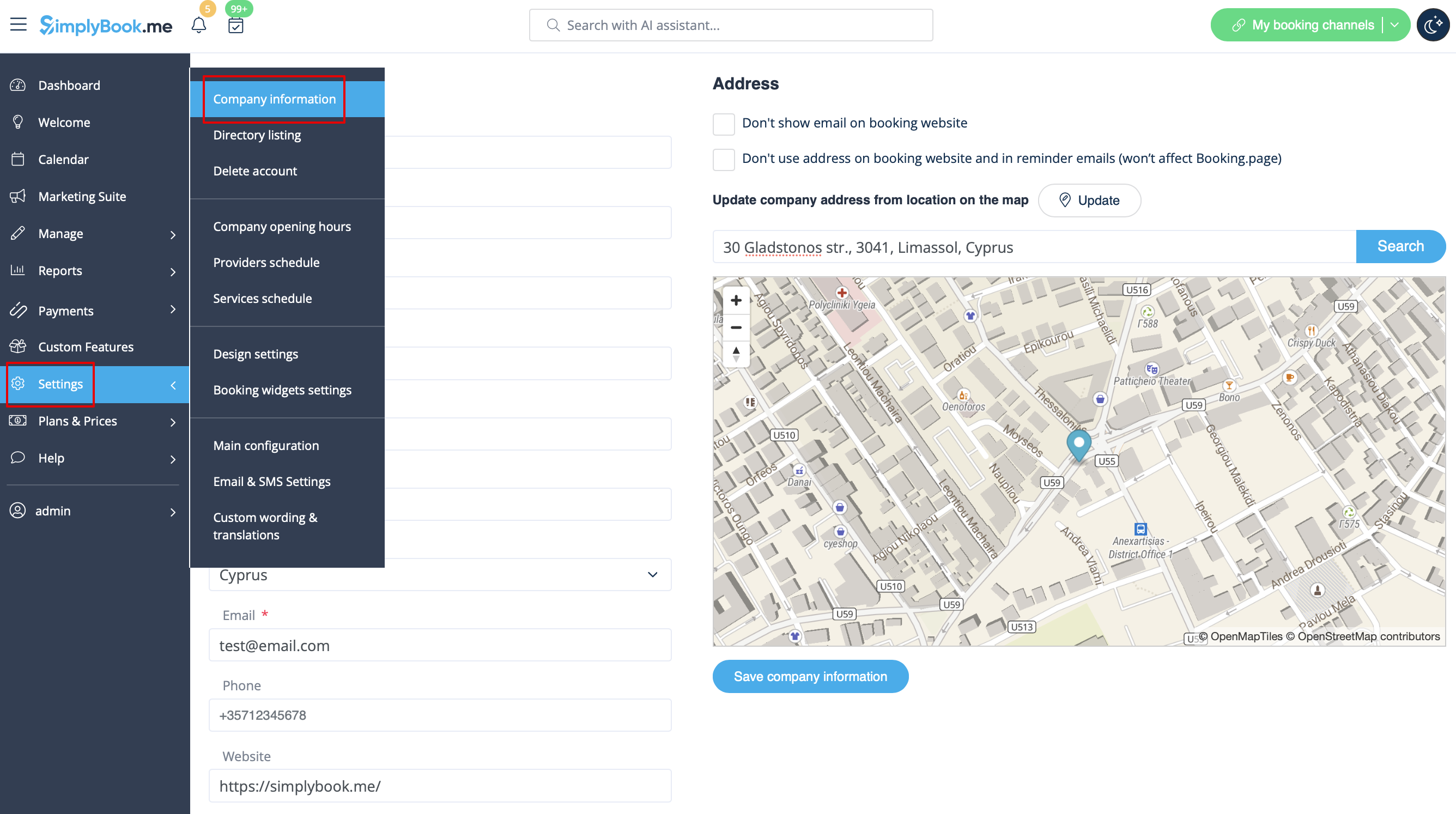
Titre de l'entreprise
In Settings // Company Information // Name.
Url de l'entreprise
Malheureusement, il n'y a pas d'option pour changer l'url dans le système. Pour la modifier, vous devez enregistrer une nouvelle entreprise avec l'adresse souhaitée.
Gratuit :
Vous pouvez créer une nouvelle société avec le nom souhaité dans l'url et y transférer manuellement toutes les données et paramètres. Vous pouvez créer des services et des fournisseurs, et copier la liste des clients dans le nouveau système à l'aide de la fonction personnalisée d'importation de clients (voir les instructions ici). Les réservations et autres paramètres ne peuvent pas être transférés.
Payé :
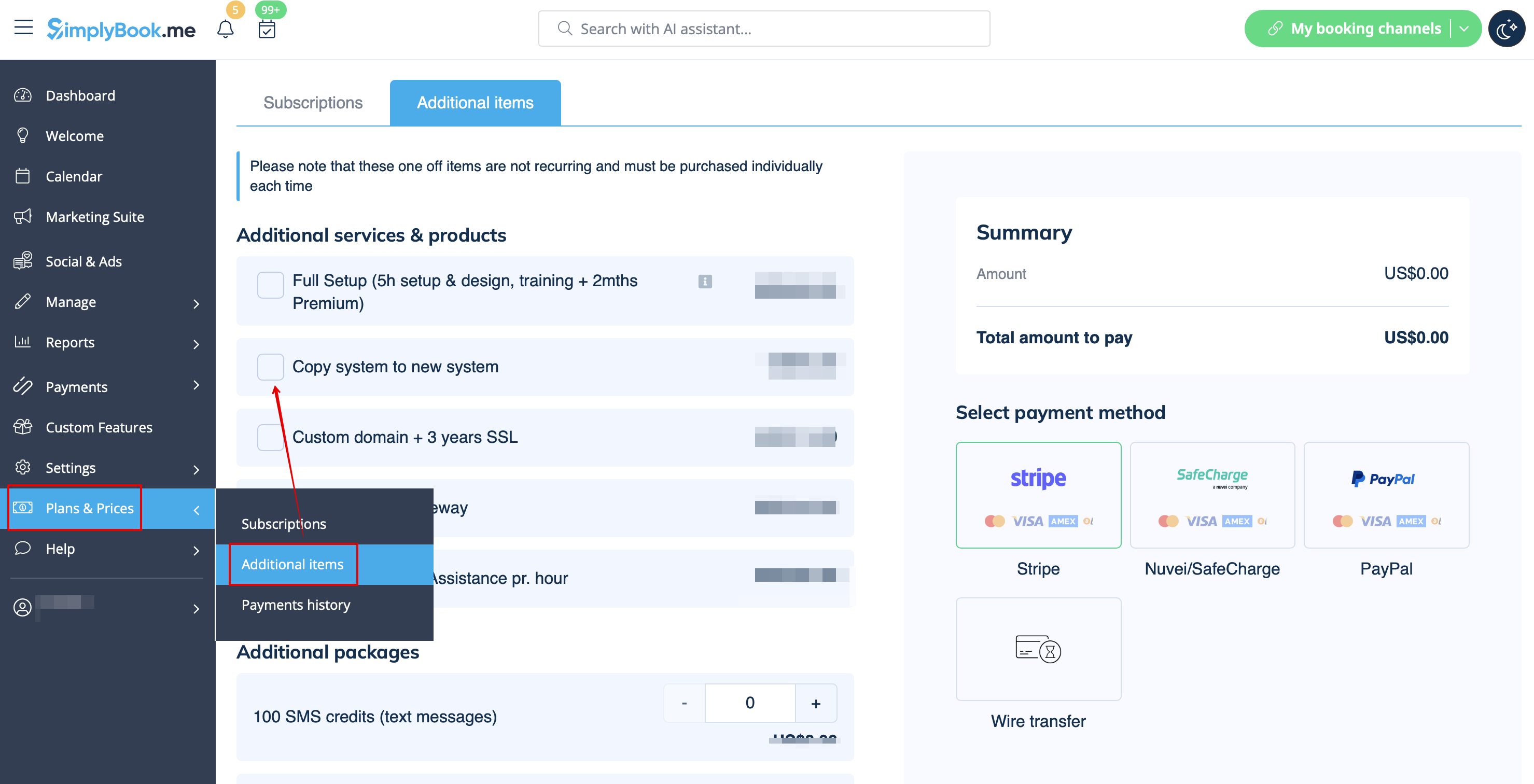
Créez un nouveau système avec le nom souhaité dans l'url, allez dans Plans&Prix // Éléments supplémentaires et sélectionnez "Copier le système dans le nouveau système", effectuez le paiement et nos développeurs transféreront vos données. Après avoir effectué le paiement, vous devez contacter le support, leur indiquer l'ancien nom de la société et le nouveau nom de la société (confirmer la propriété des deux comptes), et demander le transfert du système.
Veuillez noter ! Les avis ainsi que le formatage HTML des descriptions ne seront pas copiés dans le nouveau système.
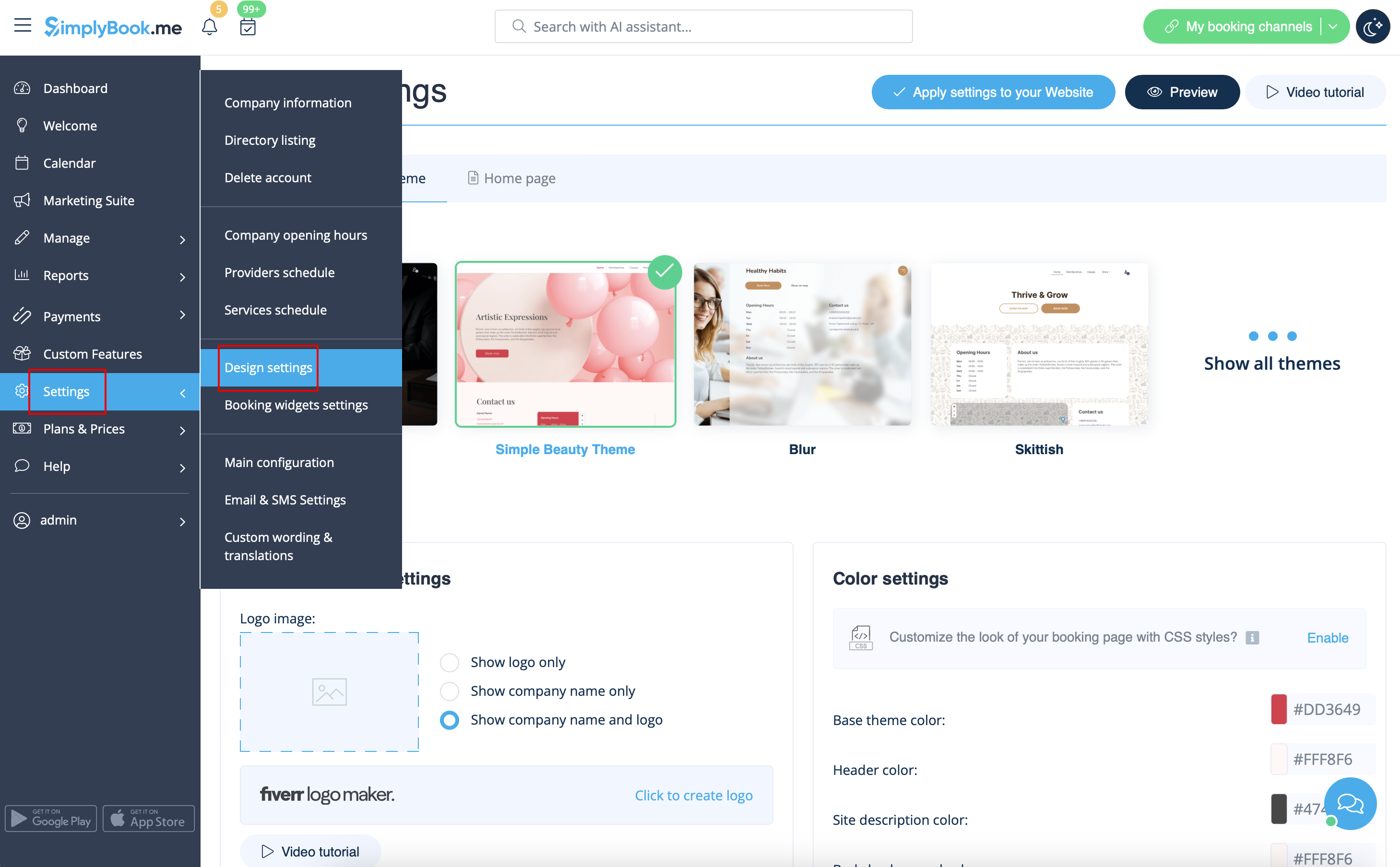
Company logo and background
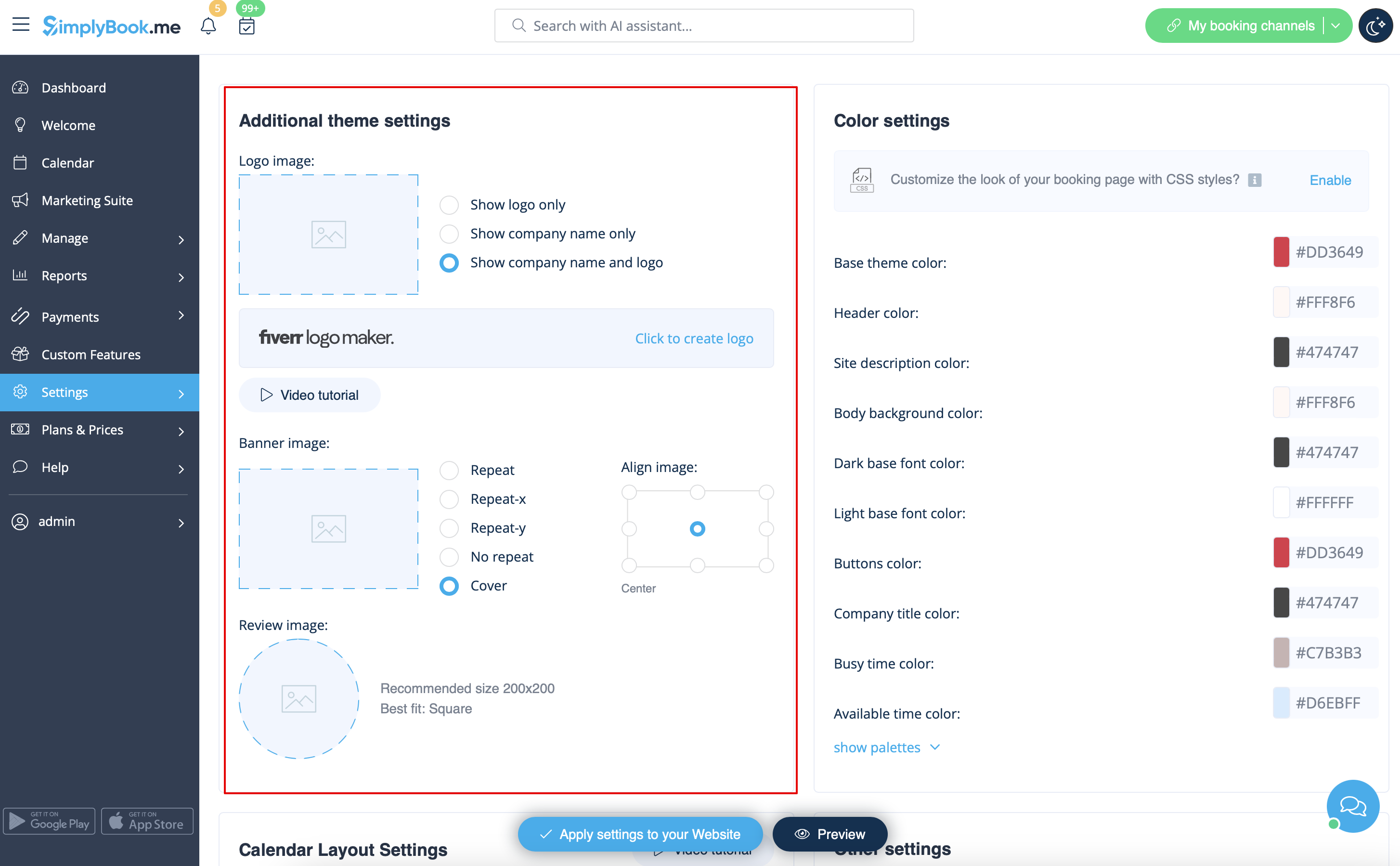
In Settings // Design settings // Additional theme settings.
Favicon
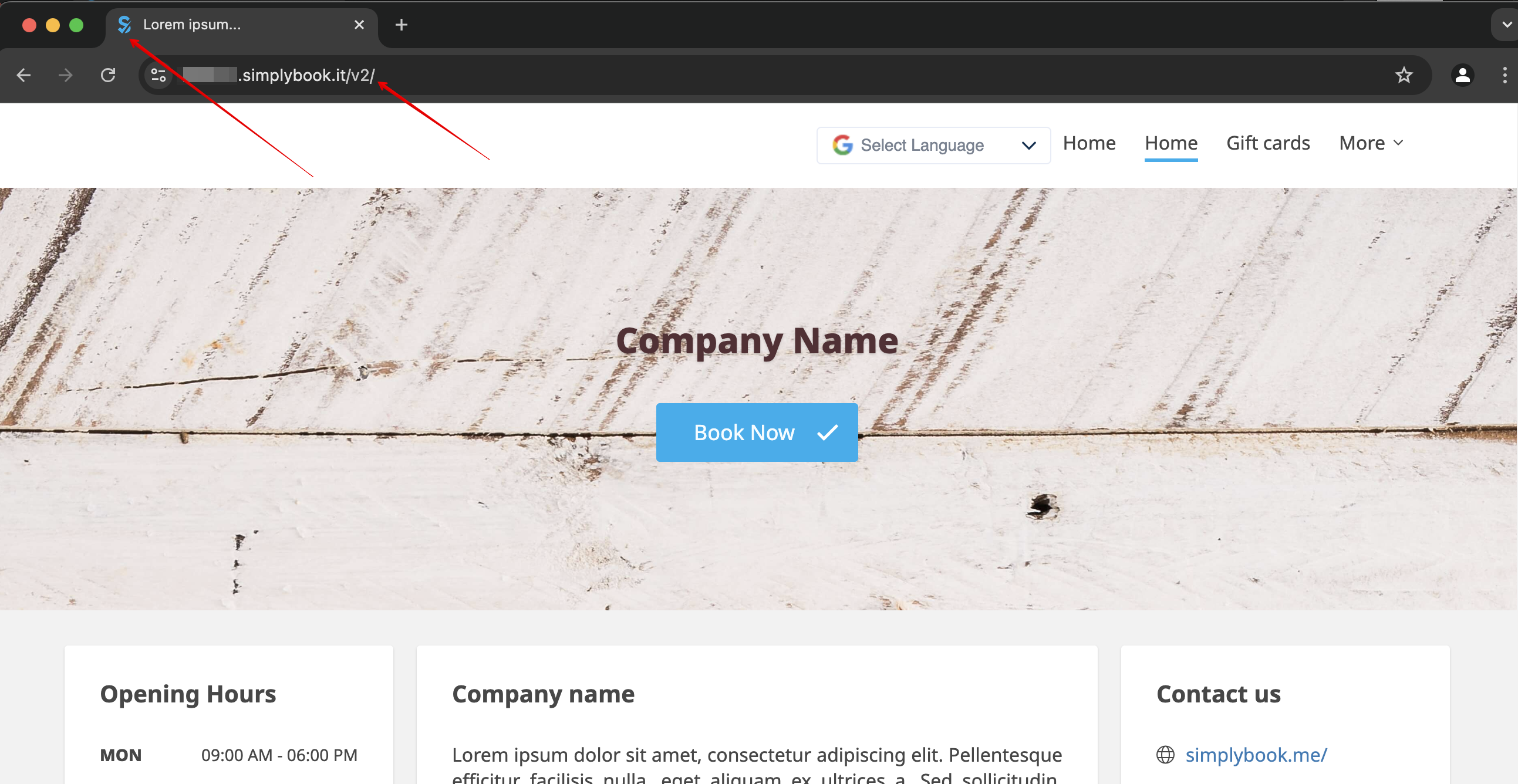
La partie /v2/ de l'URL du site de réservation ne peut être ni supprimée ni modifiée.
Cet élément est fixe et ne peut être modifié.
Le Favicon (logo affiché dans l'onglet du navigateur) ne peut être modifié qu'au niveau de l'entreprise.
Design
In Settings // Design settings.
- Thèmes recommandés
- Tous les nouveaux
Ces thèmes prennent en charge toutes les nouvelles fonctionnalités et offrent la possibilité d'ajuster les couleurs de votre page de réservation.
Textes et langue
Si vous devez modifier des textes sur votre page de réservation (par exemple, remplacer Employé par Thérapeute, Coach ou Chambre), vous pouvez le faire dans Paramètres // Libellés et traductions personnalisés.
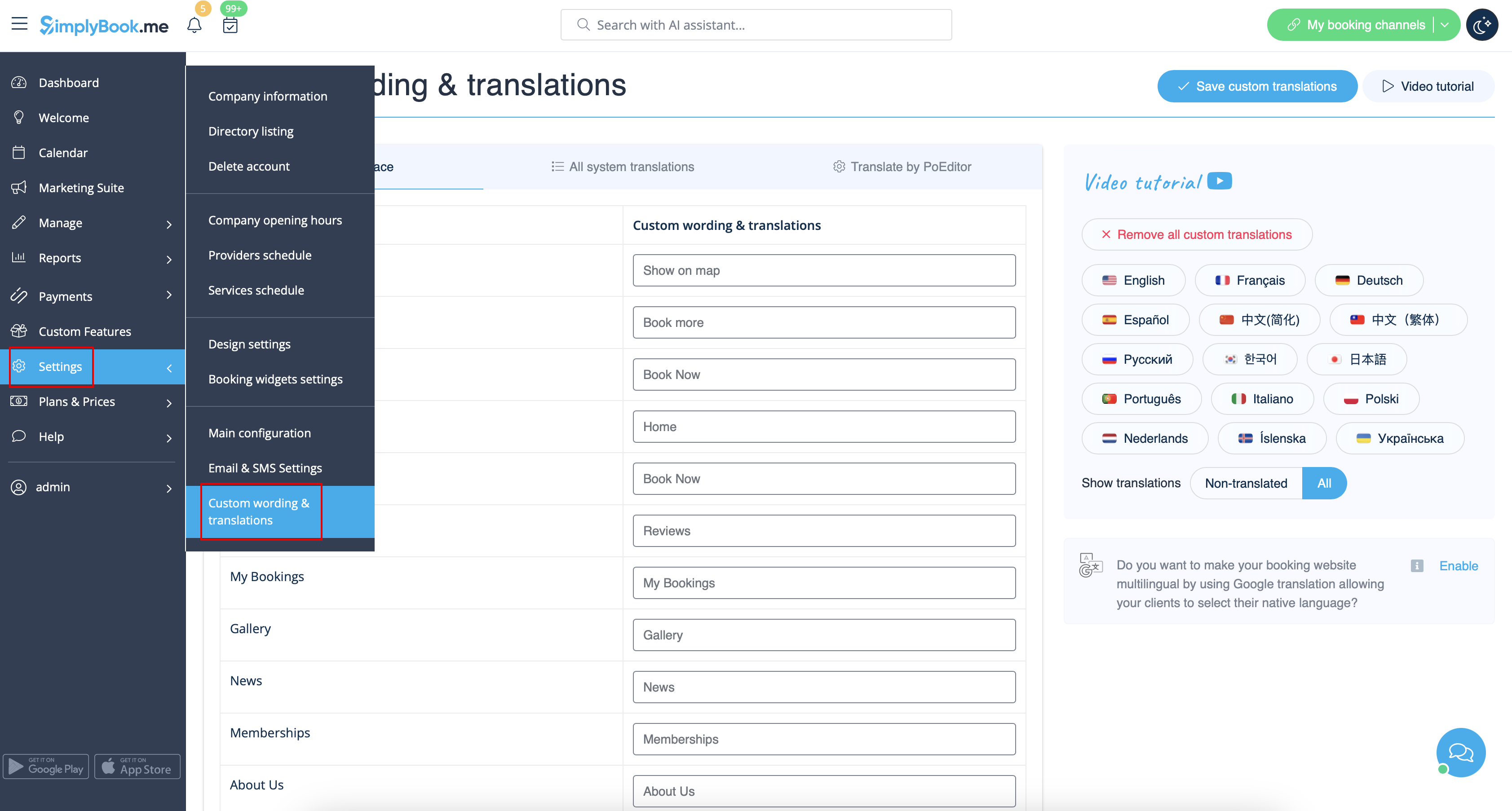
Vous pouvez également modifier la langue de votre page de réservation en cliquant sur le drapeau correspondant et en cliquant sur "Enregistrer les traductions personnalisées". Si votre langue ne figure pas dans la liste, vous pouvez traduire le système vous-même.
Paramètres SEO
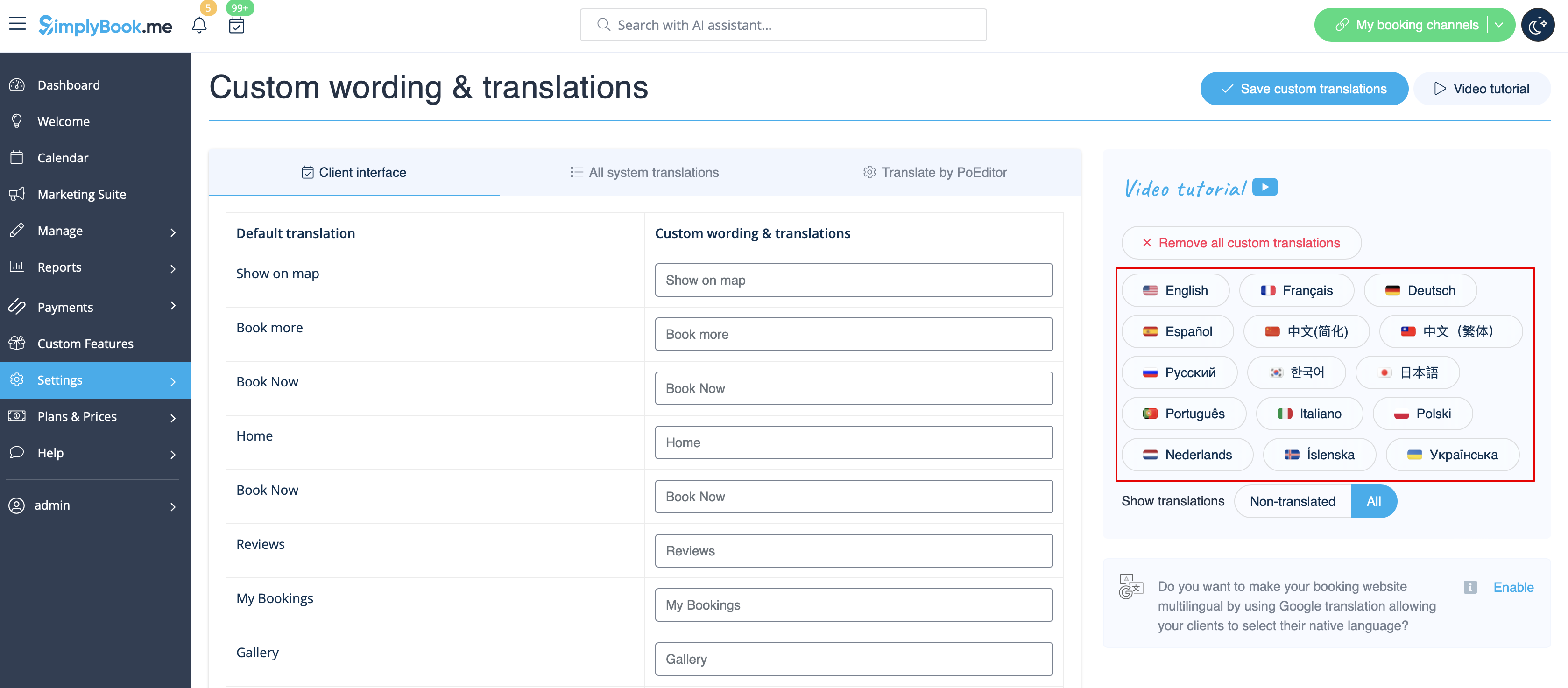
Par défaut, la balise Title est représentée par le nom de votre entreprise que vous avez inséré dans Paramètres -> Informations sur l'entreprise -> Nom et ajout automatique du texte Scheduling et Booking Website.
La méta description est tirée du texte que vous avez ajouté dans Paramètres -> Paramètres de conception -> Page d'accueil -> texte de description pour le bloc " A propos de nous" du site de réservation.
Si vous le souhaitez, vous pouvez configurer ces deux options pour qu'elles contiennent des données différentes et influencent ainsi le référencement de votre site de réservation.
Pour définir votre propre balise Title et Meta description, veuillez naviguer dans Paramètres -> Paramètres de conception -> Page d'accueil et ajoutez les textes souhaités dans les champs correspondants.
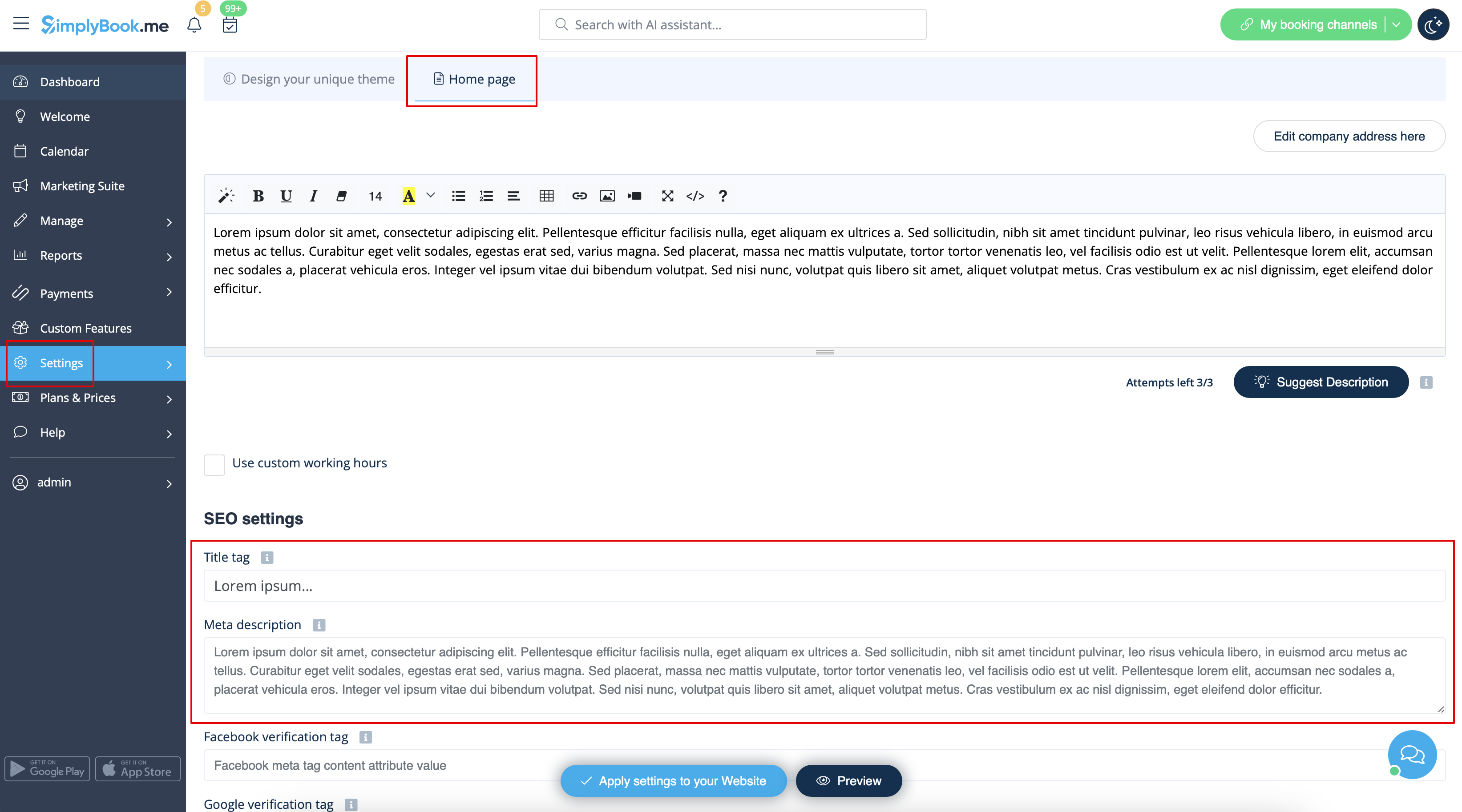
Veuillez noter quenous recommandons de ne pas utiliser plus de 60 symboles pour la balise Titre.
La méta description est limitée à 400 caractères et si vous essayez d'ajouter un résumé plus long, il sera automatiquement coupé lors de l'enregistrement des paramètres.
Notre heure
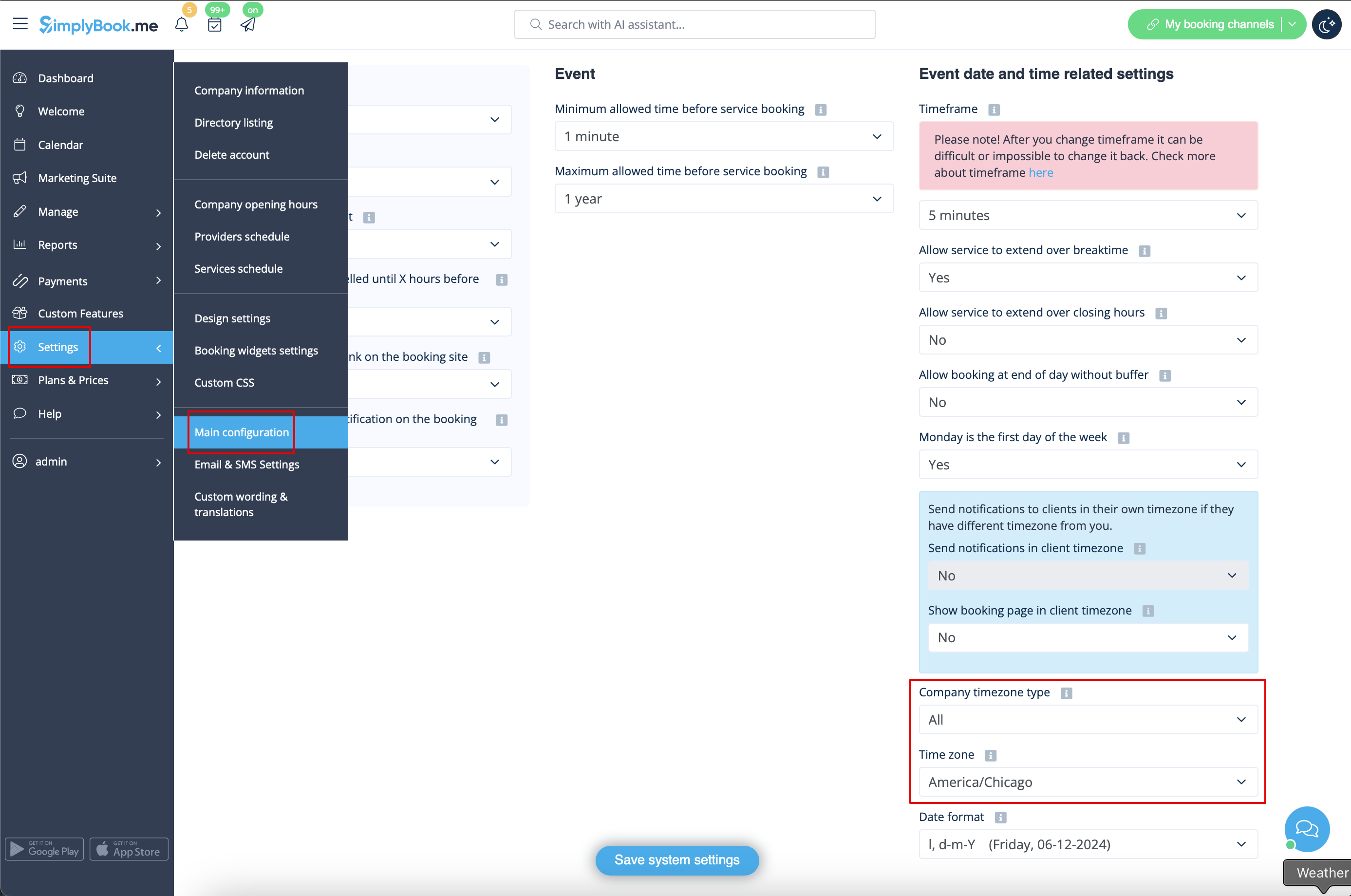
Votre heure sur la page de réservation est l'heure du fuseau horaire de l'entreprise. Vous pouvez modifier votre fuseau horaire dans Paramètres -> Configuration principale -> Fuseau horaire.
About section
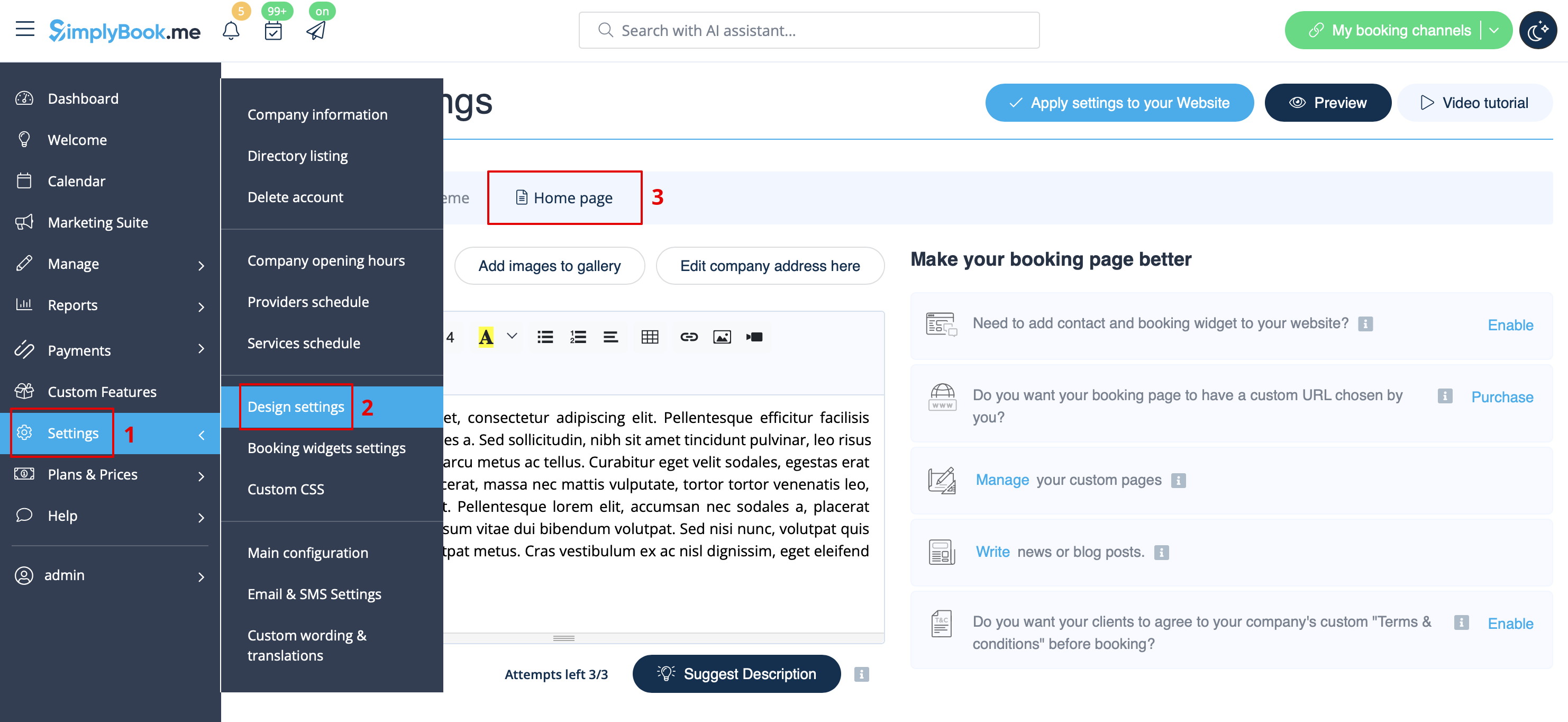
In Settings // Design settings // Home page // Company description.
Address
In Settings // Company Information // Address.
Company Contacts
You can edit them in Settings -> Company information
The following details can be added/edited:
- Email address
- Phone number
- Website address
- WhatsApp phone
- Facebook profile url
- X.com (Twitter) page link
- Instagram page url
- LinkedIn page
An example of the client side look.
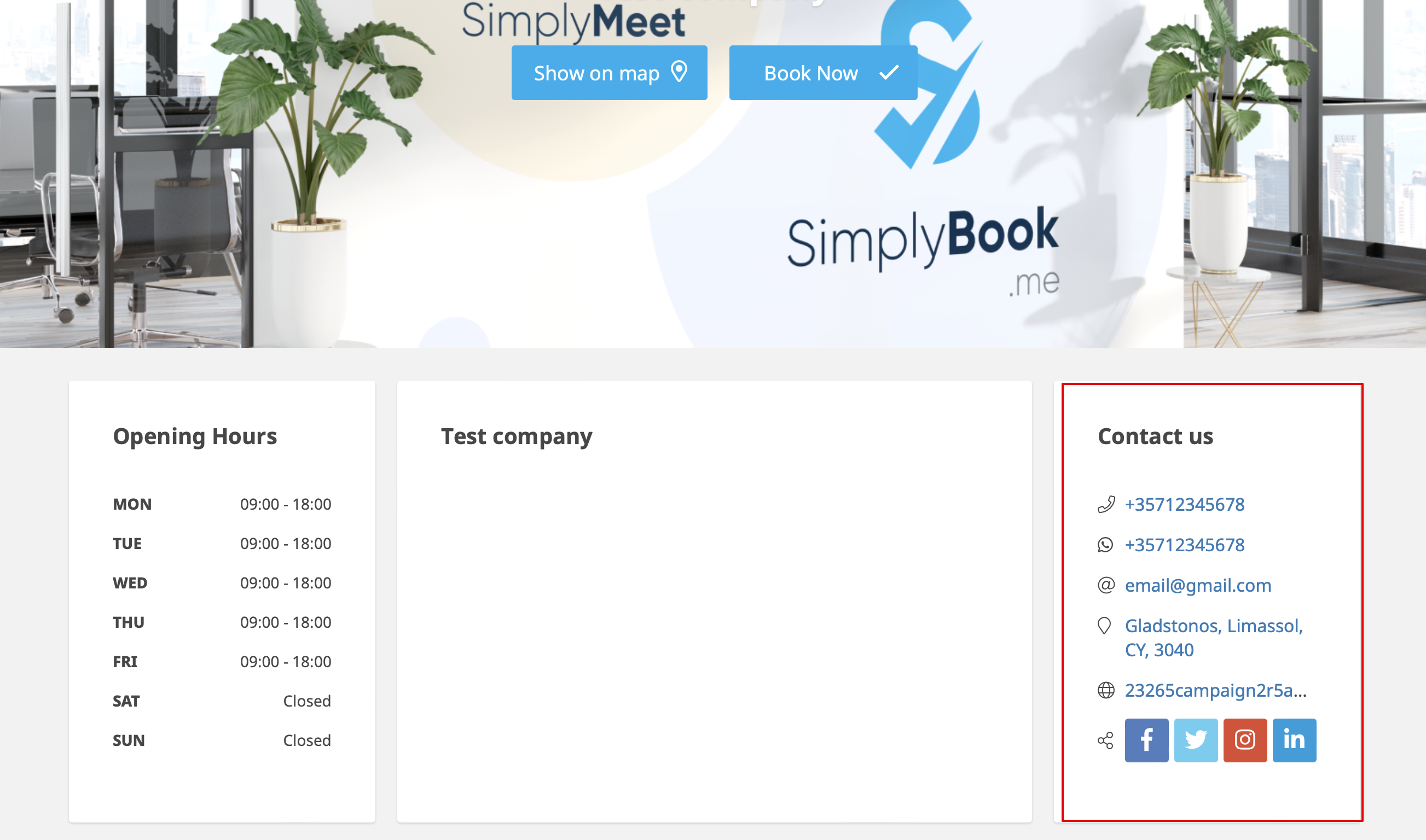
The clients will be able to, for example, click on WhatsApp number and be redirected to the WhatsApp messenger to easily contact you there.
Working hours
Working hours block on the booking page:

To change working hours block go to Settings // Company opening hours.
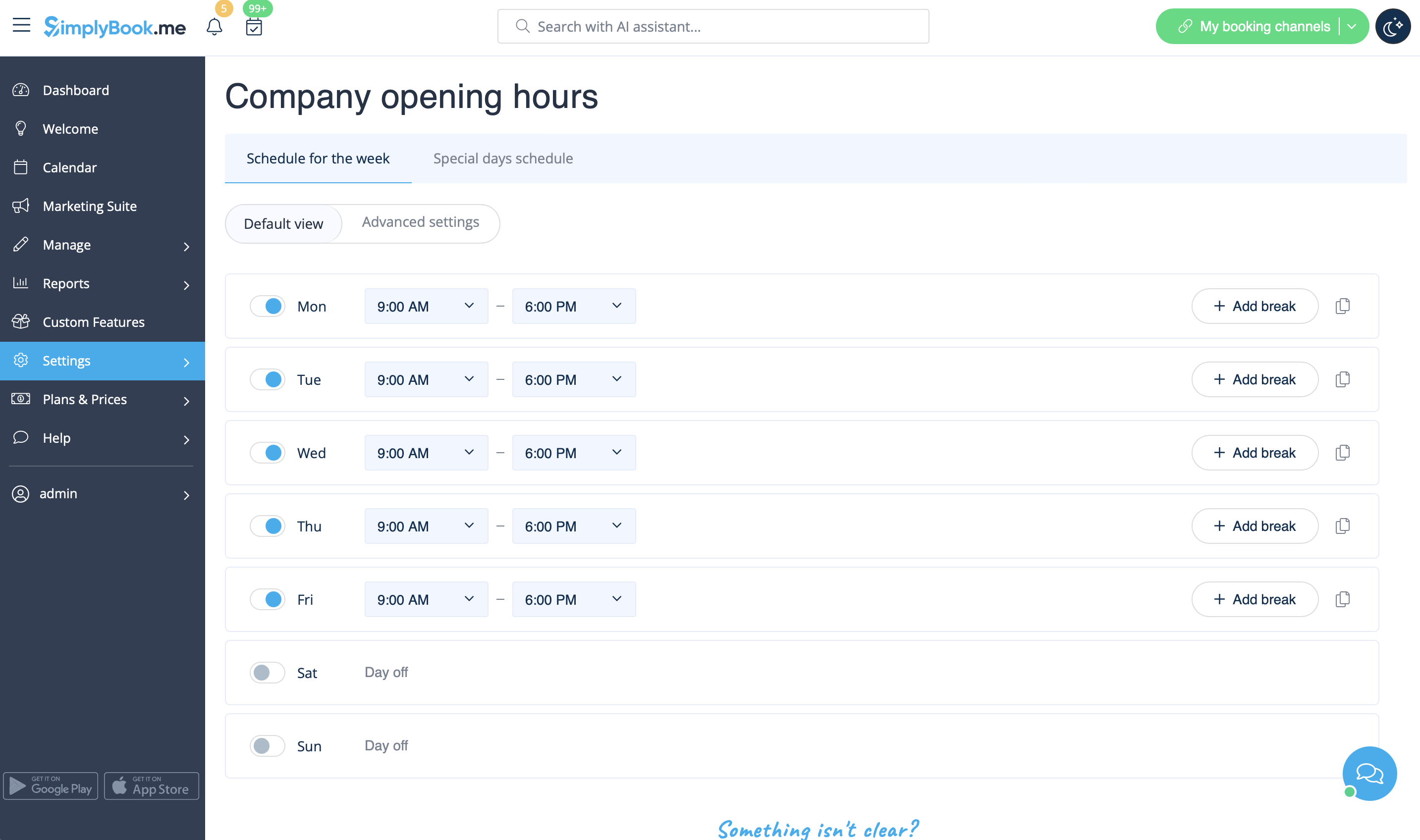
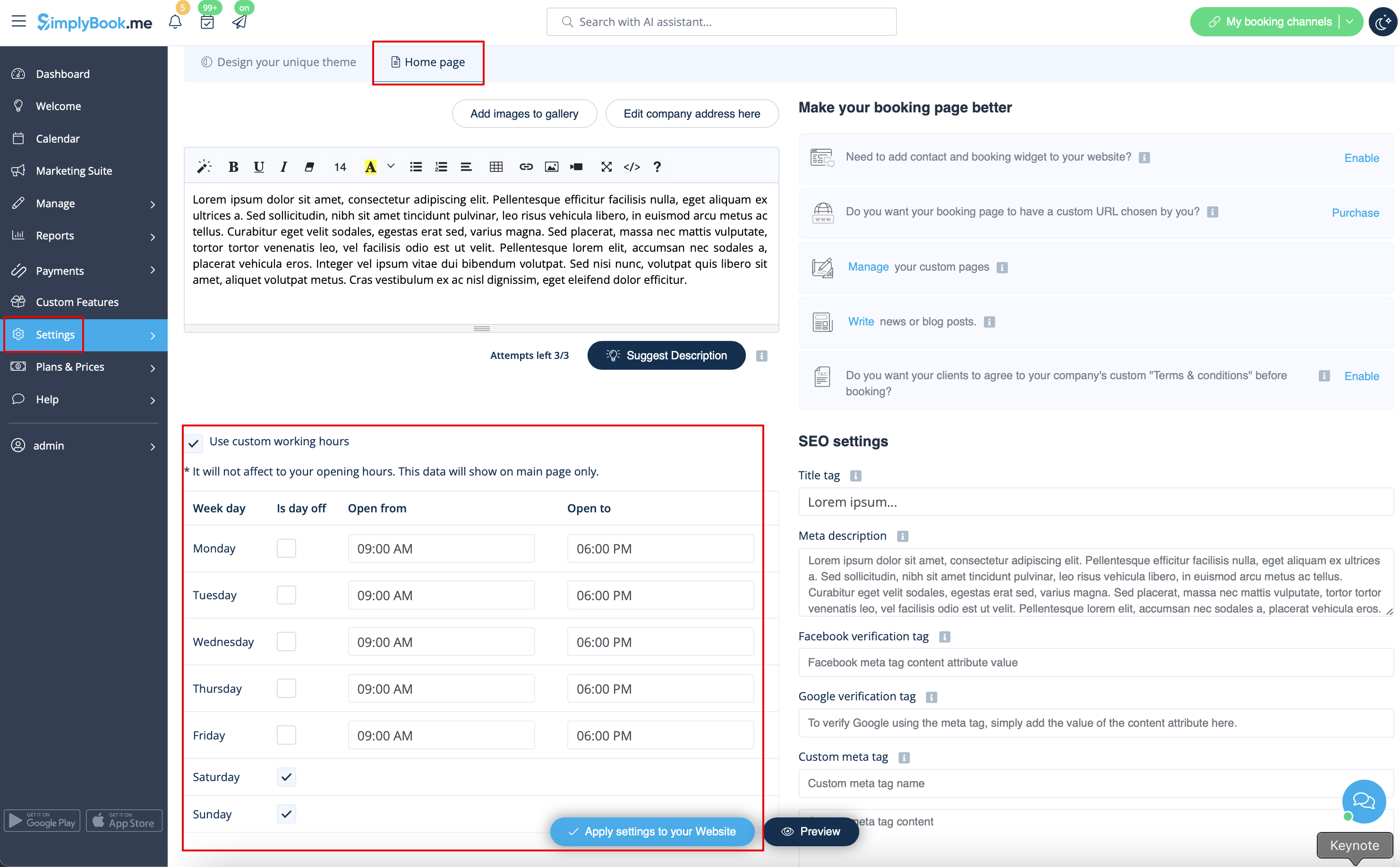
If you wish to display times different from real working hours there you can use "Use custom working hours" in Settings//Design settings//Home page.
Calendar Layout
You can change calendar layout in Settings // Design settings // Calendar Layout settings // Calendar Layout drop-down
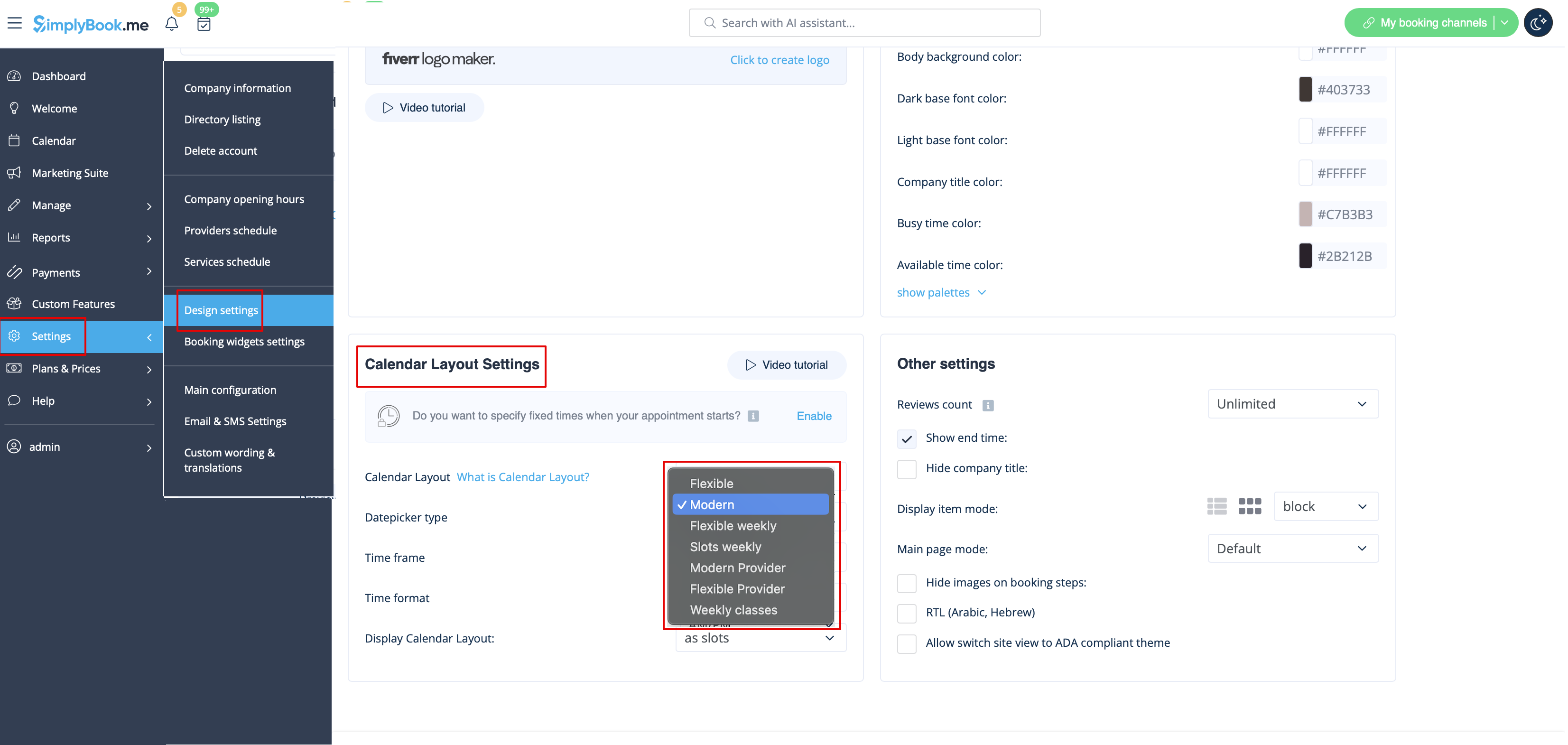
There are 9 types of calendar layout:
- Slots weekly - shows available time in the intervals equal to your service duration for a week. Starts counting from the first available time.
- Modern - shows available time in the intervals equal to your service duration for a day. Starts counting from the first available time.
- Flexible weekly - shows available time in the intervals equal to your timeframe duration for a week. Starts counting from the first available time.
- Flexible - shows available time in the intervals equal to your timeframe duration for a day. Starts counting from the first available time.
- Modern provider - shows available time for providers for chosen date. Starts counting from the first available time of all providers.
- Flexible provider- shows available times for providers in the intervals equal to your timeframe duration. Starts counting from the first available time on selected date.
- Daily Classes- shows available times for classes in the intervals equal to class duration. Starts counting from the first available time.
- Please note! Multiple Bookings custom feature currently does not work with Classes layout.
- Weekly Classes shows available times for classes in the intervals equal to class duration with weekly options. Starts counting from the first available time for a date. Only available times are displayed, unavailable slots are hidden.
If you have services that have fixed start times, you can try using Appointment at fixed time Custom Feature.
Interval
You can change it in Settings // Main configuration // Timeframe.
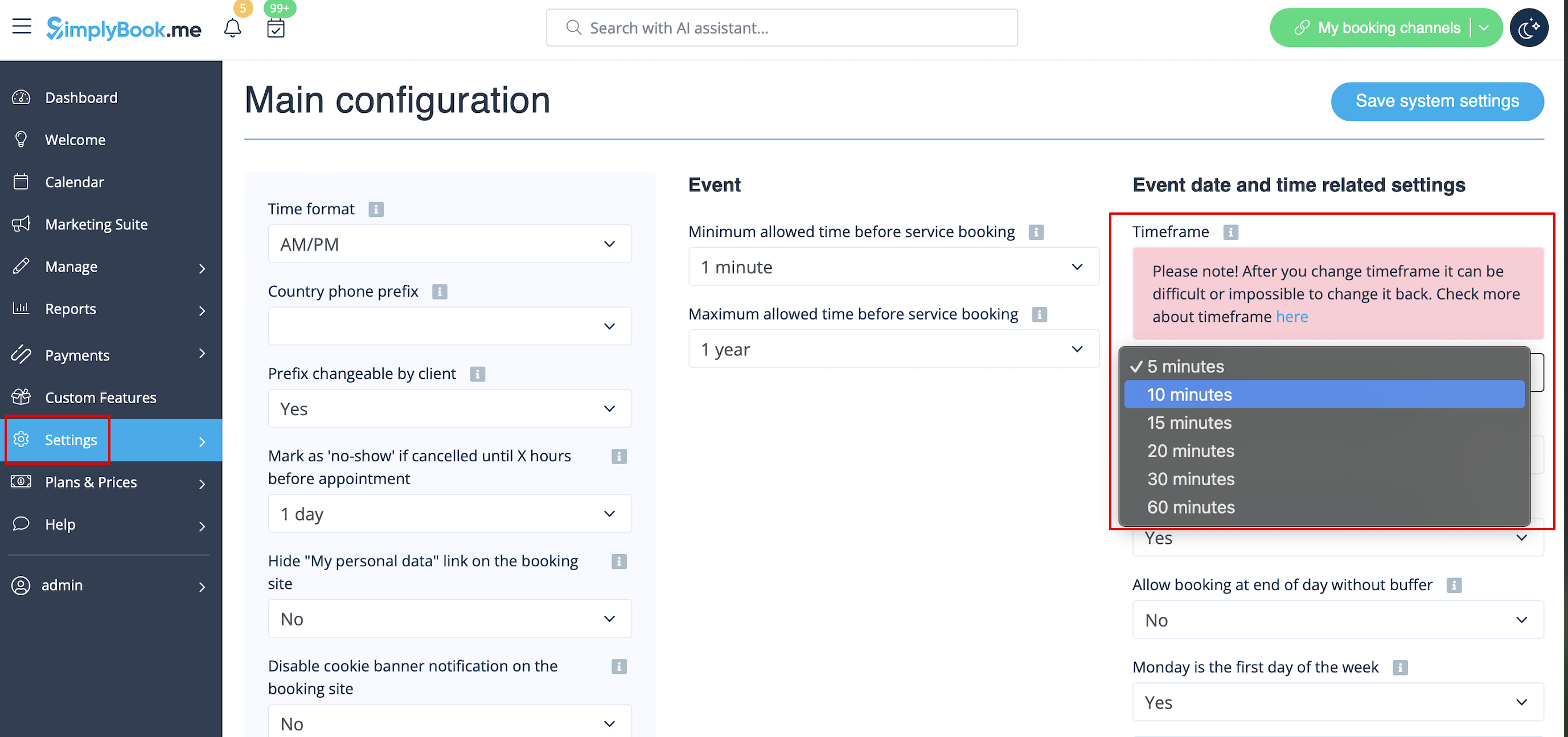
You can also try to change calendar layout to flexible in order to show availability according to your interval. Check types of Calendar Layouts here.
