Created page with "<span style="background-color:#ffe9e9; padding:5px; border-radius:5px;">'''Bemærk!'''</span> *<span style="background-color:#ffe9e9; padding:5px; border-radius:5px;">De fakturaer, der genereres i QuickBooks som følge af integrationen, indeholder ikke oplysninger om skatter og rabatter, men kun det samlede beløb. SimplyBook-fakturaer indeholder derimod oplysninger om varepriser, skatter/rabatter (hvis relevant) og det samlede beløb.</span> *<span style="background-col..." |
Created page with "6. Du kan tilføje et <span style="background-color:#d4f8e5; padding:5px; border-radius:5px;">indskudskontonavn</span> og vælge <span style="background-color:#d4f8e5; padding:5px; border-radius:5px;">indskudskontotype</span>. Det skal være enten <span style="background-color:#d4f8e5; padding:5px; border-radius:5px;">Anden kortfristet aktiv</span> eller <span style="background-color:#d4f8e5; padding:5px; border-radius:5px;">Bank (kontanter).</span> Hvis indskudskonto ik..." Tags: Mobile edit Mobile web edit |
||
| Line 35: | Line 35: | ||
[[File:Quickbooks deposit account.png|1200px|center|link=https://help.simplybook.me/images/7/75/Quickbooks_deposit_account.png]] | [[File:Quickbooks deposit account.png|1200px|center|link=https://help.simplybook.me/images/7/75/Quickbooks_deposit_account.png]] | ||
7. <span style="background-color:#d4f8e5; padding:5px; border-radius:5px;">Spring over transaktioner med nul beløb</span> er aktiveret som standard for at udelukke ordrer med nul beløb fra at blive overført til QuickBooks. For eksempel transaktioner, hvor rabatten blev anvendt, og det resulterende totalbeløb er 0. | |||
7. <span style="background-color:#d4f8e5; padding:5px; border-radius:5px;"> | Du kan beholde det, som det er, hvis du ikke har brug for at se sådanne poster i Quickbooks, eller deaktivere det, hvis det er vigtigt at have dem til din bogføring. | ||
[[File:Quickbooks skip zero transactions.png|1200px|center|link=https://help.simplybook.me/images/2/27/Quickbooks_skip_zero_transactions.png]] | [[File:Quickbooks skip zero transactions.png|1200px|center|link=https://help.simplybook.me/images/2/27/Quickbooks_skip_zero_transactions.png]] | ||
8. Du kan aktivere automatisk <span style="background-color:#d4f8e5; padding:5px; border-radius:5px;">oprettelse af en refusionskvittering</span> i QuickBooks, når der foretages en refusion på SBPay.me. Sørg for at inkludere <span style="background-color:#d4f8e5; padding:5px; border-radius:5px;">indbetalingskontonavnet</span>, hvis du vælger at aktivere denne mulighed, da det er obligatorisk for synkronisering af refusioner. | |||
8. | |||
[[File:Quickbooks rrefund receipts.png|1200px|center|link=https://help.simplybook.me/images/5/57/Quickbooks_rrefund_receipts.png]] | [[File:Quickbooks rrefund receipts.png|1200px|center|link=https://help.simplybook.me/images/5/57/Quickbooks_rrefund_receipts.png]] | ||
<div lang="en" dir="ltr" class="mw-content-ltr"> | <div lang="en" dir="ltr" class="mw-content-ltr"> | ||
Revision as of 17:35, 15 May 2025

Denne nemme SBPay.me- integration med Quickbooks giver dig mulighed for automatisk at oprette fakturaer eller salgsbilag i QuickBooks for hver betalt ordre og sende dem til kunderne.
Video-vejledning 
Bemærk!
- De fakturaer, der genereres i QuickBooks som følge af integrationen, indeholder ikke oplysninger om skatter og rabatter, men kun det samlede beløb. SimplyBook-fakturaer indeholder derimod oplysninger om varepriser, skatter/rabatter (hvis relevant) og det samlede beløb.
- Multivaluta skal være aktiveret i QuickBooks for transaktionsdokumenter, der involverer forskellige valutaer.
Sådan indstilles og bruges
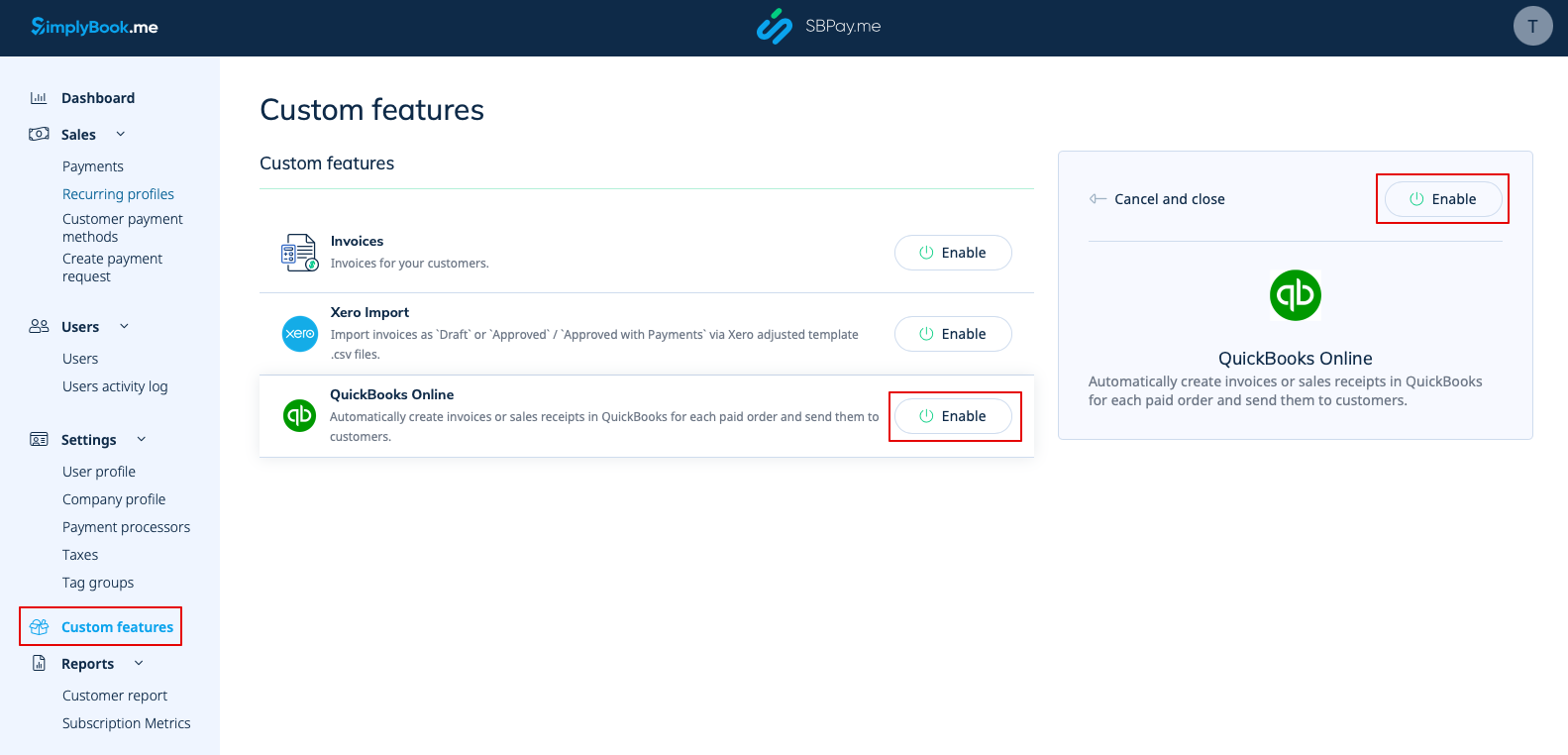
1. Gå til siden Custom Features (Tilpassede funktioner) i din SBPay.me-grænseflade, og klik på knappen Enable (Aktiver) ved siden af QuickBooks.
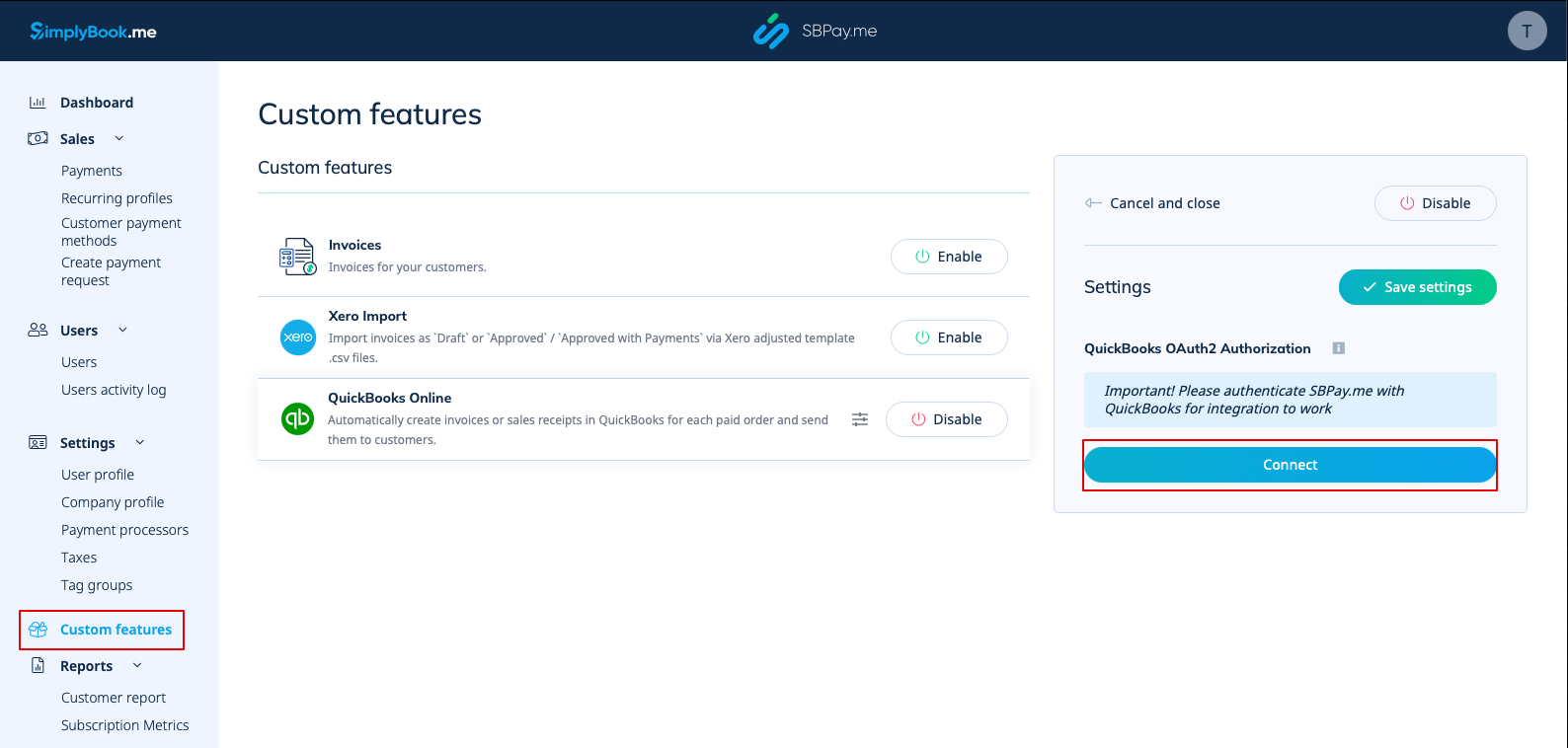
2. Når funktionen er aktiveret, skal du klikke på knappen Connect for at fortsætte med opsætningen.
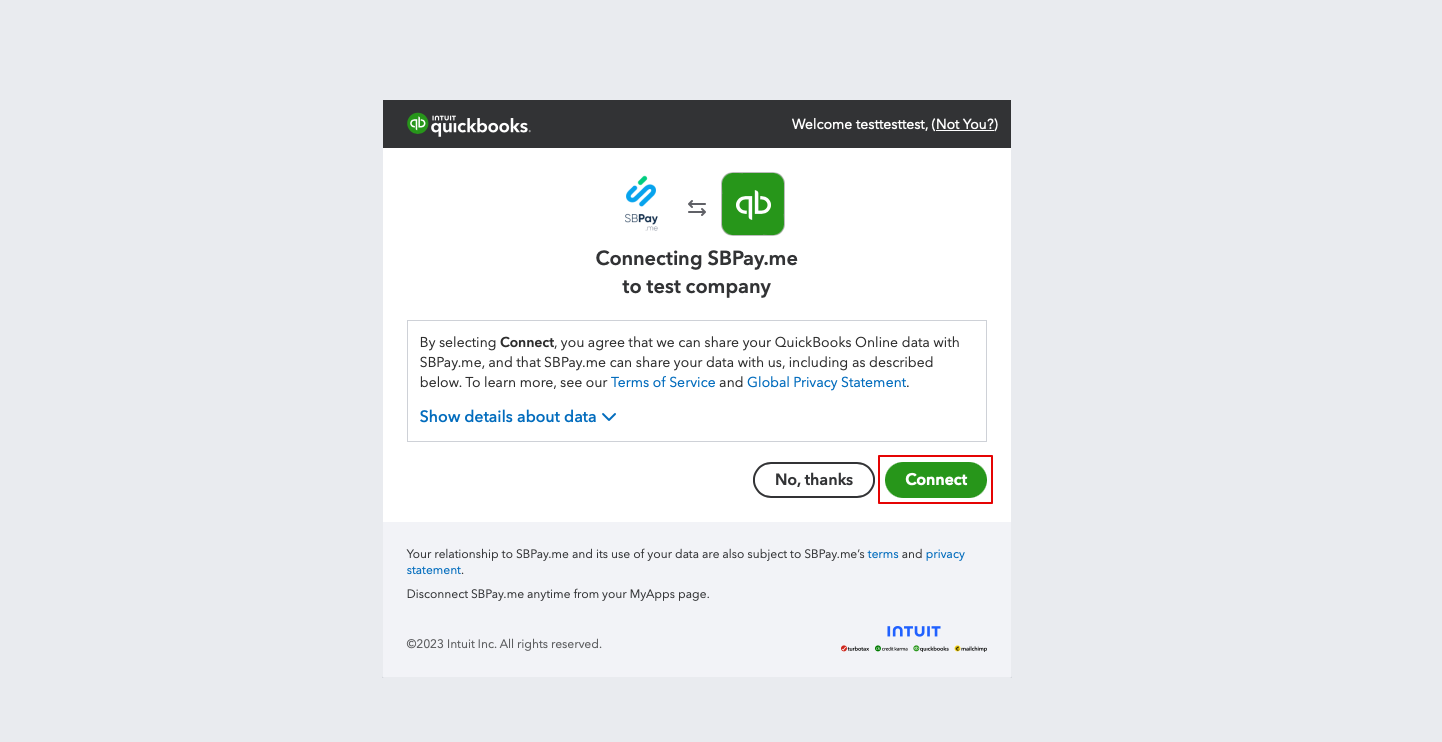
3. Du bliver bedt om at logge ind på din Quickbooks-konto for at oprette forbindelse. Hvis du allerede er logget ind i din browser, oprettes forbindelsen automatisk efter bekræftelse. Du vil også se SBPay.me i afsnittet Apps -> Mine apps i QuickBooks.
4. Når systemerne er forbundet, får du adgang til integrationsindstillingerne i SBPay.me-grænsefladen.
5. Vælg transaktionsdokumenttypen: Der er to muligheder: Faktura og salgsbilag. Faktura udløser oprettelsen af både en faktura og den tilhørende betaling i QuickBooks for hver opfyldt ordre på SimplyBook-siden. Du vil således se to poster (betaling og faktura) på QuickBooks-kontoen, der er knyttet til den samme transaktion. Salgskvittering resulterer i generering af en salgskvittering (betaling) udelukkende ved vellykket betaling for ordren.
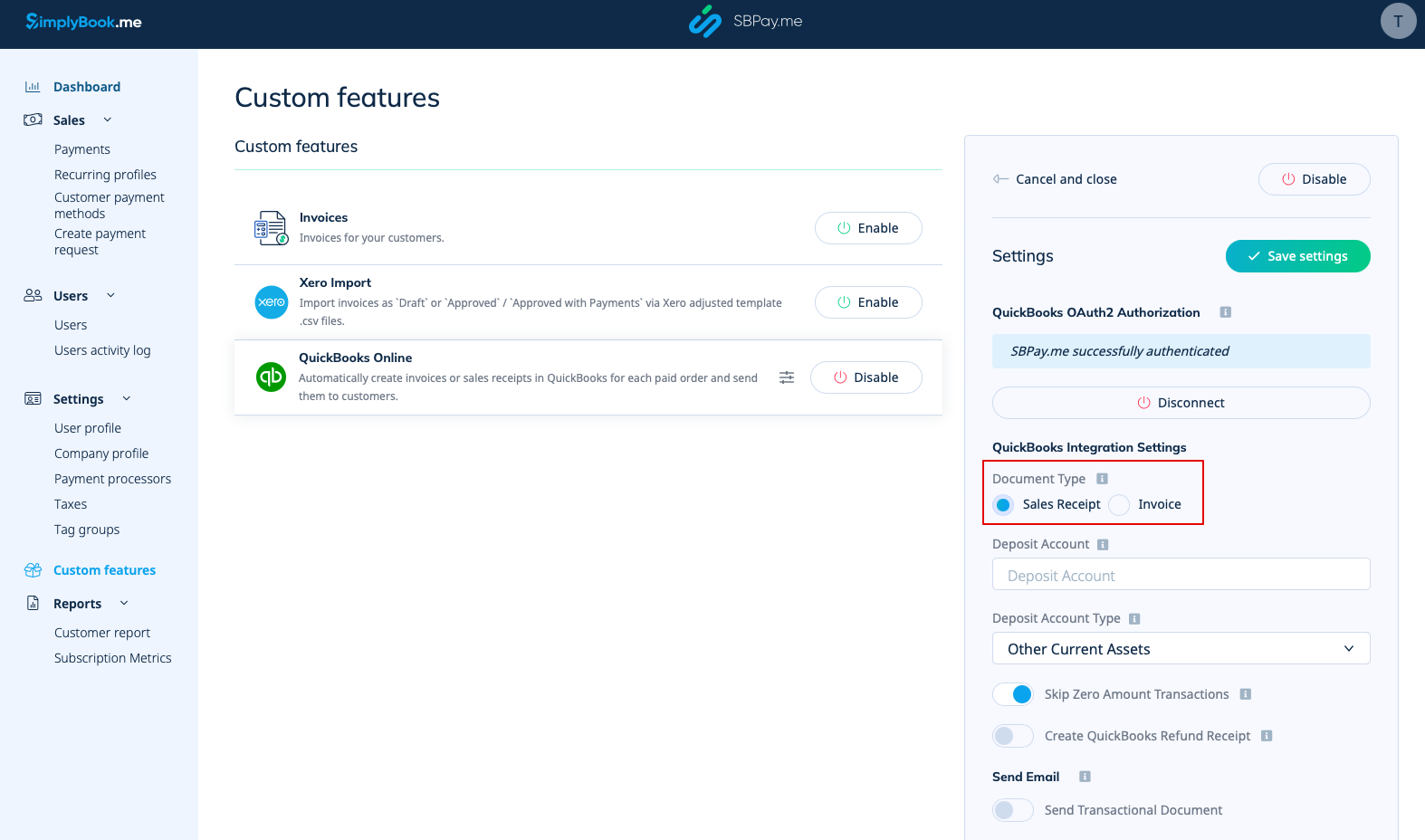
6. Du kan tilføje et indskudskontonavn og vælge indskudskontotype. Det skal være enten Anden kortfristet aktiv eller Bank (kontanter). Hvis indskudskonto ikke er angivet, bruger QuickBooks en standardkonto kaldet Ikke indbetalte midler.
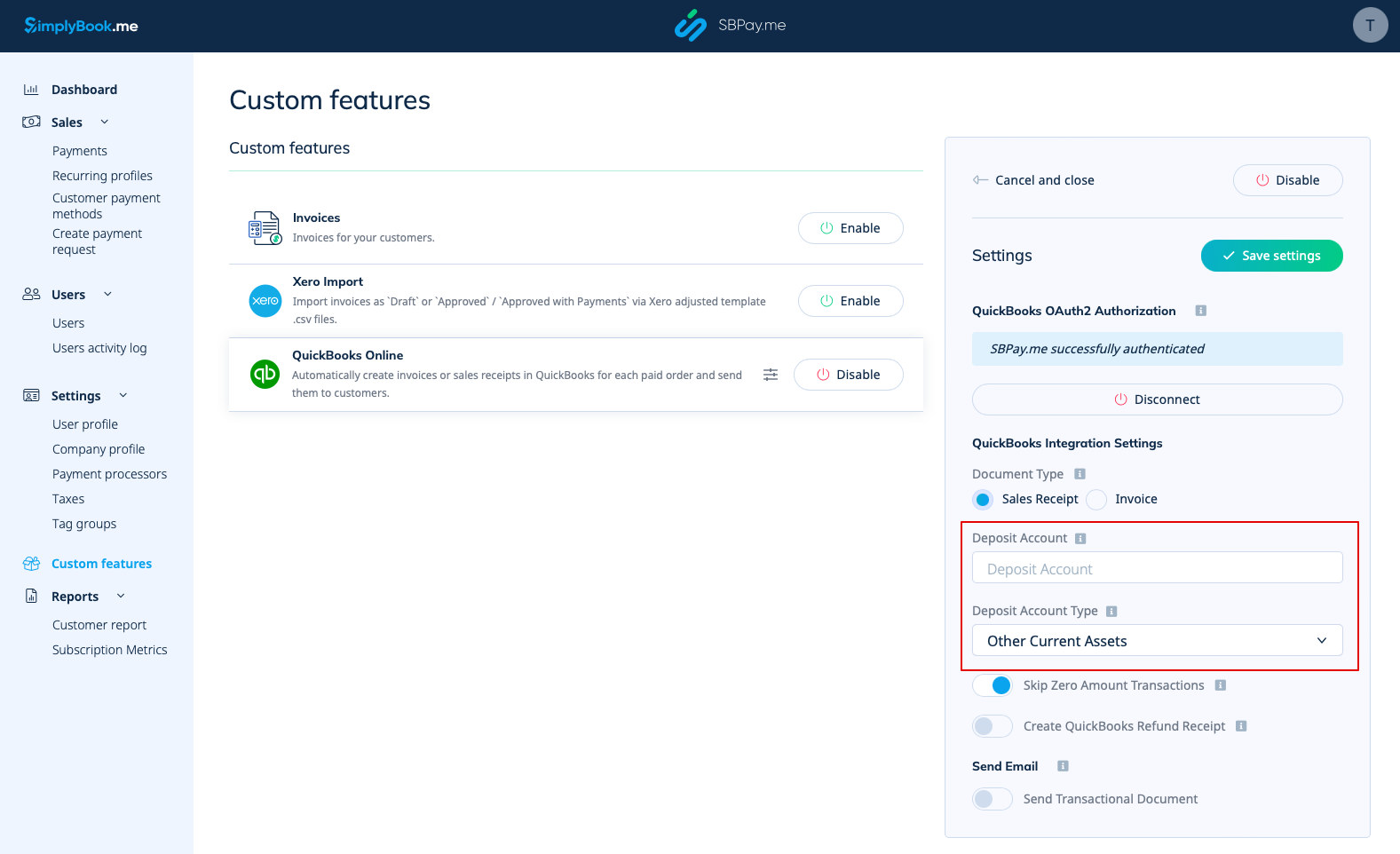
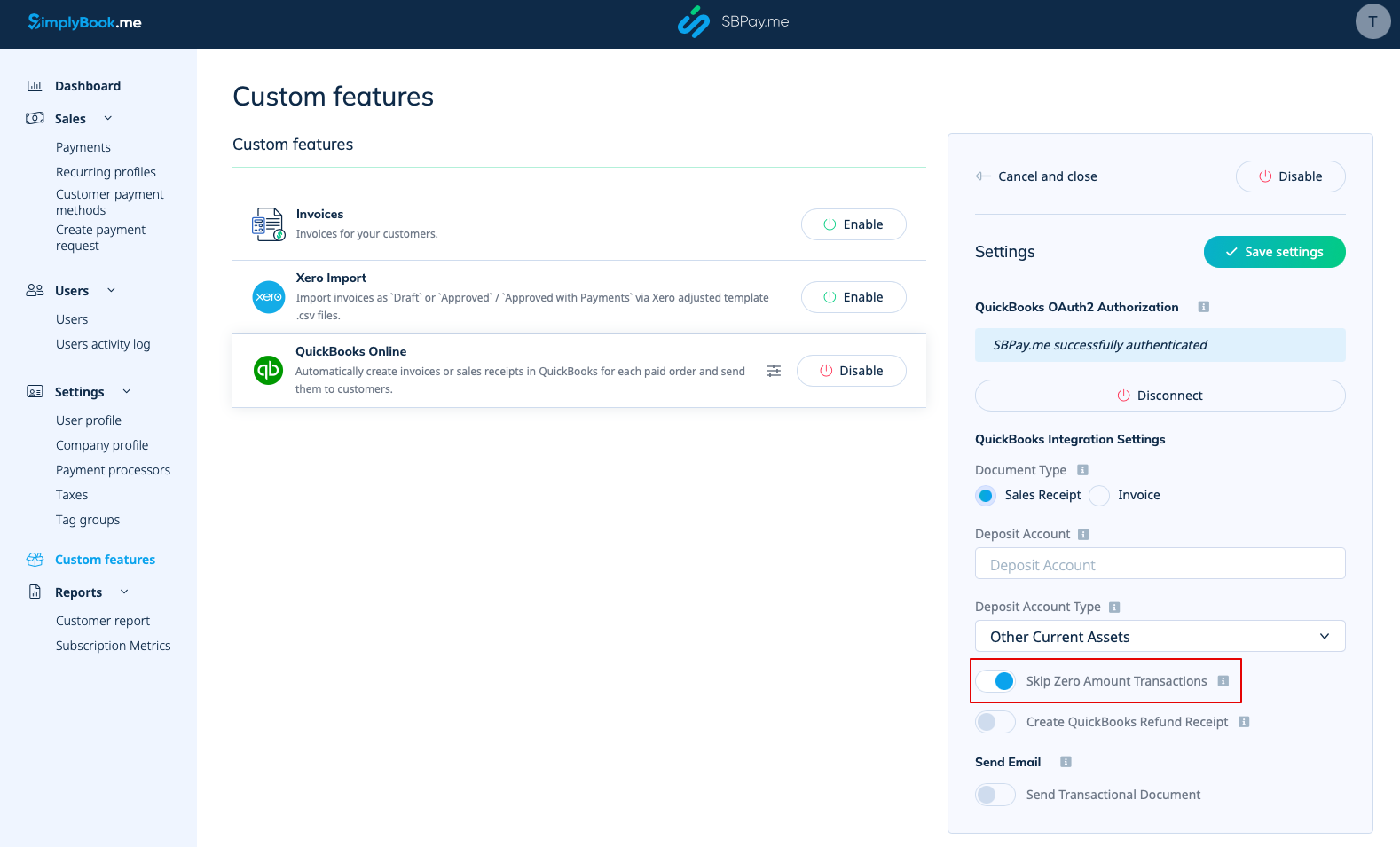
7. Spring over transaktioner med nul beløb er aktiveret som standard for at udelukke ordrer med nul beløb fra at blive overført til QuickBooks. For eksempel transaktioner, hvor rabatten blev anvendt, og det resulterende totalbeløb er 0. Du kan beholde det, som det er, hvis du ikke har brug for at se sådanne poster i Quickbooks, eller deaktivere det, hvis det er vigtigt at have dem til din bogføring.
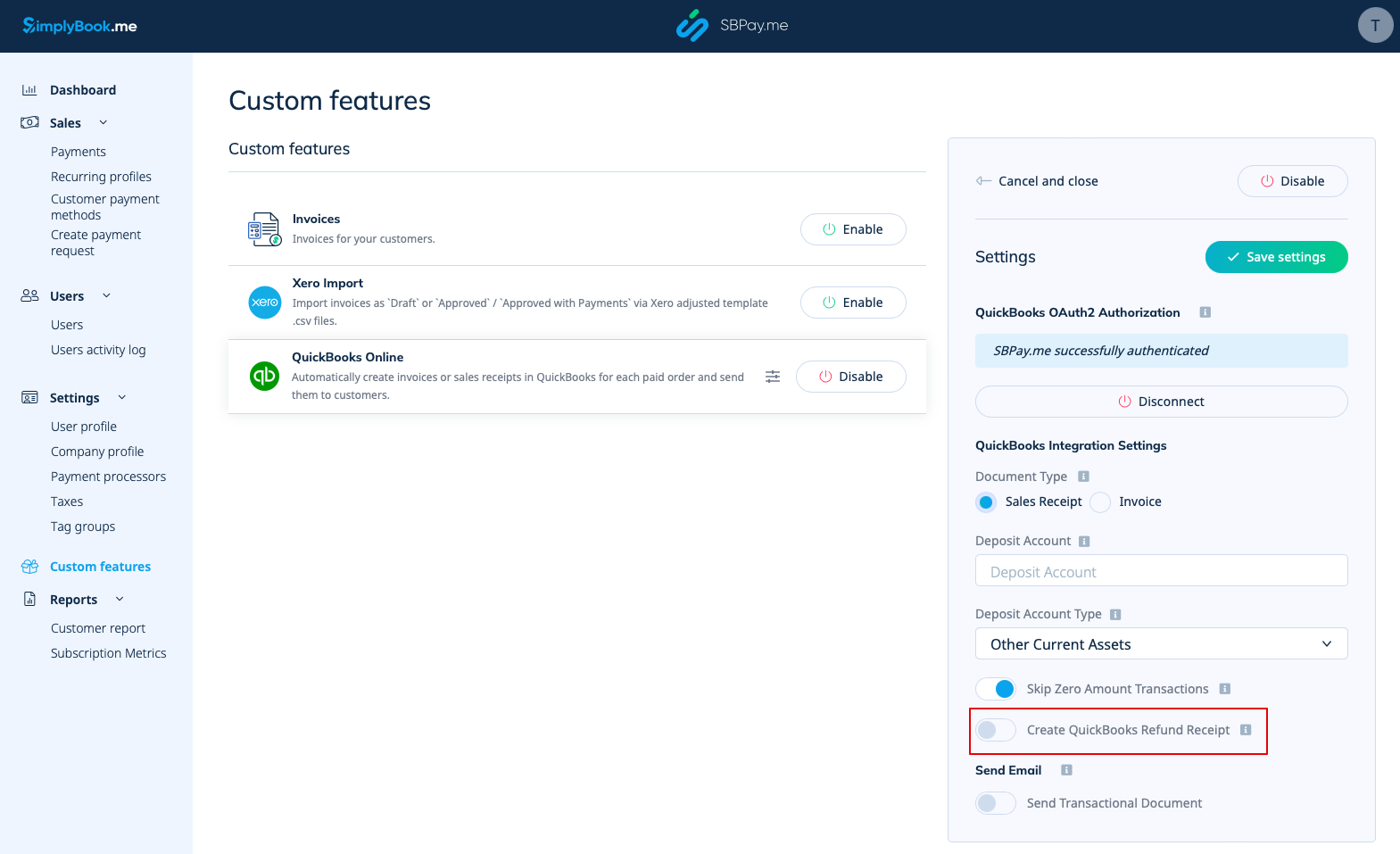
8. Du kan aktivere automatisk oprettelse af en refusionskvittering i QuickBooks, når der foretages en refusion på SBPay.me. Sørg for at inkludere indbetalingskontonavnet, hvis du vælger at aktivere denne mulighed, da det er obligatorisk for synkronisering af refusioner.
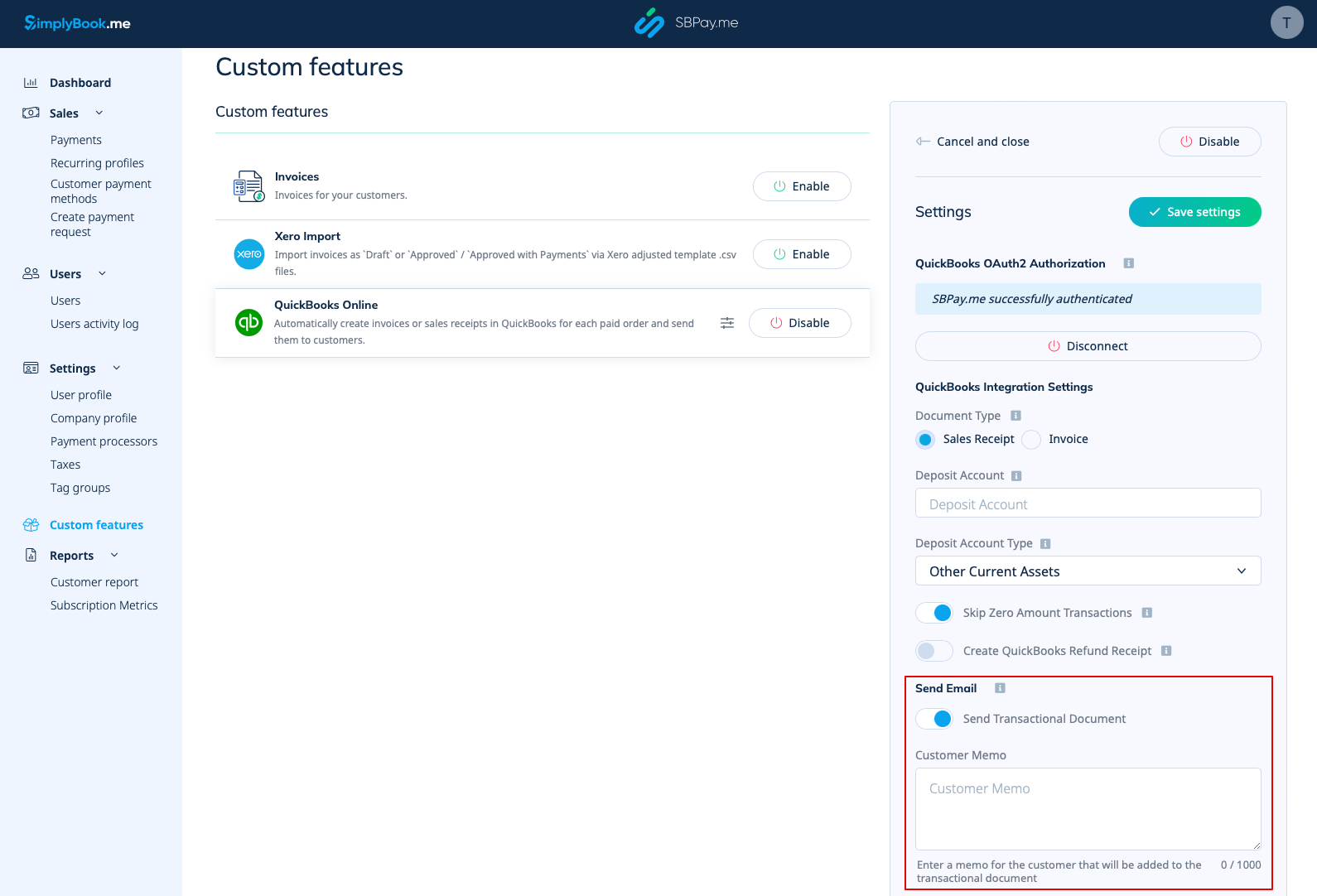
9. There is also an option to send a transactional document. If enabled, the client will also receive an invoice from QuickBooks in addition to other active notifications.
You can also add a note to be reflected in the Quickbooks invoices.
Taxes
To activate this option and pass taxes information to Quickbooks please check the "Add tax info to transaction document" in the Custom features -> Sales tax in your SBPay.me interface. And select the corresponding tax location.
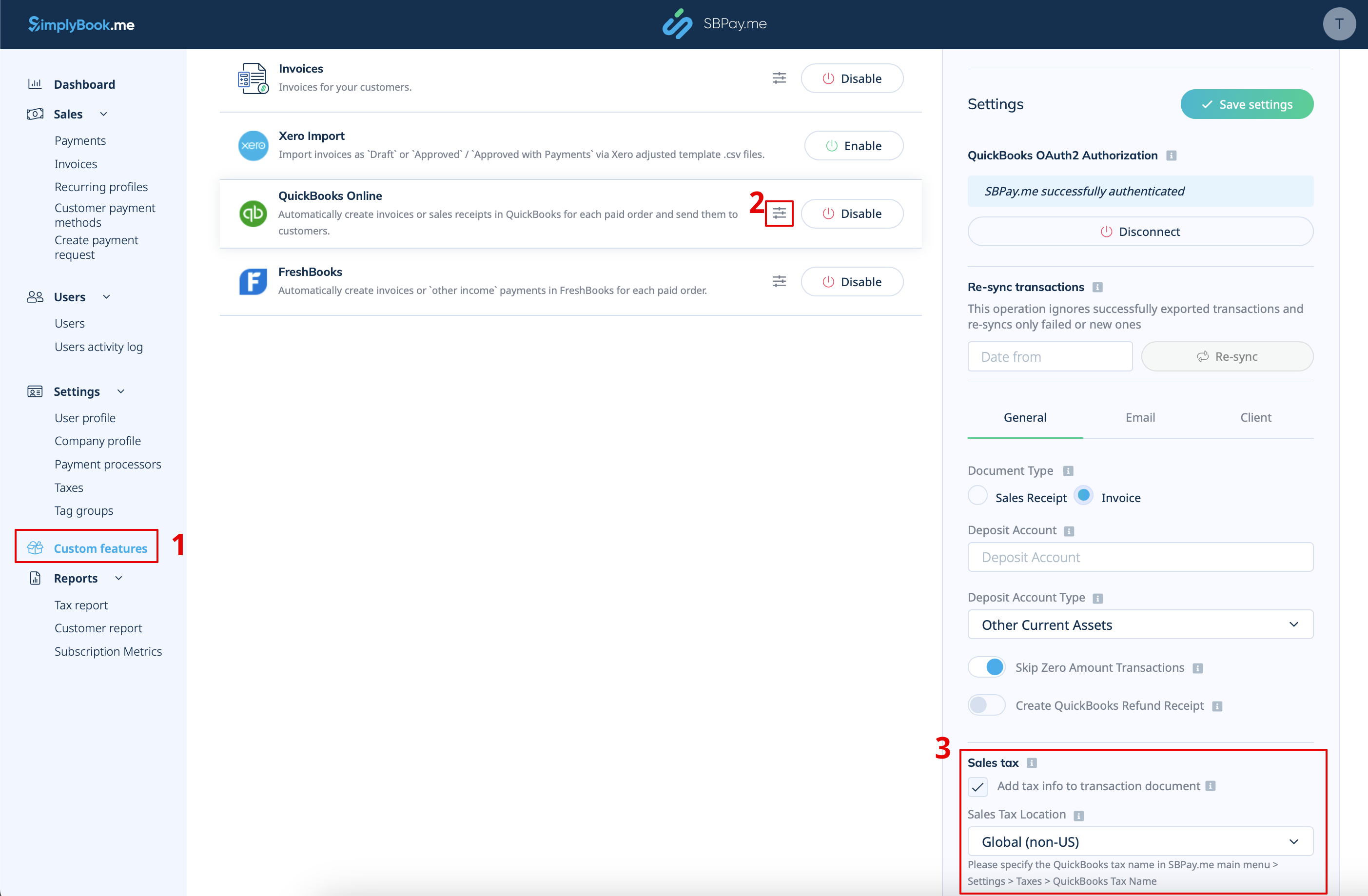
- For Global tax location
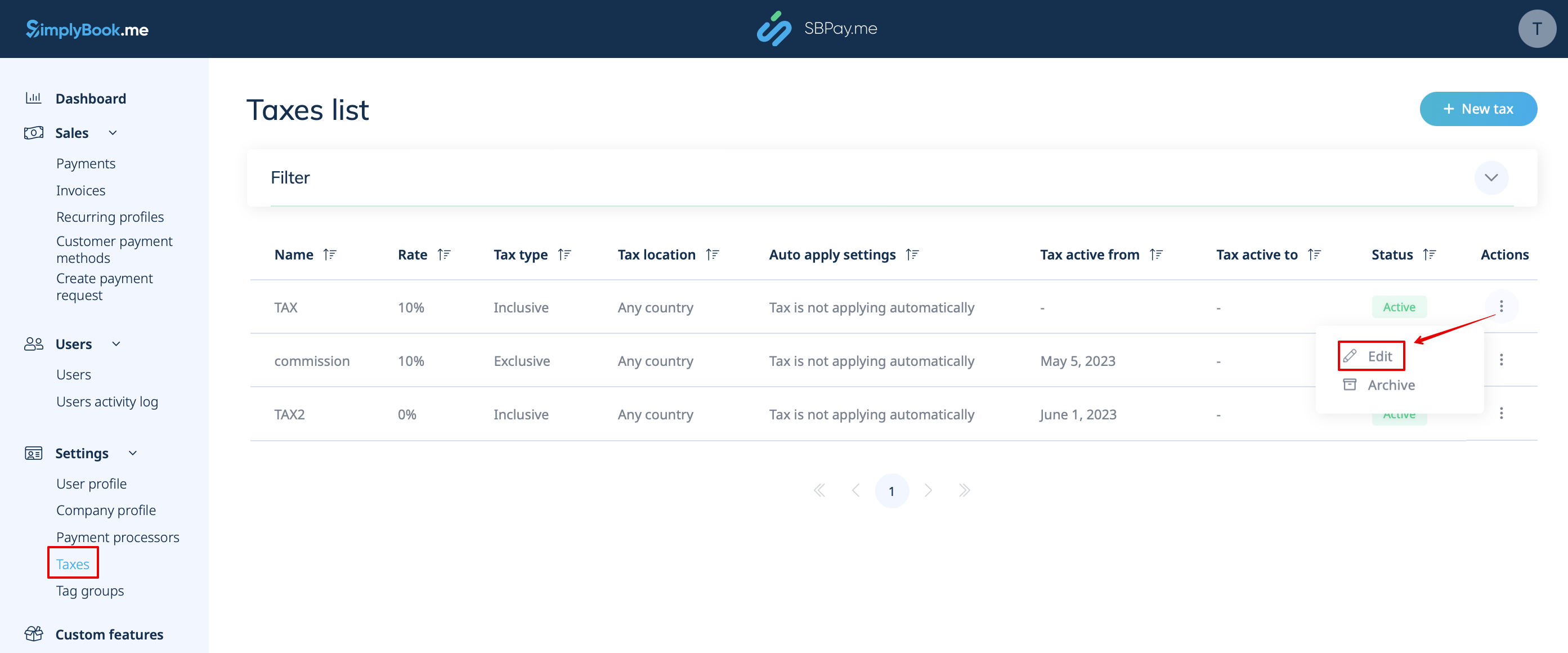
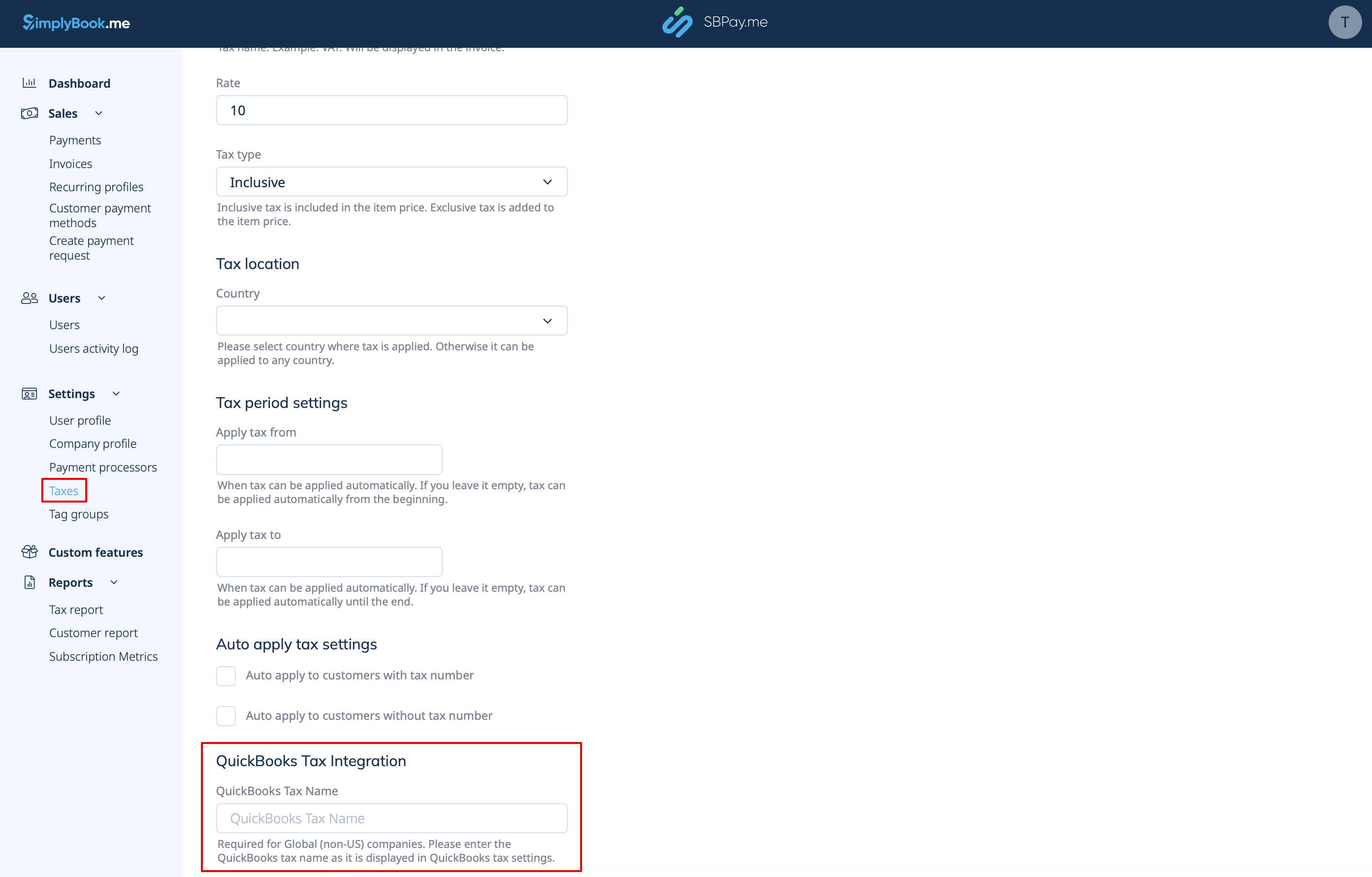
Also navigate to Settings -> Taxes in SBPay.me interface, select the necessary tax and set the exact tax name as it is defined in QuickBooks.
Please note!
- Tax is defined for each line separately;
- All lines with taxes should have the same tax type (inclusive or exclusive) throughout the order;
- The orders that contain lines with multiple taxes will not be passed to Quickbooks;
- If the order contains lines with no tax applied it will not be passed to Quickbooks;
- The orders that contain lines with mixed inclusive and exclusive taxes are not passed to Quickbooks;
- If the Quickbooks tax name is not set for some tax in that order it will not be passed to Quickbooks.
- For USA tax location
For now it is only possible to use Automated Sales Tax (AST) as defined in QuickBooks. If you set the tax name set in SBPay.me Settings -> Taxes, it will be ignored.
Please note!
- Tax is defined for the whole order. On the SBPay.me side, this means that ALL lines should have the same single tax with the same rate and type set for each order line;
- Tax is always exclusive.
