Created page with "<span style="background-color:#ffe9e9; padding:5px; border-radius:5px;">'''Let op!'''</span> *<span style="background-color:#ffe9e9; padding:5px; border-radius:5px;">De facturen die aan de QuickBooks-kant worden gegenereerd als resultaat van de integratie, bevatten geen informatie over belastingen en kortingen, maar alleen het totale bedrag. De SimplyBook-facturen bevatten wel informatie over de prijs van het artikel, belastingen/kortingen (indien van toepassing) en het..." |
Created page with "5. Kies het type transactiedocument: er zijn twee opties: <span style="background-color:#d4f8e5; padding:5px; border-radius:5px;">factuur</span> en <span style="background-color:#d4f8e5; padding:5px; border-radius:5px;">verkoopbon</span>. Invoice activeert het aanmaken van zowel een factuur als de bijbehorende betaling in QuickBooks voor elke voltooide bestelling aan de SimplyBook-kant. U ziet dus twee records (betaling en factuur) op de QuickBooks-account die aan dezel..." Tags: Mobile edit Mobile web edit |
||
| Line 52: | Line 52: | ||
<br><br> | <br><br> | ||
:''<u>Voor wereldwijde belastinglocatie</u>''<br> | |||
:''<u> | Ga ook naar <span style="background-color:#d4f8e5; padding:5px; border-radius:5px;">Instellingen</span> -> <span style="background-color:#d4f8e5; padding:5px; border-radius:5px;">Belastingen</span> in de SBPay.me-interface, selecteer de benodigde belasting en stel de exacte belastingnaam in zoals deze is gedefinieerd in QuickBooks. | ||
[[File:Sbpay edit tax path.png|1200px|center|link=https://help.simplybook.me/images/4/43/Sbpay_edit_tax_path.png]] | [[File:Sbpay edit tax path.png|1200px|center|link=https://help.simplybook.me/images/4/43/Sbpay_edit_tax_path.png]] | ||
[[File:Qb tax global path.png|1200px|center|link=https://help.simplybook.me/images/c/cf/Qb_tax_global_path.png]] | [[File:Qb tax global path.png|1200px|center|link=https://help.simplybook.me/images/c/cf/Qb_tax_global_path.png]] | ||
<br><br> | <br><br> | ||
<span style="background-color:#ffe9e9; padding:5px; border-radius:5px;">''' | <span style="background-color:#ffe9e9; padding:5px; border-radius:5px;">'''Let op!'''</span> | ||
* <span style="background-color:#ffe9e9; padding:5px; border-radius:5px;"> | *<span style="background-color:#ffe9e9; padding:5px; border-radius:5px;">Belasting wordt voor elke regel afzonderlijk gedefinieerd;</span> | ||
* <span style="background-color:#ffe9e9; padding:5px; border-radius:5px;"> | *<span style="background-color:#ffe9e9; padding:5px; border-radius:5px;">Alle regels met belastingen moeten in de hele bestelling hetzelfde belastingtype hebben (inclusief of exclusief);</span> | ||
* <span style="background-color:#ffe9e9; padding:5px; border-radius:5px;"> | *<span style="background-color:#ffe9e9; padding:5px; border-radius:5px;">Bestellingen die regels met meerdere belastingen bevatten, worden niet doorgegeven aan Quickbooks;</span> | ||
* <span style="background-color:#ffe9e9; padding:5px; border-radius:5px;"> | *<span style="background-color:#ffe9e9; padding:5px; border-radius:5px;">Als de bestelling regels bevat waarop geen belasting is toegepast, wordt deze niet doorgegeven aan Quickbooks;</span> | ||
* <span style="background-color:#ffe9e9; padding:5px; border-radius:5px;"> | *<span style="background-color:#ffe9e9; padding:5px; border-radius:5px;">Bestellingen die regels met gemengde inclusieve en exclusieve belastingen bevatten, worden niet doorgegeven aan Quickbooks;</span> | ||
* <span style="background-color:#ffe9e9; padding:5px; border-radius:5px;"> | *<span style="background-color:#ffe9e9; padding:5px; border-radius:5px;">Als de Quickbooks-belastingnaam niet is ingesteld voor een bepaalde belasting in die bestelling, wordt deze niet doorgegeven aan Quickbooks.</span> | ||
<br><br> | <br><br> | ||
:''<u>Voor belastinglocatie in de VS</u>''<br> | |||
:''<u> | Voorlopig is het alleen mogelijk om automatische omzetbelasting (AST) te gebruiken zoals gedefinieerd in QuickBooks. Als u de belastingnaam instelt in SBPay. <span style="background-color:#d4f8e5; padding:5px; border-radius:5px;">me-instellingen</span> -> <span style="background-color:#d4f8e5; padding:5px; border-radius:5px;">Belastingen</span>, wordt deze genegeerd.<br> | ||
<br><br> | <br><br> | ||
<span style="background-color:#ffe9e9; padding:5px; border-radius:5px;">''' | <span style="background-color:#ffe9e9; padding:5px; border-radius:5px;">'''Let op!'''</span><span style="background-color:#ffe9e9; padding:5px; border-radius:5px;">De belasting '</span> | ||
* <span style="background-color:#ffe9e9; padding:5px; border-radius:5px;"> | *<span style="background-color:#ffe9e9; padding:5px; border-radius:5px;">' wordt voor de hele bestelling gedefinieerd. Aan de kant van SBPay.me betekent dit dat ALLE regels dezelfde belasting met hetzelfde tarief en type moeten hebben voor elke bestellingsregel;</span><span style="background-color:#ffe9e9; padding:5px; border-radius:5px;">de belasting '</span> | ||
* <span style="background-color:#ffe9e9; padding:5px; border-radius:5px;"> | *<span style="background-color:#ffe9e9; padding:5px; border-radius:5px;">' is altijd exclusief.</span> | ||
<br><br><br><br> | <br><br><br><br> | ||
Revision as of 17:36, 15 May 2025

Met deze eenvoudig in te stellen SBPay.me- integratie met Quickbooks kunt u automatisch facturen of verkoopbonnen in QuickBooks aanmaken voor elke betaalde bestelling en deze naar klanten verzenden.
Videohandleiding 
Let op!
- De facturen die aan de QuickBooks-kant worden gegenereerd als resultaat van de integratie, bevatten geen informatie over belastingen en kortingen, maar alleen het totale bedrag. De SimplyBook-facturen bevatten wel informatie over de prijs van het artikel, belastingen/kortingen (indien van toepassing) en het totale bedrag.
- Multi-currency moet zijn ingeschakeld in QuickBooks voor transactiedocumenten met verschillende valuta's.
Hoe instellen en gebruiken
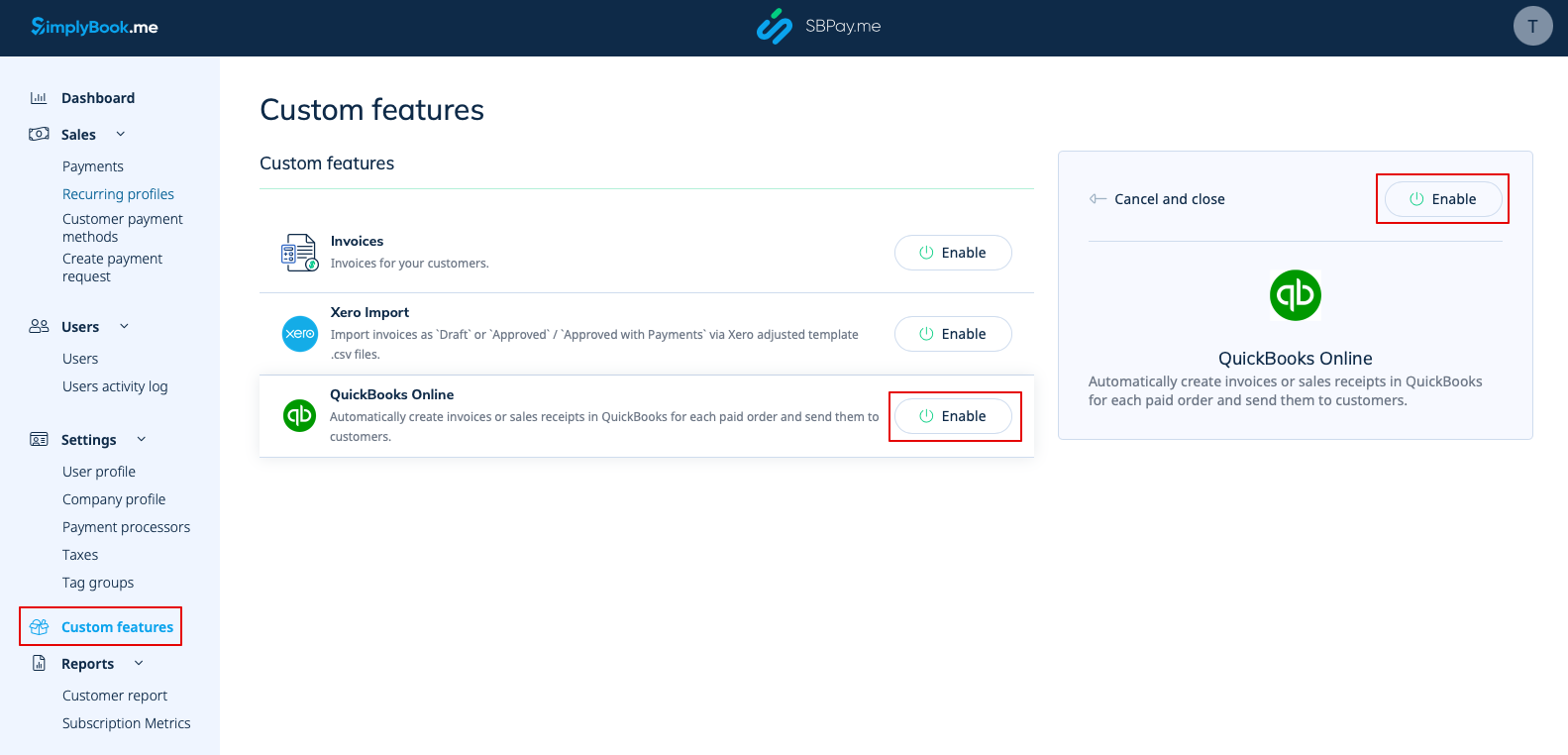
1. Ga naar de pagina 'Aangepaste functies' in uw SBPay.me-interface en klik op de knop ' ' naast QuickBooks.
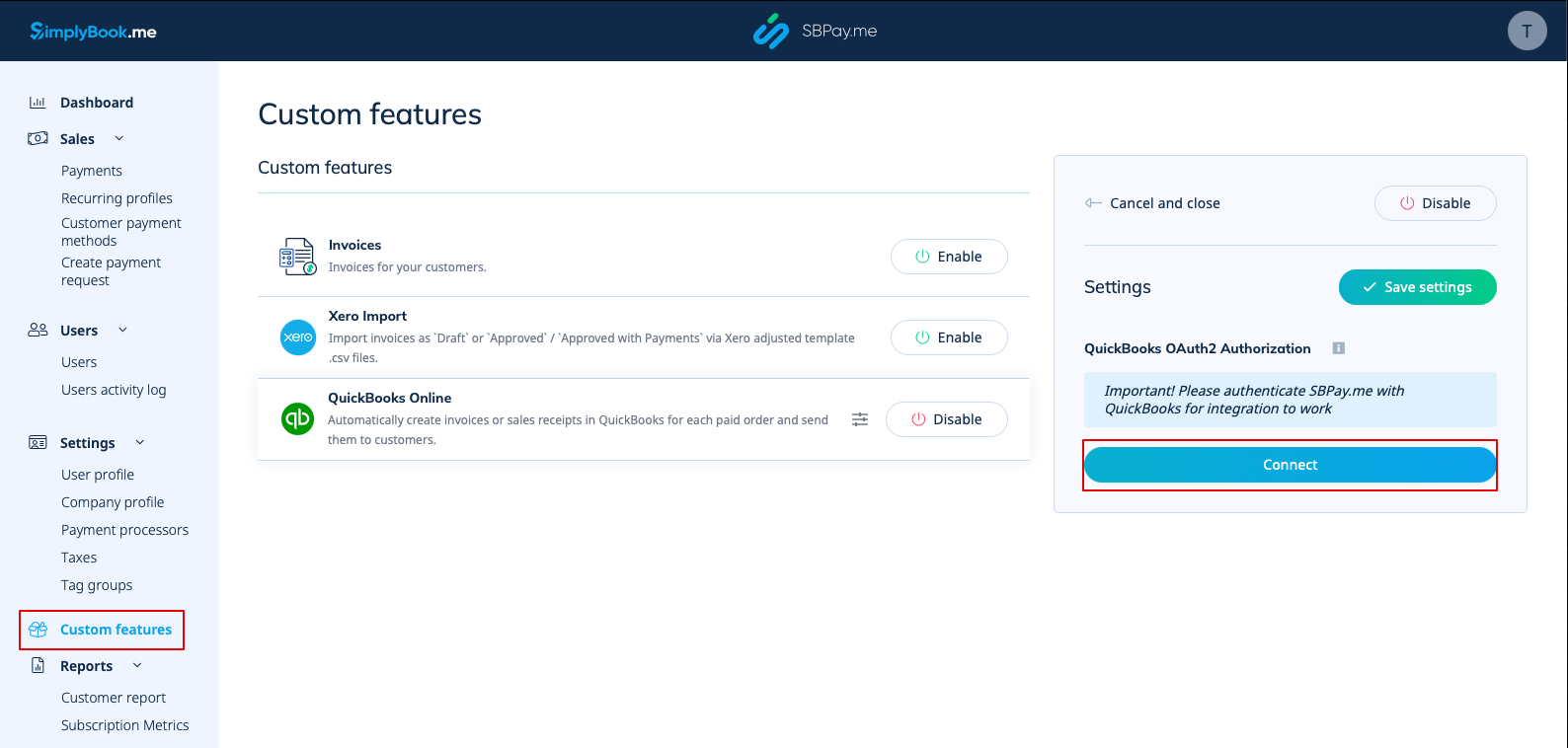
2. Zodra deze optie is ingeschakeld, klikt u op de knop Verbinden om door te gaan met de installatie.
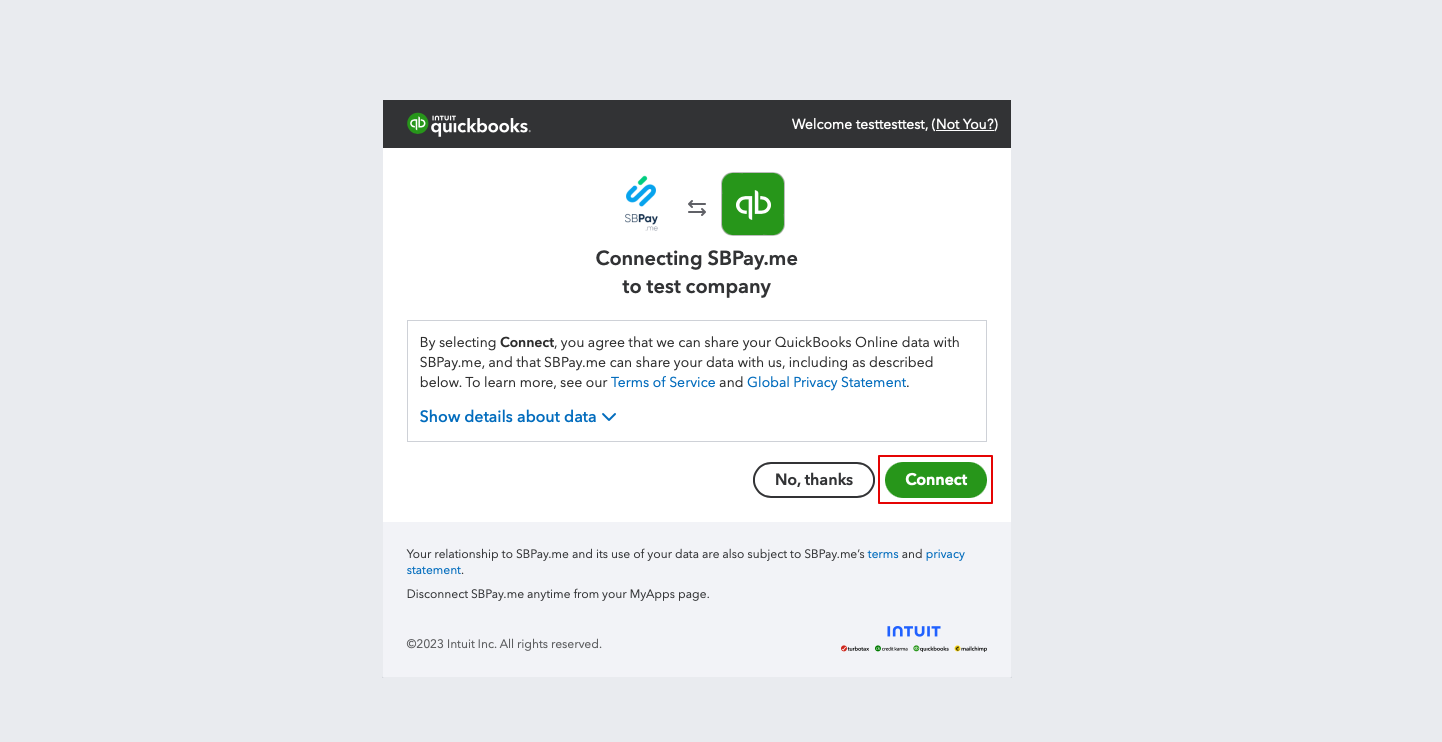
3. U wordt gevraagd om in te loggen op uw Quickbooks-account om verbinding te maken. Als u al bent ingelogd in uw browser, wordt de verbinding automatisch tot stand gebracht na bevestiging. U ziet ook SBPay.me in het gedeelte Apps -> Mijn apps van QuickBooks.
4. Nadat de systemen zijn verbonden, krijgt u toegang tot de integratie-instellingen in de SBPay.me-interface.
5. Kies het type transactiedocument: er zijn twee opties: factuur en verkoopbon. Invoice activeert het aanmaken van zowel een factuur als de bijbehorende betaling in QuickBooks voor elke voltooide bestelling aan de SimplyBook-kant. U ziet dus twee records (betaling en factuur) op de QuickBooks-account die aan dezelfde transactie zijn gekoppeld. Verkoopbon resulteert in het genereren van een verkoopbon (betaling) uitsluitend na succesvolle betaling van de bestelling.
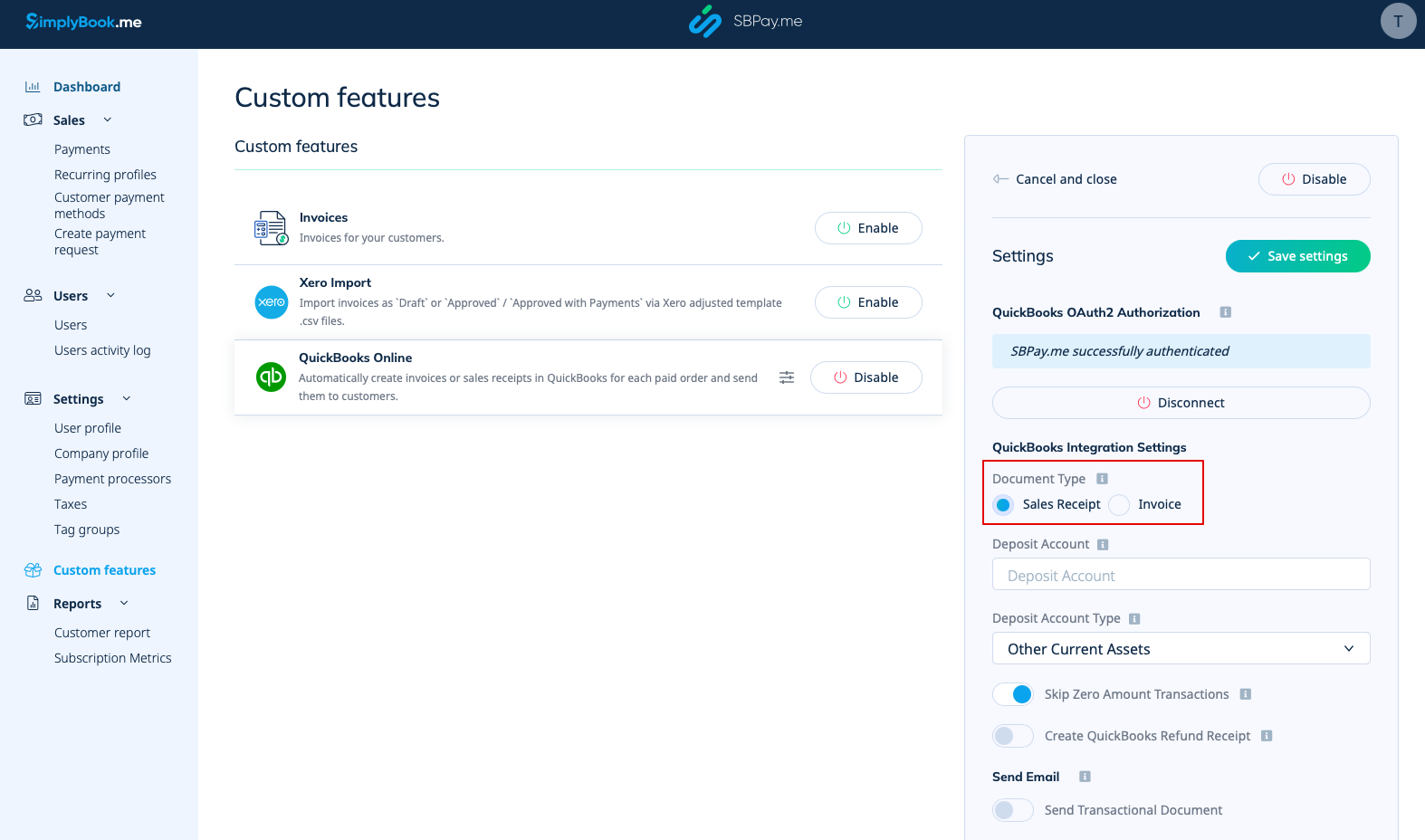
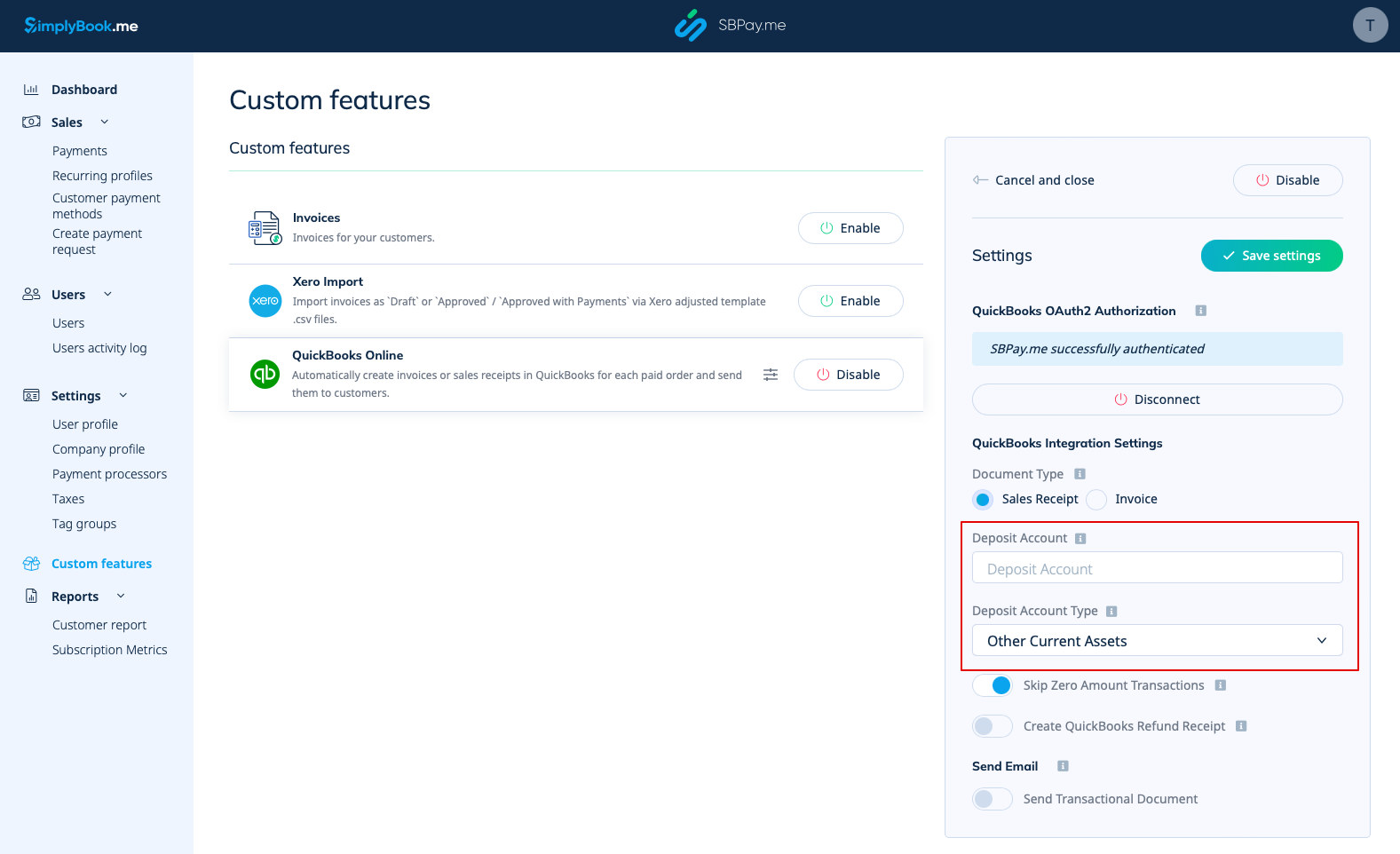
6. U kunt een naam voor de depositorekening toevoegen en het type depositorekening selecteren. Dit moet het type 'Overige vlottende activa' of 'Bank (contant geld) ' zijn. Als er geen depositorekening is opgegeven, gebruikt QuickBooks een standaardrekening met de naam 'Niet-gestorte gelden'.
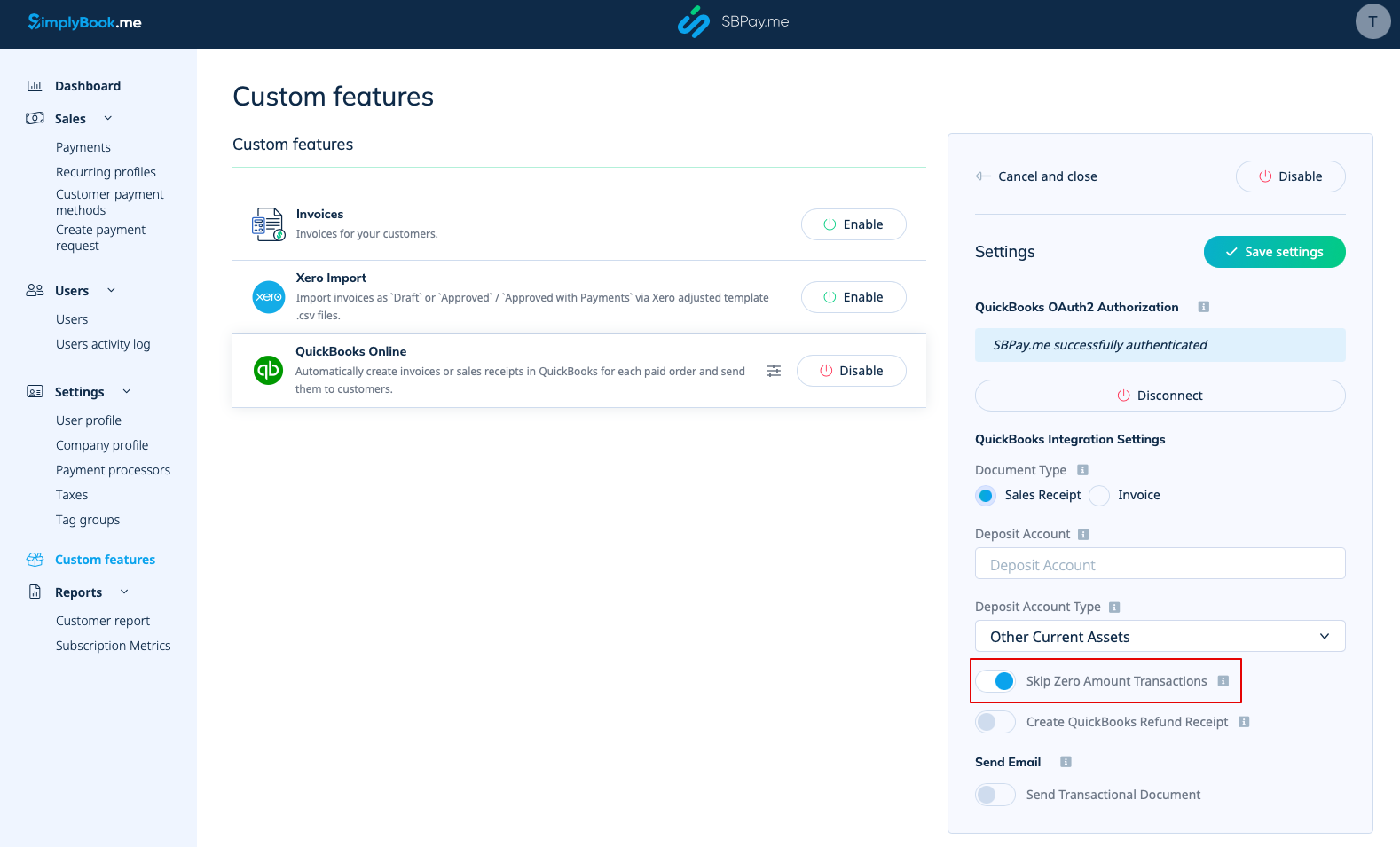
7. Het overslaan van transacties met een bedrag van nul is standaard ingeschakeld om bestellingen met een bedrag van nul uit te sluiten van overdracht naar QuickBooks. Bijvoorbeeld transacties waarbij korting is toegepast en het resulterende totaal 0 is. U kunt dit zo laten als u dergelijke records niet in Quickbooks wilt zien, of uitschakelen als het belangrijk is voor uw boekhouding.
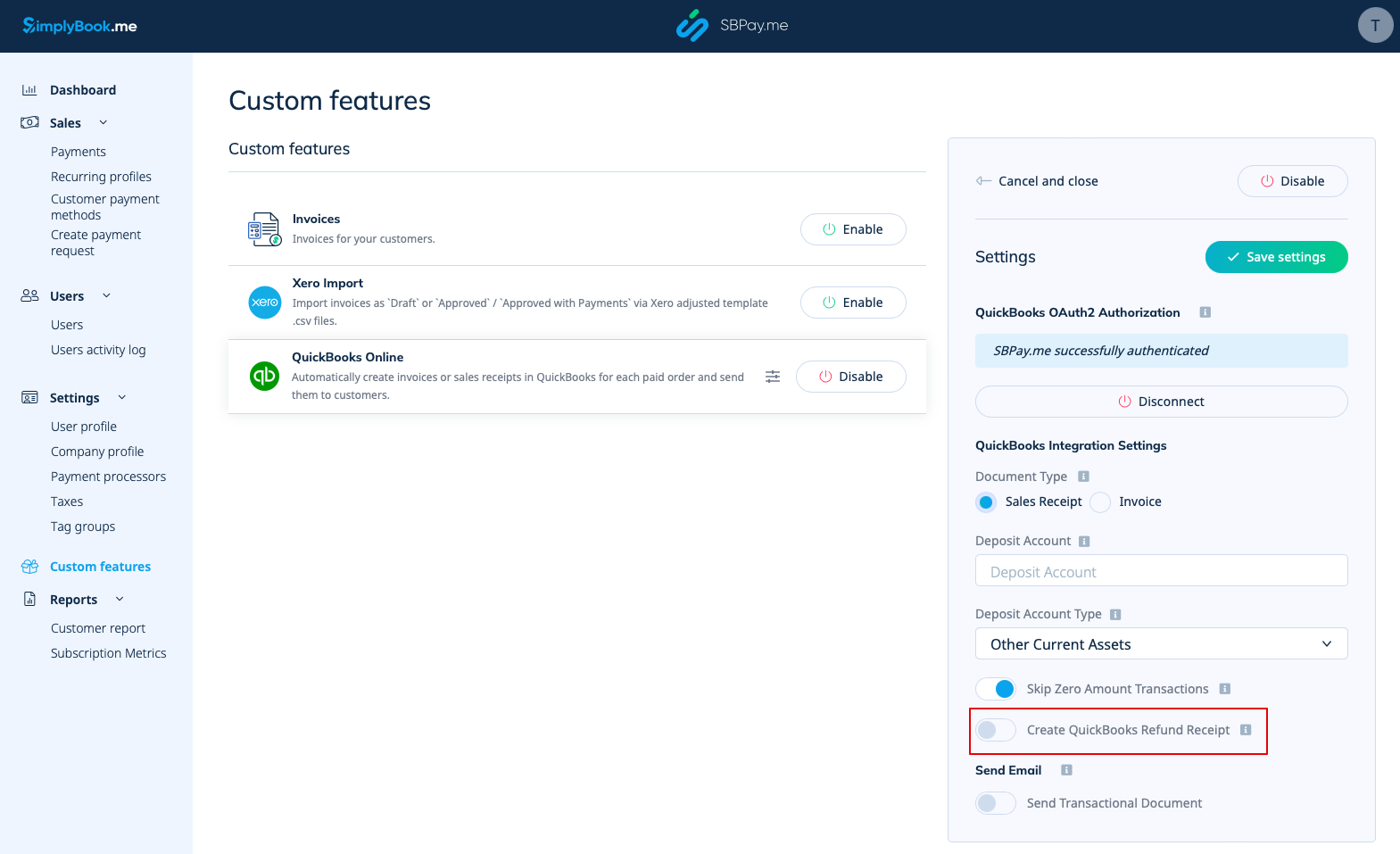
8. U kunt het automatisch aanmaken van een terugbetalingsbon in QuickBooks activeren wanneer er een terugbetaling wordt gedaan aan de kant van SBPay.me. Zorg ervoor dat u de naam van de stortingsrekening vermeldt als u deze optie inschakelt, aangezien dit verplicht is voor de synchronisatie van terugbetalingen.
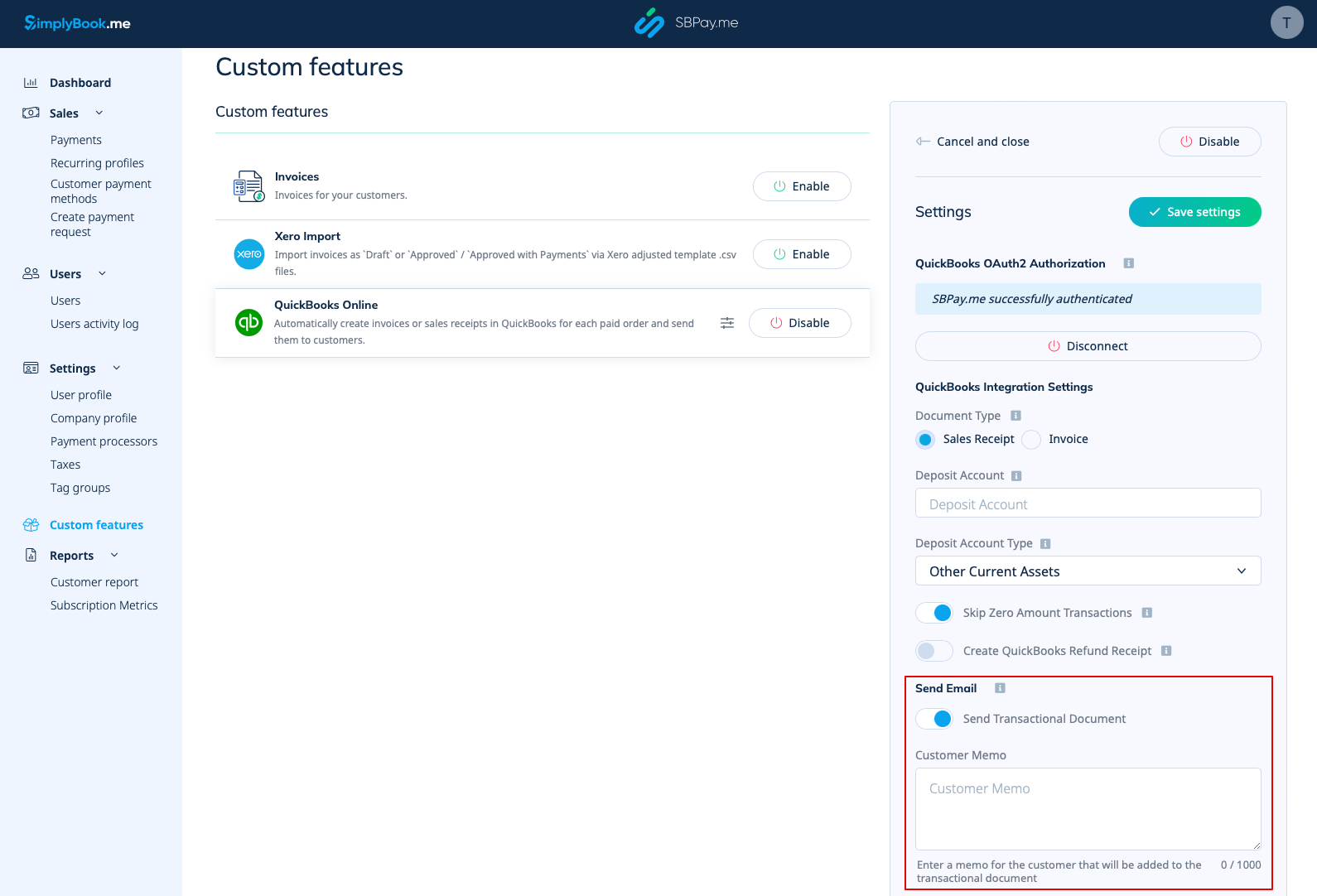
9. Er is ook een optie om een transactiedocument te verzenden. Als deze optie is ingeschakeld, ontvangt de klant naast andere actieve meldingen ook een factuur van QuickBooks.
U kunt ook een opmerking toevoegen die wordt weergegeven op de Quickbooks-facturen.
Belastingen
Om deze optie te activeren en belastinginformatie door te geven aan Quickbooks, vink je 'Belastinginformatie toevoegen aan transactiedocument' aan in de aangepaste functies -> Omzetbelasting in je SBPay.me-interface. Selecteer vervolgens de juiste belastinglocatie.
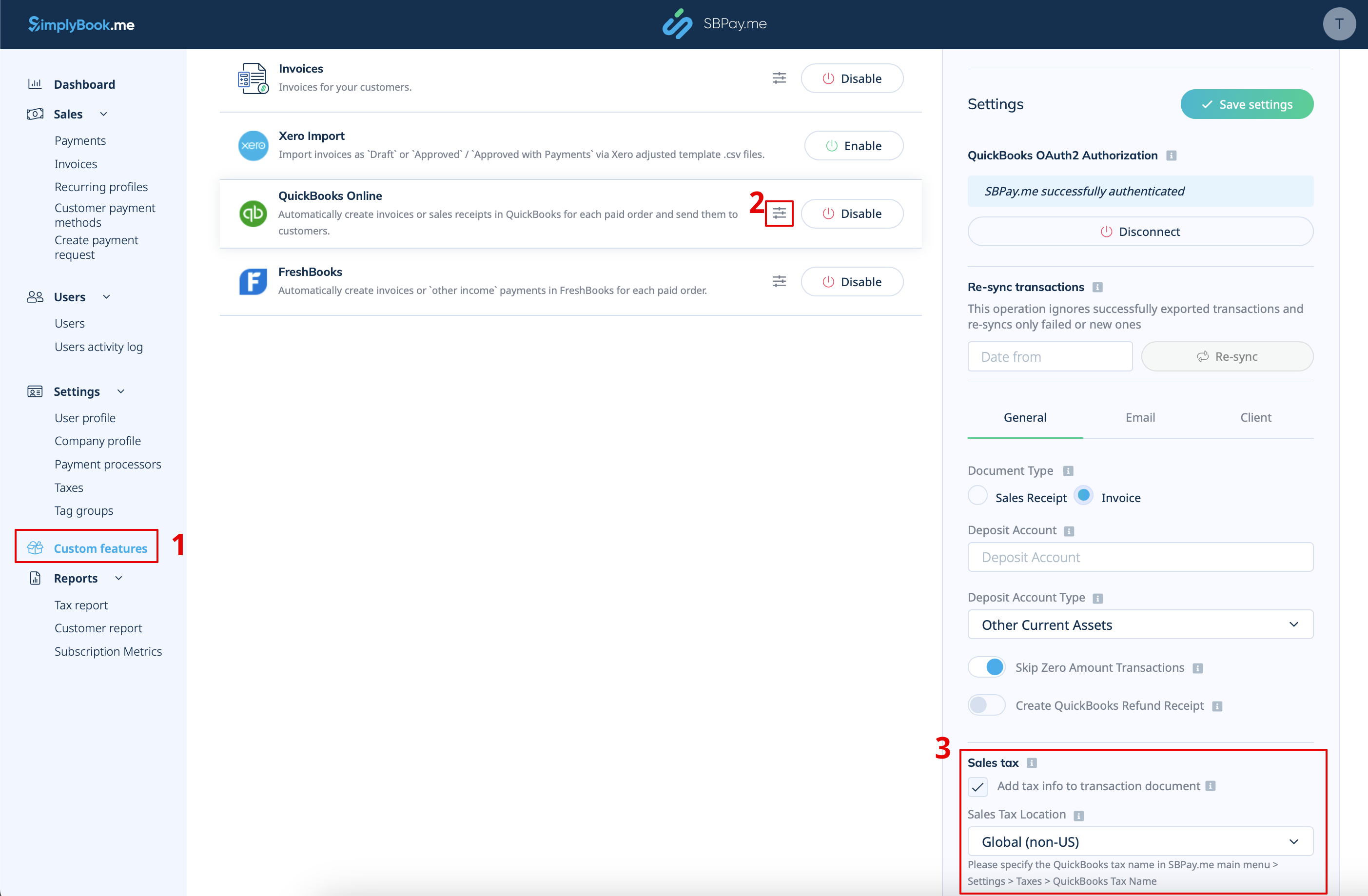
- Voor wereldwijde belastinglocatie
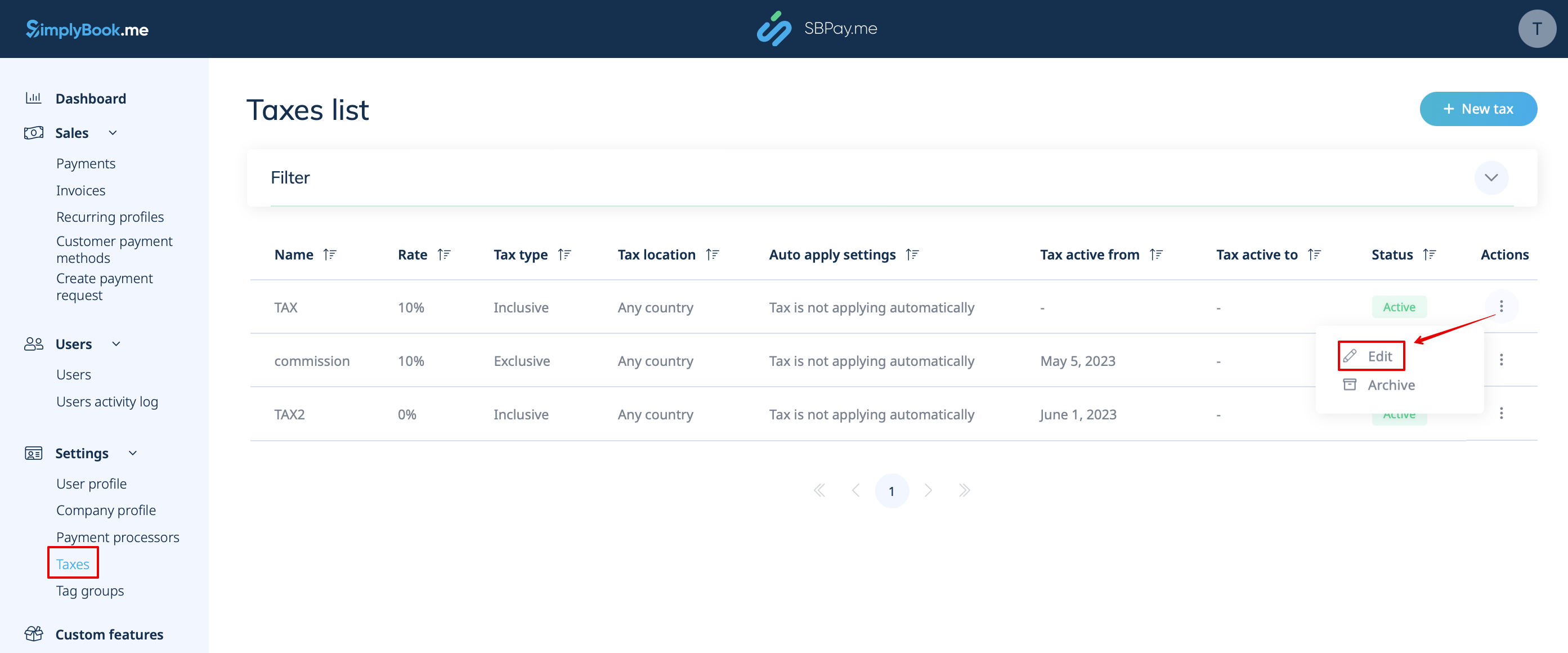
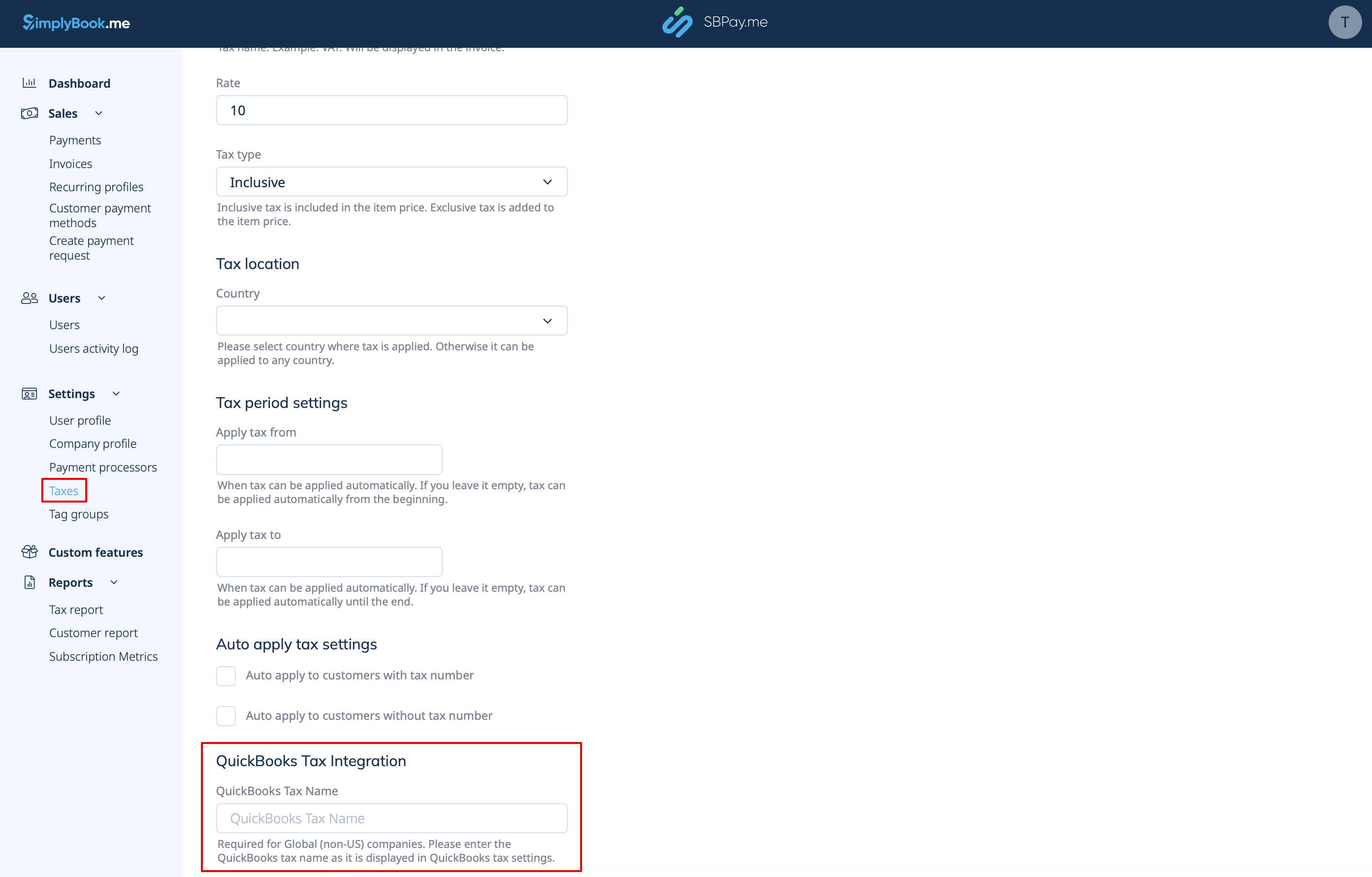
Ga ook naar Instellingen -> Belastingen in de SBPay.me-interface, selecteer de benodigde belasting en stel de exacte belastingnaam in zoals deze is gedefinieerd in QuickBooks.
Let op!
- Belasting wordt voor elke regel afzonderlijk gedefinieerd;
- Alle regels met belastingen moeten in de hele bestelling hetzelfde belastingtype hebben (inclusief of exclusief);
- Bestellingen die regels met meerdere belastingen bevatten, worden niet doorgegeven aan Quickbooks;
- Als de bestelling regels bevat waarop geen belasting is toegepast, wordt deze niet doorgegeven aan Quickbooks;
- Bestellingen die regels met gemengde inclusieve en exclusieve belastingen bevatten, worden niet doorgegeven aan Quickbooks;
- Als de Quickbooks-belastingnaam niet is ingesteld voor een bepaalde belasting in die bestelling, wordt deze niet doorgegeven aan Quickbooks.
- Voor belastinglocatie in de VS
Voorlopig is het alleen mogelijk om automatische omzetbelasting (AST) te gebruiken zoals gedefinieerd in QuickBooks. Als u de belastingnaam instelt in SBPay. me-instellingen -> Belastingen, wordt deze genegeerd.
Let op!De belasting '
- ' wordt voor de hele bestelling gedefinieerd. Aan de kant van SBPay.me betekent dit dat ALLE regels dezelfde belasting met hetzelfde tarief en type moeten hebben voor elke bestellingsregel;de belasting '
- ' is altijd exclusief.
