Created page with "1200px | center|link=https://help.simplybook.me/images/2/23/Ics_files_options_redesigned.png <br><br> :'''Bemærk''', at iCal-filer ikke har en indstillet tidszone, så tiden i den pågældende fil vises i henhold til IP-adressen/enhedsindstillingerne. <br><br>" |
Created page with ":2. Vælg fanen <span style="background-color:#d4f8e5; padding:5px; border-radius:5px;">Filtre og blokerede adresser</span>" |
||
| Line 346: | Line 346: | ||
[[File:Gmail create filter with this search.png|center]] | |||
[[File:Gmail create filter with this search.png| center]] | |||
:6. Markér afkrydsningsfeltet ved siden af <span style="background-color:#d4f8e5; padding:5px; border-radius:5px;">Send aldrig til spam-</span> | |||
:6. | :7. Klik på den blå knap med teksten <span style="background-color:#d4f8e5; padding:5px; border-radius:5px;">Opret filter</span> | ||
:7. | |||
Revision as of 09:58, 16 May 2025
Sådan aktiverer/deaktiverer du reservationsmeddelelser og justerer dine skabeloner
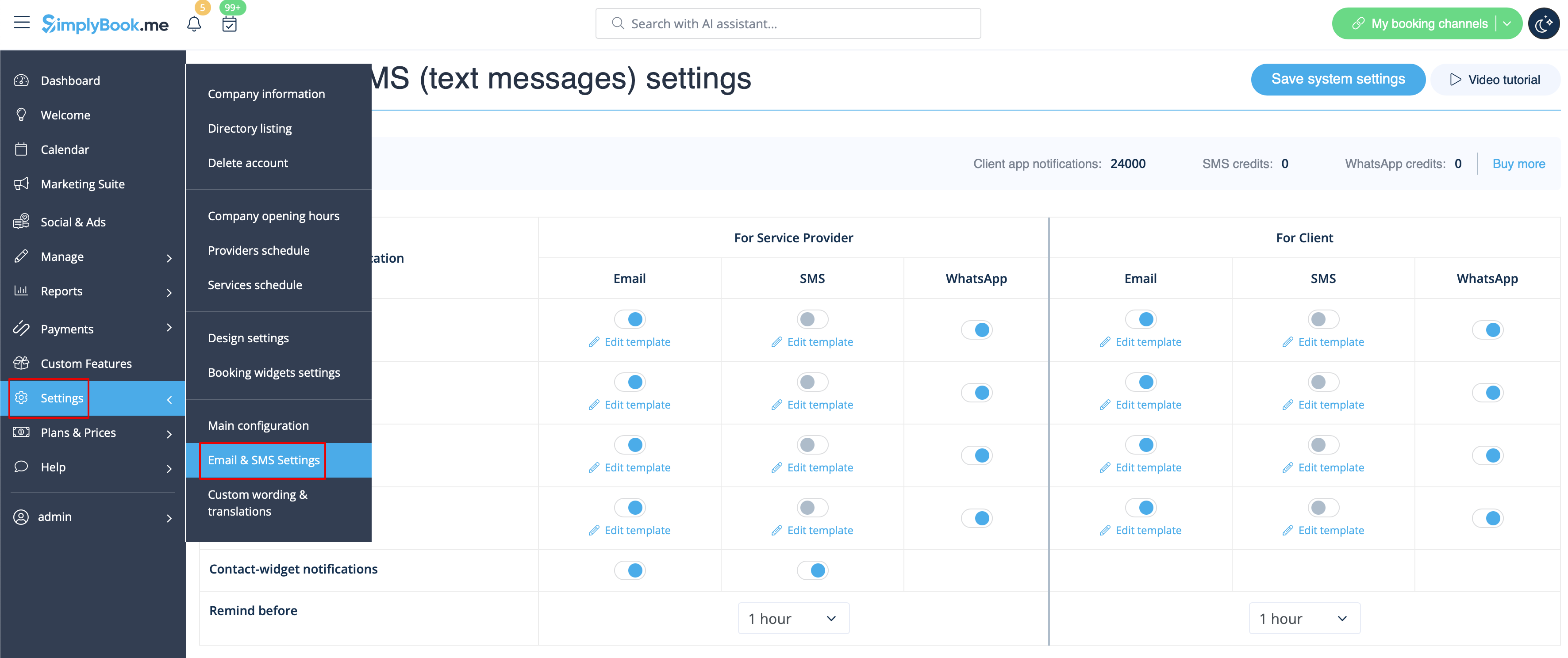
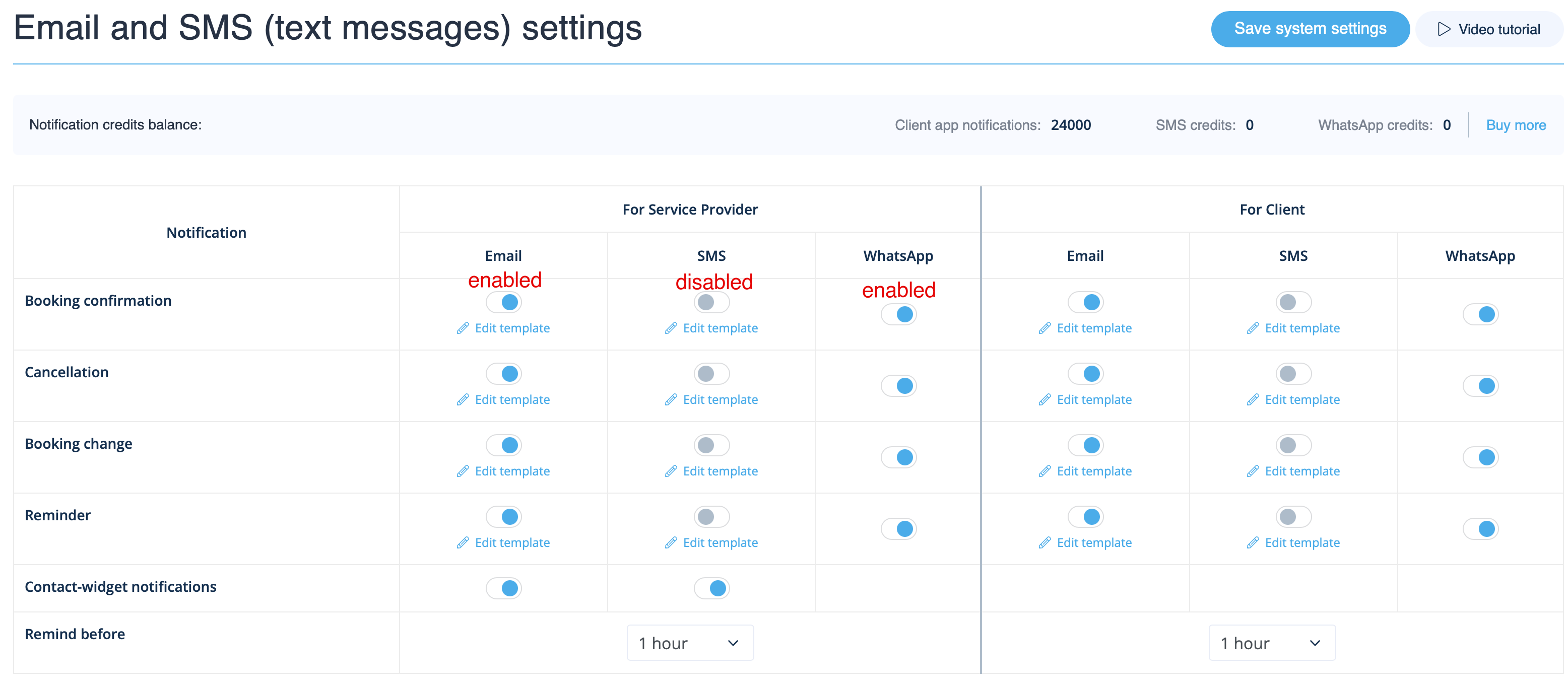
Gå til Indstillinger -> E-mail- og SMS-indstillinger og marker/fjern markeringen i de relevante felter for at sende/ikke sende notifikationer. Du kan ændre teksten i notifikationerne, så de passer bedre til dine behov , ved at klikke på Rediger skabelon, foretage ændringer og gemme systemindstillingerne.
WhatsApp-meddelelser
Hvis du og dine kunder aktivt bruger WhatsApp Messenger, kan I modtage meddelelser om bookinger der.
- Sådan bruges
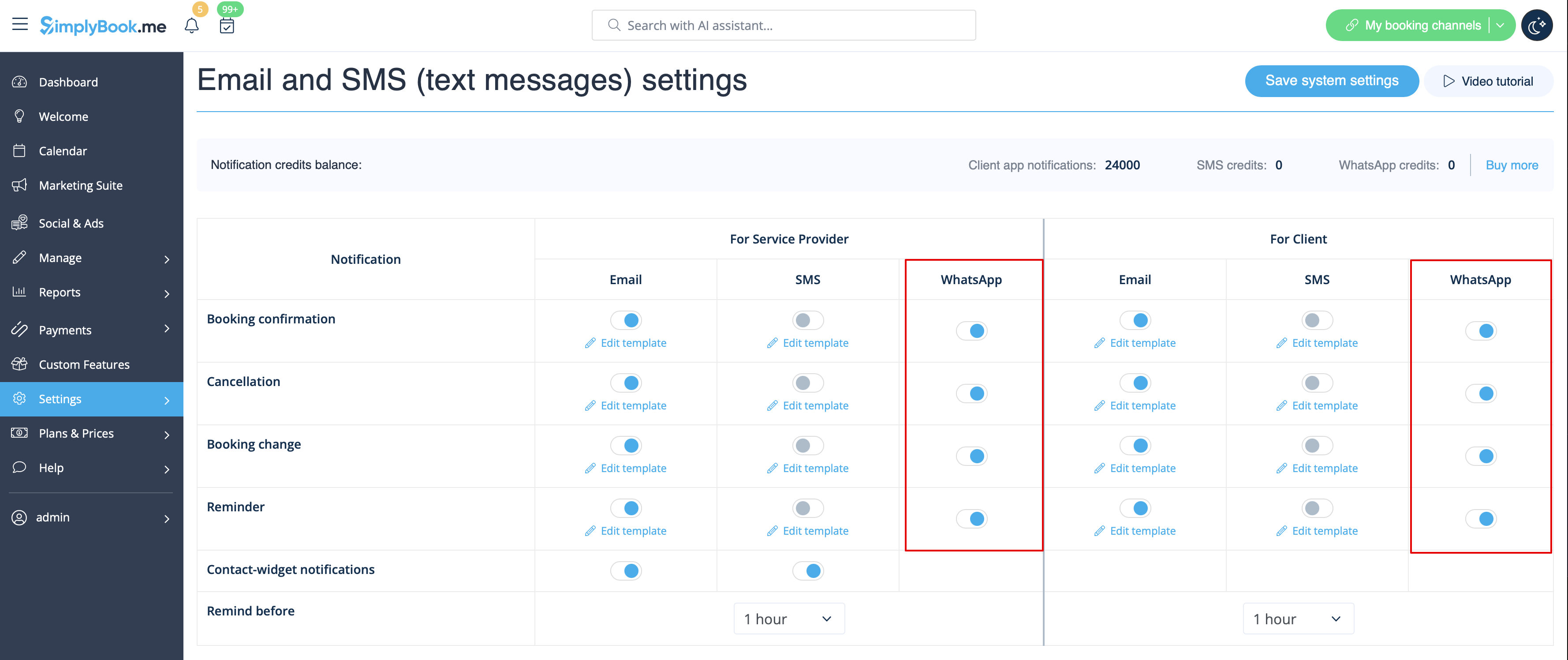
1. Aktivér de ønskede typer WhatsApp-meddelelser i Indstillinger -> E-mail- og SMS-indstillinger
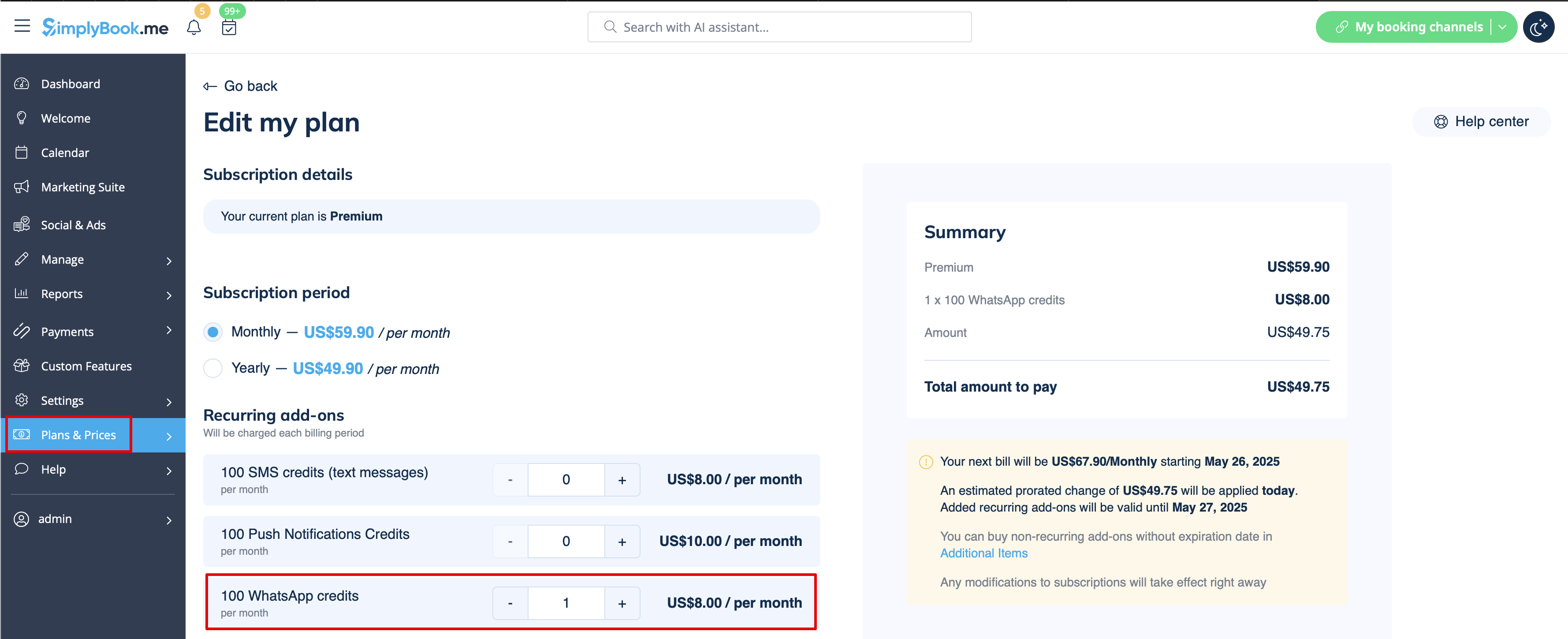
2. Køb WhatsApp-kreditter i Planer og priser -> Abonnementer eller Ekstra, afhængigt af om du ønsker, at kreditterne automatisk fornyes med dit abonnement, eller om du foretrækker et engangskøb.
(Du kan også se de beskeder, der er sendt fra systemet, samt antallet af kreditter, der er brugt, under Rapporter -> SMS (txt-beskeder) -> WhatsApp-notifikationer)
Bemærk! For at overholde WhatsApps politikker bruger beskeder forudgodkendte skabeloner og kan ikke tilpasses. Disse skabeloner dækker vigtige oplysninger på en klar og professionel måde.
Admin-mobilapp
Hvis du bruger mobilappen til administration, kan du modtage reservationsrelaterede meddelelser, såsom reservationsbekræftelser, påmindelser, reservationsændringer og afbestillingsmeddelelser.
For at aktivere/deaktivere disse meddelelser skal du gå til fanen Indstillinger -> Administrer meddelelser i mobilappen til administration.
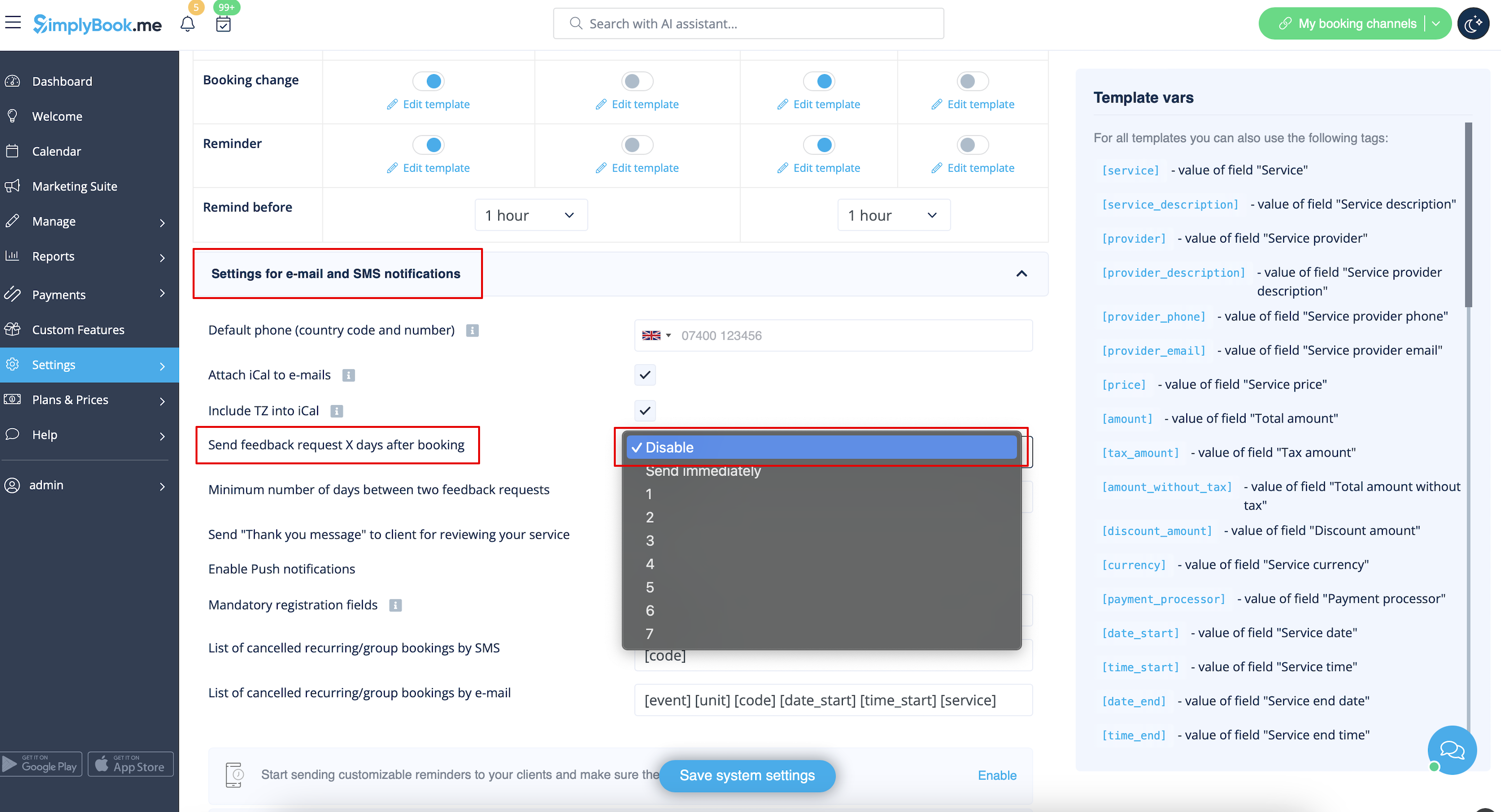
Sådan deaktiveres feedback
Du kan se alle dine anmeldelser i fanen Rapporter -> Anmeldelser i menuen til venstre, slette dem eller svare på dem. Hvis du ønsker at fjerne muligheden for at skrive en anmeldelse og ikke sende en anmodning om feedback, skal du gå til Indstillinger -> E-mail- og SMS-indstillinger -> Indstillinger for e-mail- og SMS-underretninger -> indstil Antal dage, indtil anmodning om feedback sendes til kunden til Deaktiver.
Meddelelser relateret tilbrugerdefinerede funktioner
Følgende tilpassede funktioner har enten egne meddelelsestyper eller kan påvirke de meddelelser, der sendes af systemet:
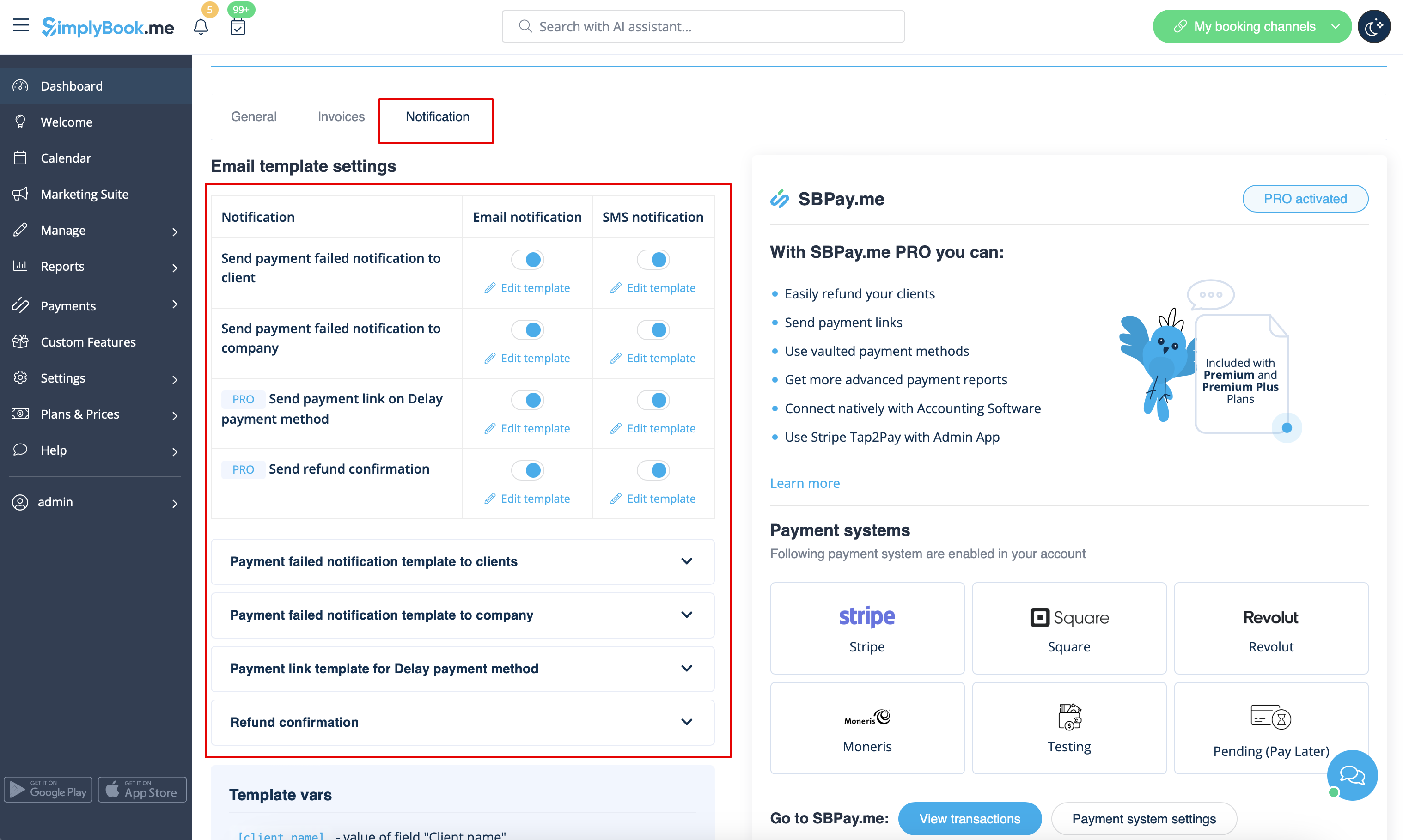
Accepter betalinger
Giver mulighed for at sende:
- Fakturaer til kunder (e-mail-skabelon)
- Meddelelser om mislykkede betalinger til kunden (e-mail-skabelon)
- Meddelelser om mislykkede betalinger til virksomheden (e-mail-skabelon)
Alle disse skabeloner kan redigeres i Brugerdefinerede funktioner -> Accepter betalinger -> Indstillinger -> Indstillinger for e-mail-skabeloner.
- Læs mere om brugen af denne brugerdefinerede funktion.
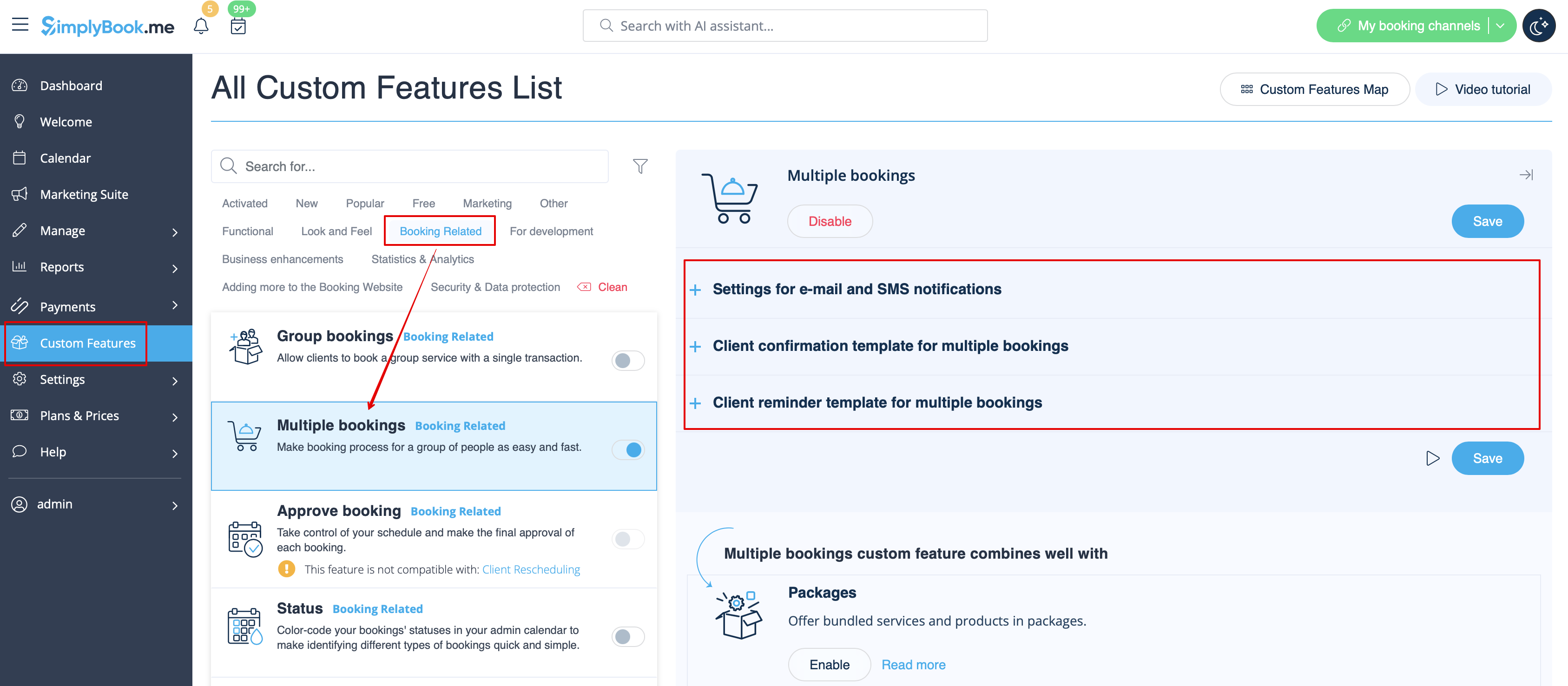
Flere bookinger
Har egne skabeloner til:
- Bekræftelse af booking til kunden (e-mail- og SMS-skabeloner)
- Påmindelse om booking til kunden (e-mail- og SMS-skabeloner)
Begge typer anvendes automatisk, når denne tilpassede funktion er aktiveret, og kunderne foretager en række aftaler på én gang ved hjælp af knappen "Tilføj en anden service" ved kassen. Skabelonteksterne kan justeres i Tilpassede funktioner -> Flere bookinger -> i højre side af siden.
- Læs mere om brugen af denne tilpassede funktion.
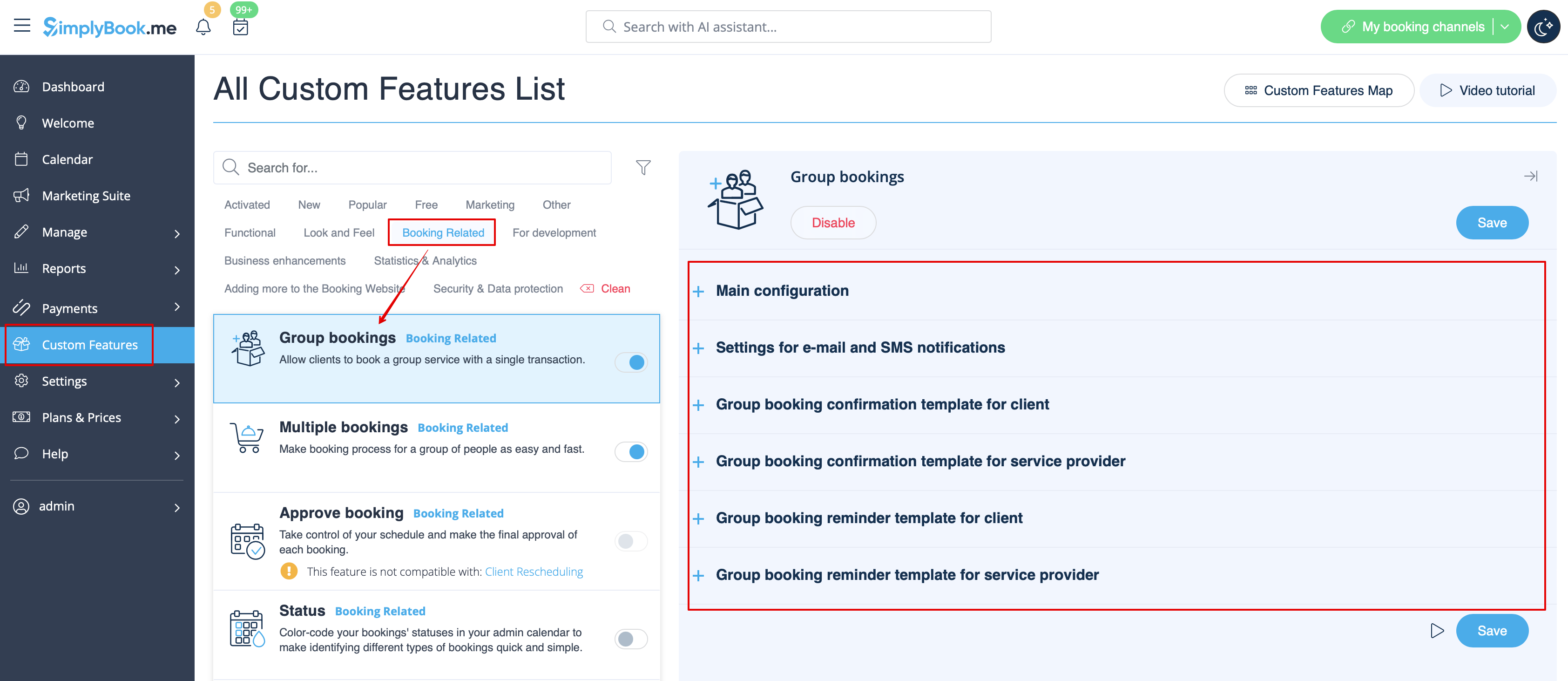
Gruppebookinger
Der er specielle skabeloner til følgende typer:
- Bekræftelse af booking til kunden (e-mail- og SMS-skabeloner)
- Påmindelse om booking til kunden (e-mail- og SMS-skabeloner)
- Bekræftelse af booking til udbyderen (e-mail- og SMS-skabeloner)
- Påmindelse om booking til udbyderen (e-mail- og SMS-skabeloner)
De anvendes automatisk, når denne tilpassede funktion er aktiveret, og kunden booker en aftale ved at vælge flere deltagere i servicetrinnet i bookingprocessen. Alle skabeloner kan justeres i Tilpassede funktioner -> Gruppebookinger -> i højre side af siden.
- Læs mere om brugen af denne tilpassede funktion.
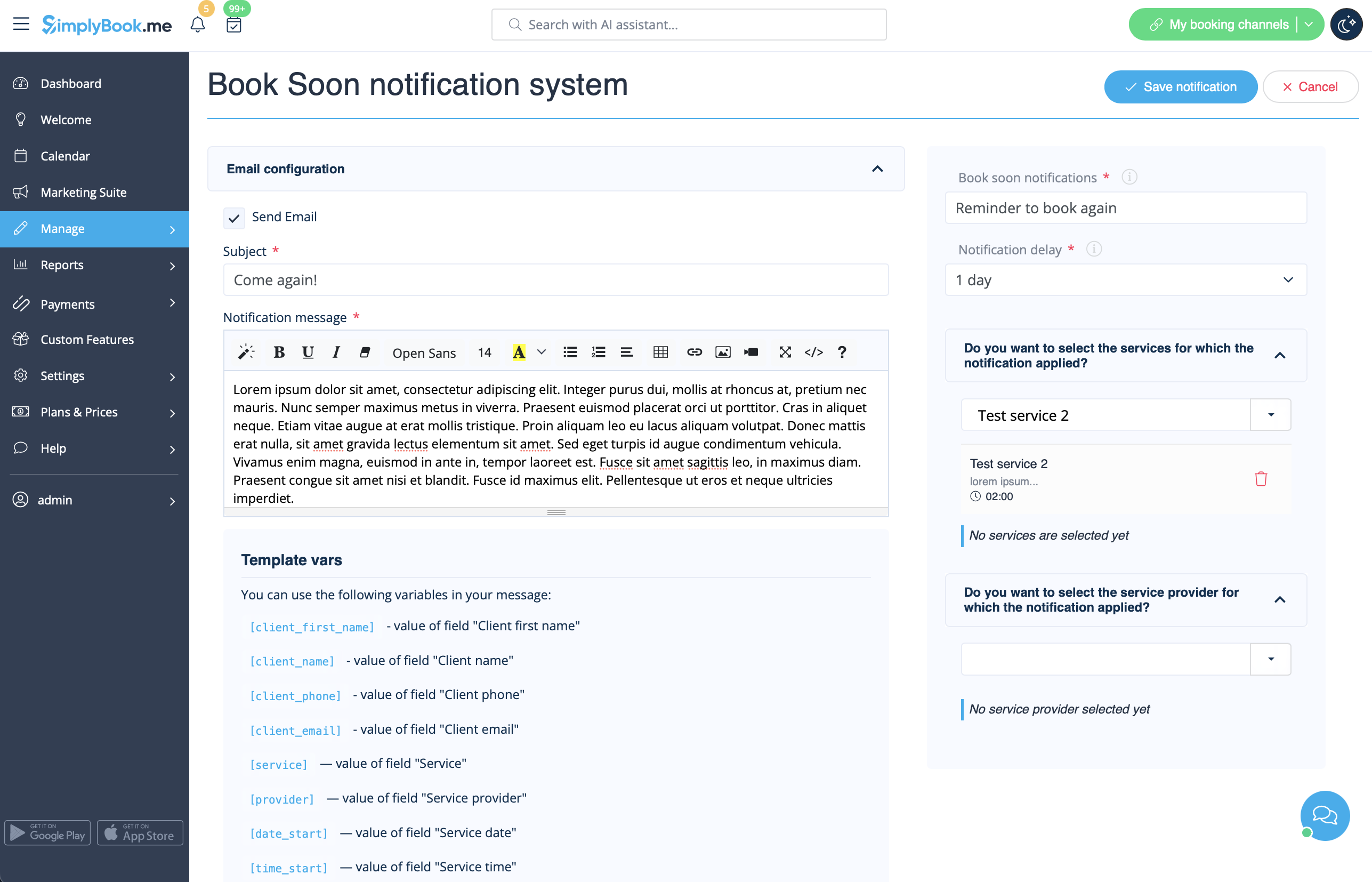
Book snart-notifikationssystem
Gør det muligt at sende påmindelser til kunder, der har booket tidligere, om at komme igen.
Skabeloner kan indstilles i Tilpassede funktioner -> Book snart-notifikationssystem -> Indstillinger -> Tilføj nyt for at oprette en ny skabelon (e-mail og SMS).
Du kan oprette adskillige specifikke skabeloner til bestemte tjenester/udbydere, og de vil blive sendt, når den angivne tid er gået fra kundens aftale.
- Læs mere om brugen af denne tilpassede funktion.
Kuponer og gavekort
Du kan sende specifikke meddelelser i følgende tilfælde, når du bruger denne tilpassede funktion:
- Kunden køber et gavekort på bookingwebstedet (e-mail- og SMS-skabeloner)
Denne meddelelsesskabelon kan aktiveres/deaktiveres og redigeres i Tilpassede funktioner -> Kuponer og gavekort -> i højre side af siden.
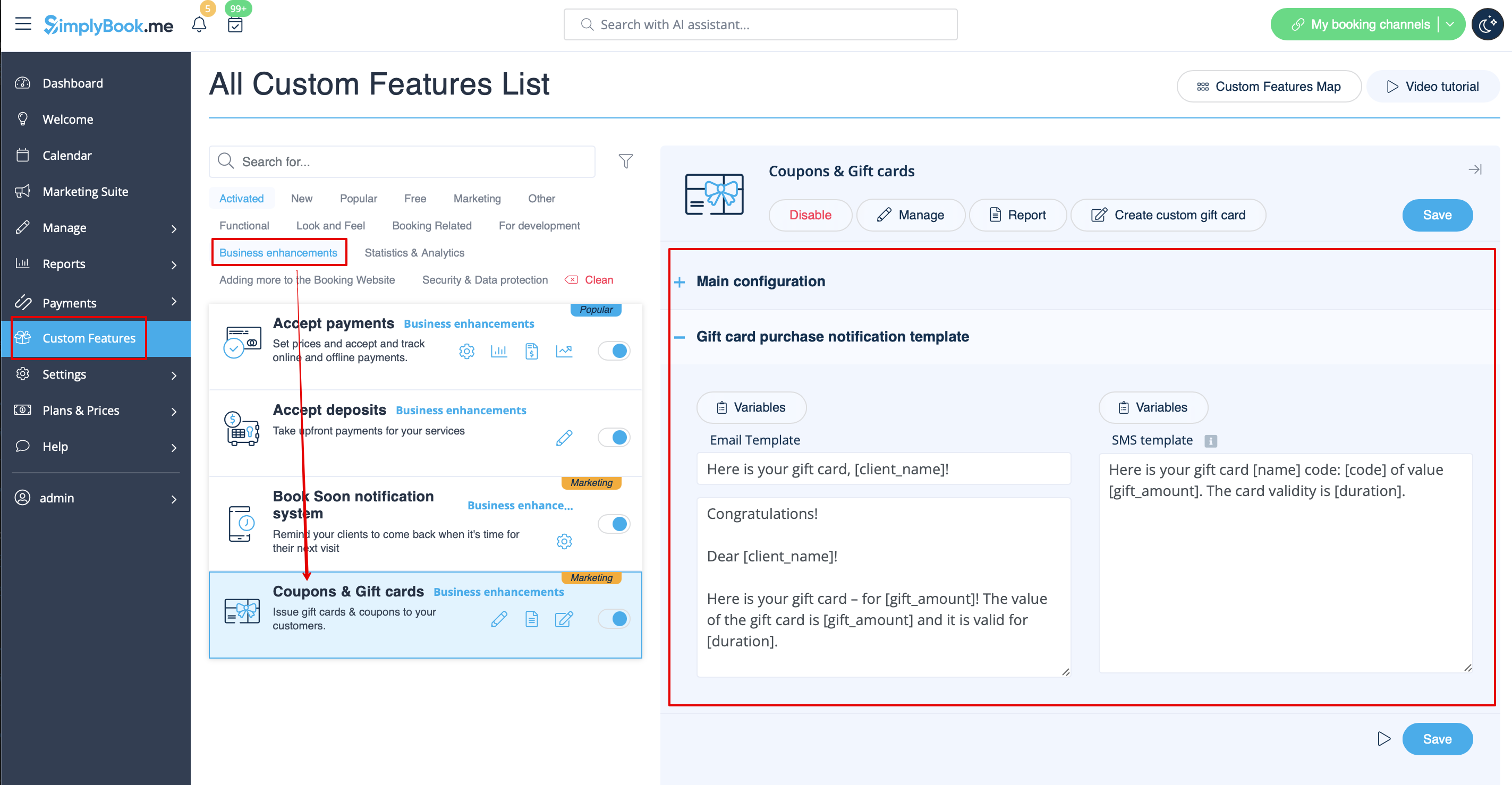
Hvis du manuelt udsteder gavekort eller kuponer til dine kunder, kan den skabelon, der skal bruges i dette tilfælde, findes under Administrer -> Kuponer og gavekort -> Udsted gavekort /Send kuponbesked for det ønskede gavekort/kupon -> Send e-mail/Send SMS.
- Læs mere om brugen af denne tilpassede funktion.
Kundens mobilapp
Hvis denne funktion er aktiveret, og kunden har tilladt notifikationer, sender mobilapplikationen push-notifikationer vedrørende bookinger.
Der er ikke noget sted, hvor du kan redigere skabelonen, men du kan se notifikationsrapporten under Rapporter -> Push-notifikationsrapport.
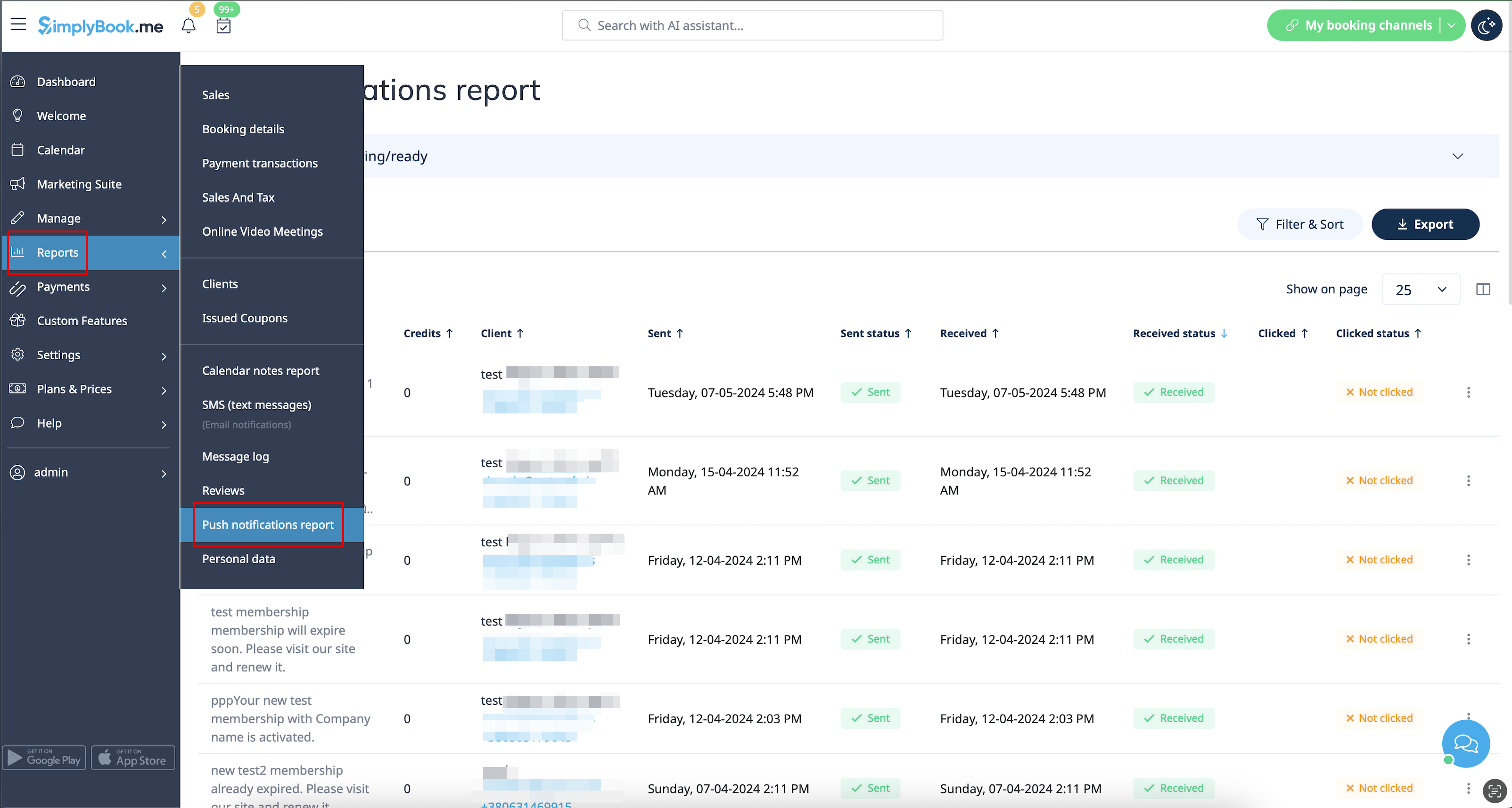
Bemærk! Du skal have tilstrækkelige push-notifikationskreditter for at kunne sende sådanne notifikationer til kunder
- Læs mere om brugen af denne tilpassede funktion.
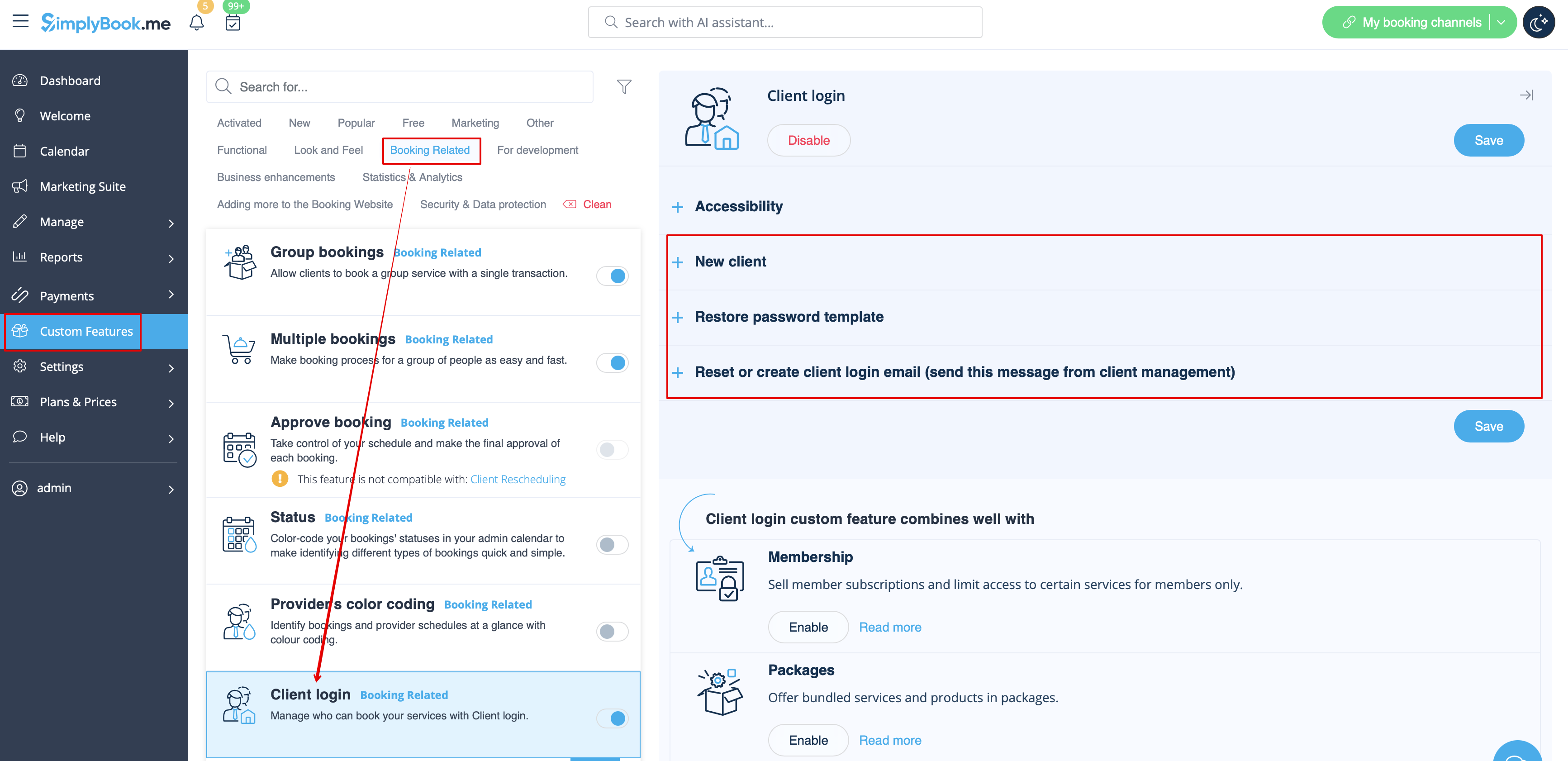
Klientlogin
Hvis du kræver, at kunderne skal logge ind/tilmelde sig for at kunne booke aftaler eller foretage køb på din bookingwebsite, og du har aktiveret den tilpassede funktion Kundelogin,
er der tre typer meddelelser, der kan sendes til dine kunder (de kan ikke deaktiveres):
- registrering af ny kunde (e-mail)
- gendannelse af adgangskode (e-mail)
- nulstilling af adgangskode eller oprettelse af kunde fra admin-grænsefladen (e-mail)
Du kan redigere skabeloner i Tilpassede funktioner -> Kundelogin -> i højre side af siden.
- Læs mere om brugen af denne tilpassede funktion.
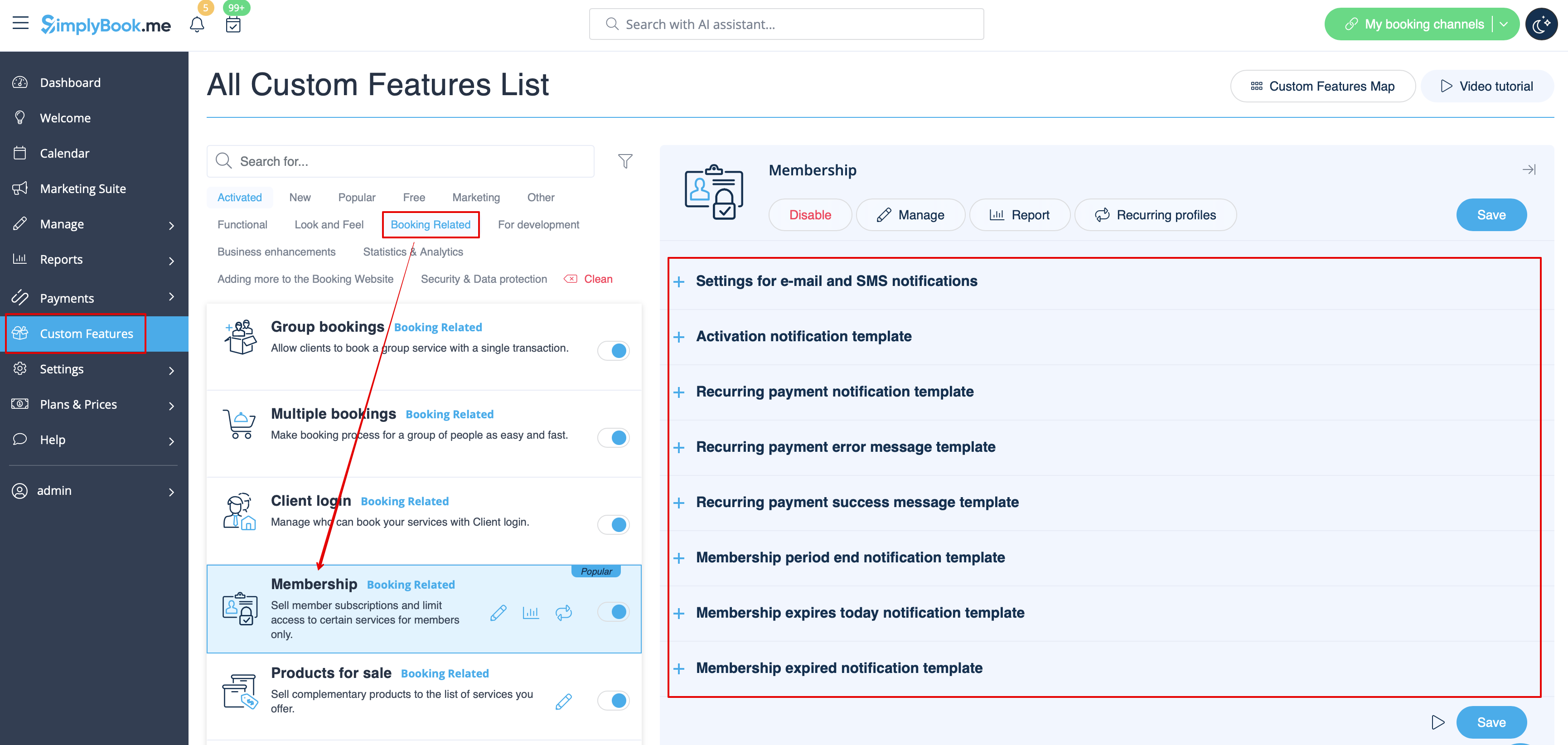
Medlemskab
Når du sælger medlemskaber på bookingwebstedet, skal du muligvis også informere dine kunder om de forskellige punkter.
Denne tilpassede funktion gør det muligt at sende:
- meddelelse om aktivering af medlemskab (e-mail- og SMS-skabeloner)
- meddelelse om tilbagevendende betaling (e-mail- og SMS-skabeloner)
- fejl ved tilbagevendende betaling (e-mail- og SMS-skabeloner)
- tilbagevendende betaling gennemført (e-mail- og SMS-skabeloner)
- medlemskabsperiode udløbet (e-mail- og SMS-skabeloner)
- medlemskab udløber i dag (e-mail- og SMS-skabeloner)
- meddelelse om udløbet medlemskab (e-mail- og SMS-skabeloner)
Du kan redigere skabeloner samt aktivere/deaktivere bestemte typer meddelelser i Tilpassede funktioner -> Medlemskab -> i højre side af siden.
- Læs mere om brugen af denne tilpassede funktion.
Fleksible meddelelser
Denne tilpassede funktion gør det muligt at tilpasse reservationsrelaterede meddelelser for en bestemt service/udbyder eller begge dele.
Følgende typer kan bruges:
- bookingbekræftelse til klient (e-mail- og SMS-skabeloner)
- bookingbekræftelse til leverandør (e-mail- og SMS-skabeloner)
- påmindelse til klient (e-mail- og SMS-skabeloner)
- påmindelse til leverandør (e-mail- og SMS-skabeloner)
- aflysningsmeddelelse til klient (e-mail- og SMS-skabeloner)
- aflysningsmeddelelse til leverandør (e-mail- og SMS-skabeloner)
- meddelelse om bookingændring til klient (e-mail- og SMS-skabeloner)
- meddelelse om bookingændring til leverandør (e-mail- og SMS-skabeloner)
- bekræftelse af tilbagevendende begivenhed til klient (e-mail- og SMS-skabeloner)
- bekræftelse af tilbagevendende begivenhed til udbyder (e-mail- og SMS-skabeloner)
- meddelelse om batch-afbestilling til klient (e-mail- og SMS-skabeloner)
- meddelelse om batch-afbestilling til udbyder (e-mail- og SMS-skabeloner)
- bekræftelse af batch-bookingaf flere bookinger til klient (e-mail- og SMS-skabeloner)
- påmindelse om begivenhedmed flere bookinger til klient (e-mail- og SMS-skabeloner)
- bekræftelse af batch-booking af gruppebookinger til klient (e-mail- og SMS-skabeloner )
- bekræftelseaf batch-booking af gruppebookinger til udbyder (e-mail- og SMS-skabeloner)
- påmindelseom gruppebookinger til klient (e-mail og SMS-skabeloner)
- påmindelseom gruppebestillinger til udbyder (e-mail- og SMS-skabeloner)
Du kan oprette alle de ønskede skabeloner i Tilpassede funktioner -> Fleksible meddelelser -> Administrer.
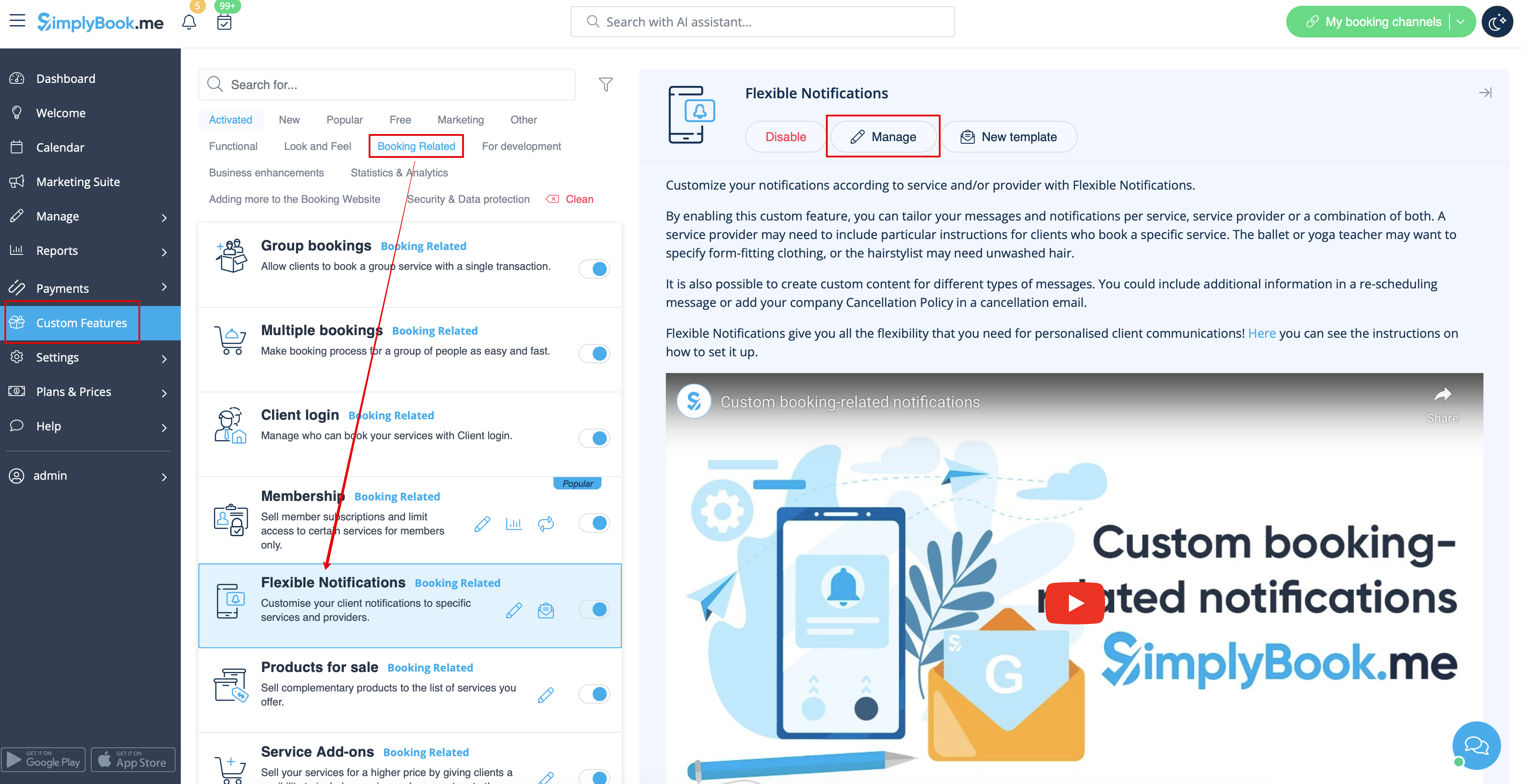
Hvis du har brug for at aktivere/deaktivere nogle af disse meddelelsestyper, skal du gå til Indstillinger -> E-mail- og SMS-indstillinger -> og bruge tabellen øverst på siden.
Bemærk! Dette er generelle indstillinger for bookingnotifikationer, så hvis du deaktiverer nogle af dem, vil det også påvirke lignende typer relateret til andre funktioner (dvs. hvis du deaktiverer bookingbekræftelser til udbydere der, vil almindelige bekræftelser samt bekræftelsesnotifikationer for grupper og tilbagevendende batches blive deaktiveret).
- Læs mere om brugen af denne tilpassede funktion.
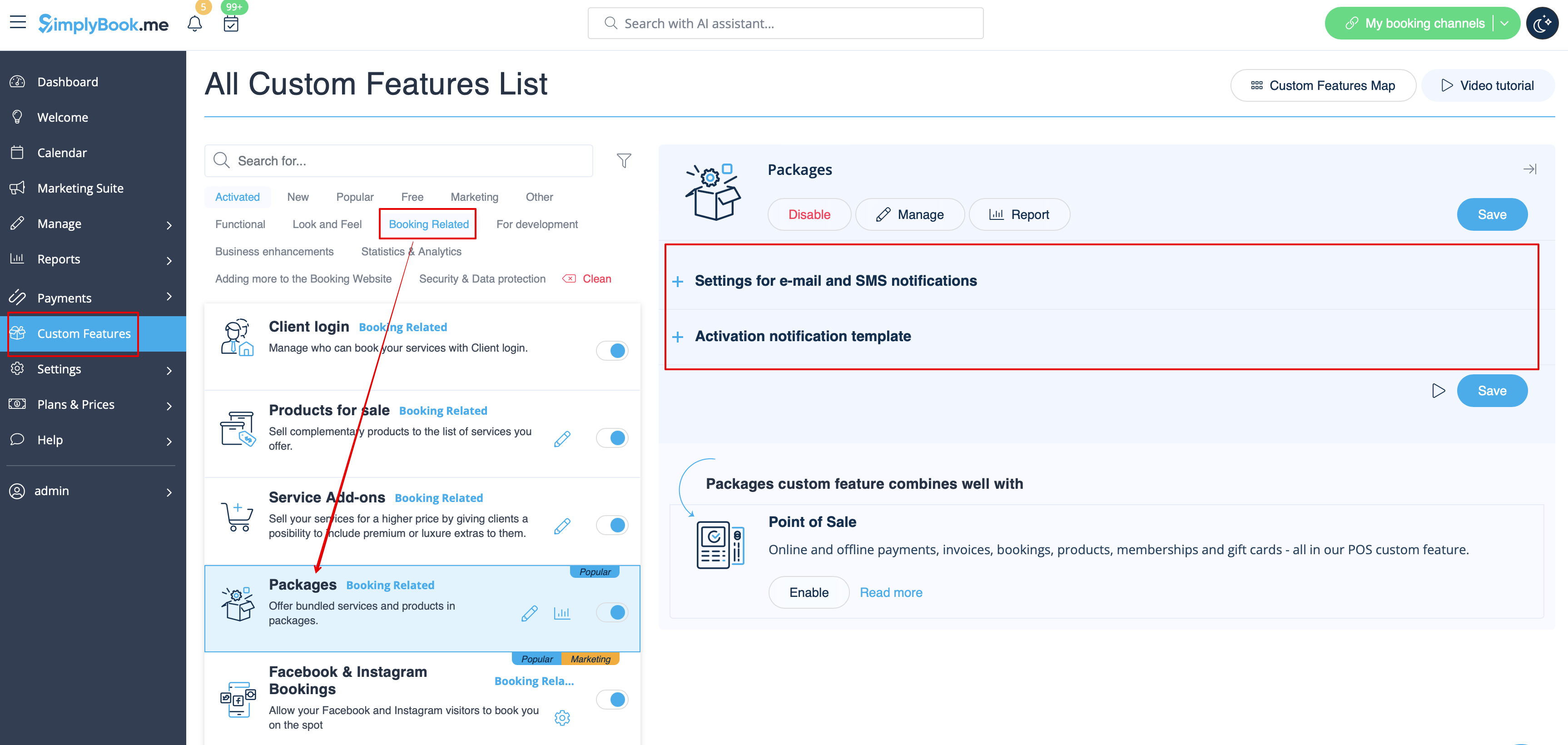
Pakker
Når du sælger pakker med tjenester/klasser/produkter/tjenesteudvidelser eller udsteder pakker fra administrationssiden, er det også muligt automatisk at sende kunderne en pakkeaktiveringsmeddelelse (e-mail og/eller SMS).
For at redigere skabelonteksten eller aktivere/deaktivere meddelelserne skal du gå til Tilpassede funktioner -> Pakker -> højre side af siden.
- Læs mere om brugen af denne tilpassede funktion.
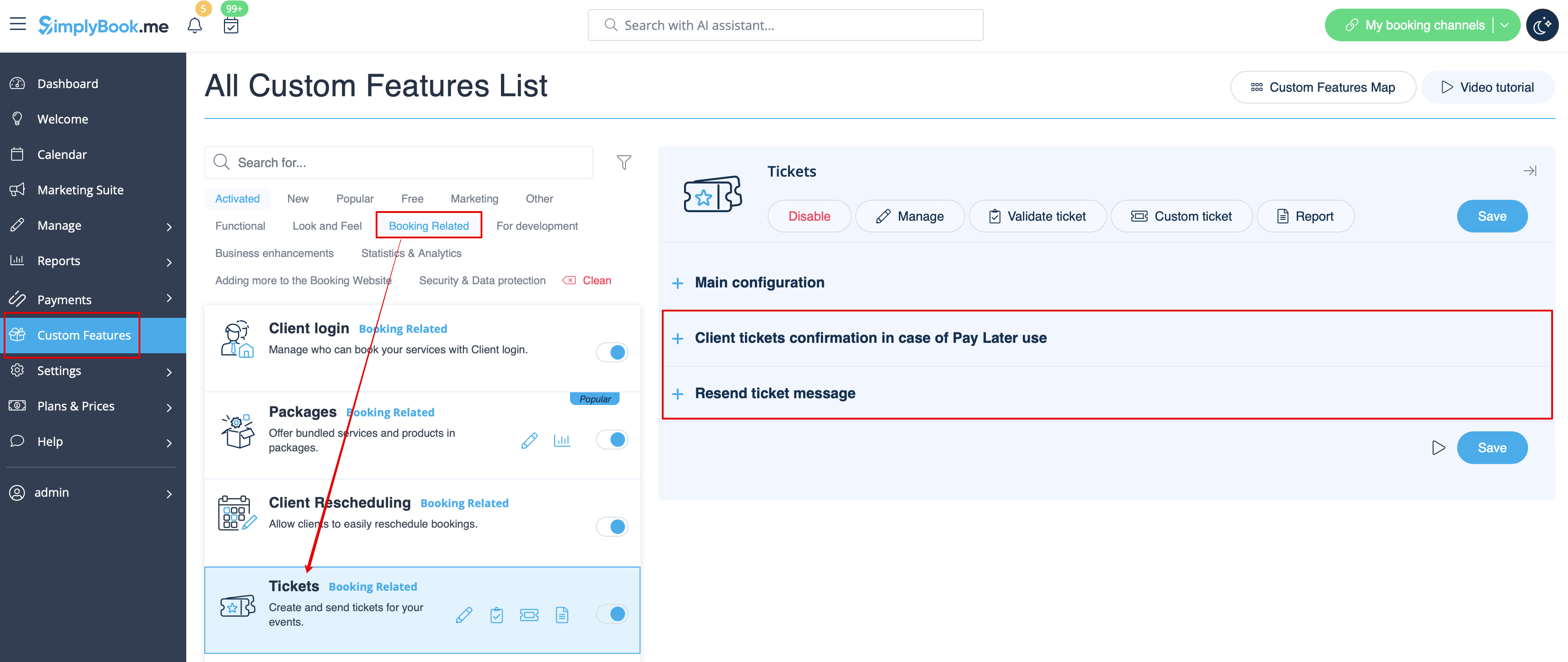
Billetter
Som standard sendes billetten automatisk til kundens e-mail sammen med den tilhørende bekræftelses-e-mail for tjenesten.
Men hvis du bruger onlinebetalinger og tillader at vælge betal senere -muligheden på bookingwebstedet, og kunden vælger denne mulighed,
vil billetten i dette tilfælde blive sendt med en separat e-mail.
Du kan også vælge at sende billetten til kunden igen i visse tilfælde (dette er muligt i Rapporter -> Billetrapport).
Begge notifikationsskabeloner kan redigeres i Tilpassede funktioner -> Billetter -> i højre side af siden. Der er kun e-mail-typer tilgængelige.
- Læs mere om brugen af denne tilpassede funktion.
Brugerdefineret e-mail
Giver mulighed for at tilpasse designet af e-mail-notifikationer, så de passer til din branding og smag.
For at oprette dine designs skal du gå til Tilpassede funktioner -> Tilpasset e-mail -> Opret skabelon.
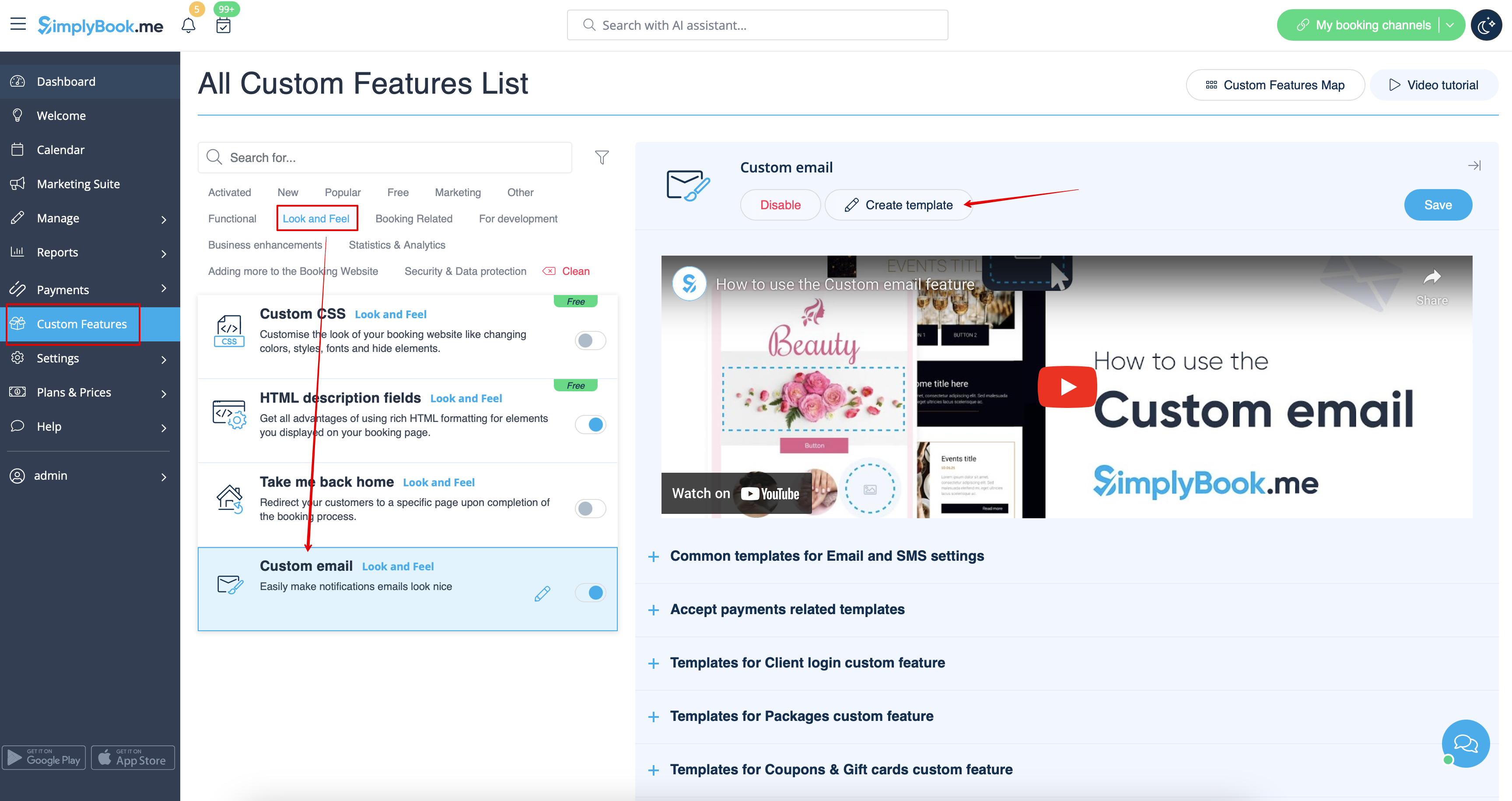
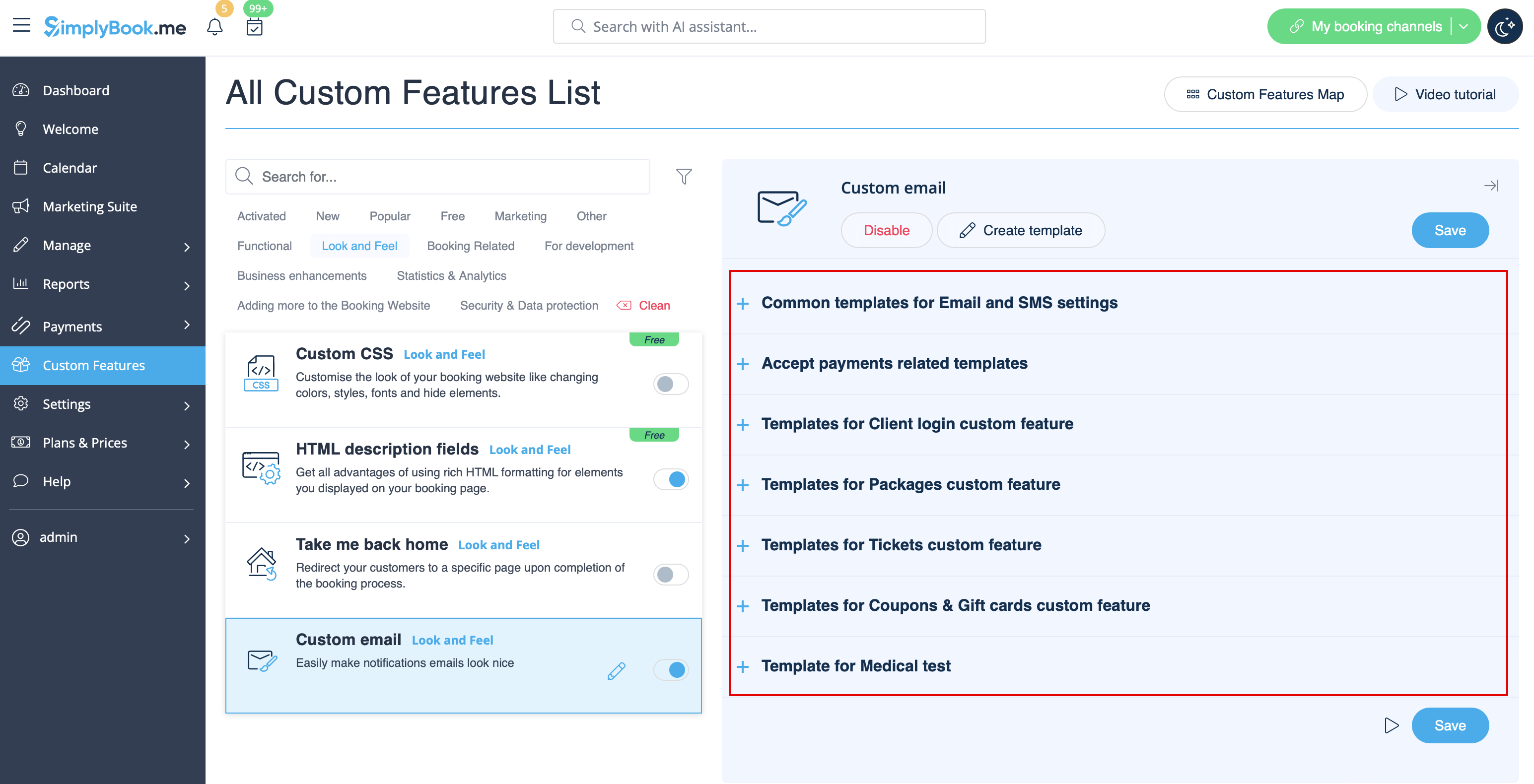
Med hjælp fra denne brugerdefinerede funktion kan du påvirke udseendet af følgende notifikationstyper:
- almindelige bookingrelaterede meddelelser fra Indstillinger -> E-mail- og SMS-indstillinger;
- faktura-e-mails fra den tilpassede funktion Accepter betalinger;
- meddelelser fra den tilpassede funktion Gruppebookinger;
- meddelelserfra den tilpassede funktionFlere bookinger;
- meddelelserfra den tilpassede funktionKlientlogin;
- meddelelserfra den tilpassede funktionMedlemskab;
- meddelelser fra den tilpassede funktionPakker;
- meddelelser fra den tilpassede funktionBilletter;
- meddelelserfra dentilpassede funktionKuponer og gavekort;
- meddelelser fra den tilpassedefunktion Medicinsk test;
- meddelelserfra den tilpassede funktion Book snart-meddelelsessystem.
Denne funktion gør det muligt at teste hver notifikationstype med det foruddefinerede design.
Tagget {{content}}, der indeholder booking-/købsoplysningerne, kan redigeres i de tilsvarende funktionsindstillinger.
- Læs mere om brugen af denne tilpassede funktion.
SMTP
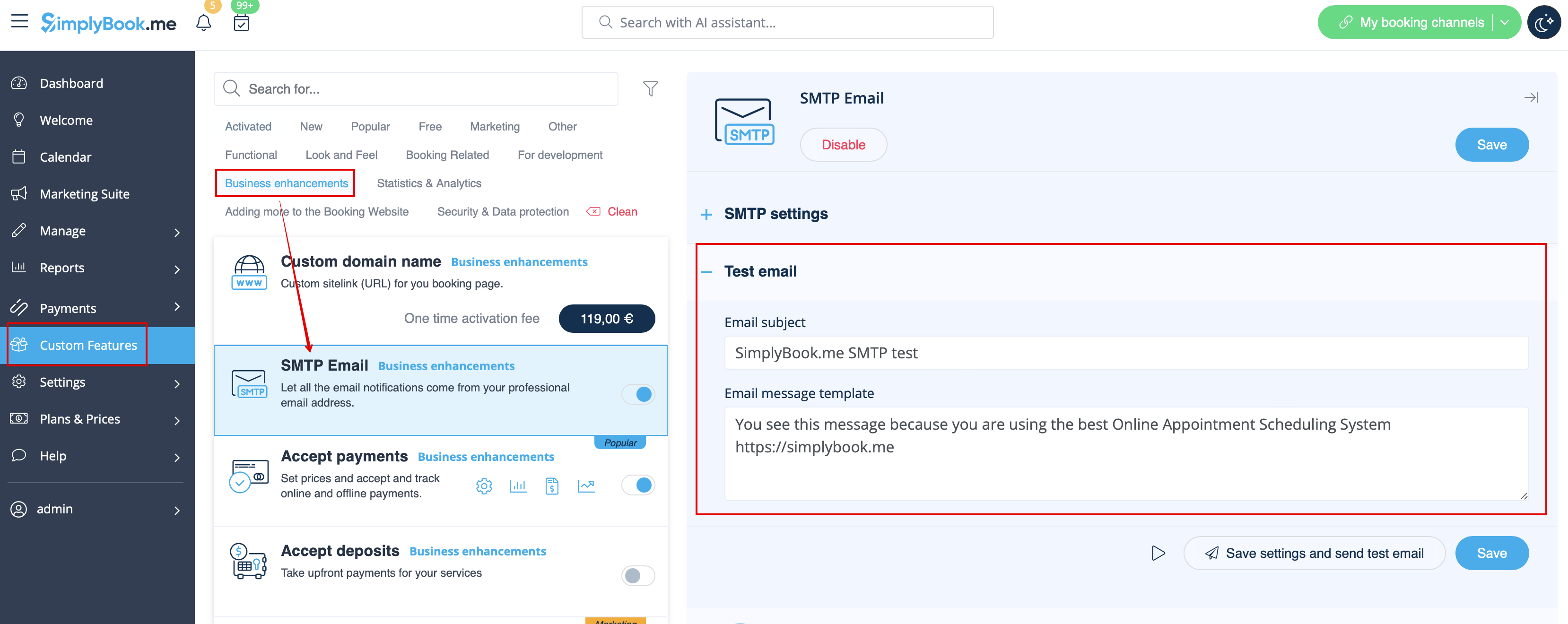
Denne funktion giver dig mulighed for at bruge din egen SMTP-server til at sende e-mails.
Der er kun én skabelon til at teste denne funktion, når du har indtastet indstillingerne.
Du kan redigere og bruge test-e-mailskabelonen i Tilpassede funktioner -> SMTP -> i højre side af siden.
- Læs mere om brugen af denne tilpassede funktion.
Daglig rapport
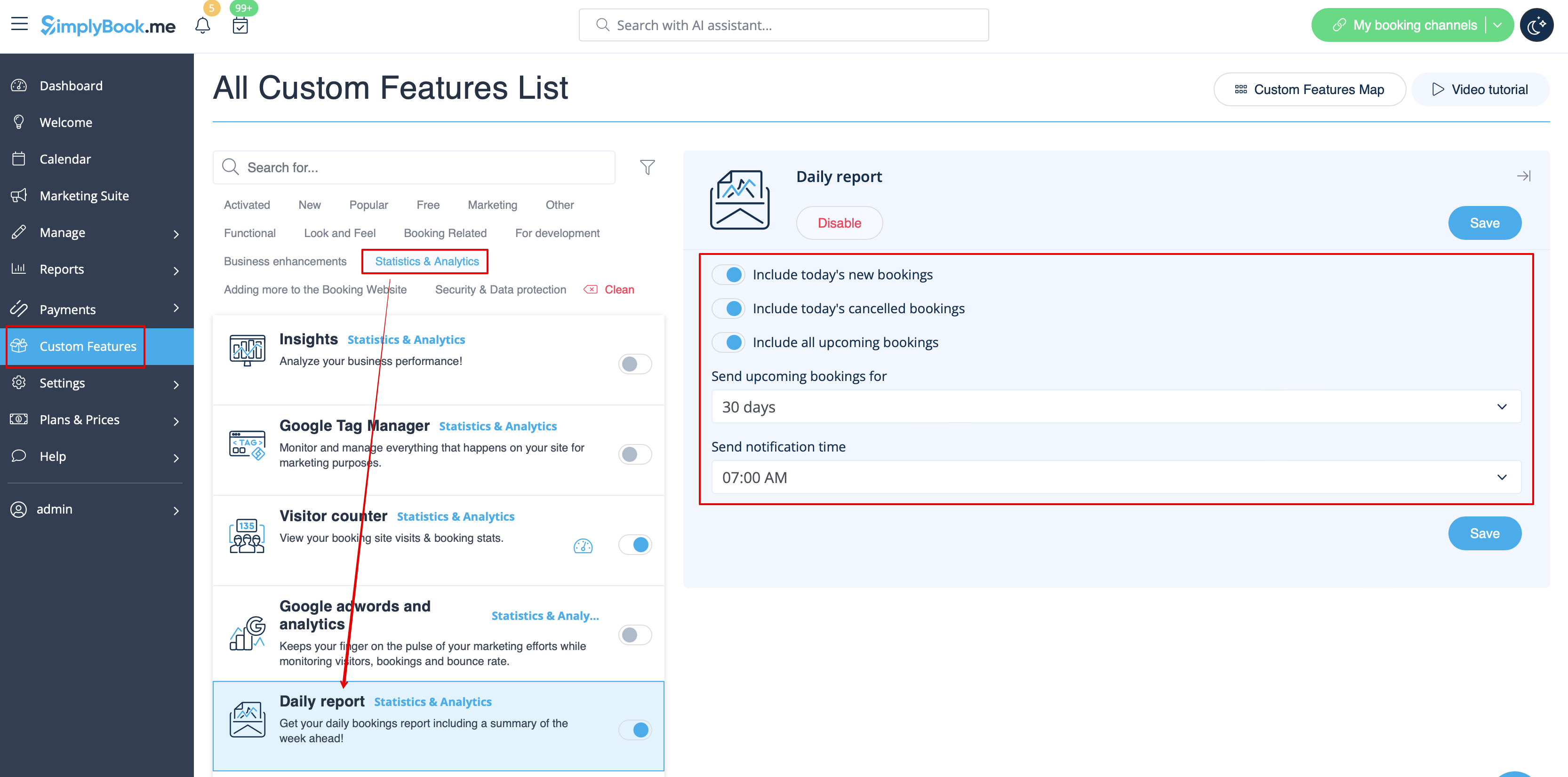
Når du aktiverer og indstiller denne brugerdefinerede funktion, sendes der automatisk en e-mailrapport om nye, kommende og aflyste aftaler til din virksomheds e-mailadresse.
Der er ikke en skabelon, der kan redigeres som sådan, men du kan justere de elementer, der er inkluderet i Tilpassede funktioner -> Daglig rapport -> i højre side af siden.
- Læs mere om brugen af denne tilpassede funktion.
HIPAA
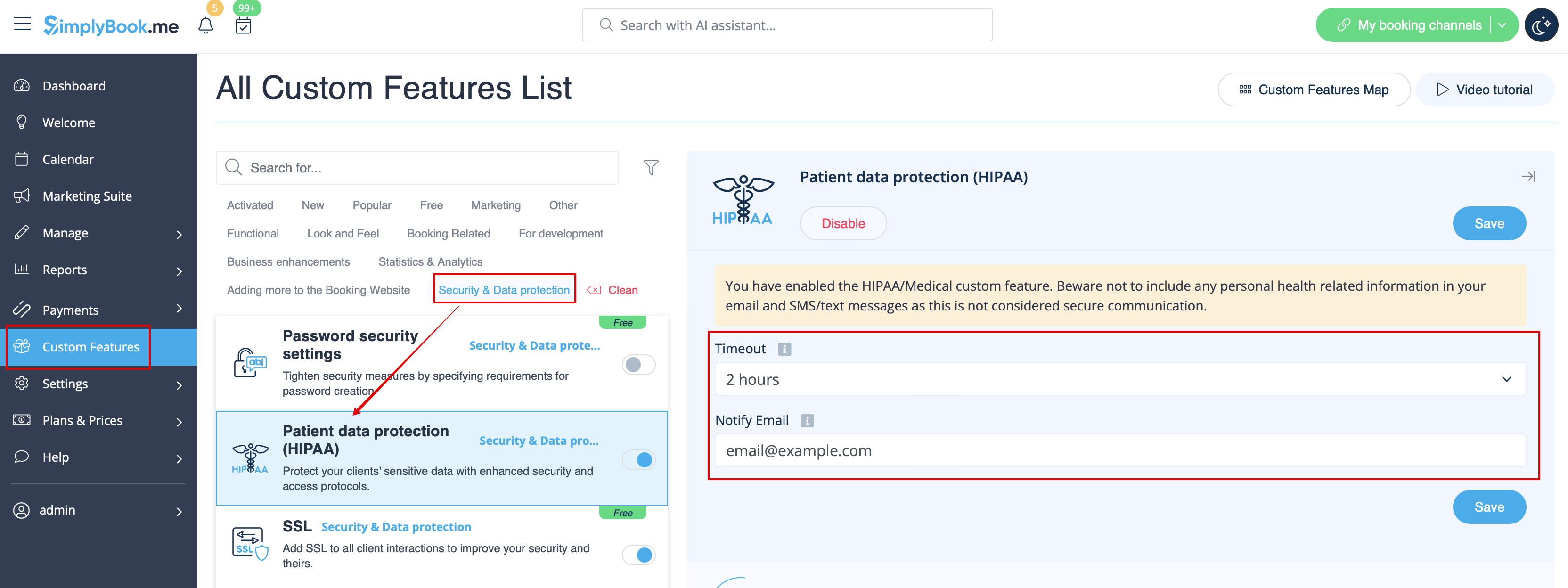
Dette er en sikkerhedsrelateret tilpasset funktion, der gør det muligt at sende e-mail-underretninger, når nogen logger ind på dit system.
Den indeholder ikke nogen e-mailskabeloner, der kan redigeres, og kan aktiveres/deaktiveres ved at tilføje/fjerne e-mailadressen i Tilpassede funktioner -> HIPAA -> højre side af siden -> Notificer e-mail.
- Læs mere om brugen af denne tilpassede funktion.
Kontaktwidget
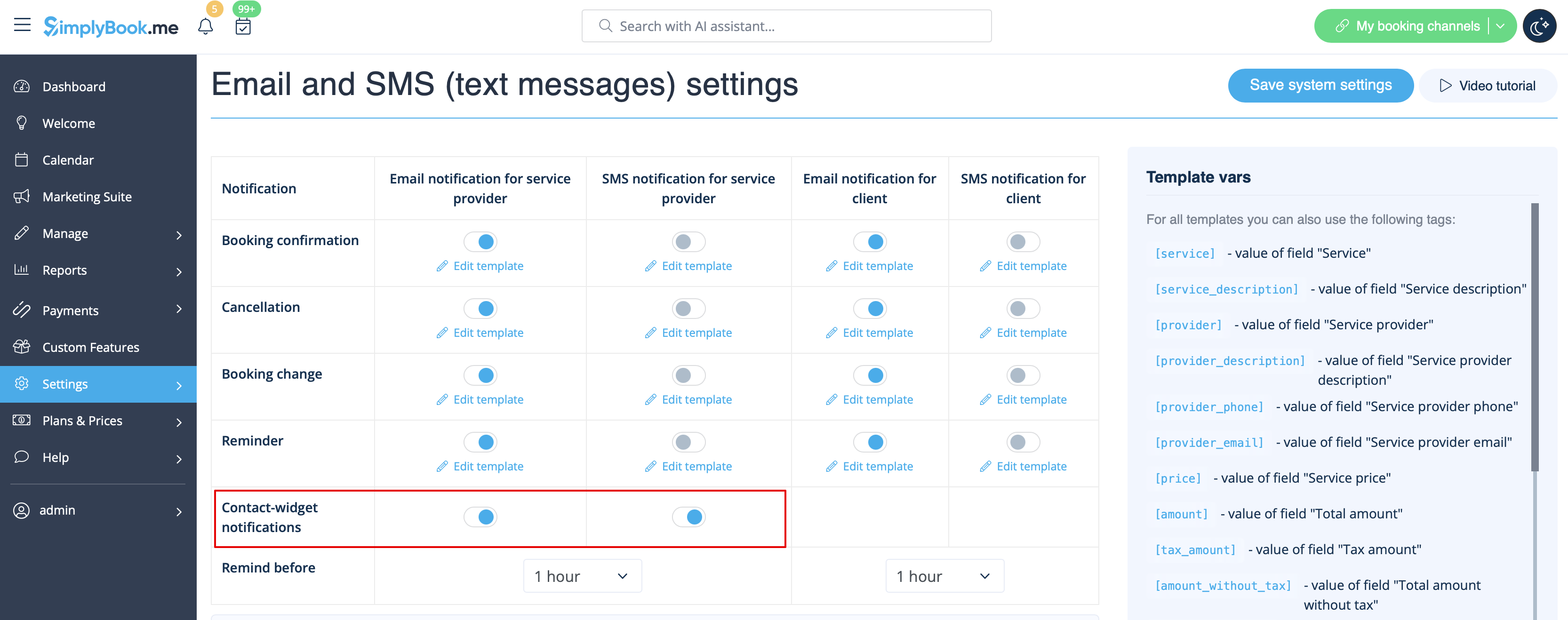
Da denne tilpassede funktion gør det muligt at tilføje en kontaktformular til din bookingwebsite eller oprette en kontaktknap-widget, er der også en e-mail-/SMS-besked til virksomheden, der sendes, når nogen efterlader en besked på bookingwebsitet eller widgeten, så du kan svare med det samme. Der er ingen skabelon, der kan redigeres, men du kan deaktivere sådanne meddelelser i Indstillinger -> E-mail- og SMS-indstillinger -> Kontaktwidget-meddelelser.
- Læs mere om brugen af denne tilpassede funktion.
Medicinsk test
Når du bruger denne tilpassede funktion, skal du sørge for at sende testresultaterne til patienternes e-mails.
I Tilpassede funktioner -> Medicinsk test -> i højre side af siden kan du aktivere/deaktivere eller redigere følgende skabeloner:
- positive resultater (e-mail- og SMS-skabeloner);
- negative resultater (e-mail- og SMS-skabeloner);
- uklare resultater (e-mail- og SMS-skabeloner).
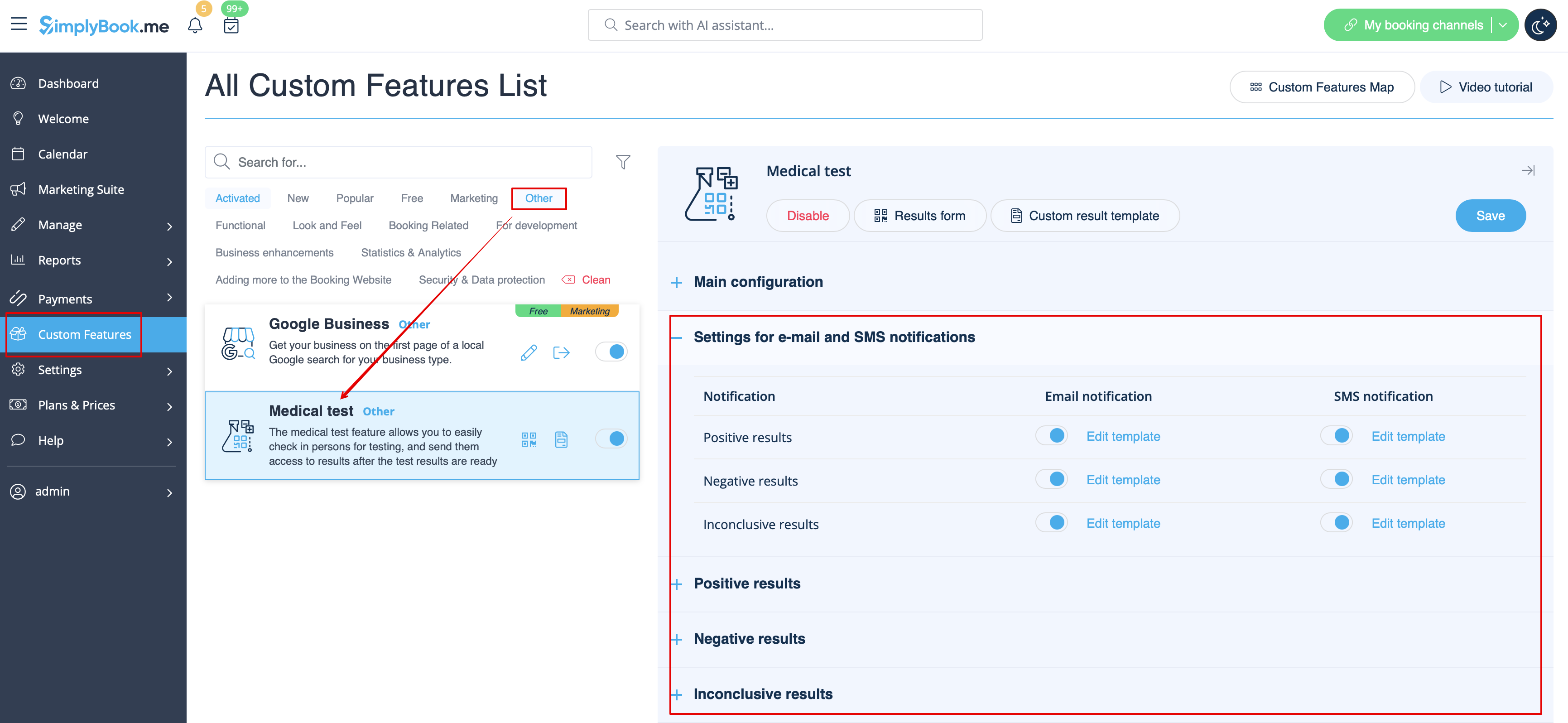
Hvis du har brug for at justere skabelonen for testresultater, skal du bruge indstillingen Tilpasset resultatskabelon over skabelonerne.
- Læs mere om brugen af denne tilpassede funktion.
Hvad er variabler?
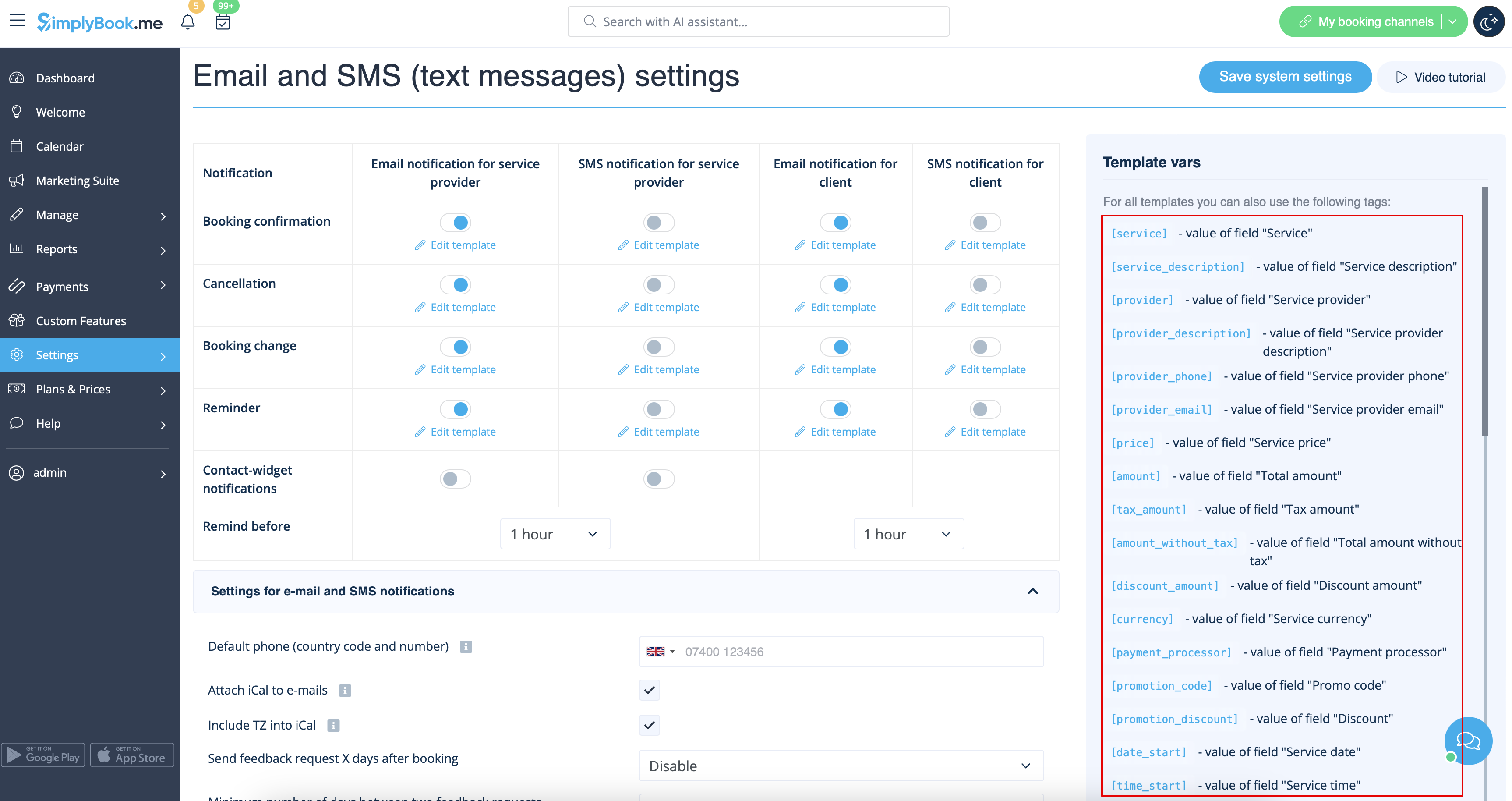
Variabler er elementer, der kan indsættes i e-mail- og sms-skabeloner (Indstillinger -> E-mail- og SMS-indstillinger). Disse variabler angiver det valgte element, når bookingen er foretaget. For eksempel har du to udbydere: Mary og John. I e-mailskabelonen indsætter du teksten "Du har booket en service hos [udbyder]". Hvis kunden på bookingsiden vælger udbyder Mary, modtager de følgende tekst: "Du har booket en service hos Mary". Hvis de vælger John, modtager de teksten "Du har booket en service hos John"
Du kan altid finde de variabler, der kan bruges med den pågældende notifikationstype, ved siden af skabelonen enten til højre på siden eller i pop op-vinduet, som du får adgang til ved at klikke på knappen "Variabler".
iCals og hvordan man bruger dem
I Indstillinger -> E-mail- og SMS-indstillinger kan du markere afkrydsningsfeltet Vedhæft iCal til e-mails, hvorefter e-mails vil indeholde en fil i .isc-format. Når du klikker på den fil, åbnes den i en af dine kalendere (Google Kalender, iCalendar osv.)
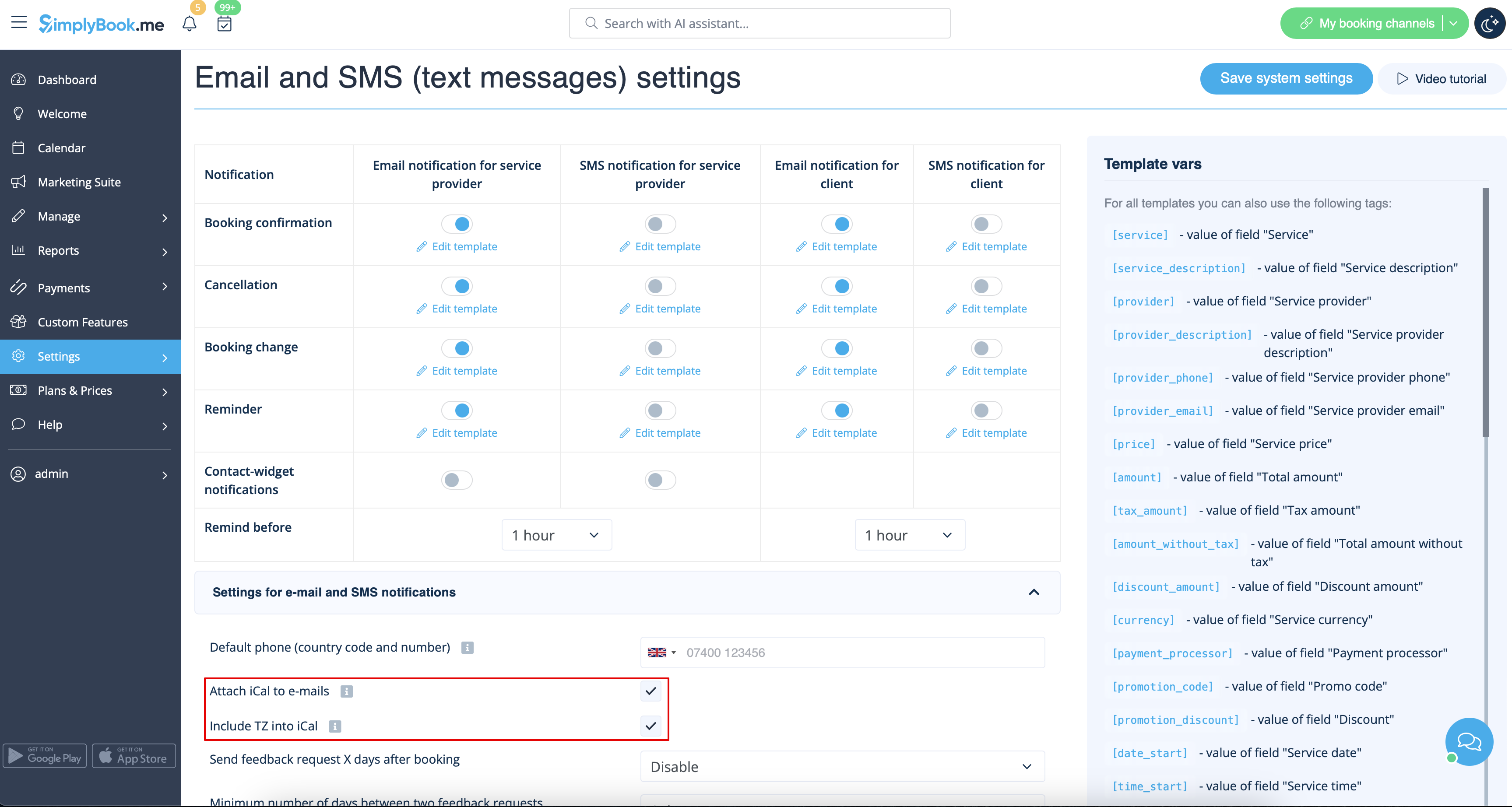
- Bemærk, at iCal-filer ikke har en indstillet tidszone, så tiden i den pågældende fil vises i henhold til IP-adressen/enhedsindstillingerne.
Kunder/udbydere modtager ikke meddelelser
mulige årsager
- 1. De tilsvarende felter i Indstillinger -> E-mail- og SMS-indstillinger er ikke markeret.
- 2. Kunden/udbyderen har indtastet en forkert e-mail eller telefonnummer.
- 3. E-mailen er havnet i junk-mappen (spam) eller under fanen "Social". Se vejledningen til hvidlistning her.
- 4. SMTP-tilføjelsesfunktionen er ikke indstillet korrekt.
- 5. Hvis du ikke modtager sms'er, skal du kontrollere din sms-saldo i Planer og priser -> Abonnementer nederst på siden.
Kunder/udbydere modtager forkerte meddelelser
- 1. Kontroller, om du har aktiveret den tilpassede funktion Flere bookinger eller Gruppebookinger. Disse tilpassede funktioner har deres egne skabeloner.
- Skabelon til flere bookinger (Tilpassede funktioner -> Flere bookinger -> i højre side af siden)
- Skabelon til gruppebookinger (Tilpassede funktioner -> Gruppebookinger -> i højre side af siden)
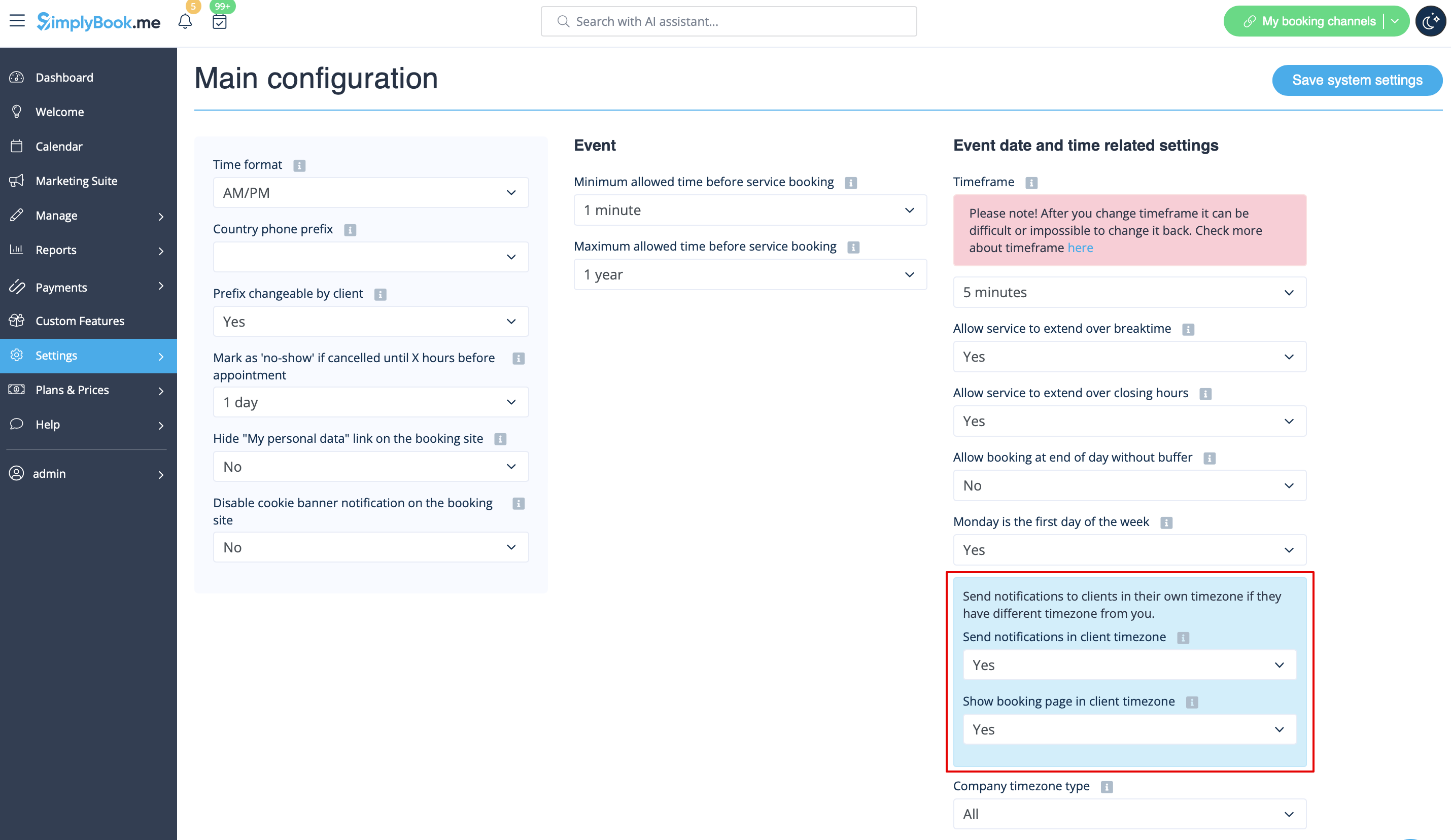
- 2. Kontroller , om du har indstillet tidszone i Indstillinger -> Hovedkonfiguration. I dette tilfælde har kunden muligvis valgt den forkerte tidszone og modtaget en meddelelse i den forkerte tidszone.
Instruktioner til hvidlistning af e-mails
Her er et par ting, du kan gøre for at sikre, at du modtager alle vigtige e-mails fra teamet her hos SimplyBook.me.
Du kan forvente systemmeddelelser, f.eks. når dit abonnement skal fornyes, meddelelser om bookinger og nyttige oplysninger om forskellige ting, f.eks. hvordan du får mest muligt ud af din SimplyBook.me-service.
Selvom teknologien er fantastisk, er den ikke perfekt, og nogle gange forveksler e-mailsystemer og internetudbydere legitime e-mails med spam. For at sikre, at du ikke går glip af vigtig kommunikation fra os, skal du følge disse trin:
Sæt alle e-mails fra domænet @simplybook.me på hvidlisten.
Hvorfor? Fordi det fortæller din e-mail-tjeneste eller dit program, at du faktisk ønsker e-mails fra dette domæne, så de kan sikre, at du modtager dem.
Hvordan? Det varierer mellem e-mail-tjenester og programmer, men nedenfor kan du se oplysninger om nogle af de vigtigste. Hvis du ikke bruger en af disse, kan du finde oplysninger i hjælpesektionen for din tjeneste.
Brug af Gmail eller Gsuite
Filtrer beskeder fra @simplybook.me og bed systemet om aldrig at sende dem til spam:
- 1. Gå til Indstillinger (klik på tandhjulsikonet øverst til højre)

- 2. Vælg fanen Filtre og blokerede adresser

- 3. Nederst på fanen skal du klikke på linket Opret et nyt filter

- 4. I feltet Fra skriver du @simplybook.me
- 5. Klik på Opret filter med denne søgning nederst til højre i vinduet

- 6. Markér afkrydsningsfeltet ved siden af Send aldrig til spam-
- 7. Klik på den blå knap med teksten Opret filter

Great! Now you won’t miss anything from us!
And to ensure that our emails don’t get lost in that Updates or Promotions tab:
- 1. Find an email from SimplyBook.me in your inbox
- 2. Click and drag it to the Primary tab in your inbox

- 3. You’ll be asked whether you want to do this for future emails, so tell them yes

Using Yahoo! mail
- 1. When you open an email message, hover your mouse on the Sender's name.
- 2. Click the the three dots in the Sender's info window that appears and click Add to contacts.

- 3. When Add Contact form comes up, click Save.

Using Mac Mail
- 1. From the top menu select Mail -> Preferences

- 2. Then select the Rules icon, click Add Rule and type a name for the rule in the description field. Use the following settings:

- 3. “If any of the following conditions are met: From Contains”. In the text field besides Contains type @simplybook.me

- 4. Select Move Message and Inbox from the drop down menus and then click OK to save the rule.
Using Outlook
- 1. Right-click on the message in your inbox.
- 2. Select Junk E-mail from the menu.
- 3. Click Never Block Sender or Never Block Sender's Domain (@example.com).

Great, you’re all set! We look forward to being in touch and seeing your business blossom!

