Created page with "*Annulez facilement votre profil de paiement d'abonnement récurrent. *Choisissez un autre forfait mieux adapté à vos besoins. *Mettez votre compte en attente jusqu'à ce que vous en ayez à nouveau besoin. *Obtenez une solution de réservation plus simple <span style="background-color:#cdeffc; padding:5px; border-radius:5px;">[https://simplymeet.me/ SimplyMeet.me]</span> si SimplyBook.me est trop complet pour vos besoins" |
Created page with "{{#seo: |title=Comment résilier votre abonnement SimplyBook.me SimplyBook.me |description=Découvrez comment résilier votre abonnement SimplyBook.me en quelques étapes simples. Suivez nos instructions ici. |titlemode=ajouter |keywords=faq, foire aux questions, logiciel de réservation, questions sur le système de rendez-vous, rendez-vous en ligne, logiciel de calendrier, système de réservation, calendrier de réservation, logiciel de planification, planification de..." Tags: Mobile edit Mobile web edit |
||
| Line 36: | Line 36: | ||
:1. Accédez à la page <span style="background-color:#d4f8e5; padding:5px; border-radius:5px;">Plans et tarifs</span> -> <span style="background-color:#d4f8e5; padding:5px; border-radius:5px;">Abonnements</span> dans votre compte. | :1. Accédez à la page <span style="background-color:#d4f8e5; padding:5px; border-radius:5px;">Plans et tarifs</span> -> <span style="background-color:#d4f8e5; padding:5px; border-radius:5px;">Abonnements</span> dans votre compte. | ||
:2. Dans le <span style="background-color:#d4f8e5; padding:5px; border-radius:5px;">bloc des options de forfait</span>, veuillez cliquer sur « <span style="background-color:#d4f8e5; padding:5px; border-radius:5px;">Downgrade</span> » sous le forfait souhaité. | |||
:2. | (Remarque Il est possible de passer à un forfait inférieur si celui-ci couvre tous les éléments activés dans votre compte) | ||
( | |||
[[File:Downgrade plan path redesigned.png|1200px|center|link=https://help.simplybook.me/images/f/f4/Downgrade_plan_path_redesigned.png]] | [[File:Downgrade plan path redesigned.png|1200px|center|link=https://help.simplybook.me/images/f/f4/Downgrade_plan_path_redesigned.png]] | ||
<br><br> | <br><br> | ||
:3. | :3. Vérifiez les informations relatives à l'entreprise sur le côté gauche de la page (elles seront utilisées pour la facture) et choisissez le mode de paiement. | ||
[[File:Confirm subscription update redesigned.png|1200px|center|link=https://help.simplybook.me/images/e/e3/Confirm_subscription_update_redesigned.png]] | [[File:Confirm subscription update redesigned.png|1200px|center|link=https://help.simplybook.me/images/e/e3/Confirm_subscription_update_redesigned.png]] | ||
<br><br> | <br><br> | ||
:4. | :4. Une fois le paiement effectué et reçu par le système, le nouveau forfait entrera en vigueur. | ||
<br><br> | <br><br> | ||
== Vous avez besoin d'une solution plus simple ? == | |||
== | Veuillez <span style="background-color:#d4f8e5; padding:5px; border-radius:5px;">contacter notre assistance</span> soit via le LiveChat directement depuis votre compte, soit en envoyant un e-mail à <span style="background-color:#cdeffc; padding:5px; border-radius:5px;">[mailto:support@simplybook.me support@simplybook.me]</span> et nous serons ravis de vous aider à choisir la formule la mieux adaptée à votre entreprise.<br><br> | ||
Vous pouvez également découvrir notre solution <span style="background-color:#cdeffc; padding:5px; border-radius:5px;">[https://simplymeet.me/ SimplyMeet.me]</span>, un outil de planification de réunions simple à configurer et doté de nombreuses fonctionnalités. | |||
<br><br> | <br><br> | ||
== Comment supprimer le compte == | |||
<br> | <br> | ||
Avant de supprimer votre compte, vous pouvez également envisager d'annuler votre abonnement afin de ne pas être facturé si vous faites une pause dans votre activité ou si vous avez une occupation saisonnière, plutôt que de le supprimer.<br><br> | |||
Si tel est le cas, veuillez suivre <span style="background-color:#cdeffc; padding:5px; border-radius:5px;">[[How_to_Cancel_SimplyBook.me_subscription#How_to_cancel_the_paid_subscription|les étapes pour annuler le paiement récurrent]].</span> | |||
<br><br> | <br><br> | ||
Ou, si l'abonnement ne correspond pas à vos besoins actuels, vous pouvez en acheter un autre en fonction de <span style="background-color:#cdeffc; padding:5px; border-radius:5px;">[[How_to_Cancel_SimplyBook.me_subscription#How_to_downgrade_the_subscription|cela]].</span> | |||
<br><br> | <br><br> | ||
<div lang="en" dir="ltr" class="mw-content-ltr"> | <div lang="en" dir="ltr" class="mw-content-ltr"> | ||
Of course you can always contact our support for assistance with selecting a new subscription plan to match your current business needs in the best way. | Of course you can always contact our support for assistance with selecting a new subscription plan to match your current business needs in the best way. | ||
Revision as of 12:22, 16 May 2025
Au fur et à mesure que votre entreprise évolue, votre formule d'abonnement peut ne plus répondre à vos besoins. Pas d'inquiétude ! Vous avez la possibilité de :
- Annulez facilement votre profil de paiement d'abonnement récurrent.
- Choisissez un autre forfait mieux adapté à vos besoins.
- Mettez votre compte en attente jusqu'à ce que vous en ayez à nouveau besoin.
- Obtenez une solution de réservation plus simple SimplyMeet.me si SimplyBook.me est trop complet pour vos besoins
Nous sommes là pour vous offrir une expérience fluide et flexible. Si vous avez des questions ou besoin d'aide, notre équipe d'assistance est à votre disposition.
Comment annuler l'abonnement payant
Si vous avez acheté au moins une fois un forfait payant, votre compte ne sera pas automatiquement supprimé après la résiliation de votre abonnement, même si vous ne l'utilisez pas pendant un certain temps.
Veuillez suivre les étapes suivantes pour annuler votre paiement récurrent :
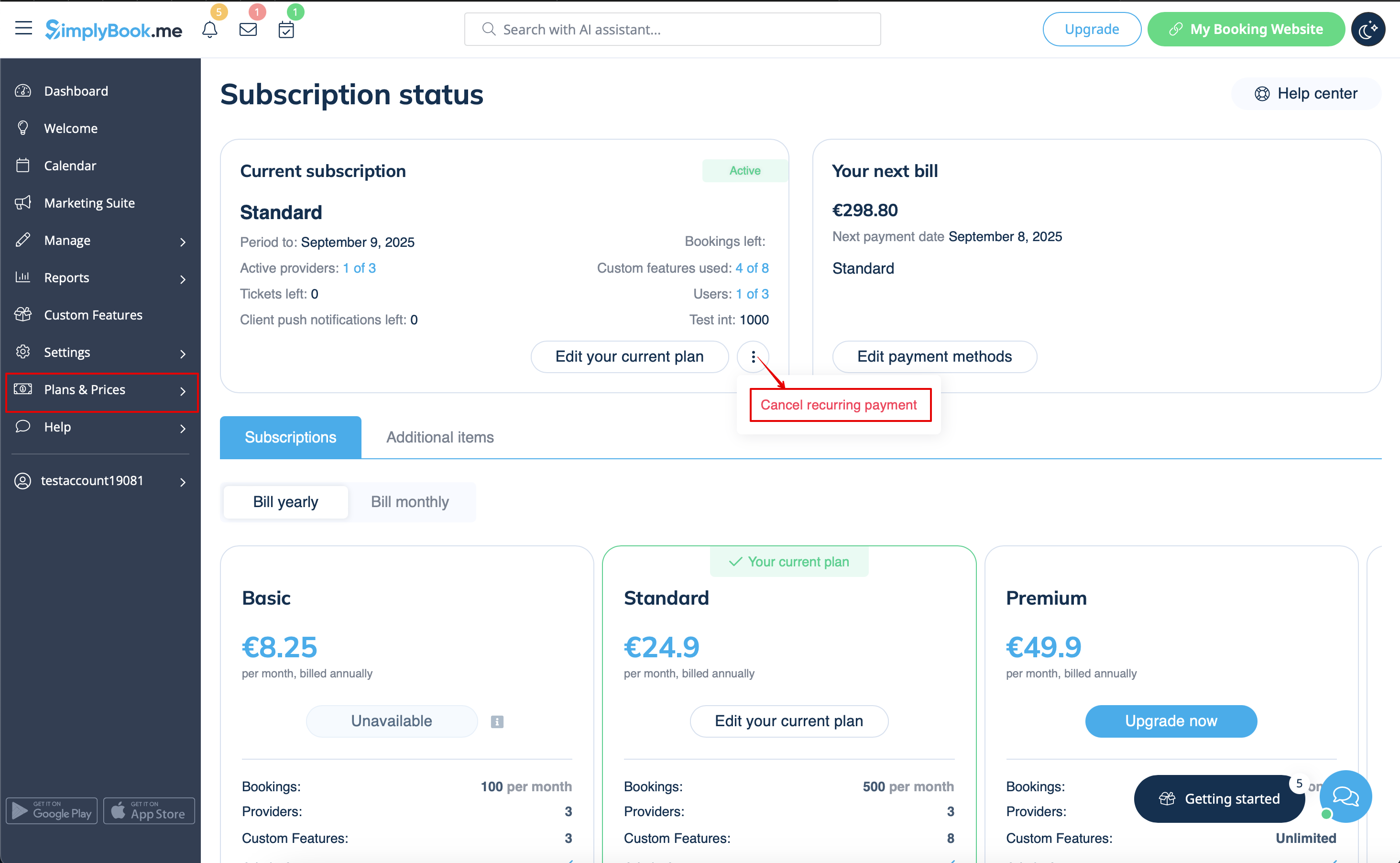
- 1. Accédez à la page Plans et tarifs -> Abonnements dans votre compte.
- 2. Dans le bloc supérieur contenant les détails de l'abonnement, veuillez cliquer sur le menu à trois points.
- 3. Sélectionnez « Annuler la répétition » et confirmez l'action.
- 4. Il n'y aura donc pas de frais supplémentaires. Vous pourrez utiliser toutes les options jusqu'à la fin de la période en cours.
- Vous pourrez acheter le forfait souhaité à tout moment dans Plans et tarifs -> Abonnements et définir un nouveau profil récurrent pour une utilisation fluide du système.
Comment passer à un abonnement inférieur
Remarque importante : il n'est pas possible de passer à un forfait gratuit.
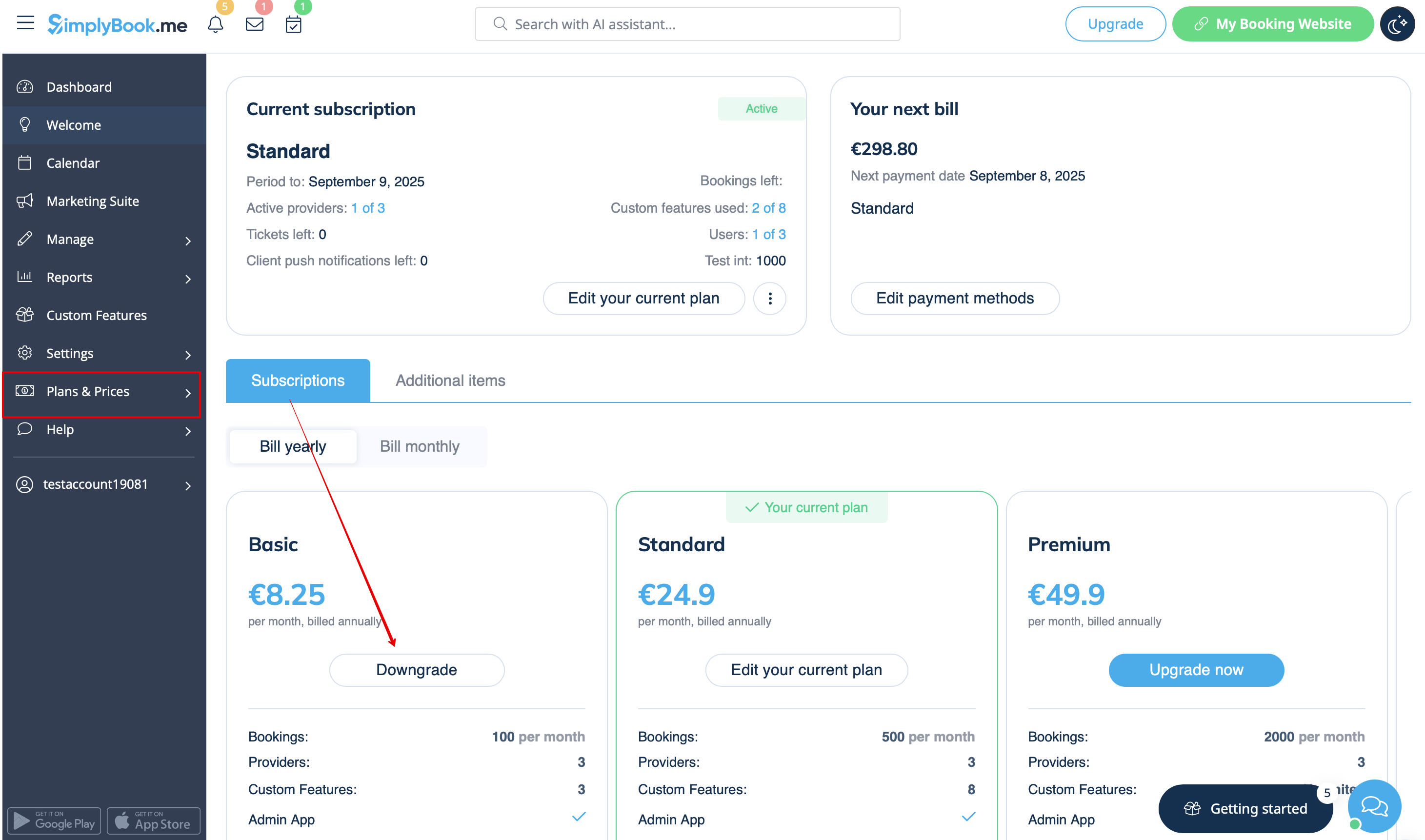
- 1. Accédez à la page Plans et tarifs -> Abonnements dans votre compte.
- 2. Dans le bloc des options de forfait, veuillez cliquer sur « Downgrade » sous le forfait souhaité.
(Remarque Il est possible de passer à un forfait inférieur si celui-ci couvre tous les éléments activés dans votre compte)
- 3. Vérifiez les informations relatives à l'entreprise sur le côté gauche de la page (elles seront utilisées pour la facture) et choisissez le mode de paiement.
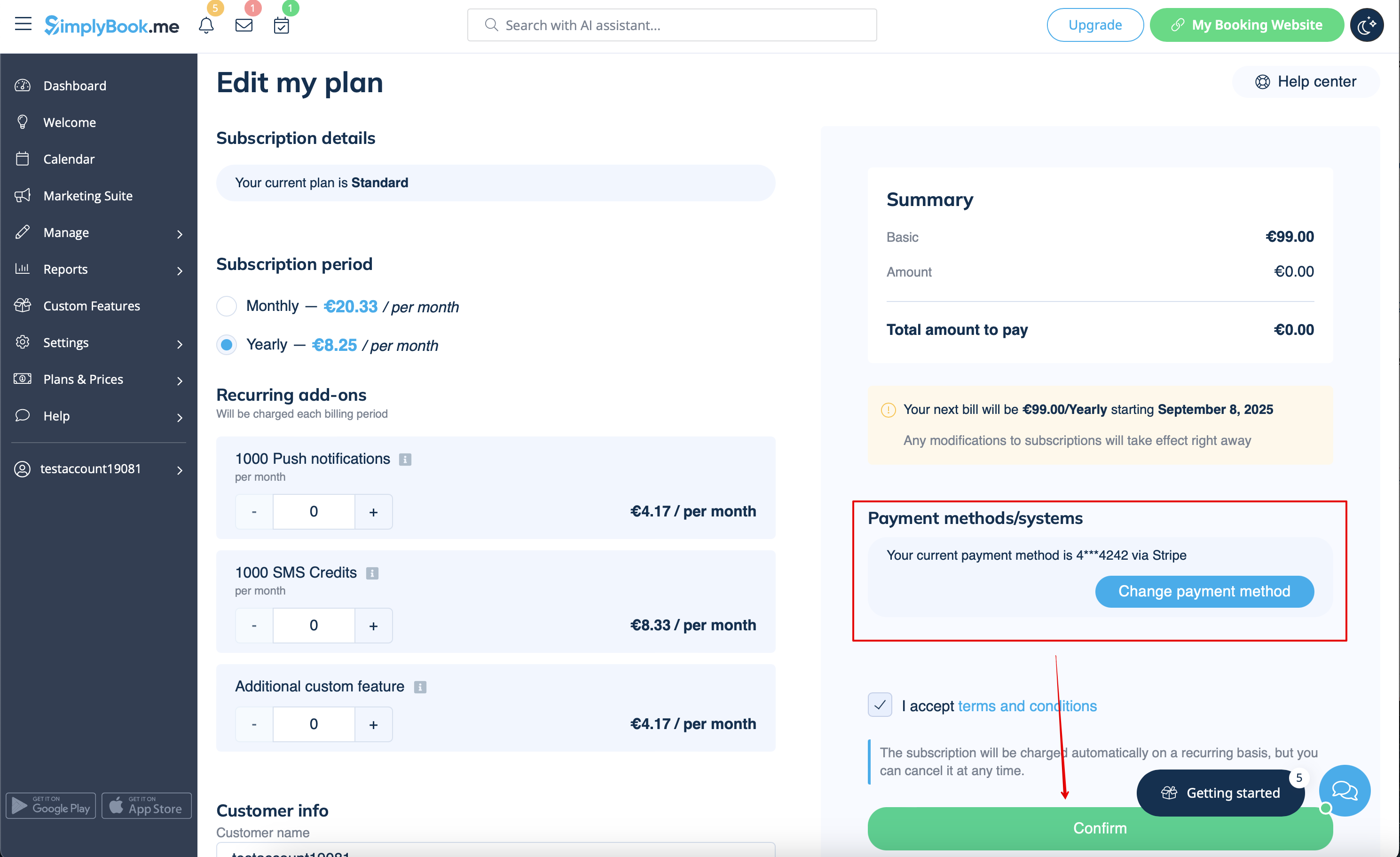
- 4. Une fois le paiement effectué et reçu par le système, le nouveau forfait entrera en vigueur.
Vous avez besoin d'une solution plus simple ?
Veuillez contacter notre assistance soit via le LiveChat directement depuis votre compte, soit en envoyant un e-mail à support@simplybook.me et nous serons ravis de vous aider à choisir la formule la mieux adaptée à votre entreprise.
Vous pouvez également découvrir notre solution SimplyMeet.me, un outil de planification de réunions simple à configurer et doté de nombreuses fonctionnalités.
Comment supprimer le compte
Avant de supprimer votre compte, vous pouvez également envisager d'annuler votre abonnement afin de ne pas être facturé si vous faites une pause dans votre activité ou si vous avez une occupation saisonnière, plutôt que de le supprimer.
Si tel est le cas, veuillez suivre les étapes pour annuler le paiement récurrent.
Ou, si l'abonnement ne correspond pas à vos besoins actuels, vous pouvez en acheter un autre en fonction de cela.
Of course you can always contact our support for assistance with selecting a new subscription plan to match your current business needs in the best way.
If you are sure that you want to delete the account please follow these simple steps:
- 1. Go to Settings and click on Delete account.
- 2. Select the reason for deletion, confirm your agreement for data deletion, and proceed with the action.
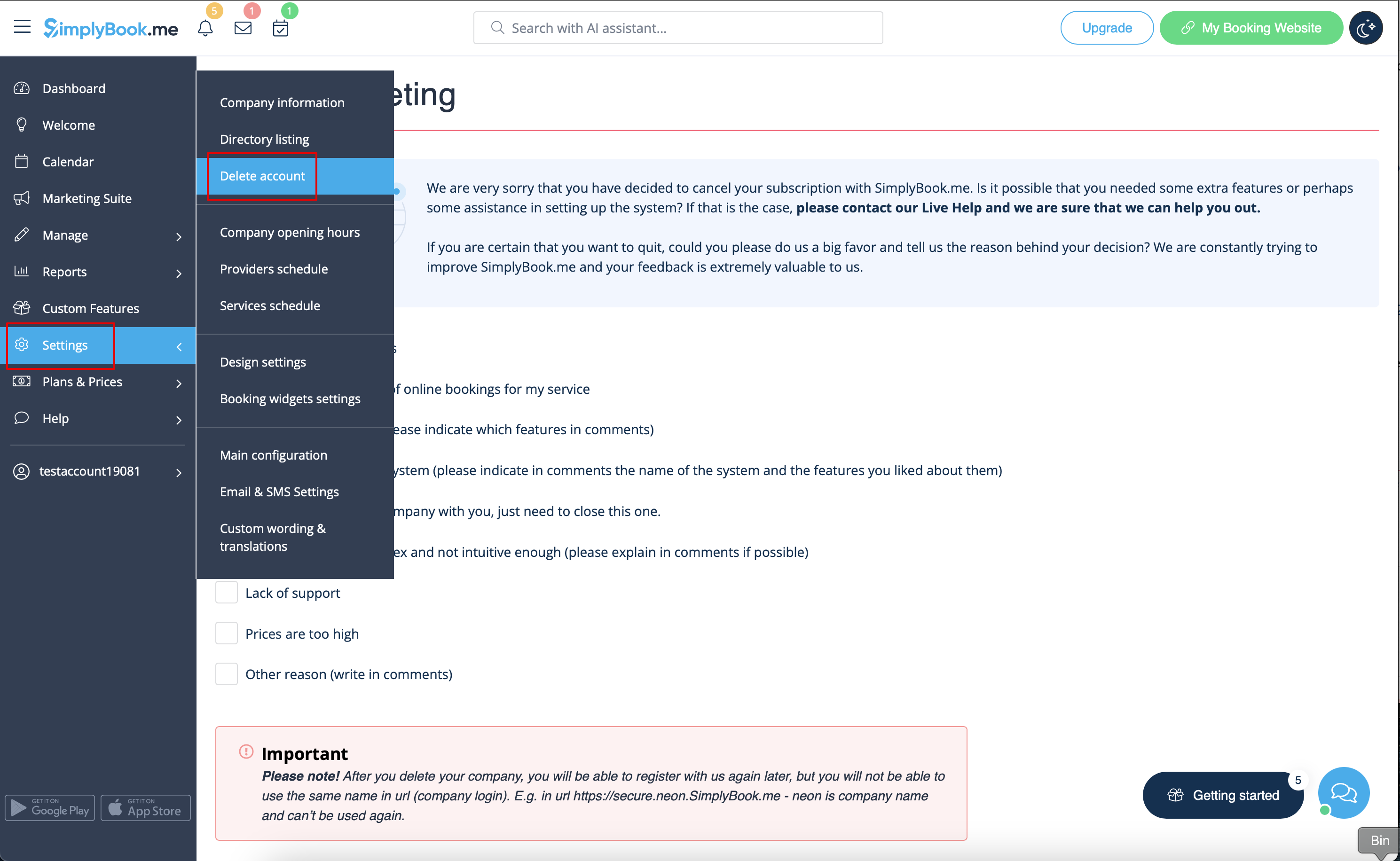
Once completed, your account will be deleted. For a certain period, you'll have the option to restore it. If not, it will be permanently removed from our databases.
