No edit summary |
No edit summary |
||
| Line 1: | Line 1: | ||
<languages/> | |||
<translate> | |||
{{#seo: | {{#seo: | ||
|title=How To Configure Your System Using Online Scheduler SimplyBook.me | |title=How To Configure Your System Using Online Scheduler SimplyBook.me | ||
| Line 4: | Line 6: | ||
|titlemode=append | |titlemode=append | ||
|keywords=faq, frequently asked questions, scheduling software, employee scheduling software, free scheduling software, booking calendar, booking software, free online calendar, online calendar, online scheduling, online appointment scheduling, online booking calendar | |keywords=faq, frequently asked questions, scheduling software, employee scheduling software, free scheduling software, booking calendar, booking software, free online calendar, online calendar, online scheduling, online appointment scheduling, online booking calendar | ||
}} | }}</translate> | ||
<translate> | |||
<div class="mw-collapsible mw-collapsed" data-expandtext="Show" data-collapsetext="Hide" style="width:800px;"> | <div class="mw-collapsible mw-collapsed" data-expandtext="Show" data-collapsetext="Hide" style="width:800px;"> | ||
<span class="qa">[https://www.youtube.com/watch?v=Hr2YQcU_gRI Beauty sphere businesses]</span> | <span class="qa">[https://www.youtube.com/watch?v=Hr2YQcU_gRI Beauty sphere businesses]</span> | ||
| Line 17: | Line 21: | ||
</div> | </div> | ||
</div> | </div> | ||
<br/> | <br/></translate> | ||
<translate> | |||
<div class="mw-collapsible mw-collapsed" data-expandtext="Show" data-collapsetext="Hide" style="width:800px;"> | <div class="mw-collapsible mw-collapsed" data-expandtext="Show" data-collapsetext="Hide" style="width:800px;"> | ||
<span class="qa">[[Quest rooms]]</span> | <span class="qa">[[Quest rooms]]</span> | ||
| Line 34: | Line 40: | ||
:5. Rename the word "Employee" on the booking page to "Room" or "Game" in Settings // Custom wording & translations. | :5. Rename the word "Employee" on the booking page to "Room" or "Game" in Settings // Custom wording & translations. | ||
[[File:Quest rooms booking page view v3.png | center ]]<br><br> | [[File:Quest rooms booking page view v3.png | center ]]<br><br> | ||
:6. If each room has different price and you plan to accept payments online with our [[Custom_Features#Accept_Payments| Accept Payments]] custom feature, create more services in Manage // Services // Add service, set price for those services and relate with rooms by checking correponding boxes in "Service providers" tab.<br> | :6. If each room has different price and you plan to accept payments online with our [[Custom_Features#Accept_Payments| Accept Payments]] custom feature, create more services in Manage // Services // Add service, set price for those services and relate with rooms by checking correponding boxes in "Service providers" tab.<br></translate> | ||
<translate> | |||
[[File:Quest rooms connect service to provider.png|1200px| center|link=https://help.simplybook.me/images/2/2f/Quest_rooms_connect_service_to_provider.png ]]<br><br> | [[File:Quest rooms connect service to provider.png|1200px| center|link=https://help.simplybook.me/images/2/2f/Quest_rooms_connect_service_to_provider.png ]]<br><br> | ||
:7. If morning game prices are different from evening/weekend game prices - add Morning games and Evening/Weekend games services in Manage // Services, and set corresponding price for each service. Then in Manage // Service Providers create 2 providers for each game and set available hours for providers in "Service provider schedule" tab.<br> | :7. If morning game prices are different from evening/weekend game prices - add Morning games and Evening/Weekend games services in Manage // Services, and set corresponding price for each service. Then in Manage // Service Providers create 2 providers for each game and set available hours for providers in "Service provider schedule" tab.<br> | ||
| Line 47: | Line 54: | ||
</div> | </div> | ||
</div> | </div> | ||
<br/> | <br/></translate> | ||
<translate> | |||
<div class="mw-collapsible mw-collapsed" data-expandtext="Show" data-collapsetext="Hide" style="width:800px;"> | <div class="mw-collapsible mw-collapsed" data-expandtext="Show" data-collapsetext="Hide" style="width:800px;"> | ||
<span class="qa">[https://www.youtube.com/watch?v=1qf4gF3u1Ik Sports and Fitness Businesses]</span> | <span class="qa">[https://www.youtube.com/watch?v=1qf4gF3u1Ik Sports and Fitness Businesses]</span> | ||
| Line 61: | Line 69: | ||
</div> | </div> | ||
</div> | </div> | ||
<br/> | <br/></translate> | ||
<translate> | |||
<div class="mw-collapsible mw-collapsed" data-expandtext="Show" data-collapsetext="Hide" style="width:800px;"> | <div class="mw-collapsible mw-collapsed" data-expandtext="Show" data-collapsetext="Hide" style="width:800px;"> | ||
<span class="qa">[https://www.youtube.com/watch?v=SOnGXBaLmbY Child Care]</span> | <span class="qa">[https://www.youtube.com/watch?v=SOnGXBaLmbY Child Care]</span> | ||
| Line 108: | Line 117: | ||
<div class="mw-collapsible-content"><br><br> | <div class="mw-collapsible-content"><br><br> | ||
If you are offering renting services, [https://simplybook.me/ Simplybook] can become a suitable booking software for you. | If you are offering renting services, [https://simplybook.me/ Simplybook] can become a suitable booking software for you. | ||
<br><br> | <br><br></translate> | ||
<translate> | |||
;If you rent items for hours: | ;If you rent items for hours: | ||
:Make your items as providers. For example if you rent musical instruments, create providers Flute, Bass, Violin, etc. | :Make your items as providers. For example if you rent musical instruments, create providers Flute, Bass, Violin, etc. | ||
| Line 124: | Line 134: | ||
</div> | </div> | ||
</div> | </div> | ||
<br/> | <br/></translate> | ||
<translate> | |||
<div class="mw-collapsible mw-collapsed" data-expandtext="Show" data-collapsetext="Hide" style="width:800px;"> | <div class="mw-collapsible mw-collapsed" data-expandtext="Show" data-collapsetext="Hide" style="width:800px;"> | ||
<span class="qa">[[Custom_Features#Classes | Classes]]</span> | <span class="qa">[[Custom_Features#Classes | Classes]]</span> | ||
| Line 153: | Line 164: | ||
</div> | </div> | ||
</div> | </div> | ||
<br/> | <br/></translate> | ||
<translate> | |||
<div class="mw-collapsible mw-collapsed" data-expandtext="Show" data-collapsetext="Hide" style="width:800px;"> | <div class="mw-collapsible mw-collapsed" data-expandtext="Show" data-collapsetext="Hide" style="width:800px;"> | ||
<span class="qa">[[Adding_services,_providers_and_availability(new_interface)#How_to_set_24.2F7_or_after_00.00_services | 24/7 or after 00.00 services]]</span> | <span class="qa">[[Adding_services,_providers_and_availability(new_interface)#How_to_set_24.2F7_or_after_00.00_services | 24/7 or after 00.00 services]]</span> | ||
| Line 173: | Line 185: | ||
For those companies that are restricted to amount of rooms or items we recommend to check [[Custom_Features#Limit_Bookings | Limit Bookings Custom Feature]]. | For those companies that are restricted to amount of rooms or items we recommend to check [[Custom_Features#Limit_Bookings | Limit Bookings Custom Feature]]. | ||
This Custom Feature allows you to restrict booking quantity which can be booked at the same time. This Custom Feature is useful when your services require additional things like dental chair or room in the studio etc. When the booking limit is reached the corresponding time interval will look like breaktime on the booking page (and in the admin interface if you haven't set to skip these restrictions for admin). It is possible to limit booking number at the same time generally, and also you can set certain limit for each service separately. | This Custom Feature allows you to restrict booking quantity which can be booked at the same time. This Custom Feature is useful when your services require additional things like dental chair or room in the studio etc. When the booking limit is reached the corresponding time interval will look like breaktime on the booking page (and in the admin interface if you haven't set to skip these restrictions for admin). It is possible to limit booking number at the same time generally, and also you can set certain limit for each service separately. | ||
<br/><br/> | <br/><br/></translate> | ||
<translate> | |||
Or as another option you can use [[Related_Resources_custom_feature|Related Resources]] custom feature as it allows to connect equipment, rooms or anything else that is limited in quantity to a service. Different resources can be connected to the same service when needed. You can create all the necessary equipment, define the number of items required for each appointment per service/class and the resources will be automatically attached during the booking process. | Or as another option you can use [[Related_Resources_custom_feature|Related Resources]] custom feature as it allows to connect equipment, rooms or anything else that is limited in quantity to a service. Different resources can be connected to the same service when needed. You can create all the necessary equipment, define the number of items required for each appointment per service/class and the resources will be automatically attached during the booking process. | ||
</div> | </div> | ||
</div> | </div> | ||
<br/> | <br/></translate> | ||
Revision as of 10:31, 19 May 2025
- Video tutorials available
- 1.

- 2.
- 3.
Simplybook is a perfect online booking system for quest and escape rooms of various types. It allows clients to choose the room and book specific time when the game will take place. Clients can leave feedback on the company booking page after the follow up email.
In order to use Simplybook.me efficiently we recommend the following setup:
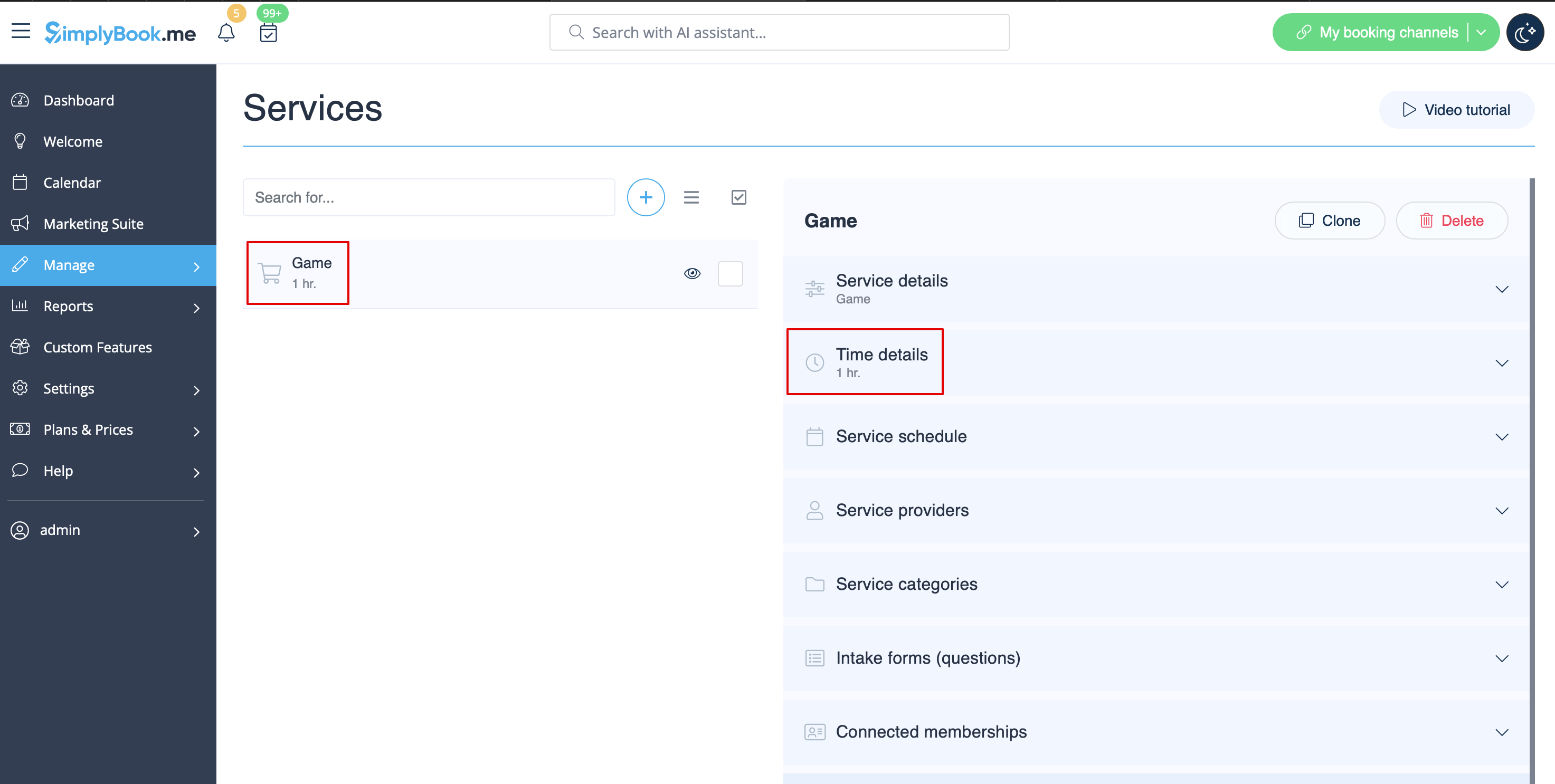
- 1. Create service as game with corresponding duration in Manage // Services // "+". Use Manage // Services // Time details to edit service duration.
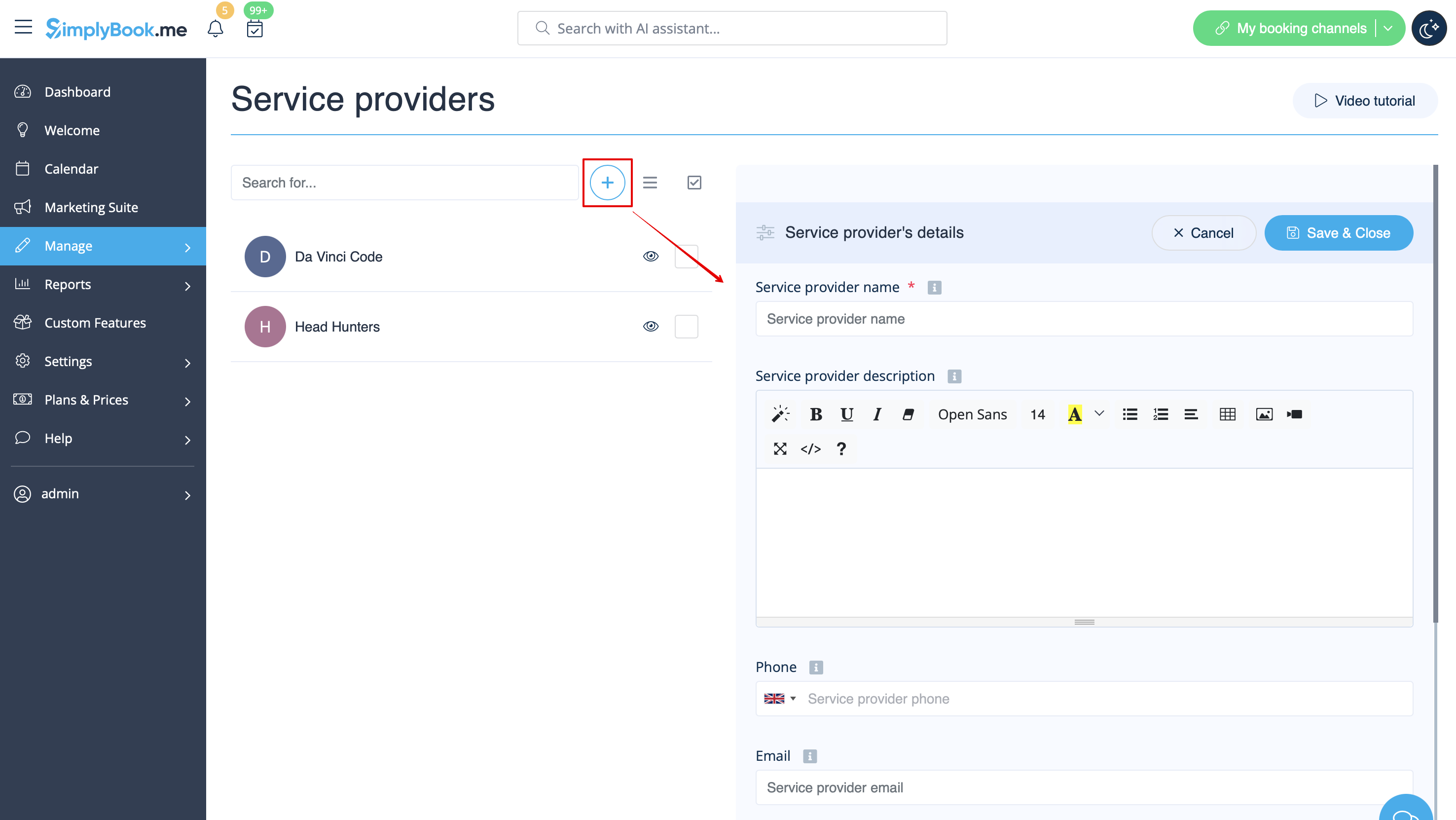
- 2. Make providers as rooms. In Manage // Service Providers // "+" to add new service provider - create the number of providers equal to the rooms you have.
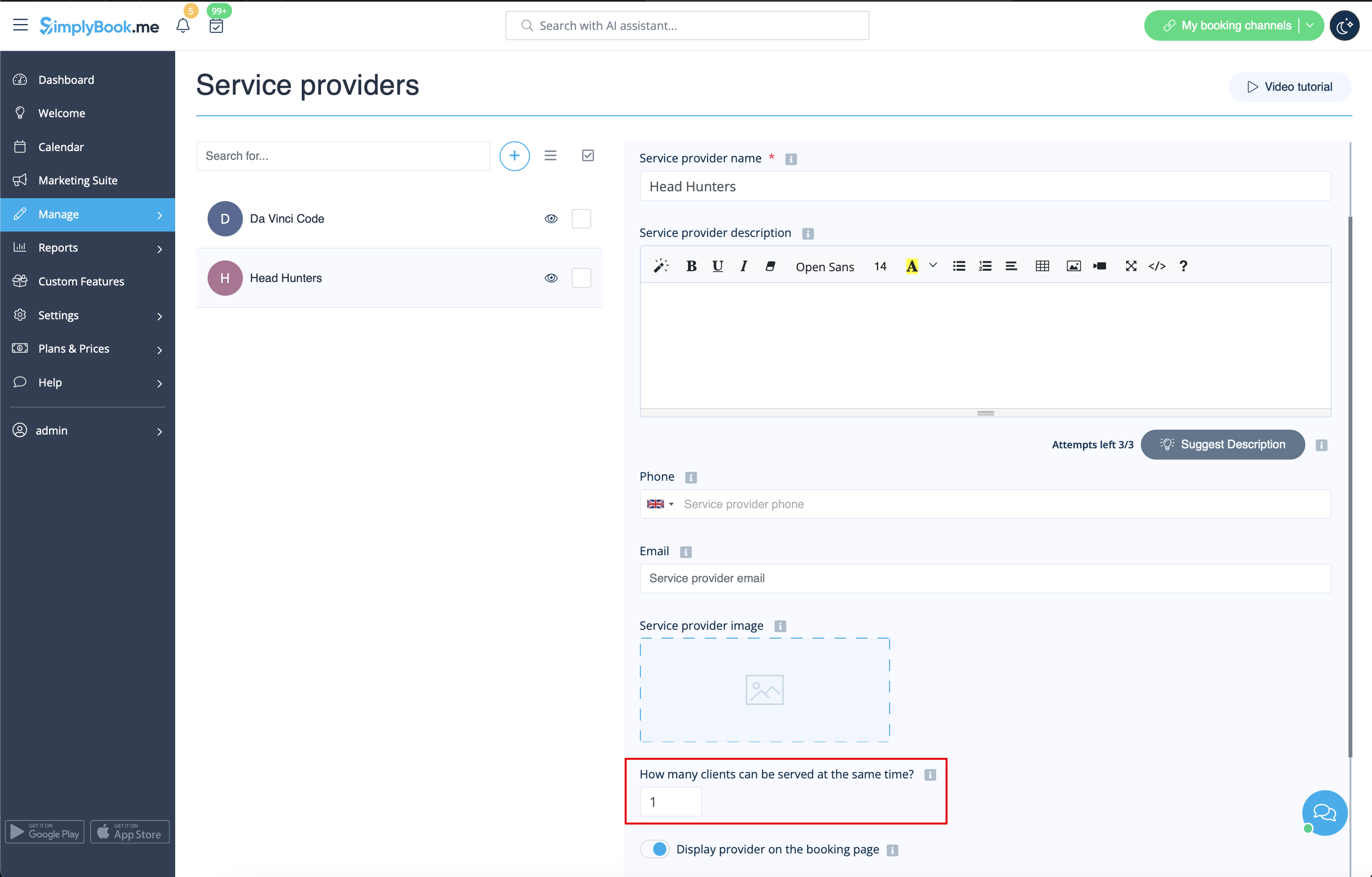
- 3. Make sure that each provider can serve 1 client at a time.
- 4. You can also set specific availability for that room by clicking on "Customize time settings for this provider" on "Service provider schedule" tab in Manage // Service Providers.
- 5. Rename the word "Employee" on the booking page to "Room" or "Game" in Settings // Custom wording & translations.

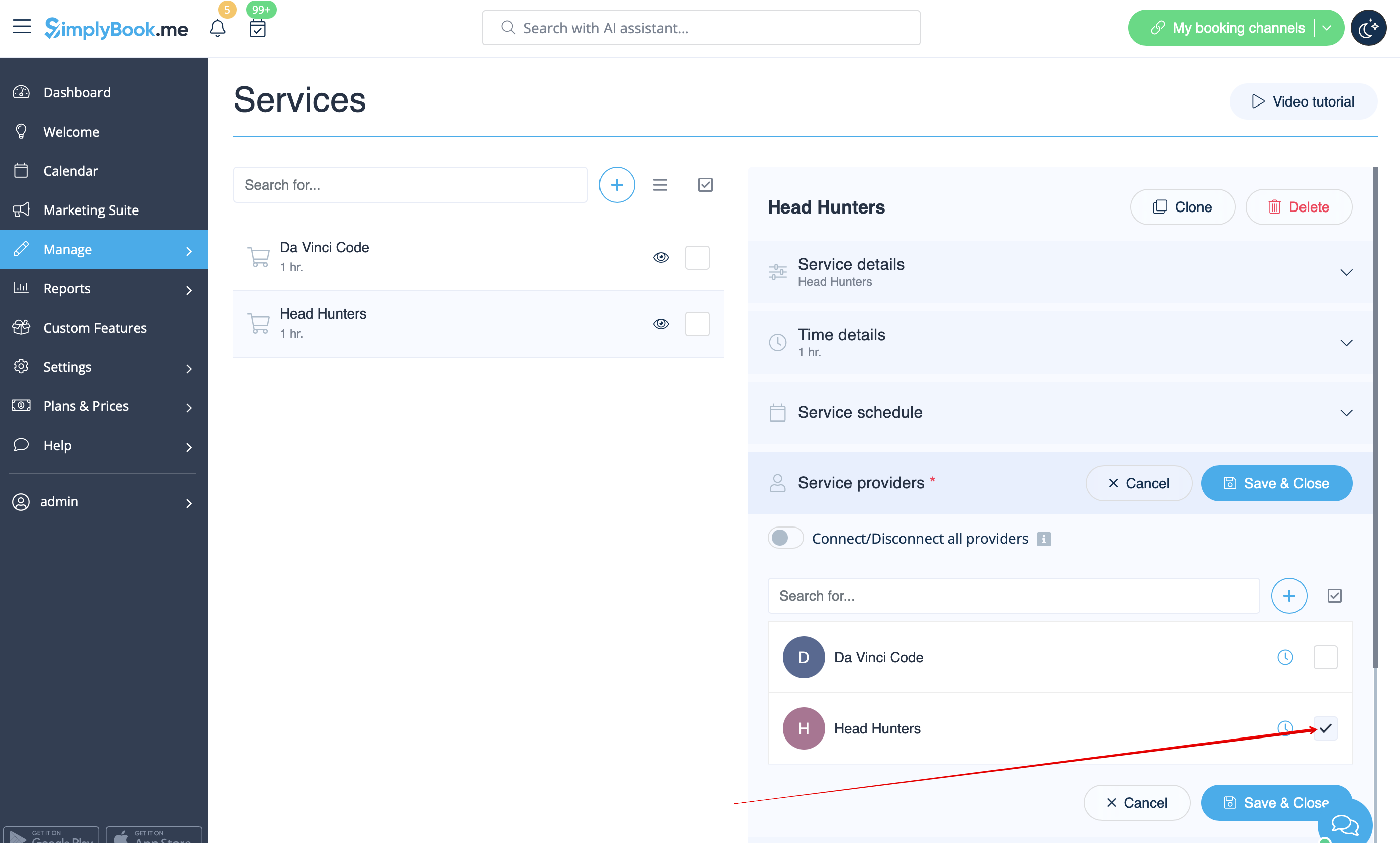
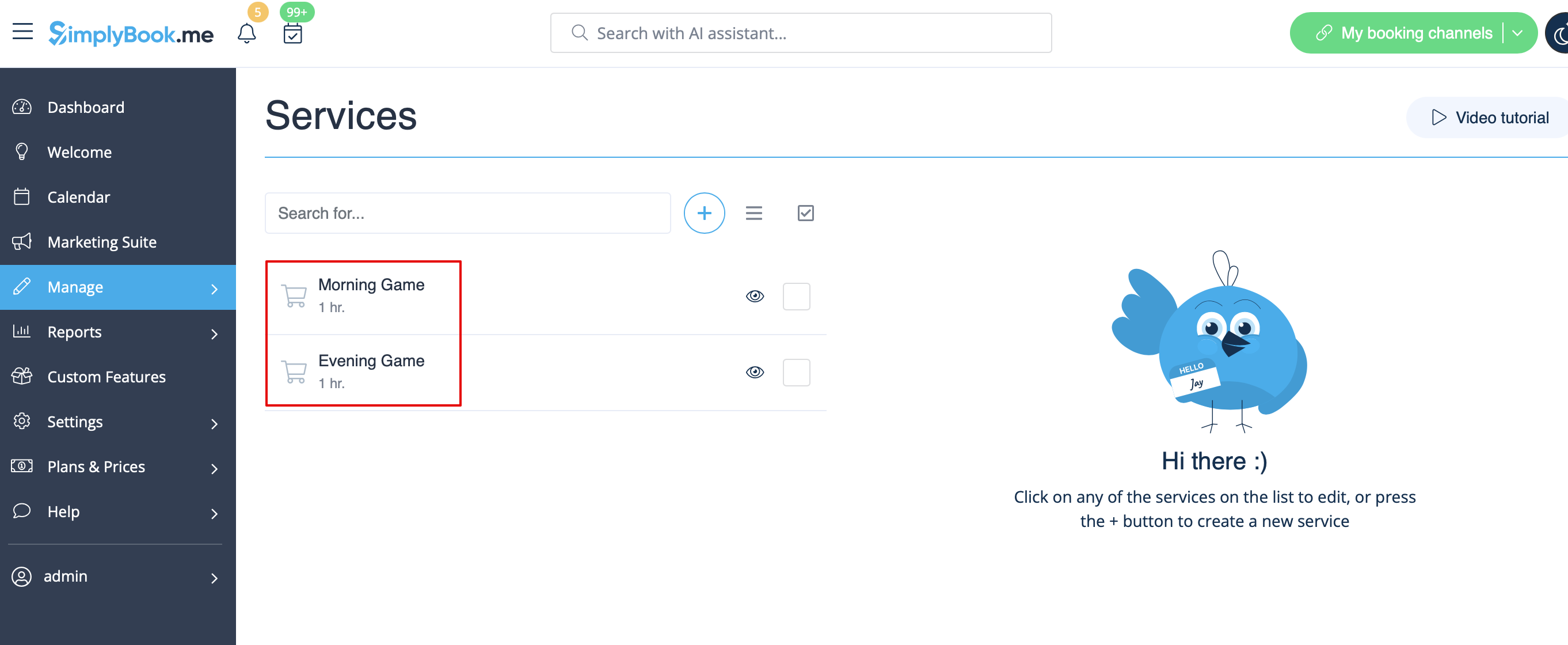
- 6. If each room has different price and you plan to accept payments online with our Accept Payments custom feature, create more services in Manage // Services // Add service, set price for those services and relate with rooms by checking correponding boxes in "Service providers" tab.
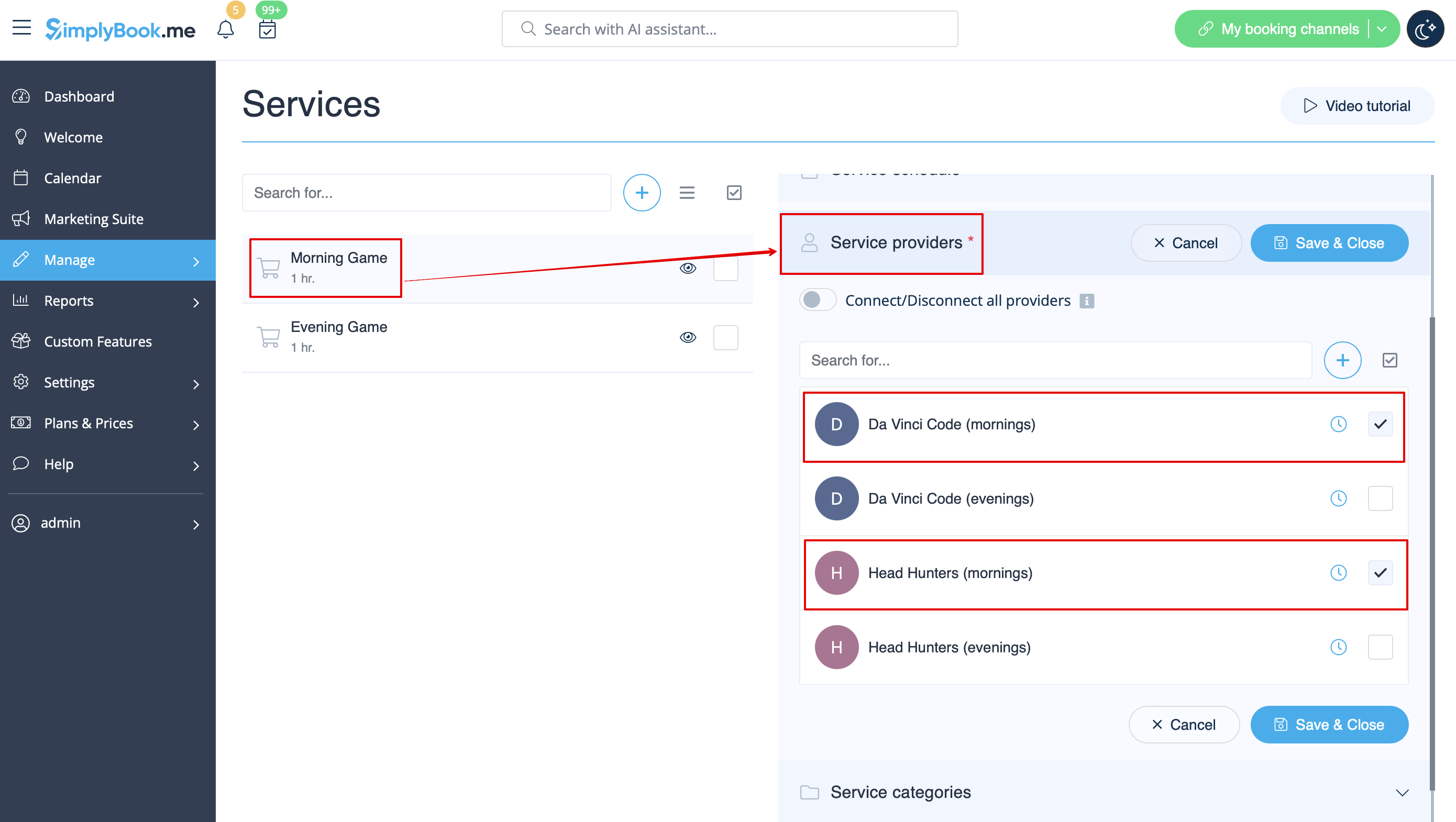
- 7. If morning game prices are different from evening/weekend game prices - add Morning games and Evening/Weekend games services in Manage // Services, and set corresponding price for each service. Then in Manage // Service Providers create 2 providers for each game and set available hours for providers in "Service provider schedule" tab.
- 8. Connect providers to corresponding services
- 9. On the booking page clients will choose morning/weekend hours, select game - and then will see available slots.

- 10. If you have fixed schedule, you may need Appointment at fixed time custom feature where you can set specific start times for each of your services.
- 11. With the help of Intake Forms custom feature you can request additional info from clients such as how many clients will be in a group.
- Video tutorial available
- Video tutorial available
- Video tutorial available
- Video tutorial available
- Video tutorial available
- Video tutorial available
- Video tutorial available
- Video tutorial available
If you are offering renting services, Simplybook can become a suitable booking software for you.
- If you rent items for hours
- Make your items as providers. For example if you rent musical instruments, create providers Flute, Bass, Violin, etc.
- If you rent for different duration you will need to create multiple services with different duration. For example: Renting 1 hour, Renting 2 hours, Renting 6 hours, etc.
- If you rent items for days
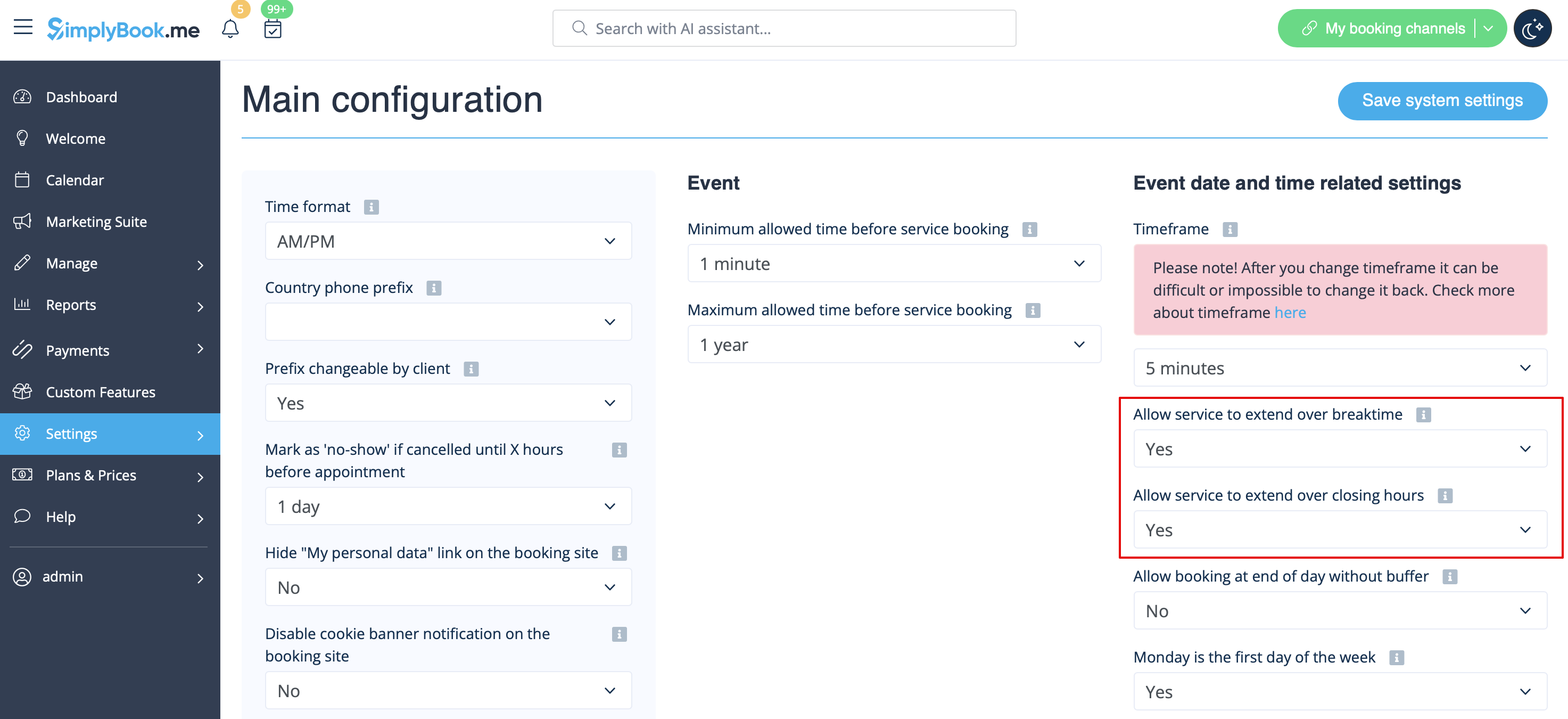
- 1. In Settings // Main configuration set both "Allow service to extend over breaktime" and "Allow service to extend over closing hours" to "Yes".
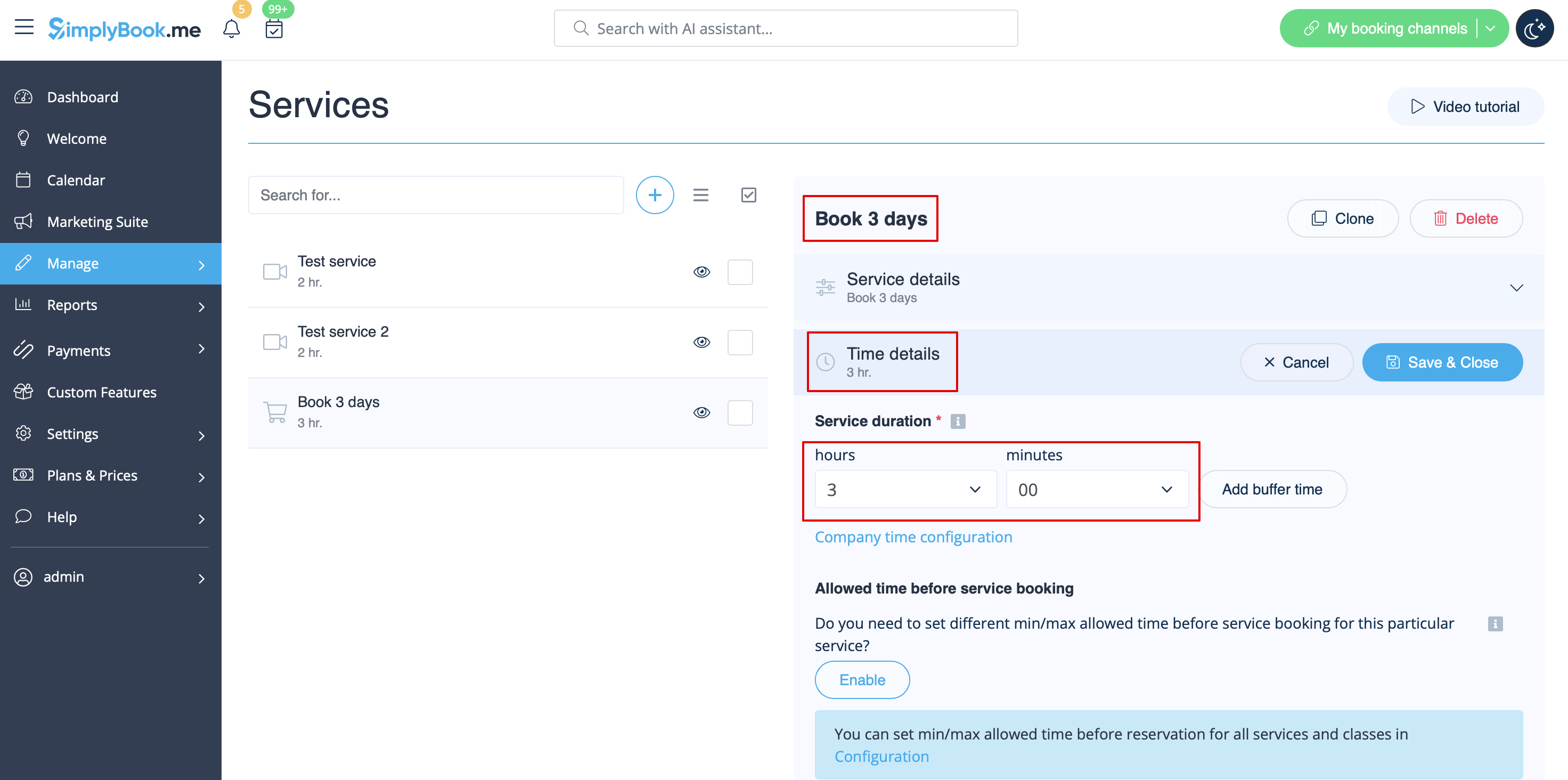
- 2. In Manage // Services // "+" create service with the duration corresponding to the amount of days your service will be offered for (3 days=3 hours, 7 days=7 hours).
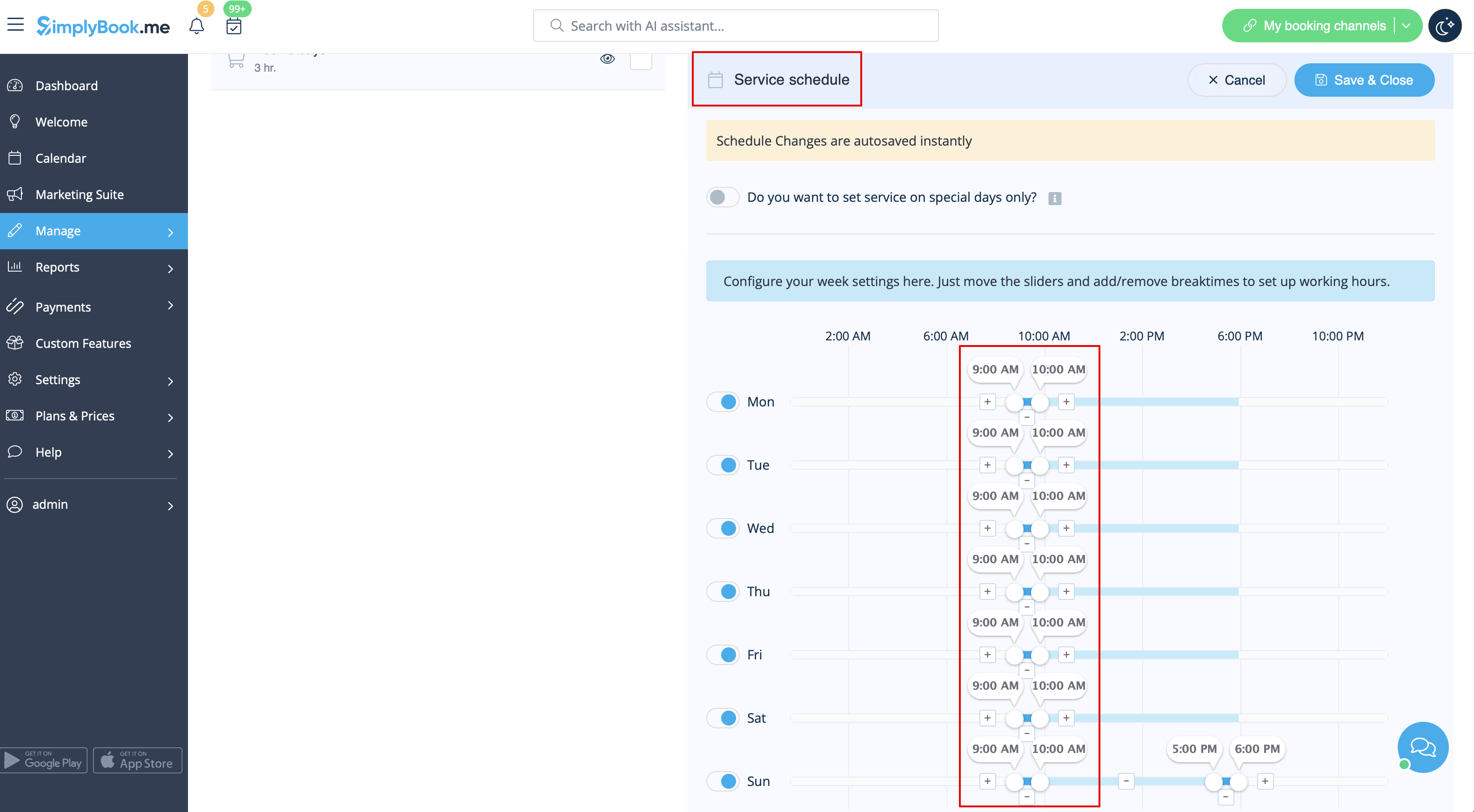
- 3. In the Settings // Company opening hours (when you have only 1 service) or in the working hours of the service (Manage // Services // Service schedule) open only 1 hour each day.
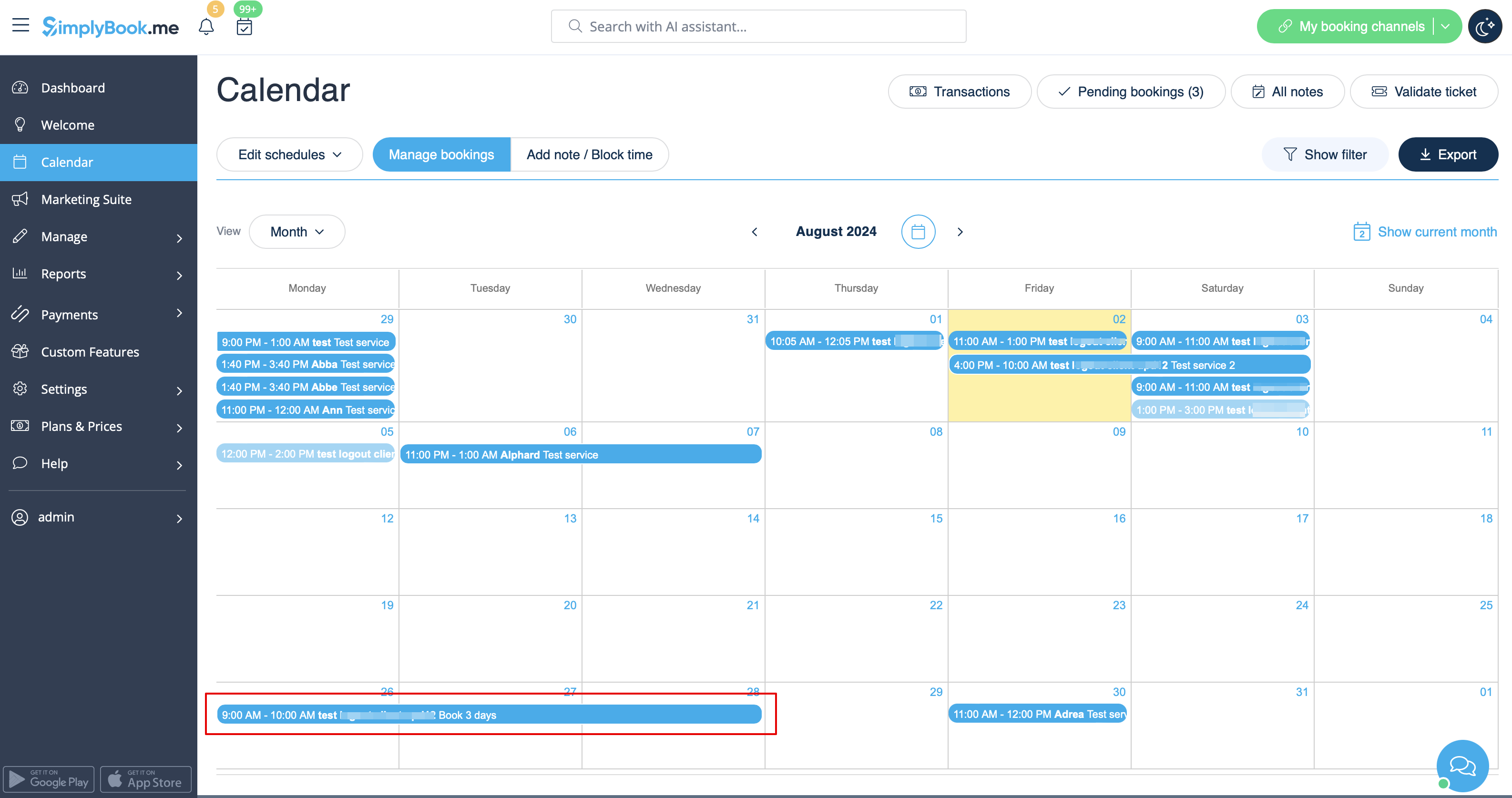
- 4. The system will then book the number of hours indicated in service duration as the number of days.
See extended tutorial about classes online scheduling here
And video tutorial how to sell membership related classes 
- Video tutorial available
Video available
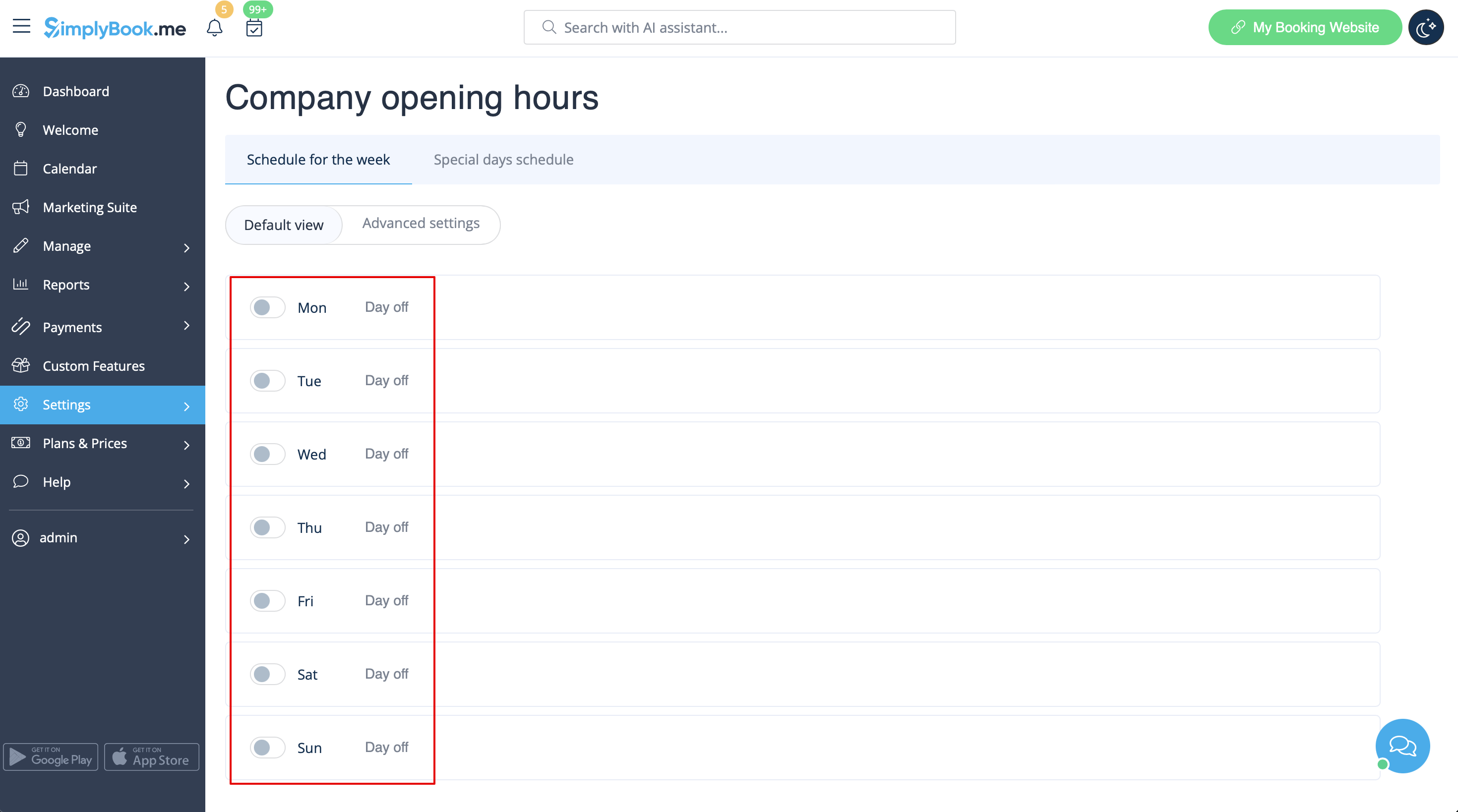
If you plan to have 1 event or several events without regular services you should do the following:
- 1. Close all company opening hours in Settings // Company opening hours - put the switchers near weekday names to "off" position.
- 2. Create events you need in Manage // Services // "+". See detailed tutorial about events here.
If your services will cross midnight, after you set up your availability make sure to set "Allow service to extend over closing hours" to "Yes" in Settings//Main configuration.
Different clinics/salons under one account
If you have several clinics/salons/gyms/etc you can use Locations Custom Feature and make each clinic or salon a location. You can assign providers who work on that location and while booking your services, clients will first choose location and then service and provider.
Services limited to the amount of rooms or items
For those companies that are restricted to amount of rooms or items we recommend to check Limit Bookings Custom Feature.
This Custom Feature allows you to restrict booking quantity which can be booked at the same time. This Custom Feature is useful when your services require additional things like dental chair or room in the studio etc. When the booking limit is reached the corresponding time interval will look like breaktime on the booking page (and in the admin interface if you haven't set to skip these restrictions for admin). It is possible to limit booking number at the same time generally, and also you can set certain limit for each service separately.
Or as another option you can use Related Resources custom feature as it allows to connect equipment, rooms or anything else that is limited in quantity to a service. Different resources can be connected to the same service when needed. You can create all the necessary equipment, define the number of items required for each appointment per service/class and the resources will be automatically attached during the booking process.
