From SimplyBook.me
No edit summary |
Marked this version for translation |
||
| Line 1: | Line 1: | ||
<languages/> | <languages/> | ||
<translate> | <translate> | ||
<!--T:1--> | |||
{{#seo: | {{#seo: | ||
|title=Time slots are not bookable - SimplyBook.me | |title=Time slots are not bookable - SimplyBook.me | ||
| Line 11: | Line 12: | ||
<!--T:2--> | |||
In certain conditions it may happen that some period of time looks as available on your company admin side, but these timeslots are not shown on the booking website and thus cannot be booked. | In certain conditions it may happen that some period of time looks as available on your company admin side, but these timeslots are not shown on the booking website and thus cannot be booked. | ||
It is the system peculiarity and there is currently no way to change its operation. | It is the system peculiarity and there is currently no way to change its operation. | ||
| Line 16: | Line 18: | ||
</translate><translate> | </translate><translate> | ||
<!--T:3--> | |||
;Preconditions: | ;Preconditions: | ||
:1. <span style="background-color:#cdeffc; padding:5px; border-radius:5px;">[[Adding_services,_providers_and_availability(new_interface)#How_to_add_a_provider|Provider(s)]]</span> are set to serve more than one client at a time. | :1. <span style="background-color:#cdeffc; padding:5px; border-radius:5px;">[[Adding_services,_providers_and_availability(new_interface)#How_to_add_a_provider|Provider(s)]]</span> are set to serve more than one client at a time. | ||
| Line 21: | Line 24: | ||
<br><br> | <br><br> | ||
</translate><translate> | </translate><translate> | ||
<!--T:4--> | |||
:2. <span style="background-color:#cdeffc; padding:5px; border-radius:5px;">[[Need_to_change_interval_(timeframe)|Timeframe]]</span> period selected in the system is less than <span style="background-color:#cdeffc; padding:5px; border-radius:5px;">[[Adding_services,_providers_and_availability(new_interface)#How_to_set_service_duration|service duration]].</span> | :2. <span style="background-color:#cdeffc; padding:5px; border-radius:5px;">[[Need_to_change_interval_(timeframe)|Timeframe]]</span> period selected in the system is less than <span style="background-color:#cdeffc; padding:5px; border-radius:5px;">[[Adding_services,_providers_and_availability(new_interface)#How_to_set_service_duration|service duration]].</span> | ||
:For example, you have selected <span style="background-color:#d4f8e5; padding:5px; border-radius:5px;">10mins</span> timeframe and set <span style="background-color:#d4f8e5; padding:5px; border-radius:5px;">30mins</span> service duration. | :For example, you have selected <span style="background-color:#d4f8e5; padding:5px; border-radius:5px;">10mins</span> timeframe and set <span style="background-color:#d4f8e5; padding:5px; border-radius:5px;">30mins</span> service duration. | ||
| Line 27: | Line 31: | ||
</translate><translate> | </translate><translate> | ||
<!--T:5--> | |||
;Case example: | ;Case example: | ||
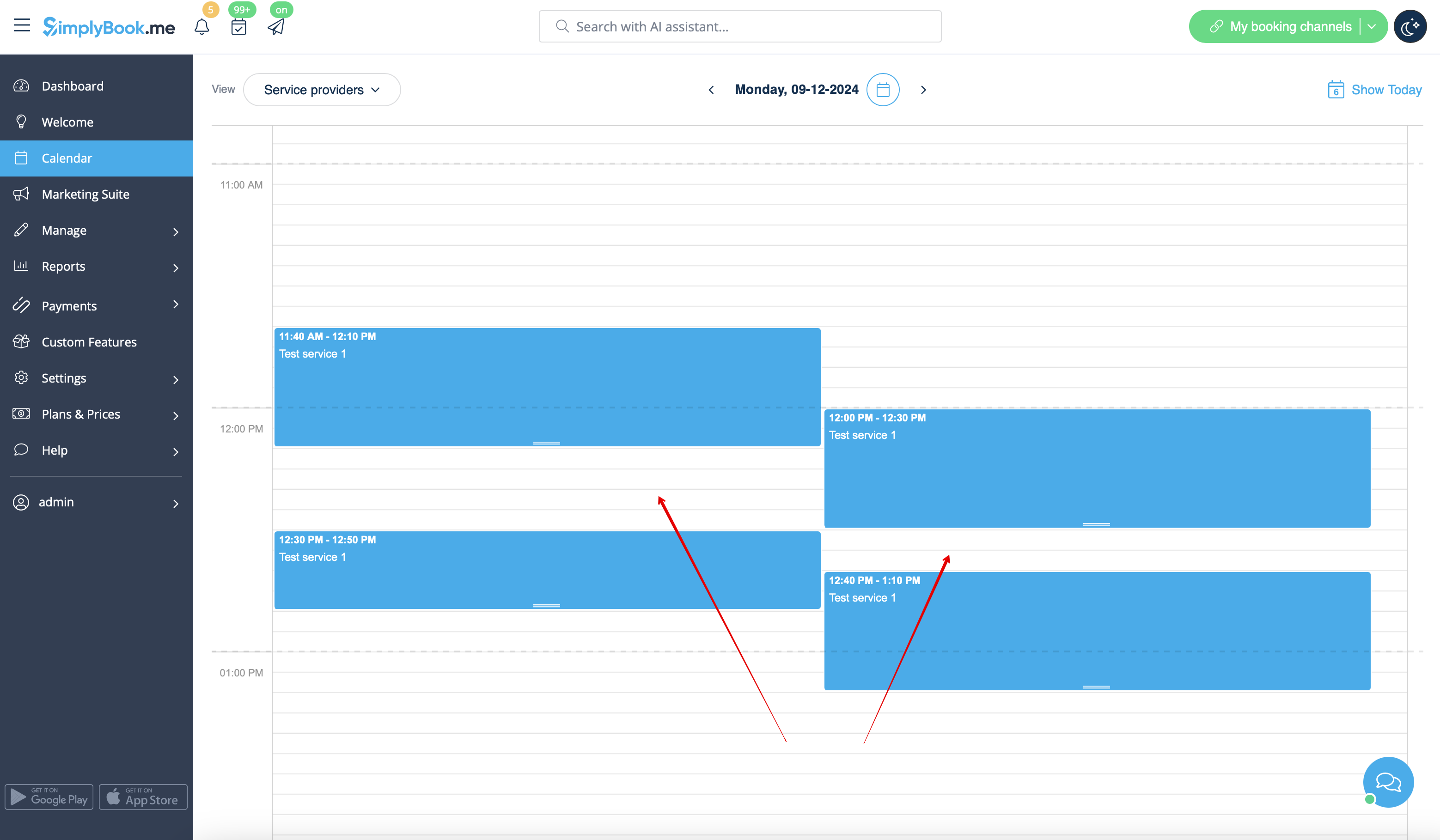
* Slots are booked at <span style="background-color:#d4f8e5; padding:5px; border-radius:5px;">12:00-12:30</span> and <span style="background-color:#d4f8e5; padding:5px; border-radius:5px;">12:40-13:10</span> | * Slots are booked at <span style="background-color:#d4f8e5; padding:5px; border-radius:5px;">12:00-12:30</span> and <span style="background-color:#d4f8e5; padding:5px; border-radius:5px;">12:40-13:10</span> | ||
| Line 35: | Line 40: | ||
</translate><translate> | </translate><translate> | ||
<!--T:6--> | |||
;How to avoid the risk of such cases: | ;How to avoid the risk of such cases: | ||
:1. Try to have service duration equal to timeframe if possible | :1. Try to have service duration equal to timeframe if possible | ||
Revision as of 08:56, 18 June 2025
In certain conditions it may happen that some period of time looks as available on your company admin side, but these timeslots are not shown on the booking website and thus cannot be booked.
It is the system peculiarity and there is currently no way to change its operation.
- Preconditions
- 1. Provider(s) are set to serve more than one client at a time.
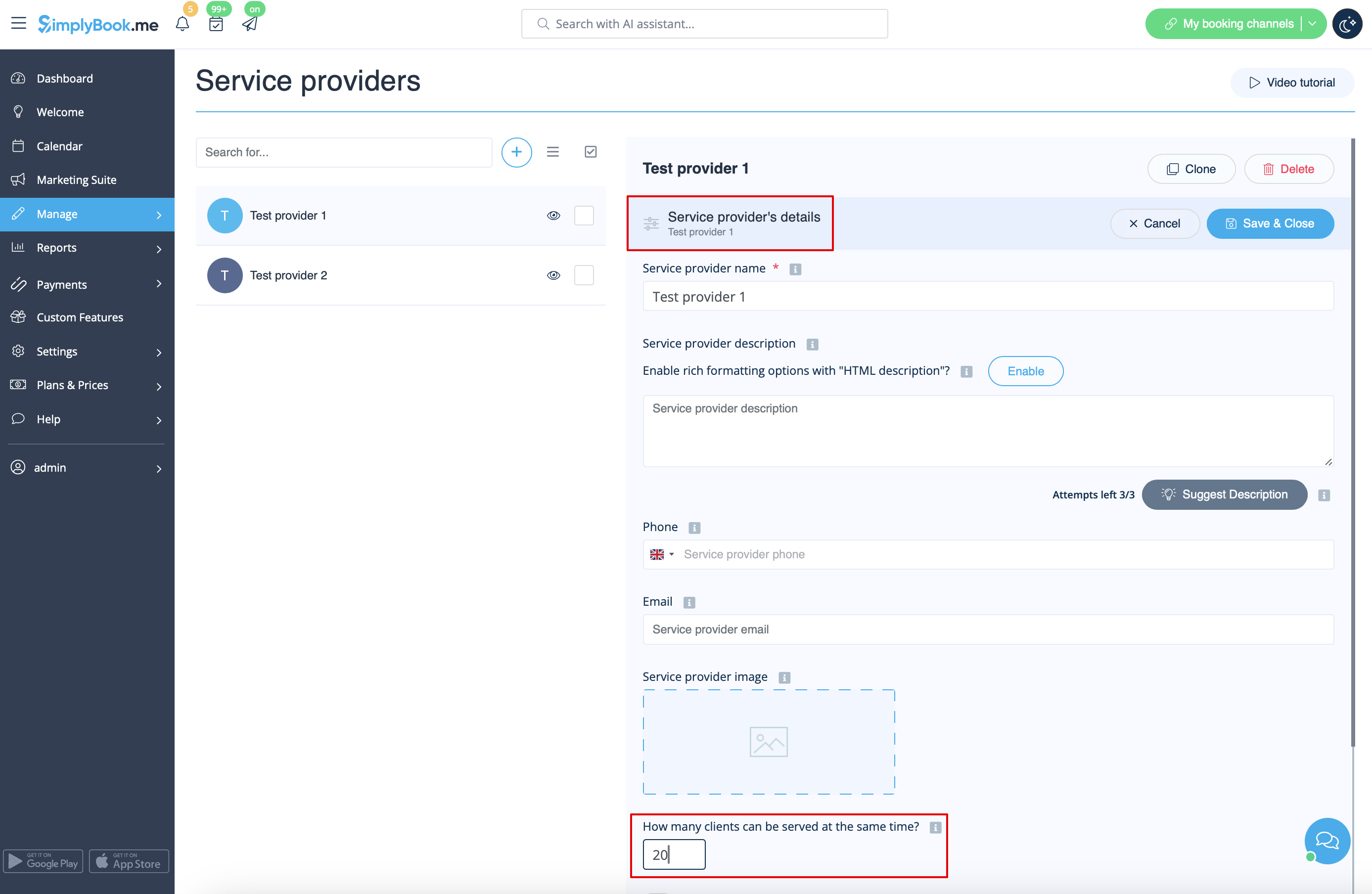
:2. Timeframe period selected in the system is less than service duration.
- For example, you have selected 10mins timeframe and set 30mins service duration.
- (If these two periods are equal this case cannot happen).
- Case example
- Slots are booked at 12:00-12:30 and 12:40-13:10
- Slots are booked at 11:40-12:10 and 12:30-12:50
- So it may seem that the period 12:10 - 12:40 is free, but in reality it is represented by two independent timeslots: 12:10-12:30 and 12:30-12:40 so 30mins service cannot be booked there.
- How to avoid the risk of such cases
- 1. Try to have service duration equal to timeframe if possible
- 2. Use modern calendar layout for the booking website and Appointment at fixed time custom feature to restrict the timeslots shifting and avoid possible gaps in-between.
