From SimplyBook.me
Created page with "Ansichten des Kalenders" |
Created page with "{{#seo: |title=Ansichten des Kalenders – SimplyBook.me |description=Passen Sie Ihre Kalenderansicht an, um Termine zu organisieren. Wählen Sie das Format, das zu Ihrem Unternehmen passt. Erfahren Sie jetzt mehr! |titlemode=anhängen |keywords=fAQ, häufig gestellte Fragen, Buchungssoftware, Fragen zum Terminsystem, Online-Termine, Kalender-Software, Buchungssystem, Buchungskalender, Terminplanungs-Software, Online-Terminplanung, Online-Terminplanung, Einrichtung, Hilf..." |
||
| Line 1: | Line 1: | ||
<languages/> | <languages/> | ||
{{#seo: |title=Ansichten des Kalenders – SimplyBook.me |description=Passen Sie Ihre Kalenderansicht an, um Termine zu organisieren. Wählen Sie das Format, das zu Ihrem Unternehmen passt. Erfahren Sie jetzt mehr! |titlemode=anhängen |keywords=fAQ, häufig gestellte Fragen, Buchungssoftware, Fragen zum Terminsystem, Online-Termine, Kalender-Software, Buchungssystem, Buchungskalender, Terminplanungs-Software, Online-Terminplanung, Online-Terminplanung, Einrichtung, Hilfe zur Einrichtung, Support, Hilfeinhalte }} | |||
{{#seo: | |||
|title= | |||
|description= | |||
|titlemode= | |||
|keywords= | |||
}} | |||
<div lang="en" dir="ltr" class="mw-content-ltr"> | <div lang="en" dir="ltr" class="mw-content-ltr"> | ||
Revision as of 09:34, 18 June 2025
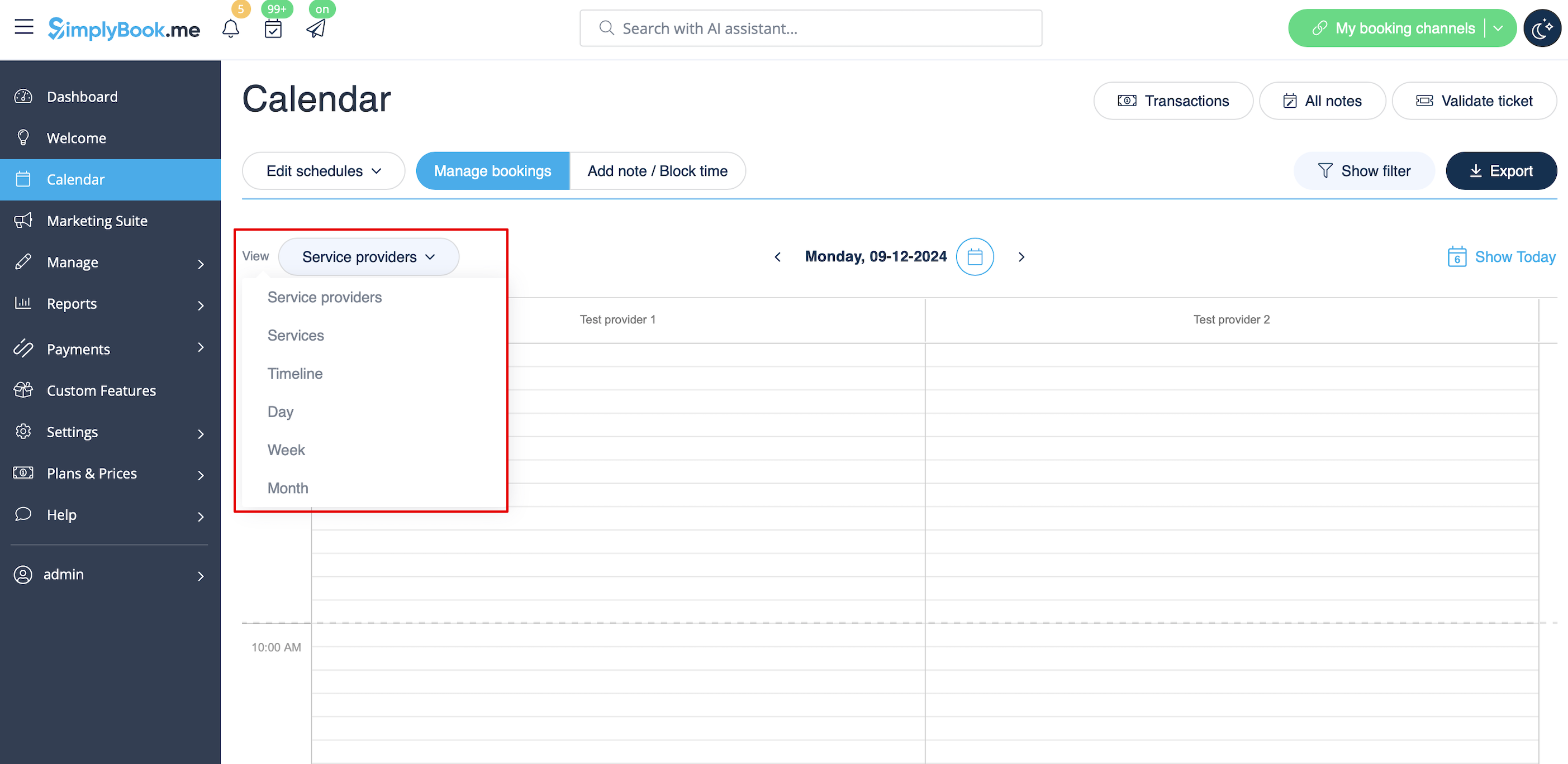
- Service providers. Shows columns with service providers and bookings/notes assigned to each service provider in the corresponding column.
- Services. Shows columns with services and bookings/notes assigned to each service in the corresponding column.
- Timeline. same as Service providers, but in horizontal view. Easier when there are multiple service providers.
- Day. Shows bookings/notes for all service providers for current day, schedule is built according to times in company's opening hours (use arrows to navigate to previous/next day). To easily distinguish bookings by different providers you can use Provider's Color Coding Custom Feature
- Week. Shows bookings/notes for all service providers for current week, schedule is built according to times in company's opening hours (use arrows to navigate to previous/next week). To easily distinguish bookings by different providers you can use Provider's Color Coding Custom Feature
- Month. Shows bookings/notes for all service providers for current month (use arrows to navigate to previous/next month).