From SimplyBook.me
Created page with "= Voorwaarden en bepalingen = <br><br> Moet uw bedrijf kogelvrij zijn? U kunt uw eigen <span style="background-color:#cdeffc; padding:5px; border-radius:5px;"> Algemene voorwaarden</span> toevoegen door de betreffende aangepaste functie te activeren in <span style="background-color:#d4f8e5; padding:5px; border-radius:5px;">Aangepaste functies</span> -> <span style="background-color:#d4f8e5; padding:5px; border-radius:5px;">Beve..." |
No edit summary |
||
| Line 2: | Line 2: | ||
<br><br> | <br><br> | ||
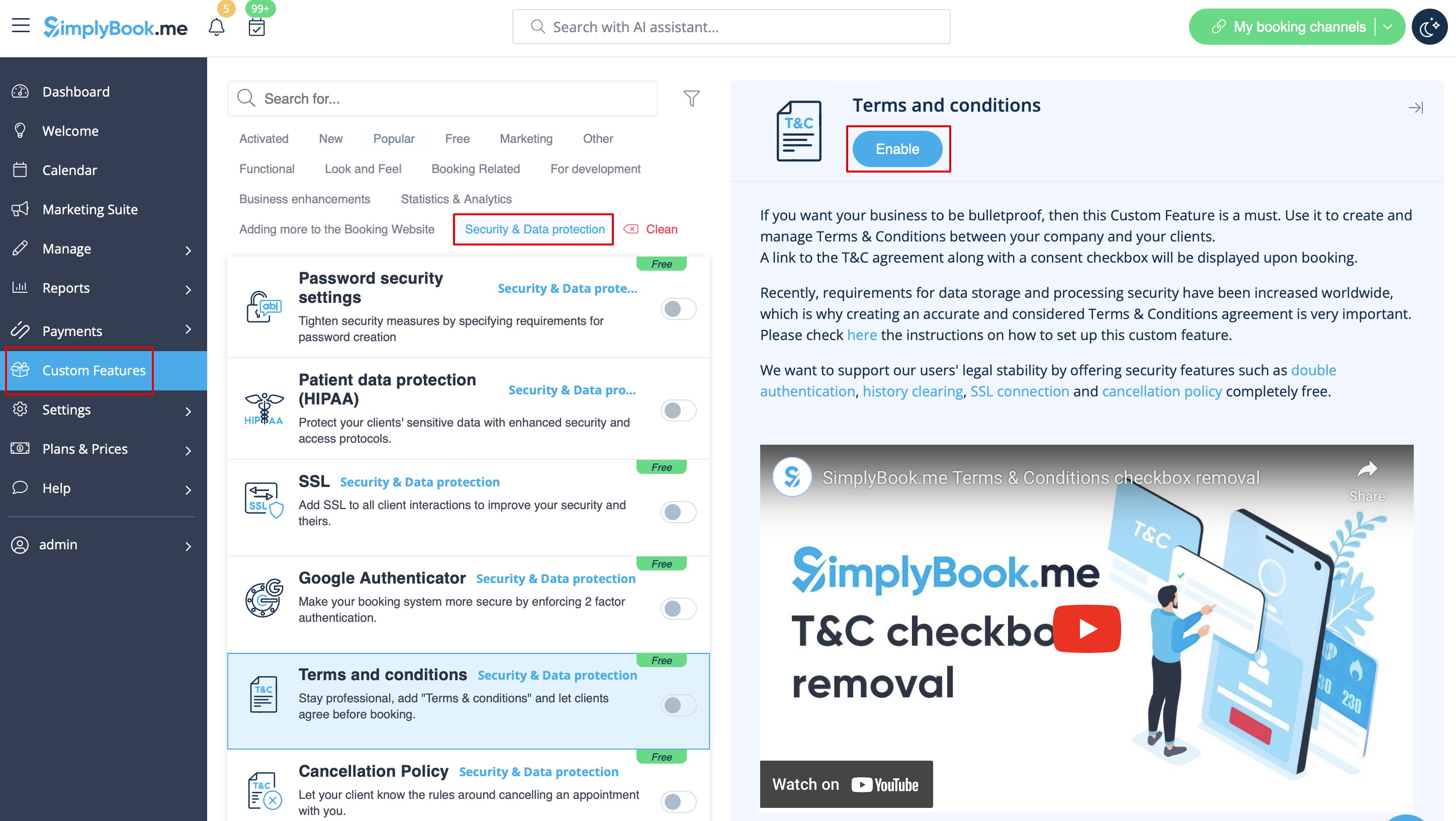
Moet uw bedrijf kogelvrij zijn? U kunt uw eigen <span style="background-color:#cdeffc; padding:5px; border-radius:5px;">[[Custom_Features#Terms_and_Conditions| Algemene voorwaarden]]</span> toevoegen door de betreffende aangepaste functie te activeren in <span style="background-color:#d4f8e5; padding:5px; border-radius:5px;">Aangepaste functies</span> -> <span style="background-color:#d4f8e5; padding:5px; border-radius:5px;">Beveiliging en gegevensbescherming</span> en de tekst van uw Algemene voorwaarden toe te voegen in de instellingen. | Moet uw bedrijf kogelvrij zijn? U kunt uw eigen <span style="background-color:#cdeffc; padding:5px; border-radius:5px;">[[Custom_Features#Terms_and_Conditions| Algemene voorwaarden]]</span> toevoegen door de betreffende aangepaste functie te activeren in <span style="background-color:#d4f8e5; padding:5px; border-radius:5px;">Aangepaste functies</span> -> <span style="background-color:#d4f8e5; padding:5px; border-radius:5px;">Beveiliging en gegevensbescherming</span> en de tekst van uw Algemene voorwaarden toe te voegen in de instellingen. | ||
[[File:T & C enable path redesigned.png|1200px| border|center|link=https://help.simplybook.me/images/2/21/T_%26_C_enable_path_redesigned.png]] | |||
<br><br> | <br><br> | ||
Latest revision as of 13:39, 23 June 2025
Voorwaarden en bepalingen
Moet uw bedrijf kogelvrij zijn? U kunt uw eigen Algemene voorwaarden toevoegen door de betreffende aangepaste functie te activeren in Aangepaste functies -> Beveiliging en gegevensbescherming en de tekst van uw Algemene voorwaarden toe te voegen in de instellingen.