Created page with "Anpassat intervall före tjänstbokning – anpassad funktion" Tags: Mobile edit Mobile web edit |
Updating to match new version of source page |
||
| Line 2: | Line 2: | ||
{{#seo: |title=Anpassat intervall före tjänstbokning – SimplyBook.me |description=Ställ in anpassade intervall innan kunder kan boka tjänster. Hantera bokningar effektivt med denna flexibla funktion. Aktivera den idag! |titlemode=lägg till |keywords=faq, vanliga frågor, bokningsprogramvara, frågor om bokningssystem, onlinebokningar, kalenderprogramvara, bokningssystem, bokningskalender, schemaläggningsprogramvara, onlinebokning, onlinebokning, plugins, anpassade funktioner, anpassad bokningssida, domännamn, anpassat domännamn, anpassad webbadress }} | {{#seo: |title=Anpassat intervall före tjänstbokning – SimplyBook.me |description=Ställ in anpassade intervall innan kunder kan boka tjänster. Hantera bokningar effektivt med denna flexibla funktion. Aktivera den idag! |titlemode=lägg till |keywords=faq, vanliga frågor, bokningsprogramvara, frågor om bokningssystem, onlinebokningar, kalenderprogramvara, bokningssystem, bokningskalender, schemaläggningsprogramvara, onlinebokning, onlinebokning, plugins, anpassade funktioner, anpassad bokningssida, domännamn, anpassat domännamn, anpassad webbadress }} | ||
<div lang="en" dir="ltr" class="mw-content-ltr"> | |||
<br><br> | <br><br> | ||
This new feature allows users to set custom minimum and maximum time intervals before booking for each service or class. This feature gives the user more control over their booking schedule and allows them to tailor their services to their specific needs. | This new feature allows users to set custom minimum and maximum time intervals before booking for each service or class. This feature gives the user more control over their booking schedule and allows them to tailor their services to their specific needs. | ||
<br><br> | <br><br> | ||
</div> | |||
<div lang="en" dir="ltr" class="mw-content-ltr"> | |||
;How to use | ;How to use | ||
</div> | |||
<div lang="en" dir="ltr" class="mw-content-ltr"> | |||
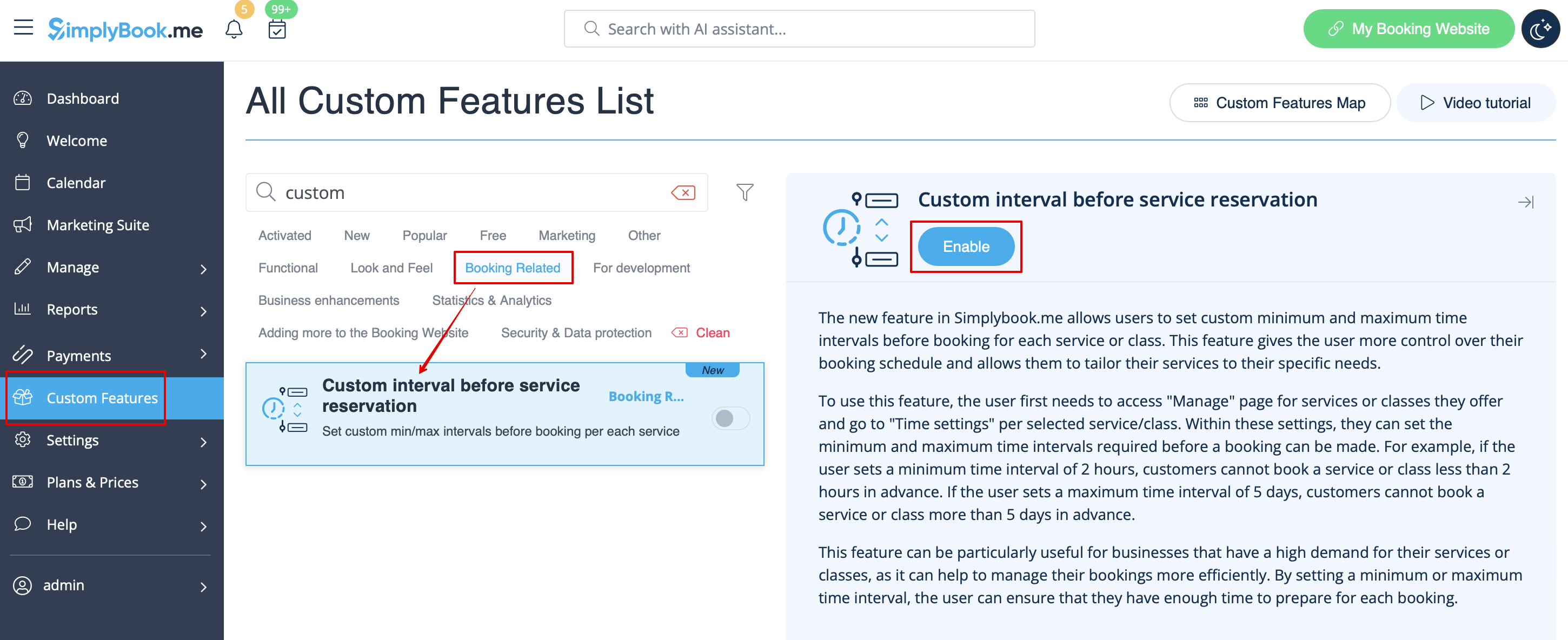
1. Enable Custom interval before service reservation custom feature in the '''Custom Feature''' section -> '''Booking Related'''. | 1. Enable Custom interval before service reservation custom feature in the '''Custom Feature''' section -> '''Booking Related'''. | ||
[[File:Custom interval enable path redesigned.png|1200px|center|link=https://help.simplybook.me/images/2/2e/Custom_interval_enable_path_redesigned.png]] | [[File:Custom interval enable path redesigned.png|1200px|center|link=https://help.simplybook.me/images/2/2e/Custom_interval_enable_path_redesigned.png]] | ||
<br><br> | <br><br> | ||
</div> | |||
<div lang="en" dir="ltr" class="mw-content-ltr"> | |||
2. Go to '''Manage''' -> '''Services''' and choose the service you wish to adjust. Click on '''Time details''' tab and within these settings, you can set the minimum and maximum time intervals required before a booking can be made. | 2. Go to '''Manage''' -> '''Services''' and choose the service you wish to adjust. Click on '''Time details''' tab and within these settings, you can set the minimum and maximum time intervals required before a booking can be made. | ||
[[File:Custom interval setting per service path redesigned.png|1200px|center|link=https://help.simplybook.me/images/7/75/Custom_interval_setting_per_service_path_redesigned.png]] | [[File:Custom interval setting per service path redesigned.png|1200px|center|link=https://help.simplybook.me/images/7/75/Custom_interval_setting_per_service_path_redesigned.png]] | ||
| Line 15: | Line 22: | ||
For example, if you set a minimum time interval of 2 hours, your customers cannot book a service or class less than 2 hours in advance. If you set a maximum time interval of 5 days, your customers cannot book a service or class more than 5 days in advance. | For example, if you set a minimum time interval of 2 hours, your customers cannot book a service or class less than 2 hours in advance. If you set a maximum time interval of 5 days, your customers cannot book a service or class more than 5 days in advance. | ||
<br><br> | <br><br> | ||
</div> | |||
<div lang="en" dir="ltr" class="mw-content-ltr"> | |||
3. After all adjustments done, click on '''Save&Close''' button. | 3. After all adjustments done, click on '''Save&Close''' button. | ||
<br><br> | <br><br> | ||
This feature can be particularly useful for businesses that have a high demand for their services or classes, as it can help to manage their bookings more efficiently. By setting a minimum or maximum time interval, the user can ensure that they have enough time to prepare for each booking.<br><br><br><br> | This feature can be particularly useful for businesses that have a high demand for their services or classes, as it can help to manage their bookings more efficiently. By setting a minimum or maximum time interval, the user can ensure that they have enough time to prepare for each booking.<br><br><br><br> | ||
</div> | |||
Revision as of 07:53, 1 July 2025
This new feature allows users to set custom minimum and maximum time intervals before booking for each service or class. This feature gives the user more control over their booking schedule and allows them to tailor their services to their specific needs.
- How to use
1. Enable Custom interval before service reservation custom feature in the Custom Feature section -> Booking Related.
2. Go to Manage -> Services and choose the service you wish to adjust. Click on Time details tab and within these settings, you can set the minimum and maximum time intervals required before a booking can be made.
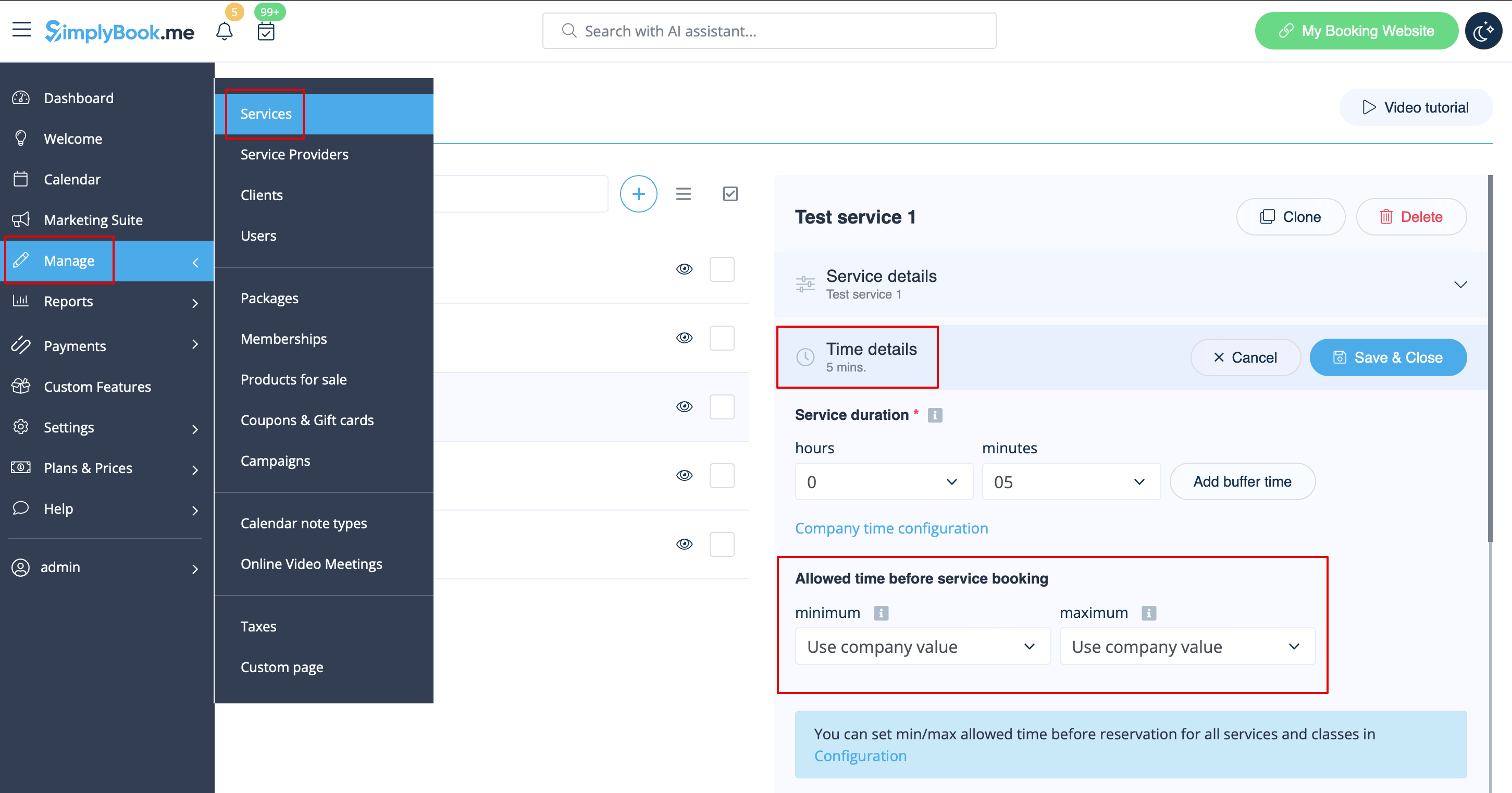
For example, if you set a minimum time interval of 2 hours, your customers cannot book a service or class less than 2 hours in advance. If you set a maximum time interval of 5 days, your customers cannot book a service or class more than 5 days in advance.
3. After all adjustments done, click on Save&Close button.
This feature can be particularly useful for businesses that have a high demand for their services or classes, as it can help to manage their bookings more efficiently. By setting a minimum or maximum time interval, the user can ensure that they have enough time to prepare for each booking.
