Created page with "<br><br> Denna nya funktion gör det möjligt för användare att ställa in anpassade minimi- och maximitidsintervall före bokning för varje tjänst eller klass. Funktionen ger användaren större kontroll över sin bokningskalender och gör det möjligt att anpassa tjänsterna efter specifika behov. <br><br>" Tags: Mobile edit Mobile web edit |
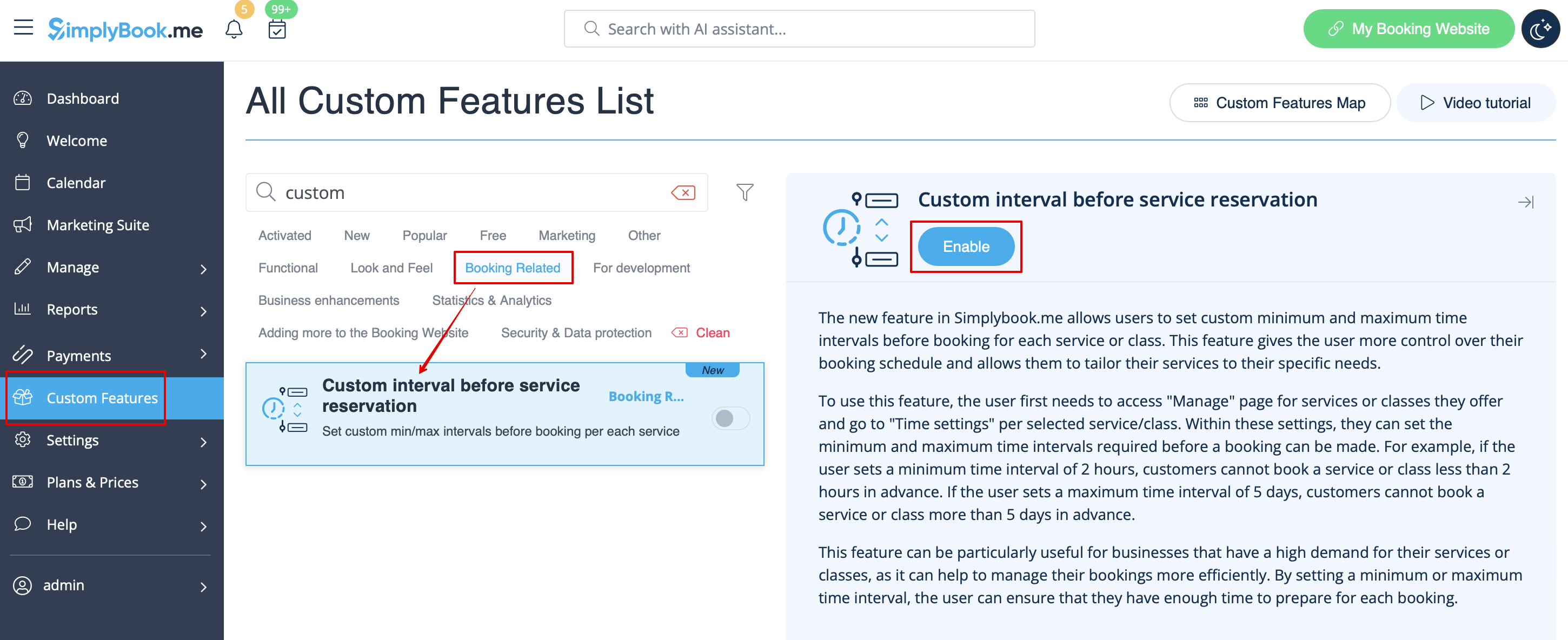
Created page with "1. Aktivera anpassad funktion för anpassat intervall före tjänstbokning i avsnittet '''Anpassade funktioner''' -> '''Bokningsrelaterat'''. 1200px|center|link=https://help.simplybook.me/images/2/2e/Custom_interval_enable_path_redesigned.png <br><br>" |
||
| Line 7: | Line 7: | ||
;Hur man använder | ;Hur man använder | ||
1. Aktivera anpassad funktion för anpassat intervall före tjänstbokning i avsnittet '''Anpassade funktioner''' -> '''Bokningsrelaterat'''. | |||
1. | |||
[[File:Custom interval enable path redesigned.png|1200px|center|link=https://help.simplybook.me/images/2/2e/Custom_interval_enable_path_redesigned.png]] | [[File:Custom interval enable path redesigned.png|1200px|center|link=https://help.simplybook.me/images/2/2e/Custom_interval_enable_path_redesigned.png]] | ||
<br><br> | <br><br> | ||
<div lang="en" dir="ltr" class="mw-content-ltr"> | <div lang="en" dir="ltr" class="mw-content-ltr"> | ||
2. Go to '''Manage''' -> '''Services''' and choose the service you wish to adjust. Click on '''Time details''' tab and within these settings, you can set the minimum and maximum time intervals required before a booking can be made. | 2. Go to '''Manage''' -> '''Services''' and choose the service you wish to adjust. Click on '''Time details''' tab and within these settings, you can set the minimum and maximum time intervals required before a booking can be made. | ||
Revision as of 08:05, 1 July 2025
Denna nya funktion gör det möjligt för användare att ställa in anpassade minimi- och maximitidsintervall före bokning för varje tjänst eller klass. Funktionen ger användaren större kontroll över sin bokningskalender och gör det möjligt att anpassa tjänsterna efter specifika behov.
- Hur man använder
1. Aktivera anpassad funktion för anpassat intervall före tjänstbokning i avsnittet Anpassade funktioner -> Bokningsrelaterat.
2. Go to Manage -> Services and choose the service you wish to adjust. Click on Time details tab and within these settings, you can set the minimum and maximum time intervals required before a booking can be made.
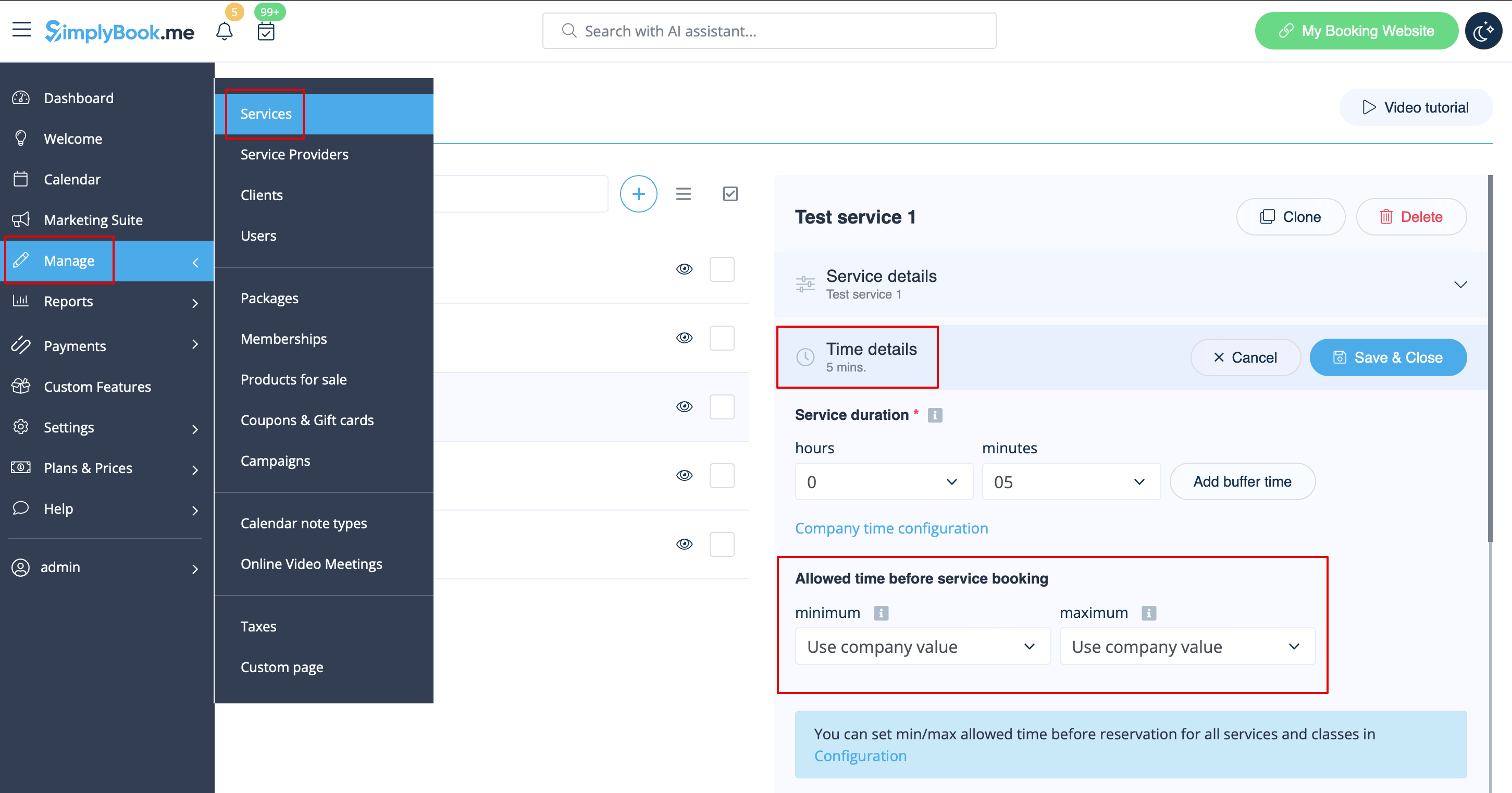
For example, if you set a minimum time interval of 2 hours, your customers cannot book a service or class less than 2 hours in advance. If you set a maximum time interval of 5 days, your customers cannot book a service or class more than 5 days in advance.
3. After all adjustments done, click on Save&Close button.
This feature can be particularly useful for businesses that have a high demand for their services or classes, as it can help to manage their bookings more efficiently. By setting a minimum or maximum time interval, the user can ensure that they have enough time to prepare for each booking.

