No edit summary Tags: Mobile edit Mobile web edit |
Created page with "<div class="mw-collapsible mw-collapsed" data-expandtext="Show" data-collapsetext="Hide" style="width:800px;"> <span class="qa"> Många tjänster</span> <div class="mw-collapsible-content"> '''Kategorier är''' avsedda att gruppera tjänster. De kan läggas till med hjälp av den anpassade funktionen Custom_Features#Service_Categories| Tjäns..." Tags: Mobile edit Mobile web edit |
||
| Line 99: | Line 99: | ||
</div> | </div> | ||
<br/> | <br/> | ||
<div class="mw-collapsible mw-collapsed" data-expandtext="Show" data-collapsetext="Hide" style="width:800px;"> | <div class="mw-collapsible mw-collapsed" data-expandtext="Show" data-collapsetext="Hide" style="width:800px;"> | ||
<span class="qa">[[Categories_and_Locations#How_to_add_Category| | <span class="qa">[[Categories_and_Locations#How_to_add_Category| Många tjänster]]</span> | ||
<div class="mw-collapsible-content"> | <div class="mw-collapsible-content"> | ||
[[Custom_Features#Service_Categories| ''' | [[Custom_Features#Service_Categories| '''Kategorier är''']] avsedda att gruppera tjänster. De kan läggas till med hjälp av [[Custom_Features#Service_Categories| den anpassade]] funktionen [[Custom_Features#Service_Categories| Tjänstekategorier]]. | ||
; | ;Så här lägger du till: | ||
Aktivera [[Custom_Features#Service_Categories | funktionen Tjänstekategorier]]. I Hantera//Tjänster//Lägg till kategori skapar du alla nödvändiga kategorier. Klicka på fliken "Kategoritjänster" för kategorin och markera de rutor som är nödvändiga för att koppla tjänster till kategorin. | |||
</div> | </div> | ||
</div> | </div> | ||
<br/> | <br/> | ||
<div class="mw-collapsible mw-collapsed" data-expandtext="Show" data-collapsetext="Hide" style="width:800px;"> | <div class="mw-collapsible mw-collapsed" data-expandtext="Show" data-collapsetext="Hide" style="width:800px;"> | ||
<span class="qa">[[Adding_services,_providers_and_availability(new_interface)#How_to_attach_services_to_provider | | <span class="qa">[[Adding_services,_providers_and_availability(new_interface)#How_to_attach_services_to_provider | Leverantörer utför endast vissa tjänster]]</span> | ||
<div class="mw-collapsible-content"> | <div class="mw-collapsible-content"> | ||
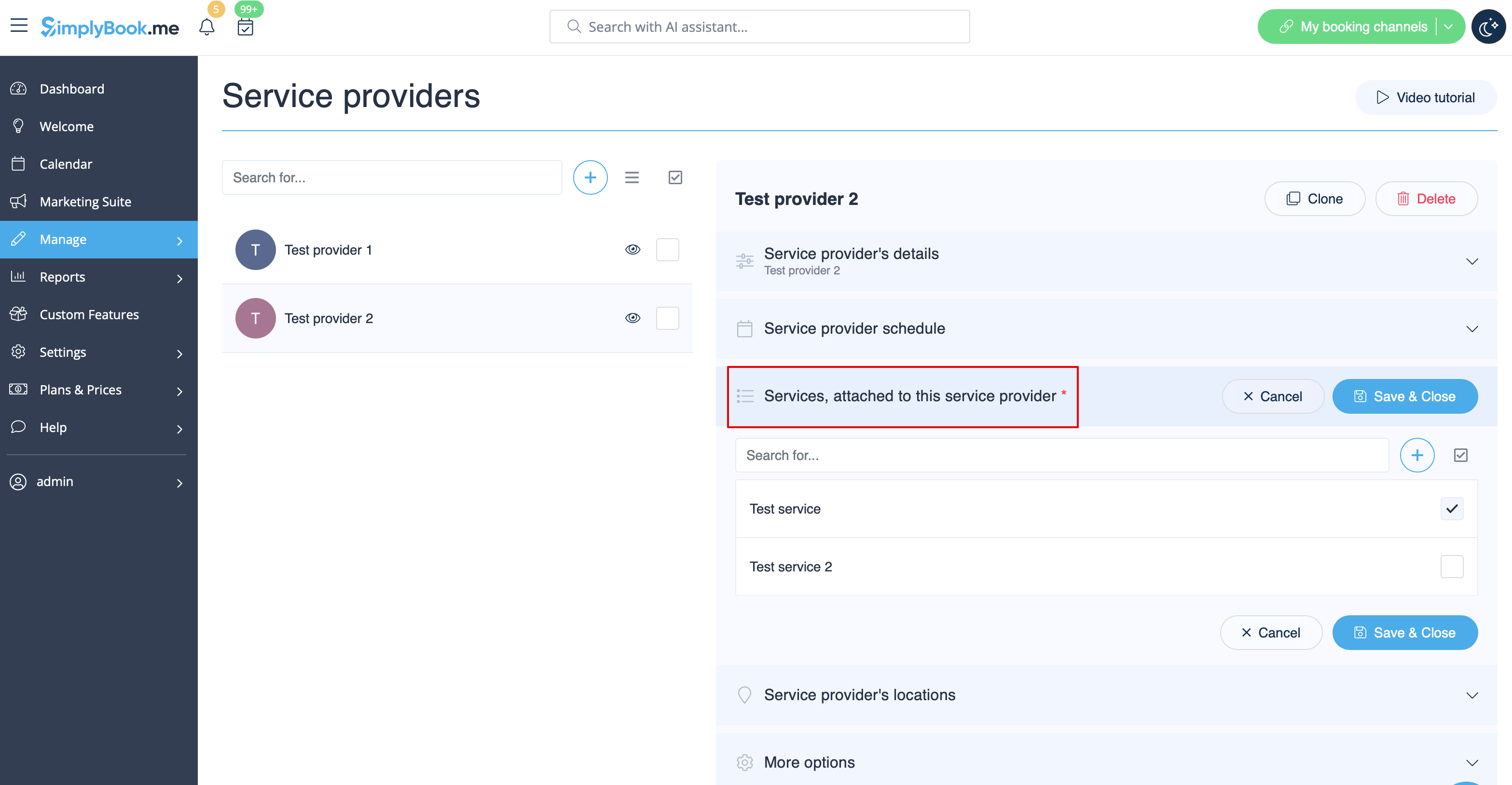
I Hantera//Tjänsteleverantörer//välj önskad leverantör//Tjänster, markera kryssrutorna för nödvändiga tjänster som ska kopplas till denna tjänsteleverantör.<br/> | |||
[[File:Provider edit attached services redesigned.png|1200px | center|link=https://help.simplybook.me/images/2/23/Provider_edit_attached_services_redesigned.png]]<br/> | [[File:Provider edit attached services redesigned.png|1200px | center|link=https://help.simplybook.me/images/2/23/Provider_edit_attached_services_redesigned.png]]<br/> | ||
</div> | </div> | ||
</div> | </div> | ||
<br/> | <br/> | ||
Latest revision as of 08:06, 1 July 2025
Hur man skapar scheman för tjänster
- I vårt system är det möjligt att ställa in scheman för varje tjänst. För att göra detta, följ dessa steg:
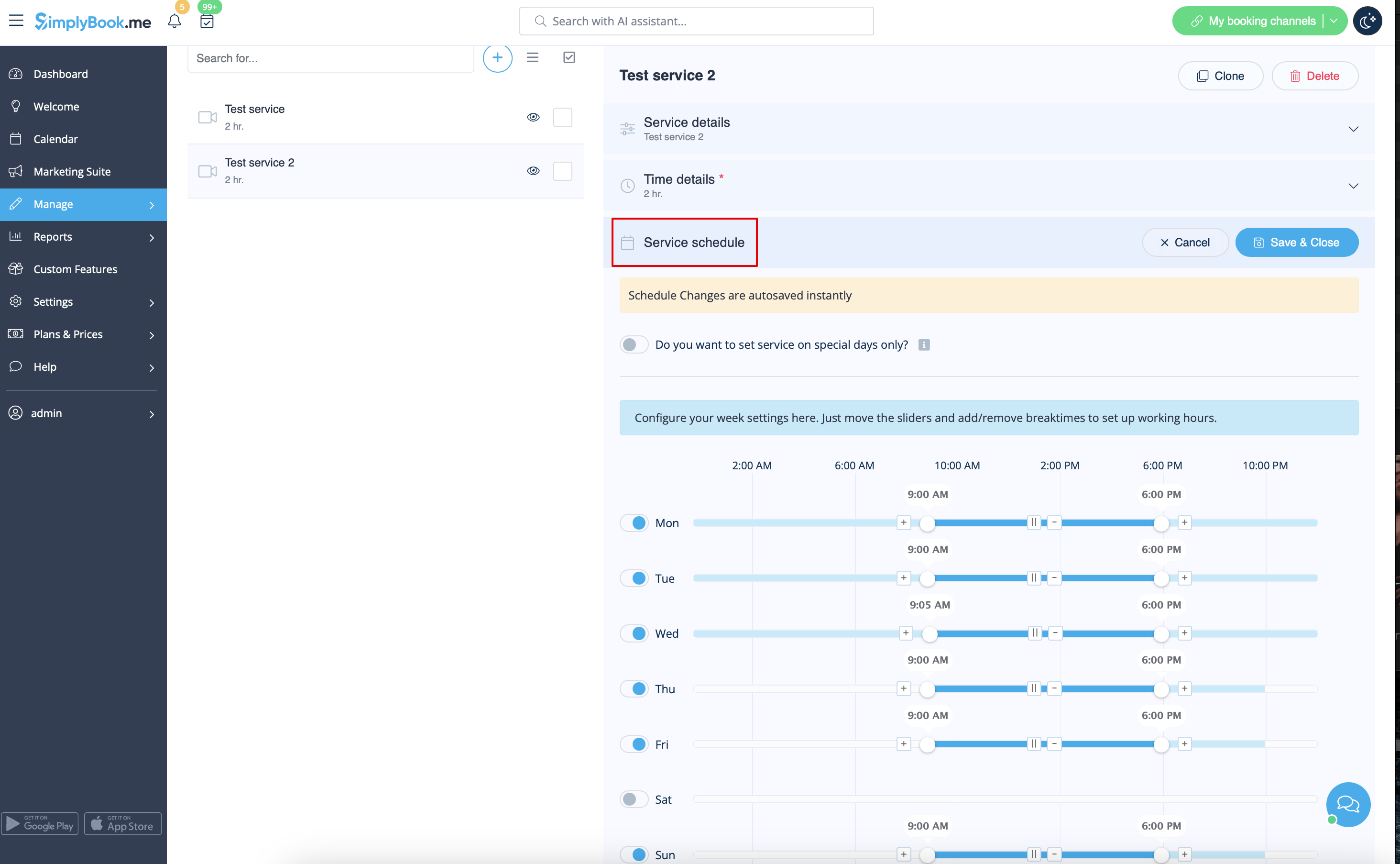
- 1. Gå till Hantera // Tjänster// Lägg till tjänst och skapa alla nödvändiga tjänster.
- 2. Klicka sedan på fliken "Tjänstschema" i Hantera // Tjänster och ställ in schema för varje tjänst.
Händelser (tjänster på vissa datum)
Alternativ 1 (som tjänst med eget schema)
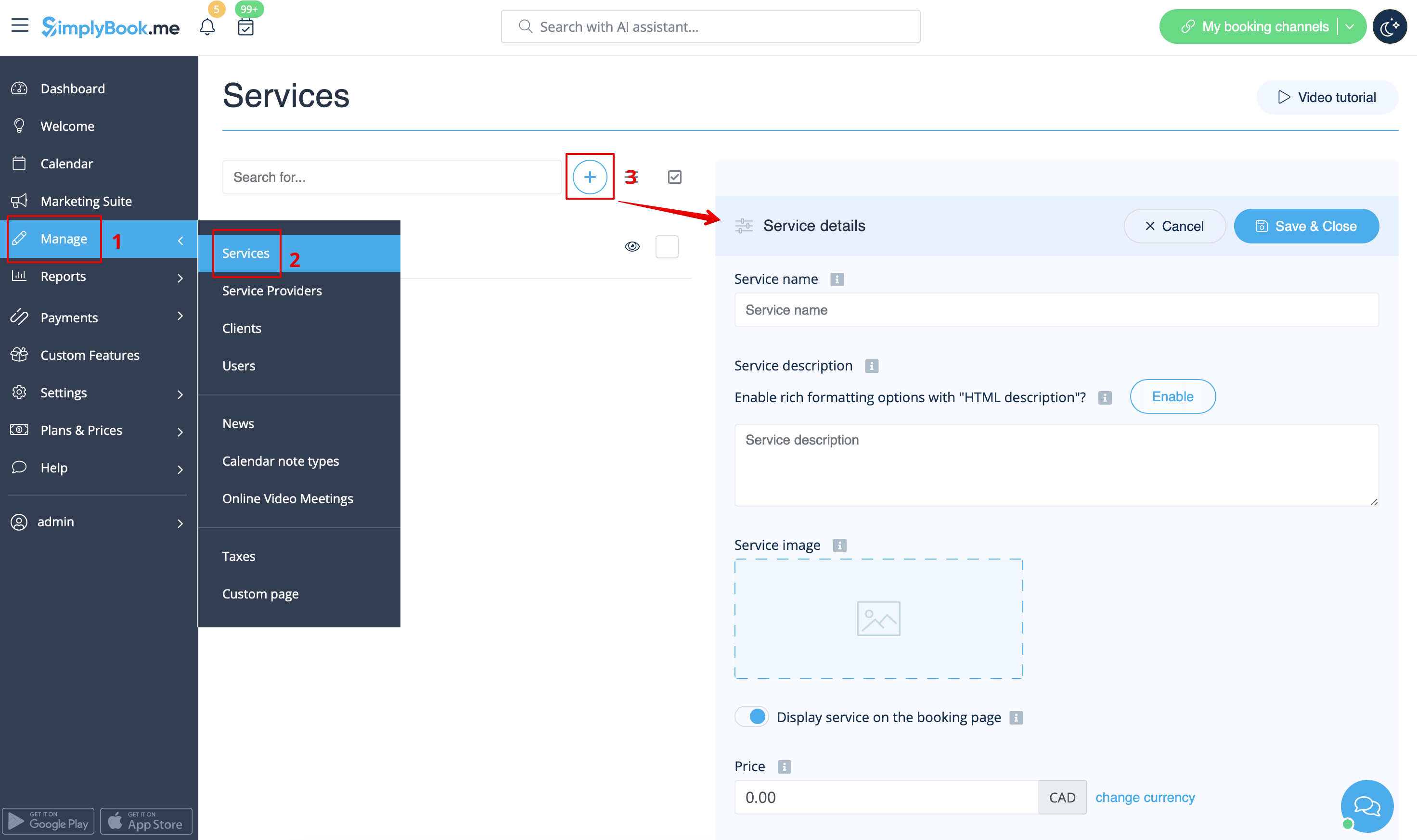
- 1. I Hantera//Tjänster klickar du på ikonen "+" för att skapa en ny tjänst.
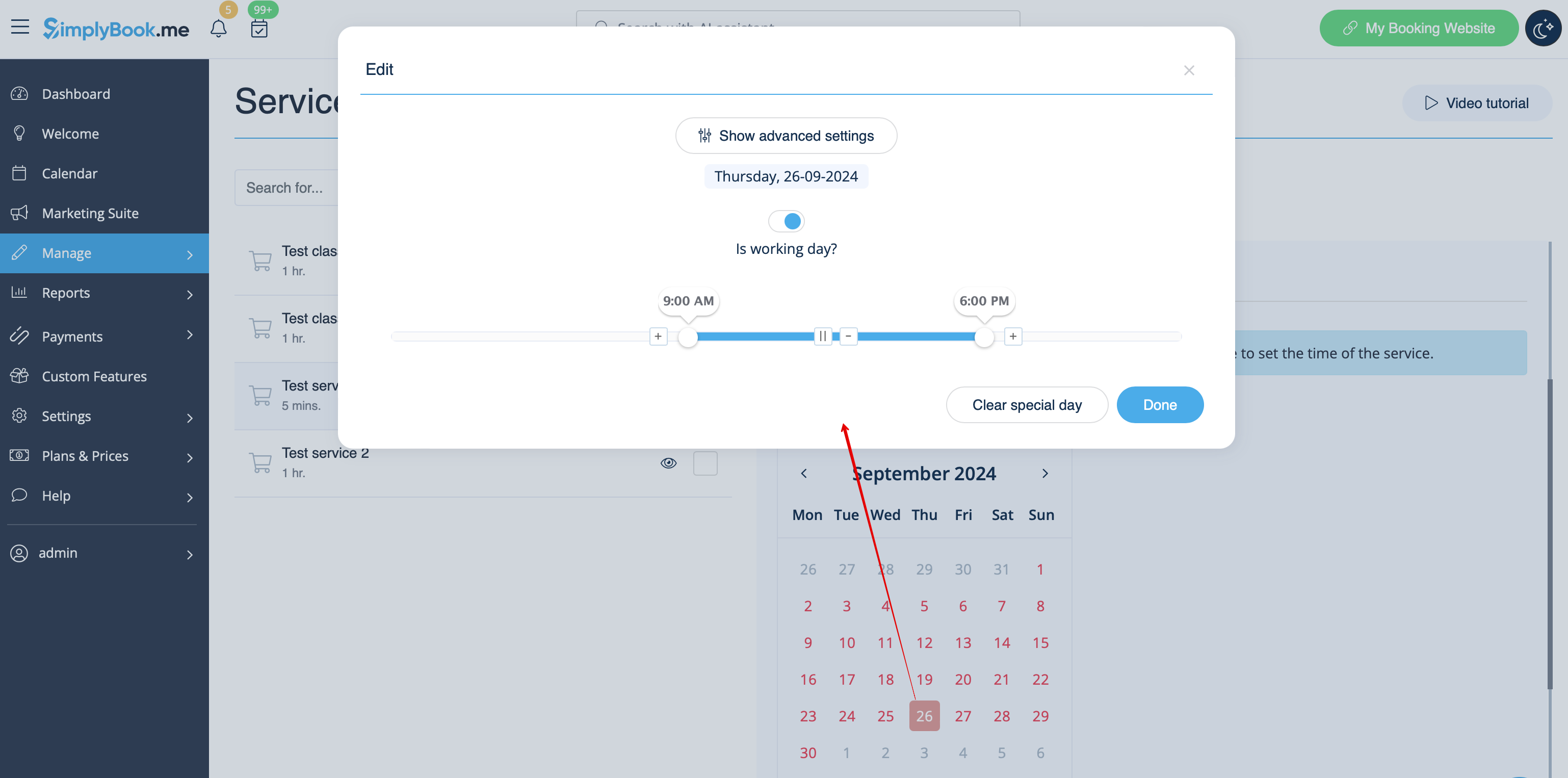
- 2. I Hantera//Tjänster väljer du fliken "Tjänstschema" på den nyskapade tjänsten och aktiverar alternativet "Vill du ställa in tjänsten endast på särskilda dagar?".
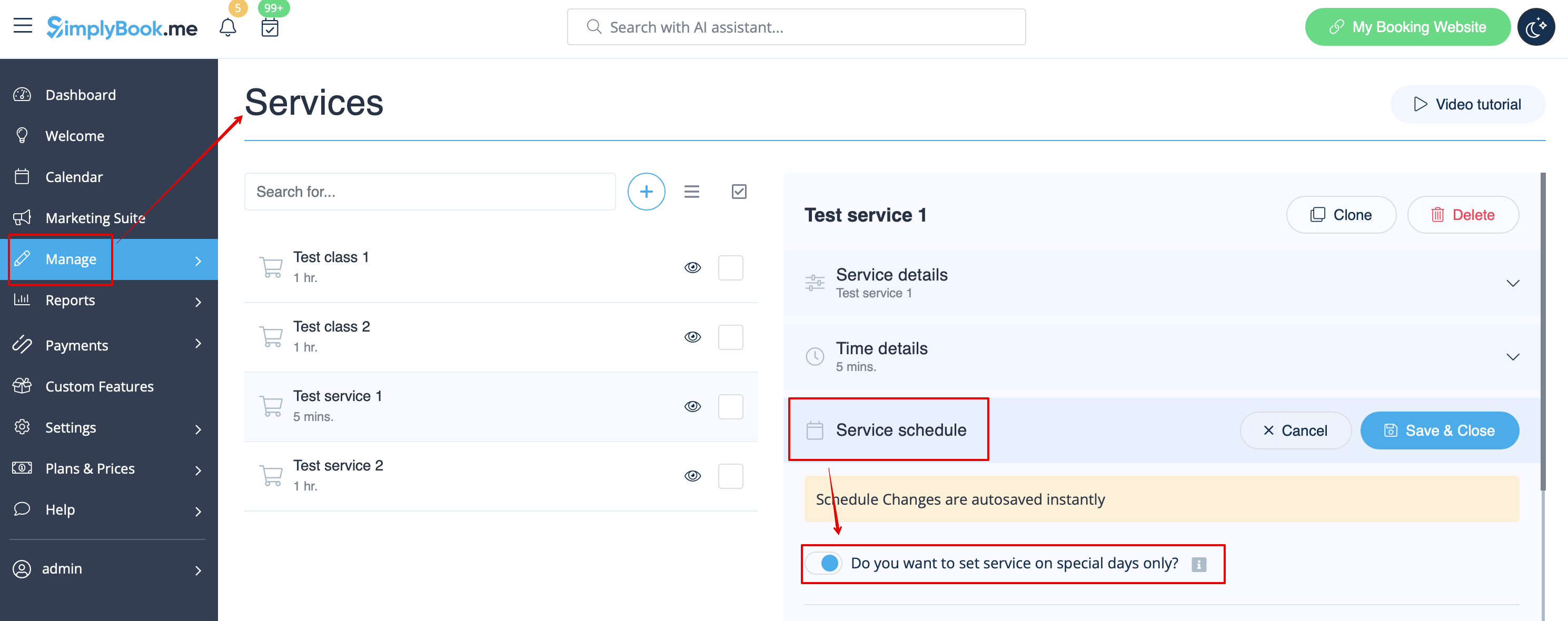
- 3. Använd sedan kalendern, klicka på de datum du vill öppna och ställ in schemat för dessa datum genom att flytta reglagen (den ljusblå zonen är öppen tid).
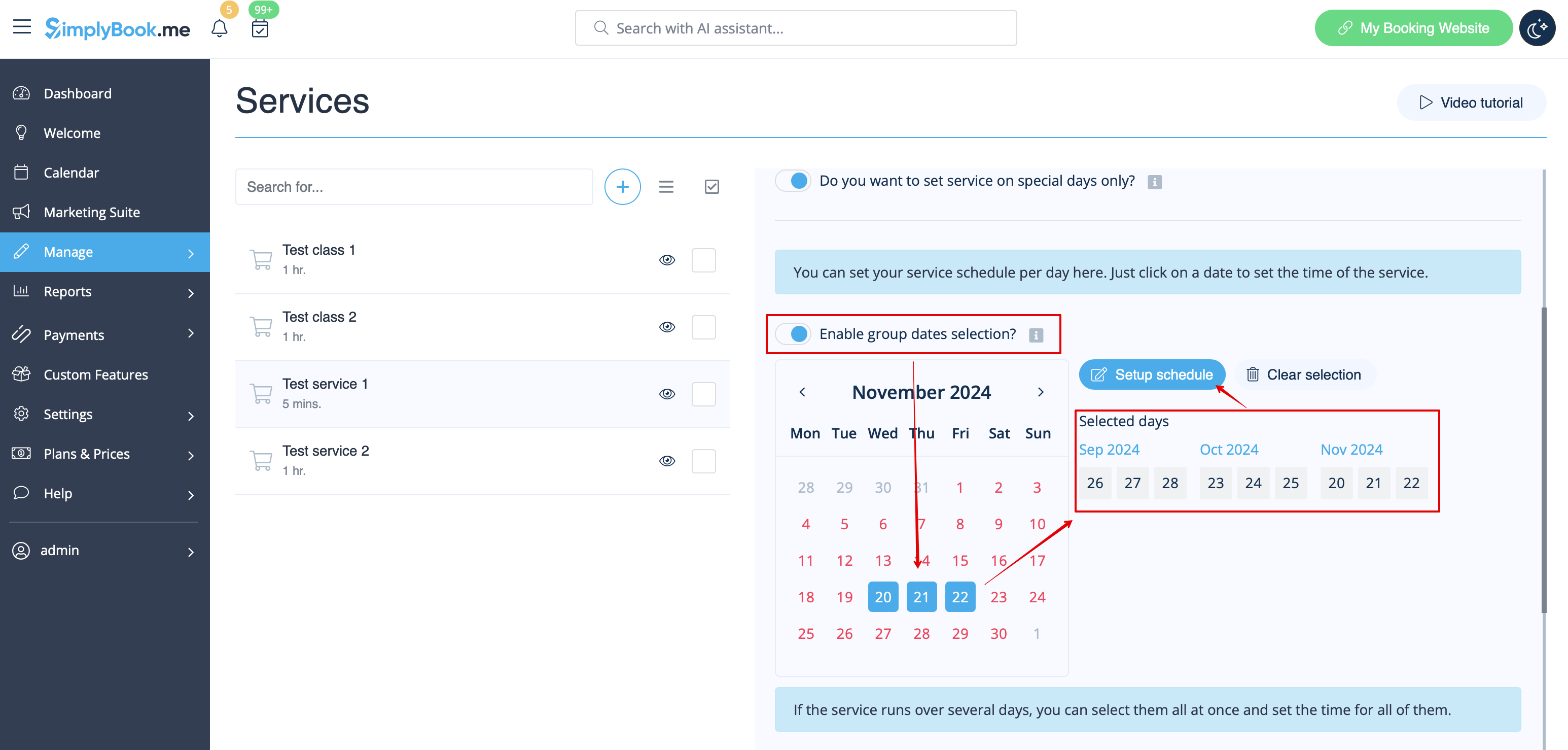
- Om du behöver välja flera datum samtidigt, aktivera "Aktivera val av gruppdatum?", välj de datum du vill redigera och klicka på "Ställ in schema" för att ställa in tiderna.
- 4. Anslut tjänsten till nödvändig leverantör i fliken "Tjänsteleverantörer".
Alternativ 2 (som händelse med hjälp av den anpassade funktionen Klasser )
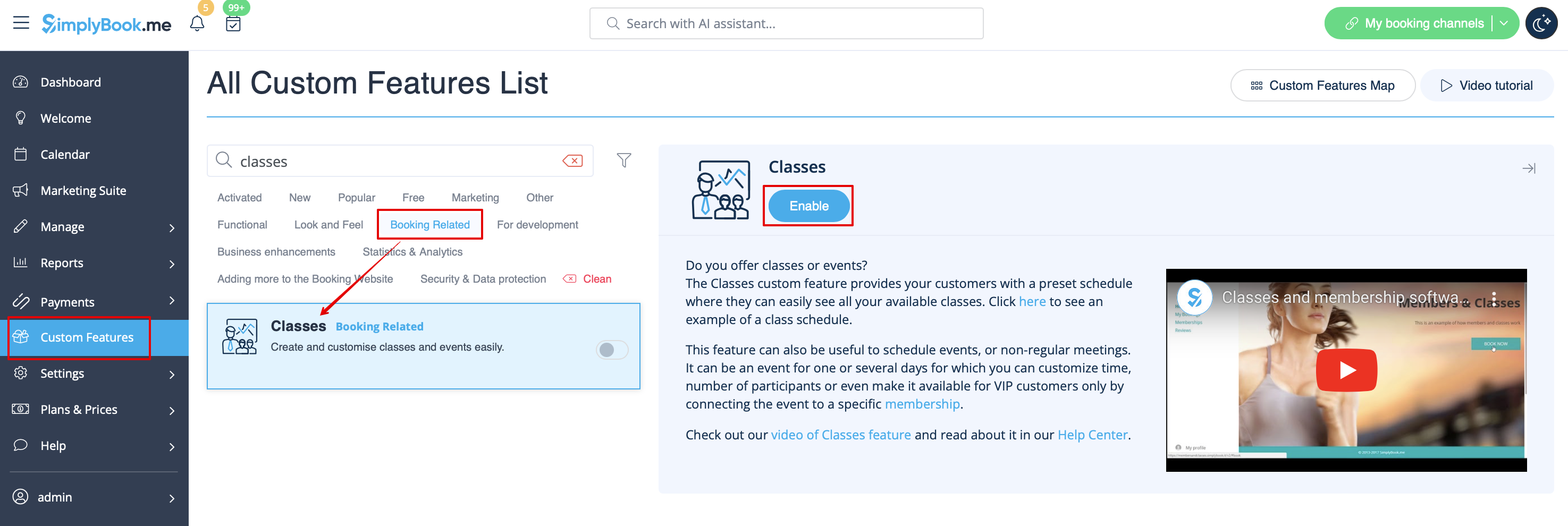
- 1. Aktivera anpassningsfunktionen Klasser på sidan Anpassade funktioner.
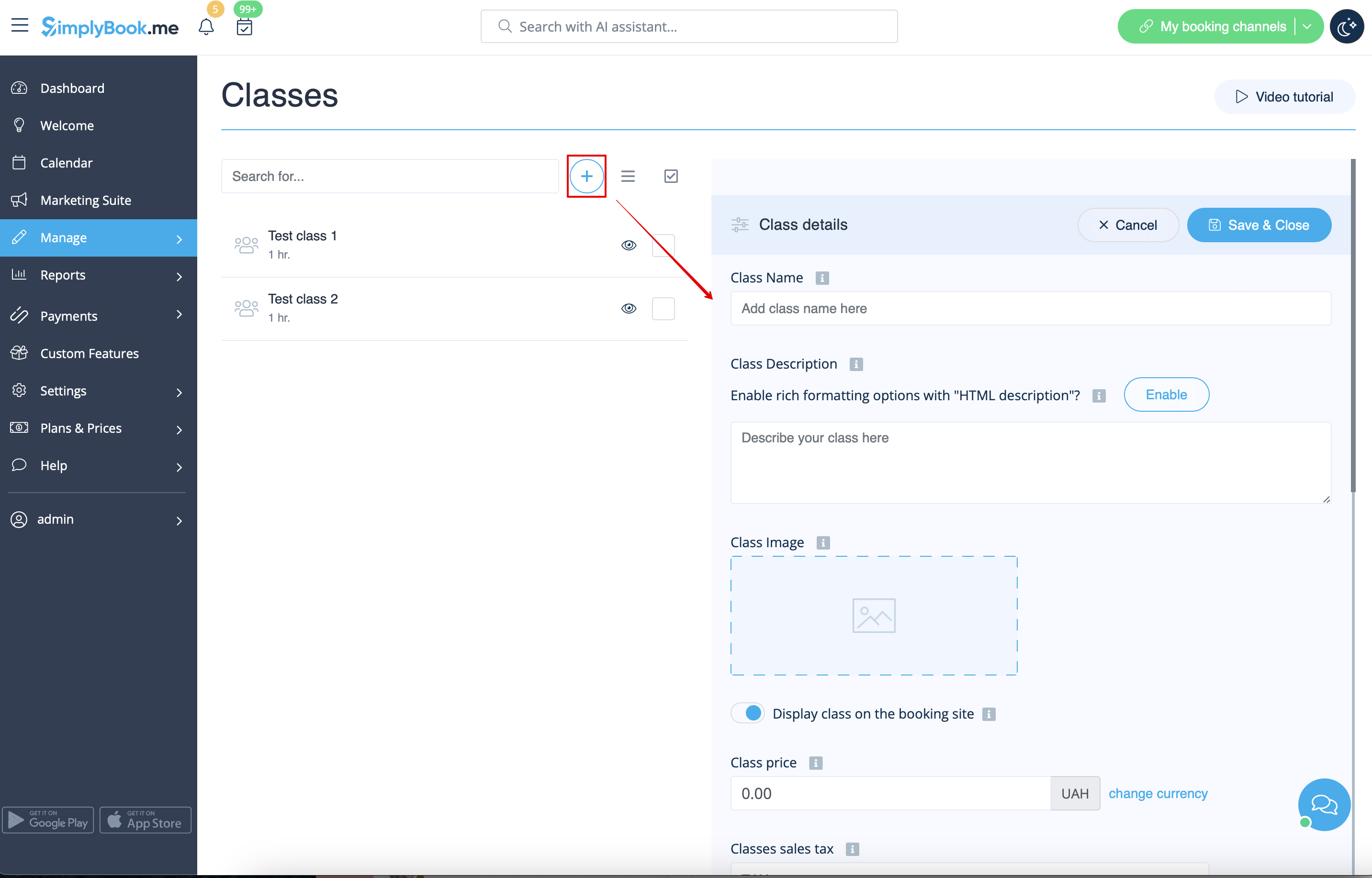
- 2. Navigera till sidan Hantera//Klasser och skapa en ny klass.
- 3. Välj fliken "Klasschema" på den nyskapade klassen och aktivera alternativet "Vill du ställa in tjänsten endast på särskilda dagar?"
- 4. Använd sedan kalendern, klicka på de datum du vill öppna och ställ in schemat för dessa datum genom att flytta skjutreglagen (den ljusblå zonen är öppen tid).
hur händelser (klasser) fungerar
Den allmänna logiken för händelser (klasser) är att skapa en tjänst + leverantör relaterad till den med datum som valts i inställningarna för händelsen (klassen) som speciella dagar. När du använder den anpassade funktionen Klasser skapar händelsen en tjänst + leverantör relaterad till den med identiskt namn. För att händelsen ska fungera korrekt på de datum som behövs bör du inte radera leverantörer med identiskt namn relaterade till händelsen (men du kan enkelt ändra deras namn) och du bör inte koppla bort leverantörer från händelsen.

Du kan skapa återkommande tjänster och göra det möjligt för dina kunder att boka ett visst antal sessioner.
Så här skapar du en återkommande tjänst:
- 1. Gå till Hantera // Tjänster // fliken "Tidsdetaljer" för den önskade tjänsten.
- 2. Aktivera "Gör tjänsten återkommande (paket)?" där
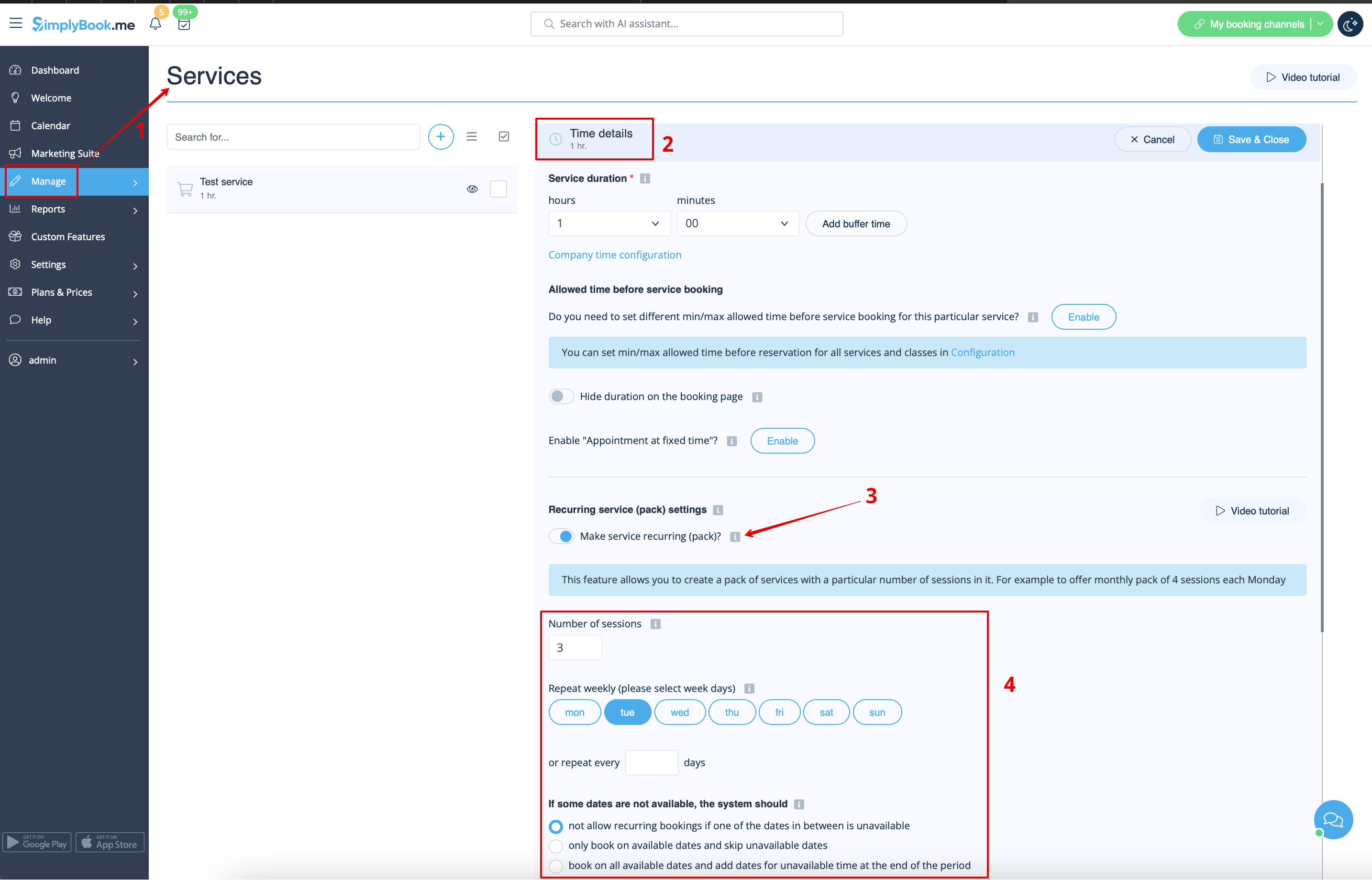
- 4. Välj när din tjänst ska upprepas. Välj "Upprepa varje vecka (välj veckodagar)" och vilken eller vilka dagar i veckan (t.ex. måndagar) din tjänst ska utföras.
- Om du behöver mer specifika intervall kan du välja "Eller upprepa varje" och ställa in att din tjänst ska upprepas var 14:e dag, till exempel.
- 5. Välj läge för bokningarna. Tillgängliga lägen:
- Inte tillåta – tillåt inte återkommande bokningar om något av datumen däremellan är upptaget (med hjälp av exemplet nedan, om den 15:e är upptagen, tillåter systemet inte bokningar den 1:a och 8:e, utan endast dagar efter den upptagna dagen).
- Boka endast på tillgängliga datum – boka endast på tillgängliga datum och hoppa över otillgängliga datum (i exemplet nedan, om den 15:e är upptagen, tillåter systemet dig att boka den 1:a, 8:e och 22:a (endast 3 av 4).
- Lägg till möten – boka alla tillgängliga datum och lägg till datum efter de datum som inte är tillgängliga (i exemplet nedan, om den 15:e är upptagen, kommer systemet att boka den 1:a, 8:e och 22:a + 1 dag istället för den upptagna 15:e, vilket är den 29 augusti).
- 6. Ange hur många gånger din tjänst ska upprepas i "Upprepningsantal".
- Exempel: Om du ställer in måndagar och upprepningsantalet 4, kommer kunderna att boka 4 måndagar på en gång när de bokar denna tjänst från bokningssidan.

Observera!
- Om du gör den återkommande tjänsten betalbar är det belopp som du anger som tjänstepris det totala beloppet för alla sessioner.
Det är för närvarande inte möjligt att ange ett pris per session för återkommande servicepaket.
Därför kommer priset inte att multipliceras med antalet valda sessioner om du har en enskild tjänst och väljer att göra en återkommande bokning för den frånadminsidan/POS-gränssnittet.
- Det går inte att omboka bokningar som är relaterade till återkommande batchar med funktionen för ombokning av kunder.
- När en kund bokar en tjänst som är inställd som återkommande med ett visst antal sessioner, motsvarar antalet bokningar som skapas på en gång det antal sessioner som du har angett för den tjänsten.
Platser är avsedda att gruppera leverantörer. De kan läggas till med hjälp av den anpassade funktionen Flera platser.
- Så här lägger du till
Aktivera den anpassade funktionen "Flera platser" och lägg till platser antingen i inställningarna för funktionen eller i Hantera//Tjänsteleverantörer//Lägg till plats. Klicka på fliken "Platsleverantörer" för platsen och markera motsvarande rutor för att koppla leverantörer till platsen.
Kategorier är avsedda att gruppera tjänster. De kan läggas till med hjälp av den anpassade funktionen Tjänstekategorier.
- Så här lägger du till
Aktivera funktionen Tjänstekategorier. I Hantera//Tjänster//Lägg till kategori skapar du alla nödvändiga kategorier. Klicka på fliken "Kategoritjänster" för kategorin och markera de rutor som är nödvändiga för att koppla tjänster till kategorin.
Leverantörer utför endast vissa tjänster
I Hantera//Tjänsteleverantörer//välj önskad leverantör//Tjänster, markera kryssrutorna för nödvändiga tjänster som ska kopplas till denna tjänsteleverantör.