From SimplyBook.me
No edit summary Tags: Mobile edit Mobile web edit |
Created page with ":4. Klicka på <span style="background-color:#d4f8e5; padding:5px; border-radius:5px;">Lägg till innehåll</span> och välj <span style="background-color:#d4f8e5; padding:5px; border-radius:5px;">Anpassad</span>border|center border|center <br><br> :5. Gå till ditt <span style="background-color:#d4f8e5; padding:5px; border-radius:5px;">SimplyBook.me-konto</span> -> <span style="background-color:#d4f8e5; padding:5px; b..." Tags: Mobile edit Mobile web edit |
||
| Line 16: | Line 16: | ||
[[File:Shopify select custom content.png|border|center]] | [[File:Shopify select custom content.png|border|center]] | ||
<br><br> | <br><br> | ||
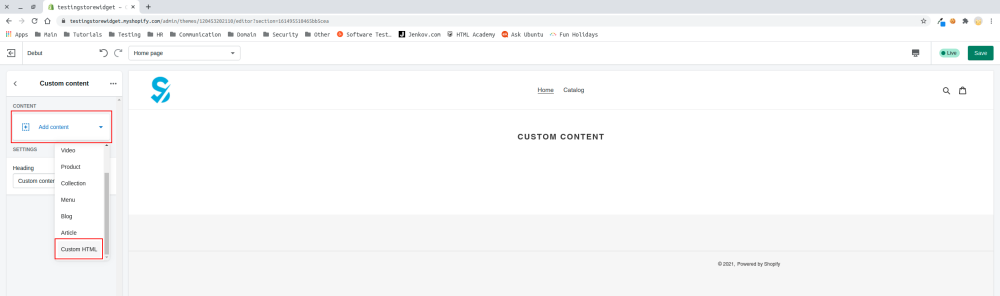
:4. Klicka på <span style="background-color:#d4f8e5; padding:5px; border-radius:5px;">Lägg till innehåll</span> och välj <span style="background-color:#d4f8e5; padding:5px; border-radius:5px;">Anpassad</span>[[File:Select html.png|border|center]] | |||
:4. | |||
[[File:Select html.png|border|center]] | [[File:Select html.png|border|center]] | ||
<br><br> | <br><br> | ||
:5. | :5. Gå till ditt <span style="background-color:#d4f8e5; padding:5px; border-radius:5px;">SimplyBook.me-konto</span> -> <span style="background-color:#d4f8e5; padding:5px; border-radius:5px;">Inställningar</span> -> <span style="background-color:#d4f8e5; padding:5px; border-radius:5px;">Inställningar för bokningswidgets</span> -> <span style="background-color:#d4f8e5; padding:5px; border-radius:5px;">iFrame-widget</span> | ||
[[File:Booking widget path redesigned.png|1200px|border|center|link=https://help.simplybook.me/images/6/68/Booking_widget_path_redesigned.png]] | [[File:Booking widget path redesigned.png|1200px|border|center|link=https://help.simplybook.me/images/6/68/Booking_widget_path_redesigned.png]] | ||
<br><br> | <br><br> | ||
:6. | :6. Anpassa designen efter dina önskemål och behov, <span style="background-color:#d4f8e5; padding:5px; border-radius:5px;">hämta widgetkoden.</span> | ||
[[File:Copy widget code redesigned.png|1200px|border|center|link=https://help.simplybook.me/images/b/b4/Copy_widget_code_redesigned.png]] | [[File:Copy widget code redesigned.png|1200px|border|center|link=https://help.simplybook.me/images/b/b4/Copy_widget_code_redesigned.png]] | ||
<br><br> | <br><br> | ||
<div lang="en" dir="ltr" class="mw-content-ltr"> | <div lang="en" dir="ltr" class="mw-content-ltr"> | ||
:7. Copy the whole code from the popup and insert it to <span style="background-color:#d4f8e5; padding:5px; border-radius:5px;">HTML</span> field on Shopify side. Adjust container width if necessary. <span style="background-color:#d4f8e5; padding:5px; border-radius:5px;">Save</span> the changes | :7. Copy the whole code from the popup and insert it to <span style="background-color:#d4f8e5; padding:5px; border-radius:5px;">HTML</span> field on Shopify side. Adjust container width if necessary. <span style="background-color:#d4f8e5; padding:5px; border-radius:5px;">Save</span> the changes | ||
Revision as of 08:06, 1 July 2025
Om du använder Shopify och vill lägga till möjligheten att boka på din webbplats har vi rätt lösning för dig!
Vår iFrame-widget låter dig koppla Shopify-webbplatsen till SimplyBook.com så att dina kunder kan boka direkt från webbplatsen, både från sin dator och från sina mobila enheter. Denna lösning gör din bokningsprocess mer bekväm och enkel.
- Hur man ställer in
- 1. Gå till Onlinebutik -> Teman -> Anpassa i ditt Shopify-konto.

- 2. Välj den sektion du vill redigera till vänster eller lägg till en ny.

- 3. Välj att lägga till anpassat innehåll.

- 4. Klicka på Lägg till innehåll och välj Anpassad

- 5. Gå till ditt SimplyBook.me-konto -> Inställningar -> Inställningar för bokningswidgets -> iFrame-widget

- 6. Anpassa designen efter dina önskemål och behov, hämta widgetkoden.

- 7. Copy the whole code from the popup and insert it to HTML field on Shopify side. Adjust container width if necessary. Save the changes

- 8. As the result you will see how the booking widget looks like right away.

