No edit summary |
No edit summary |
||
| Line 186: | Line 186: | ||
Video tutorials [[File:Youtube-Logo.png|link=https://www.youtube.com/playlist?list=PLM9QxGer1Y2rKQwKDx4TmfnTYtuZDbN7r]] | Video tutorials [[File:Youtube-Logo.png|link=https://www.youtube.com/playlist?list=PLM9QxGer1Y2rKQwKDx4TmfnTYtuZDbN7r]] | ||
==How to set and use it with [https://simplybook.me/ SimplyBook.me]== | ==How to set and use it with [https://simplybook.me/ SimplyBook.me]== | ||
<!--T:10--> | <!--T:10--> | ||
:1. First of all, as you plan to work with online payment, you need to have <span style="background-color:#cdeffc; padding:5px; border-radius:5px;">[[Accept payments custom feature|Accept Payments]]</span> custom feature enabled in your [https://simplybook.me/ SimplyBook.me] account. | :1. First of all, as you plan to work with online payment, you need to have <span style="background-color:#cdeffc; padding:5px; border-radius:5px;">[[Accept payments custom feature|Accept Payments]]</span> custom feature enabled in your [https://simplybook.me/ SimplyBook.me] account. | ||
| Line 214: | Line 212: | ||
<translate> | <translate> | ||
==Using PRO version features== | ==Using PRO version features== | ||
<!--T:12--> | <!--T:12--> | ||
If you have a higher subscription in your SimplyBook.me account then the <span style="background-color:#d4f8e5; padding:5px; border-radius:5px;">PRO</span> version of SBPay.me is enabled by default so you can get access to the list of additional options like vaulted payments, refunds and payment links. | If you have a higher subscription in your SimplyBook.me account then the <span style="background-color:#d4f8e5; padding:5px; border-radius:5px;">PRO</span> version of SBPay.me is enabled by default so you can get access to the list of additional options like vaulted payments, refunds and payment links. | ||
| Line 306: | Line 303: | ||
</translate> | </translate> | ||
<translate> | <translate> | ||
<!--T:18--> | <!--T:18--> | ||
==SBPay.me Reports== | ==SBPay.me Reports== | ||
| Line 325: | Line 321: | ||
<translate> | <translate> | ||
==Create payment requests== | ==Create payment requests== | ||
<!--T:20--> | <!--T:20--> | ||
'''Video tutorial''' <p><youtube>JHN6T1QzsHk</youtube></p> | '''Video tutorial''' <p><youtube>JHN6T1QzsHk</youtube></p> | ||
Revision as of 11:49, 15 July 2025
SBPay.me is the payment management feature by SimplyBook.me that lets you accept and manage payments via multiple payment providers, whilst simplifying online and offline payments, sending payment links, charging saved cards and making refunds.
See video tutorial
The list of currently supported payment processors:
| Supported payment system | Recurring | Rebilling |
|---|---|---|
| Stripe(SCA) | ✔ |
✔ |
| ECPay | − |
− |
| PayPal | ✔ |
✔ |
| SafeCharge | ✔ |
✔ |
| 2Checkout | − |
− |
| Mollie | ✔ |
✔ |
| Authorize | ✔ |
✔ |
| Squareup (Square) | ✔ |
✔ |
| Worldpay | ✔ |
✔ |
| Adyen | ✔ |
✔ |
| LiqPay | ✔ |
✔ |
| Skrill | ✔ |
✔ |
| Asiapay | ✔ |
✔ |
| Borgun | ✔ |
✔ |
| Paytabs | ✔ |
✔ |
| Rapyd | ✔ |
✔ |
| Payfast | ✔ |
✔ |
| PayULatam | − |
− |
| Paymentasia | − |
− |
| Newebpay | − |
− |
| PinPayments | ✔ |
✔ |
| Swish | − |
− |
| Braintree | ✔ |
✔ |
| TapPay | ✔ |
✔ |
| Line Pay | ✔ |
✔ |
| TwoCheckout [Verifone] | − |
− |
| CCAvenue | − |
− |
| Revolut | ✔ |
✔ |
| Sumup | − |
− |
| Payrexx | − |
− |
| JCC | ✔ |
✔ |
| Pagar.me | − |
− |
| PayPal Checkout | − |
− |
| Monobank | − |
− |
| Moneris | − |
− |
How to set specific payment processors
Video tutorials 
How to set and use it with SimplyBook.me
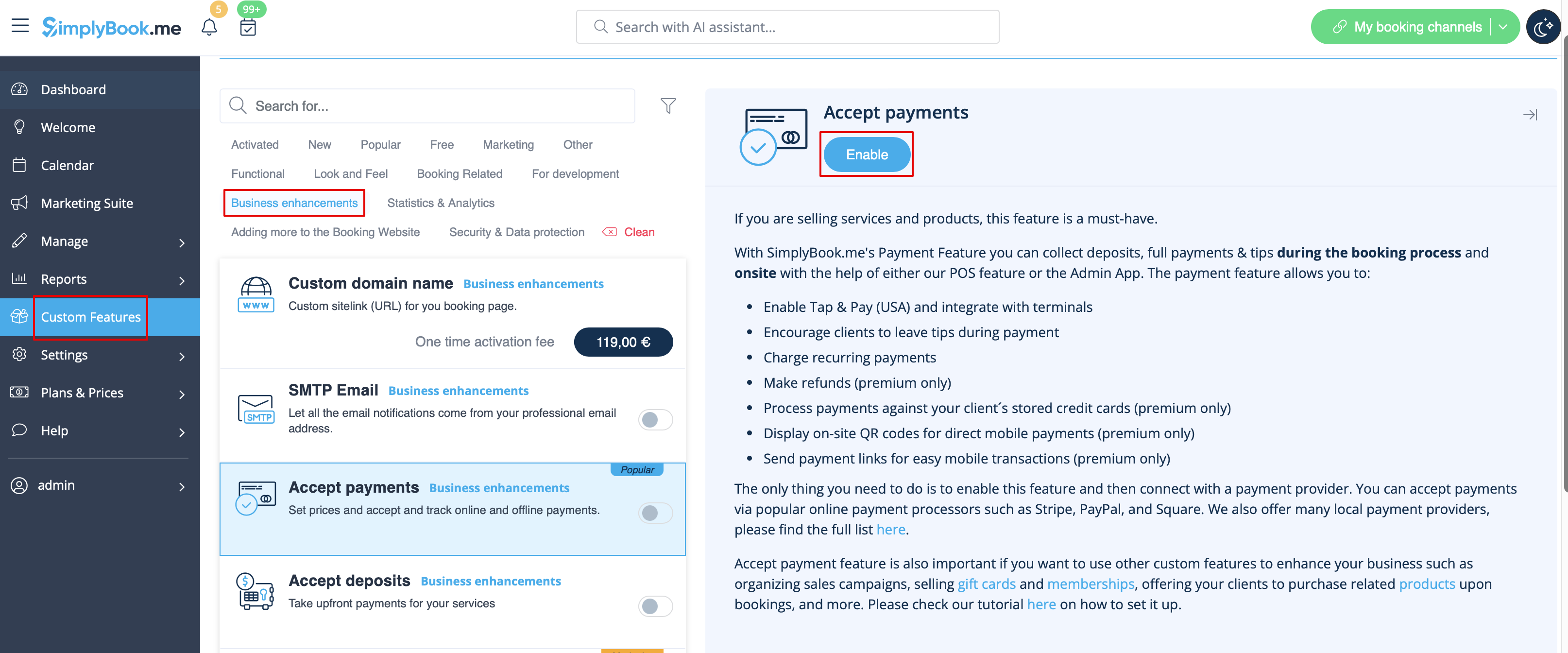
- 1. First of all, as you plan to work with online payment, you need to have Accept Payments custom feature enabled in your SimplyBook.me account.
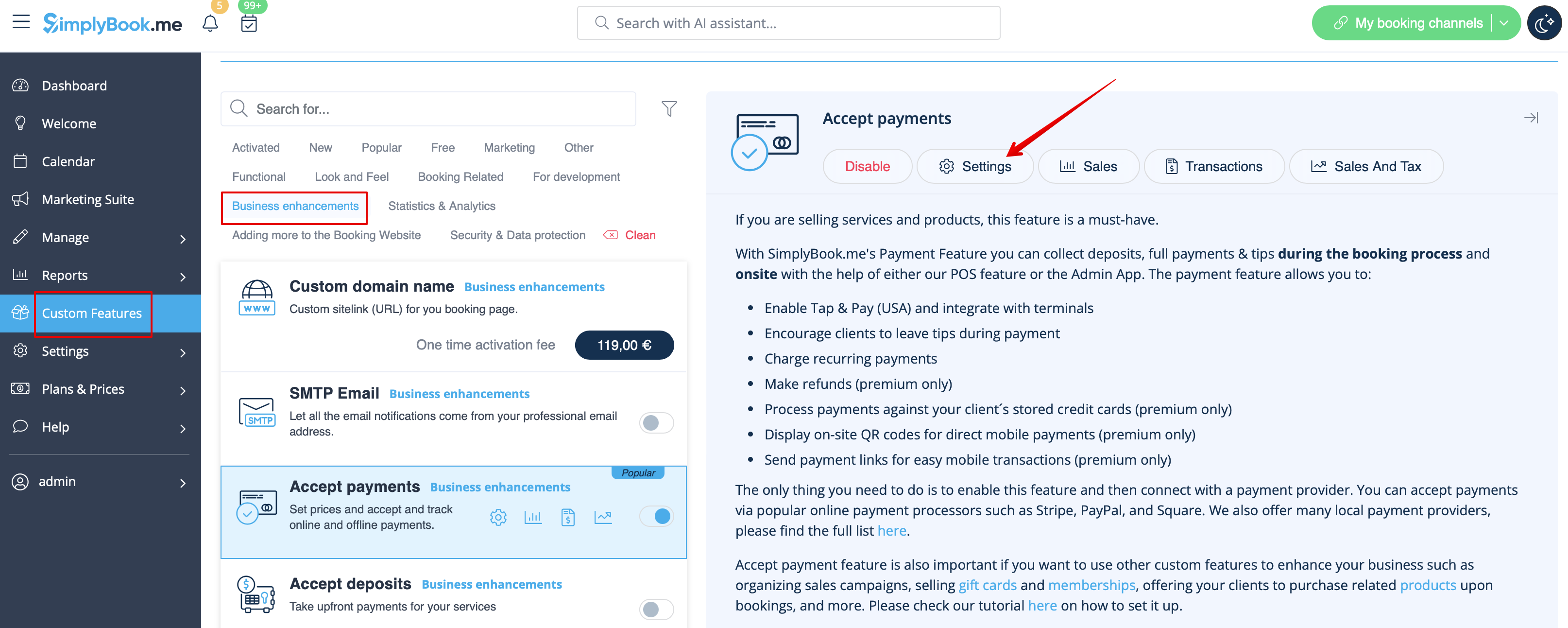
- 2. Click on Settings button on the custom features page next to the Accept Payments feature.
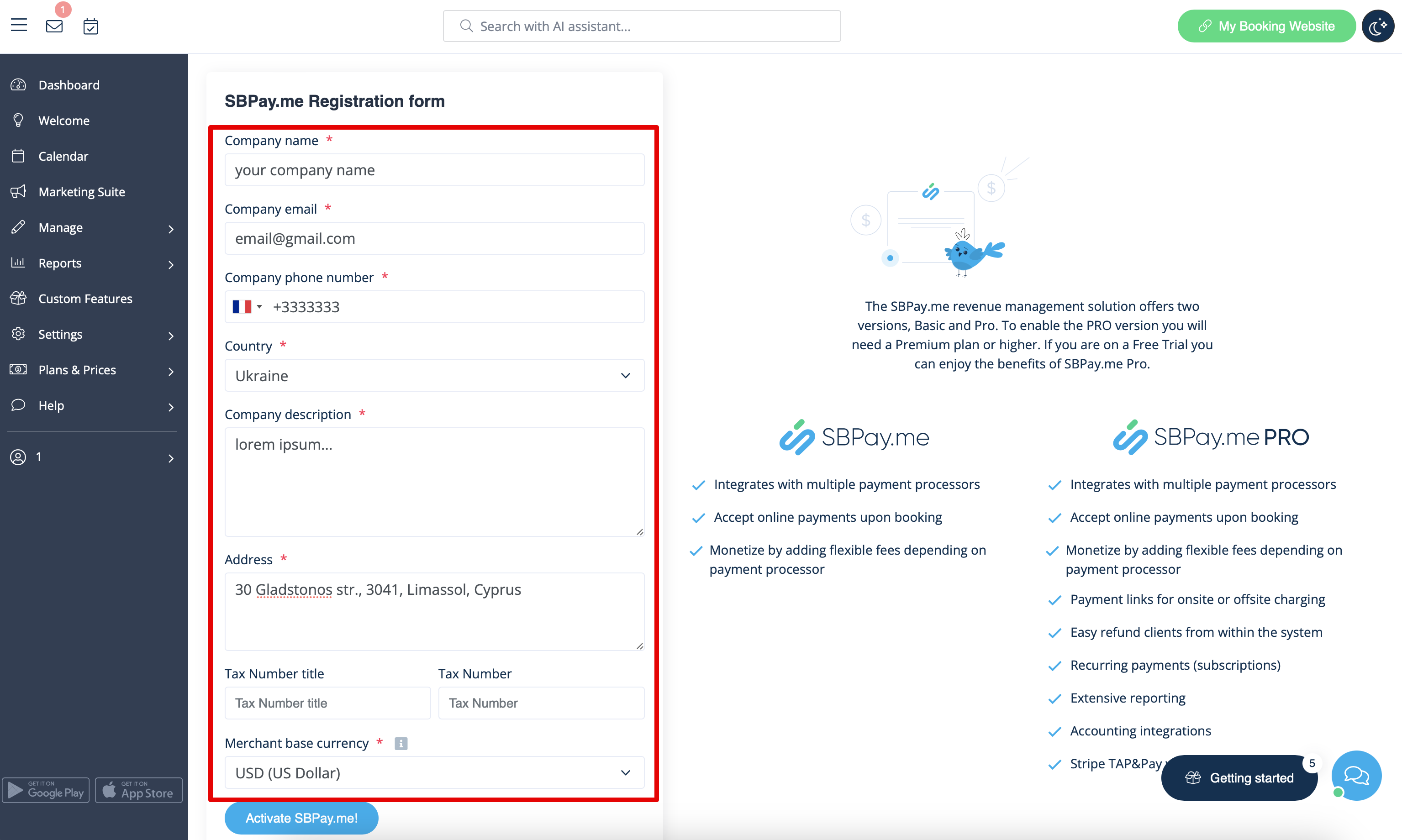
- 3. Adjust your company information in the registration form if necessary.
- (It will be autocompleted with the company details that you already have in your system).
- Click on Activate SBPay.me button below.
- Congratulations! Your SBPay.me account is created!
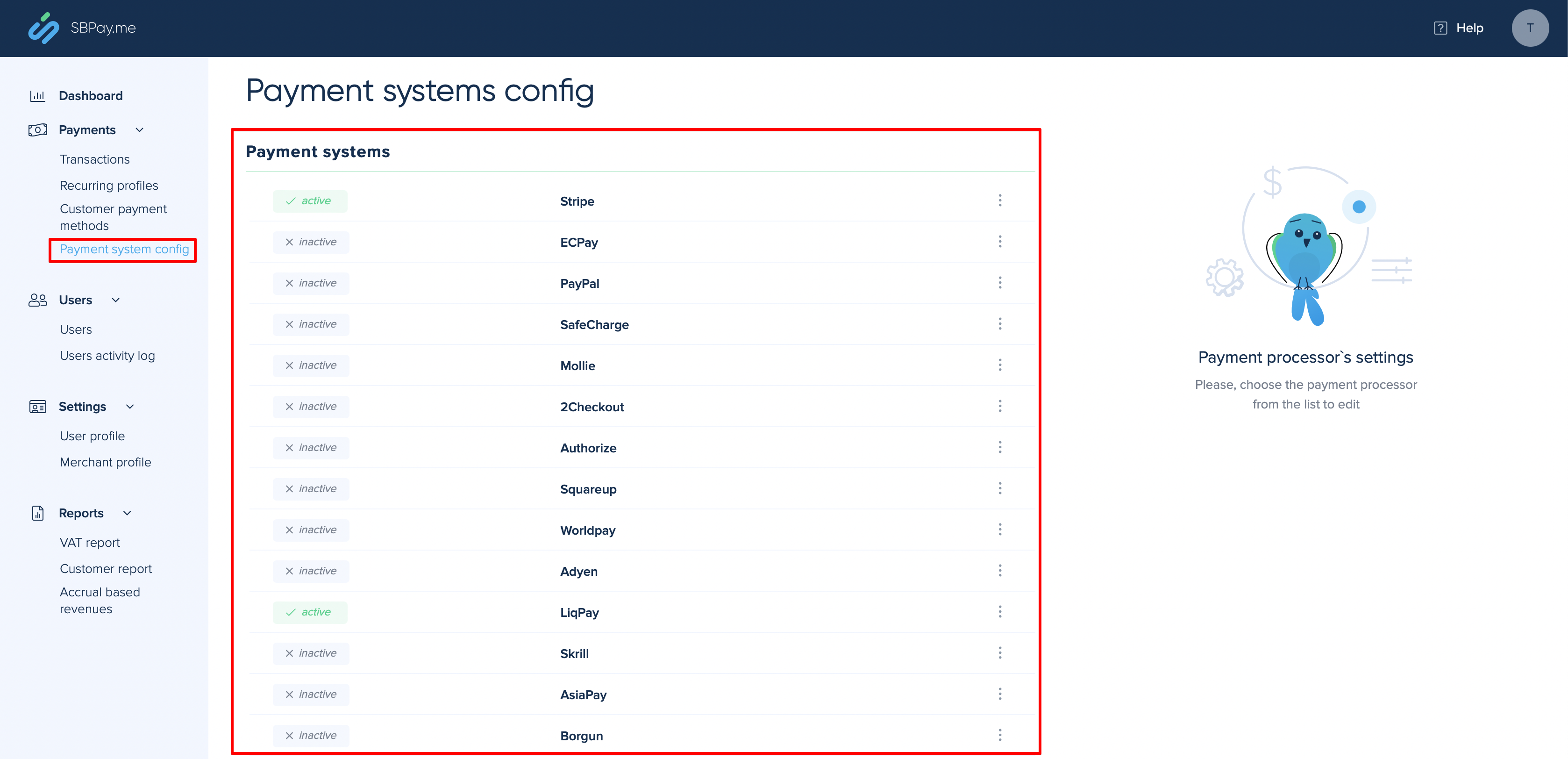
- 4. Navigate to the Payment system settings and add the credentials of the payment gateway that you plan to use for online payments.
- If you had some payment system details before enabling SBPay.me integration it may have been copied to SBPay.me side, but there may be some changes in the payment flow so you will need to check if all the settings are added there for the smooth online payments operation.
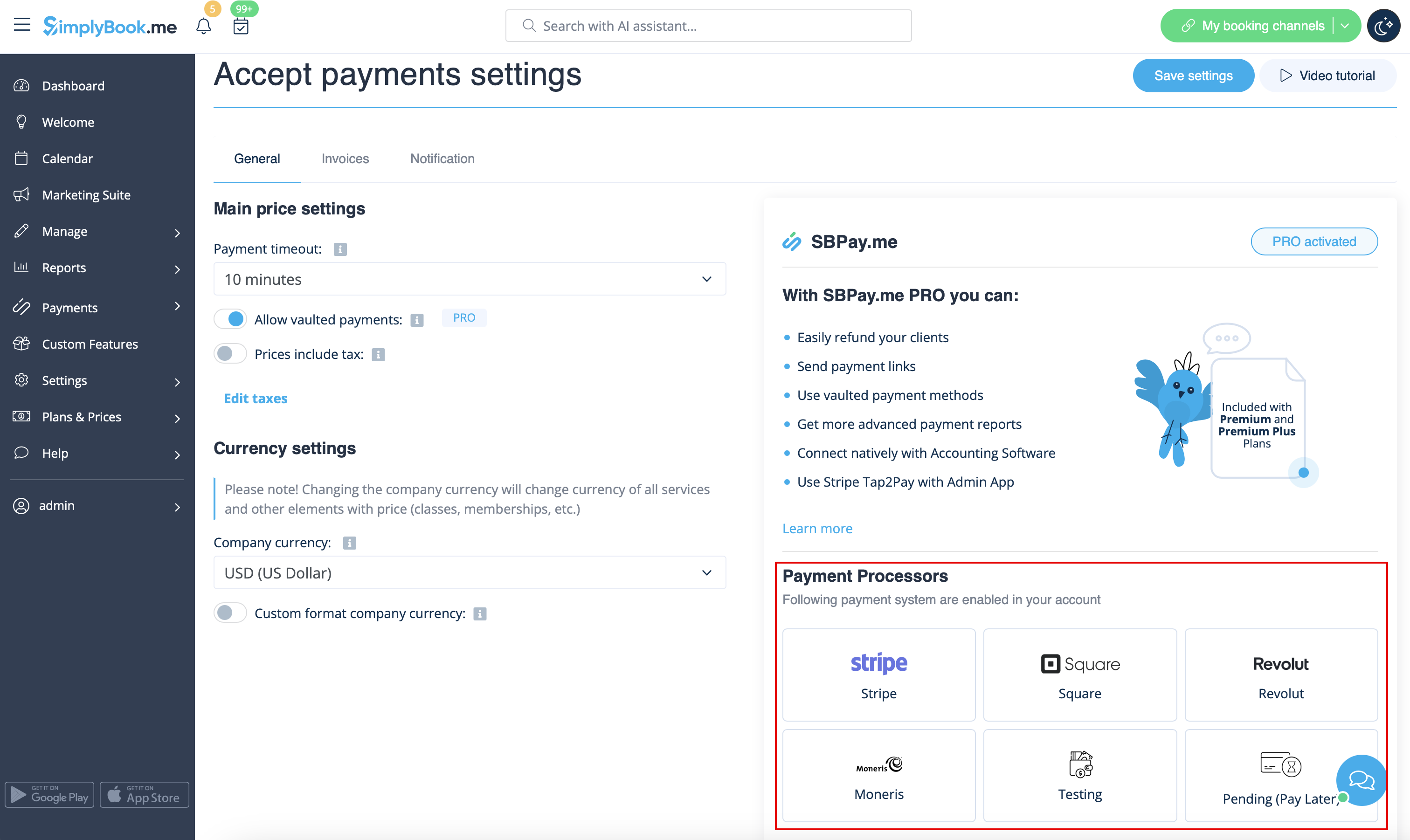
- 5. Once you have set the payment processors up you will be able to see the active ones on the SimplyBook.me side as well.
- 6. Set the prices for your services, classes, packages, memberships, gift cards, products or service add-ons in your SimplyBook.me account and you are ready to get payments online.
Using PRO version features
If you have a higher subscription in your SimplyBook.me account then the PRO version of SBPay.me is enabled by default so you can get access to the list of additional options like vaulted payments, refunds and payment links.
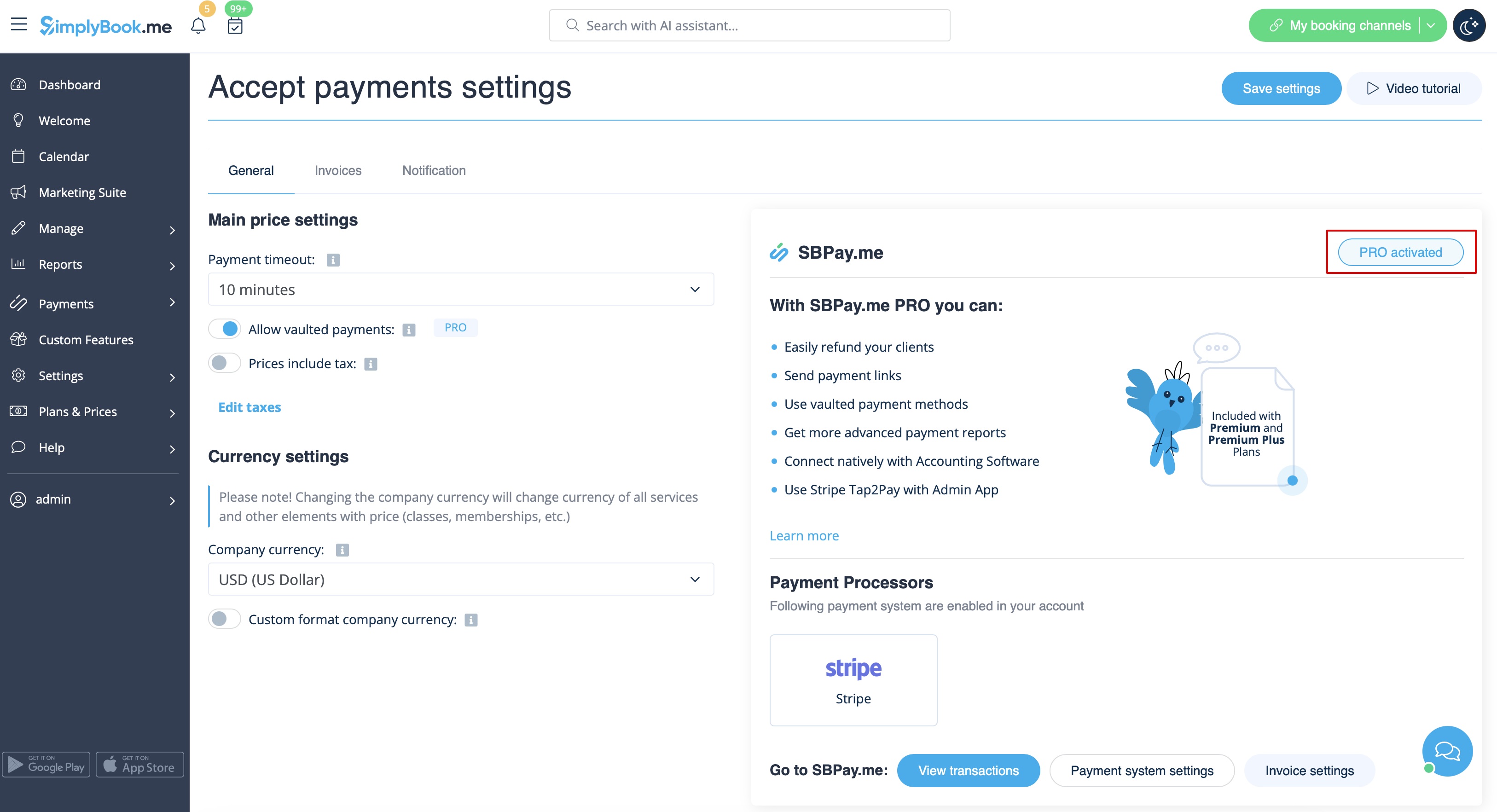
In case you do not plan to use the additional options listed below you can easily disable the "PRO" version by turning the switch off.
Vaulted payments
Please note!
- It requires Client login custom feature to be enabled to use this functionality.
- Not all the payment gateways support this feature. Please check the availability of such an option in the table and/or by contacting your payment gateway support as it may require some adjustments on their side.
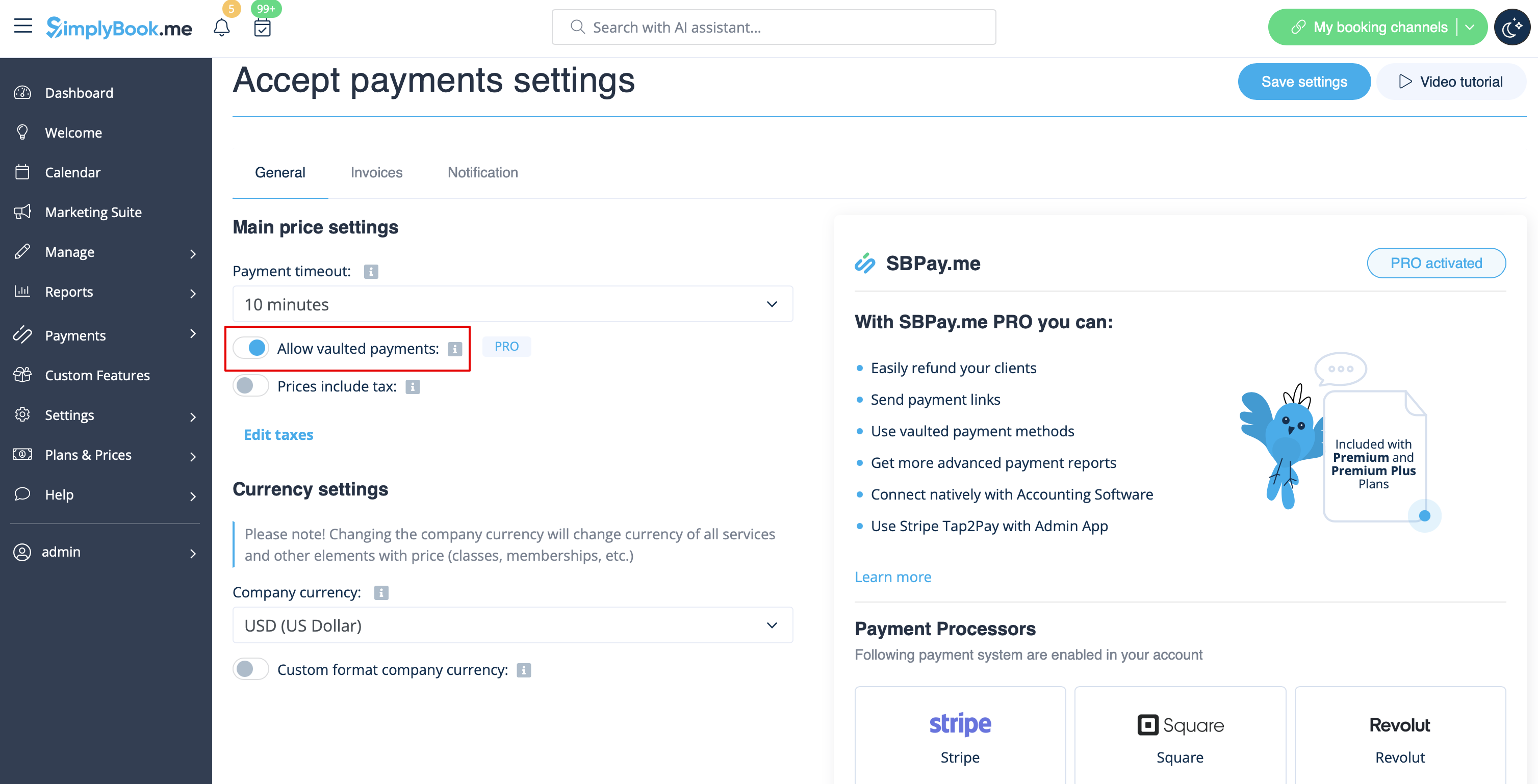
- 1. Enable the option Allow vaulted payments on your Accept payments settings page.
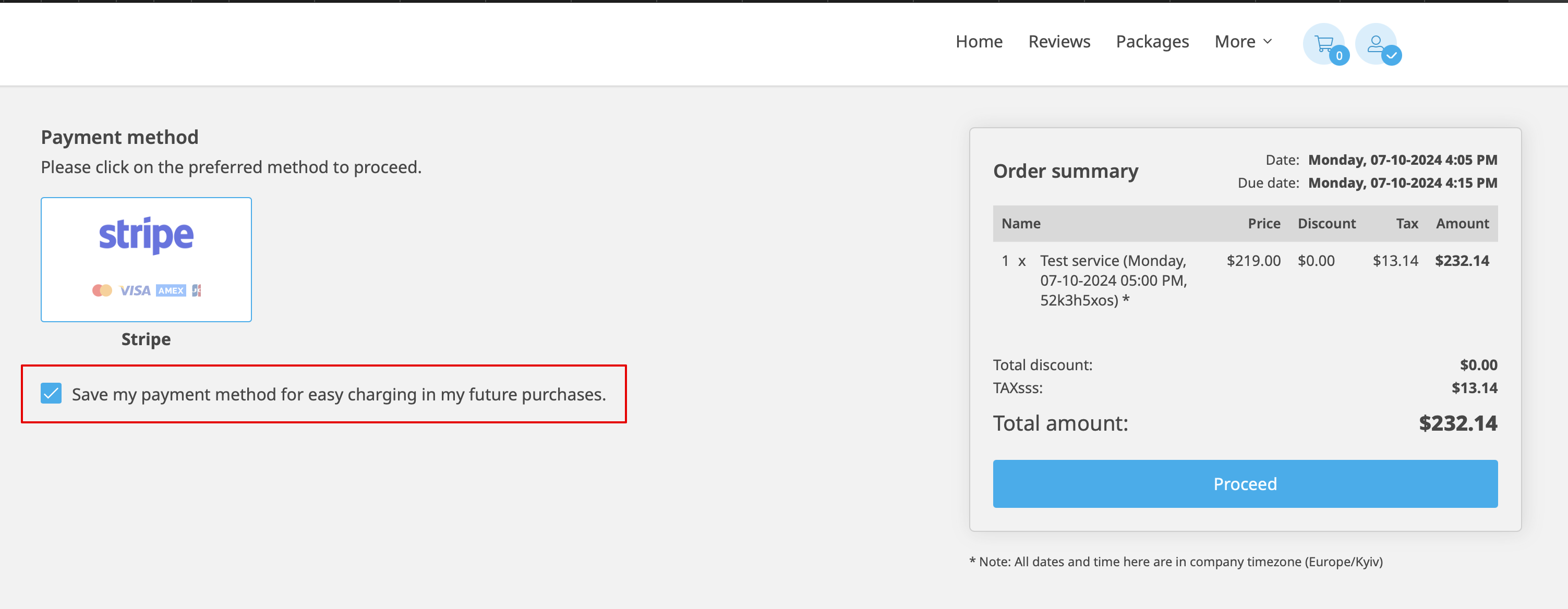
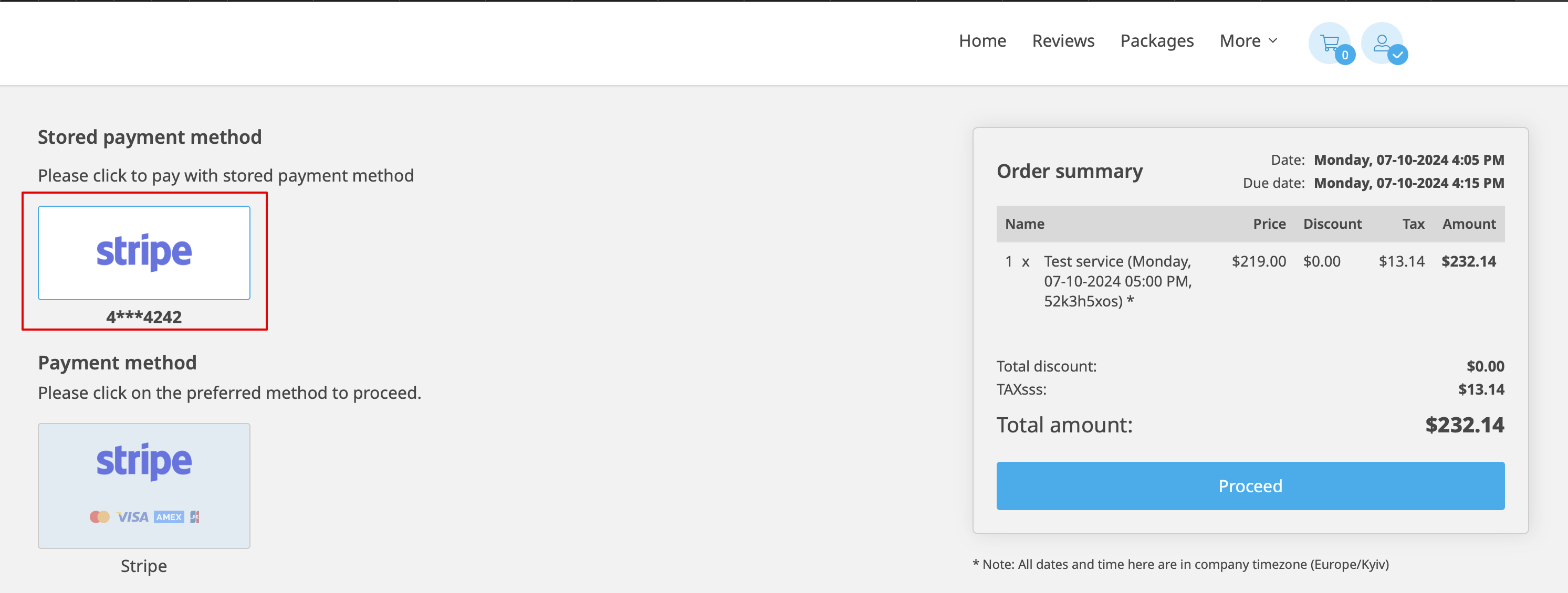
- 2. As the result the client will be able to tick the checkbox Save my payment method for easy charging in my future purchases at checkout on the booking website and his/her payment details will be attached to the client profile.
- 3. During the next purchase or booking on the client side he/she can decide whether to confirm the order with the already saved payment method or to choose the new option.
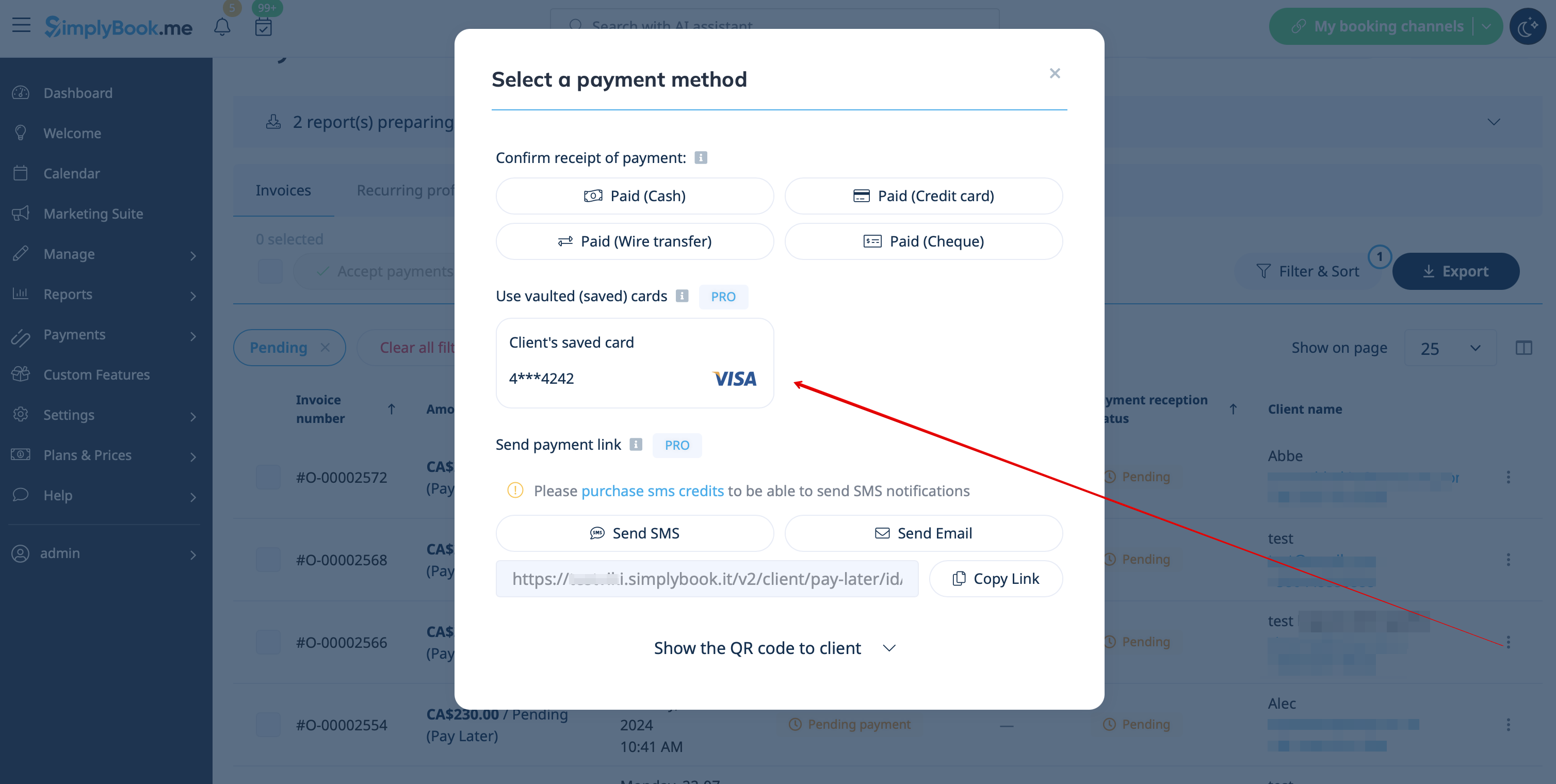
- 4. During the payment approval on the admin side Payment transactions report or sale management inside the POS interface you will also be able to use the client's saved payment method.

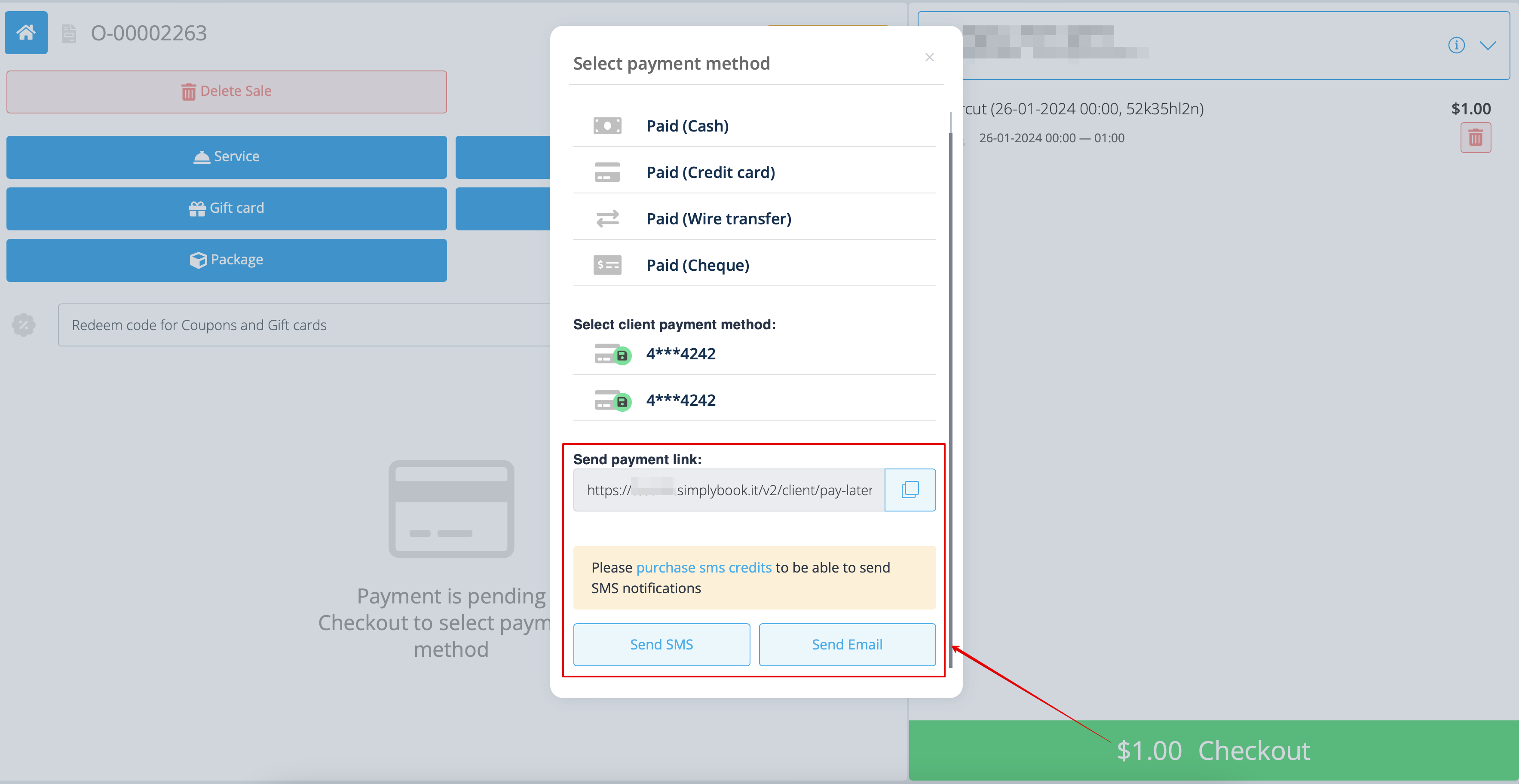
Payment links
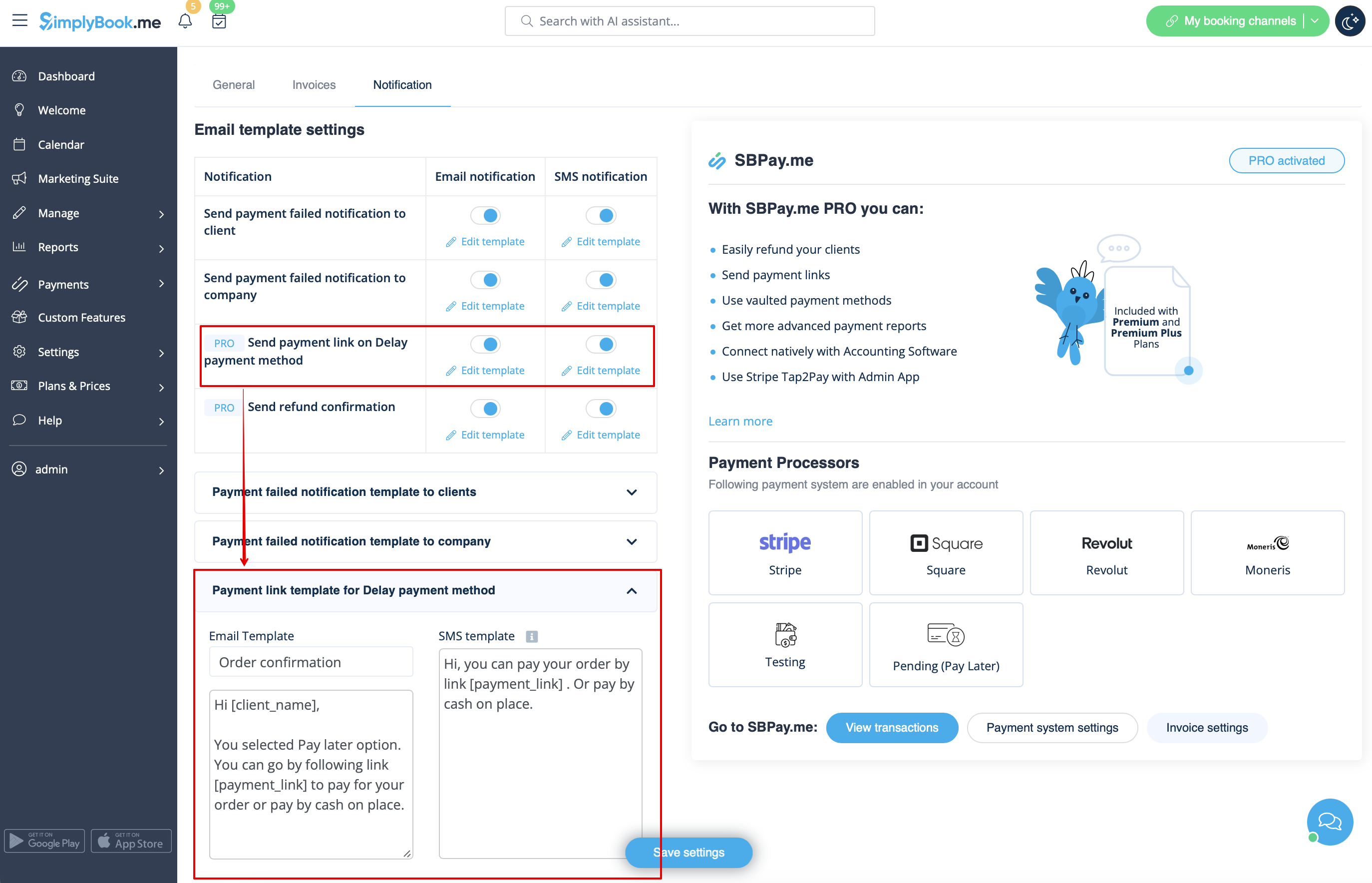
- 1. Enable Send payment link on Delay payment method in the settings of Accept payments custom feature, inside the Email template settings block and adjust the template to your needs.
- Please do not forget to add [payment_link] variable for the client to easily navigate to the payment.
- 2. After you create the order from admin side or from POS interface with Pay later selected as the payment method, or if the client selects Pay later at the checkout step on the booking website, the system will automatically send the email/SMS with the link to pay for the sale (saved payment methods can also be used in this case).
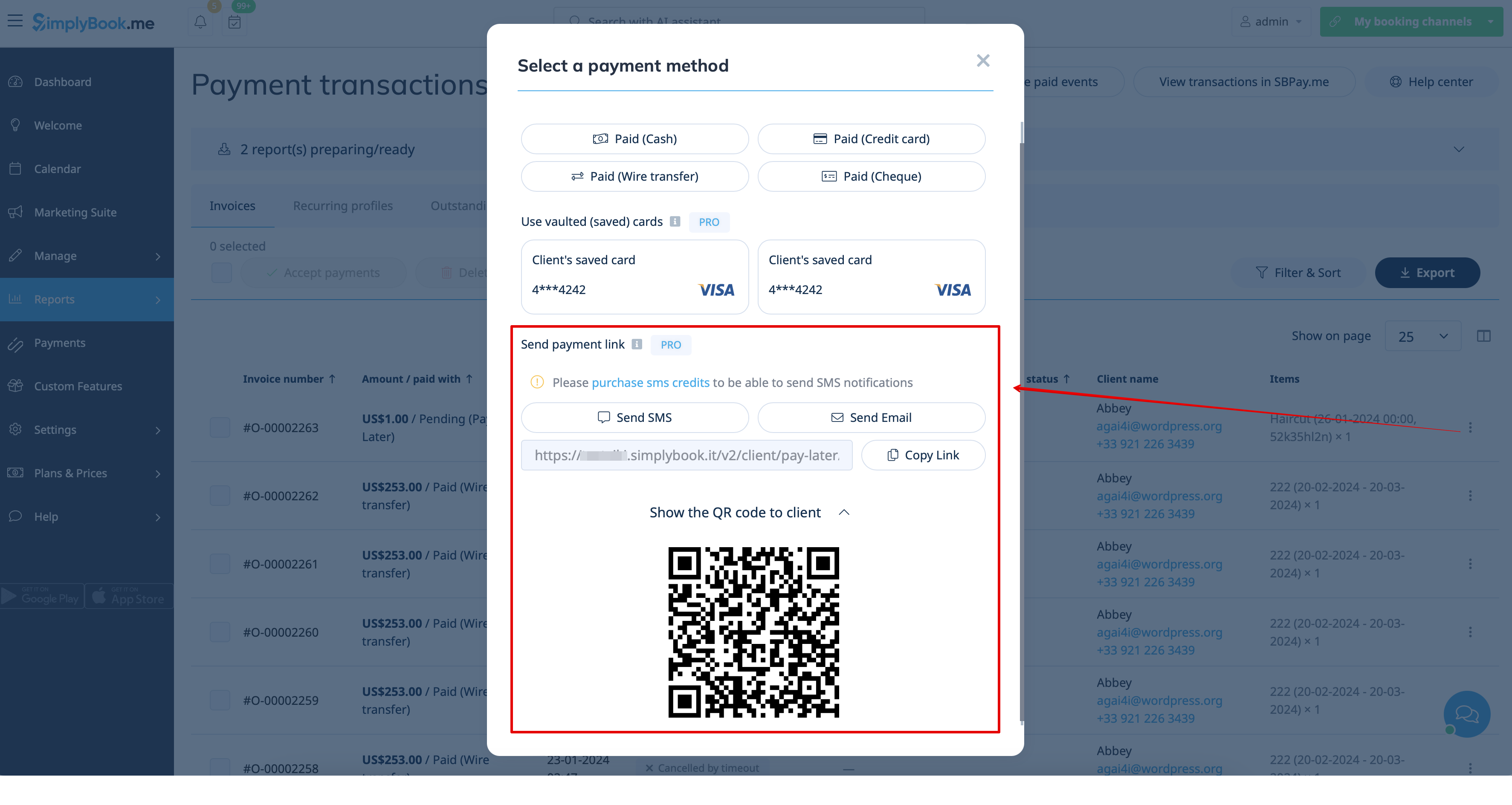
- 3. You can also trigger sending payment link from Payment transactions report or POS interface or simply copy the payment link per the specific order there and send it to your client using own communication channels.
- As well, if the client is at your place, you can show him/her the QR code to scan with his/her phone camera and be redirected to the payment page to complete the order. It can be found in Reports -> Payment transactions -> Receive payment.
Easy mobile payments from the app: video tutorial
With just a few clicks, users can easily generate payment links that can be shared with their clients via email, sending the direct link or QR code. This feature enables business owners and individuals to easily collect payments for their goods or services, without the need for a website or an online store.
In addition, it allows users to set up recurring payments, so that they can automatically charge their clients on a regular basis. This is a useful feature for businesses that offer subscription-based services or recurring billing.
Users can also choose from a wide selection of payment processors to be used for payments or to choose previously saved payment method, making it easy for returning customers to pay for their purchases quickly and securely.
For businesses that need to keep track of their payments, SBPay.me offers the ability to list detailed descriptions of sale items, including any additional taxes or discounts. This feature ensures that users can easily monitor their sales and keep accurate records.
Finally, SBPay.me allows users to tag payments so that they can group them when creating reports. This feature provides an organized way to manage payment data and generate comprehensive reports. Overall, SBPay.me is a powerful payment system that provides a simple, yet effective way to manage payments and increase revenue.
More features coming!
