From SimplyBook.me
Created page with "Anpassad funktion för att begränsa bokningar" |
Updating to match new version of source page Tags: Mobile edit Mobile web edit |
||
| Line 12: | Line 12: | ||
[[File:Limit bookings new icon.png |left]] | [[File:Limit bookings new icon.png |left]] | ||
<div class="mw-translate-fuzzy"> | |||
Denna anpassade funktion låter dig begränsa antalet bokningar som kan göras samtidigt. Denna anpassade funktion är användbar när dina tjänster kräver ytterligare saker som tandläkarstol eller rum i studion etc. (Ett annat sätt att begränsa antalet bokningar på grund av begränsade resurser är att använda funktionen [[Special:MyLanguage/Related_Resources_custom_feature|Relaterade resurser]] istället). När bokningsgränsen är nådd visas motsvarande tidsintervall som en paus på bokningssidan (och i administratörsgränssnittet om du inte har ställt in att dessa begränsningar ska ignoreras för administratörer). Det är möjligt att begränsa antalet bokningar samtidigt generellt, och du kan också ställa in en viss gräns för varje tjänst separat. | Denna anpassade funktion låter dig begränsa antalet bokningar som kan göras samtidigt. Denna anpassade funktion är användbar när dina tjänster kräver ytterligare saker som tandläkarstol eller rum i studion etc. (Ett annat sätt att begränsa antalet bokningar på grund av begränsade resurser är att använda funktionen [[Special:MyLanguage/Related_Resources_custom_feature|Relaterade resurser]] istället). När bokningsgränsen är nådd visas motsvarande tidsintervall som en paus på bokningssidan (och i administratörsgränssnittet om du inte har ställt in att dessa begränsningar ska ignoreras för administratörer). Det är möjligt att begränsa antalet bokningar samtidigt generellt, och du kan också ställa in en viss gräns för varje tjänst separat. | ||
<br> | <br> | ||
| Line 37: | Line 38: | ||
[[File:Limit bookings per service redesigned.png|1200px | center|link=https://help.simplybook.me/images/e/e6/Limit_bookings_per_service_redesigned.png]] | [[File:Limit bookings per service redesigned.png|1200px | center|link=https://help.simplybook.me/images/e/e6/Limit_bookings_per_service_redesigned.png]] | ||
<br><br> | <br><br> | ||
</div> | |||
<div lang="en" dir="ltr" class="mw-content-ltr"> | |||
<br><br> | |||
;How to use | |||
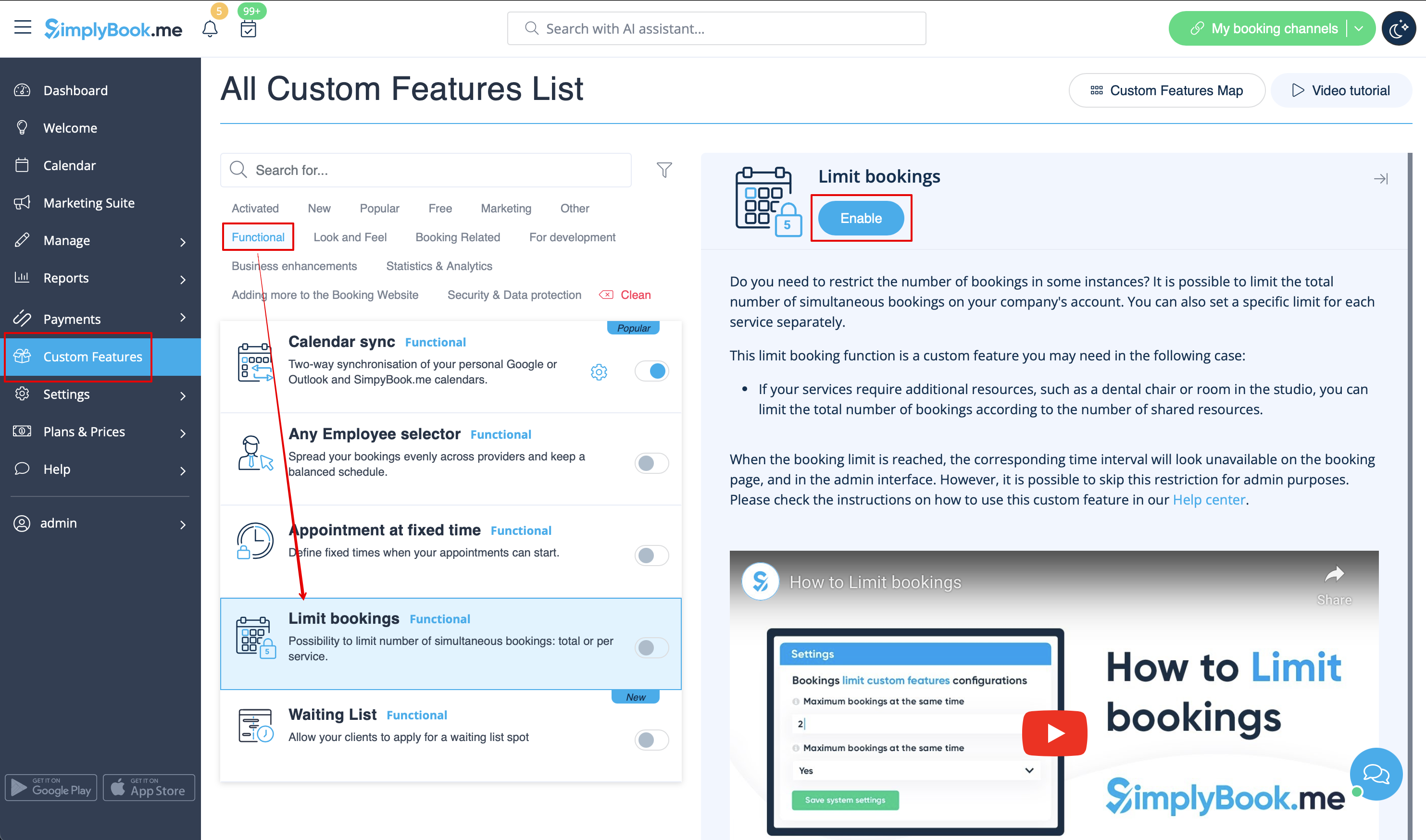
:1. Enable this custom feature on your Custom Features page. | |||
[[File:Limit bookings enable path redesigned.png|1200px| center|link=https://help.simplybook.me/images/a/a4/Limit_bookings_enable_path_redesigned.png]] | |||
<br><br> | |||
:2. Go to its settings on the right if you need to limit number of bookings for the whole system. | |||
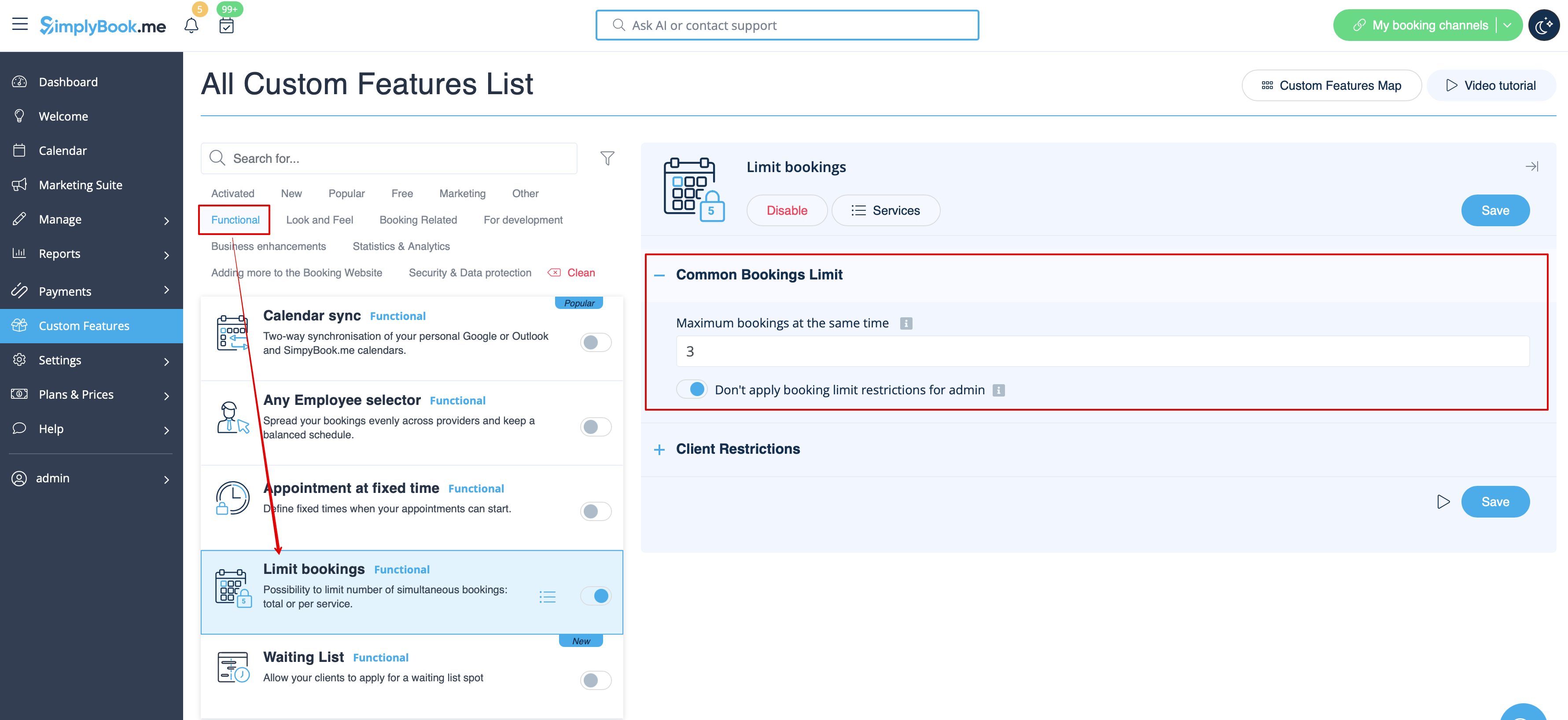
:3. If you need to set the limit per timeslot for the whole system please expand the first "Common bookings limit" block and indicate the desired number. As the result the bookings will be limited to this amount for all the services and classes you have. | |||
[[File:Limit bookings common limit per system.png|1200px | center|link=https://help.simplybook.me/images/6/68/Limit_bookings_common_limit_per_system.png]] | |||
<br><br> | |||
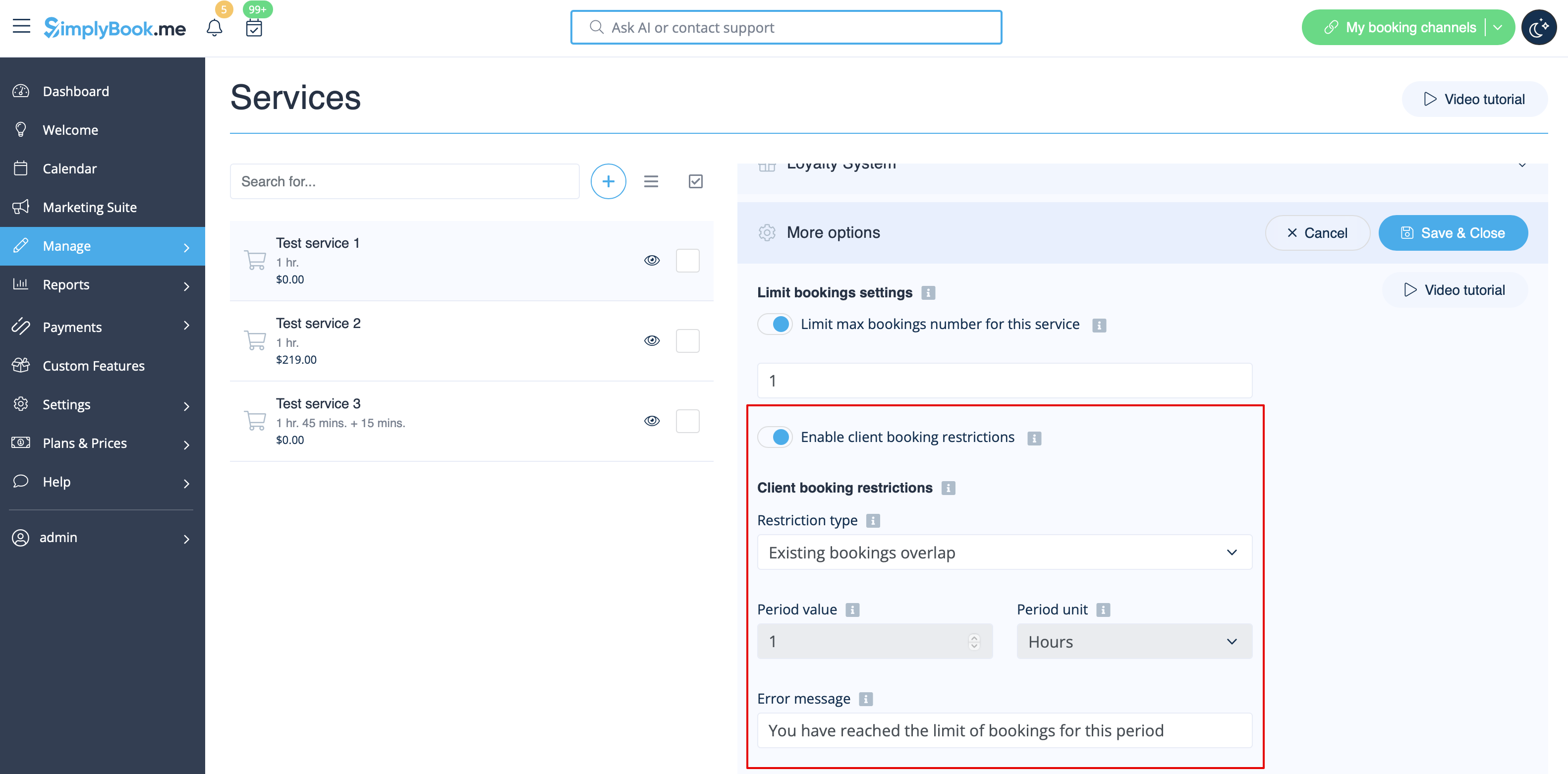
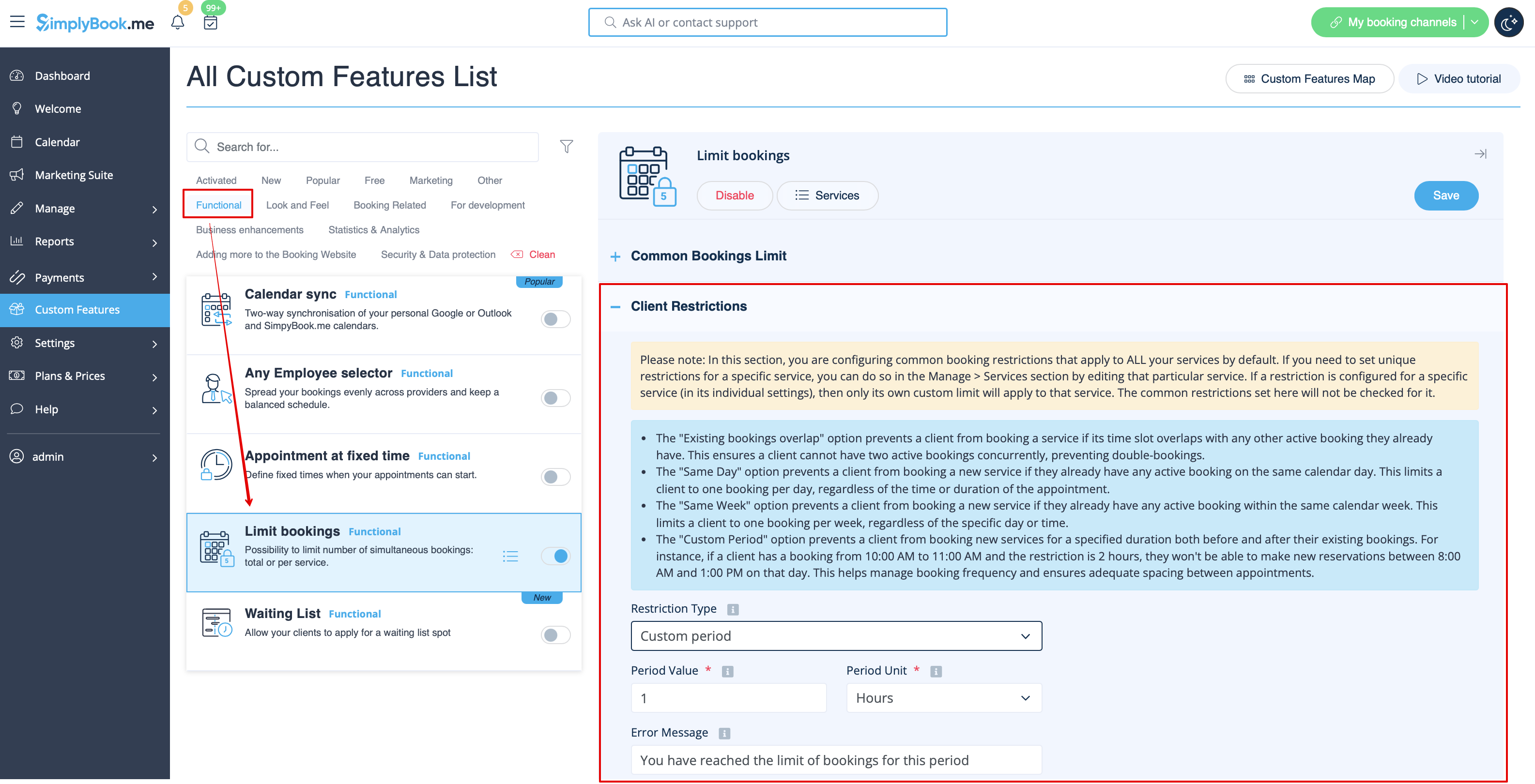
:4. In case you would like to add client limitations please use the second block there "Client Restrictions" and set the desired pattern. | |||
[[File:Limit bookings client restrictions per system.png|1200px | center|link=https://help.simplybook.me/images/4/48/Limit_bookings_client_restrictions_per_system.png]] | |||
<br><br> | |||
The available options: | |||
* The '''Existing bookings overlap''' option prevents a client from booking a service if its time slot overlaps with any other active booking they already have. This ensures a client cannot have two active bookings concurrently, preventing double-bookings. | |||
* The '''Same Day''' option prevents a client from booking a new service if they already have any active booking on the same calendar day. This limits a client to one booking per day, regardless of the time or duration of the appointment. | |||
* The '''Same Week''' option prevents a client from booking a new service if they already have any active booking within the same calendar week. This limits a client to one booking per week, regardless of the specific day or time. | |||
* The '''Custom Period''' option prevents a client from booking new services for a specified duration both before and after their existing bookings. For instance, if a client has a booking from 10:00 AM to 11:00 AM and the restriction is 2 hours, they won't be able to make new reservations between 8:00 AM and 1:00 PM on that day. This helps manage booking frequency and ensures adequate spacing between appointments. | |||
<br><br> | |||
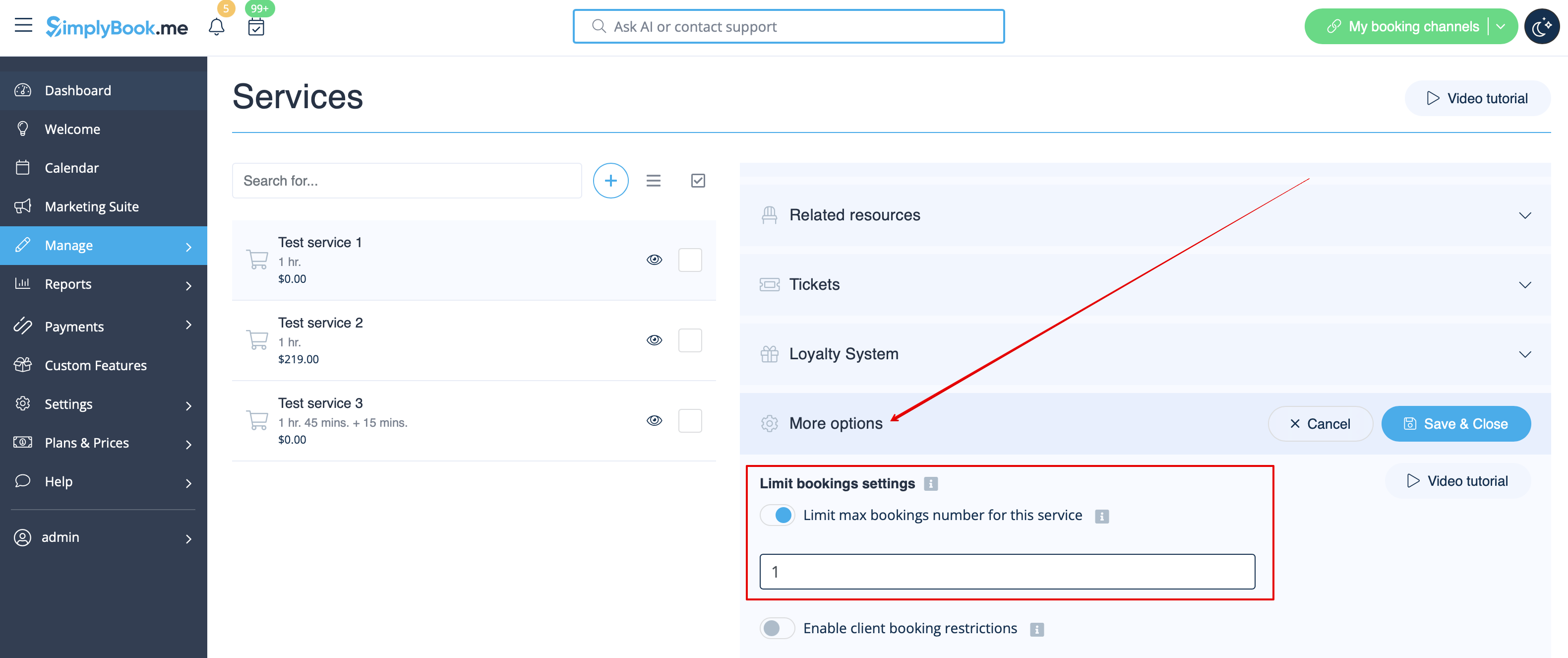
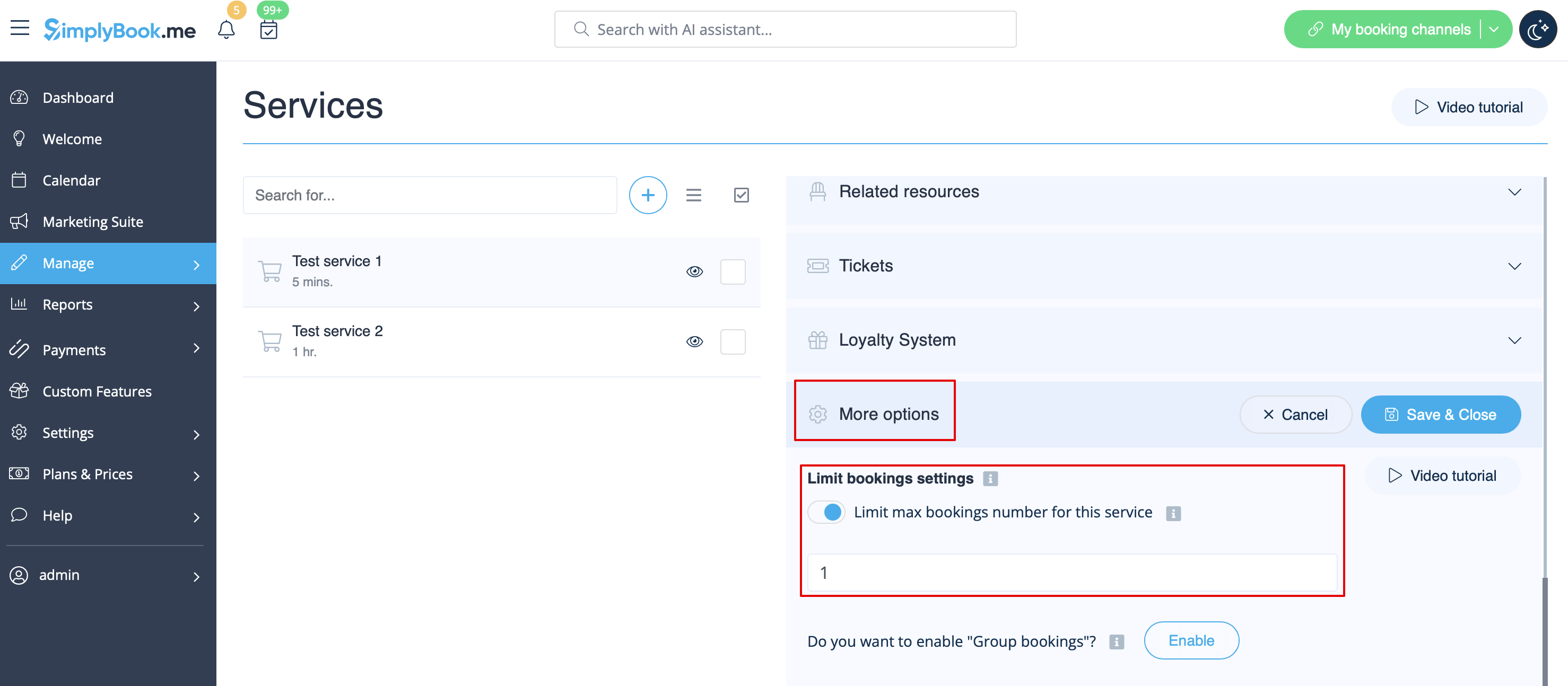
:5. If you need to set the limit for certain service please navigate to Manage//Services(Classes) page, choose "More options" tab and set the desired number per service/class. You fill find both options there: per timeslot and per client | |||
[[File:Limit bookings per service new.png|1200px | center|link=https://help.simplybook.me/images/a/aa/Limit_bookings_per_service_new.png]] | |||
[[File:Limit bookings per client per service.png|1200px | center|link=https://help.simplybook.me/images/0/06/Limit_bookings_per_client_per_service.png]] | |||
<br><br> | |||
</div> | |||
Revision as of 11:40, 31 July 2025

Denna anpassade funktion låter dig begränsa antalet bokningar som kan göras samtidigt. Denna anpassade funktion är användbar när dina tjänster kräver ytterligare saker som tandläkarstol eller rum i studion etc. (Ett annat sätt att begränsa antalet bokningar på grund av begränsade resurser är att använda funktionen Relaterade resurser istället). När bokningsgränsen är nådd visas motsvarande tidsintervall som en paus på bokningssidan (och i administratörsgränssnittet om du inte har ställt in att dessa begränsningar ska ignoreras för administratörer). Det är möjligt att begränsa antalet bokningar samtidigt generellt, och du kan också ställa in en viss gräns för varje tjänst separat.
Till exempel har du två leverantörer och ett rum, och båda leverantörerna är tillgängliga kl. 10.00.
Varje leverantör är inställd på att betjäna 1 person åt gången och totalt kan 2 personer boka tjänsten kl. 10.00.
Men du måste begränsa antalet till 1 person, eftersom endast 1 rum är tillgängligt.
Du måste aktivera den anpassade funktionen Begränsa bokningar och ställa in den på 1.
På så sätt kommer denna tid att stängas för en annan leverantör när någon bokar kl. 10.00.
Observera!
- Denna funktion är inte kompatibel med Visa återstående platser
- Denna funktion är utvecklad för att begränsa bokningar per tjänst per tidslucka och tillåter inte att man ställer in begränsningar för antalet bokningar en kund kan göra inom en viss tidsperiod. För att kontrollera kundbokningar under en viss tidsperiod kan du överväga att använda den anpassade funktionen Bedrägeri-/spamskydd.
- Hur man använder
- 1. Aktivera denna anpassade funktion på sidan Anpassade funktioner.
- 2. Gå till inställningarna till höger om du behöver begränsa antalet bokningar åt gången för hela systemet.
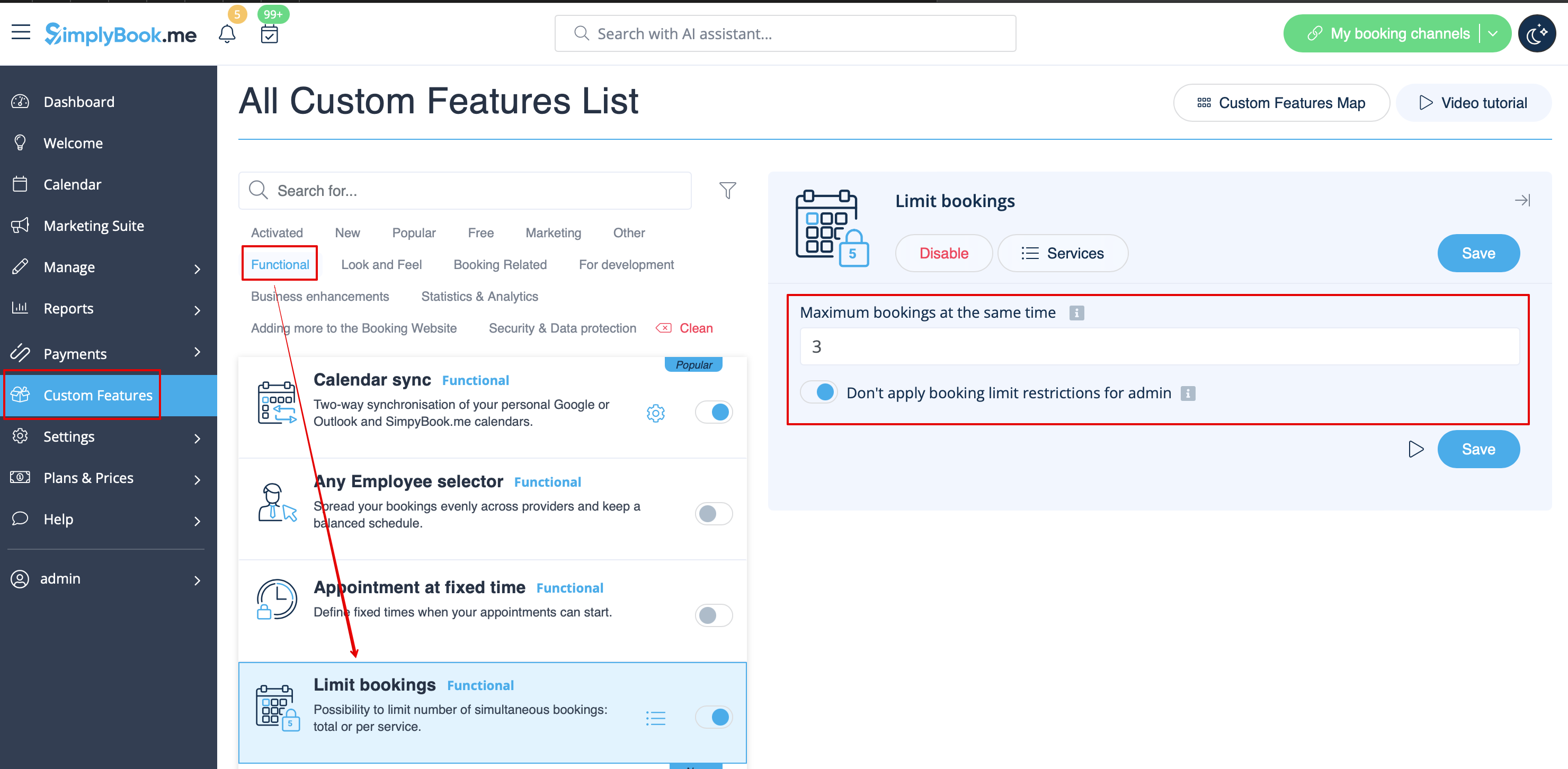
- 3. Ange önskat antal i motsvarande ruta.
- 4. Om du behöver ställa in gränsen för en viss tjänst, gå till sidan Hantera//Tjänster (Klasser), välj fliken Fler alternativ och ställ in önskat antal per tjänst/klass.
- How to use
- 1. Enable this custom feature on your Custom Features page.
- 2. Go to its settings on the right if you need to limit number of bookings for the whole system.
- 3. If you need to set the limit per timeslot for the whole system please expand the first "Common bookings limit" block and indicate the desired number. As the result the bookings will be limited to this amount for all the services and classes you have.
- 4. In case you would like to add client limitations please use the second block there "Client Restrictions" and set the desired pattern.
The available options:
- The Existing bookings overlap option prevents a client from booking a service if its time slot overlaps with any other active booking they already have. This ensures a client cannot have two active bookings concurrently, preventing double-bookings.
- The Same Day option prevents a client from booking a new service if they already have any active booking on the same calendar day. This limits a client to one booking per day, regardless of the time or duration of the appointment.
- The Same Week option prevents a client from booking a new service if they already have any active booking within the same calendar week. This limits a client to one booking per week, regardless of the specific day or time.
- The Custom Period option prevents a client from booking new services for a specified duration both before and after their existing bookings. For instance, if a client has a booking from 10:00 AM to 11:00 AM and the restriction is 2 hours, they won't be able to make new reservations between 8:00 AM and 1:00 PM on that day. This helps manage booking frequency and ensures adequate spacing between appointments.
- 5. If you need to set the limit for certain service please navigate to Manage//Services(Classes) page, choose "More options" tab and set the desired number per service/class. You fill find both options there: per timeslot and per client