From SimplyBook.me
Importing a new version from external source |
Importing a new version from external source |
||
| Line 1: | Line 1: | ||
=Pay later possibility= | =Pay later possibility= | ||
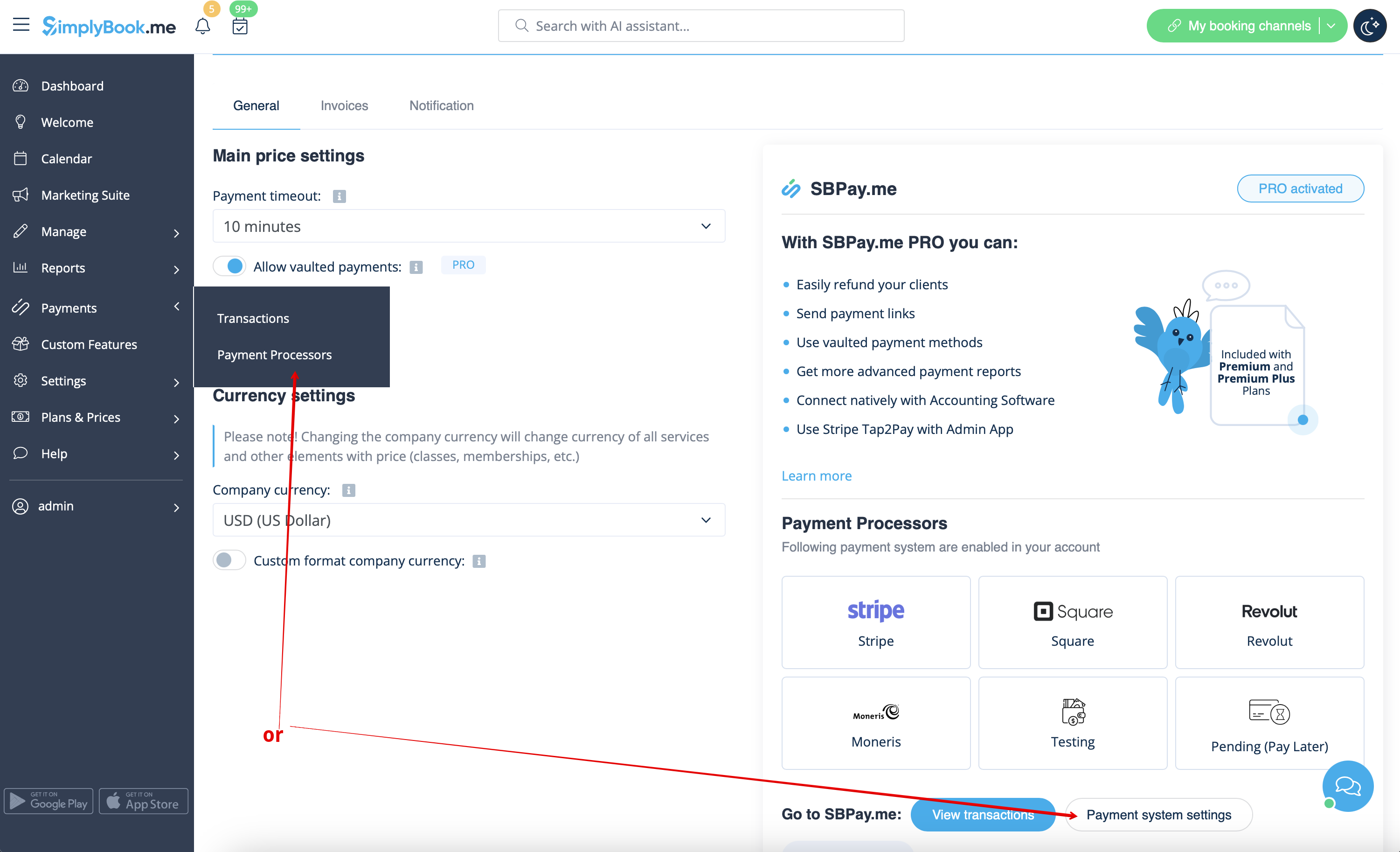
Please navigate to <span style="background-color:#d4f8e5; padding:5px; border-radius:5px;">Payments</span> -> <span style="background-color:#d4f8e5; padding:5px; border-radius:5px;">Payment Processors</span> or <span style="background-color:#d4f8e5; padding:5px; border-radius:5px;">Custom Features</span> -> <span style="background-color:#cdeffc; padding:5px; border-radius:5px;">[[Accept_payments_custom_feature|Accept payments]]</span> -> <span style="background-color:#d4f8e5; padding:5px; border-radius:5px;">Settings</span> -> <span style="background-color:#d4f8e5; padding:5px; border-radius:5px;">Payment system settings</span> to go to SBPay.me interface and disable <span style="background-color:#d4f8e5; padding:5px; border-radius:5px;">Pay later</span> option there. | Please navigate to <span style="background-color:#d4f8e5; padding:5px; border-radius:5px;">Payments</span> -> <span style="background-color:#d4f8e5; padding:5px; border-radius:5px;">Payment Processors</span> or <span style="background-color:#d4f8e5; padding:5px; border-radius:5px;">Custom Features</span> -> <span style="background-color:#cdeffc; padding:5px; border-radius:5px;">[[Special:MyLanguage/Accept_payments_custom_feature|Accept payments]]</span> -> <span style="background-color:#d4f8e5; padding:5px; border-radius:5px;">Settings</span> -> <span style="background-color:#d4f8e5; padding:5px; border-radius:5px;">Payment system settings</span> to go to SBPay.me interface and disable <span style="background-color:#d4f8e5; padding:5px; border-radius:5px;">Pay later</span> option there. | ||
[[File:Payment processors settings path redesigned.png|1200px| border|center|link=https://help.simplybook.me/images/6/6f/Payment_processors_settings_path_redesigned.png]] | [[File:Payment processors settings path redesigned.png|1200px| border|center|link=https://help.simplybook.me/images/6/6f/Payment_processors_settings_path_redesigned.png]] | ||
<br><br> | <br><br> | ||
Latest revision as of 10:24, 6 August 2025
Pay later possibility
Please navigate to Payments -> Payment Processors or Custom Features -> Accept payments -> Settings -> Payment system settings to go to SBPay.me interface and disable Pay later option there.