From SimplyBook.me
Created page with "= Étape de l'employé = Activez le <span style="background-color:#cdeffc; padding:5px; border-radius:5px;">sélecteur de tout employé</span> dans la <span style="background-color:#d4f8e5; padding:5px; border-radius:5px;">section des fonctions personnalisées</span> et dans ses <span style="background-color:#d4f8e5; padding:5px; border-radius:5px;">paramètres</span>, sur le côté droit de la page, activez l'option <span style=..." |
No edit summary |
||
| Line 1: | Line 1: | ||
= Étape de l'employé = | = Étape de l'employé = | ||
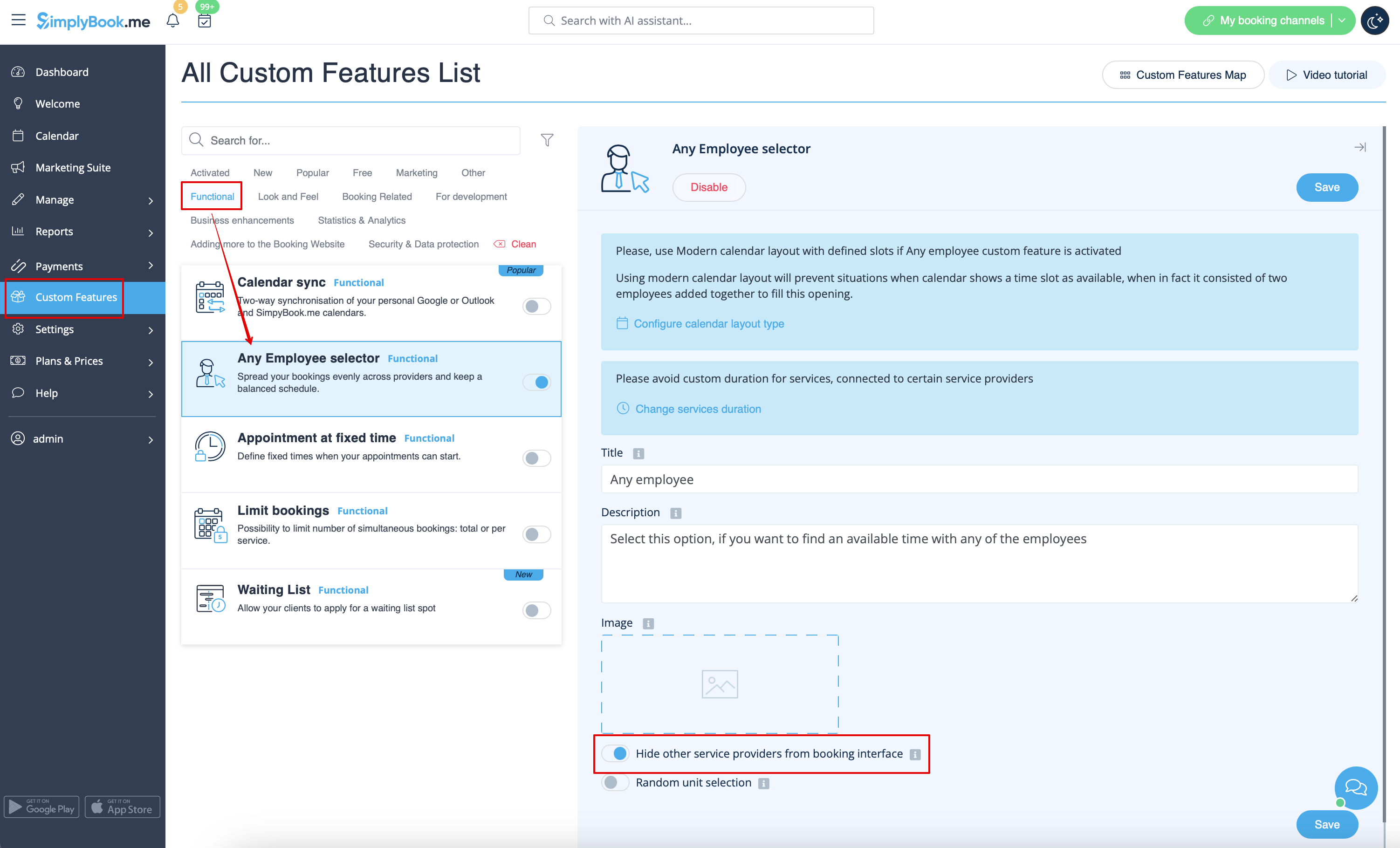
Activez le <span style="background-color:#cdeffc; padding:5px; border-radius:5px;">[[ | Activez le <span style="background-color:#cdeffc; padding:5px; border-radius:5px;">[[Special:MyLanguage/Any_Employee_Selector_custom_feature|sélecteur de tout employé]]</span> dans la <span style="background-color:#d4f8e5; padding:5px; border-radius:5px;">section des fonctions personnalisées</span> et dans ses <span style="background-color:#d4f8e5; padding:5px; border-radius:5px;">paramètres</span>, sur le côté droit de la page, activez l'option <span style="background-color:#d4f8e5; padding:5px; border-radius:5px;">Masquer les autres prestataires de services dans l'interface de réservation</span><br/> | ||
[[File:Any employee hide provider redesigned.png|1200px| center|link=https://help.simplybook.me/images/6/68/Any_employee_hide_provider_redesigned.png]] | [[File:Any employee hide provider redesigned.png|1200px| center|link=https://help.simplybook.me/images/6/68/Any_employee_hide_provider_redesigned.png]] | ||
<br><br> | <br><br> | ||
Latest revision as of 11:02, 6 August 2025
Étape de l'employé
Activez le sélecteur de tout employé dans la section des fonctions personnalisées et dans ses paramètres, sur le côté droit de la page, activez l'option Masquer les autres prestataires de services dans l'interface de réservation