From SimplyBook.me
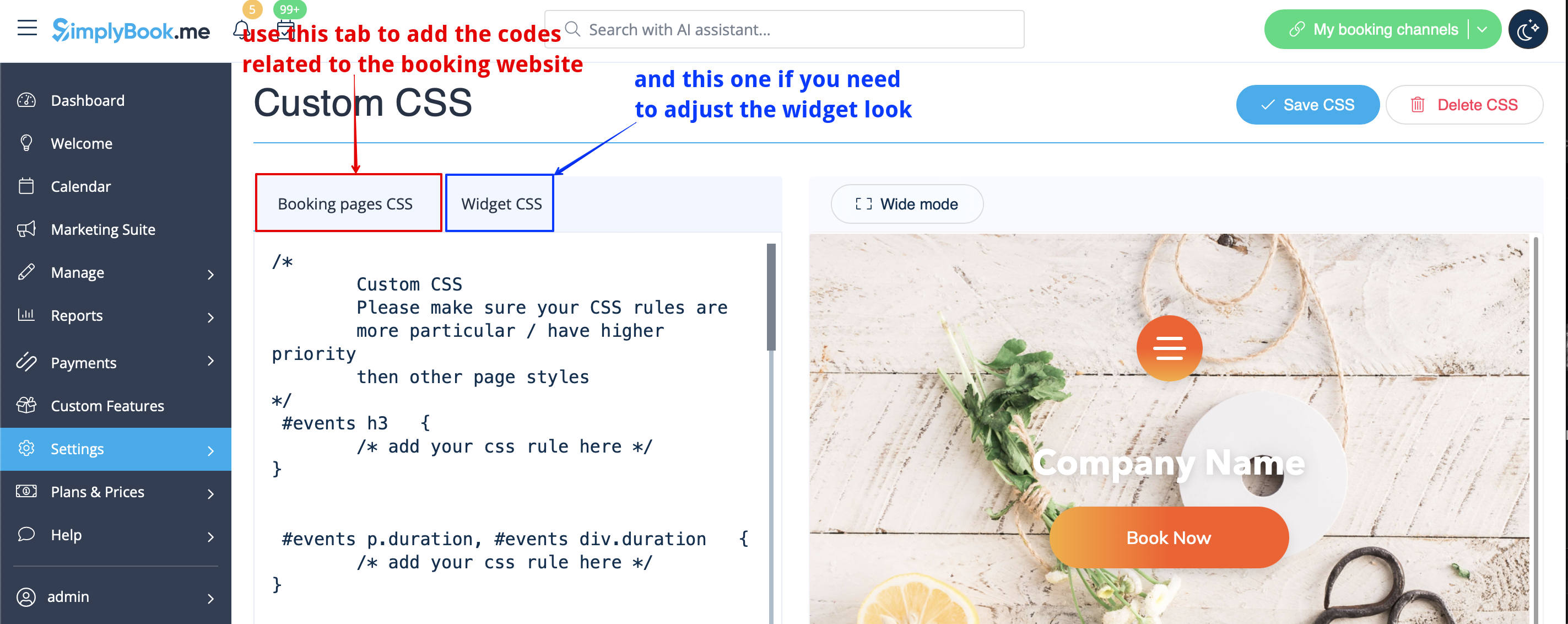
Created page with "= Suppression à l'aide d'un CSS personnalisé = :<span style="background-color:#ffe9e9; padding:5px; border-radius:5px;">'''Attention !''' Ajoutez le(s) code(s) pour ajuster les styles dans l'onglet "Booking pages CSS" si vous souhaitez éditer le site de réservation</span><br> :<span style="background-color:#ffe9e9; padding:5px; border-radius:5px;">ou "Widget CSS" si vous éditez des widgets sur votre site web.</span> File:Custom css tabs redesigned.png|1200px| cent..." |
No edit summary |
||
| Line 5: | Line 5: | ||
<br><br> | <br><br> | ||
== Champ téléphone == | == Champ téléphone == | ||
<span style="background-color:#cdeffc; padding:5px; border-radius:5px;">(</span> La fonction de<span style="background-color:#cdeffc; padding:5px; border-radius:5px;">[[ | <span style="background-color:#cdeffc; padding:5px; border-radius:5px;">(</span> La fonction de<span style="background-color:#cdeffc; padding:5px; border-radius:5px;">[[Special:MyLanguage/Client_Login_custom_feature |connexion du client]]</span> est désactivée)<br> | ||
:1. Allez dans <span style="background-color:#d4f8e5; padding:5px; border-radius:5px;">Paramètres</span> -> <span style="background-color:#d4f8e5; padding:5px; border-radius:5px;">Paramètres e-mail et SMS</span> -> <span style="background-color:#d4f8e5; padding:5px; border-radius:5px;">Paramètres pour les notifications par e-mail et SMS</span> -> <span style="background-color:#d4f8e5; padding:5px; border-radius:5px;">Champs d'enregistrement obligatoires</span> - | :1. Allez dans <span style="background-color:#d4f8e5; padding:5px; border-radius:5px;">Paramètres</span> -> <span style="background-color:#d4f8e5; padding:5px; border-radius:5px;">Paramètres e-mail et SMS</span> -> <span style="background-color:#d4f8e5; padding:5px; border-radius:5px;">Paramètres pour les notifications par e-mail et SMS</span> -> <span style="background-color:#d4f8e5; padding:5px; border-radius:5px;">Champs d'enregistrement obligatoires</span> -> <span style="background-color:#d4f8e5; padding:5px; border-radius:5px;">E-mail</span> (pour que le téléphone ne soit pas obligatoire). | ||
Latest revision as of 12:09, 6 August 2025
Suppression à l'aide d'un CSS personnalisé
- Attention ! Ajoutez le(s) code(s) pour ajuster les styles dans l'onglet "Booking pages CSS" si vous souhaitez éditer le site de réservation
- ou "Widget CSS" si vous éditez des widgets sur votre site web.
Champ téléphone
( La fonction deconnexion du client est désactivée)
- 1. Allez dans Paramètres -> Paramètres e-mail et SMS -> Paramètres pour les notifications par e-mail et SMS -> Champs d'enregistrement obligatoires -> E-mail (pour que le téléphone ne soit pas obligatoire).
