From SimplyBook.me
Created page with "= Hoe locatie toevoegen = <br/> Locaties zijn bedoeld om aanbieders te groeperen. Ze kunnen worden toegevoegd met behulp van de aangepaste functie 'Meerdere locaties'. ;Toevoegen: :Schakel de aangepaste functie'Meerdere locaties' in en voeg locaties toe in de instellingen van de aangepaste functie of in Beheer // Dienstverleners // '+' om een nieuwe loc..." |
No edit summary |
||
| Line 1: | Line 1: | ||
= Hoe locatie toevoegen = | = Hoe locatie toevoegen = | ||
<br/> | <br/> | ||
[[ | [[Special:MyLanguage/Multiple_Locations_custom_feature| Locaties zijn]] bedoeld om aanbieders te groeperen. Ze kunnen worden toegevoegd met behulp van [[Special:MyLanguage/Multiple_Locations_custom_feature| de aangepaste functie 'Meerdere locaties'.]] | ||
;Toevoegen: | ;Toevoegen: | ||
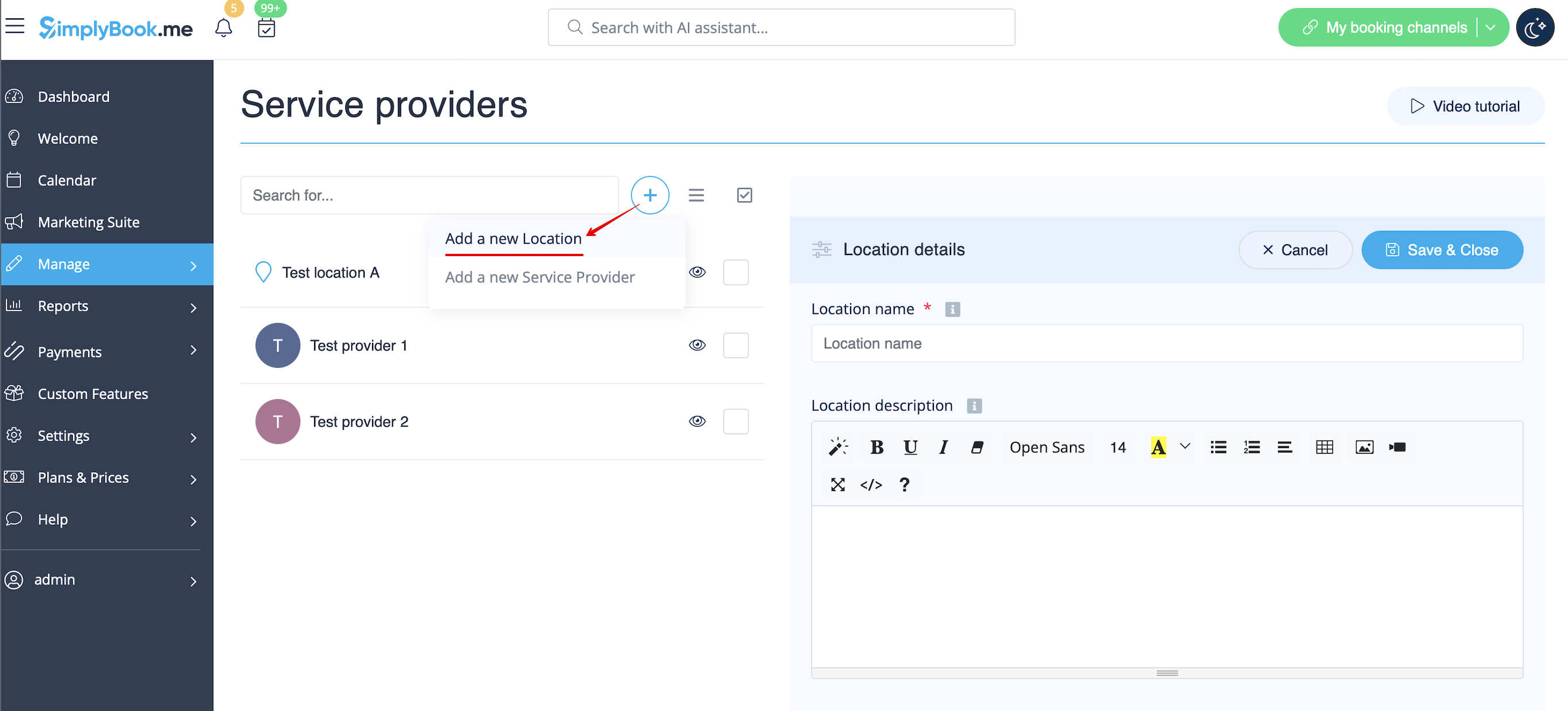
:Schakel de aangepaste functie[[ | :Schakel de aangepaste functie[[Special:MyLanguage/Multiple_Locations_custom_feature |'Meerdere locaties']] in en voeg locaties toe in de instellingen van de aangepaste functie of in Beheer // Dienstverleners // '+' om een nieuwe locatie toe te voegen. Klik op het tabblad 'Locatieaanbieders' voor de betreffende locatie en vink de vakjes aan bij de dienstverleners die u aan de locatie wilt koppelen.<br/> | ||
[[File:Create new location redesigned.png|1200px | center|link=https://help.simplybook.me/images/1/15/Create_new_location_redesigned.png]] | [[File:Create new location redesigned.png|1200px | center|link=https://help.simplybook.me/images/1/15/Create_new_location_redesigned.png]] | ||
<br/> | <br/> | ||
<br/> | <br/> | ||
Latest revision as of 10:36, 11 August 2025
Hoe locatie toevoegen
Locaties zijn bedoeld om aanbieders te groeperen. Ze kunnen worden toegevoegd met behulp van de aangepaste functie 'Meerdere locaties'.
- Toevoegen
- Schakel de aangepaste functie'Meerdere locaties' in en voeg locaties toe in de instellingen van de aangepaste functie of in Beheer // Dienstverleners // '+' om een nieuwe locatie toe te voegen. Klik op het tabblad 'Locatieaanbieders' voor de betreffende locatie en vink de vakjes aan bij de dienstverleners die u aan de locatie wilt koppelen.