From SimplyBook.me
Importing a new version from external source Tags: Mobile edit Mobile web edit |
Importing a new version from external source |
||
| Line 1: | Line 1: | ||
==[[ | ==[[Special:MyLanguage/Client Login custom feature|Client login]]== | ||
If you require the clients to sign in/sign up to be able to book the appointments or make purchases on your booking website and have Client login custom feature enabled,<br> | If you require the clients to sign in/sign up to be able to book the appointments or make purchases on your booking website and have Client login custom feature enabled,<br> | ||
there are three notification types that can be sent to your clients(they cannot be disabled): | there are three notification types that can be sent to your clients(they cannot be disabled): | ||
| Line 5: | Line 5: | ||
* restore password(Email) | * restore password(Email) | ||
* reset password or create client from admin interface(Email) | * reset password or create client from admin interface(Email) | ||
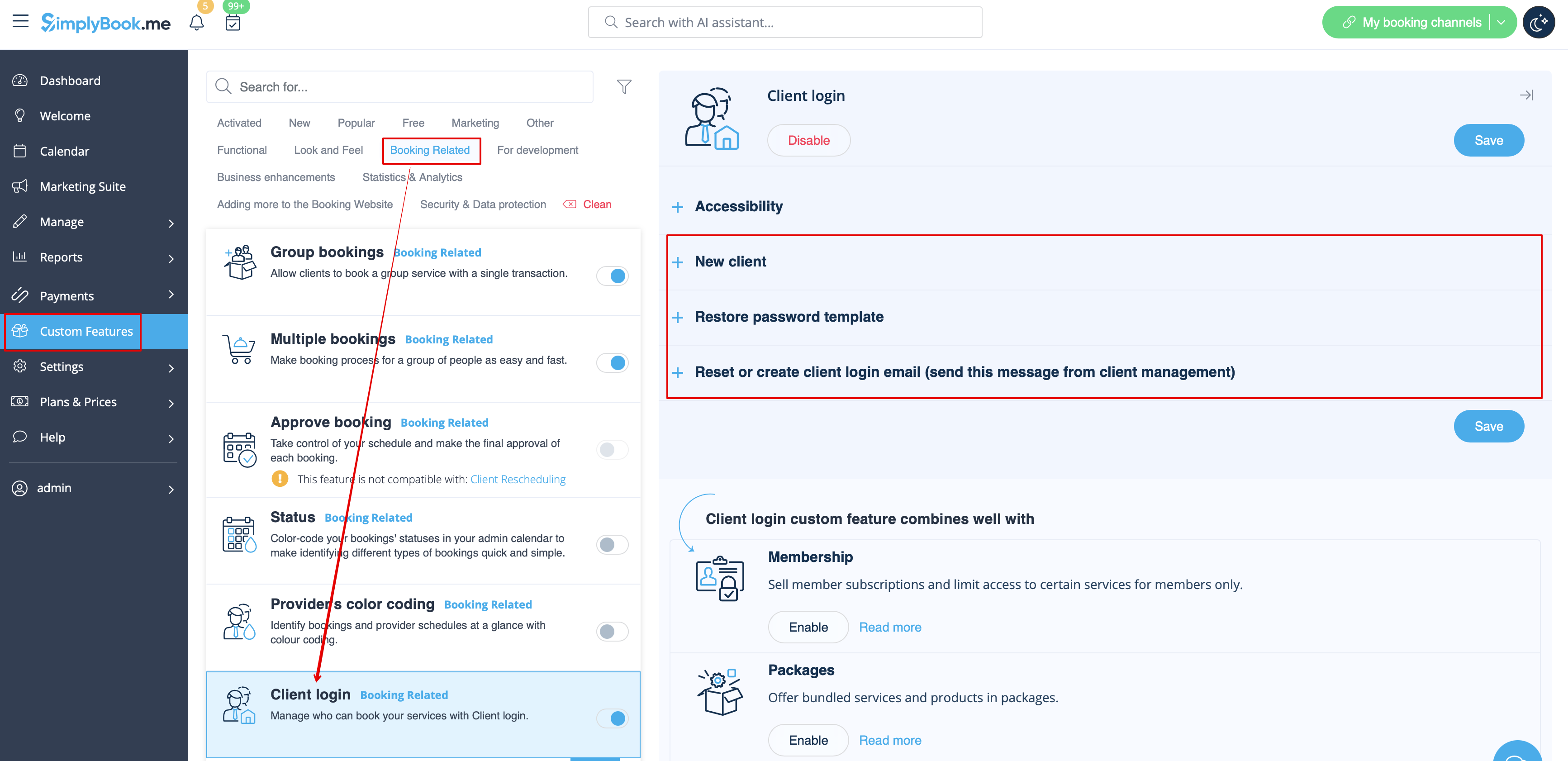
You can edit the templates in <span style="background-color:#d4f8e5; padding:5px; border-radius:5px;">Custom features</span> -> [[ | You can edit the templates in <span style="background-color:#d4f8e5; padding:5px; border-radius:5px;">Custom features</span> -> [[Special:MyLanguage/Client Login custom feature|Client login]] -> on the <span style="background-color:#d4f8e5; padding:5px; border-radius:5px;">right side</span> of the page. | ||
[[File:Client login notifications path redesigned.png|1200px|border|center|link=https://help.simplybook.me/images/d/d0/Client_login_notifications_path_redesigned.png]] | [[File:Client login notifications path redesigned.png|1200px|border|center|link=https://help.simplybook.me/images/d/d0/Client_login_notifications_path_redesigned.png]] | ||
<br><br> | <br><br> | ||
:''[[ | :''[[Special:MyLanguage/Client Login custom feature|Read more]] about his custom feature use.'' | ||
-------- | -------- | ||
Latest revision as of 13:08, 13 August 2025
Client login
If you require the clients to sign in/sign up to be able to book the appointments or make purchases on your booking website and have Client login custom feature enabled,
there are three notification types that can be sent to your clients(they cannot be disabled):
- new client registration(Email)
- restore password(Email)
- reset password or create client from admin interface(Email)
You can edit the templates in Custom features -> Client login -> on the right side of the page.
- Read more about his custom feature use.
