From SimplyBook.me
Importing a new version from external source Tags: Mobile edit Mobile web edit |
Importing a new version from external source |
||
| Line 1: | Line 1: | ||
==[[ | ==[[Special:MyLanguage/Tickets custom feature|Tickets]]== | ||
By default the ticket is automatically sent to client email together with the corresponding service confirmation email.<br> | By default the ticket is automatically sent to client email together with the corresponding service confirmation email.<br> | ||
But in case you are using online payments and allow to choose <span style="background-color:#d4f8e5; padding:5px; border-radius:5px;">pay later</span> option on the booking website and the client select it,<br> | But in case you are using online payments and allow to choose <span style="background-color:#d4f8e5; padding:5px; border-radius:5px;">pay later</span> option on the booking website and the client select it,<br> | ||
in this case the ticket will be sent with the separate email. | in this case the ticket will be sent with the separate email. | ||
As well you may wish to <span style="background-color:#d4f8e5; padding:5px; border-radius:5px;">re-send the ticket</span> to the client in certain cases(it is possible in <span style="background-color:#d4f8e5; padding:5px; border-radius:5px;">Reports</span> -> <span style="background-color:#d4f8e5; padding:5px; border-radius:5px;">Tickets report).</span> | As well you may wish to <span style="background-color:#d4f8e5; padding:5px; border-radius:5px;">re-send the ticket</span> to the client in certain cases(it is possible in <span style="background-color:#d4f8e5; padding:5px; border-radius:5px;">Reports</span> -> <span style="background-color:#d4f8e5; padding:5px; border-radius:5px;">Tickets report).</span> | ||
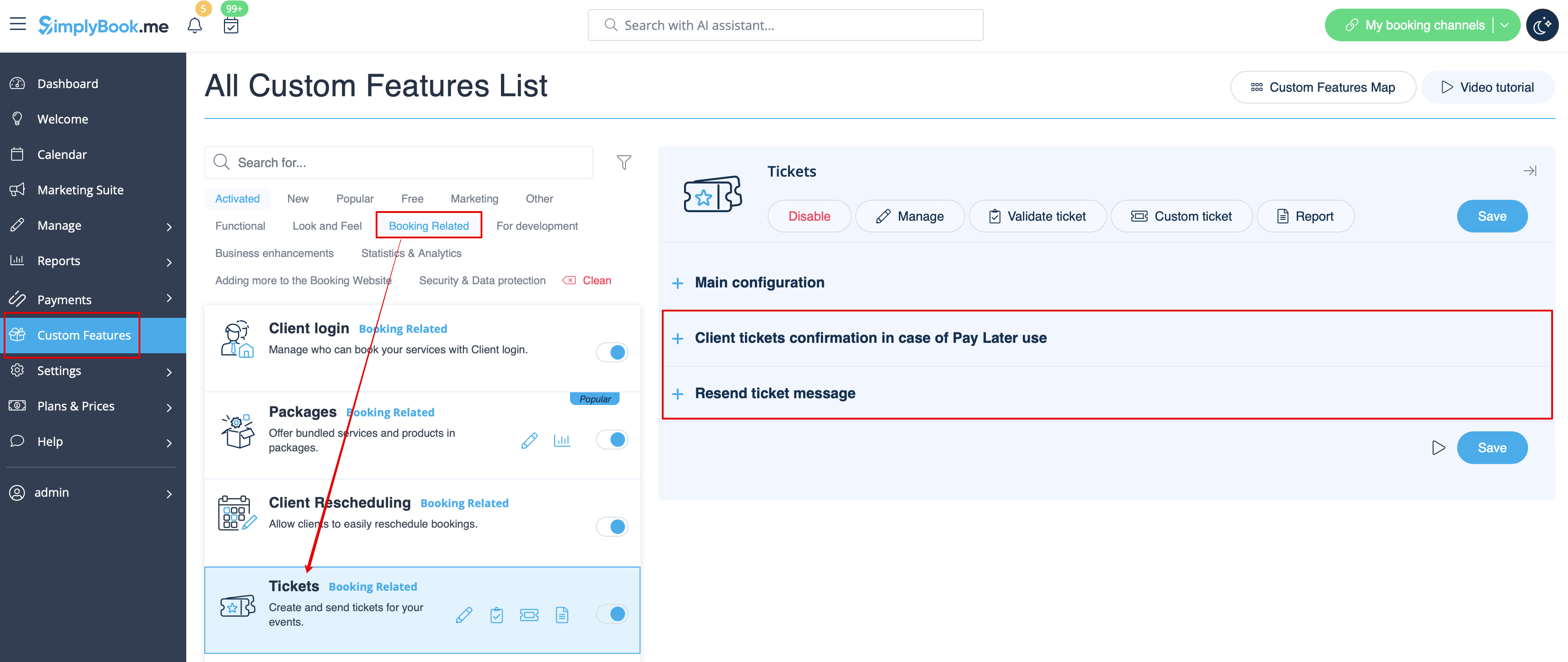
Both notification templates case be edited in <span style="background-color:#d4f8e5; padding:5px; border-radius:5px;">Custom features</span> -> [[ | Both notification templates case be edited in <span style="background-color:#d4f8e5; padding:5px; border-radius:5px;">Custom features</span> -> [[Special:MyLanguage/Tickets custom feature|Tickets]] -> on the <span style="background-color:#d4f8e5; padding:5px; border-radius:5px;">right side</span> or the page. There are Email types available only. | ||
[[File:Tickets notificatons path redesigned.png|1200px|border|center|link=https://help.simplybook.me/images/e/ea/Tickets_notificatons_path_redesigned.png]] | [[File:Tickets notificatons path redesigned.png|1200px|border|center|link=https://help.simplybook.me/images/e/ea/Tickets_notificatons_path_redesigned.png]] | ||
<br><br> | <br><br> | ||
:''[[ | :''[[Special:MyLanguage/Tickets custom feature|Read more]] about his custom feature use.'' | ||
-------- | -------- | ||
Latest revision as of 13:08, 13 August 2025
Tickets
By default the ticket is automatically sent to client email together with the corresponding service confirmation email.
But in case you are using online payments and allow to choose pay later option on the booking website and the client select it,
in this case the ticket will be sent with the separate email.
As well you may wish to re-send the ticket to the client in certain cases(it is possible in Reports -> Tickets report).
Both notification templates case be edited in Custom features -> Tickets -> on the right side or the page. There are Email types available only.
- Read more about his custom feature use.
