From SimplyBook.me
Importing a new version from external source |
Importing a new version from external source |
||
| Line 1: | Line 1: | ||
:1. First of all, as you plan to work with online payment, you need to have <span style="background-color:#cdeffc; padding:5px; border-radius:5px;">[[Accept payments custom feature|Accept Payments]]</span> custom feature enabled in your [https://simplybook.me/ SimplyBook.me] account. | :1. First of all, as you plan to work with online payment, you need to have <span style="background-color:#cdeffc; padding:5px; border-radius:5px;">[[Special:MyLanguage/Accept payments custom feature|Accept Payments]]</span> custom feature enabled in your [https://simplybook.me/ SimplyBook.me] account. | ||
[[File:Accept payments enable path redesigned.png|1200px|center|link=https://help.simplybook.me/images/9/9e/Accept_payments_enable_path_redesigned.png]] | [[File:Accept payments enable path redesigned.png|1200px|center|link=https://help.simplybook.me/images/9/9e/Accept_payments_enable_path_redesigned.png]] | ||
<br><br> | <br><br> | ||
:2. Click on <span style="background-color:#d4f8e5; padding:5px; border-radius:5px;">Settings</span> button on the <span style="background-color:#d4f8e5; padding:5px; border-radius:5px;">custom features page</span> next to the <span style="background-color:#cdeffc; padding:5px; border-radius:5px;">[[Accept payments custom feature|Accept Payments]]</span> feature. | :2. Click on <span style="background-color:#d4f8e5; padding:5px; border-radius:5px;">Settings</span> button on the <span style="background-color:#d4f8e5; padding:5px; border-radius:5px;">custom features page</span> next to the <span style="background-color:#cdeffc; padding:5px; border-radius:5px;">[[Special:MyLanguage/Accept payments custom feature|Accept Payments]]</span> feature. | ||
[[File:Accept payments settings path redesigned.png|1200px|border | center|link=https://help.simplybook.me/images/3/37/Accept_payments_settings_path_redesigned.png]] | [[File:Accept payments settings path redesigned.png|1200px|border | center|link=https://help.simplybook.me/images/3/37/Accept_payments_settings_path_redesigned.png]] | ||
<br><br> | <br><br> | ||
| Line 18: | Line 18: | ||
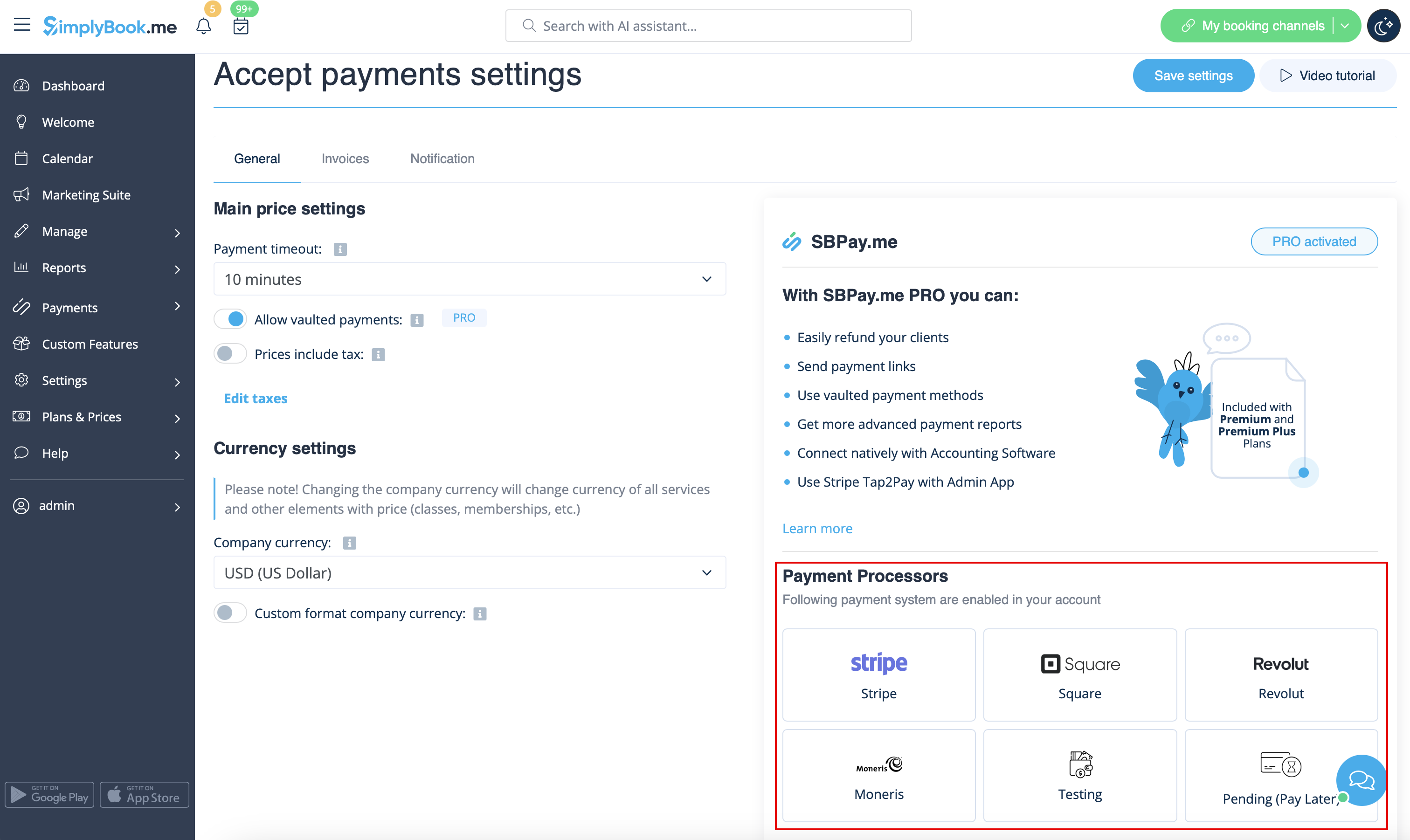
[[File:Active payment processors redesigned.png|1200px|center|link=https://help.simplybook.me/images/0/03/Active_payment_processors_redesigned.png]] | [[File:Active payment processors redesigned.png|1200px|center|link=https://help.simplybook.me/images/0/03/Active_payment_processors_redesigned.png]] | ||
<br><br> | <br><br> | ||
:6. Set the prices for your services, <span style="background-color:#cdeffc; padding:5px; border-radius:5px;">[[Classes custom feature|classes]]</span>, <span style="background-color:#cdeffc; padding:5px; border-radius:5px;">[[Packages custom feature|packages]]</span>, <span style="background-color:#cdeffc; padding:5px; border-radius:5px;">[[Membership custom feature|memberships]]</span>, <span style="background-color:#cdeffc; padding:5px; border-radius:5px;">[[Coupons and Gift Cards custom feature|gift cards]]</span>, <span style="background-color:#cdeffc; padding:5px; border-radius:5px;">[[Products for Sale custom feature|products]]</span> or <span style="background-color:#cdeffc; padding:5px; border-radius:5px;">[[Service Add-Ons custom feature|service add-ons]]</span> in your [https://simplybook.me/ SimplyBook.me] account and you are ready to get payments online. | :6. Set the prices for your services, <span style="background-color:#cdeffc; padding:5px; border-radius:5px;">[[Special:MyLanguage/Classes custom feature|classes]]</span>, <span style="background-color:#cdeffc; padding:5px; border-radius:5px;">[[Special:MyLanguage/Packages custom feature|packages]]</span>, <span style="background-color:#cdeffc; padding:5px; border-radius:5px;">[[Special:MyLanguage/Membership custom feature|memberships]]</span>, <span style="background-color:#cdeffc; padding:5px; border-radius:5px;">[[Special:MyLanguage/Coupons and Gift Cards custom feature|gift cards]]</span>, <span style="background-color:#cdeffc; padding:5px; border-radius:5px;">[[Special:MyLanguage/Products for Sale custom feature|products]]</span> or <span style="background-color:#cdeffc; padding:5px; border-radius:5px;">[[Special:MyLanguage/Service Add-Ons custom feature|service add-ons]]</span> in your [https://simplybook.me/ SimplyBook.me] account and you are ready to get payments online. | ||
<br><br> | <br><br> | ||
Latest revision as of 08:30, 18 September 2025
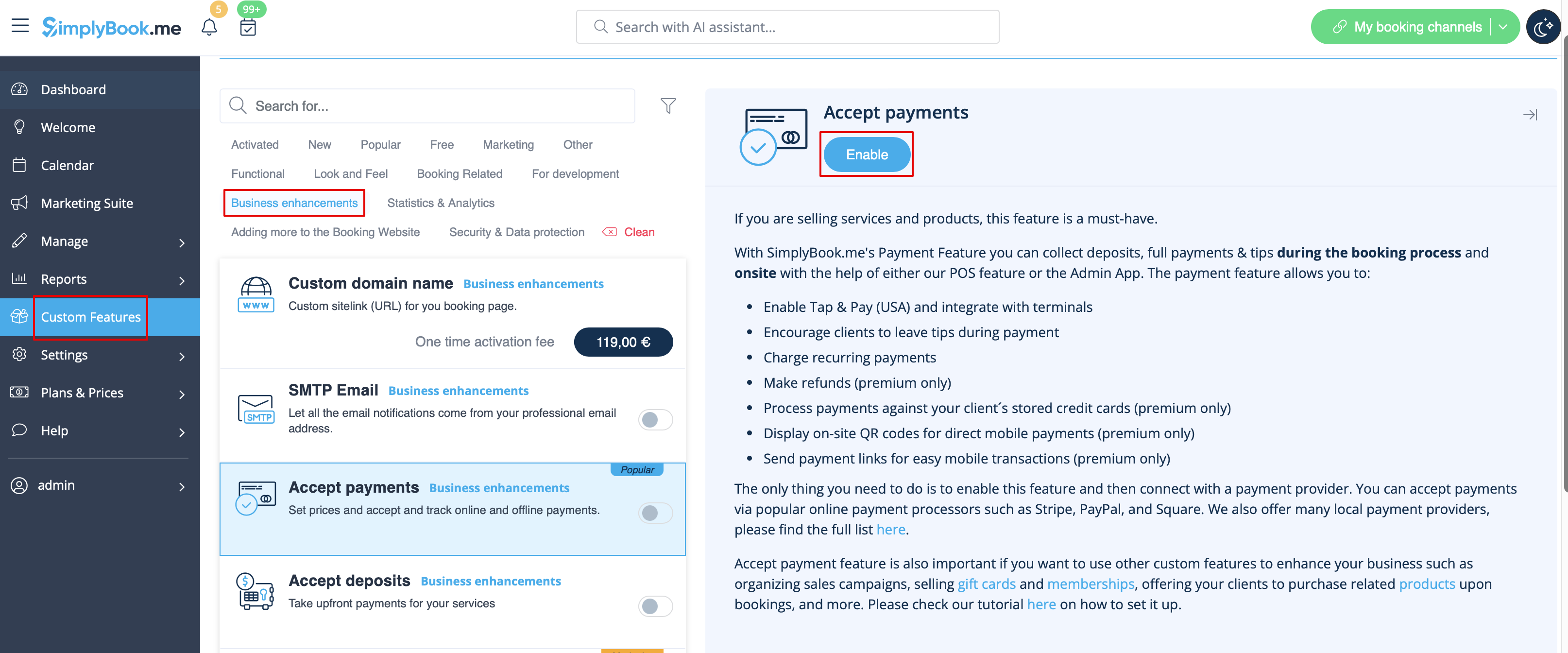
- 1. First of all, as you plan to work with online payment, you need to have Accept Payments custom feature enabled in your SimplyBook.me account.
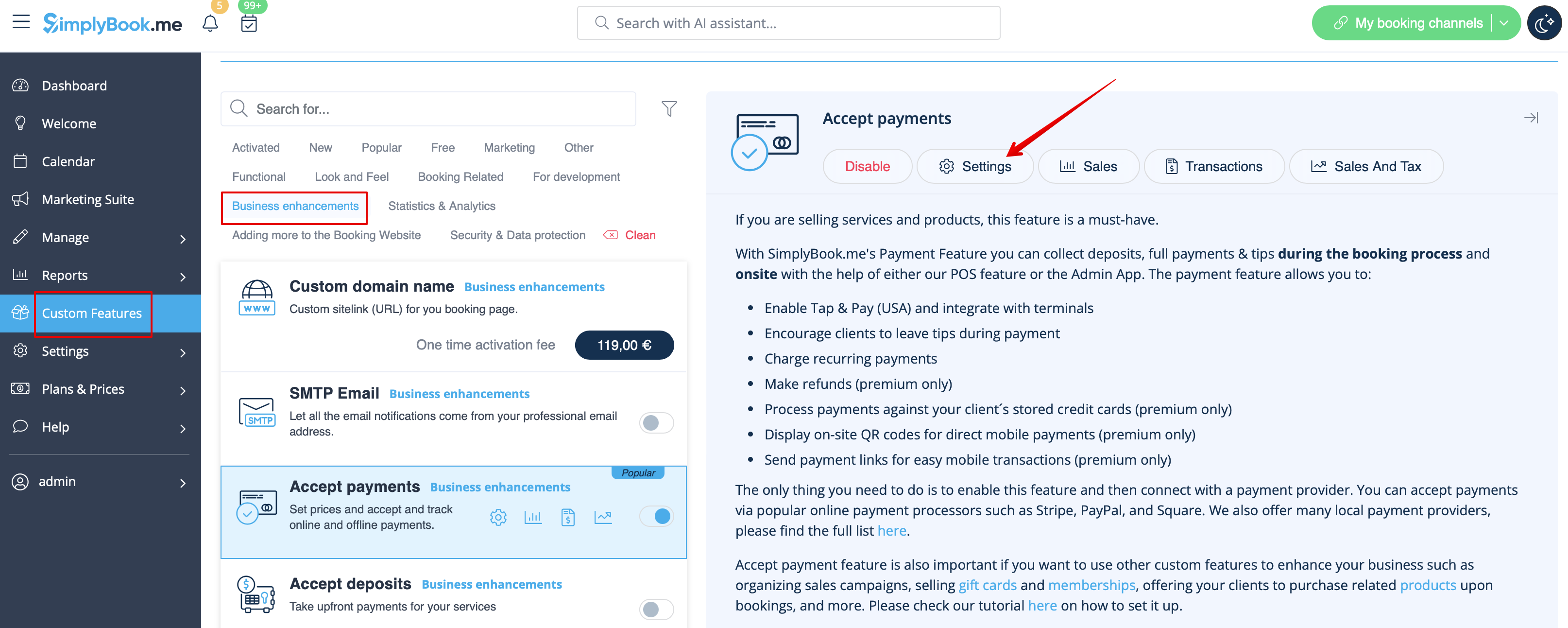
- 2. Click on Settings button on the custom features page next to the Accept Payments feature.
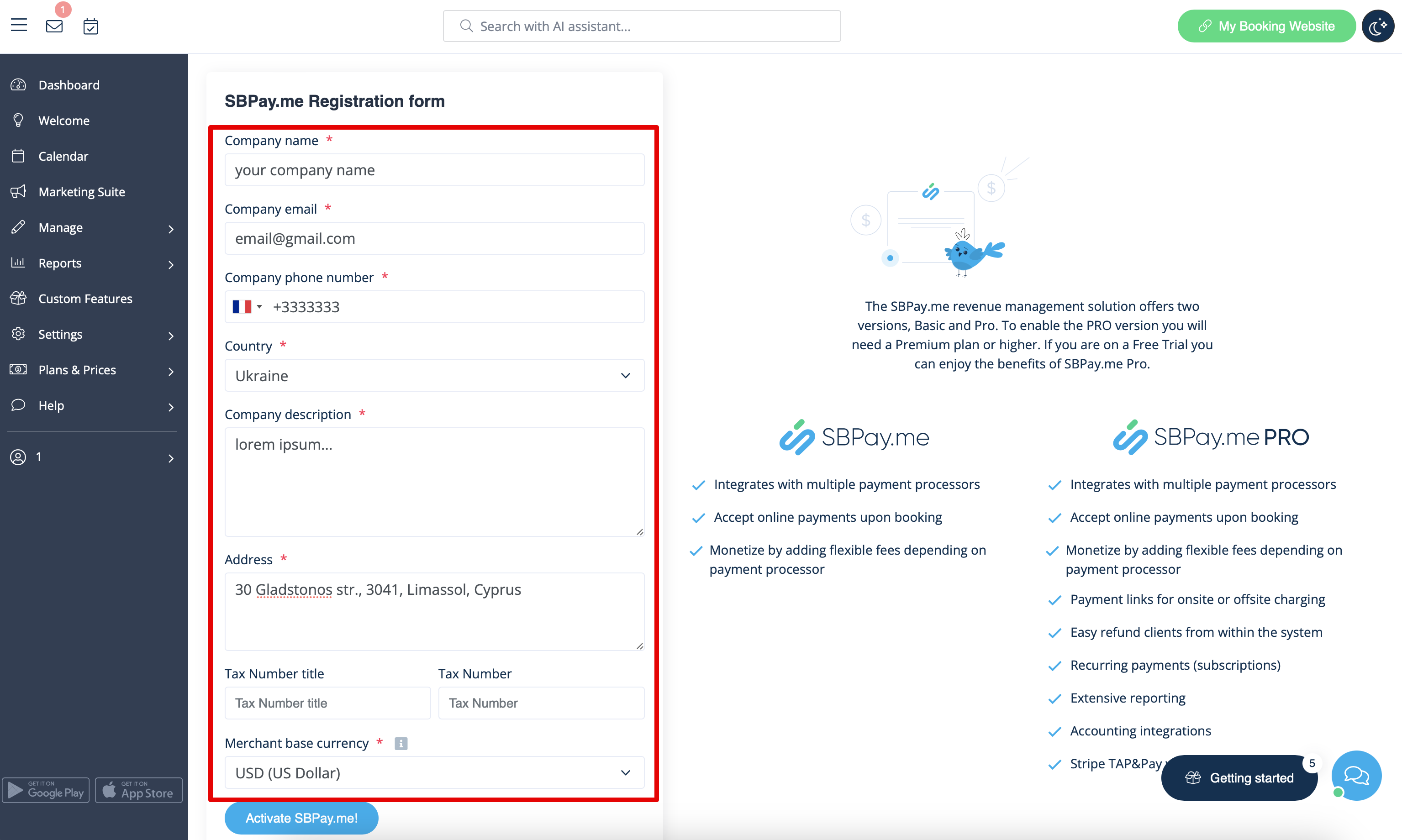
- 3. Adjust your company information in the registration form if necessary.
- (It will be autocompleted with the company details that you already have in your system).
- Click on Activate SBPay.me button below.
- Congratulations! Your SBPay.me account is created!
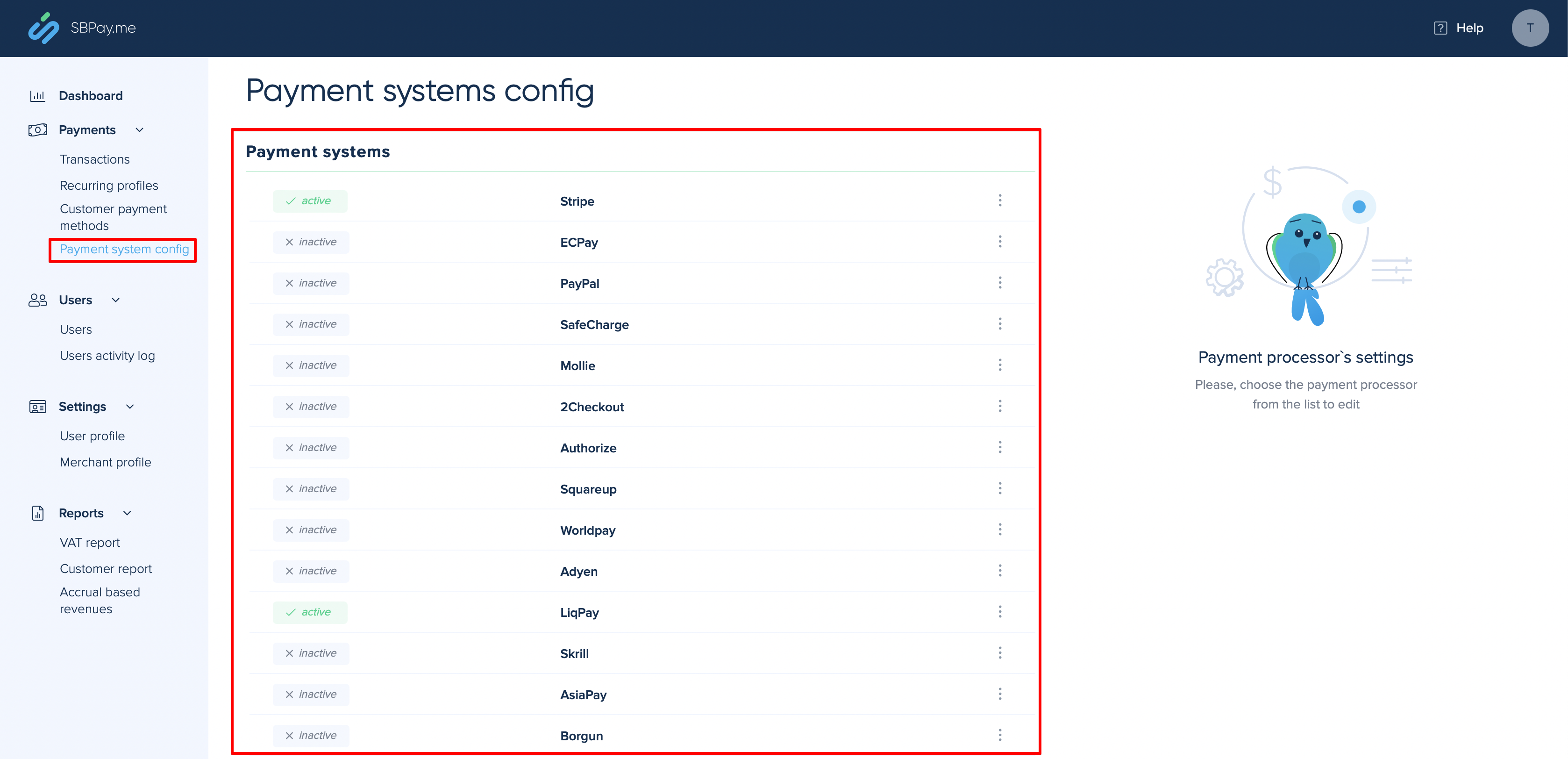
- 4. Navigate to the Payment system settings and add the credentials of the payment gateway that you plan to use for online payments.
- If you had some payment system details before enabling SBPay.me integration it may have been copied to SBPay.me side, but there may be some changes in the payment flow so you will need to check if all the settings are added there for the smooth online payments operation.
- 5. Once you have set the payment processors up you will be able to see the active ones on the SimplyBook.me side as well.
- 6. Set the prices for your services, classes, packages, memberships, gift cards, products or service add-ons in your SimplyBook.me account and you are ready to get payments online.
