From SimplyBook.me
Created page with "{{#seo: |title=Bookinger på Facebook - SimplyBook.me |description=Giv kunderne mulighed for at booke direkte via din Facebook-side. Øg synligheden og antallet af bookinger uden besvær. Kom i gang i dag! |titlemode=tilføj |keywords=faq, ofte stillede spørgsmål, bookingssoftware, spørgsmål om aftalesystem, onlineaftaler, kalendersoftware, bookingsystem, bookingkalender, planlægningssoftware, online aftaleplanlægning, online planlægning, opsætning, hjælp til op..." |
Updating to match new version of source page |
||
| Line 2: | Line 2: | ||
{{#seo: |title=Bookinger på Facebook - SimplyBook.me |description=Giv kunderne mulighed for at booke direkte via din Facebook-side. Øg synligheden og antallet af bookinger uden besvær. Kom i gang i dag! |titlemode=tilføj |keywords=faq, ofte stillede spørgsmål, bookingssoftware, spørgsmål om aftalesystem, onlineaftaler, kalendersoftware, bookingsystem, bookingkalender, planlægningssoftware, online aftaleplanlægning, online planlægning, opsætning, hjælp til opsætning, support, hjælpen }} | {{#seo: |title=Bookinger på Facebook - SimplyBook.me |description=Giv kunderne mulighed for at booke direkte via din Facebook-side. Øg synligheden og antallet af bookinger uden besvær. Kom i gang i dag! |titlemode=tilføj |keywords=faq, ofte stillede spørgsmål, bookingssoftware, spørgsmål om aftalesystem, onlineaftaler, kalendersoftware, bookingsystem, bookingkalender, planlægningssoftware, online aftaleplanlægning, online planlægning, opsætning, hjælp til opsætning, support, hjælpen }} | ||
<div class="mw-translate-fuzzy"> | |||
<br><br> | <br><br> | ||
__TOC__ | __TOC__ | ||
| Line 11: | Line 12: | ||
*<span style="background-color:#ffe9e9; padding:5px; border-radius:5px;">Widgetten kan se forskellig ud afhængigt af Facebook-indstillingerne for forskellige enheder og applikationer</span><br> | *<span style="background-color:#ffe9e9; padding:5px; border-radius:5px;">Widgetten kan se forskellig ud afhængigt af Facebook-indstillingerne for forskellige enheder og applikationer</span><br> | ||
<br><br> | <br><br> | ||
</div> | |||
<div class="mw-translate-fuzzy"> | |||
:'''Videovejledning tilgængelig '''[[File:Youtube-Logo.png|link=https://www.youtube.com/watch?v=9o5fJkZD384&feature=youtu.be]] | :'''Videovejledning tilgængelig '''[[File:Youtube-Logo.png|link=https://www.youtube.com/watch?v=9o5fJkZD384&feature=youtu.be]] | ||
<br><br> | <br><br> | ||
| Line 18: | Line 21: | ||
[[File:Facebook and insta bookings enable path redesigned.png|1200px | border| center|link=https://help.simplybook.me/images/0/06/Facebook_and_insta_bookings_enable_path_redesigned.png]] | [[File:Facebook and insta bookings enable path redesigned.png|1200px | border| center|link=https://help.simplybook.me/images/0/06/Facebook_and_insta_bookings_enable_path_redesigned.png]] | ||
<br><br> | <br><br> | ||
</div> | |||
:2. Log ind på din Facebook/Instagram-forretningskonto i en anden browserfane. | :2. Log ind på din Facebook/Instagram-forretningskonto i en anden browserfane. | ||
<br><br> | <br><br> | ||
| Line 74: | Line 78: | ||
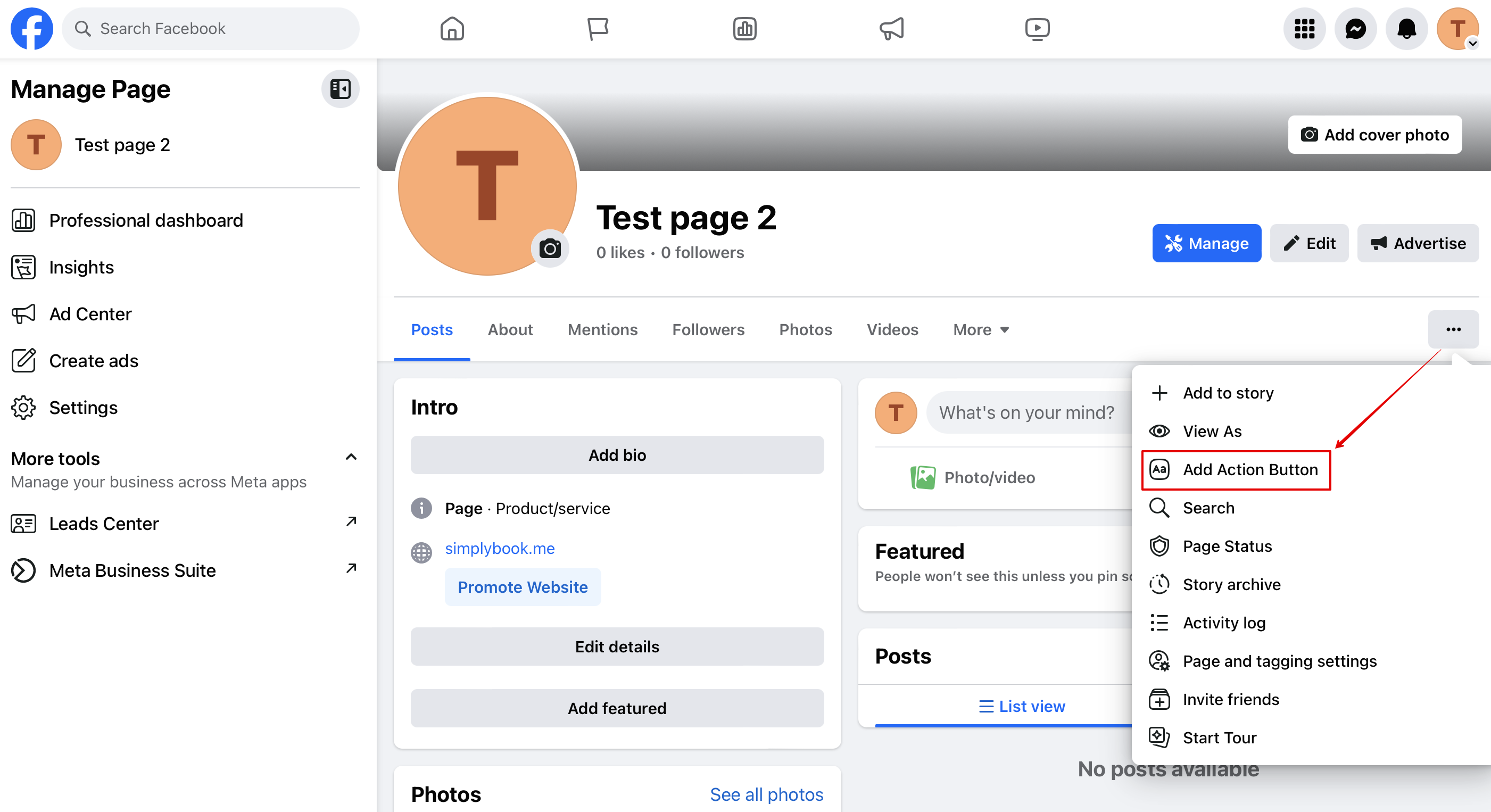
[[File:Fb new add action button.png|1200px|center|link=https://help.simplybook.me/images/b/b3/Fb_new_add_action_button.png]] | [[File:Fb new add action button.png|1200px|center|link=https://help.simplybook.me/images/b/b3/Fb_new_add_action_button.png]] | ||
<br><br> | <br><br> | ||
<div class="mw-translate-fuzzy"> | |||
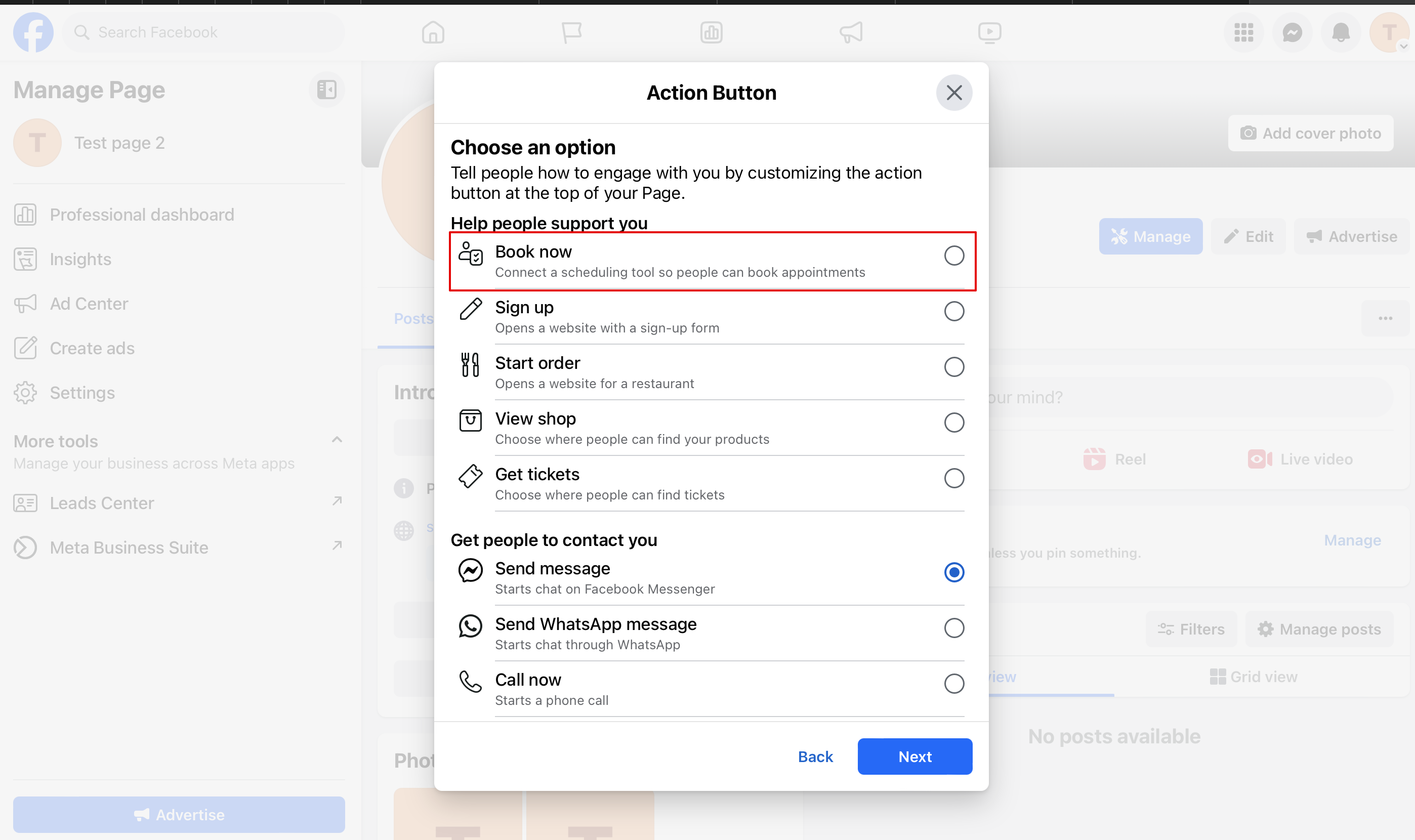
:2. Du kan vælge "Book nu" eller "Reserver" som call-to-action og derefter vælge [https://simplybook.me/en/ SimplyBook.me]. På den måde aktiverer du [[Facebook and Instagram Bookings|Facebook og Instagram Bookings]] tilpassede funktion | :2. Du kan vælge "Book nu" eller "Reserver" som call-to-action og derefter vælge [https://simplybook.me/en/ SimplyBook.me]. På den måde aktiverer du [[Facebook and Instagram Bookings|Facebook og Instagram Bookings]] tilpassede funktion | ||
[[File:Fb action button new book.png|1200px|center|link=https://help.simplybook.me/images/6/64/Fb_action_button_new_book.png]] | [[File:Fb action button new book.png|1200px|center|link=https://help.simplybook.me/images/6/64/Fb_action_button_new_book.png]] | ||
| Line 80: | Line 85: | ||
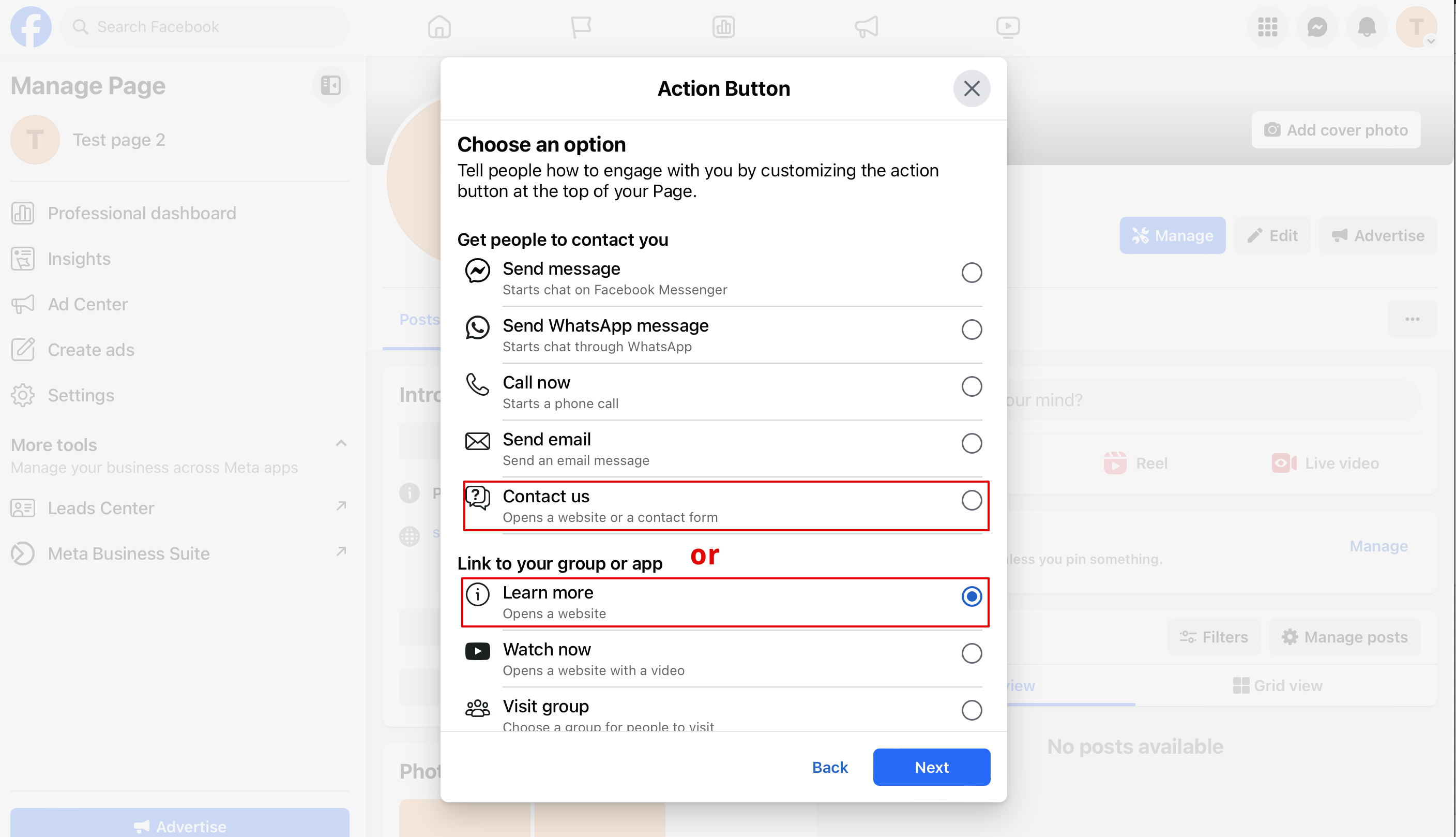
[[File:Fb new contact us action.png|1200px|center|link=https://help.simplybook.me/images/4/49/Fb_new_contact_us_action.png]] | [[File:Fb new contact us action.png|1200px|center|link=https://help.simplybook.me/images/4/49/Fb_new_contact_us_action.png]] | ||
<br><br> | <br><br> | ||
</div> | |||
:3. Indsæt linket til din bookingwebsite i det relevante felt og gem indstillingerne. | :3. Indsæt linket til din bookingwebsite i det relevante felt og gem indstillingerne. | ||
[[File:Add link to fb button.png|1200px|center|link=https://help.simplybook.me/images/0/03/Add_link_to_fb_button.png]] | [[File:Add link to fb button.png|1200px|center|link=https://help.simplybook.me/images/0/03/Add_link_to_fb_button.png]] | ||
| Line 87: | Line 93: | ||
<br><br> | <br><br> | ||
<div class="mw-translate-fuzzy"> | |||
= Sådan tilføjer du en Facebook Messenger-chat til din reservationsside = | = Sådan tilføjer du en Facebook Messenger-chat til din reservationsside = | ||
:'''Video-vejledning tilgængelig '''[[File:Youtube-Logo.png|link=https://www.youtube.com/watch?v=PuFFtCOksc8]] | :'''Video-vejledning tilgængelig '''[[File:Youtube-Logo.png|link=https://www.youtube.com/watch?v=PuFFtCOksc8]] | ||
<br><br> | <br><br> | ||
</div> | |||
Revision as of 12:20, 19 September 2025
Facebook og Instagram Bookings tilpasset funktion
Bemærk
- Det er muligt at forbinde bookingmuligheden til Facebook Business- og Instagram Business-sider. Denne funktion kan ikke tilføjes til en personlig side.
- Bookingsmuligheden vises ikke på desktopversionen af Instagram og kan kun bruges via mobilapps.
- Bookingtroll-temaet bruges som standard til booking-widgeten. Hvis du ønsker at ændre stilen, skal du opgradere til Premium for at vælge det ønskede tema og kunne bruge tilpassede CSS-justeringer.
- Widgetten kan se forskellig ud afhængigt af Facebook-indstillingerne for forskellige enheder og applikationer
- Videovejledning tilgængelig

Sådan tilføjes og bruges bookingmuligheden på Facebook/Instagram-virksomhedssiden
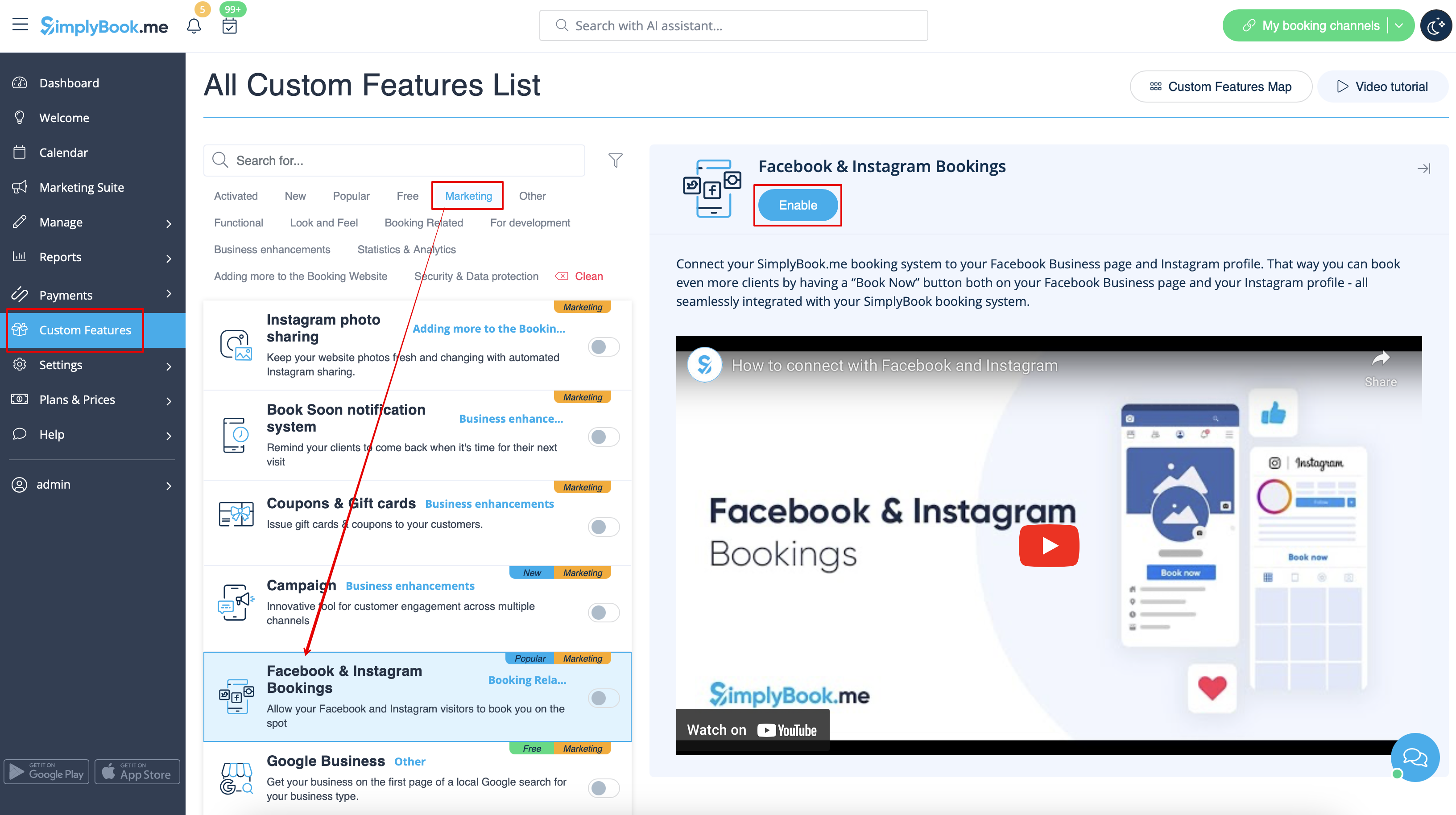
- 1. Aktivér den tilpassede funktion Facebook- og Instagram-bookinger på siden Tilpassede funktioner.
- 2. Log ind på din Facebook/Instagram-forretningskonto i en anden browserfane.
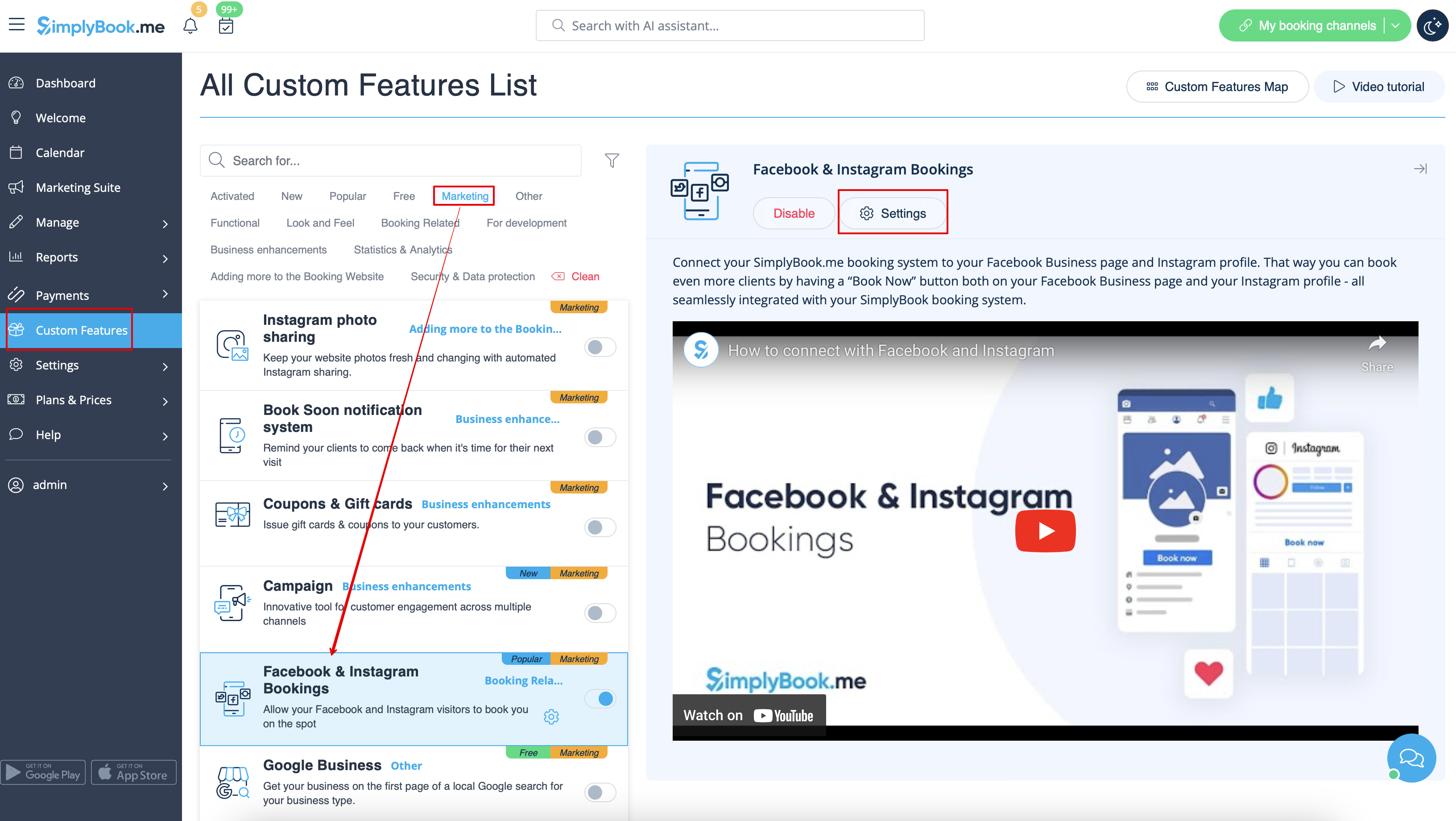
- 3. Gå tilbage til SimplyBook.me-grænsefladen og klik på Indstillinger ved siden af Facebook & Instagram-bookinger.
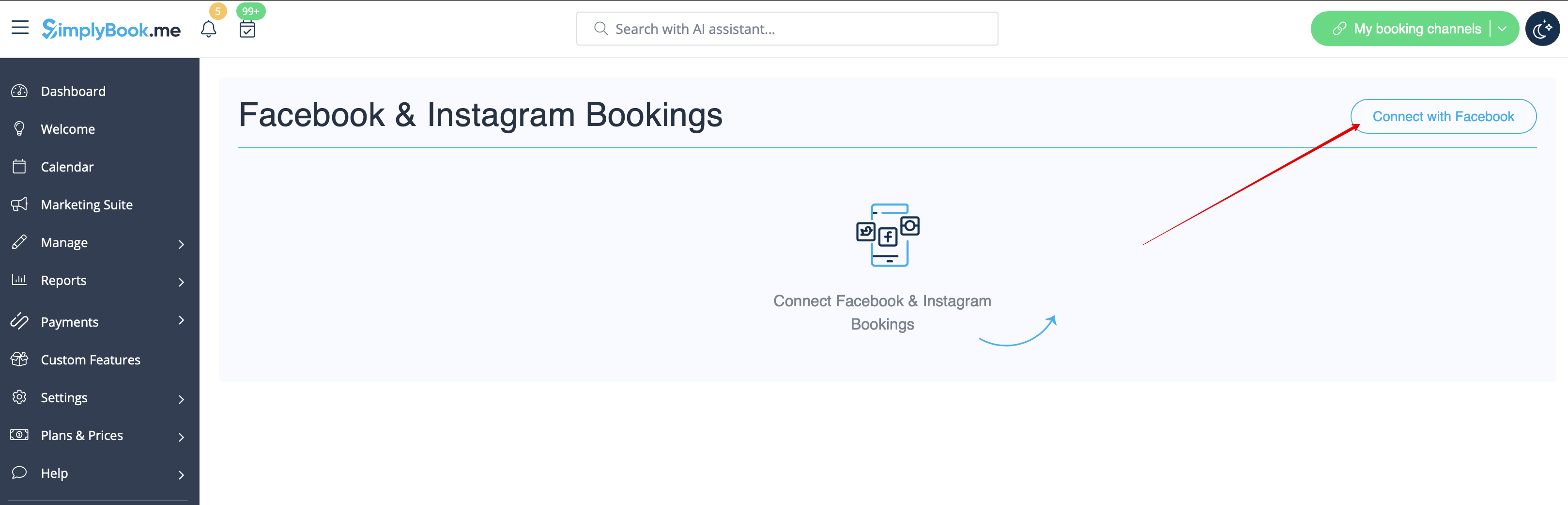
- 4. Klik på knappen Forbind med Facebook på den side, du ser.
- 5. Du vil blive omdirigeret til Facebook -grænsefladen for at administrere tilladelser og forbindelse til SimplyBook.me.
- Følg trin 1-5 nedenfor.
- (Hvis du har en Instagram-forretningsprofil, der er forbundet med din Facebook-forretningsside, kan du også forbinde den der
- , og knappen Book vises automatisk der)

- 6. Nu vil dine tjenester blive vist på din Facebook-side med knapperne "Book" ved siden af eller " Book nu " under sidebanneret, som omdirigerer dine kunder til din bookingside.
- (visningsmulighederne afhænger af din Facebook-virksomhedsside)

- 7. Du kan også tilføje en bookingmulighed til dine Facebook-opslag, så kunderne hurtigt kan booke dine tjenester.

Sådan fjerner du knappen "Book" fra Facebook/Instagram-sider
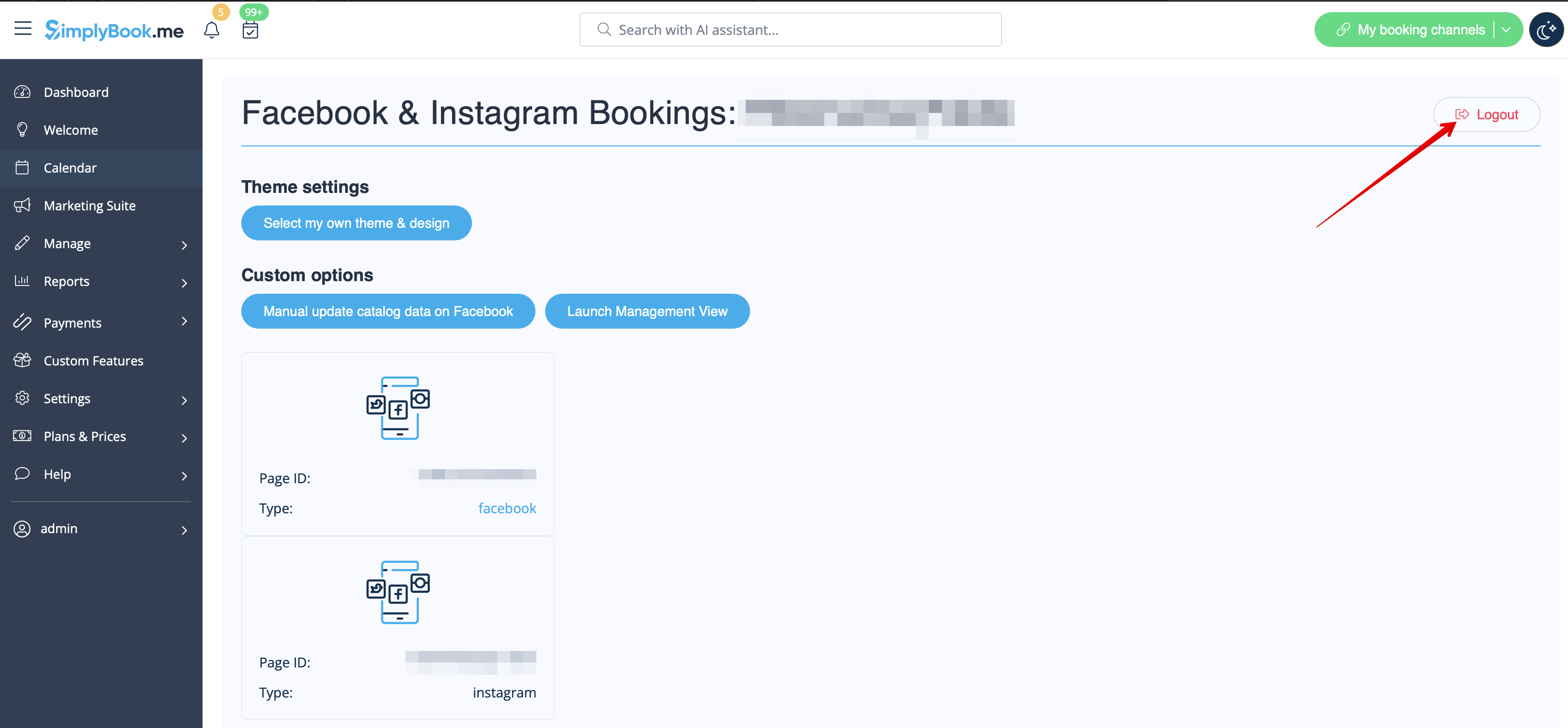
- 1. Gå til Tilpassede funktioner -> Facebook- og Instagram-bookinger -> Indstillinger på SimplyBook.me-siden.
- 2. Klik på Log ud øverst på siden.
Sådan tilføjes og bruges bookingmuligheden på Instagram
- 1. Åbn din Instagram-mobilapp og log ind på din virksomhedsside.
- 2. Gå til din profil og vælg at redigere den.
- 3. Følg trin 1-8 nedenfor for at tilføje knappen Book, der fører kunderne til din bookingside:

Sådan fjerner du Book-indstillingen fra din Instagram-virksomhedsside
- 1. Åbn din Instagram -mobilapp og gå til redigering af din profil.
- Følg trin 1-5 nedenfor for at fjerne knappen Book:

Call-to-action-knap til Facebook-fanside
- 1. Gå til dit Facebook-forretningssides forsidebillede, klik på de tre prikker under forsidebilledet, og vælg Tilføj handlingsknap
- 2. Du kan vælge "Book nu" eller "Reserver" som call-to-action og derefter vælge SimplyBook.me. På den måde aktiverer du Facebook og Instagram Bookings tilpassede funktion
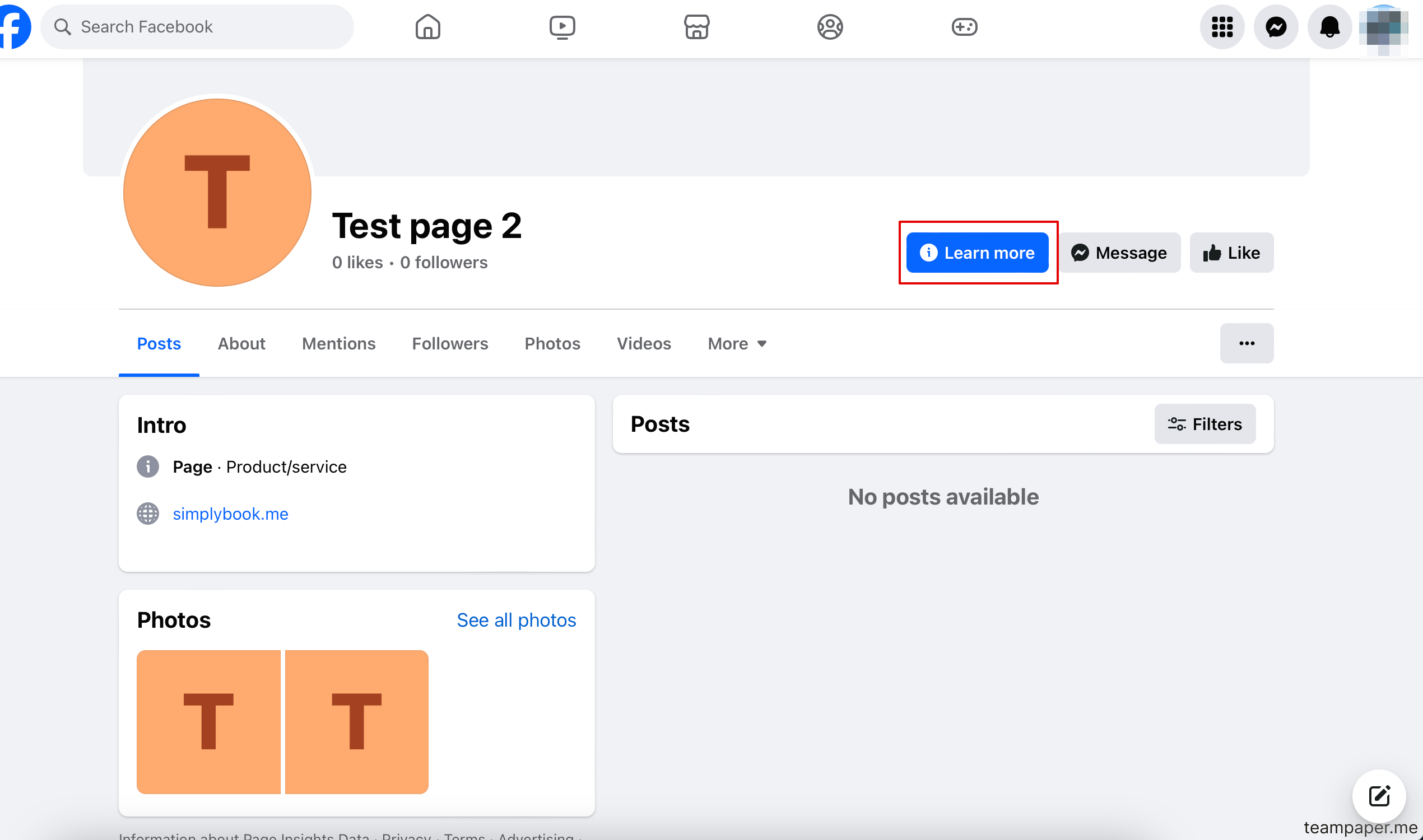
- 3. Hvis du har brug for en knap, der fører til din booking-hjemmeside, kan du vælge "Kontakt os" eller "Lær mere" i den pop op-vindue
- 3. Indsæt linket til din bookingwebsite i det relevante felt og gem indstillingerne.
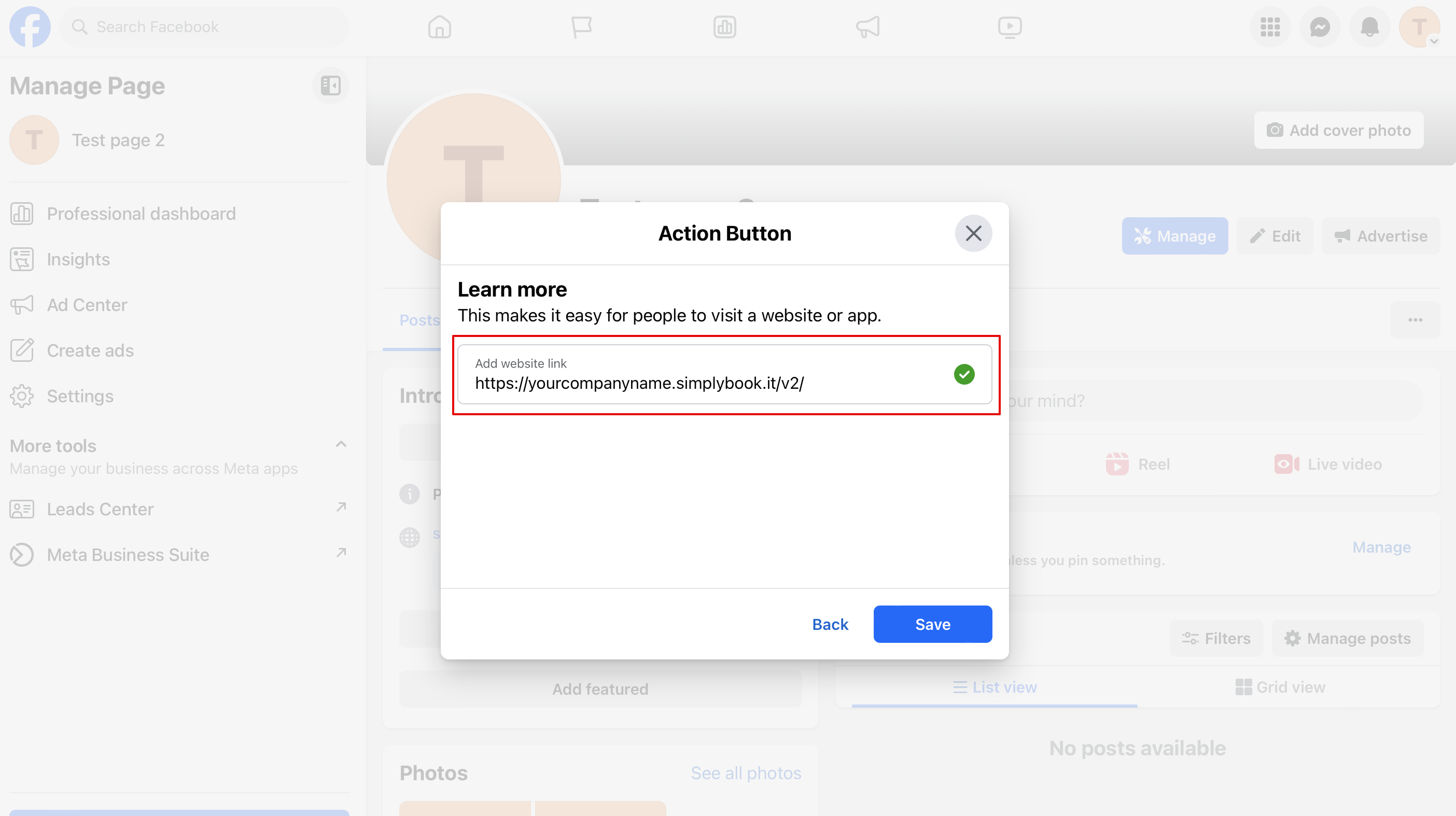
- 4. Som resultat får du en handlingsknap med teksten "Kontakt os" eller "Læs mere", der fører til din bookingwebsite.
Sådan tilføjer du en Facebook Messenger-chat til din reservationsside
- Video-vejledning tilgængelig
