From SimplyBook.me
Created page with "left<br><br>Affichez le nombre de places restantes lorsque vous acceptez plusieurs clients par créneau, par exemple pour des cours ou des événements. Vous pouvez également choisir d'afficher le nombre total de places ainsi que le nombre de places restantes. <br><br> <br><br> '''Remarque importante !''' *Cette fonctionnalité n'est pas compatible avec la limitation des réservations; *E..." |
Updating to match new version of source page |
||
| Line 1: | Line 1: | ||
<languages/> | <languages/> | ||
<div lang="en" dir="ltr" class="mw-content-ltr"> | |||
{{#seo: | {{#seo: | ||
|title= | |title=Display Remaining Spaces - SimplyBook.me | ||
|description= | |description=Learn how to display the remaining available spaces for your services in SimplyBook.me. Step-by-step guide included! | ||
|titlemode=append | |titlemode=append | ||
|keywords=faq, frequently asked questions, booking software, appointment system questions, appointments online, calendar software, booking system, booking calendar, scheduling software, online appointment scheduling, online scheduling, plugins, custom features, | |keywords=faq, frequently asked questions, booking software, appointment system questions, appointments online, calendar software, booking system, booking calendar, scheduling software, online appointment scheduling, online scheduling, plugins, custom features, custom booking page link, domain name, custom domain name, custom url | ||
}} | }} | ||
</div> | |||
[[File:Seats left icon.png|left]]<br><br> | <!--T:1--> | ||
[[File:Seats left icon.png|left]]<br><br>Show how many spaces are left when you accept multiple clients per slot, such as for classes and events. You can also choose to show the total number of spaces as well as the number of spaces left. | |||
<br><br> | <br><br> | ||
<br><br> | <br><br> | ||
''' | '''Please note!''' | ||
* | *This feature is not compatible with [[Special:MyLanguage/Limit_Bookings_custom_feature|Limit Bookings]]; | ||
* | *Works for the following [[Special:MyLanguage/How_to_change_the_way_time_slots_are_shown#Calendar_Layouts|calendar layouts]] only: slots weekly, modern, weekly and daily classes, modern provider. | ||
* | *The time blocked by [[Special:MyLanguage/Calendar_Sync_custom_feature|Calendar sync]] does not influence the number of timeslots. | ||
<br><br> | <br><br> | ||
: | :Video tutorial available <p><youtube>Dn0tNJhOToE</youtube></p> | ||
<br><br> | <br><br> | ||
; | ;How to use | ||
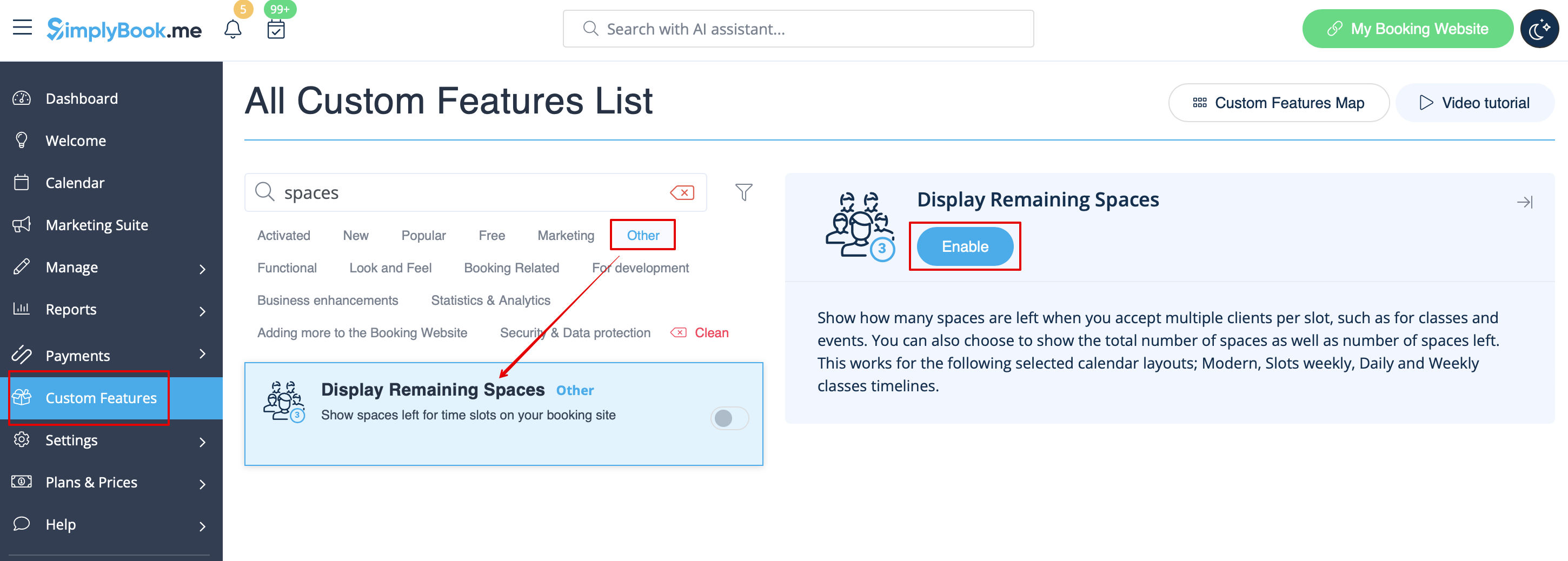
:1. | :1. Enable Display Remaining Spaces in your Custom Features section. | ||
[[File:Display remaining spaces enable path redesigned.png|1200px|border|center|link=https://help.simplybook.me/images/0/0c/Display_remaining_spaces_enable_path_redesigned.png]] | [[File:Display remaining spaces enable path redesigned.png|1200px|border|center|link=https://help.simplybook.me/images/0/0c/Display_remaining_spaces_enable_path_redesigned.png]] | ||
<br><br> | <br><br> | ||
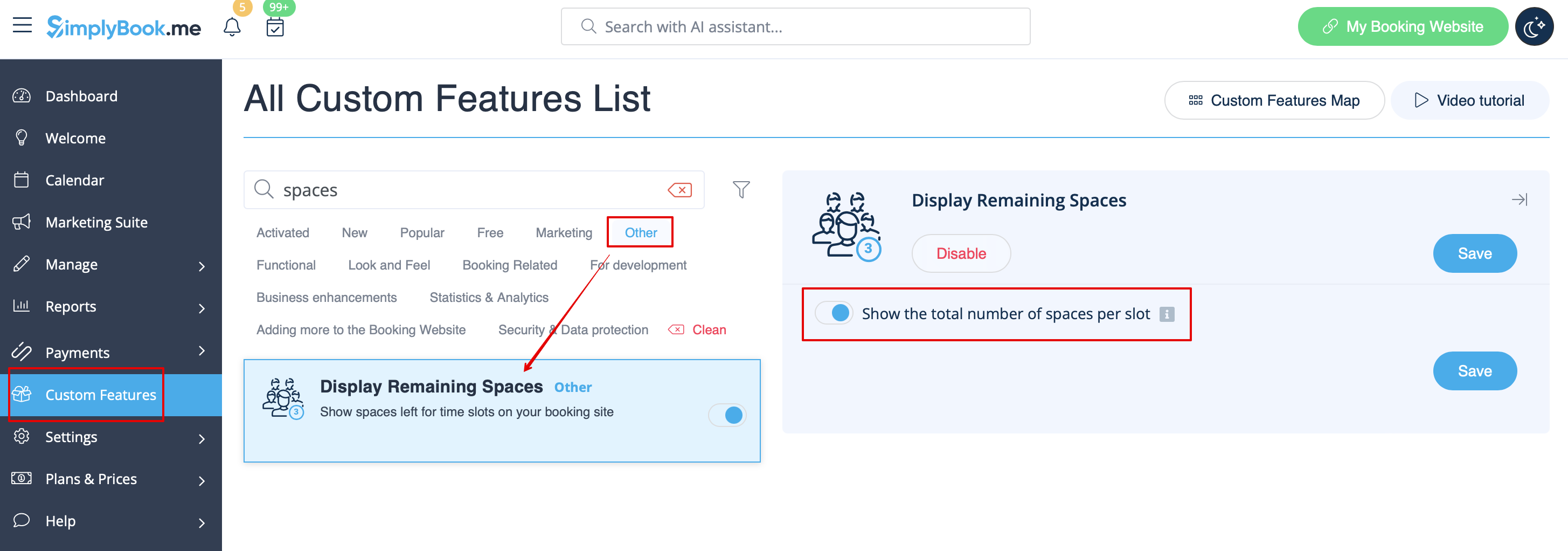
:2. ( | :2. (optional) Enable the corresponding option to display the total number of spaces along with the remaining ones. | ||
[[File:Display remaining spaces setting redesigned.png|1200px|border|center|link=https://help.simplybook.me/images/b/bd/Display_remaining_spaces_setting_redesigned.png]] | [[File:Display remaining spaces setting redesigned.png|1200px|border|center|link=https://help.simplybook.me/images/b/bd/Display_remaining_spaces_setting_redesigned.png]] | ||
<br><br> | <br><br> | ||
:3. | :3. As the result the clients will be able to see the number of the spaces left per each timeslot(and total if "Show the total number of spaces per slot" is enabled). | ||
[[File:Display slots left client side.png|1200px|border|center]] | [[File:Display slots left client side.png|1200px|border|center]] | ||
<br><br> | <br><br> | ||
<br><br> | <br><br> | ||
Revision as of 13:36, 19 September 2025

Show how many spaces are left when you accept multiple clients per slot, such as for classes and events. You can also choose to show the total number of spaces as well as the number of spaces left.
Please note!
- This feature is not compatible with Limit Bookings;
- Works for the following calendar layouts only: slots weekly, modern, weekly and daily classes, modern provider.
- The time blocked by Calendar sync does not influence the number of timeslots.
- Video tutorial available
- How to use
- 1. Enable Display Remaining Spaces in your Custom Features section.
- 2. (optional) Enable the corresponding option to display the total number of spaces along with the remaining ones.
- 3. As the result the clients will be able to see the number of the spaces left per each timeslot(and total if "Show the total number of spaces per slot" is enabled).

