From SimplyBook.me
Updating to match new version of source page |
Created page with "{{#seo: |title=Display Remaining Spaces - SimplyBook.me |description=Learn how to display the remaining available spaces for your services in SimplyBook.me. Step-by-step guide included! |titlemode=append |keywords=faq, frequently asked questions, booking software, appointment system questions, appointments online, calendar software, booking system, booking calendar, scheduling software, online appointment scheduling, online scheduling, plugins, custom features, custom bo..." |
||
| Line 1: | Line 1: | ||
<languages/> | <languages/> | ||
{{#seo: | {{#seo: | ||
|title=Display Remaining Spaces - SimplyBook.me | |title=Display Remaining Spaces - SimplyBook.me | ||
| Line 7: | Line 6: | ||
|keywords=faq, frequently asked questions, booking software, appointment system questions, appointments online, calendar software, booking system, booking calendar, scheduling software, online appointment scheduling, online scheduling, plugins, custom features, custom booking page link, domain name, custom domain name, custom url | |keywords=faq, frequently asked questions, booking software, appointment system questions, appointments online, calendar software, booking system, booking calendar, scheduling software, online appointment scheduling, online scheduling, plugins, custom features, custom booking page link, domain name, custom domain name, custom url | ||
}} | }} | ||
[[File:Seats left icon.png|left]]<br><br>Vis, hvor mange pladser der er tilbage, når du accepterer flere kunder pr. tidsrum, f.eks. til klasser og begivenheder. Du kan også vælge at vise det samlede antal pladser samt antallet af ledige pladser. | [[File:Seats left icon.png|left]]<br><br>Vis, hvor mange pladser der er tilbage, når du accepterer flere kunder pr. tidsrum, f.eks. til klasser og begivenheder. Du kan også vælge at vise det samlede antal pladser samt antallet af ledige pladser. | ||
Revision as of 13:38, 19 September 2025

Vis, hvor mange pladser der er tilbage, når du accepterer flere kunder pr. tidsrum, f.eks. til klasser og begivenheder. Du kan også vælge at vise det samlede antal pladser samt antallet af ledige pladser.
Bemærk!
- Denne funktion er ikke kompatibel med Begræns bookinger;
- Fungerer kun for følgende kalenderlayouts: ugentlige tidsrum, moderne, ugentlige og daglige klasser, moderne udbyder.
- Den tid, der er blokeret af kalendersynkronisering, har ingen indflydelse på antallet af tidsrum.
- Video-vejledning tilgængelig

- Sådan bruges det
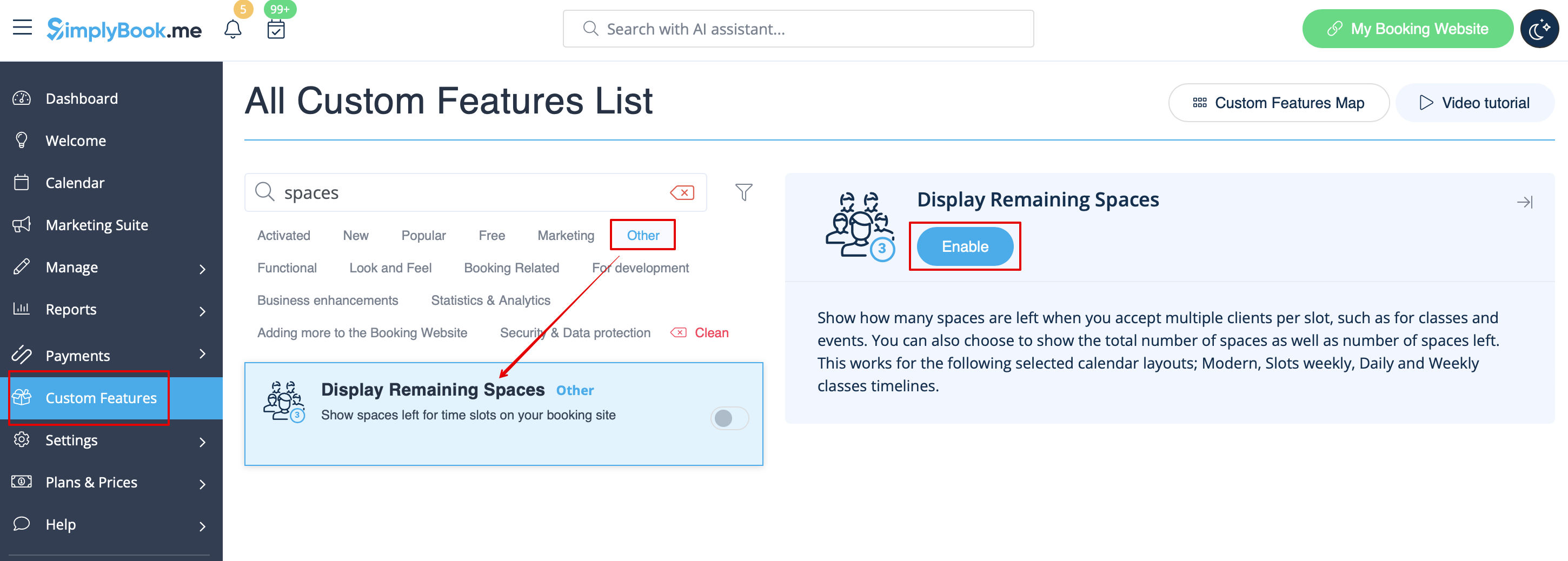
- 1. Aktivér Vis resterende pladser i afsnittet Brugerdefinerede funktioner.
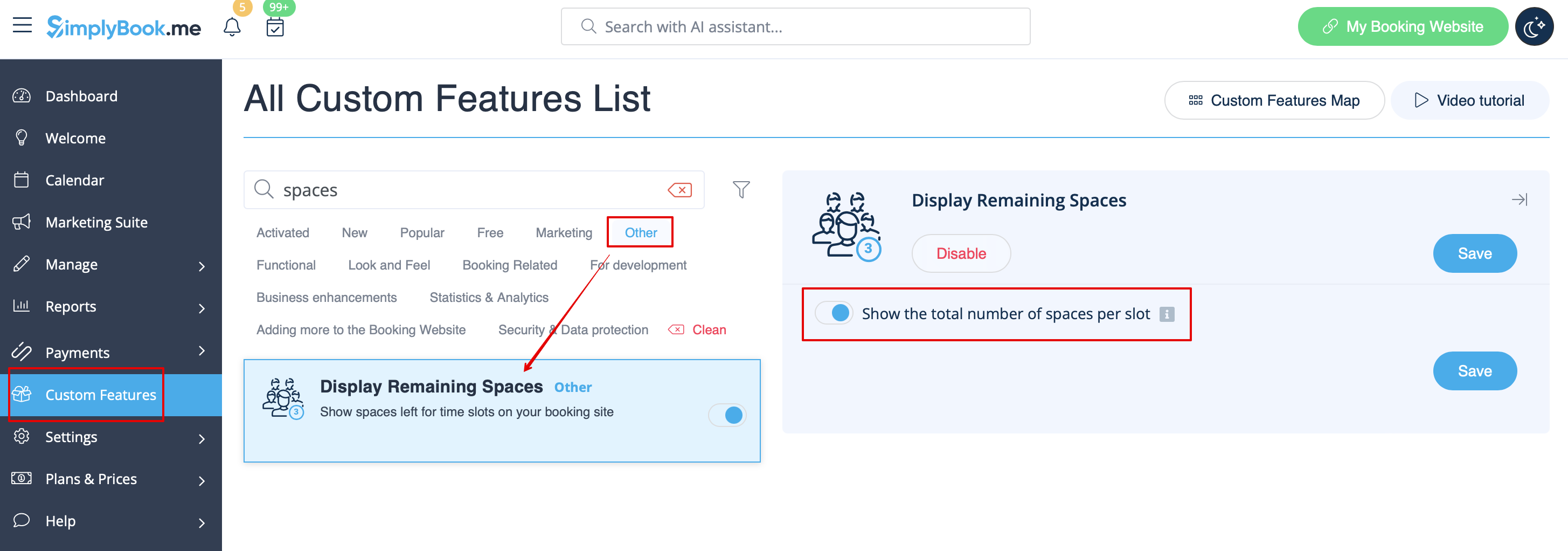
- 2. (valgfrit) Aktivér den tilsvarende indstilling for at vise det samlede antal pladser sammen med de resterende.
- 3. Som resultat vil klienterne kunne se antallet af resterende pladser pr. tidsinterval (og det samlede antal, hvis "Vis det samlede antal pladser pr. slot" er aktiveret).

