From SimplyBook.me
Marked this version for translation |
No edit summary |
||
| Line 13: | Line 13: | ||
<!--T:2--> | <!--T:2--> | ||
<br><br><br><br> | <br><br><br><br> | ||
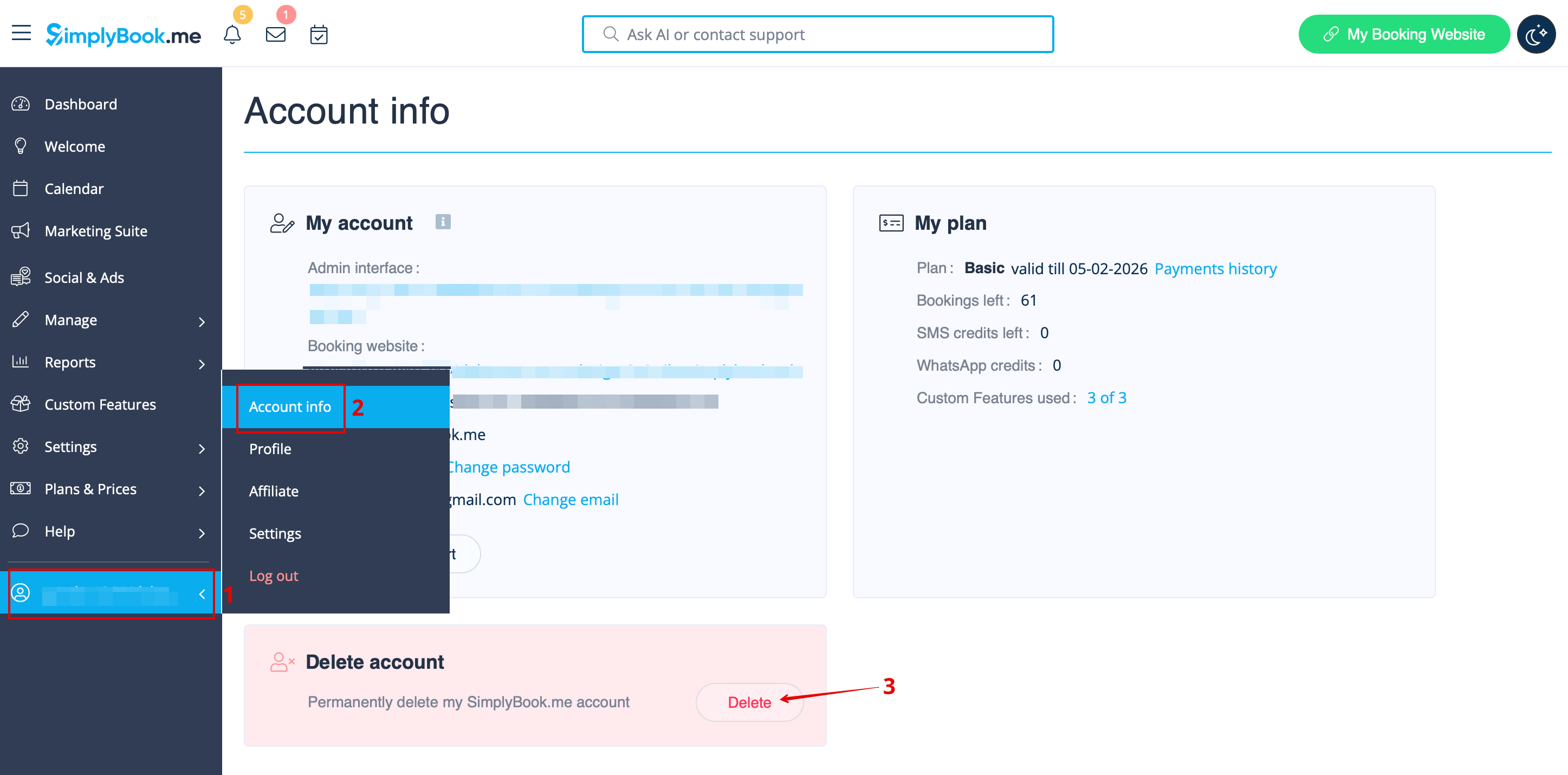
You can delete your account in <span style="background-color:#d4f8e5; padding:5px; border-radius:5px;"> | You can delete your account in <span style="background-color:#d4f8e5; padding:5px; border-radius:5px;">Account info</span> -> <span style="background-color:#d4f8e5; padding:5px; border-radius:5px;">Delete account.</span><br> | ||
We kindly ask you to indicate the reason why you have decided to delete your company. Please keep in mind that it can't be restored. If you register a new company in the future, your old company name in url can't be used. | |||
</translate> | </translate> | ||
<translate> | <translate> | ||
<!--T:3--> | <!--T:3--> | ||
[[File: | [[File:Sb delete account path new flow.png|1200px|1200px| center|link=https://help.simplybook.me/images/b/b0/Sb_delete_account_path_new_flow.png]] | ||
<br><br> | <br><br> | ||
If you need to restore the account that you have previously deleted please follow [[How_to_unblock_account|this tutorial]]. | If you need to restore the account that you have previously deleted please follow [[How_to_unblock_account|this tutorial]]. | ||
<br><br><br><br> | <br><br><br><br> | ||
</translate> | </translate> | ||
Revision as of 14:12, 8 January 2026
You can delete your account in Account info -> Delete account.
We kindly ask you to indicate the reason why you have decided to delete your company. Please keep in mind that it can't be restored. If you register a new company in the future, your old company name in url can't be used.
If you need to restore the account that you have previously deleted please follow this tutorial.
