Translations:Integration with Mailchimp/2/nl: Difference between revisions

From SimplyBook.me
No edit summary
No edit summary
 
Line 1: Line 1:
Je kunt nu verschillende functionaliteiten toevoegen aan de boekingen die je ontvangt in SimplyBook.me door gebruik te maken van Zapier.com.<br>
Hier volgt de gedetailleerde instructie over hoe je een nieuwe Zap maakt die SimplyBook.me-boekingen koppelt aan je e-maillijst bij MailChimp.com.
<br><br>
<br><br>
U kunt nu verschillende functies toevoegen aan de boekingen die u ontvangt in SimplyBook.me via Zapier.com.<br>
:1. Zorg er eerst voor dat je een account hebt bij <span style="background-color:#cdeffc; padding:5px; border-radius:5px;">[https://mailchimp.com/ MailChimp.com]</span>.
Hieronder vindt u gedetailleerde instructies voor het maken van een nieuwe zap die SimplyBook.me-boekingen koppelt aan uw e-maillijst op MailChimp.com.
<br><br>
<br><br>
:1. Zorg er allereerst voor dat u een account hebt bij <span style="background-color:#cdeffc; padding:5px; border-radius:5px;">[https://mailchimp.com/ MailChimp.com].</span>
:2. Maak een account aan bij <span style="background-color:#cdeffc; padding:5px; border-radius:5px;">[https://zapier.com/ Zapier.com]</span>, dit duurt slechts 1 minuut.
<br><br>
<br><br>
:2. Maak een account aan op <span style="background-color:#cdeffc; padding:5px; border-radius:5px;">[https://zapier.com/ Zapier.com],</span> dit duurt slechts 1 minuut.
:3. Zorg er ook voor dat je het <span style="background-color:#cdeffc; padding:5px; border-radius:5px;">[[Zapier_Connector_custom_feature|Zapier Connector]]</span> custom feature hebt ingeschakeld in je SimplyBook.me-account.
<br><br>
<br><br>
:3. Zorg er ook voor dat de aangepaste functie <span style="background-color:#cdeffc; padding:5px; border-radius:5px;">[[Zapier_Connector_custom_feature|Zapier Connector]]</span> is ingeschakeld in uw SimplyBook.me-account.
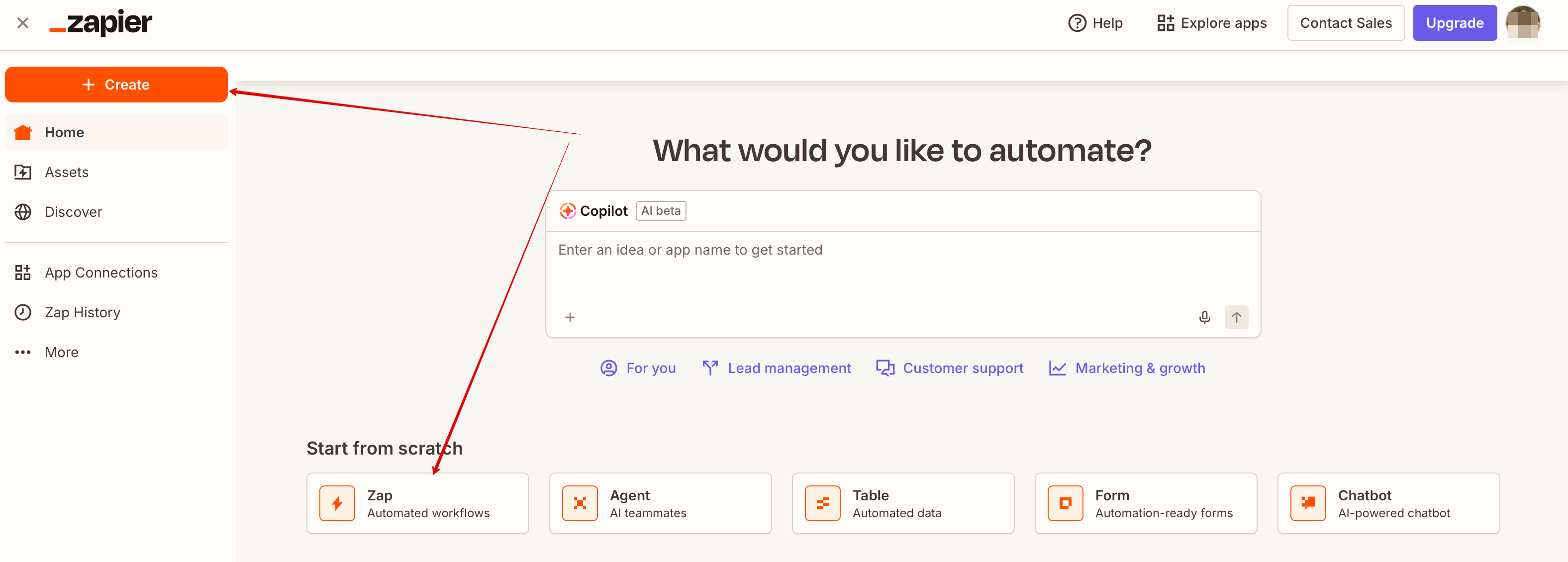
:4. Log in bij Zapier en kies om een nieuwe Zap te maken door bovenaan op de knop <span style="background-color:#d4f8e5; padding:5px; border-radius:5px;">Make a Zap</span> te klikken.
<br><br>
[[File:Create new zap updated.png|1200px|border| center|link=https://help.simplybook.me/images/6/60/Create_new_zap_updated.png]]
:4. Nadat u bent ingelogd op Zapier, selecteert u de optie om een nieuwe ZAP aan te maken door bovenaan op de knop <span style="background-color:#d4f8e5; padding:5px; border-radius:5px;">Make a Zap</span> te klikken.
[[File:Add new zap in zapier path upd.png|border|center]]
<br><br>
<br><br>

Latest revision as of 10:39, 16 March 2026

Information about message (contribute)
This message has no documentation. If you know where or how this message is used, you can help other translators by adding documentation to this message.
Message definition (Integration with Mailchimp)
<br><br>
You can now add various functionality to the bookings that you receive in SimplyBook.me through the use of Zapier.com.<br>
Here follows the detailed instruction on how to create a new zap that connects SimplyBook.me bookings to your email list at MailChimp.com.
<br><br>
:1. First of all, make sure you have an account at <span style="background-color:#cdeffc; padding:5px; border-radius:5px;">[https://mailchimp.com/ MailChimp.com].</span>
<br><br>
:2. Create an account at <span style="background-color:#cdeffc; padding:5px; border-radius:5px;">[https://zapier.com/ Zapier.com],</span> it only takes 1 minute.
<br><br>
:3. As well make sure you have <span style="background-color:#cdeffc; padding:5px; border-radius:5px;">[[Zapier_Connector_custom_feature|Zapier Connector]]</span> custom feature turned on in your SimplyBook.me account.
<br><br>
:4. After logging into Zapier select to create a new ZAP by clicking on <span style="background-color:#d4f8e5; padding:5px; border-radius:5px;">Make a Zap</span> button at the top.
[[File:Create new zap updated.png|1200px|border| center|link=https://help.simplybook.me/images/6/60/Create_new_zap_updated.png]]
<br><br>

Je kunt nu verschillende functionaliteiten toevoegen aan de boekingen die je ontvangt in SimplyBook.me door gebruik te maken van Zapier.com.
Hier volgt de gedetailleerde instructie over hoe je een nieuwe Zap maakt die SimplyBook.me-boekingen koppelt aan je e-maillijst bij MailChimp.com.

1. Zorg er eerst voor dat je een account hebt bij MailChimp.com.


2. Maak een account aan bij Zapier.com, dit duurt slechts 1 minuut.


3. Zorg er ook voor dat je het Zapier Connector custom feature hebt ingeschakeld in je SimplyBook.me-account.


4. Log in bij Zapier en kies om een nieuwe Zap te maken door bovenaan op de knop Make a Zap te klikken.