From SimplyBook.me
Importing a new version from external source |
Importing a new version from external source |
||
| Line 1: | Line 1: | ||
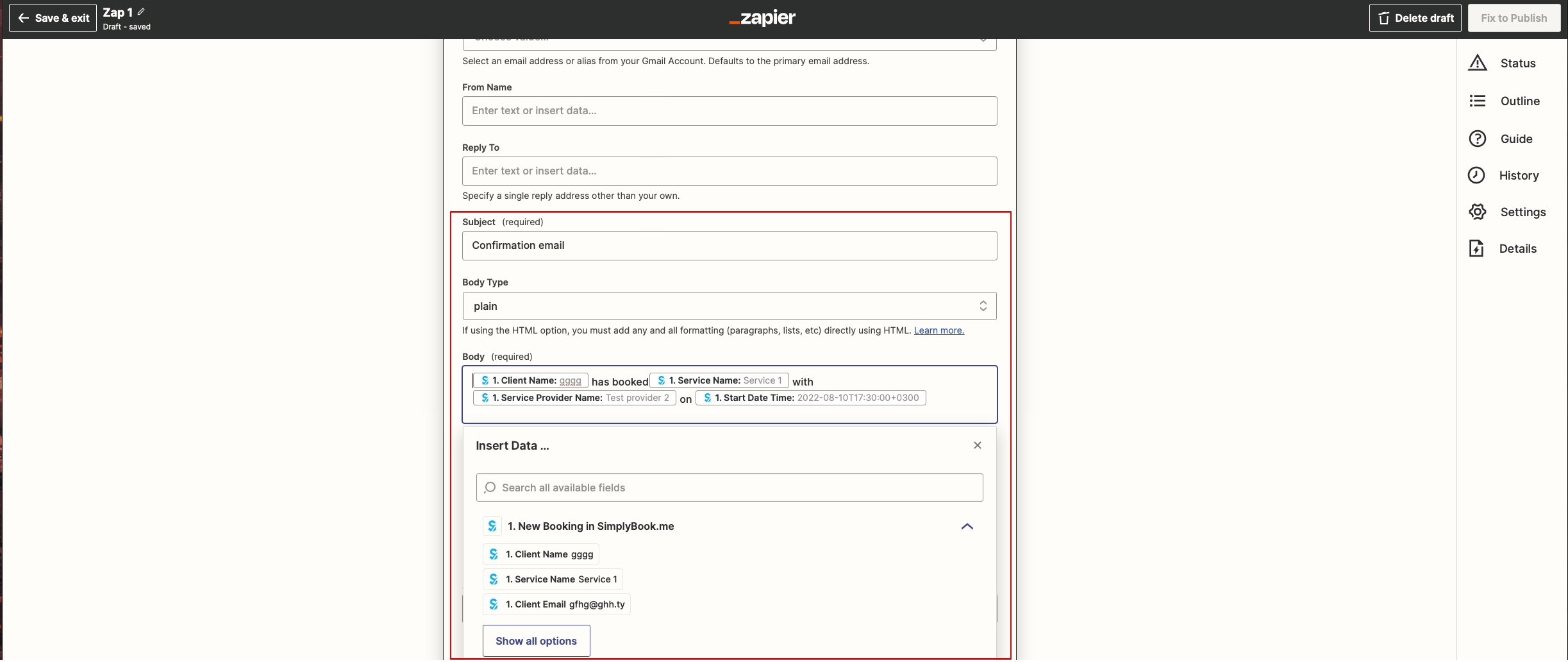
: | :10. Now you come to template step. | ||
:Please use available variables by clicking on the textbox ands selecting the necessary ones from the list.<br> | :Please use available variables by clicking on the textbox ands selecting the necessary ones from the list.<br> | ||
:Here you can see the example how notification template can be set up. | :Here you can see the example how notification template can be set up. | ||
[[File:Zapier redesigned setup the email template.png|1200px | center|link=https://help.simplybook.me/images/5/5d/Zapier_redesigned_setup_the_email_template.png]] | [[File:Zapier redesigned setup the email template.png|1200px | center|link=https://help.simplybook.me/images/5/5d/Zapier_redesigned_setup_the_email_template.png]] | ||
<br><br> | <br><br> | ||
Latest revision as of 14:54, 17 April 2026
- 10. Now you come to template step.
- Please use available variables by clicking on the textbox ands selecting the necessary ones from the list.
- Here you can see the example how notification template can be set up.