From SimplyBook.me
Created page with ":7.'''Nu''' kommer du till mallsteget. :Använd tillgängliga variabler genom att klicka på textrutan och välja de nödvändiga från listan.<br> :Här kan du se ett exempel på hur en meddelandemall kan ställas in. 1200px | center|link=https://help.simplybook.me/images/5/5d/Zapier_redesigned_setup_the_email_template.png <br><br>" |
No edit summary |
||
| Line 1: | Line 1: | ||
: | :10. Nu kommer du till mallsteget. | ||
:Använd tillgängliga | :Använd de tillgängliga variablerna genom att klicka på textrutan och välja de nödvändiga från listan.<br> | ||
:Här kan du se ett exempel på hur en | :Här kan du se ett exempel på hur en aviseringsmall kan ställas in. | ||
[[File:Zapier redesigned setup the email template.png|1200px | center|link=https://help.simplybook.me/images/5/5d/Zapier_redesigned_setup_the_email_template.png]] | [[File:Zapier redesigned setup the email template.png|1200px | center|link=https://help.simplybook.me/images/5/5d/Zapier_redesigned_setup_the_email_template.png]] | ||
<br><br> | <br><br> | ||
Latest revision as of 15:07, 17 April 2026
- 10. Nu kommer du till mallsteget.
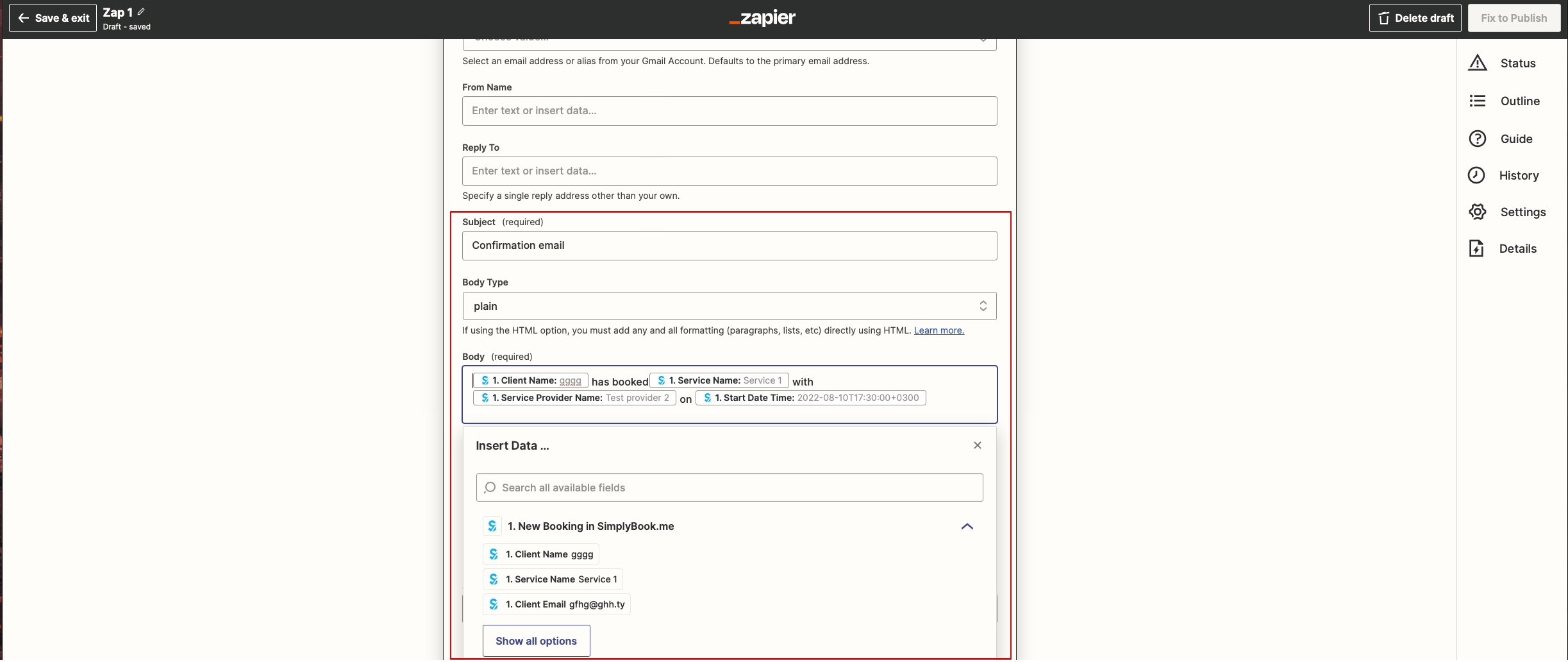
- Använd de tillgängliga variablerna genom att klicka på textrutan och välja de nödvändiga från listan.
- Här kan du se ett exempel på hur en aviseringsmall kan ställas in.