Andere gebruikers aan het systeem toevoegen
Hoe maak je een nieuwe systeemgebruiker aan?
U kunt een aparte gebruiker aanmaken voor de persoon die toegang moet hebben tot uw beheerpagina in Beheer -> Gebruikers en die gebruiker de juiste rechten toewijzen.
Zie hieronder de lijst met beschikbare gebruikersrollen.
- Om een nieuwe gebruiker aan te maken, klikt u op de knop + bovenaan:
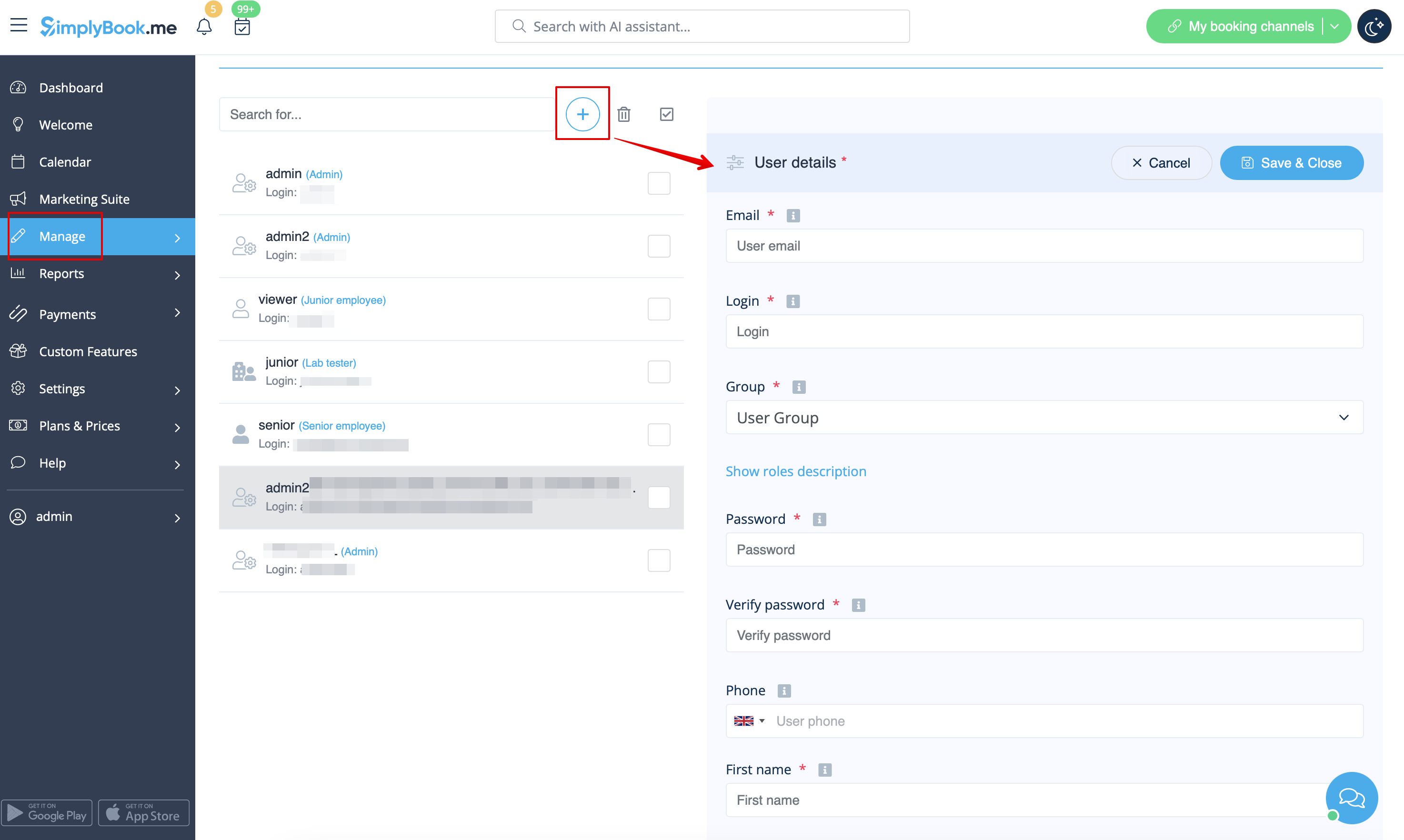
- Vul de login, het e-mailadres in , selecteer de gebruikersgroep, stel het eerste wachtwoord in , koppel indien nodig een aanbieder, voeg de voor- en achternaam en het telefoonnummer toe .
- Let op! De login is uniek voor elke gebruiker. Als u een gebruiker verwijdert, kan dezelfde login niet opnieuw worden gebruikt voor een andere gebruiker.
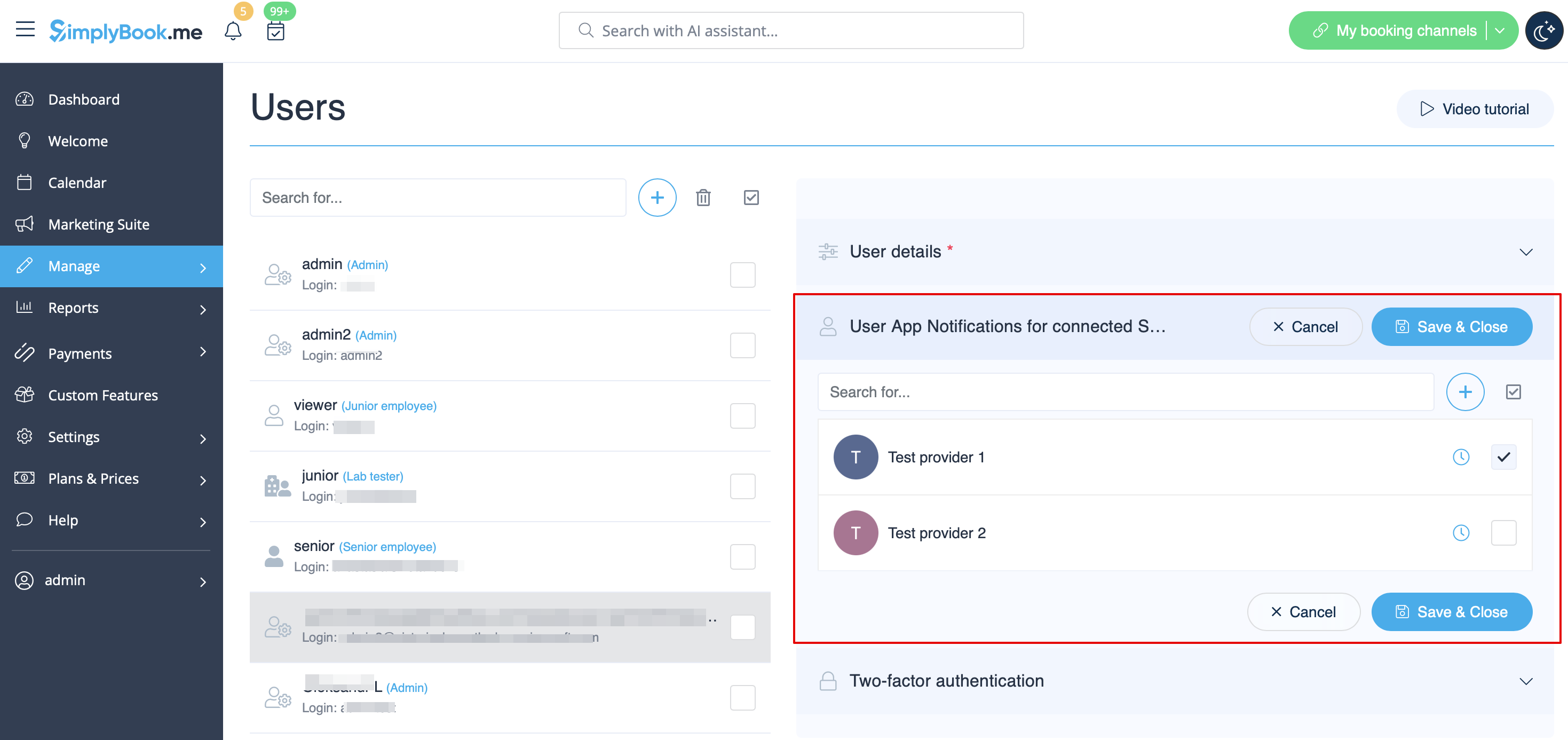
Schakel daarna de schakelaar Login-gegevens naar gebruiker verzenden in en sla het gebruikersrecord op.
Het systeem verstuurt automatisch een e-mail met de inloggegevens volgens het sjabloon dat u hebt ingesteld in Instellingen -> E-mail- en sms-instellingen -> Meldingen voor nieuwe gebruikers.
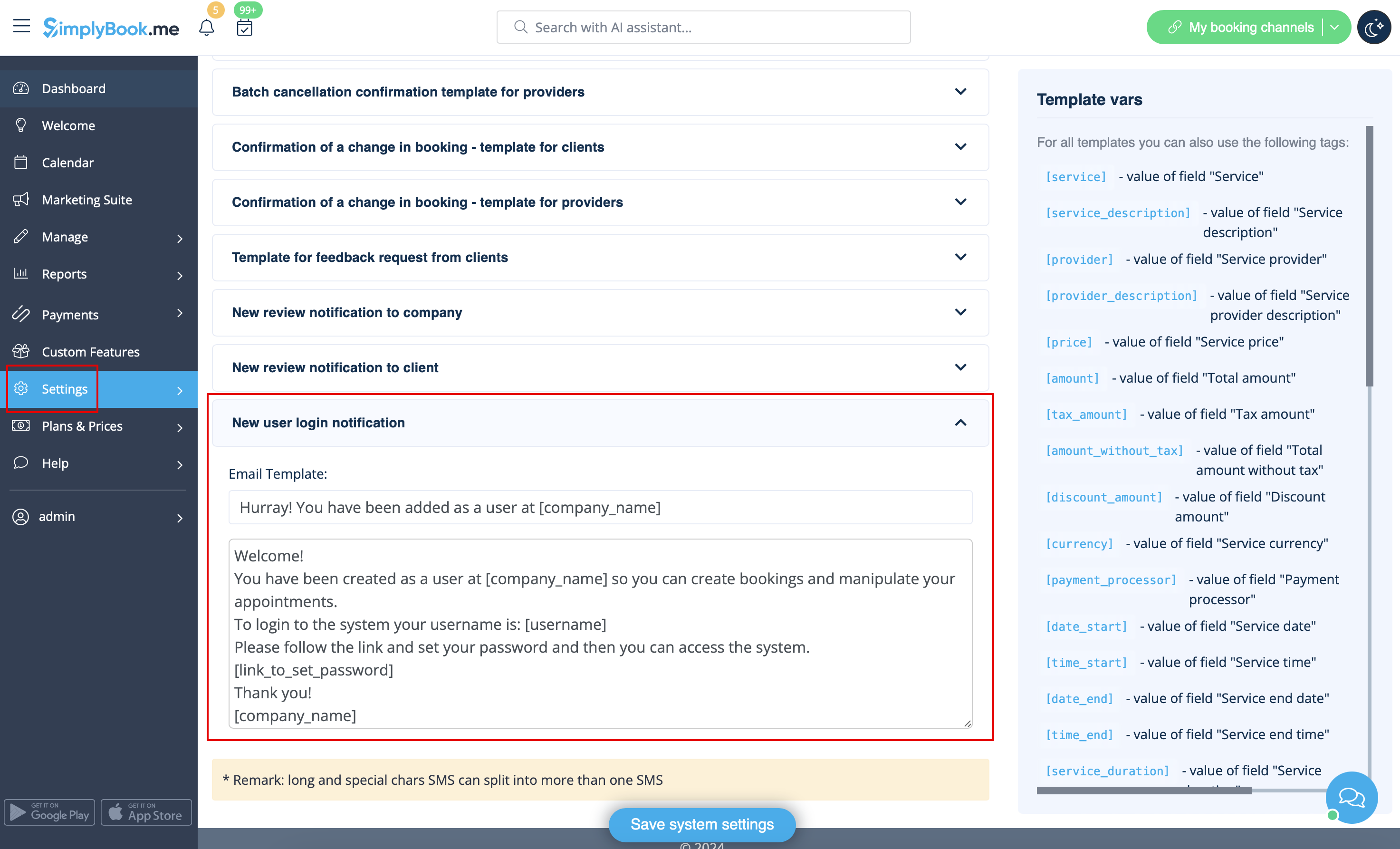
U kunt ook handmatig de inloggegevens en het wachtwoord naar uw gebruikers sturen, samen met de link naar uw beheerderspagina, nadat u de gebruiker hebt opgeslagen.
Gebruikersrollen
- Admin-
Als u het systeem voor uw bedrijf hebt gemaakt op SimplyBook.me, hebt u standaard beheerdersrechten. Dit betekent dat u het hoogste toegangsniveau hebt van alle gebruikers en dat u andere beheerders met hetzelfde toegangsniveau kunt aanmaken.
Let op! Om uw systeem tegen fouten te beschermen, is het niet toegestaan om de standaardbeheerder te verwijderen. Als hij/zij geen beheerdersrechten meer heeft, moet u zijn/haar e-mailadres en wachtwoord wijzigen om de toegang te beperken. De tweede en volgende beheerders kunnen worden verwijderd.
U kunt elke gebruiker koppelen aan een of meerdere providers (medewerkers) zodat zij, afhankelijk van hun toegangsniveau, boekingen, planningen enz. kunnen bekijken en/of beheren.
- Senior medewerker
Het niveau 'Senior medewerker' geeft gebruikers inzicht in de werkbelasting van anderen, maar zij kunnen alleen instellingen wijzigen die betrekking hebben op providers. Deze gebruikers hebben geen toegang tot de configuratie-instellingen van het bedrijf. Senior medewerkers zijn niet gebonden aan specifieke dienstverleners. Ze hebben volledige toegang tot alle dienstverleners die aan het systeem zijn toegevoegd, waardoor ze dienstverleners kunnen bekijken, toevoegen, bewerken, wijzigen en verwijderen.
Dit is een lijst met functies waartoe zij geen toegang hebben:
- Dashboard
- Gebruikersbeheer
- Tarieven en betalingen
- Inzichten
- Instellingen
- Bedrijfstijdbeheer
- Basisinformatie en adresgegevens van het bedrijf
- Beheer van de inhoud van de startpagina
- Ontwerp-instellingen
- Aangepaste CSS
- Marktplaatsinstellingen
- Widgets genereren
(zie onderstaande tabel voor meer informatie)
- Junior Employee
In cases, company has many employees with roles primarily focused on their own tasks, the Junior employee user can be created. This user level grants employees the ability to view their own workload and make modifications to their own schedule and bookings. When creating a Junior employee, the option to select the associated service provider/s is available. Notably, it is possible to connect more than 1 service provider to a Junior employee user, enhancing flexibility and control across various setup scenarios.
The functionality of selecting multiple service providers for Junior employee is particularly advantageous in situations where a team member requires access to specific providers' schedules or several providers connected to multiple locations.
Junior employee has access to the following functions:
- Calendar (can manage only own bookings and notes)
- Worktime (can change only own schedules)
- Service providers (can see only associated service provider/s)
(for more details see table below)
*On the enterprise level it is possible to hide client contact details from Junior Employees, as well as prohibit editing and cancelling bookings, statuses updates.
Please note! If a Junior employee user is not assigned to any service provider then his level of access will be automatically downgraded to Viewer level.
- Viewer
In some cases you may want to allow someone to see what is going on with company bookings but not be able to make any changes. This user should be set as Viewer. Viewers can not change anything, and they can not add any bookings.
The following functions are available for this access group:
- Calendar (view only)
- Services (view only)
(for more details see table below)
*On the enterprise level it is possible to hide client contact details from Viewers.
- Operator POS
This level was created mainly for managing POS interface and sell services, classes, packages, memberships, products and add-ons,
but also has access to Calendar, Clients, some reports and view only access to Memberships, Coupons&Gift Cards, Services/Classes and Providers.
- Doorman
Only has the ability to validate Tickets.
- Lab tester
This access level was created mainly for work with Medical Test custom feature and validate tickets, print test tube labels, update test result statuses and print results.
| Options list | Senior Employee | Junior Employee | Viewer
| |
|---|---|---|---|---|
| Dashboard | ||||
| View charts / Enable custom features | − |
− |
− | |
| Welcome | ||||
| View page / Change own password / Connect Google Authenticator* | ✔ |
✔ |
✔ | |
| Change own email address | − |
− |
− | |
| Create booking from dashboard | ✔ |
✔ |
− | |
| Get personal data report link | ✔ |
✔ |
✔ | |
| Calendar | ||||
| Different view options | ✔ |
✔ |
✔ | |
| Export to Excel/PDF | ✔ |
− |
− | |
| View & Manage bookings View & Manage calendar notes |
✔ |
own only |
view only | |
| Access Transactions* Access Pending bookings* |
✔ |
− |
− | |
| Edit booking comments | ✔ |
✔ in own bookings |
− | |
| Edit client info from the booking | ✔ |
✔ in own bookings |
view only | |
| Add/Edit SOAPnotes* | with correct key |
with correct key own only |
with correct key view only | |
| Update booking statuses* | ✔ |
own only |
− | |
| Edit Intake forms* in the bookings Edit products for sale* in the bookings Edit service add-ons* in the bookings |
✔ |
own only |
view only | |
| Marketing Suite | ||||
| View page & Enable custom features | − |
− |
− | |
| Manage | ||||
| View/Add/Edit/Change schedule/Delete services | ✔ |
− |
− | |
| View/Add/Edit/Change schedule/Delete providers | ✔ |
own and existing only |
− | |
| View/Add/Edit/Merge*/Delete clients | ✔ |
− |
− | |
| View/Add/Edit/Delete users | − |
− |
− | |
| View/Add/Edit/Change schedule/Delete classes* | ✔ |
− |
− | |
| View/Add/Edit/Delete packages* View/Add/Edit/Delete memberships* View/Add/Edit/Delete coupons and gift cards* |
✔ |
− |
− | |
| View/Add/Edit/Delete service add-ons* View/Add/Edit/Delete products for sale* View/Add/Edit/Delete related resources* |
✔ |
− |
− | |
| View/Add/Edit/Delete intake forms* View/Add/Edit/Delete client fields* |
✔ |
− |
− | |
| View/Add/Edit/Delete news* View/Add/Edit/Delete custom pages* |
− |
− |
− | |
| View/Add/Edit/Delete statuses* | ✔ |
− |
− | |
| View/Add/Edit/Delete flexible notifications* View/Add/Edit/Delete book soon reminders* |
✔ |
− |
− | |
| View/Add/Edit/Delete calendar notes types | ✔ |
view only |
view only | |
| View/Update calendar sync* | ✔ |
own only |
− | |
| Connect own tool for online video meetings* | ✔ |
✔ |
− | |
| View/Add/Edit/Delete taxes* | − |
− |
− | |
| Reports | ||||
| View sales* report | − |
− |
− | |
| View/Export/Send email/Mass cancel in booking details report | ✔ |
− |
− | |
| View/Accept/Delete payment transactions* View/Approve/Decline pending* bookings |
✔ |
− |
− | |
| View sales & tax report* | ✔ |
− |
− | |
| View/Export online video meetings* report | ✔ |
− |
− | |
| View/Export/Send email from client report | ✔ |
− |
− | |
| View/Export classes* bookings | ✔ |
− |
− | |
| View/Export membership payments* View/Export issued packages* View/Export issued coupons* |
✔ |
− |
− | |
| View/Export/Print tickets* report | ✔ |
− |
− | |
| View calendar notes report | ✔ |
view only |
view only | |
| View/Export SMS report View/Export/Reply to contact messages* |
✔ |
− |
− | |
| View/Export/Delete reviews & add/edit answers | ✔ |
− |
− | |
| View/Export client app* reports | ✔ |
− |
− | |
| View vaccination* report | ✔ |
− |
− | |
| View personal data reports | own only |
own only |
own only | |
| Custom Features
| ||||
| View page/Enable/Disable custom features | − |
− |
− | |
| Edit Accept payments* settings | − |
− |
− | |
| Change Intake forms* export settings | − |
− |
− | |
| Set color for provider with Provider color coding* | ✔ |
− |
− | |
| Set bookings limits for services* | ✔ |
− |
− | |
| View/Add/Edit/Delete service categories* | ✔ |
− |
− | |
| View/Add/Edit/Delete locations* | ✔ |
view the list only | − | |
| Edit Daily report* settings Edit Google Adwords&Analytics* settings |
− |
− |
− | |
| Add/delete images in Photo gallery* Connect account in Instagram gallery* |
− |
− |
− | |
| Edit SMTP* settings Edit SMS Gateway* settings |
− |
− |
− | |
| Edit Terms and Conditions* Edit Cancellation policy* settings |
− |
− |
− | |
| Edit Coupons and Gift Cards* notifications settings
|
− |
− |
− | |
| Edit Appointment at fixed time* settings | ✔ |
− |
− | |
| Edit Custom Domain* settings | − |
− |
− | |
| Edit API* settings | − |
− |
− | |
| Edit Multiple bookings* settings Edit Group bookings* settings |
− |
− |
− | |
| Edit Clean history* settings | − |
− |
− | |
| Edit Client login* settings Edit Strict password* settings* |
− |
− |
− | |
| Edit Any employee settings* | − | − |
− | |
| Edit Google translate settings* | − |
− |
− | |
| Edit HIPAA* settings Edit Google authenticator* settings |
− |
− |
− | |
| Settings | ||||
| Company information Directory listing Delete account |
− |
− |
− | |
| Company opening hours | − |
− |
− | |
| Providers schedule | ✔ |
own only |
− | |
| Services schedule Classes* schedule |
✔ |
− |
− | |
| Design settings Booking widgets settings Custom CSS* |
− |
− |
− | |
| Main configuration Email & SMS settings Custom wording & translations |
− |
− |
− | |
| Plans&Prices | ||||
| View & Buy subscriptions View & Buy additional items See payment history |
− |
− |
− | |
- * - corresponding custom feature should be already enabled by admin.