Interval (tijdsbestek) moet worden gewijzigd
From SimplyBook.me
U kunt dit wijzigen in Instellingen // Hoofdconfiguratie // Tijdsbestek.
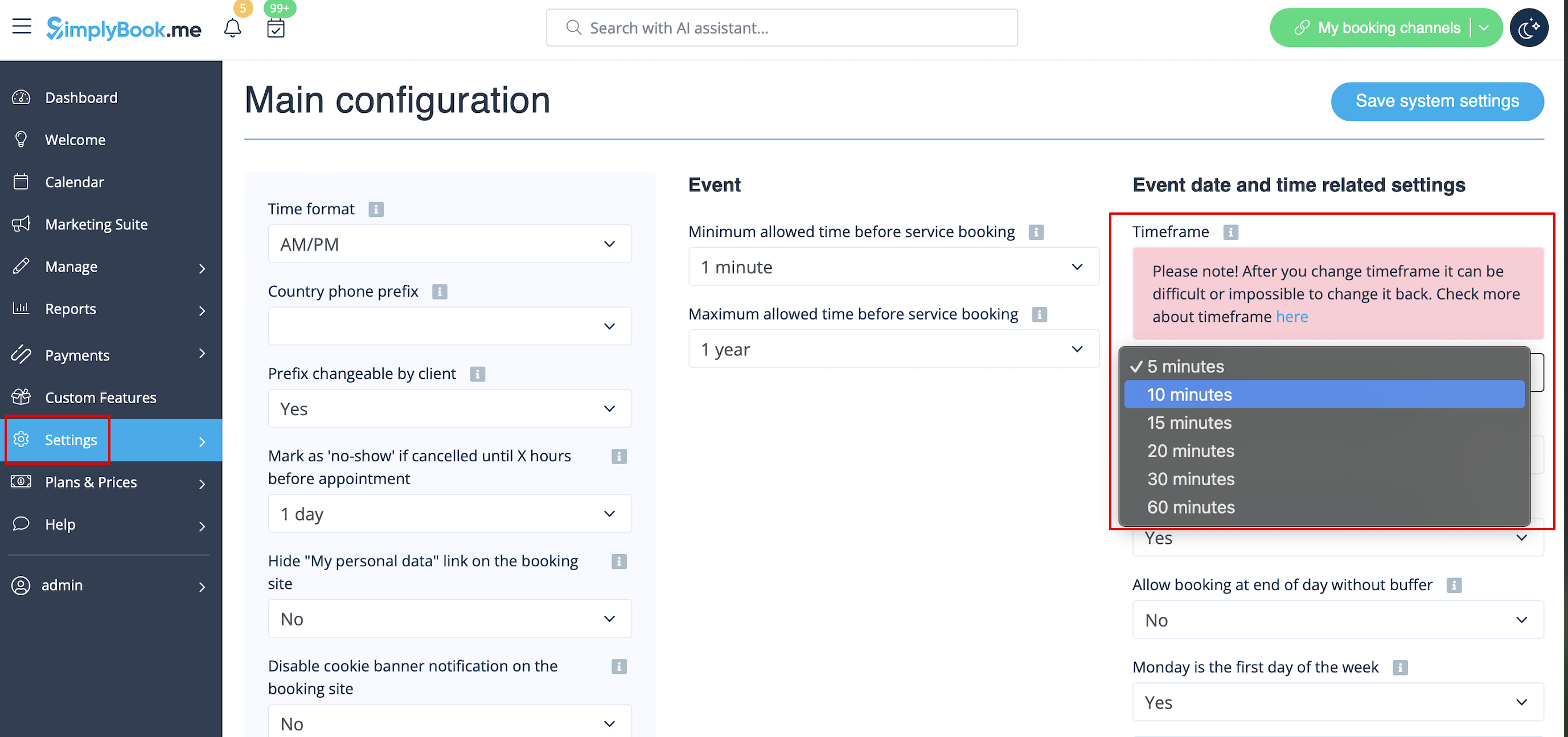
- Wat is een tijdsbestek?
- Het tijdsbestek van het systeem bepaalt de pauzetijden, openingstijden en alle diensten zijn een veelvoud van het tijdsbestek. Het is gemakkelijk om "tijdsbestek" en "duur van diensten" door elkaar te halen, maar houd er rekening mee dat u het tijdsbestek kunt wijzigen in Instellingen // Hoofdconfiguratie // Tijdsbestek en dat u de duur van diensten kunt wijzigen in Beheer // Diensten.
- I cannot change timeframe.
- Generally, timeframe can be changed in Settings // Main configuration // Timeframe, however very often you can get an error message when trying to change it. Before changing a timeframe please make sure that all your time intervals (opening hours of company and working hours of providers, break times, service duration, special days) are within the desirable timeframe. For example if you want to change timeframe from 30 min to 60 min, all your time intervals should multiply to 1 hour. Sometimes, the error message does not disappear even after all time settings are corrected, it may be caused by the bookings made with old intervals or schedule of provider that was deleted. In such case, it is impossible to change timeframe.
- How to change timeframe from 30 to 60 min?
- If you want to change timeframe from 30 min to 60 min, all your time intervals (opening hours of company and working hours of providers, break times, service duration, special days) should multiply to 1 hour (1 hour, 2 hours, 3 hours...). After you adjusted all time settings, go to Settings // Main configuration // Timeframe // 60 min. Please note, that in case you have bookings or schedule of provider that was deleted made with old intervals, timeframe change can be impossible.
- How to change timeframe from 15 to 20 min?
- If you want to change timeframe from 15 min to 20 min, all your time intervals (opening hours of company and working hours of providers, break times, service duration, special days) should multiply to 1 hour (1 hour, 2 hours, 3 hours...). After you adjusted all time settings, go to Settings // Main configuration // Timeframe // 20 min. Please note, that in case you have bookings or schedule of provider that was deleted made with old intervals, timeframe change can be impossible.
- How to change timeframe from 20 to 15 min?
- If you want to change timeframe from 20 min to 15 min, all your time intervals (opening hours of company and working hours of providers, break times, service duration, special days) should multiply to 1 hour (1 hour, 2 hours, 3 hours...). After you adjusted all time settings, go to Settings // Main configuration // Timeframe // 15 min. Please note, that in case you have bookings or schedule of provider that was deleted made with old intervals, timeframe change can be impossible.
- How to change timeframe from 5 to 10 min?
- If you want to change timeframe from 5 min to 10 min, all your time intervals (opening hours of company and working hours of providers, break times, service duration, special days) should multiply to 10 min (10 min, 20 min, 30 min, 40 min, 50 min, 1 hour...). After you adjusted all time settings, go to Settings // Main configuration // Timeframe // 10 min. Please note, that in case you have bookings or schedule of provider that was deleted made with old intervals, timeframe change can be impossible.
- I keep getting error message when trying to change timeframe.
- Before changing a timeframe please make sure that all your time intervals (opening hours of company and working hours of providers, break times, service duration, special days) are within the desirable timeframe. For example if you want to change timeframe from 30 min to 60 min, all your time intervals should multiply to 1 hour. Sometimes, the error message does not disappear even after all time settings are corrected, it may be caused by the bookings made with old intervals or schedule of provider that was deleted. In such case, timeframe change is impossible.
