Created page with " comment utiliser le <span style="background-color:#d4f8e5; padding:5px; border-radius:5px;">système de fidélité</span> 1. Pour activer <span style="background-color:#d4f8e5; padding:5px; border-radius:5px;">le système de fidélité</span>, accédez à la page <span style="background-color:#d4f8e5; padding:5px; border-radius:5px;">Fonctionnalités personnalisées</span>, sélectionnez la section <span style="background-color:#d4f8e5; padding:5px; border-radius:5px;">..." |
Updating to match new version of source page Tags: Mobile edit Mobile web edit |
||
| (2 intermediate revisions by 2 users not shown) | |||
| Line 3: | Line 3: | ||
{{#seo: | {{#seo: | ||
|title=Loyalty System custom feature - SimplyBook.me | |title=Loyalty System custom feature - SimplyBook.me | ||
|description=Reward | |description=Reward repeat clients with points. Set earning rules, redemption options. Build loyalty program to encourage repeat bookings and client retention. | ||
|titlemode=append | |titlemode=append | ||
|keywords=faq, frequently asked questions, booking software, appointment system questions, appointments online, calendar software, booking system, booking calendar, scheduling software, online appointment scheduling, online scheduling, plugins, custom features, additional functionality, loyalty system, loyalty program, bonuses, rewards, promotion, reward points, bonus system | |keywords=faq, frequently asked questions, booking software, appointment system questions, appointments online, calendar software, booking system, booking calendar, scheduling software, online appointment scheduling, online scheduling, plugins, custom features, additional functionality, loyalty system, loyalty program, bonuses, rewards, promotion, reward points, bonus system | ||
| Line 13: | Line 13: | ||
<br><br> | <br><br> | ||
Tutoriel vidéo | Tutoriel vidéo <p><youtube>GP7OFspfzNo</youtube></p> | ||
Latest revision as of 19:48, 9 February 2026

Permettez à vos clients de gagner des points pour la réservationde services/classes et échangez-les contre des cartes-cadeaux. Vous pouvez définir un nombre de points différent pour chaqueservice/classe et, 3 à 4 heures après la fin de la réunion, les bonus seront automatiquement ajoutés au solde du client. Dès que le client aura accumulé le nombre de points nécessaire, il pourra les échanger contre une carte cadeau, qui pourra ensuite être utilisée pour d'autres achats sur votre site de réservation ou comme cadeau à quelqu'un.
Tutoriel vidéo
Remarque importante !
- Lorsque vous activez le système de fidélité, les fonctionnalités personnalisées suivantes sont également activées : Acceptation des paiements, Connexion client, Coupons et cartes-cadeaux.
- Les clients doivent être abonnés à vos supports marketing pour pouvoir recevoir ces notifications.
- Cette fonctionnalité n'est pas compatible avec l'historique propre.
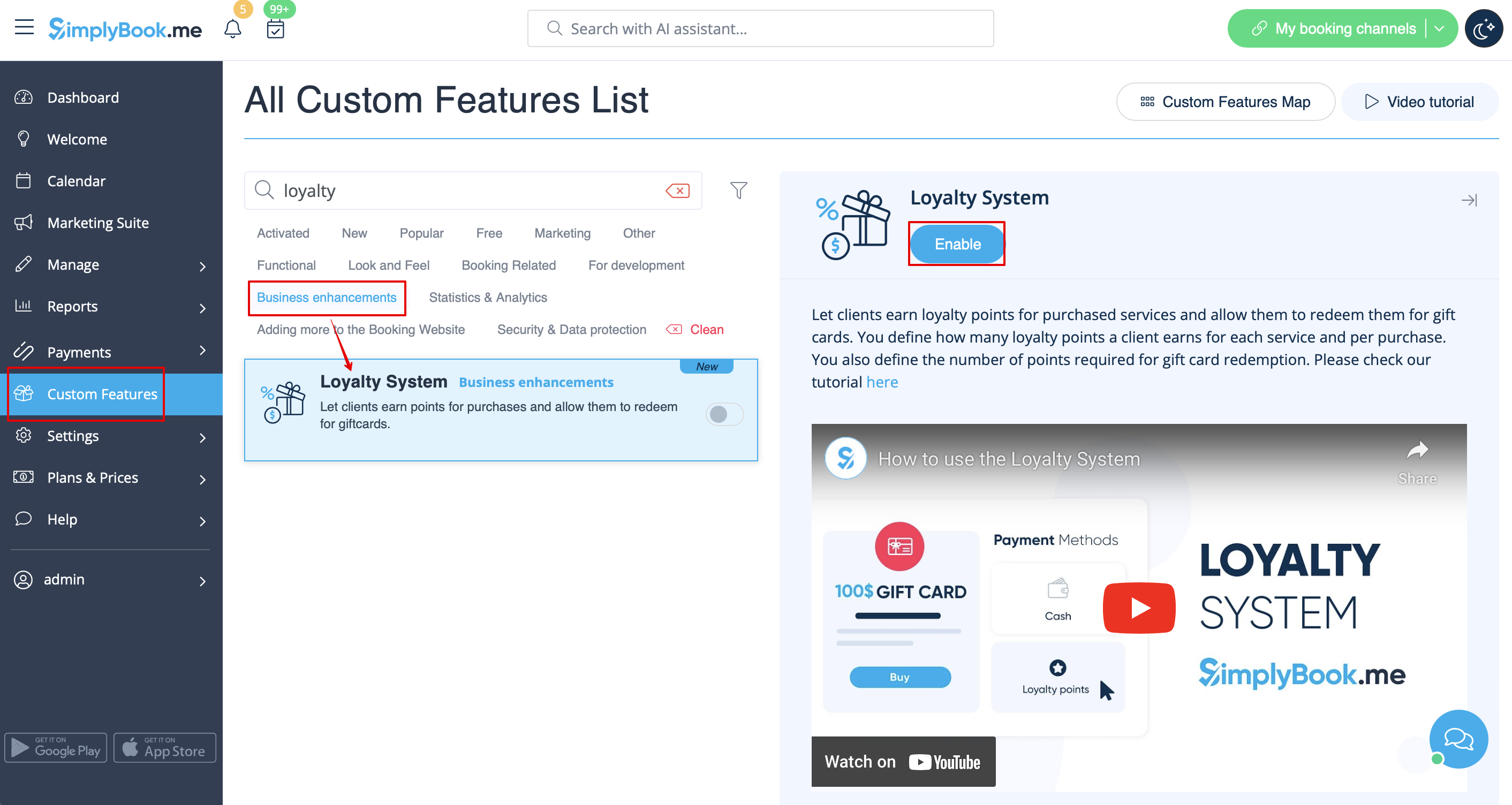
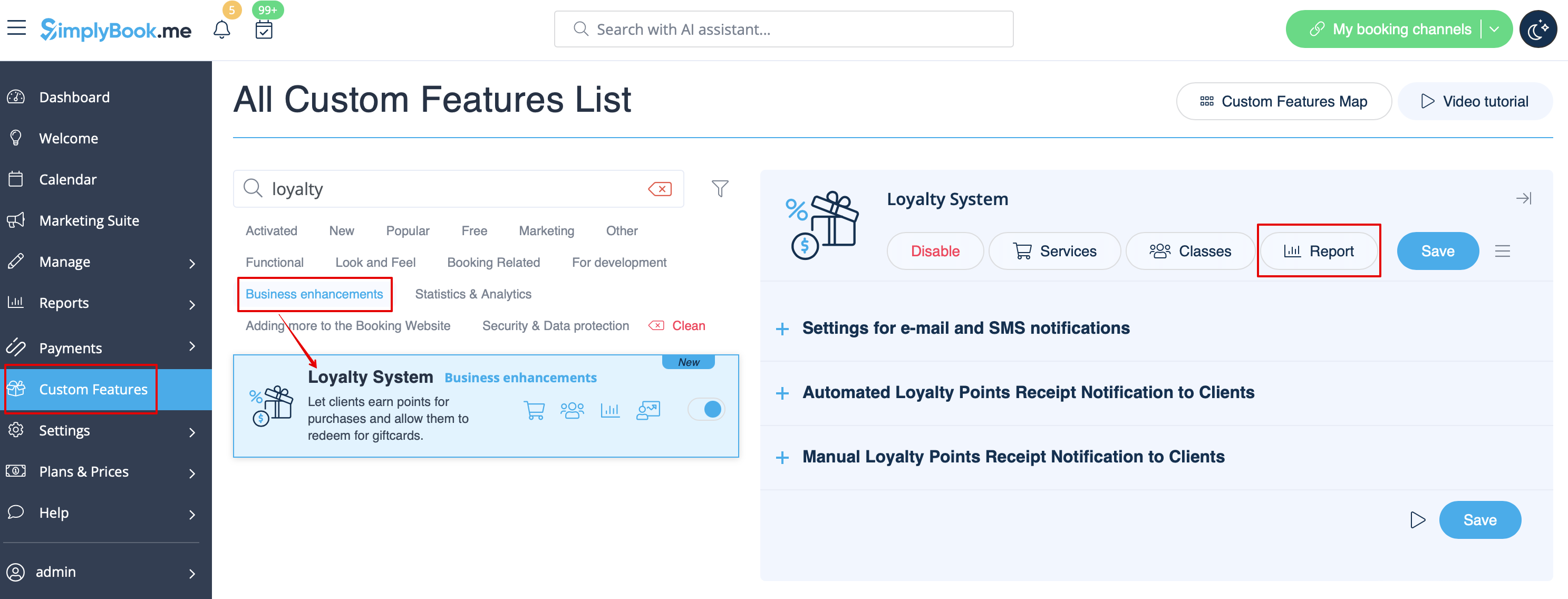
comment utiliser le système de fidélité 1. Pour activer le système de fidélité, accédez à la page Fonctionnalités personnalisées, sélectionnez la section Améliorations commerciales et cliquez sur Activer ou utilisez le bouton à côté de la fonctionnalité correspondante.
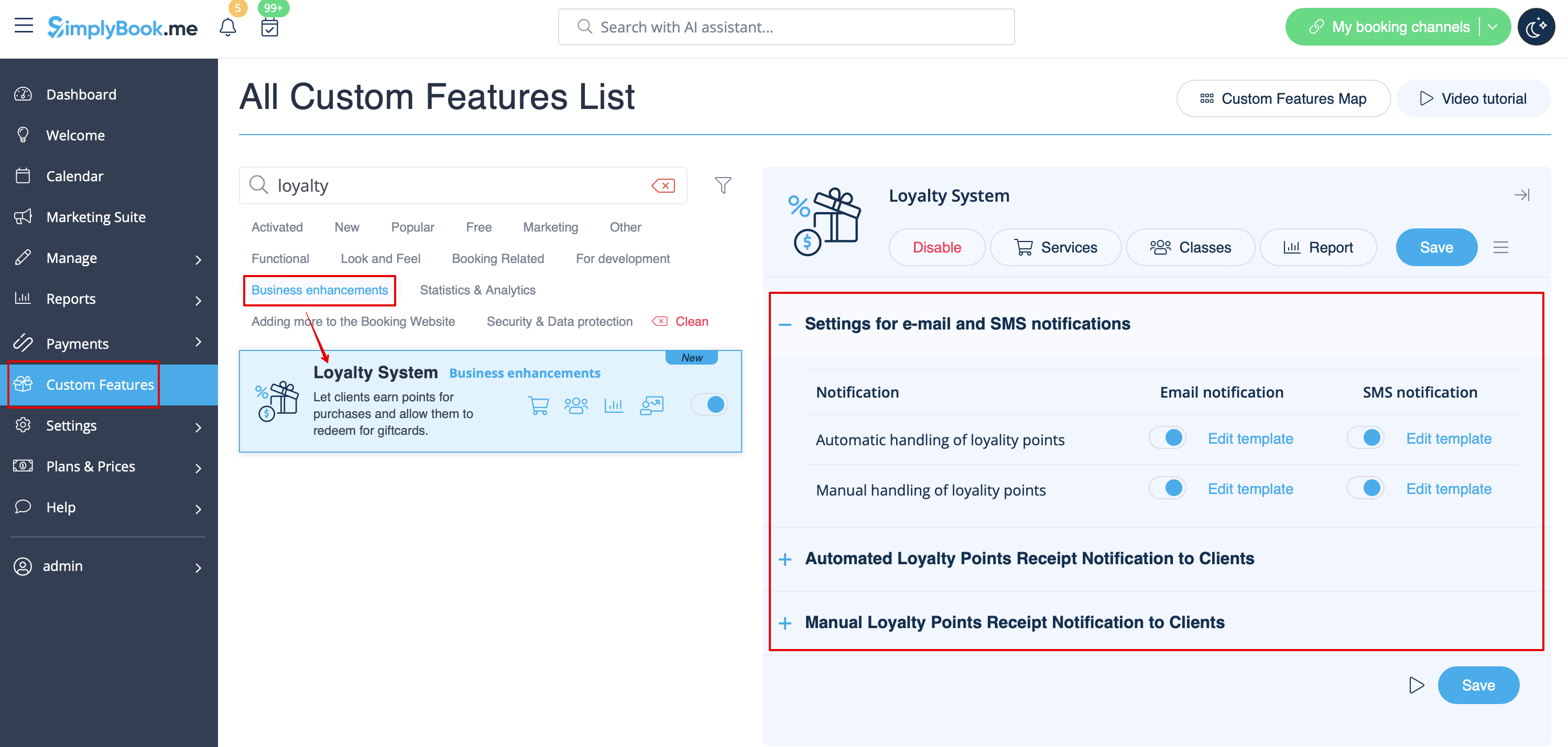
2. Une fois le système activé, vous pouvez immédiatement modifier les modèles de notifications associés, à droite de la page. Veuillez utiliser les variables suggérées si nécessaire.
Deux types de notifications sont disponibles : pour l'ajout automatique de points et la mise à jour manuelle du solde du client.
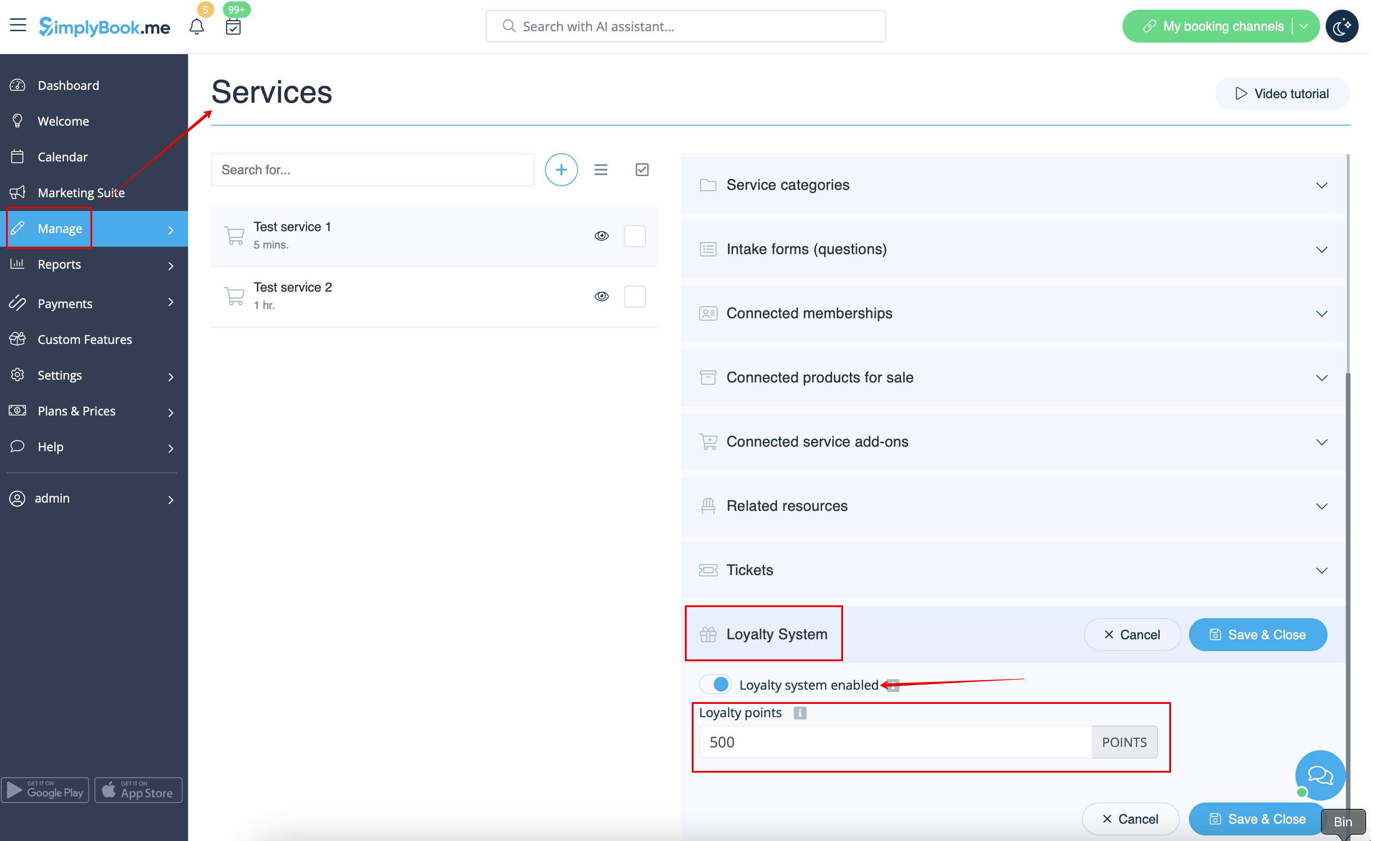
3. Pour définir le nombre de points, rendez-vous dans Gérer -> Services (ou utilisez le lien Services à côté de la fonctionnalité personnalisée) ou Gérer -> Classes (si vous les utilisez et souhaitez participer au programme de fidélité).
4. Créezun nouveauservice/une nouvelle classe si nécessaire ou cliquez sur celui/celle qui existe déjà pour le modifier, puis sélectionnez l'onglet « Système de fidélité ».
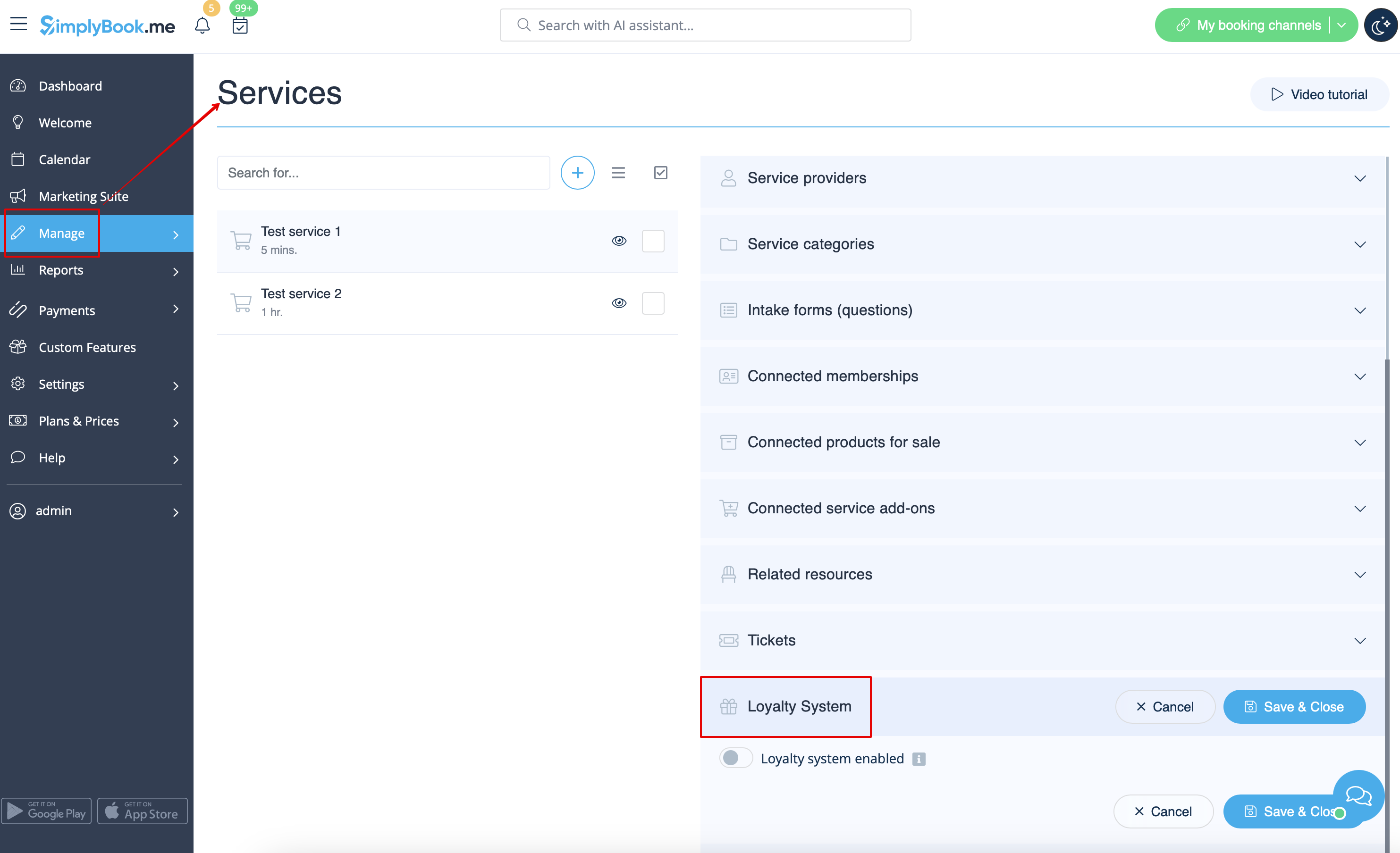
5. Activez le commutateur pour connecter leservice/la classe au système de fidélité et indiquez le nombre de points que le client gagnera pour chaque réservationde ceservice/cette classe dans la case qui apparaît. Enregistrez les paramètres.
6. Ensuite, veuillez vous rendre sur la page Gérer -> Coupons et cartes-cadeaux à l'aide du menu de gauche, créez une nouvelle carte-cadeau ou cliquez sur celle existante pour la modifier, puis sélectionnez l'onglet Système de fidélité.
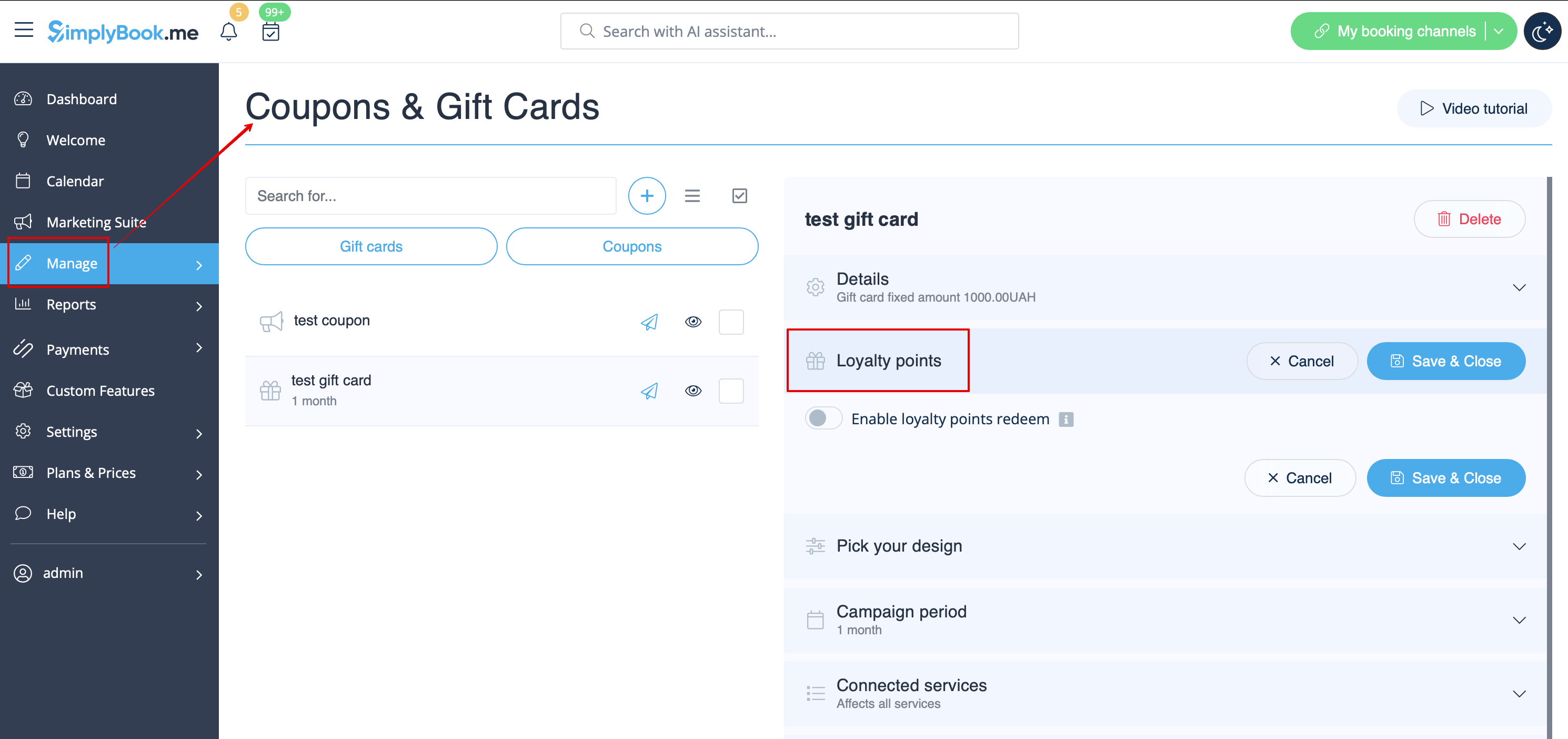
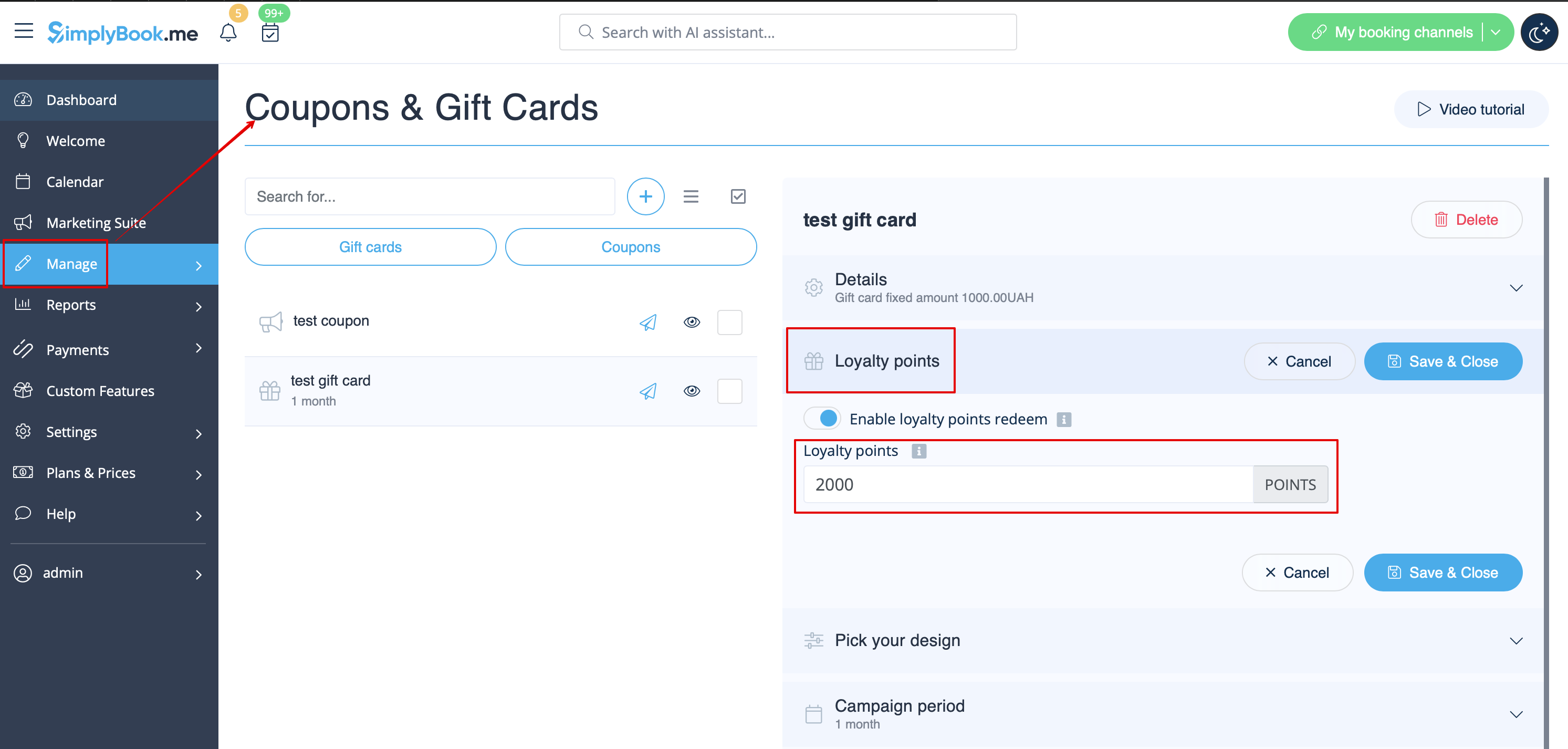
7. Activez le commutateur pour permettre aux clients d'acheter cette carte-cadeau pour obtenir des bonus. Définissez le montant nécessaire à gagner dans la case qui apparaît. Enregistrez les paramètres.
8. Du côté client, ils peuvent voir le nombre de points gagnés ainsi que l'historique d'utilisation des bonus dans le profil client ou se rendre dans l'onglet spécifique du site web de réservation.


9. Dès que le client a suffisamment de points, le bouton « Sélectionner par points » devient actif sur la page « Cartes cadeaux » du site de réservation et cette carte cadeau peut être achetée en échange de ces points.
Le client recevra alors la carte cadeau par e-mail ou pourra copier son code dans l'onglet Cartes cadeaux -> Vos cartes cadeaux et l'utiliser comme une carte cadeau classique pour d'autres achats ou pour offrir à quelqu'un.

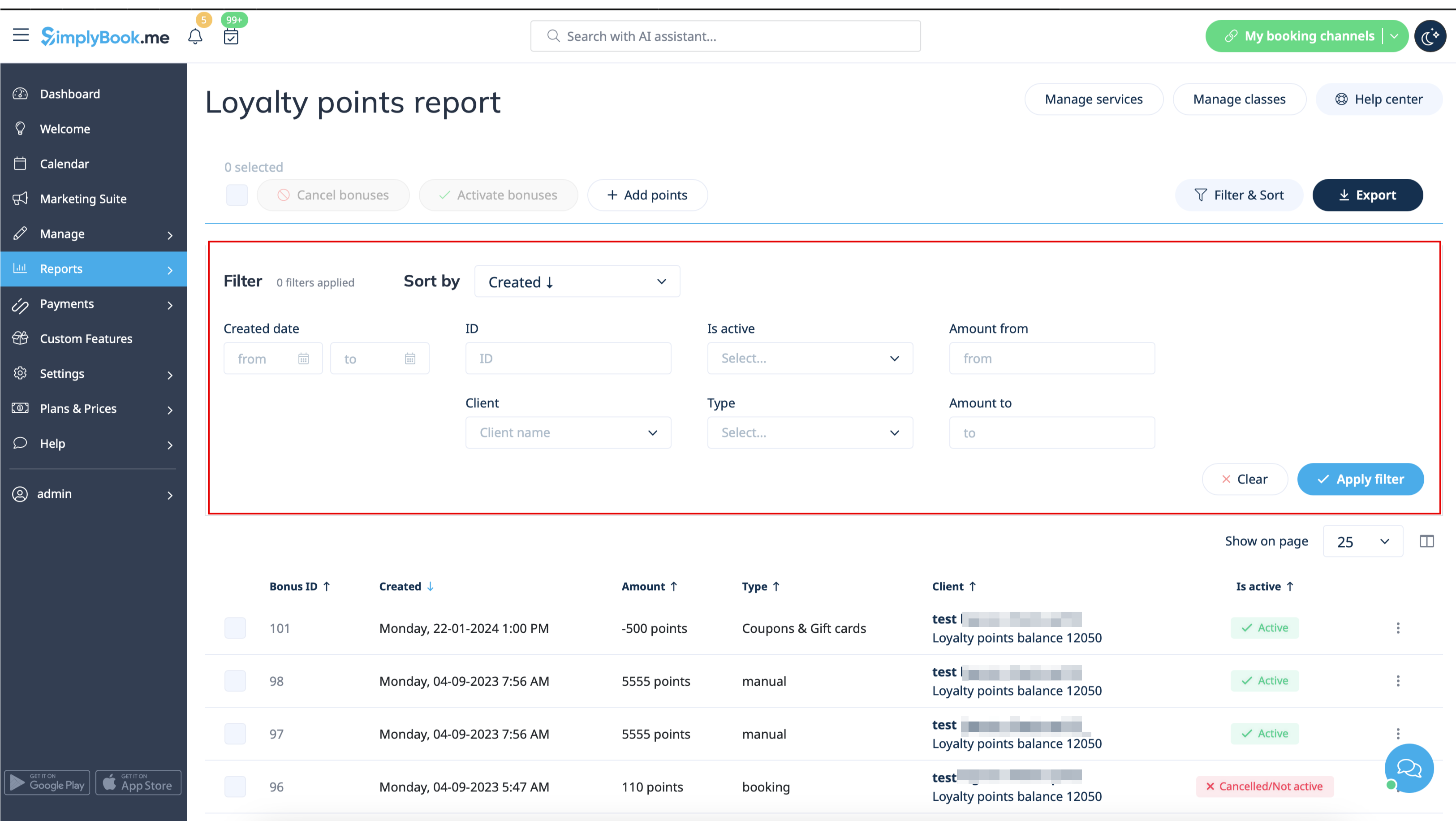
10. Du côté administrateur, vous pouvez également consulter tous les points gagnés et dépensés dans Rapports -> Rapport sur les points de fidélité. Veuillez utiliser le filtre si nécessaire pour afficher certains résultats sélectionnés, exporter les données vers Excel ou .csv.
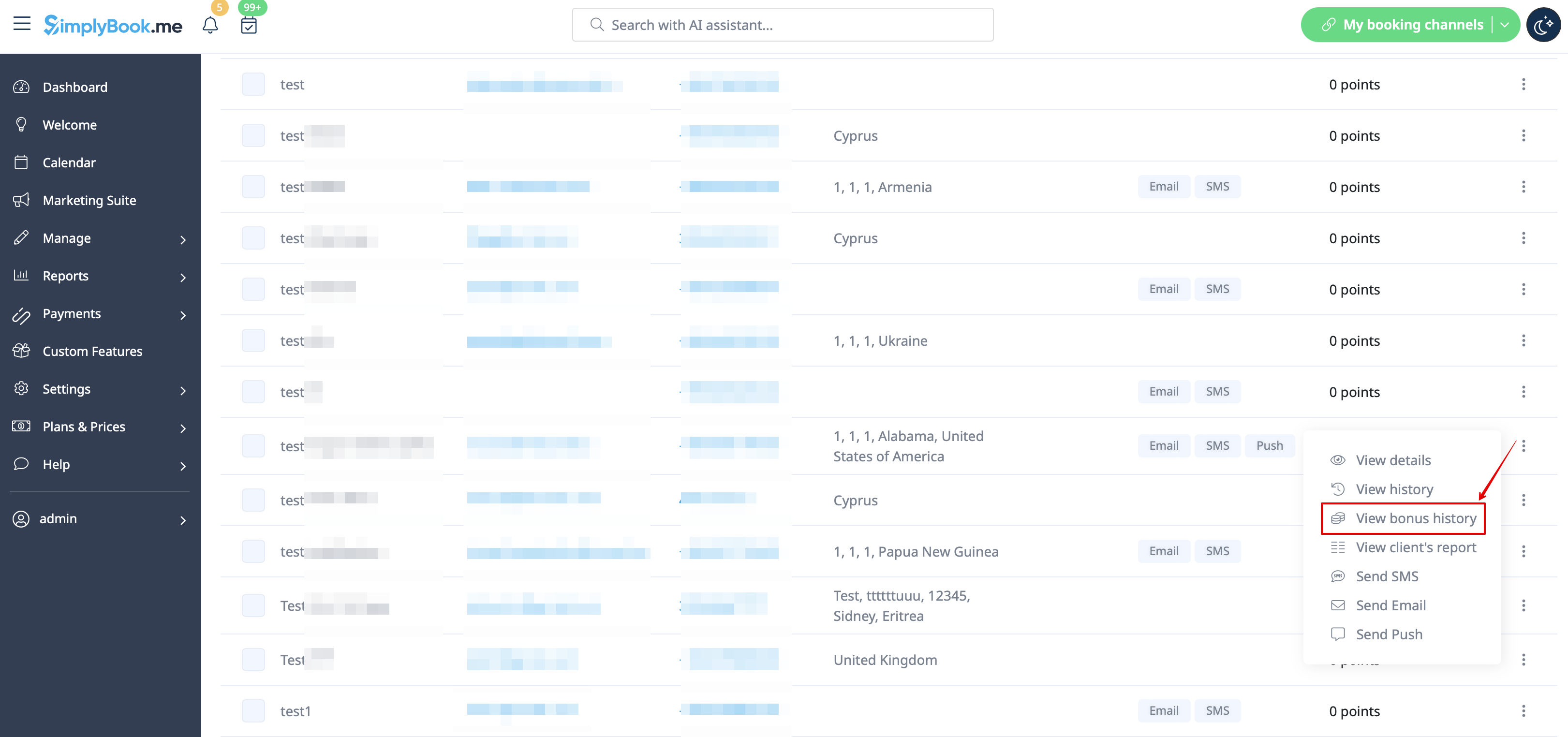
11. À l'aide de ce rapport, vous pouvez également gérer manuellement le nombre de points par client.
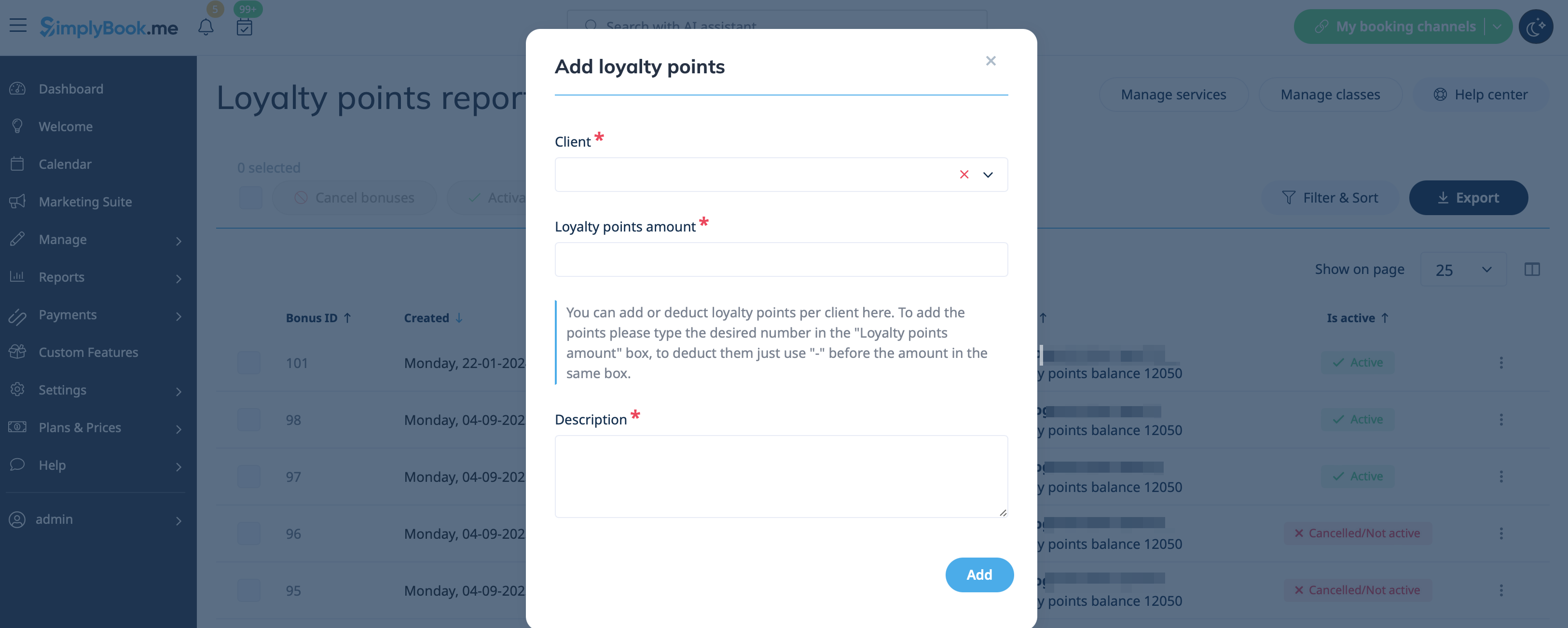
Veuillez cliquer sur le bouton Ajouter des points en haut, utiliser la zone de recherche dans la fenêtre contextuelle qui apparaît pour trouver le client souhaité, indiquer le montantà ajouter ou à déduire dans la zone Montant des points de récompense (pour déduire, il suffit d'ajouter « - » avant le montant), ajouter une description (elle sera également reflétée du côté du client) et cliquer sur Ajouter. Le client recevra une notification concernant la mise à jour du solde.
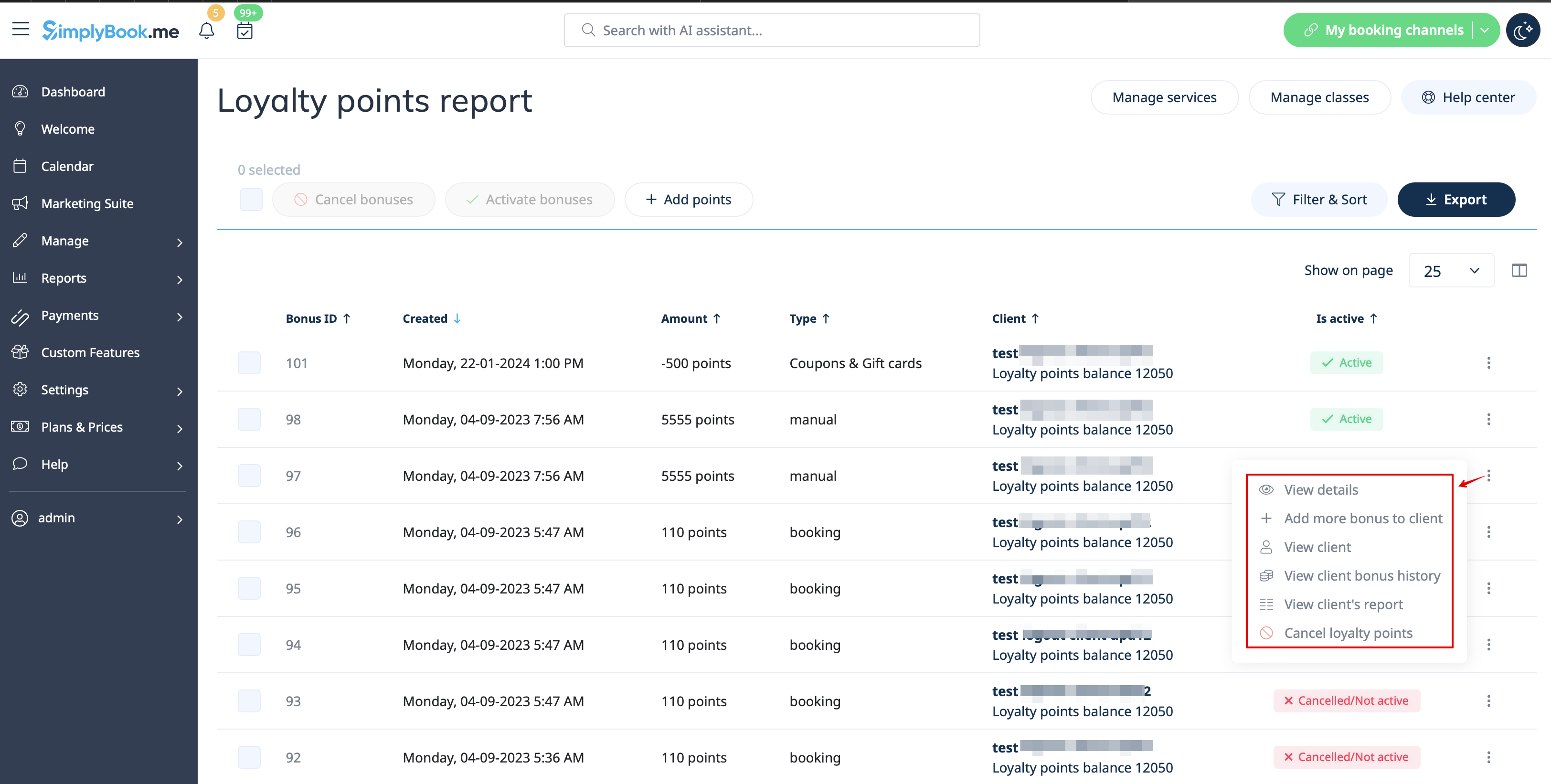
Vous pouvez également utiliser l'option Ajouter un bonus supplémentaire au client dans Actions pour la ligne spécifique du rapport afin d'accélérer la mise à jour du solde, car le client sera déjà présélectionné dans ce cas.
12. Si vous avez besoin de consulter l'historique des points par client, veuillez utiliser Rapports -> Clients et cliquer sur le montant des bonus mis en évidence dans le tableau pour accéder à la fenêtre contextuelle de l'historique des bonus.