Created page with "__FORCETOC__" |
Created page with "= Widget voor boekingsknop = <br><br> :1. Neem de code van de boekingsknop van uw boekingspagina in <span style="background-color:#d4f8e5; padding:5px; border-radius:5px;">Instellingen</span> -> <span style="background-color:#d4f8e5; padding:5px; border-radius:5px;">Instellingen boekingswidget</span> -> <span style="background-color:#d4f8e5; padding:5px; border-radius:5px;">Boekingsknop</span> -> <span style="background-color:#d4f8e5; padding:5px; border-radius:..." Tags: Mobile edit Mobile web edit |
||
| Line 115: | Line 115: | ||
[[File:Contact widget settings path redesigned.png|1200px|border| center|link=https://help.simplybook.me/images/0/09/Contact_widget_settings_path_redesigned.png]] | [[File:Contact widget settings path redesigned.png|1200px|border| center|link=https://help.simplybook.me/images/0/09/Contact_widget_settings_path_redesigned.png]] | ||
<br><br> | <br><br> | ||
[[File:Contact widget design path redesigned.png|1200px|border|center|link=https://help.simplybook.me/images/7/74/Contact_widget_design_path_redesigned.png]] | [[File:Contact widget design path redesigned.png|1200px|border|center|link=https://help.simplybook.me/images/7/74/Contact_widget_design_path_redesigned.png]] | ||
<br><br> | <br><br> | ||
[[File:Contact widget code redesigned.png|1200px | center|link=https://help.simplybook.me/images/4/49/Contact_widget_code_redesigned.png]] | [[File:Contact widget code redesigned.png|1200px | center|link=https://help.simplybook.me/images/4/49/Contact_widget_code_redesigned.png]] | ||
<br><br> | <br><br> | ||
:3. | :3. Voeg deze toe aan de HTML-code <body> van uw website (of een andere plaats op uw websiteplatform die is ontworpen voor het invoegen van HTML JavaScript iFrame-code). <br> | ||
<span style="background-color:#ffe9e9; padding:5px; border-radius:5px;">''' | <span style="background-color:#ffe9e9; padding:5px; border-radius:5px;">'''Let op!''' Verschillende websitebouwers/platforms kunnen verschillende manieren hebben om HTML-code toe te voegen. Controleer eerst of uw website het invoegen van HTML JavaScript-code ondersteunt.</span> | ||
:''' | :'''Hier zijn tutorials voor verschillende populaire websitebouwers:''' | ||
::: | :::[https://help.simplybook.me/index.php/WordPress_integration *Wordpress] | ||
::: | :::[https://help.simplybook.me/index.php/Shopify *Shopify] | ||
::: | :::[https://help.simplybook.me/index.php/Joomla_integration *Joomla] | ||
::: | :::[https://help.simplybook.me/index.php/Wix_integration *Wix] | ||
::: | :::[https://help.simplybook.me/index.php/Squarespace *Squarespace] | ||
::: | :::[https://help.simplybook.me/index.php/Weebly *Weebly] | ||
::: | :::[https://help.simplybook.me/index.php/Go_Daddy *Go Daddy] | ||
::: | :::[https://help.simplybook.me/index.php/SITE123_integration *SITE123] | ||
;[https://simplydemowidgets.mozello.com/ Bekijk hoe widgets er op uw website kunnen uitzien] | |||
;[https://simplydemowidgets.mozello.com/ | |||
<div lang="en" dir="ltr" class="mw-content-ltr"> | <div lang="en" dir="ltr" class="mw-content-ltr"> | ||
Revision as of 12:25, 19 May 2025
- Waarom u onze widgets zou moeten gebruiken

- Videohandleiding beschikbaar
iFrame-widget
- 1. Neem de iFrame-code van uw boekingspagina in Instellingen -> Instellingen boekingswidgets -> iFrame-widget -> Widgetcode ophalen.

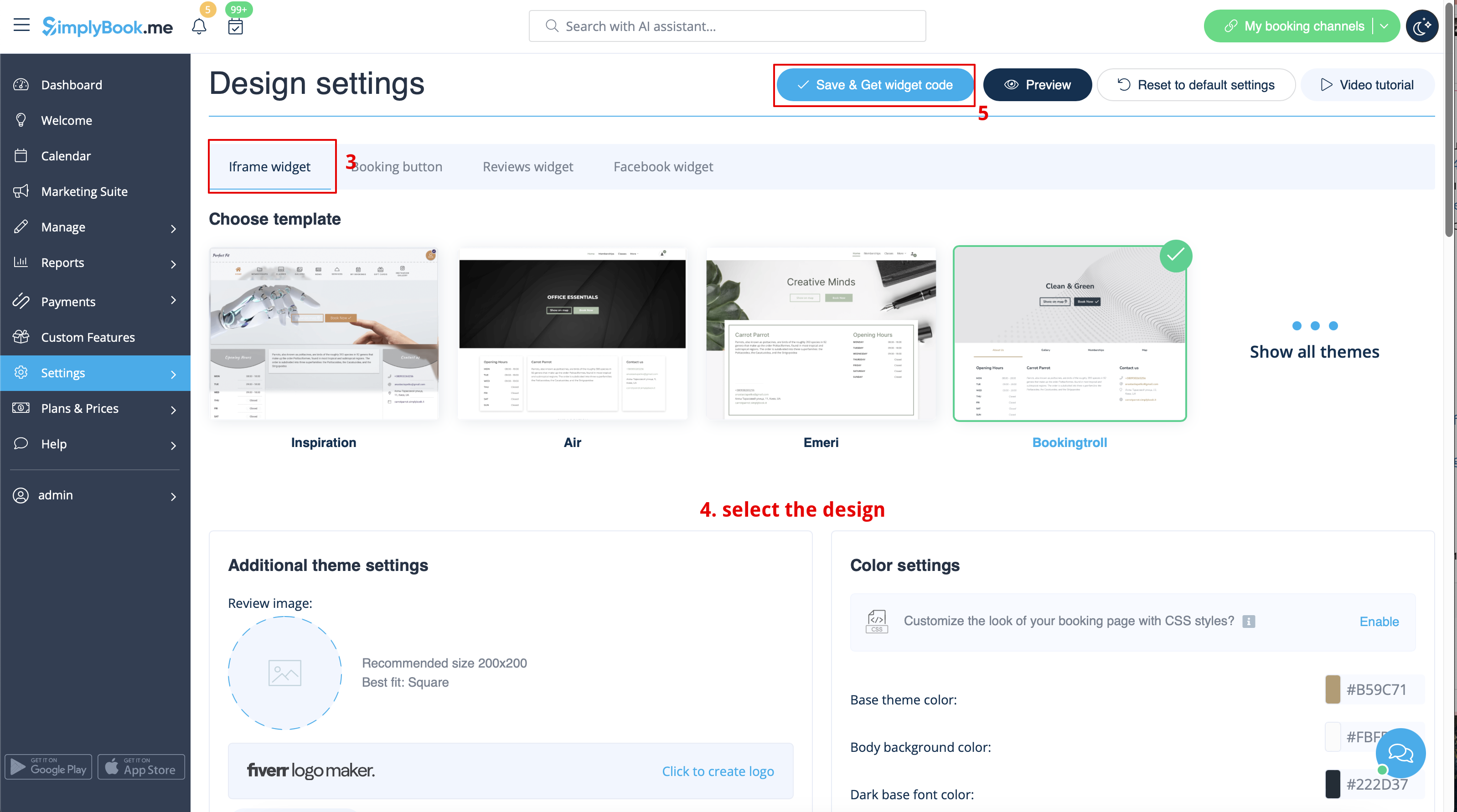

- 2. Voeg deze toe aan de HTML-code <body> van uw website (of een andere plaats op uw websiteplatform die is ontworpen voor het invoegen van HTML JavaScript iFrame-code).
Let op! Verschillende websitebouwers/platforms kunnen verschillende manieren hebben om HTML-code toe te voegen. Controleer eerst of uw website het invoegen van HTML JavaScript-code ondersteunt.
- Hier zijn tutorials voor verschillende populaire websitebouwers:
Widgets met vooraf gedefinieerde dienst, aanbieder, categorie of locatie
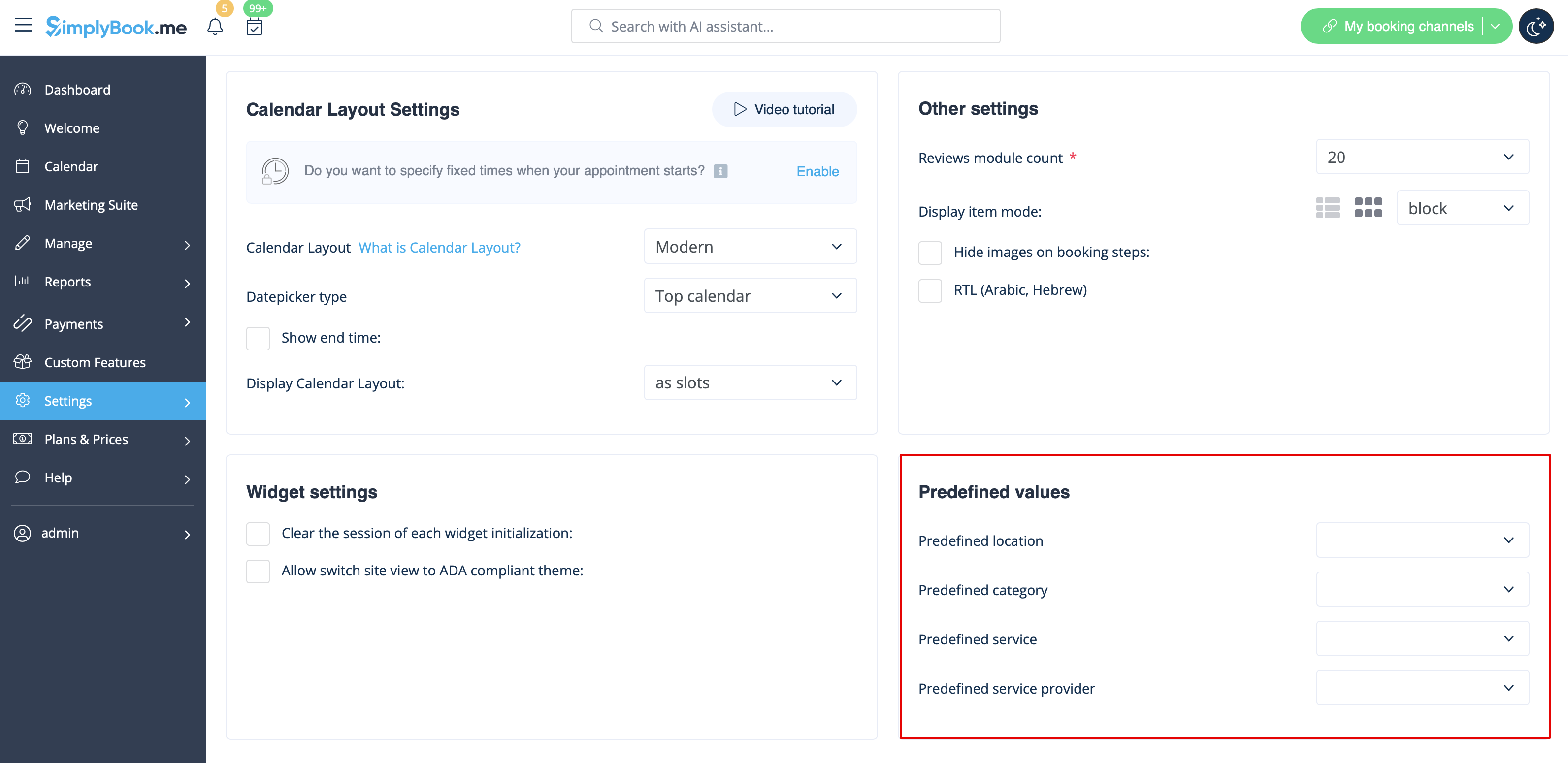
Met deze functie kunt u iframe-code genereren die specifiek is voor uw dienst, aanbieder, categorie of locatie. Als u bijvoorbeeld 2 diensten A en B hebt en u kiest dienst A als vooraf gedefinieerd, wordt de widget geopend op die dienst, waarbij de stap voor het kiezen van de dienst wordt overgeslagen. Deze functie kan handig zijn als u alleen bepaalde diensten op een specifieke pagina van uw website wilt weergeven. De stappen voor het genereren van de code zijn dezelfde als hierboven, alleen kiest u in de instellingen van de widget het item dat u vooraf wilt definiëren.
Widgets met vooraf gedefinieerde klantgegevens
U kunt nu ook een widget maken voor een bepaalde klant met zijn/haar gegevens al ingevuld.
- 1. Selecteer gewoon het gewenste widgettype in Instellingen -> Instellingen boekingswidgets, stel het ontwerp in en klik op Widgetcode ophalen.
- 2. Er verschijnt een pop-upvenster met de code. Klik op het onderste gedeelte om de details van de klantcode te bekijken.
- Kopieer de hoofdcode, voeg het onderste gedeelte toe (aan de vooraf gedefinieerde sectie) en vervang de vooraf gedefinieerde klantnaam, het vooraf gedefinieerde e-mailadres van de klant en het vooraf gedefinieerde telefoonnummer van de klant door de benodigde klantgegevens.
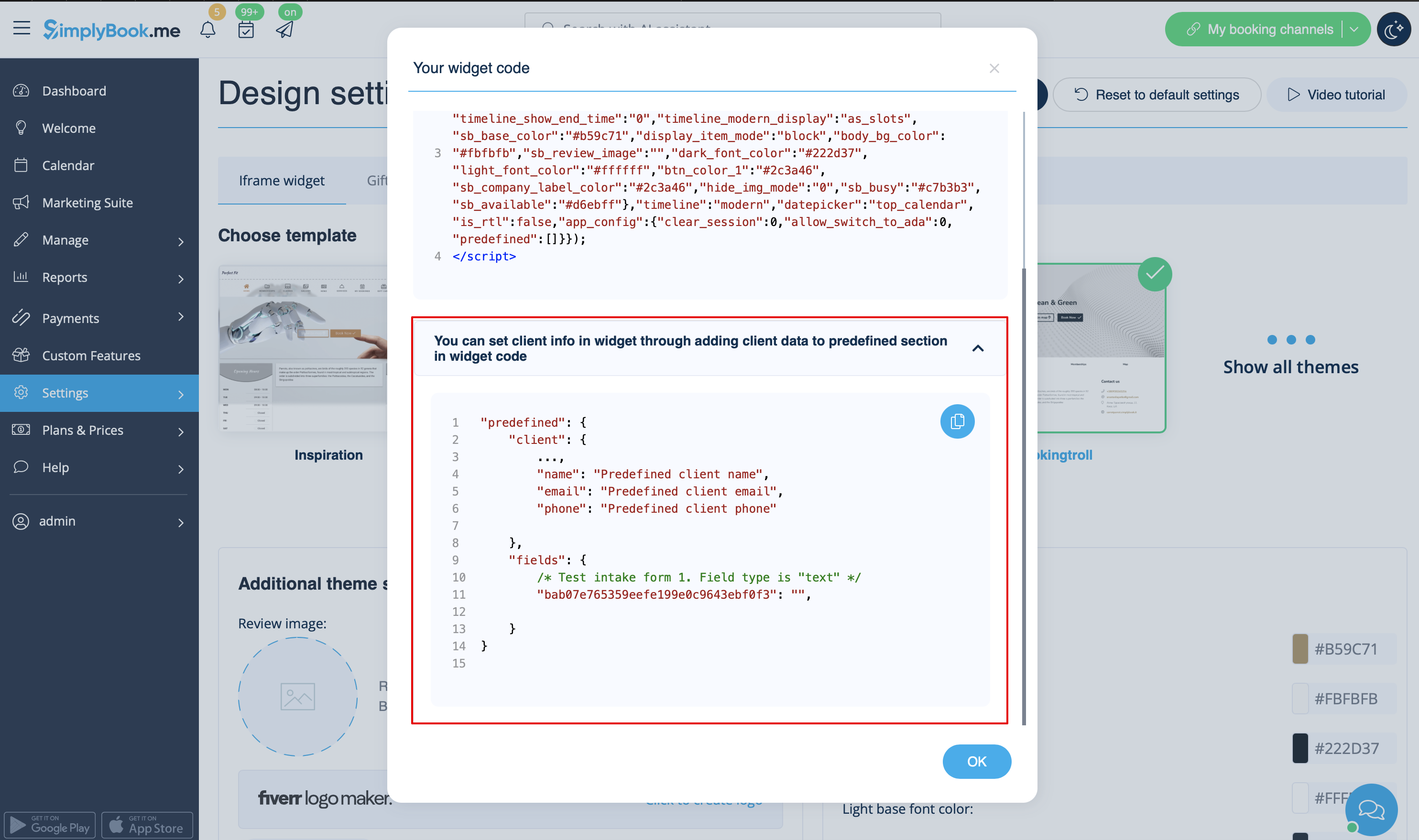
- 3. U krijgt dan de volgende code:
<script src="//simplybook.me/v2/widget/widget.js"></script>
<script>var widget = new SimplybookWidget({"widget_type":"iframe","url":"https:\/\/companyname.simplybook.me","theme":"belle","theme_settings":{"sb_base_color":"#FF6969","body_bg_color":"#ffffff","dark_font_color":"#494949","light_font_color":"#ffffff","sb_busy":"#dad2ce","sb_available":"#d3e0f1"},"timeline":"flexible","datepicker":"top_calendar","is_rtl":false,"app_config":{"predefined": {"client": {

"name": "Mary",

"email": "mary@gmail.com",

"phone": "+1234567890"

}}
}});</script>
- 4. Als gevolg hiervan worden de gegevens van deze klant vooraf ingevuld in de widget en hoeft de klant deze niet meer op te geven.

Widgets voor klantlogin, pakketten, lidmaatschappen, cadeaubonnen
Let op! Dit werkt momenteel alleen met iFrame-widgets en niet met widgets voor boekingsknoppen en contactknoppen.
Als u een of meer van deze functies gebruikt, kan het nodig zijn om een widget toe te voegen waarmee uw klanten de optie op uw website kunnen gebruiken.
Dit kan eenvoudig worden gedaan door het overeenkomstige "navigate" -element toe te voegen aan de widgetcode:
- Klantlogin - "navigate":"client/sign-in"
- Pakketten - "navigate":"packages"
- Lidmaatschappen - "navigate":"membership"
- Cadeaubonnen - "navigate":"gift-card"
Voorbeeldcode voor de widget Gift Cards:
<script src="//simplybook.it/v2/widget/widget.js"></script>
<script>var widget = new SimplybookWidget({"widget_type":"iframe","url":"https:\/\/demo.simplybook.it","navigate":"gift-card","theme":"default","theme_settings":{"timeline_show_end_time":"0","timeline_modern_display":"as_slots","sb_base_color":"#0cadef","display_item_mode":"block","booking_nav_bg_color":"#80d0f2","body_bg_color":"#f7f7f7","dark_font_color":"#494949","light_font_color":"#ffffff","btn_color_1":"#5e7da7","sb_company_label_color":"#ffffff","hide_img_mode":"0","show_sidebar":"1","sb_busy":"#dad2ce","sb_available":"#0cadef"},"timeline":"modern","datepicker":"inline_datepicker","is_rtl":false,"app_config":{"predefined":[]}});</script>
Widget voor boekingsknop
- 1. Neem de code van de boekingsknop van uw boekingspagina in Instellingen -> Instellingen boekingswidget -> Boekingsknop -> Widgetcode ophalen.
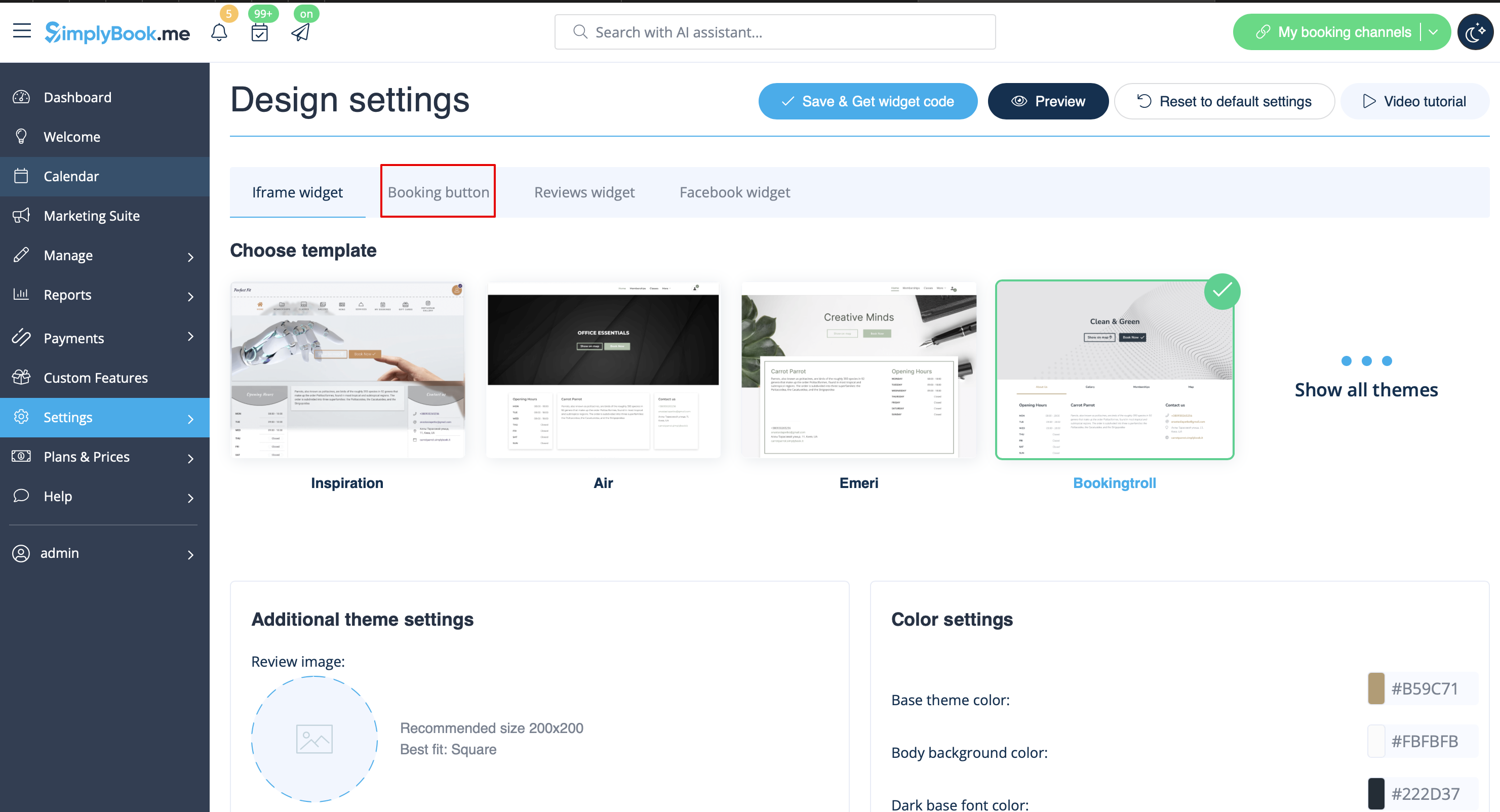
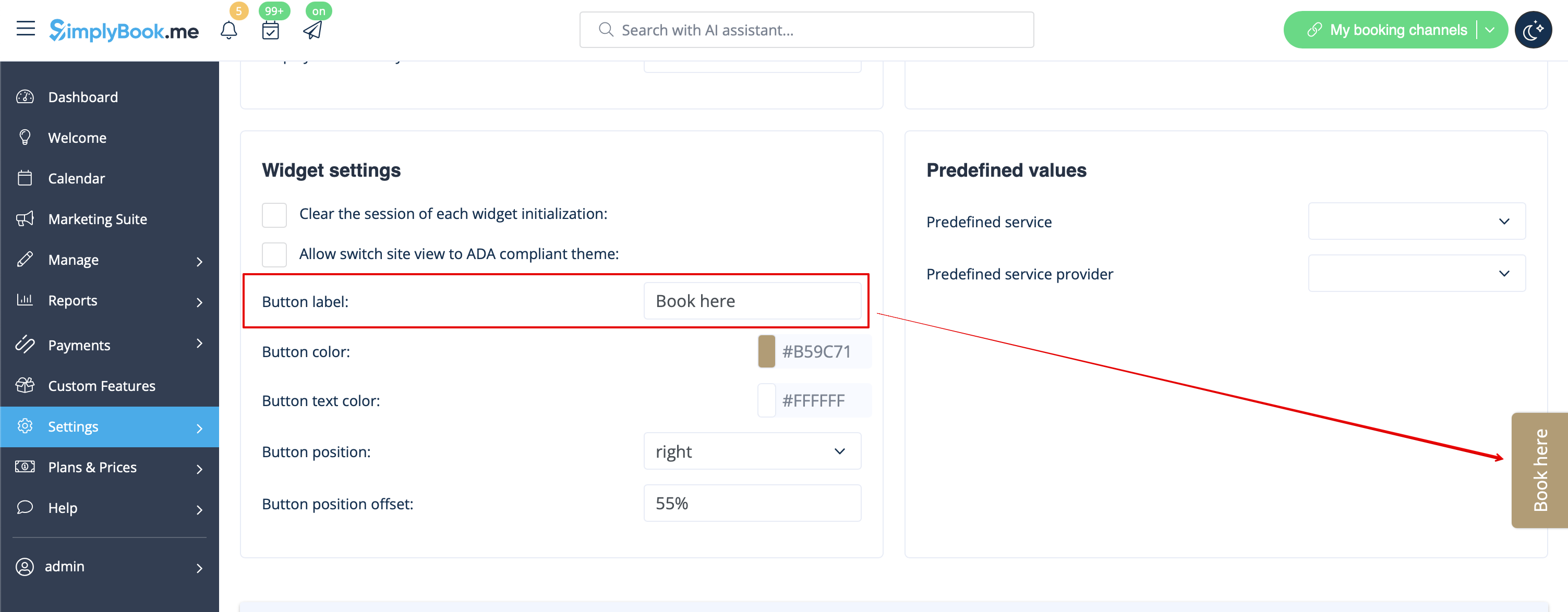
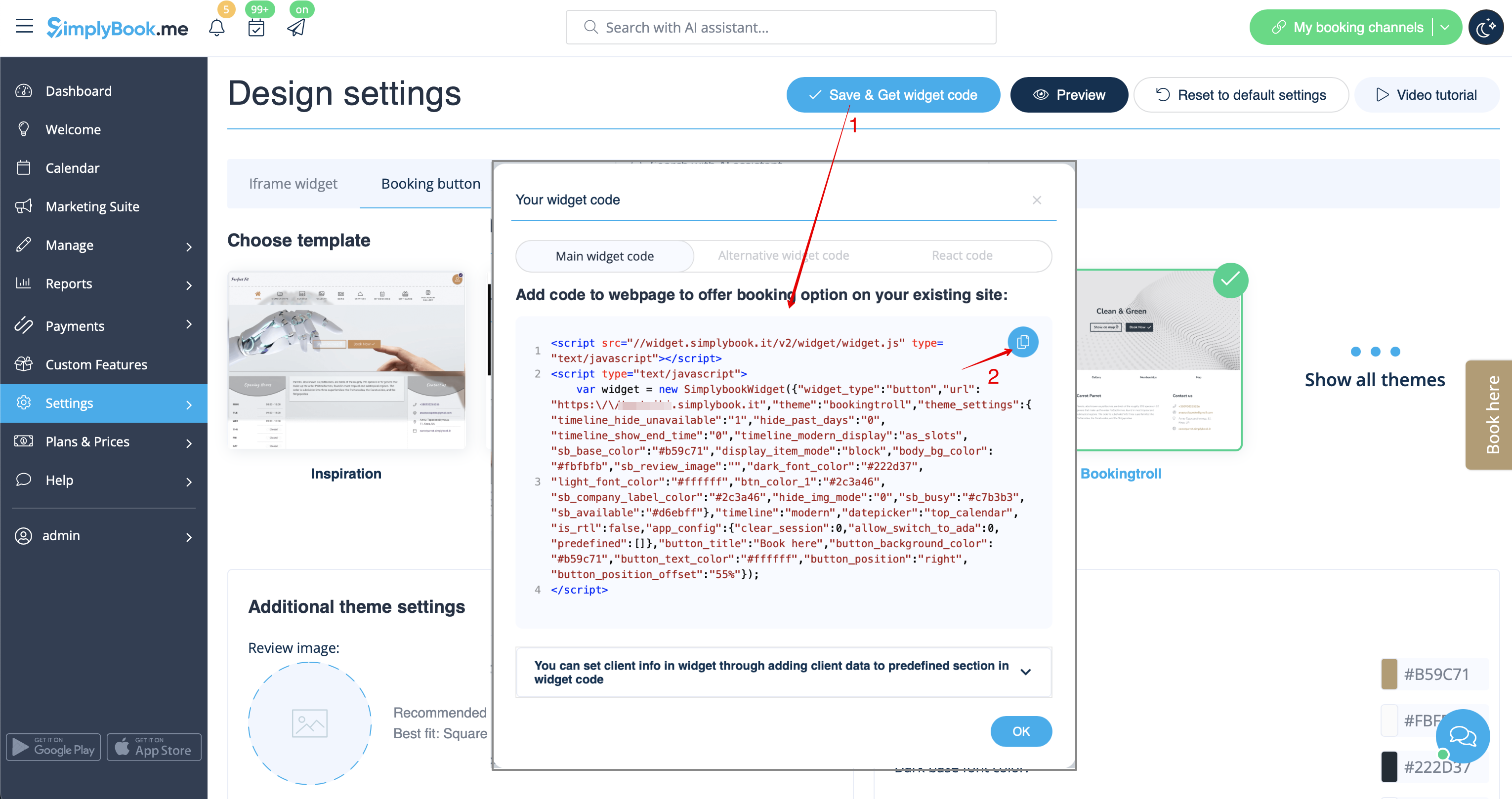
- 2. Voeg deze toe aan de HTML-code <body> van uw website (of een andere plaats op uw websiteplatform die is ontworpen voor het invoegen van HTML JavaScript iFrame-code).
Let op! Verschillende websitebouwers/platforms kunnen verschillende manieren hebben om HTML-code toe te voegen. Controleer eerst of uw website het invoegen van HTML JavaScript-code ondersteunt.
- Hier vindt u tutorials voor verschillende populaire websitebouwers:
- Widgets met vooraf gedefinieerde dienst, aanbieder, categorie of locatie.
Met deze functie kunt u iframe-code genereren die specifiek is voor de dienst, aanbieder, categorie of locatie die u hebt. Als u bijvoorbeeld 2 diensten A en B hebt en u kiest dienst A als vooraf gedefinieerd, wordt de widget geopend op die dienst, waarbij de stap voor het kiezen van de dienst wordt overgeslagen. Deze functie kan handig zijn als u alleen bepaalde diensten op een specifieke pagina van uw website wilt weergeven. De stappen voor het genereren van de code zijn dezelfde als hierboven, alleen kiest u in de instellingen van de widget het item dat u vooraf wilt definiëren.
Widget voor boekingen en contact
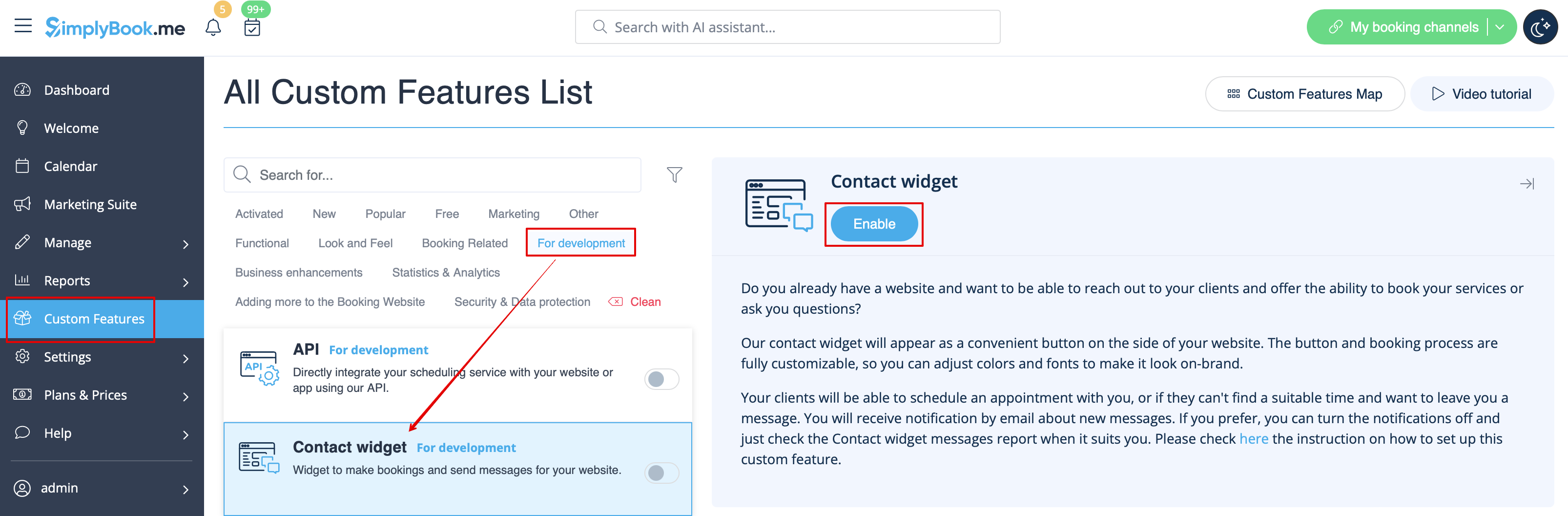
- 1. Schakel de contactwidget in via Aangepaste functies -> Voor ontwikkeling.
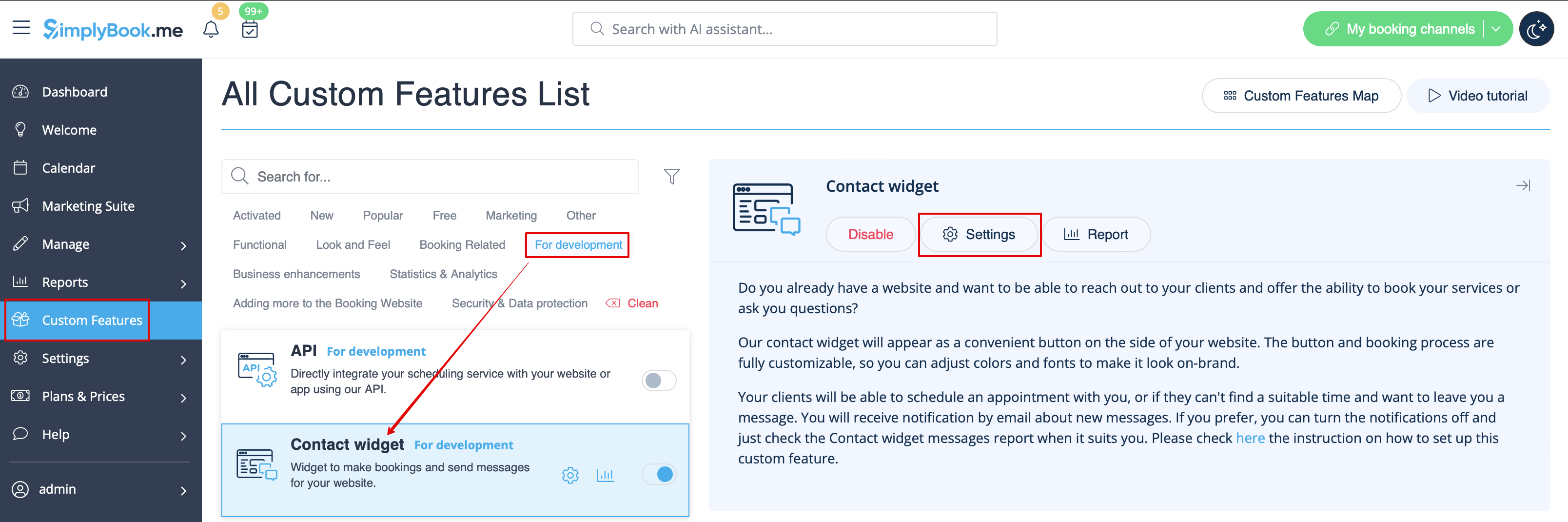
- 2. Neem de code van de boekingsknop van uw boekingspagina door naar Instellingen te gaan naast deze aangepaste functie of in Instellingen in het menu aan de linkerkant -> Boekingswidgetinstellingen -> Contactwidget -> Widgetcode ophalen.
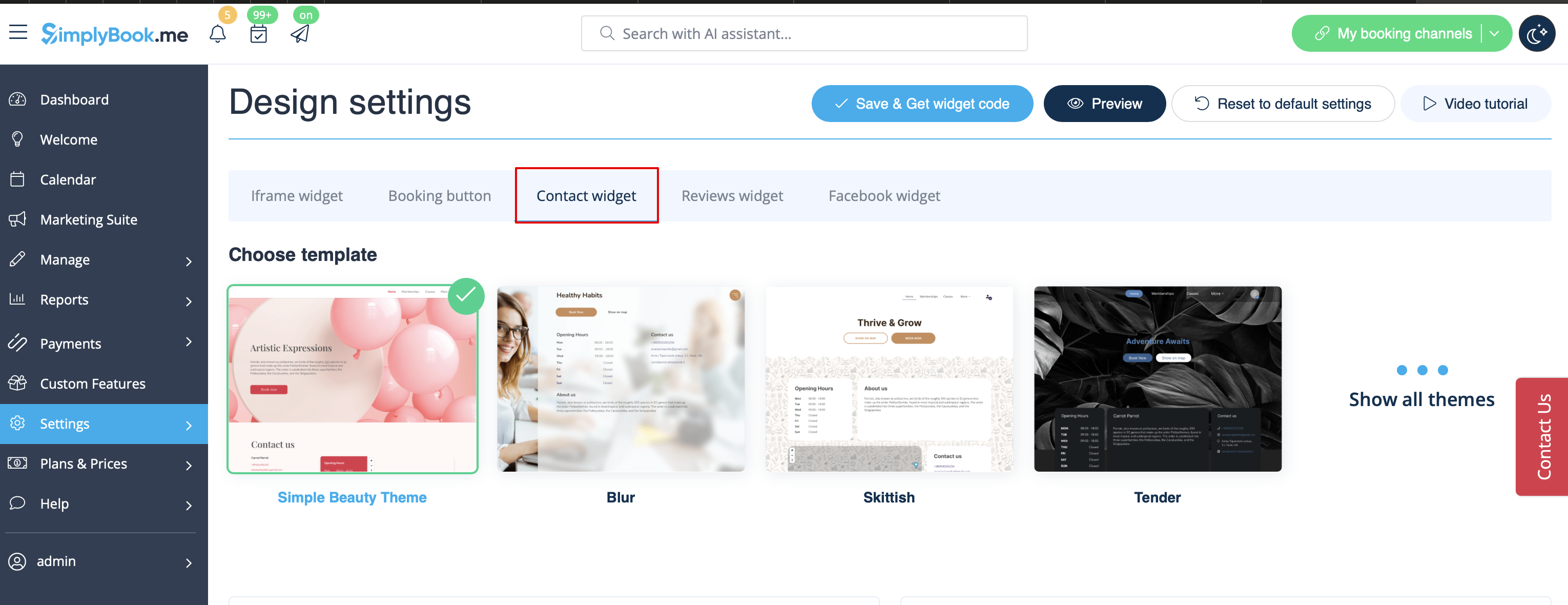
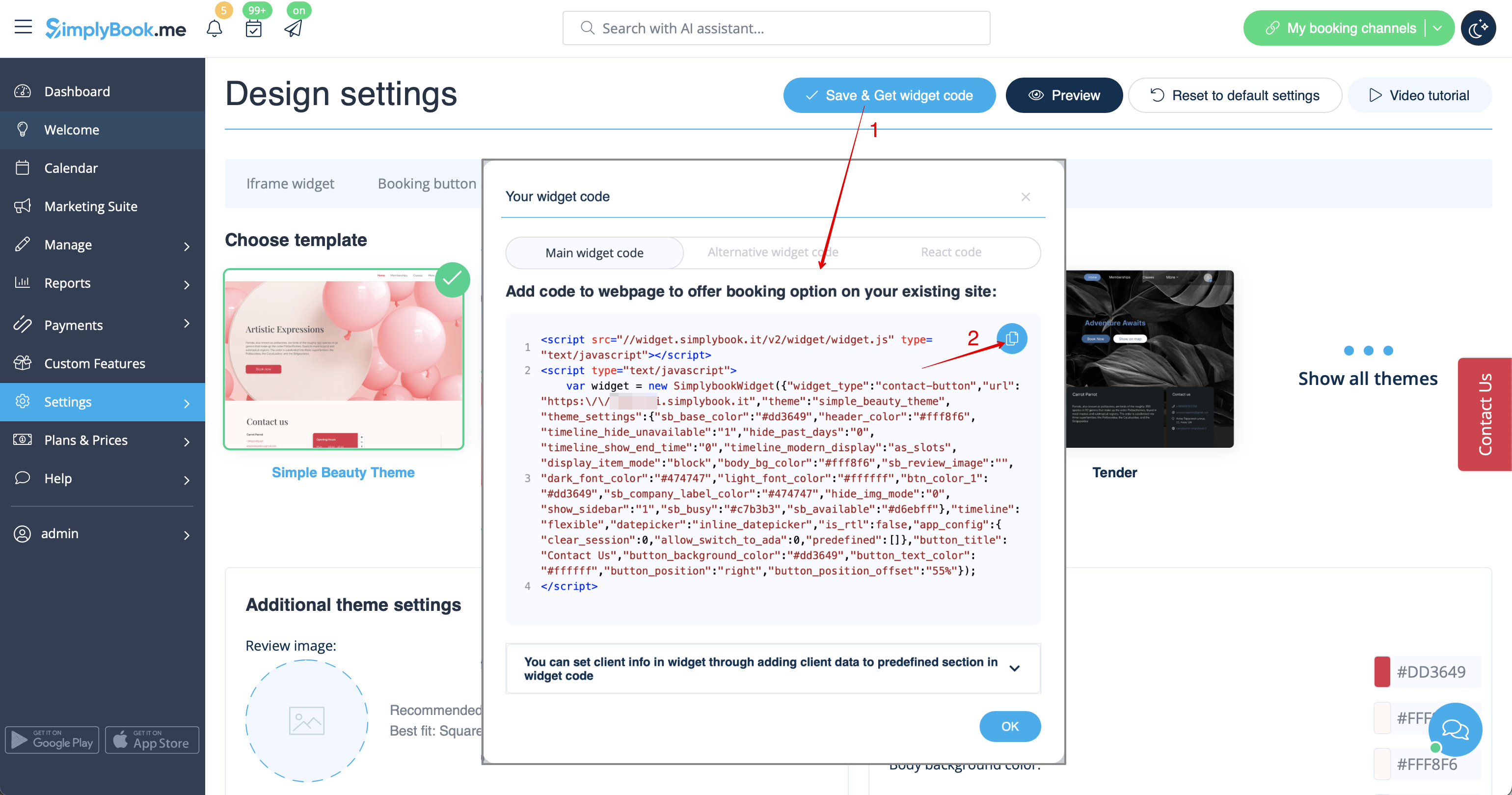
- 3. Voeg deze toe aan de HTML-code <body> van uw website (of een andere plaats op uw websiteplatform die is ontworpen voor het invoegen van HTML JavaScript iFrame-code).
Let op! Verschillende websitebouwers/platforms kunnen verschillende manieren hebben om HTML-code toe te voegen. Controleer eerst of uw website het invoegen van HTML JavaScript-code ondersteunt.
- Hier zijn tutorials voor verschillende populaire websitebouwers:
Reviews Widget
Wish to add reviews your clients leave on the booking page to your website?
Just follow these instructions:
- 1. Please go to Settings -> Booking widgets settings -> Reviews widget.
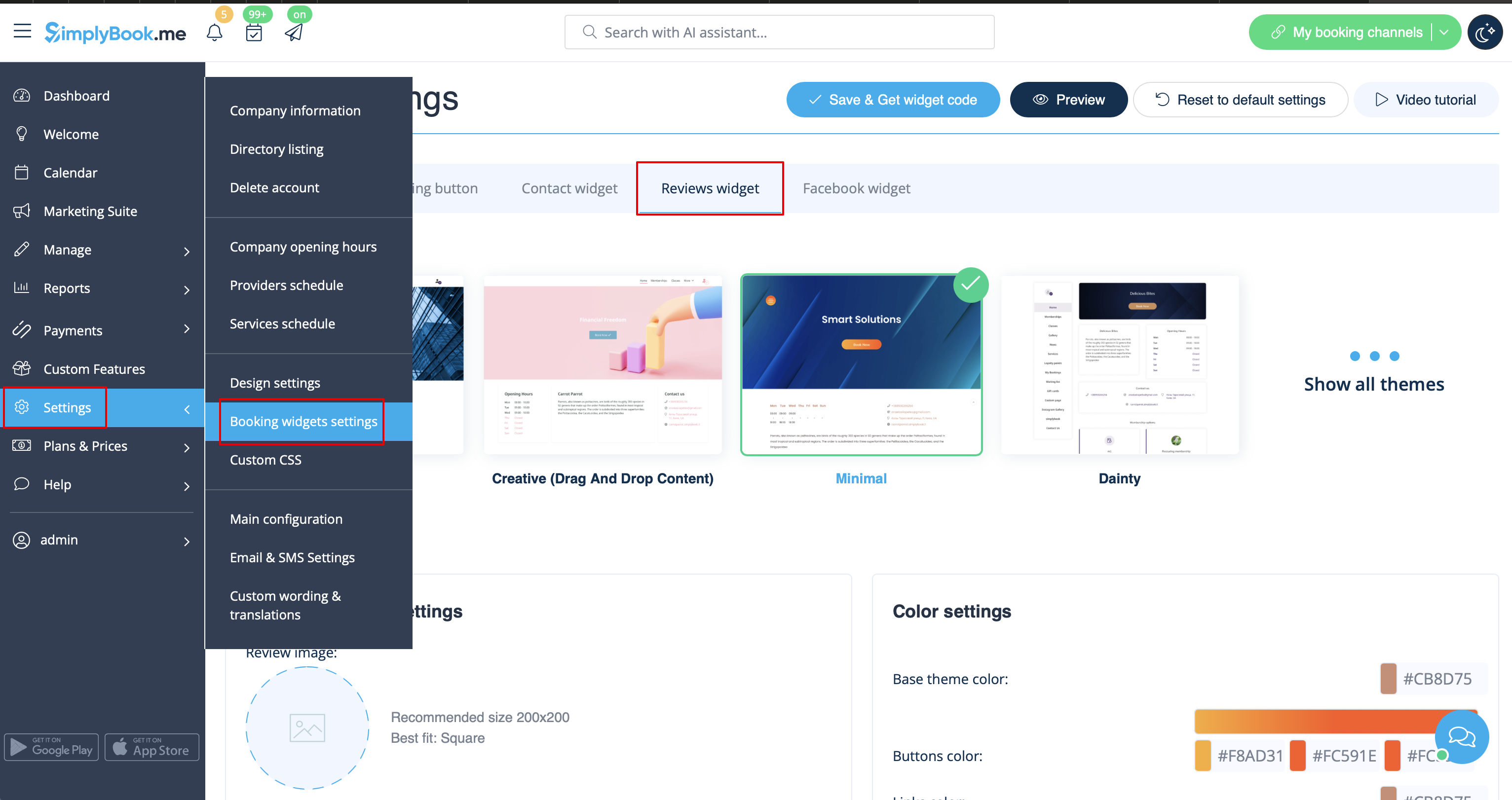
- 2. On the page you will be able to select the theme, set colors, decide on the number of reviews you wish to display and whether you wish your clients to be able to add reviews using the widget.
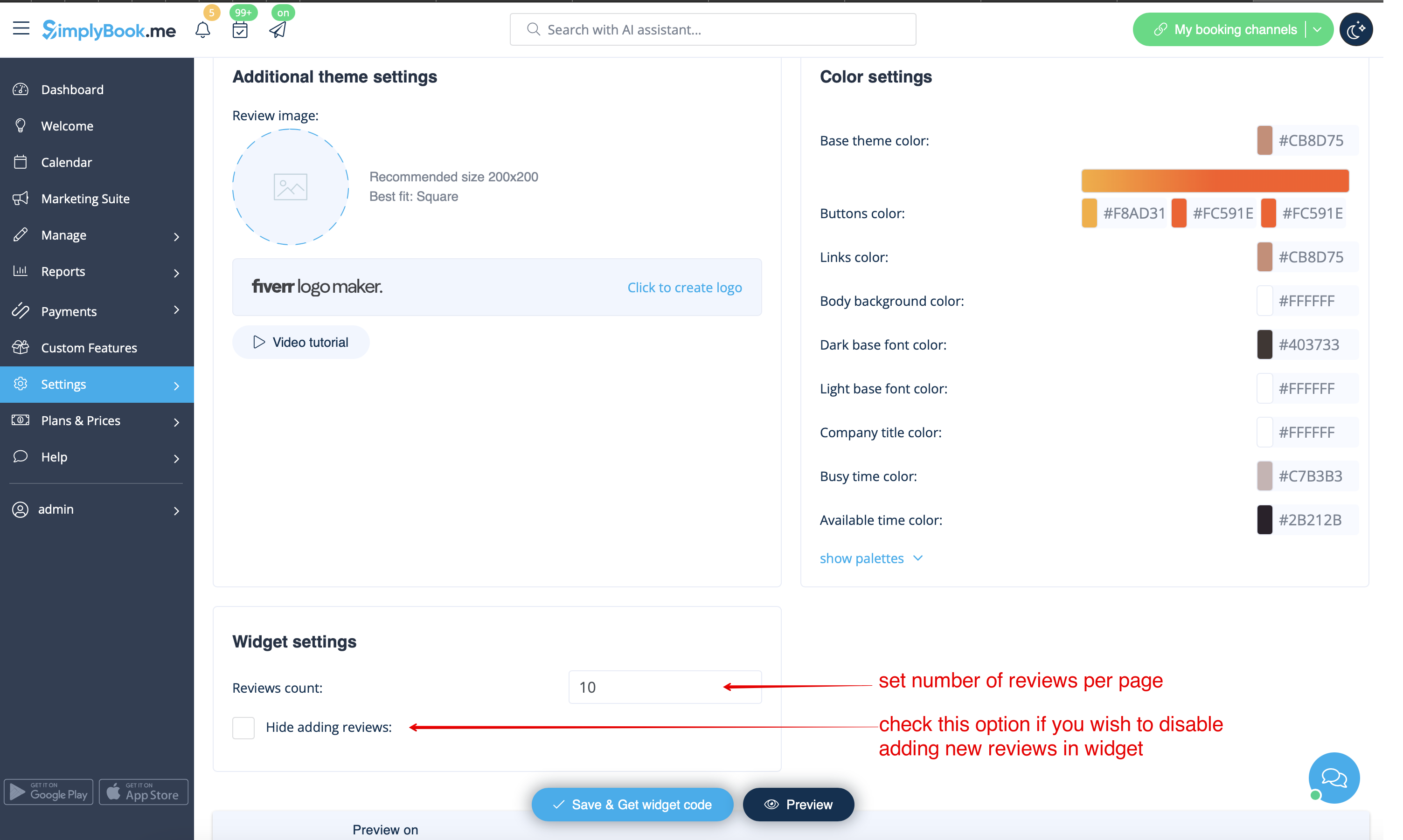
- 3. And now, when design is set, just click on Get widget code button, copy the code and insert it to your website to the desired place.
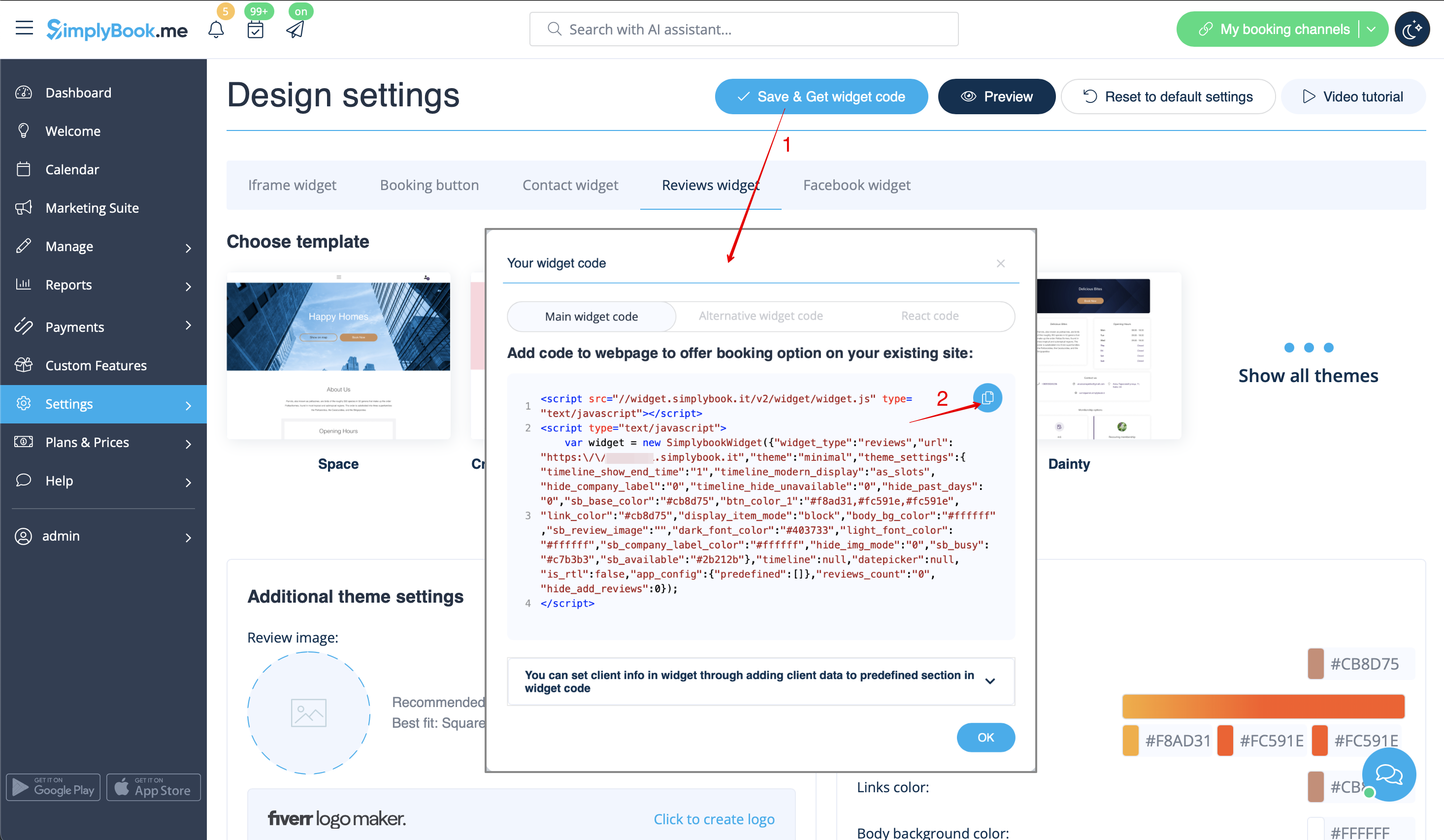
Congratulations! Widget is now ready, your reviews will be published and updated on your website!
