Created page with "== Віджети з попередньо визначеною послугою, постачальником, категорією або місцем розташування == <br>" Tags: Mobile edit Mobile web edit |
Created page with "__FORCETOC__" |
||
| Line 35: | Line 35: | ||
<br> | <br> | ||
Ця функція дозволяє генерувати код iframe спеціально для послуги, постачальника, [[Custom_Features#Service_Categories |категорії]] або [[Custom_Features#Multiple_Locations |місця]], які ви маєте. Наприклад, якщо у вас є 2 послуги А і В, і ви вибрали послугу А як попередньо визначену, віджет відкриється на цій послузі, пропускаючи крок вибору послуги. Ця функція може бути корисною, якщо вам потрібно відобразити тільки певні послуги на конкретній сторінці вашого веб-сайту. Кроки для створення коду такі самі, як і вище, тільки в налаштуваннях віджета виберіть елемент, який потрібно попередньо визначити. | |||
[[File:Widget predefined values redesigned.png|1200px| center|link=https://help.simplybook.me/images/e/ed/Widget_predefined_values_redesigned.png]] | [[File:Widget predefined values redesigned.png|1200px| center|link=https://help.simplybook.me/images/e/ed/Widget_predefined_values_redesigned.png]] | ||
<br><br> | <br><br> | ||
== Віджети з попередньо визначеними даними клієнта == | |||
<br> | <br> | ||
Тепер ви також можете створити віджет для конкретного клієнта з уже заповненими його даними. | |||
:1. | :1. Просто виберіть потрібний тип віджета в <span style="background-color:#d4f8e5; padding:5px; border-radius:5px;">Налаштуваннях</span> -> <span style="background-color:#d4f8e5; padding:5px; border-radius:5px;">Налаштування віджетів бронювання</span>, встановіть дизайн і натисніть <span style="background-color:#d4f8e5; padding:5px; border-radius:5px;">Отримати код віджета.</span> | ||
[[File:Booking widget path redesigned.png|1200px | center|link=https://help.simplybook.me/images/6/68/Booking_widget_path_redesigned.png]] | [[File:Booking widget path redesigned.png|1200px | center|link=https://help.simplybook.me/images/6/68/Booking_widget_path_redesigned.png]] | ||
<br><br> | <br><br> | ||
<div lang="en" dir="ltr" class="mw-content-ltr"> | <div lang="en" dir="ltr" class="mw-content-ltr"> | ||
:2. You will see a pop-up window with the code, click on the bottom part to get client code details. | :2. You will see a pop-up window with the code, click on the bottom part to get client code details. | ||
Revision as of 12:23, 19 May 2025
- Чому варто використовувати наші віджети

- Доступний відеоурок
віджет iFrame
- 1. Візьміть код iFrame вашої сторінки бронювання в Налаштування -> Налаштування віджетів бронювання -> Віджет iFrame -> Отримати код віджета.

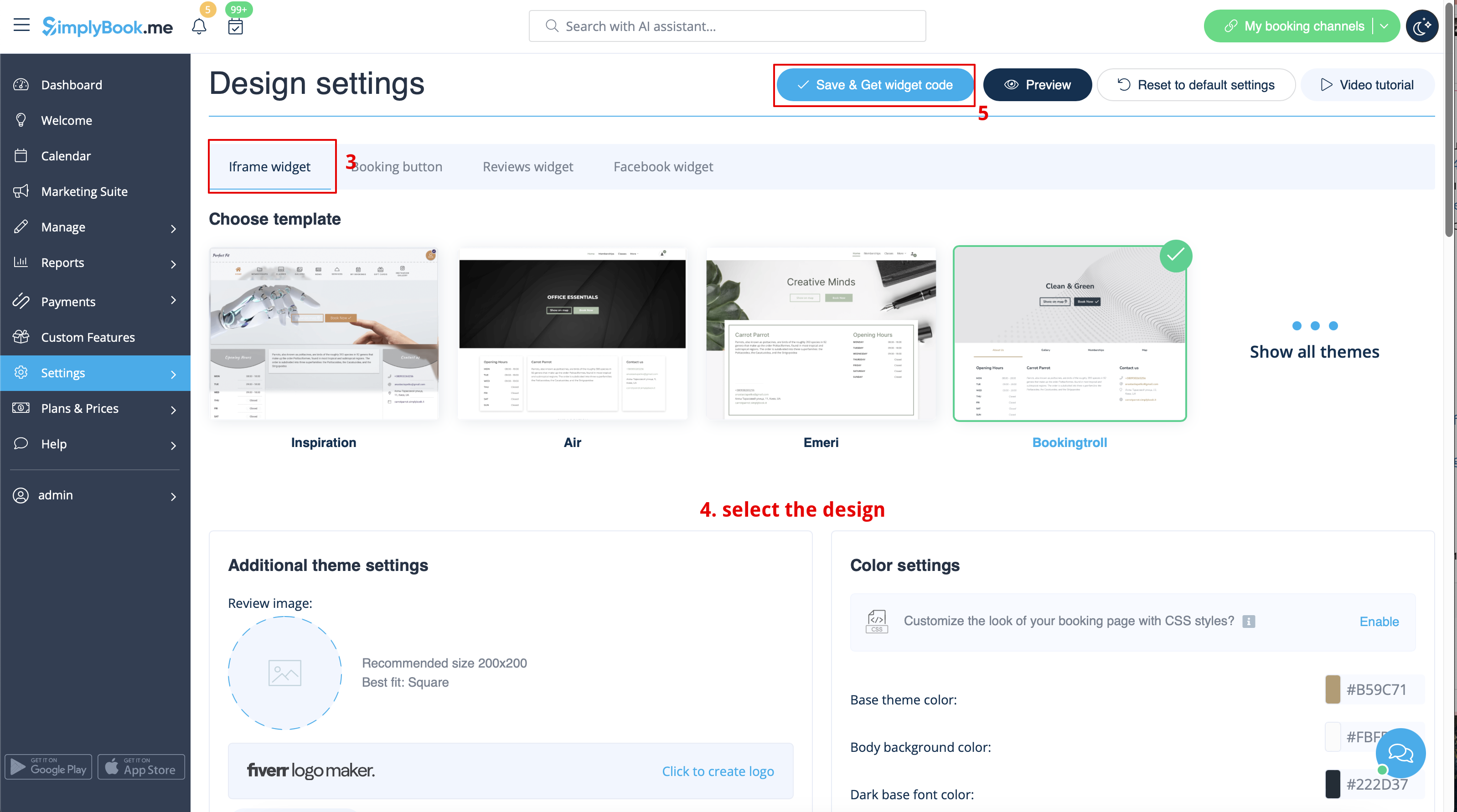

- 2. Вставте його в HTML-код <body> вашого веб-сайту (або в будь-яке інше місце на вашій веб-платформі, призначене для вставки HTML-коду JavaScript iFrame).
Зверніть увагу! Різні конструктори/платформи веб-сайтів можуть мати різні способи додавання HTML-коду, тому спочатку слід перевірити, чи підтримує ваш веб-сайт вставку HTML-коду JavaScript.
- Ось посібники для декількох популярних конструкторів веб-сайтів:
Віджети з попередньо визначеною послугою, постачальником, категорією або місцем розташування
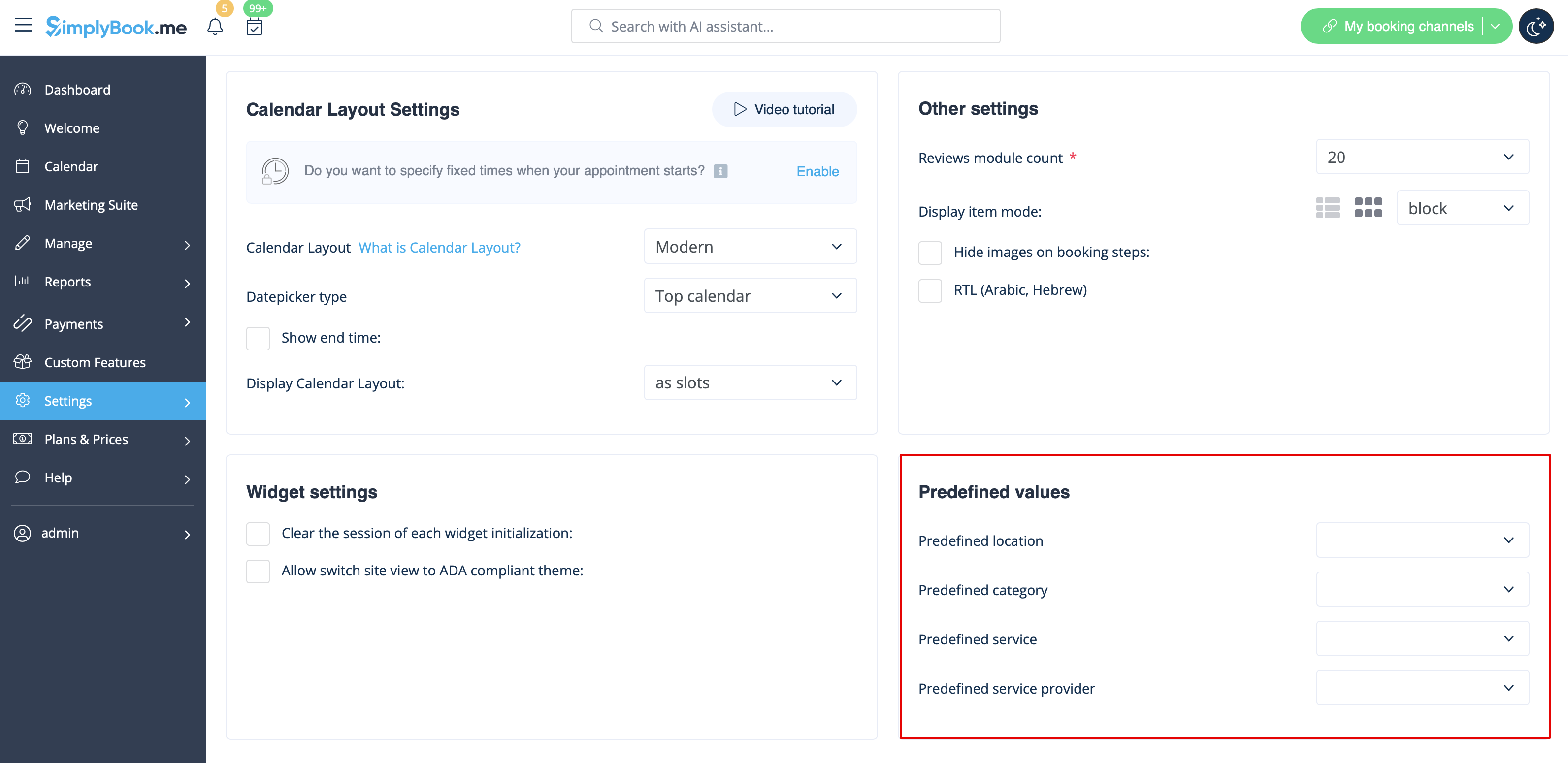
Ця функція дозволяє генерувати код iframe спеціально для послуги, постачальника, категорії або місця, які ви маєте. Наприклад, якщо у вас є 2 послуги А і В, і ви вибрали послугу А як попередньо визначену, віджет відкриється на цій послузі, пропускаючи крок вибору послуги. Ця функція може бути корисною, якщо вам потрібно відобразити тільки певні послуги на конкретній сторінці вашого веб-сайту. Кроки для створення коду такі самі, як і вище, тільки в налаштуваннях віджета виберіть елемент, який потрібно попередньо визначити.
Віджети з попередньо визначеними даними клієнта
Тепер ви також можете створити віджет для конкретного клієнта з уже заповненими його даними.
- 1. Просто виберіть потрібний тип віджета в Налаштуваннях -> Налаштування віджетів бронювання, встановіть дизайн і натисніть Отримати код віджета.
- 2. You will see a pop-up window with the code, click on the bottom part to get client code details.
- Please copy the main code, add bottom part to it(to predefined section) and replace Predefined client name, Predefined client email, Predefined client phone with the necessary client details.
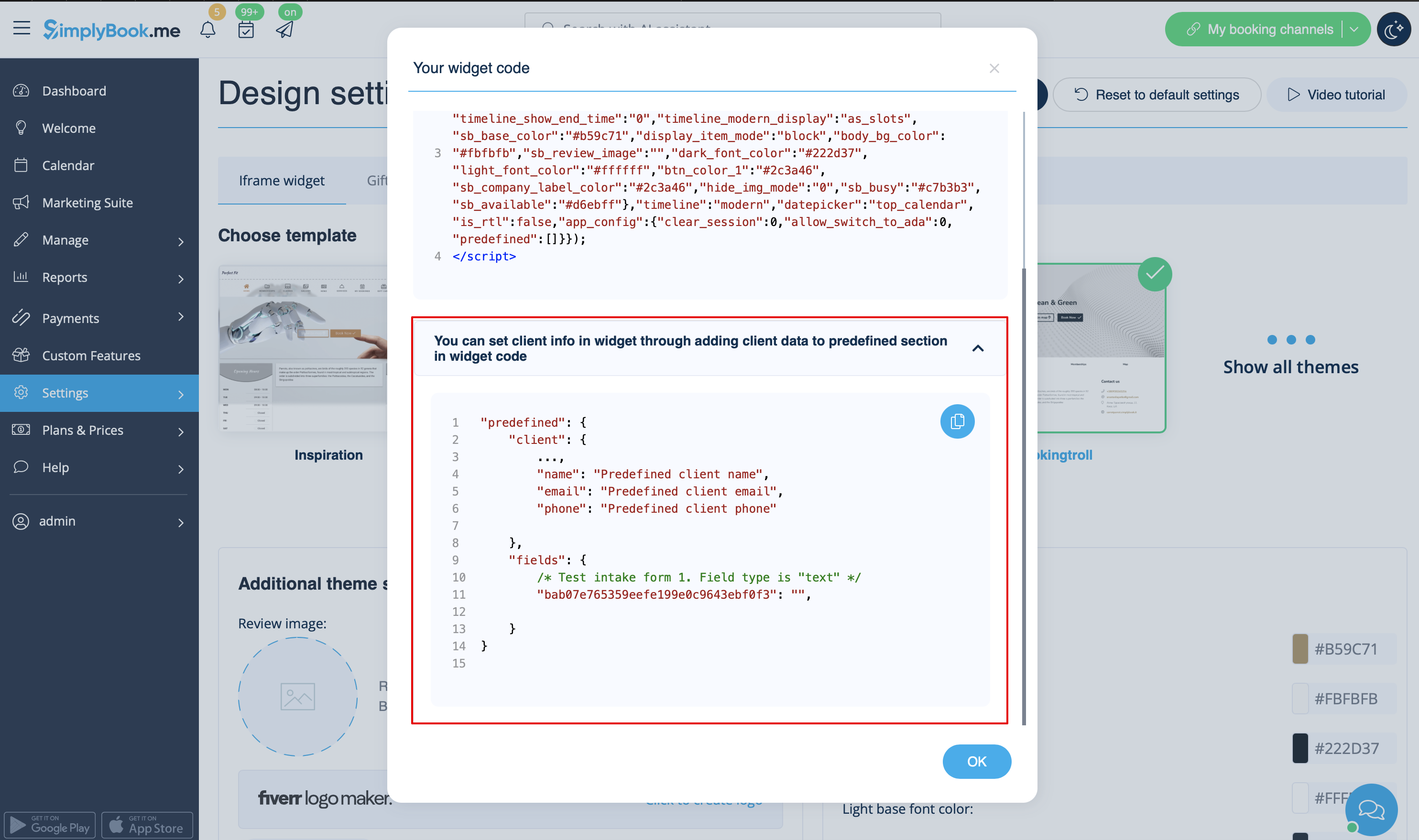
- 3. You will get the code like this:
<script src="//simplybook.me/v2/widget/widget.js"></script>
<script>var widget = new SimplybookWidget({"widget_type":"iframe","url":"https:\/\/companyname.simplybook.me","theme":"belle","theme_settings":{"sb_base_color":"#FF6969","body_bg_color":"#ffffff","dark_font_color":"#494949","light_font_color":"#ffffff","sb_busy":"#dad2ce","sb_available":"#d3e0f1"},"timeline":"flexible","datepicker":"top_calendar","is_rtl":false,"app_config":{"predefined": {"client": {

"name": "Mary",

"email": "mary@gmail.com",

"phone": "+1234567890"

}}
}});</script>
- 4. As a result the details of this client will be pre-filled in the widget and there will be no need for client to provide them.

Widgets for Client Login, Packages, Memberships, Gift Cards
Please note! It currently works with iFrame widgets only and does not work with booking button and contact button widgets.
If you are using one or several of these features it may be necessary to add a widget that will allow your clients to use the option on your website.
It can be done in a simple way by adding of the corresponding "navigate" element to the widget code:
- Client Login - "navigate":"client/sign-in"
- Packages - "navigate":"packages"
- Memberships - "navigate":"membership"
- Gift Cards - "navigate":"gift-card"
Gift Cards widget code example:
<script src="//simplybook.it/v2/widget/widget.js"></script>
<script>var widget = new SimplybookWidget({"widget_type":"iframe","url":"https:\/\/demo.simplybook.it","navigate":"gift-card","theme":"default","theme_settings":{"timeline_show_end_time":"0","timeline_modern_display":"as_slots","sb_base_color":"#0cadef","display_item_mode":"block","booking_nav_bg_color":"#80d0f2","body_bg_color":"#f7f7f7","dark_font_color":"#494949","light_font_color":"#ffffff","btn_color_1":"#5e7da7","sb_company_label_color":"#ffffff","hide_img_mode":"0","show_sidebar":"1","sb_busy":"#dad2ce","sb_available":"#0cadef"},"timeline":"modern","datepicker":"inline_datepicker","is_rtl":false,"app_config":{"predefined":[]}});</script>
Booking Button Widget
- 1. Take the booking button code of your booking page in Settings -> Booking widget settings -> Booking button -> Get widget code.
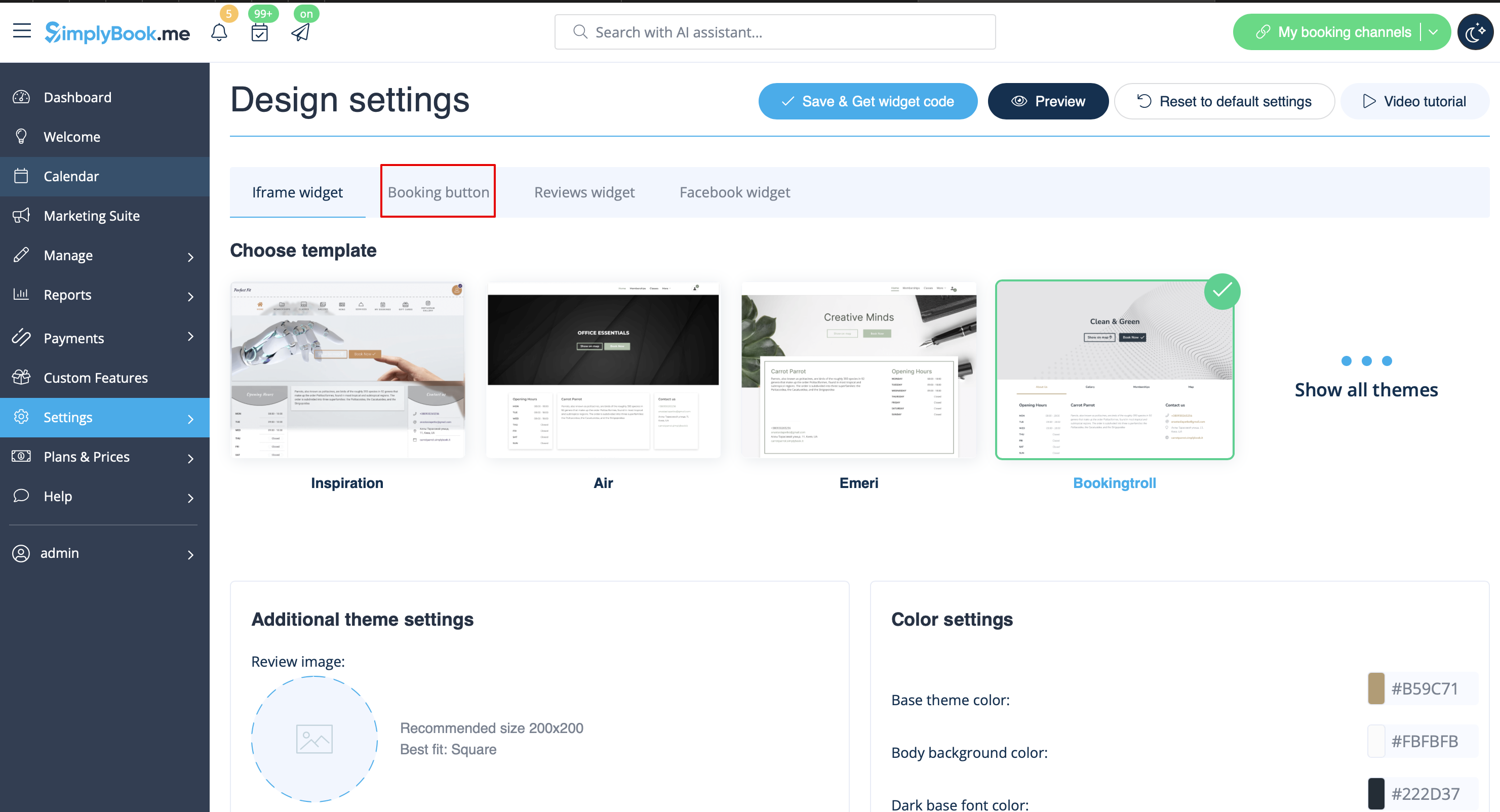
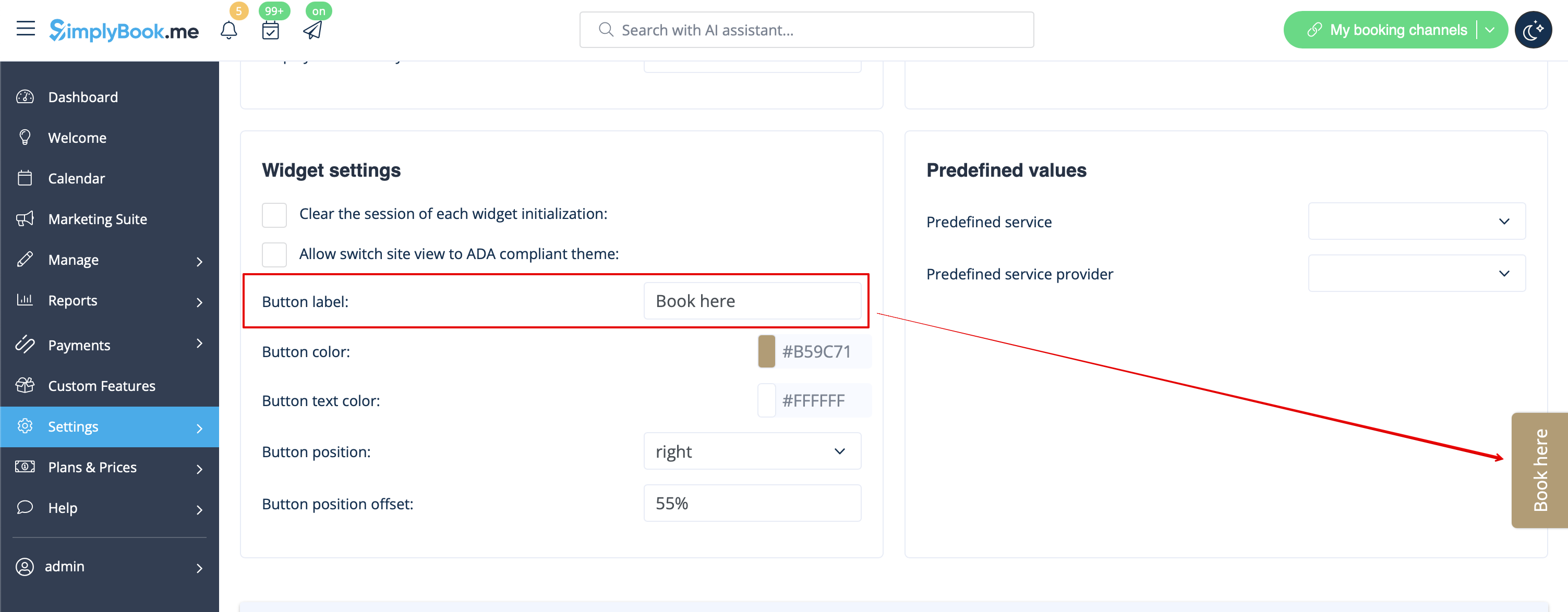
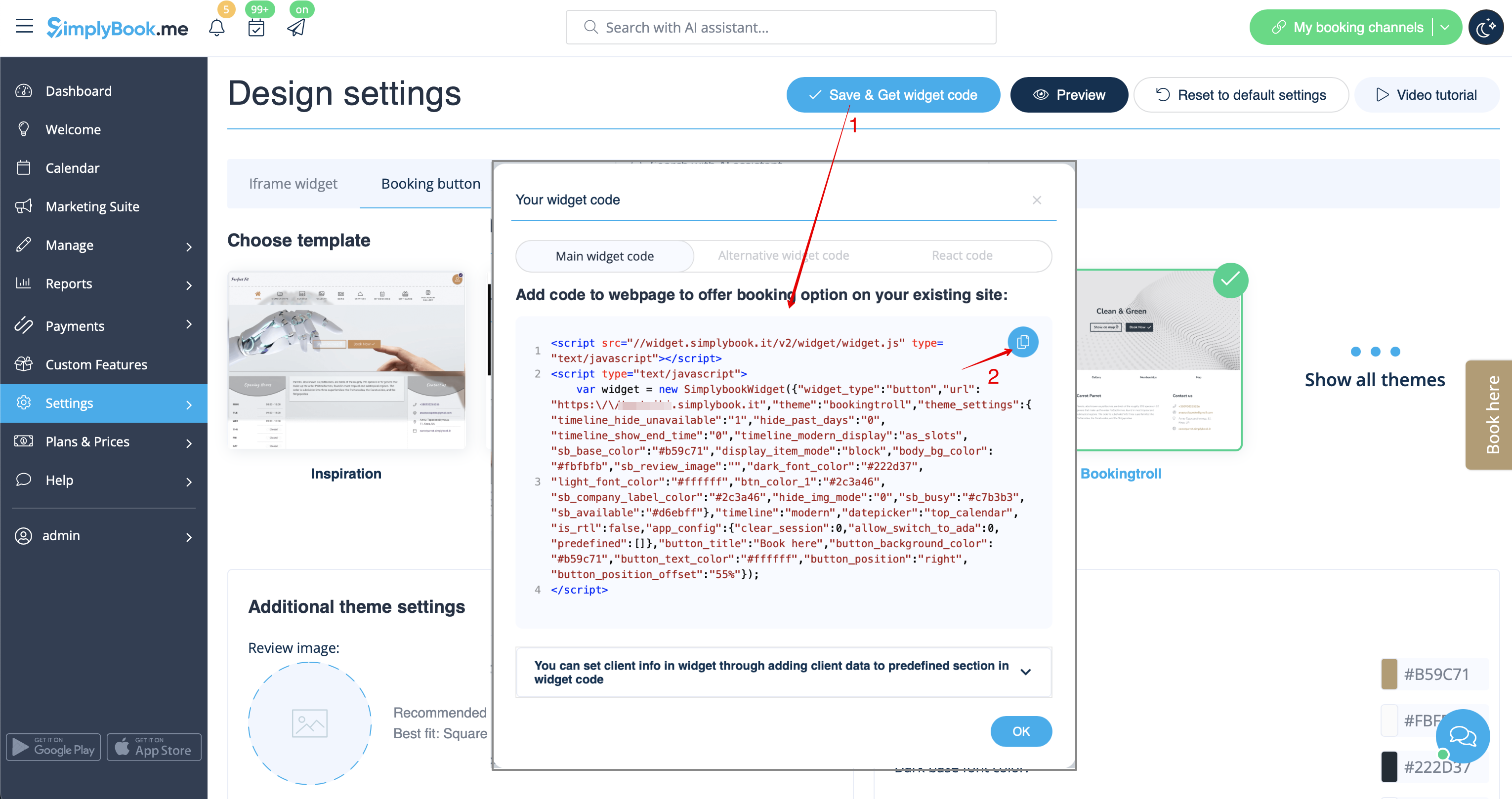
- 2. Insert it to the HTML code <body> of your website (or any other place in your website platform designed for inserting HTML JavaScript iFrame code).
Please note! Different website builders/platforms may have various ways to add HTML code, you should check first whether your website supports inserting HTML JavaScript code.
- Widgets with predefined service, provider, category or location.
This feature allows you to generate iframe code specifically for service, provider, category or location you have. For example, if you have 2 services A and B and you choose service A as predefined, the widget will open on that service, skipping the step of choosing the service. This feature may be useful if you need to display only certain services on a specific page on your website. The steps to generate the code are the same as above, only in the settings of the widget, choose the item you need to predefine.
Booking and Contact Button Widget
- 1. Enable Contact Widget in Custom Features -> For Development.
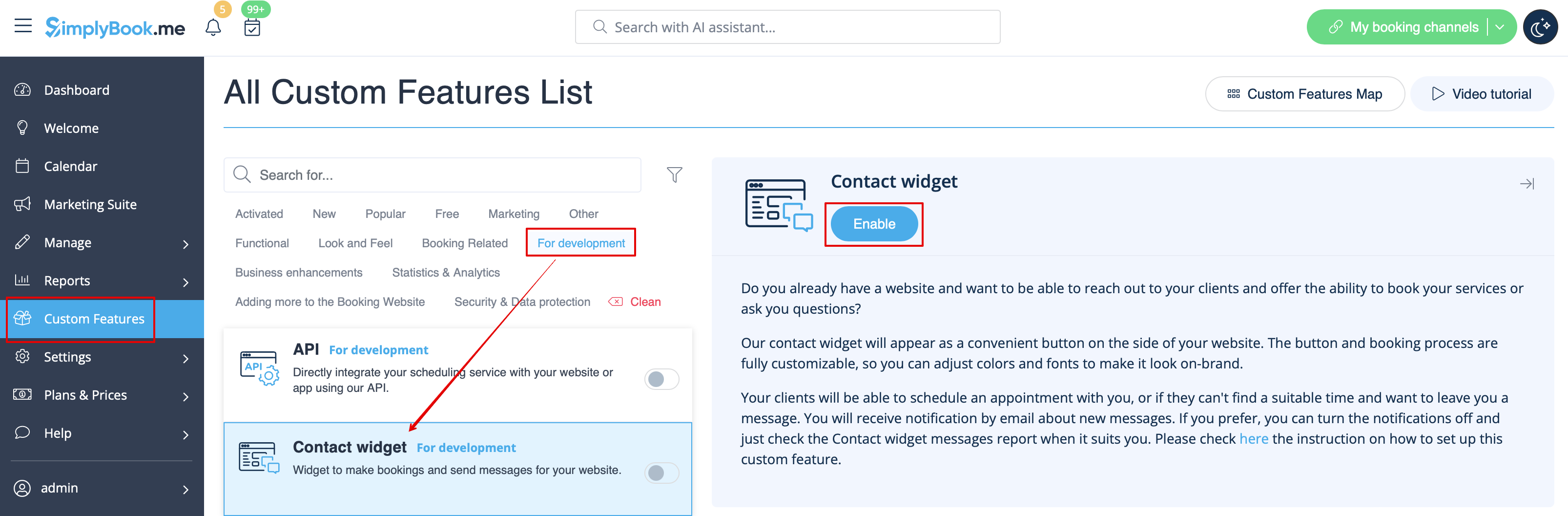
- 2. Take the booking button code of your booking page by navigating to Settings near this custom feature or in Settings in the left-side menu -> Booking widgets settings -> Contact widget -> Get widget code.
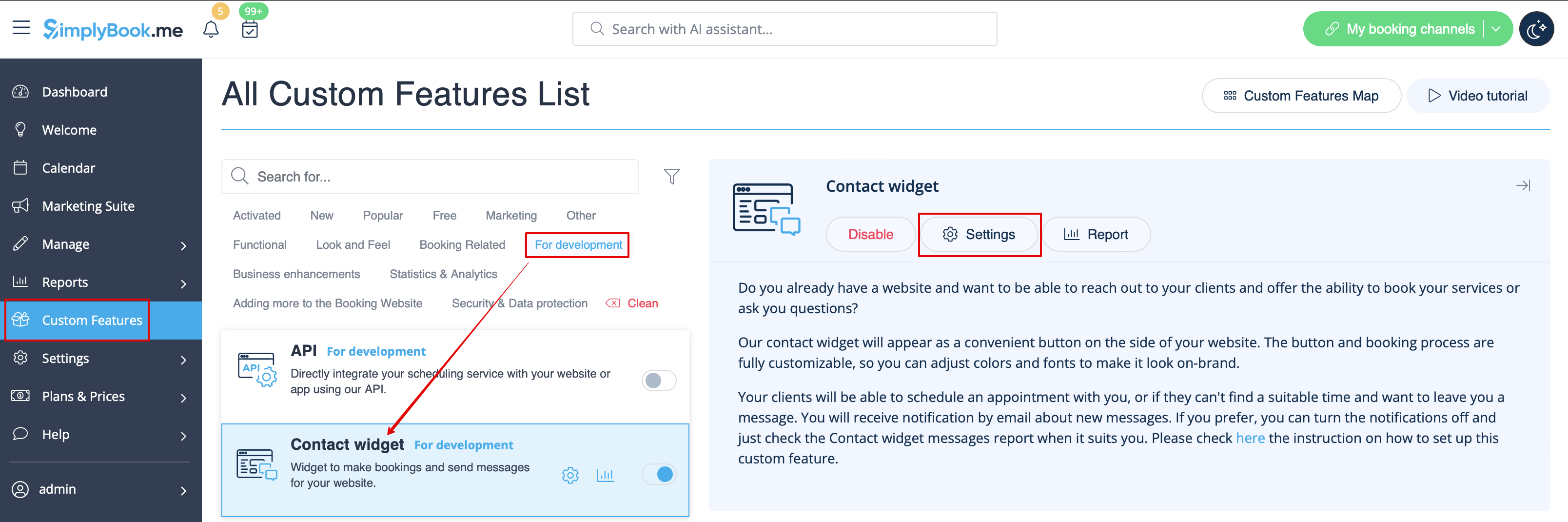
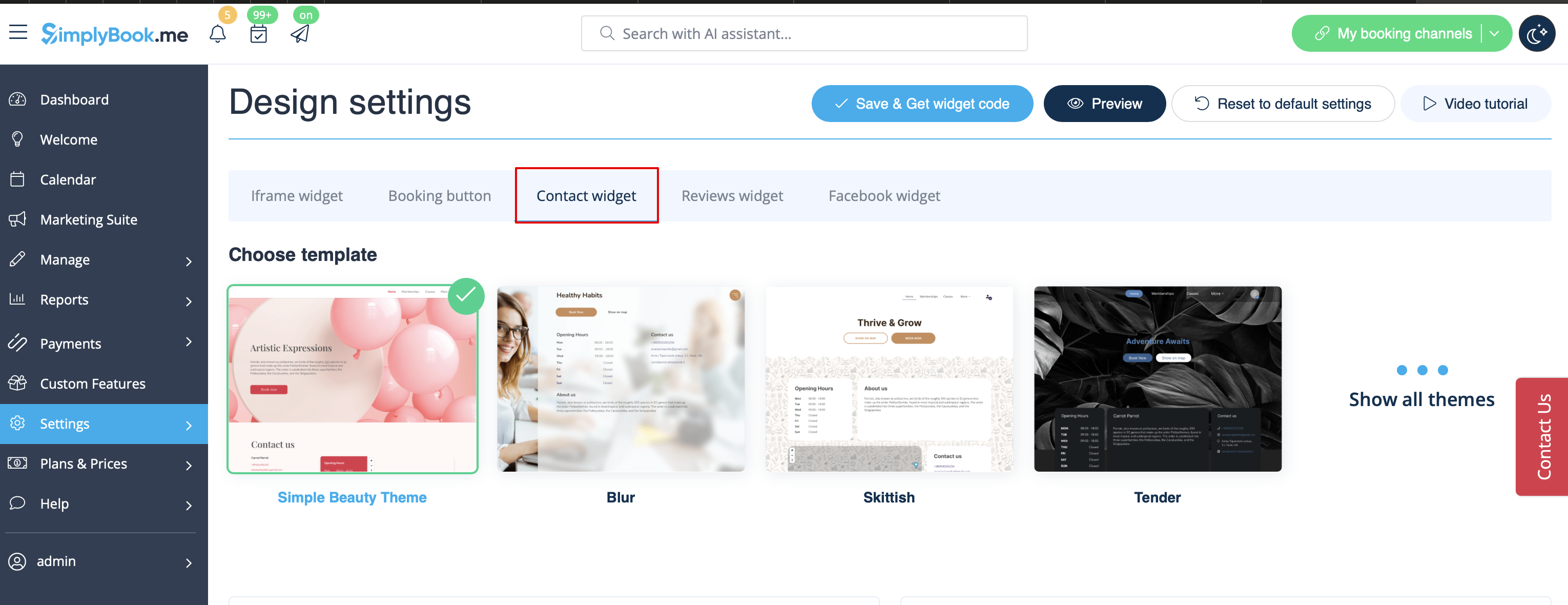
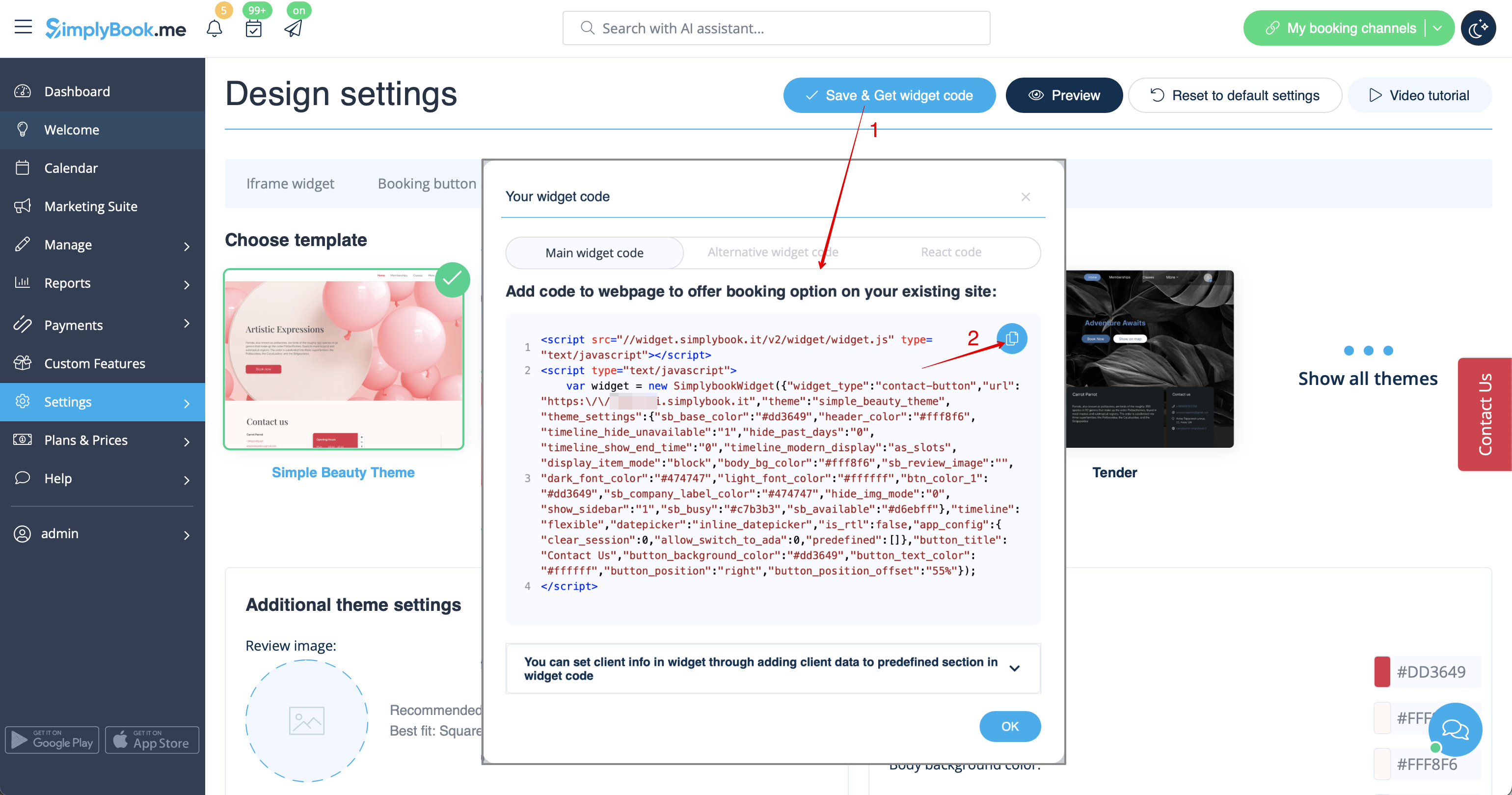
- 3. Insert it to the HTML code <body> of your website (or any other place in your website platform designed for inserting HTML JavaScript iFrame code).
Please note! Different website builders/platforms may have various ways to add HTML code, you should check first whether your website supports inserting HTML JavaScript code.
Reviews Widget
Wish to add reviews your clients leave on the booking page to your website?
Just follow these instructions:
- 1. Please go to Settings -> Booking widgets settings -> Reviews widget.
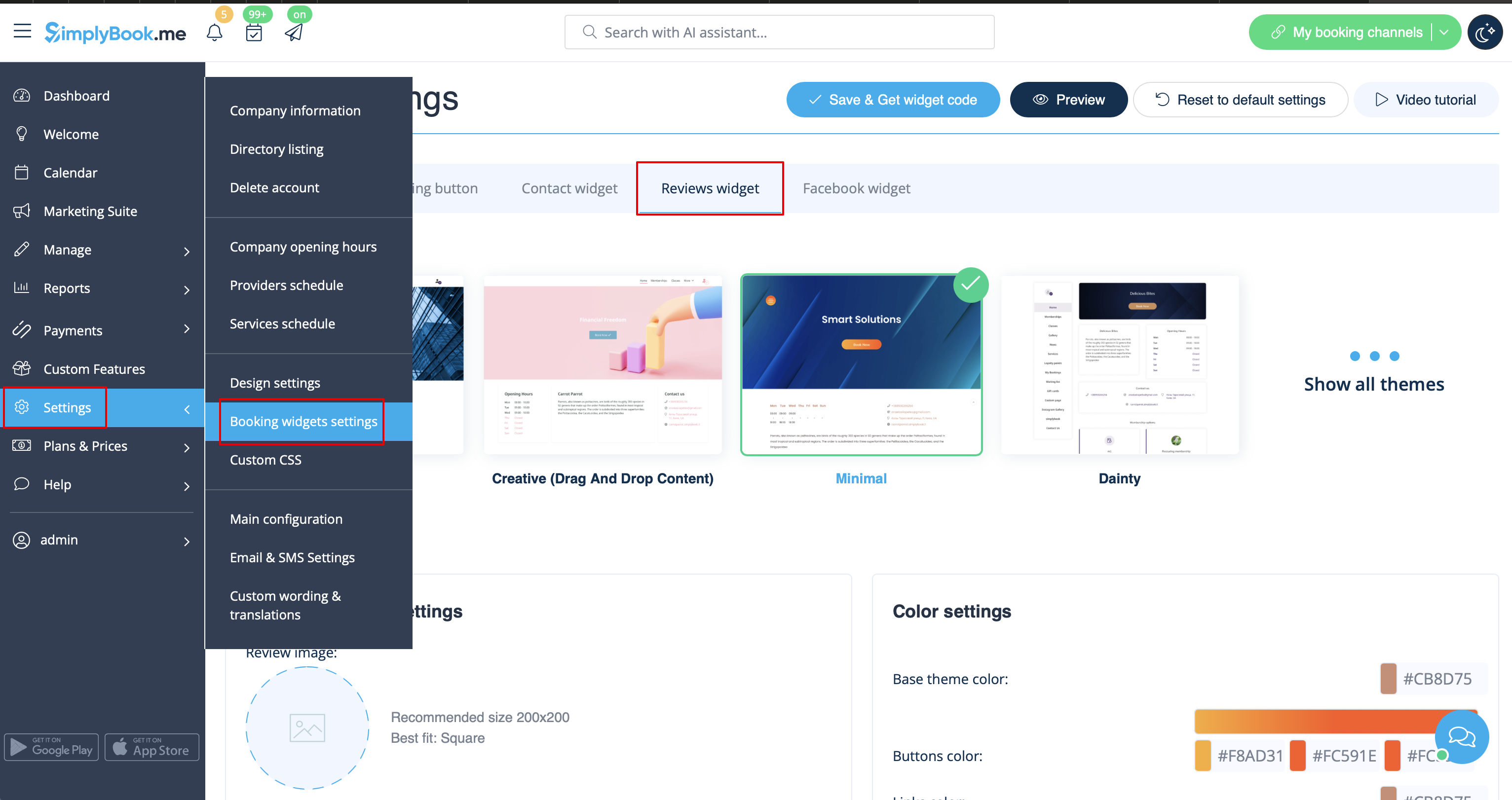
- 2. On the page you will be able to select the theme, set colors, decide on the number of reviews you wish to display and whether you wish your clients to be able to add reviews using the widget.
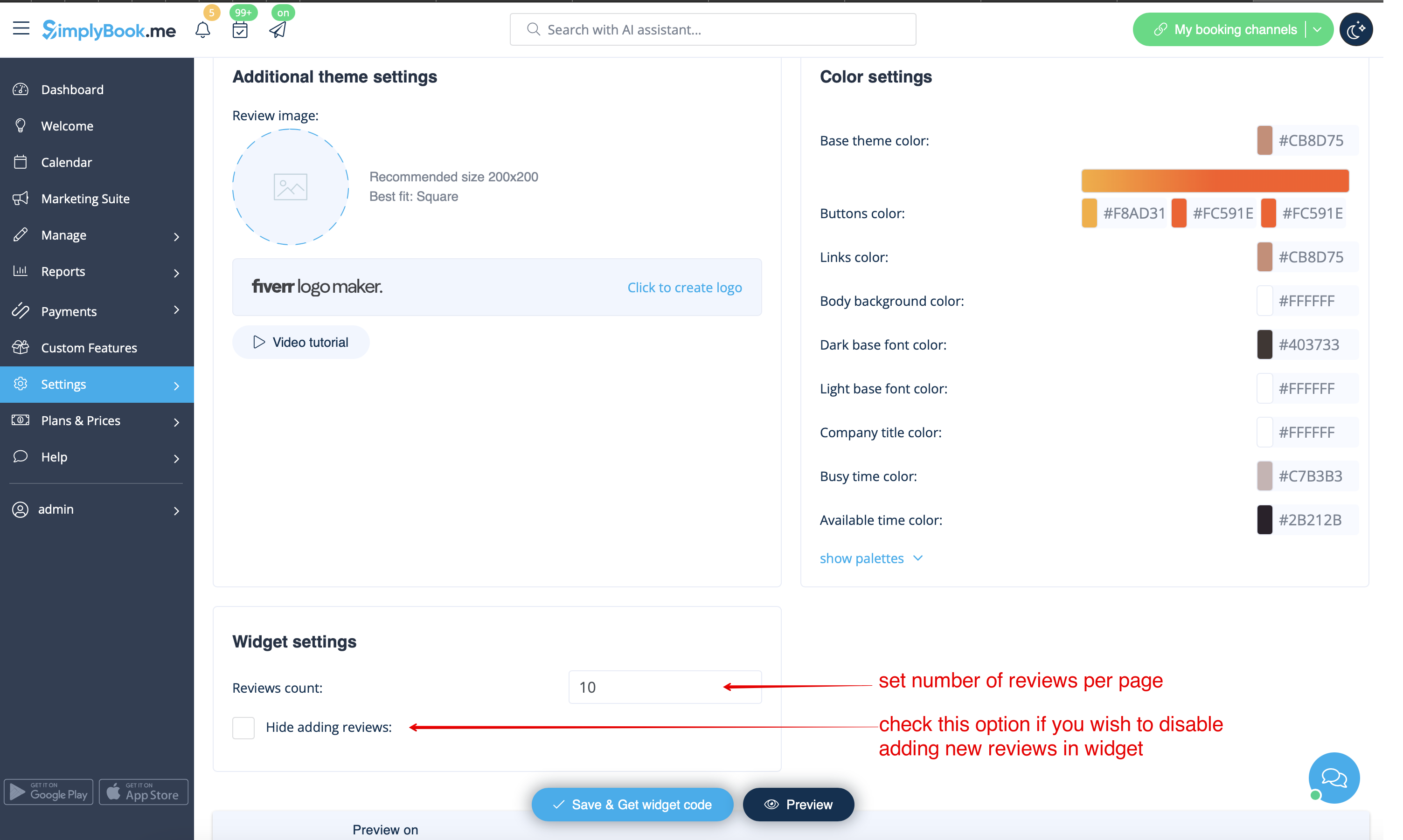
- 3. And now, when design is set, just click on Get widget code button, copy the code and insert it to your website to the desired place.
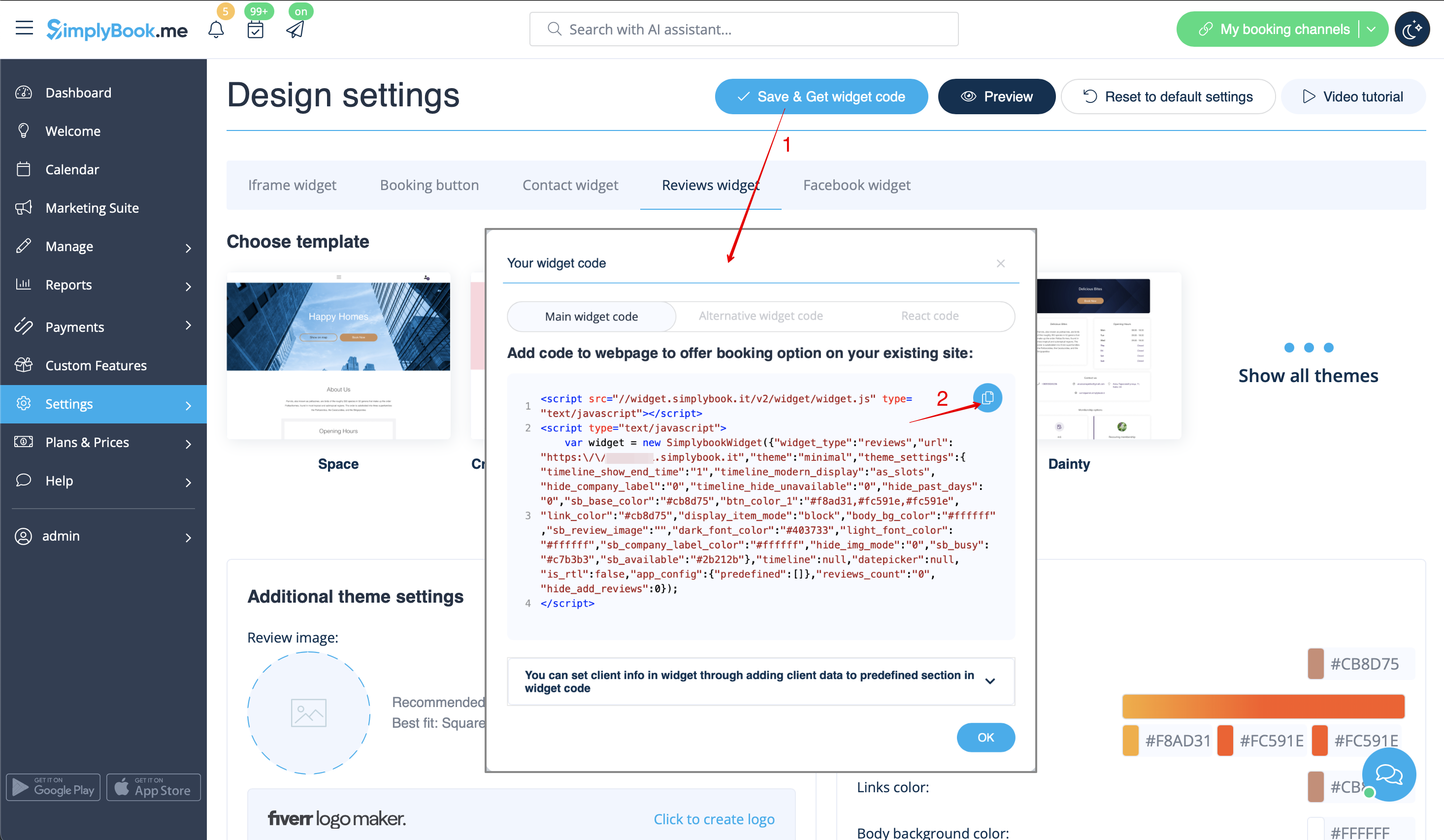
Congratulations! Widget is now ready, your reviews will be published and updated on your website!
