From SimplyBook.me
No edit summary |
No edit summary |
||
| (6 intermediate revisions by the same user not shown) | |||
| Line 1: | Line 1: | ||
<languages/> | |||
<translate> | |||
<!--T:1--> | |||
{{#seo: | {{#seo: | ||
|title=Custom Features - SimplyBook.me | |title=Custom Features - SimplyBook.me | ||
|description=Connect limited resources (rooms, equipment) to services. System auto-allocates resources per booking. Prevents overbooking when resources are limited in qua... | |||
|titlemode=append | |titlemode=append | ||
|keywords=faq, frequently asked questions, booking software, appointment system questions, appointments online, calendar software, booking system, booking calendar, scheduling software, online appointment scheduling, online scheduling, plugins, custom features, additional functionality, resources, resources booking, resource, equipment booking | |keywords=faq, frequently asked questions, booking software, appointment system questions, appointments online, calendar software, booking system, booking calendar, scheduling software, online appointment scheduling, online scheduling, plugins, custom features, additional functionality, resources, resources booking, resource, equipment booking | ||
}} | }} | ||
</translate> | |||
<translate> | |||
<!--T:2--> | |||
[[File:Resources icon.png |left]] | [[File:Resources icon.png |left]] | ||
<br><br>Connect equipment, rooms or anything else that is limited in quantity to a service. Different resources can be connected to the same service when needed. | <br><br>Connect equipment, rooms or anything else that is limited in quantity to a service. Different resources can be connected to the same service when needed. | ||
<br> | <br> | ||
<br> | <br> | ||
</translate> | |||
<translate> | |||
<!--T:3--> | |||
;How to use | ;How to use | ||
<!--T:4--> | |||
:1. Enable <span style="background-color:#d4f8e5; padding:5px; border-radius:5px;">Related Resources</span> feature on your <span style="background-color:#d4f8e5; padding:5px; border-radius:5px;">custom features</span> page. | :1. Enable <span style="background-color:#d4f8e5; padding:5px; border-radius:5px;">Related Resources</span> feature on your <span style="background-color:#d4f8e5; padding:5px; border-radius:5px;">custom features</span> page. | ||
[[File: | [[File:Related resources enable path redesigned.png|1200px|border|center|link=https://help.simplybook.me/images/e/eb/Related_resources_enable_path_redesigned.png]] | ||
<br><br> | <br><br> | ||
:2. Select <span style="background-color:#d4f8e5; padding:5px; border-radius:5px;">Manage</span> option or navigate to <span style="background-color:#d4f8e5; padding:5px; border-radius:5px;">Manage</span> -> <span style="background-color:#d4f8e5; padding:5px; border-radius:5px;">Related resources</span> using left-side menu | :2. Select <span style="background-color:#d4f8e5; padding:5px; border-radius:5px;">Manage</span> option or navigate to <span style="background-color:#d4f8e5; padding:5px; border-radius:5px;">Manage</span> -> <span style="background-color:#d4f8e5; padding:5px; border-radius:5px;">Related resources</span> using left-side menu | ||
[[File: | [[File:Related resources settings path redesigned.png|1200px|border|center|link=https://help.simplybook.me/images/5/5d/Related_resources_settings_path_redesigned.png]] | ||
<br><br> | <br><br> | ||
</translate> | |||
<translate> | |||
<!--T:5--> | |||
:3. Create resources group(s) depending on your needs using <span style="background-color:#d4f8e5; padding:5px; border-radius:5px;">+</span> icon there.<br> | :3. Create resources group(s) depending on your needs using <span style="background-color:#d4f8e5; padding:5px; border-radius:5px;">+</span> icon there.<br> | ||
<!--T:6--> | |||
:You can select between:<br> | :You can select between:<br> | ||
:*<span style="background-color:#fef3de; padding:5px; border-radius:5px;"> | :*<span style="background-color:#fef3de; padding:5px; border-radius:5px;">One per booking</span> type - with this group all the resources you attach to a service will be required for each booking. If the number of resources is not enough for a certain timeslot, it will not be displayed on the booking site. This type may be useful when some limited equipment is required to perform the service.<br> | ||
:*<span style="background-color:#fef3de; padding:5px; border-radius:5px;"> | :*<span style="background-color:#fef3de; padding:5px; border-radius:5px;">Shared</span> type - with this group it is possible to accept multiple bookings per timeslot(it will depend on the number of clients set per provider and/or <span style="background-color:#cdeffc; padding:5px; border-radius:5px;">[[Limit Bookings custom feature|limit bookings]]</span> feature settings). It can be used for a room reservation for classes as if, for example, you have one room but two classes so that one class should become unavailable if another one gets a booking. In this case, the clients will continue making bookings for this another class according to the number of spaces you have indicated for it.<br> | ||
:<span style="background-color:#ffe9e9; padding:5px; border-radius:5px;">'''Please note!''' It is recommended to use <span style="background-color:#cdeffc; padding:5px; border-radius:5px;">[[Appointment_at_Fixed_Time_custom_feature|Appointmet at fixed time]]</span> feature with this resource type so that the timeslot will always correspond to the reserved room/resource, etc.</span> | ::<span style="background-color:#ffe9e9; padding:5px; border-radius:5px;">'''Please note!''' It is recommended to use <span style="background-color:#cdeffc; padding:5px; border-radius:5px;">[[Appointment_at_Fixed_Time_custom_feature|Appointmet at fixed time]]</span> feature with this resource type so that the timeslot will always correspond to the reserved room/resource, etc.</span> | ||
[[File:Create resource | [[File:Create new resource upd.png|1200px|border|center|link=https://help.simplybook.me/images/a/a7/Create_new_resource_upd.png]] | ||
<br><br> | <br><br> | ||
</translate> | |||
<translate> | |||
<!--T:7--> | |||
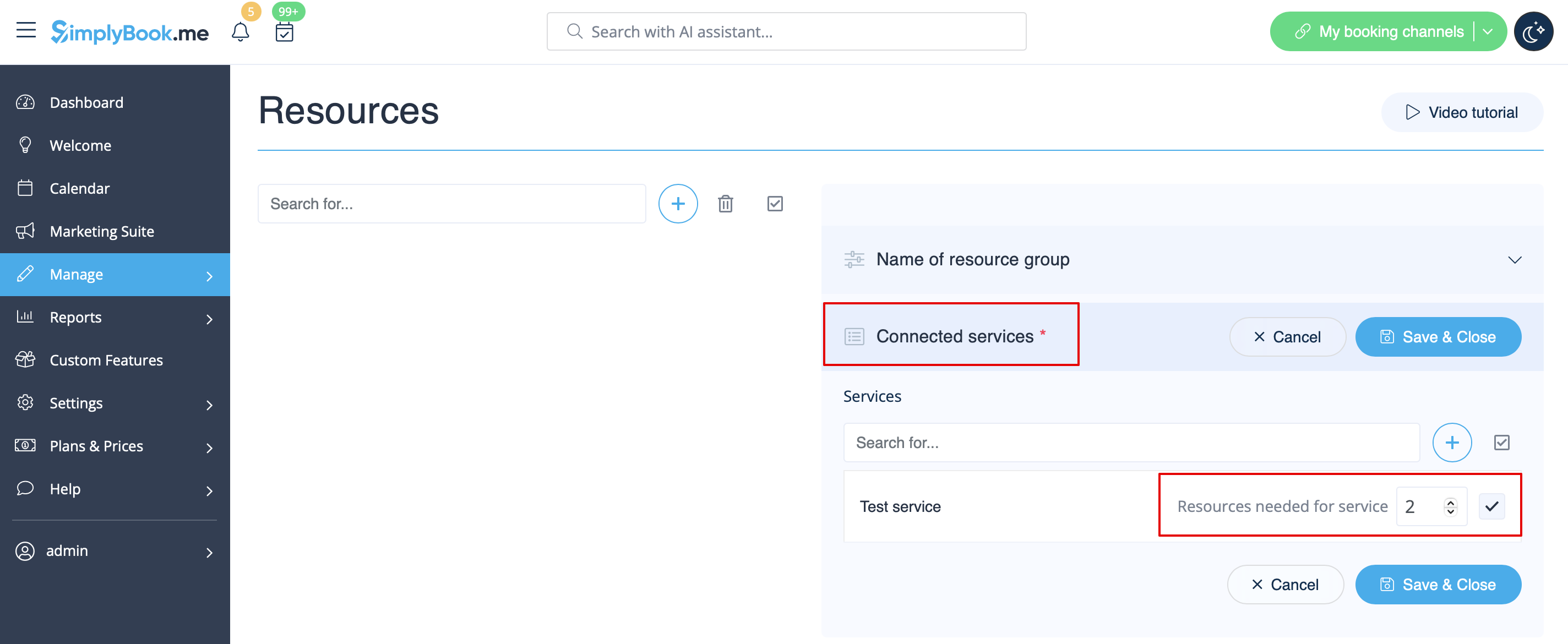
:4. It is important to <span style="background-color:#d4f8e5; padding:5px; border-radius:5px;">attach resources to services/classes</span> so that they will influence the booking process. Otherwise, the resources will not add any restrictions and will not be used. | :4. It is important to <span style="background-color:#d4f8e5; padding:5px; border-radius:5px;">attach resources to services/classes</span> so that they will influence the booking process. Otherwise, the resources will not add any restrictions and will not be used. | ||
[[File: | [[File:Connect resource to service redesigned.png|1200px|border| center|link=https://help.simplybook.me/images/8/84/Connect_resource_to_service_redesigned.png]] | ||
<br><br> | <br><br> | ||
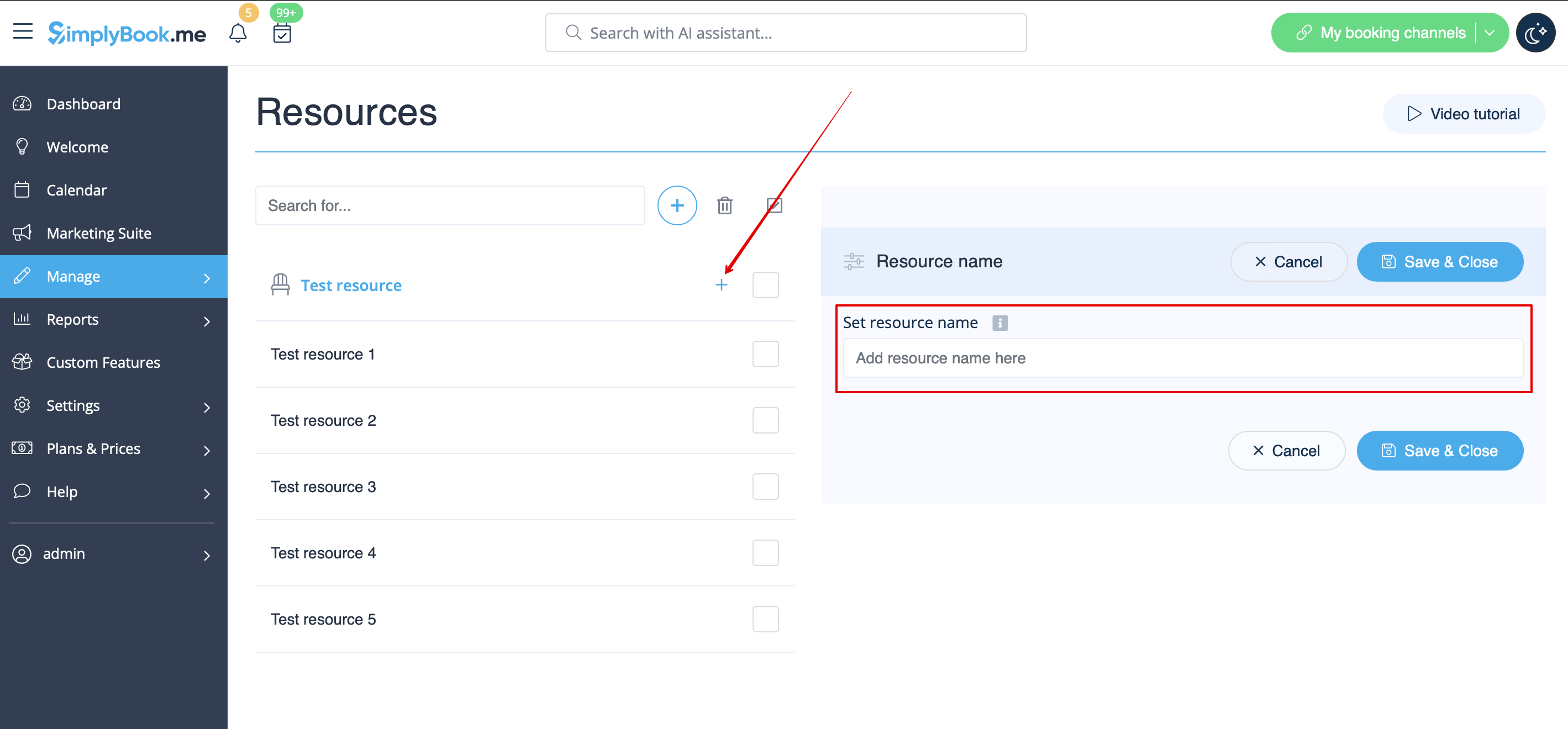
:5. If you got more resources of a certain type you can <span style="background-color:#d4f8e5; padding:5px; border-radius:5px;">add items to the particular resource group.</span> | :5. If you got more resources of a certain type you can <span style="background-color:#d4f8e5; padding:5px; border-radius:5px;">add items to the particular resource group.</span> | ||
[[File:Add | [[File:Add item to the resource group redesigned.png|1200px|border|center|link=https://help.simplybook.me/images/8/85/Add_item_to_the_resource_group_redesigned.png]] | ||
<br><br> | <br><br> | ||
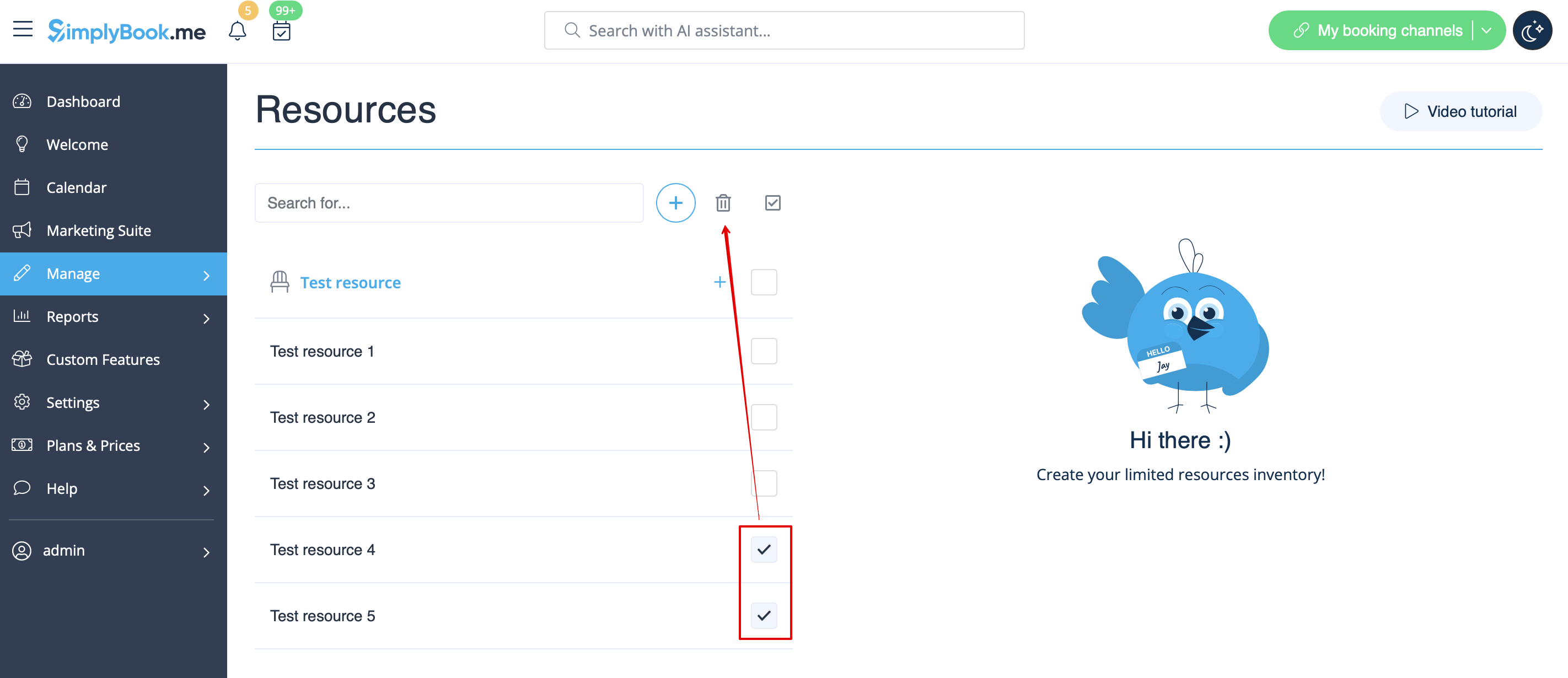
:6. In case you have less items in your inventory than it was created initially you can <span style="background-color:#d4f8e5; padding:5px; border-radius:5px;">remove unnecessary ones</span> from the group using mass actions.<br> | :6. In case you have less items in your inventory than it was created initially you can <span style="background-color:#d4f8e5; padding:5px; border-radius:5px;">remove unnecessary ones</span> from the group using mass actions.<br> | ||
:<span style="background-color:#ffe9e9; padding:5px; border-radius:5px;">If certain service was connected to resource that was deleted such service may become unavailable on the booking site.</span><br> | :<span style="background-color:#ffe9e9; padding:5px; border-radius:5px;">If certain service was connected to resource that was deleted such service may become unavailable on the booking site.</span><br> | ||
:In this case you need to update its relations towards other resources present in the system. | :In this case you need to update its relations towards other resources present in the system. | ||
[[File:Remove unnecessary resources.png|border|center]] | [[File:Remove unnecessary resources redesigned.png|1200px|border|center|link=https://help.simplybook.me/images/8/85/Remove_unnecessary_resources_redesigned.png]] | ||
<br><br> | <br><br> | ||
</translate> | |||
<translate> | |||
<!--T:8--> | |||
:7. The clients do not select the resource during the booking process, it is allocated by the system automatically depending on the service and provider selection.<br> | :7. The clients do not select the resource during the booking process, it is allocated by the system automatically depending on the service and provider selection.<br> | ||
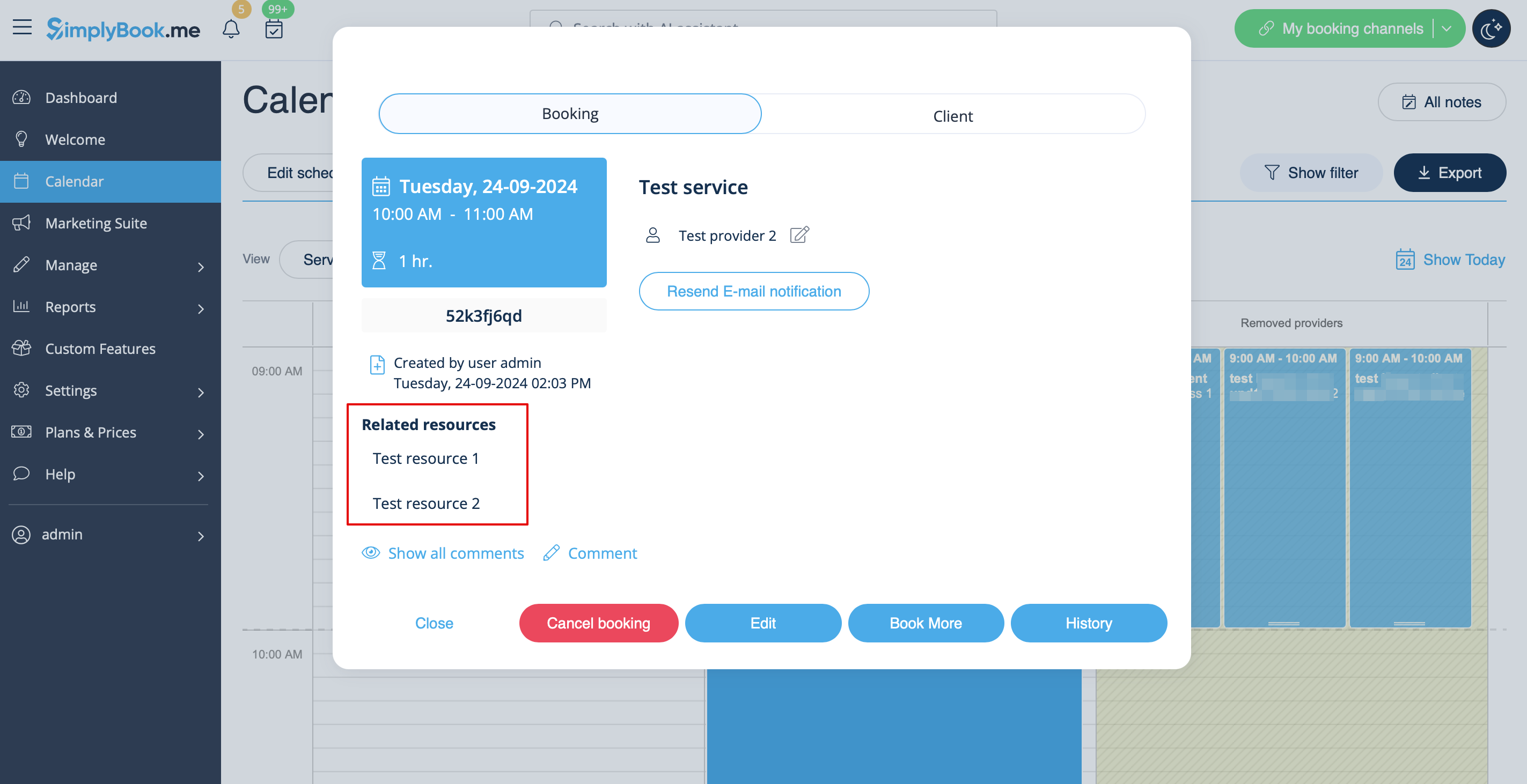
:You can <span style="background-color:#d4f8e5; padding:5px; border-radius:5px;">view the resource used for the appointment</span> from the admin side in each booking or in exported .xls file from <span style="background-color:#d4f8e5; padding:5px; border-radius:5px;">Reports</span> -> <span style="background-color:#d4f8e5; padding:5px; border-radius:5px;">Booking details.</span> | :You can <span style="background-color:#d4f8e5; padding:5px; border-radius:5px;">view the resource used for the appointment</span> from the admin side in each booking or in exported .xls file from <span style="background-color:#d4f8e5; padding:5px; border-radius:5px;">Reports</span> -> <span style="background-color:#d4f8e5; padding:5px; border-radius:5px;">Booking details.</span> | ||
[[File: | [[File:Related resources in booking redesigned.png|1200px|border|center|link=https://help.simplybook.me/images/7/72/Related_resources_in_booking_redesigned.png]] | ||
<br><br><br><br> | <br><br><br><br> | ||
</translate> | |||
Latest revision as of 08:14, 16 July 2026

Connect equipment, rooms or anything else that is limited in quantity to a service. Different resources can be connected to the same service when needed.
- How to use
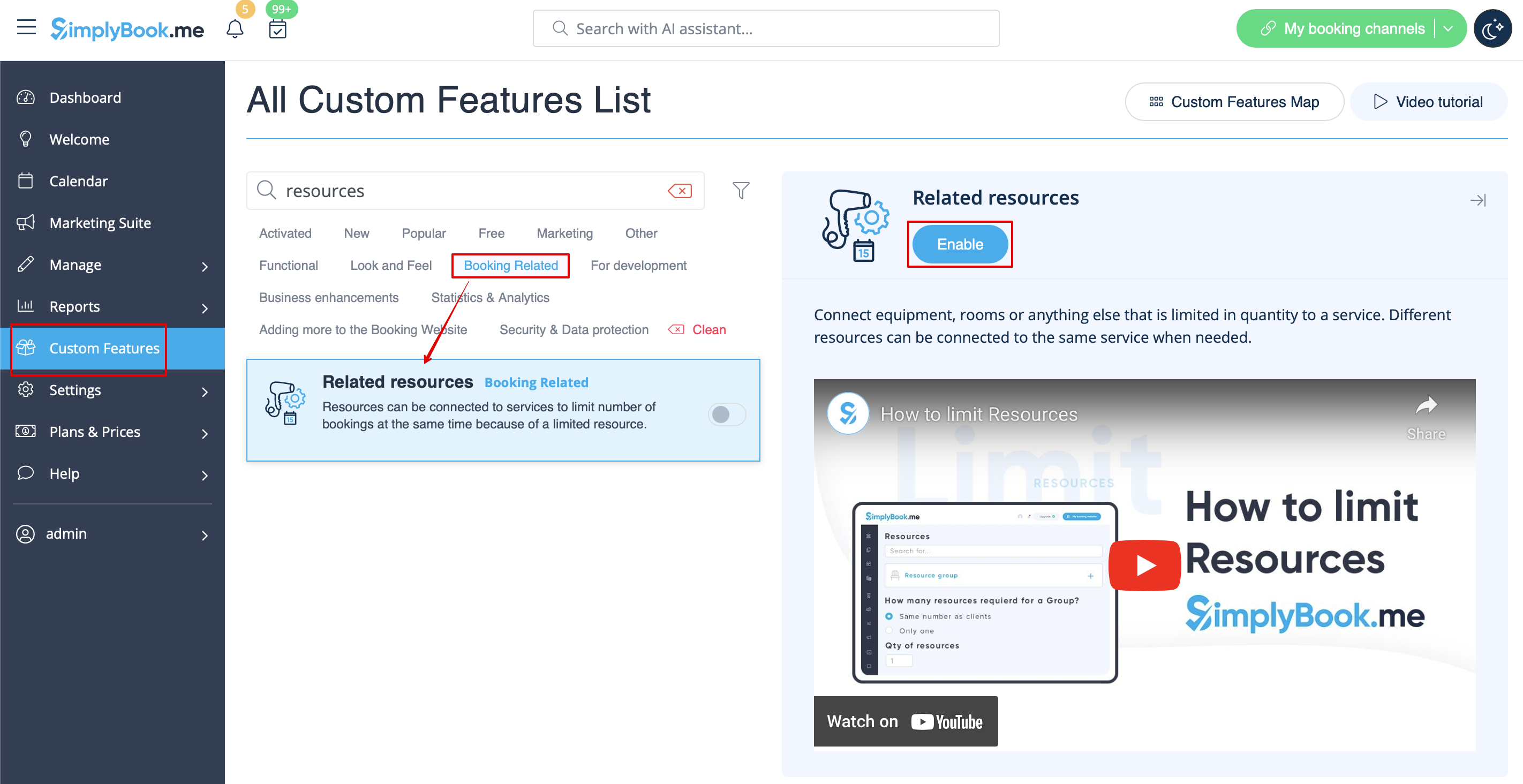
- 1. Enable Related Resources feature on your custom features page.
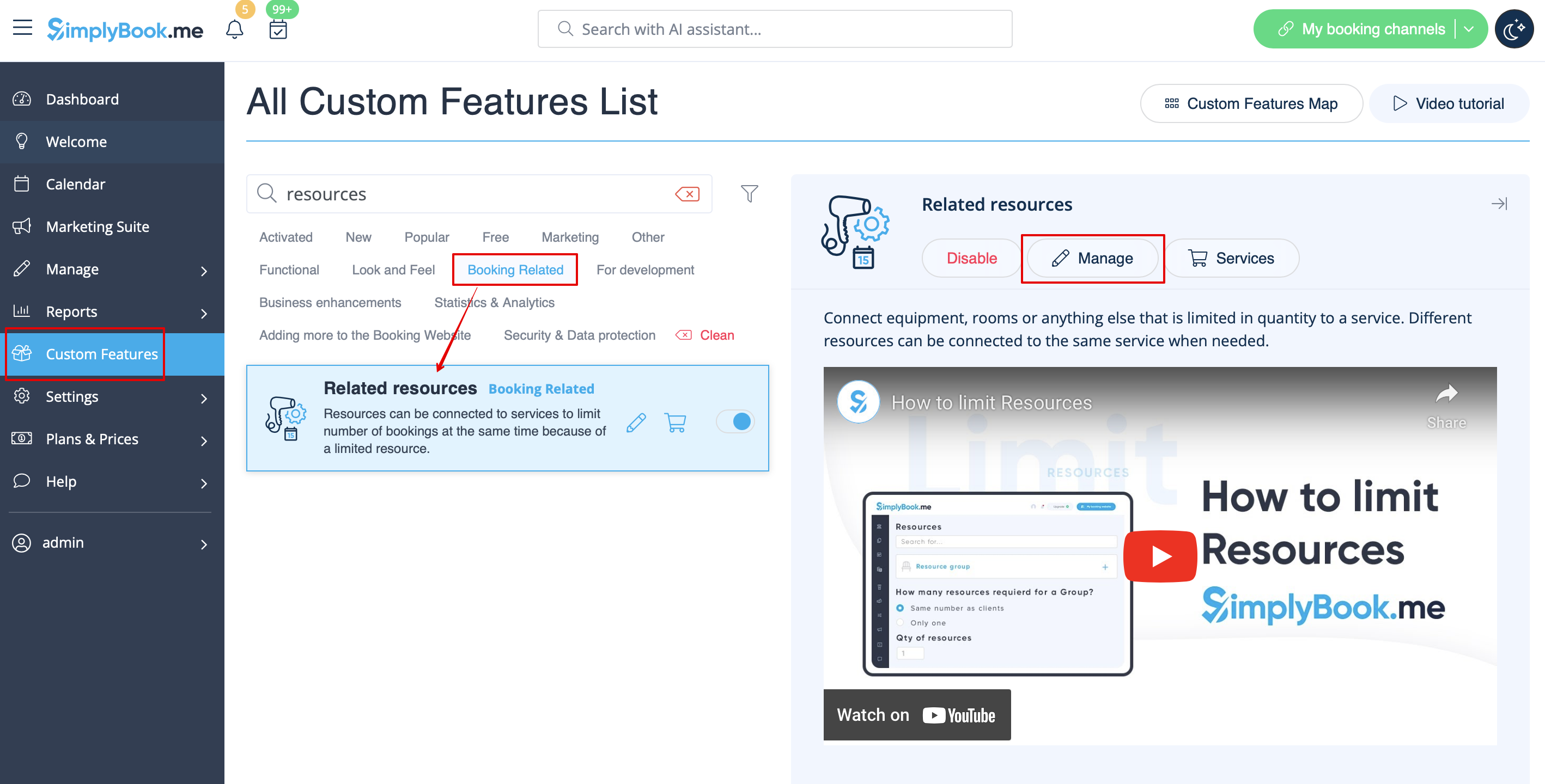
- 2. Select Manage option or navigate to Manage -> Related resources using left-side menu
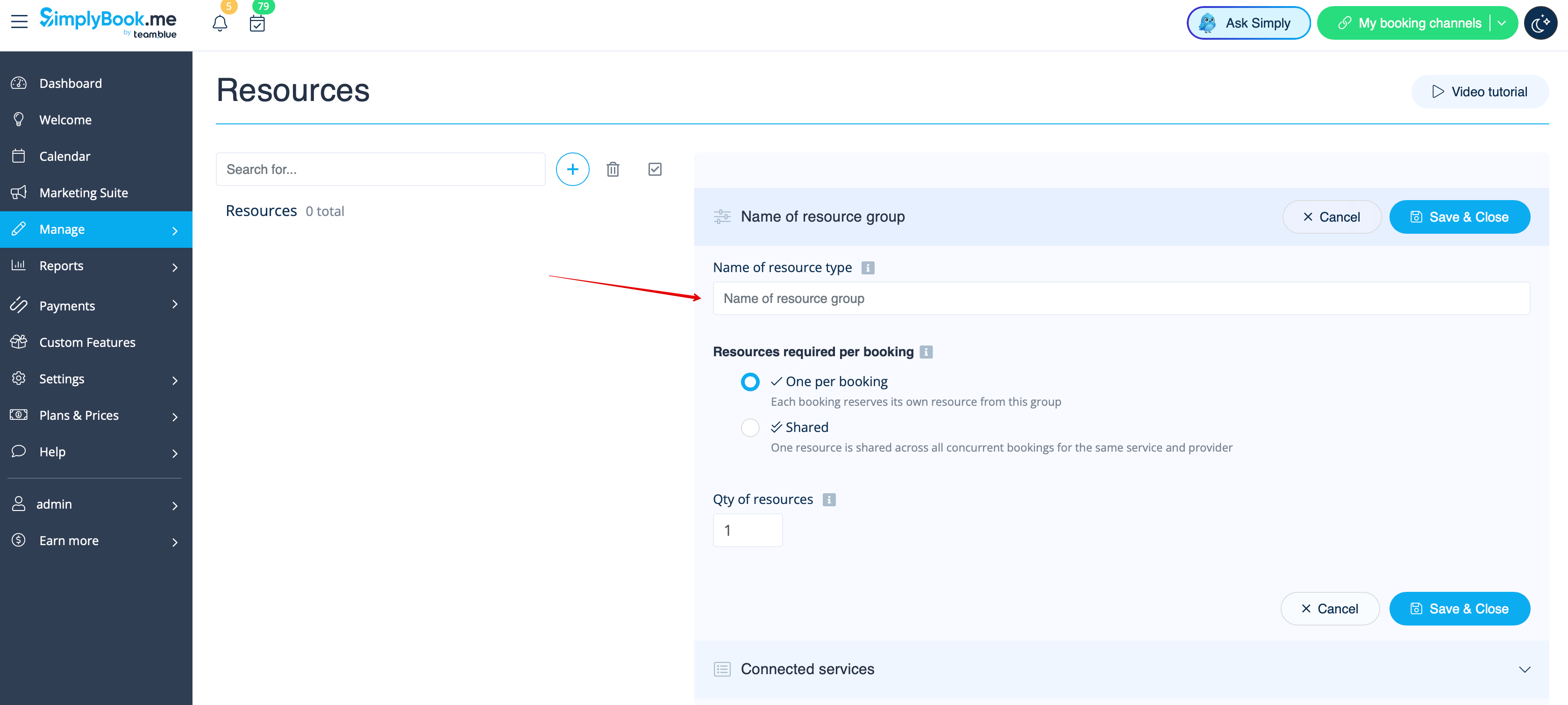
- 3. Create resources group(s) depending on your needs using + icon there.
- You can select between:
- One per booking type - with this group all the resources you attach to a service will be required for each booking. If the number of resources is not enough for a certain timeslot, it will not be displayed on the booking site. This type may be useful when some limited equipment is required to perform the service.
- Shared type - with this group it is possible to accept multiple bookings per timeslot(it will depend on the number of clients set per provider and/or limit bookings feature settings). It can be used for a room reservation for classes as if, for example, you have one room but two classes so that one class should become unavailable if another one gets a booking. In this case, the clients will continue making bookings for this another class according to the number of spaces you have indicated for it.
- Please note! It is recommended to use Appointmet at fixed time feature with this resource type so that the timeslot will always correspond to the reserved room/resource, etc.
- One per booking type - with this group all the resources you attach to a service will be required for each booking. If the number of resources is not enough for a certain timeslot, it will not be displayed on the booking site. This type may be useful when some limited equipment is required to perform the service.
- 4. It is important to attach resources to services/classes so that they will influence the booking process. Otherwise, the resources will not add any restrictions and will not be used.
- 5. If you got more resources of a certain type you can add items to the particular resource group.
- 6. In case you have less items in your inventory than it was created initially you can remove unnecessary ones from the group using mass actions.
- If certain service was connected to resource that was deleted such service may become unavailable on the booking site.
- In this case you need to update its relations towards other resources present in the system.
- 7. The clients do not select the resource during the booking process, it is allocated by the system automatically depending on the service and provider selection.
- You can view the resource used for the appointment from the admin side in each booking or in exported .xls file from Reports -> Booking details.