No edit summary |
No edit summary |
||
| Line 1: | Line 1: | ||
<languages/> | |||
<translate> | |||
{{#seo: | {{#seo: | ||
| Line 7: | Line 8: | ||
|keywords=faq, frequently asked questions, booking software, appointment system questions, appointments online, calendar software, booking system, booking calendar, scheduling software, online appointment scheduling, online scheduling, plugins, custom features, additional functionality, notifications, notifications bot, booking notifications, appointment notification | |keywords=faq, frequently asked questions, booking software, appointment system questions, appointments online, calendar software, booking system, booking calendar, scheduling software, online appointment scheduling, online scheduling, plugins, custom features, additional functionality, notifications, notifications bot, booking notifications, appointment notification | ||
}} | }} | ||
</translate> | |||
<translate> | |||
| Line 21: | Line 24: | ||
</translate> | |||
<translate> | |||
;How to use | ;How to use | ||
| Line 35: | Line 40: | ||
[[File:Telegram notifications copy token.png|1200px|center]] | [[File:Telegram notifications copy token.png|1200px|center]] | ||
<br><br> | <br><br> | ||
</translate> | |||
<translate> | |||
5. Paste the token to the corresponding field in your <span style="background-color:#d4f8e5; padding:5px; border-radius:5px;">SimplyBook.me account</span> -> <span style="background-color:#d4f8e5; padding:5px; border-radius:5px;">Custom features</span> -> <span style="background-color:#d4f8e5; padding:5px; border-radius:5px;">Telegram notifications.</span> Save settings. | 5. Paste the token to the corresponding field in your <span style="background-color:#d4f8e5; padding:5px; border-radius:5px;">SimplyBook.me account</span> -> <span style="background-color:#d4f8e5; padding:5px; border-radius:5px;">Custom features</span> -> <span style="background-color:#d4f8e5; padding:5px; border-radius:5px;">Telegram notifications.</span> Save settings. | ||
The page will show that the bot is connected to your account. | The page will show that the bot is connected to your account. | ||
| Line 50: | Line 57: | ||
[[File:Telegram notifications bot options.png|1200px|center]] | [[File:Telegram notifications bot options.png|1200px|center]] | ||
<br><br> | <br><br> | ||
</translate> | |||
<translate> | |||
The booking notifications texts depend on the templates you set for SMS notifications either in <span style="background-color:#d4f8e5; padding:5px; border-radius:5px;">Settings</span> -> <span style="background-color:#d4f8e5; padding:5px; border-radius:5px;">Email and SMS settings</span> or in the specific custom feature settings (i.e. <span style="background-color:#cdeffc; padding:5px; border-radius:5px;">[[Multiple_Bookings_custom_feature|Multiple Bookings]],</span> <span style="background-color:#cdeffc; padding:5px; border-radius:5px;">[[Group_Bookings_custom_feature|Group Bookings]],</span> <span style="background-color:#cdeffc; padding:5px; border-radius:5px;">[[Flexible_Notifications_custom_feature|Flexible Notifications]]</span>).<br> | The booking notifications texts depend on the templates you set for SMS notifications either in <span style="background-color:#d4f8e5; padding:5px; border-radius:5px;">Settings</span> -> <span style="background-color:#d4f8e5; padding:5px; border-radius:5px;">Email and SMS settings</span> or in the specific custom feature settings (i.e. <span style="background-color:#cdeffc; padding:5px; border-radius:5px;">[[Multiple_Bookings_custom_feature|Multiple Bookings]],</span> <span style="background-color:#cdeffc; padding:5px; border-radius:5px;">[[Group_Bookings_custom_feature|Group Bookings]],</span> <span style="background-color:#cdeffc; padding:5px; border-radius:5px;">[[Flexible_Notifications_custom_feature|Flexible Notifications]]</span>).<br> | ||
There you can select the desirable variables to be used and adjust the wording if necessary.<br> | There you can select the desirable variables to be used and adjust the wording if necessary.<br> | ||
| Line 58: | Line 67: | ||
[[File:Telegram notifications attachments example.png|center]] | [[File:Telegram notifications attachments example.png|center]] | ||
<br><br> | <br><br> | ||
</translate> | |||
Revision as of 15:40, 19 May 2025

This custom feature allows you to create your own notifications bot in a few simple steps. As the result each customer will have an option to subscribe to your bot notifications and get messages about the appointments, invoice details, tickets and much more.
Video tutorial available 
Please note!
- This functionality supports only booking related notifications.
- This custom feature is not compatible with Kiosk
- How to use
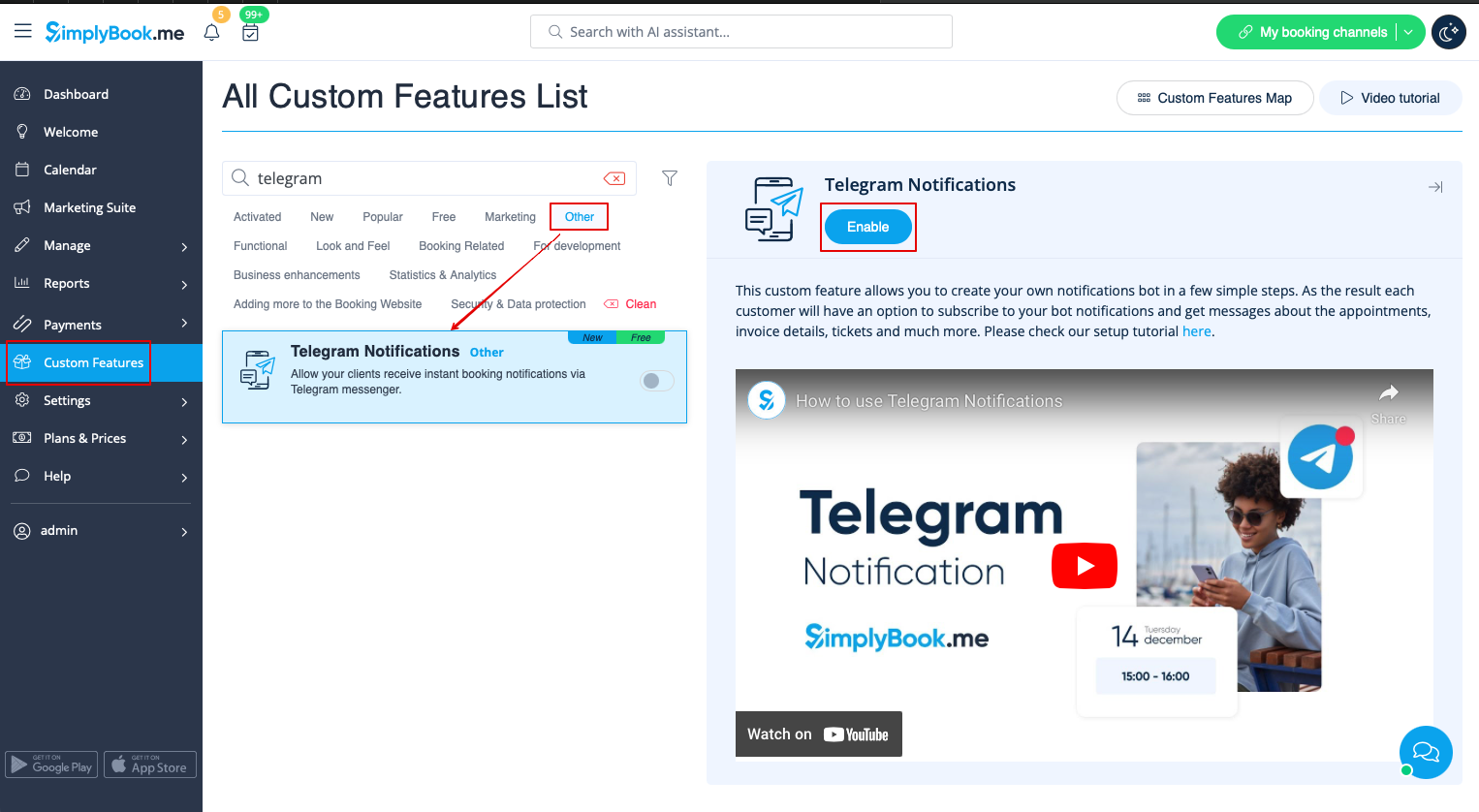
1. Enable Telegram Notifications on your Custom features page -> Other section.
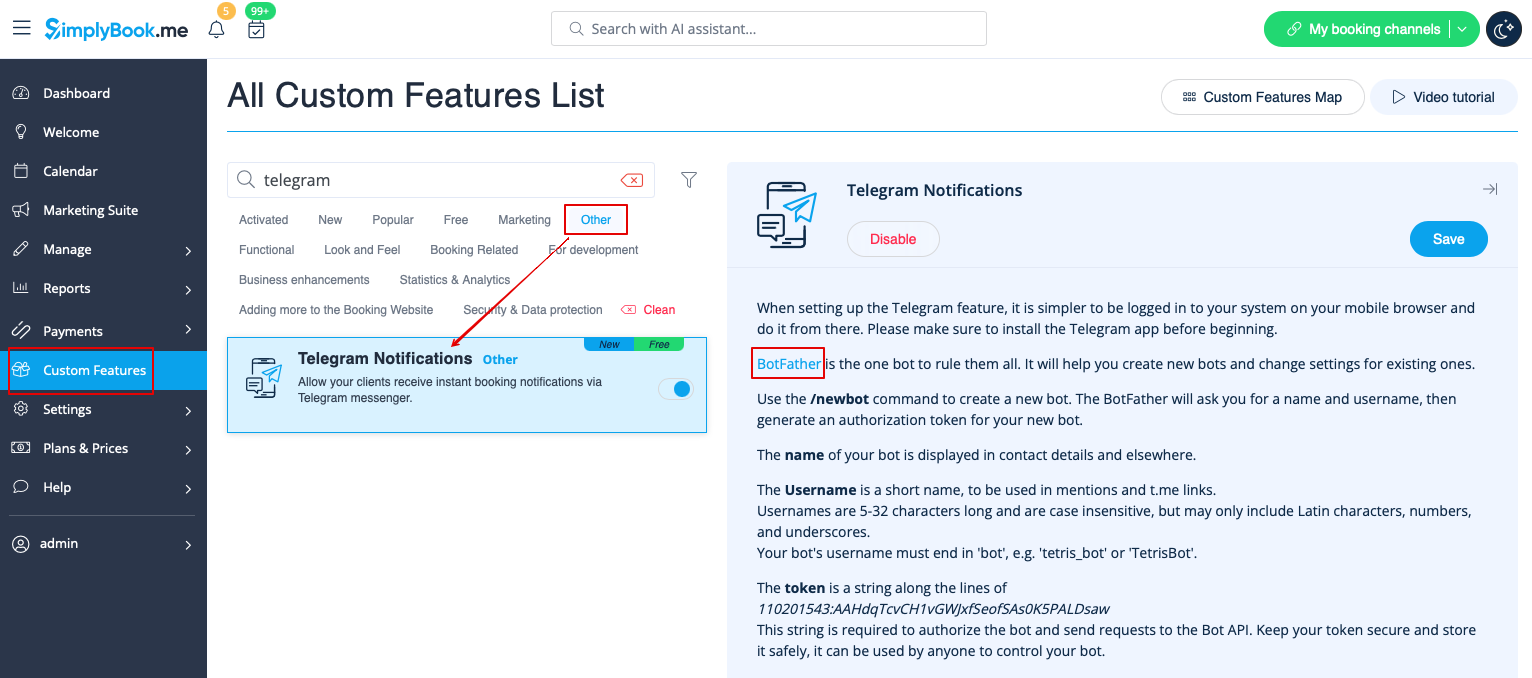
2. Navigate to helper bot BotFather using the link in the instructions on the right side of the SimplyBook.me page.
3. Start the setup process in the BotFather bot and select /newbot option, follow the hints there: add the desirable name and username.

4. Copy the token from the result message.

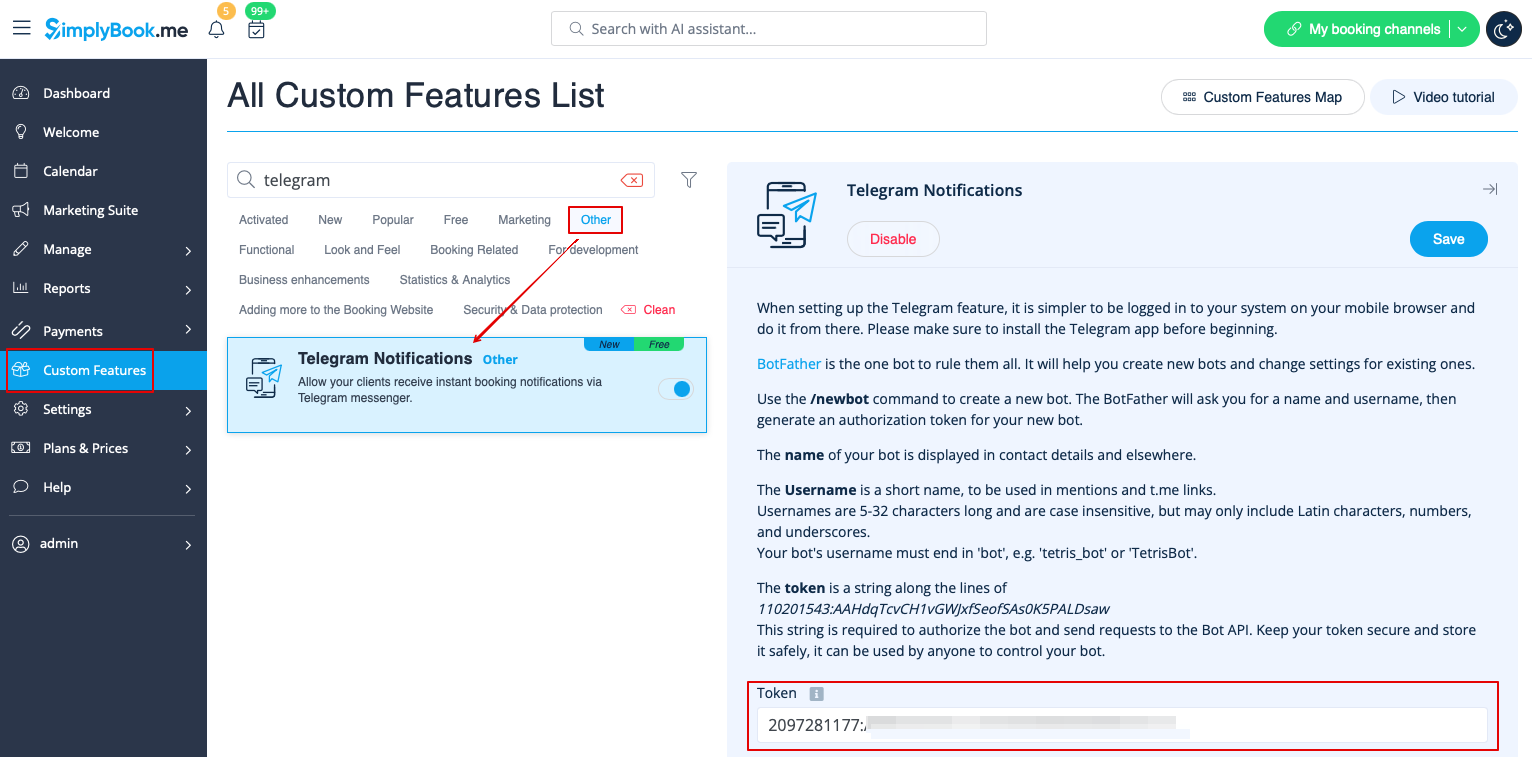
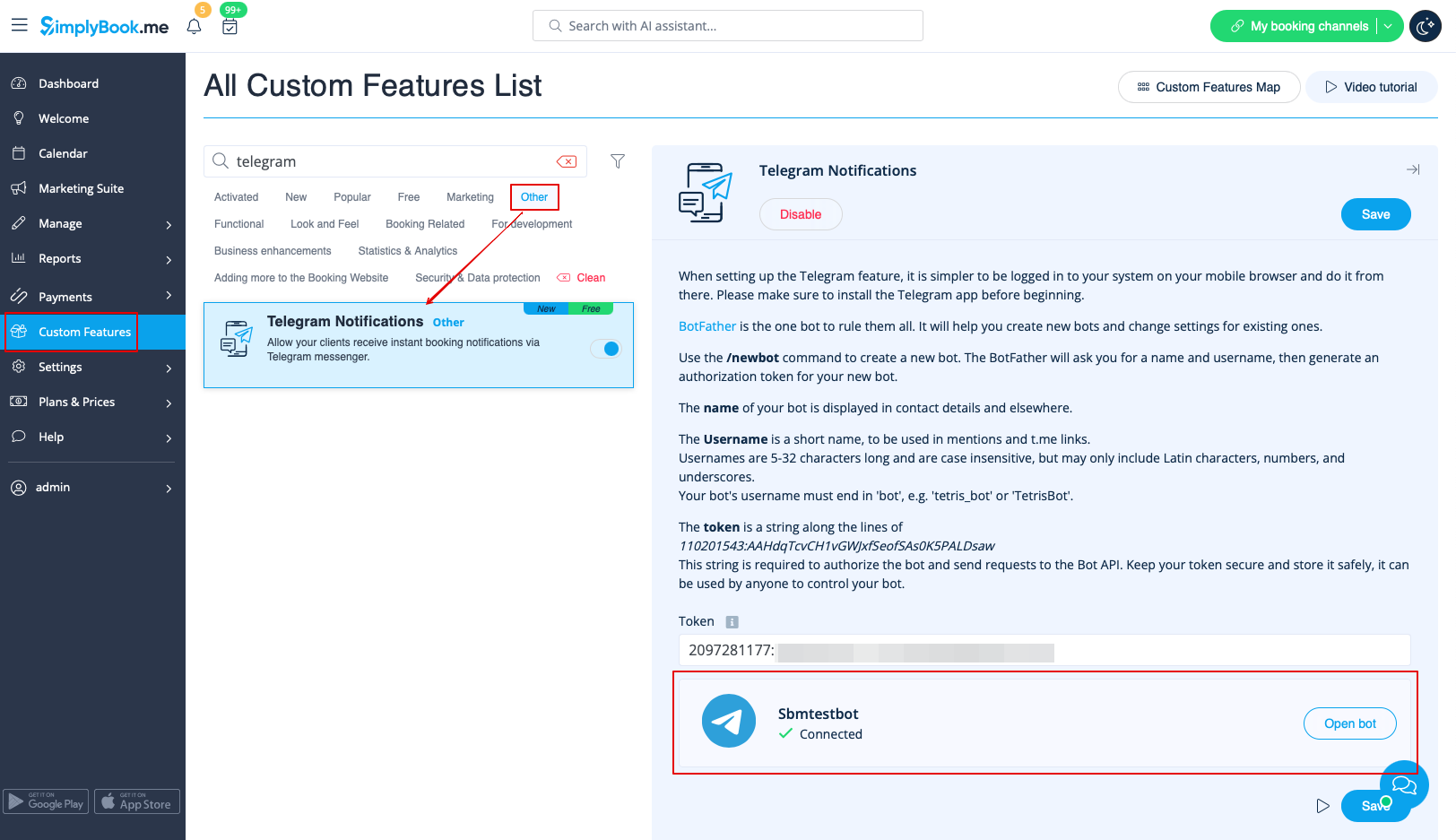
5. Paste the token to the corresponding field in your SimplyBook.me account -> Custom features -> Telegram notifications. Save settings.
The page will show that the bot is connected to your account.
6. To enable the notifications for you as a user please use top left notifications bar, click on the Telegram icon and follow the steps from the popup:
you will need to navigate to the bot, choose "Subscribe" option from the menu and insert the security code.
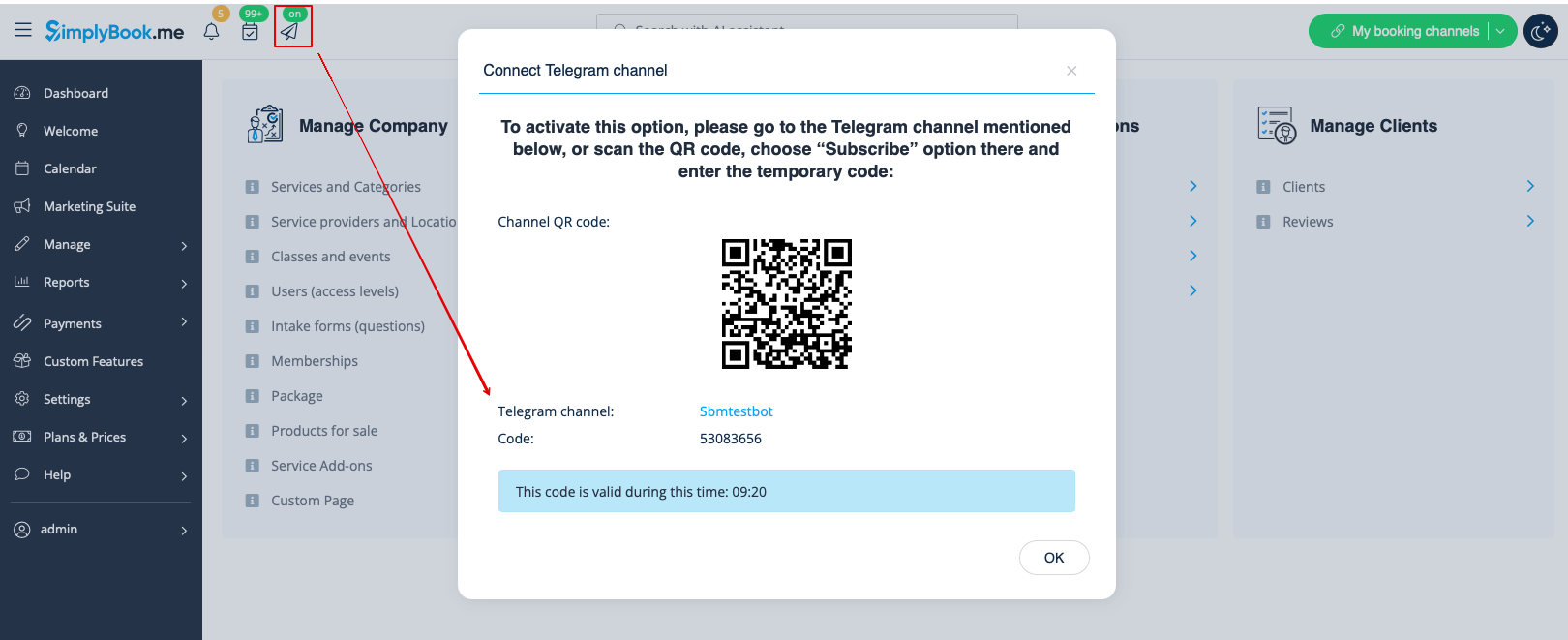
7. The clients will see the invitation to subscribe to the notifications on the booking confirmation or payment page and will be able to follow the similar steps.

With the help of this notification bot it is also possible to see the information about the company and the list of upcoming bookings(their number is limited to 21).

The booking notifications texts depend on the templates you set for SMS notifications either in Settings -> Email and SMS settings or in the specific custom feature settings (i.e. Multiple Bookings, Group Bookings, Flexible Notifications).
There you can select the desirable variables to be used and adjust the wording if necessary.

In case you are using Accept payments, Tickets and/or Online video meetings it will also be possible to get the links to the corresponding attachments per respective appointment.
Here is the example of how appointment details may look like depending on other features used in the system

